

Overview

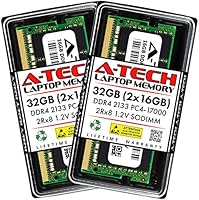
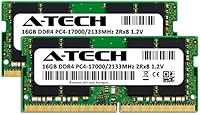
A-Tech 32GB DDR4 2133MHz SODIMM Laptop RAM is a straightforward dual-channel memory upgrade kit built for users who want their aging laptop to stop struggling under everyday workloads. A-Tech has carved out a solid reputation as a third-party memory specialist with broad compatibility across Dell, HP, Lenovo, and other major brands. This memory kit ships as two matched 16GB modules, which means your system can run them in dual-channel mode — a real throughput advantage over a single-stick setup. It sits comfortably in the reliable, no-frills tier of the market. Before you buy, confirm your laptop's maximum supported RAM and available slots — skipping that step is the most common mistake buyers make.

Features & Benefits

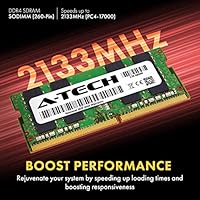
These laptop RAM modules use the standard 260-pin SODIMM form factor, so they're built specifically for laptops, mini PCs, and all-in-one systems — not desktop towers. Running at 2133MHz (PC4-17000) with CL15 latency, performance is solid for this speed class. The dual-rank layout gives a modest but real bandwidth edge over single-rank alternatives, which matters when your system is handling multiple tasks at once. On the power side, the modules operate at the JEDEC-standard 1.2V, so heat and power draw aren't a concern. The lifetime warranty and responsive customer support add a layer of confidence that generic brands simply don't offer.

Best For

This SODIMM upgrade makes the most sense for laptop owners coming from 8GB or 16GB who need meaningful headroom for multitasking, light video editing, or running a virtual machine without constant slowdowns. Students juggling browser-heavy research sessions and remote workers keeping a dozen apps open simultaneously will notice the difference right away. It's also a smart pick for budget-conscious buyers who want a reputable brand behind their purchase but don't need to spend up to Crucial or Kingston prices. If your laptop is older and locked to 2133MHz speeds, paying for faster memory would be pointless — this kit is exactly what those systems call for. First-time upgraders will also appreciate how uncomplicated the installation process is.

User Feedback

Across hundreds of reviews, the pattern is consistent: installation is quick and the performance difference is immediately noticeable. Most buyers report that the modules were detected at the correct speed without any manual BIOS tweaking. A-Tech's customer support earns regular praise from users who ran into compatibility edge cases and needed guidance. On the downside, a small number of buyers received defective units out of the box — though most of those experiences resolved cleanly through warranty replacement. The one recurring caveat worth flagging: certain OEM laptops with BIOS-level restrictions won't play nicely with third-party modules, regardless of brand. Overall, satisfaction runs high for this market tier, and most owners say they'd buy again.

Pros

  • Jumpstart from 8GB or 16GB to 32GB is immediately felt during heavy multitasking and tab-heavy sessions.
  • Matched dual-channel configuration gives better memory bandwidth than running a single large module.
  • Runs at the JEDEC standard 1.2V, so heat and power draw are not a concern during sustained use.
  • Most users report the modules are detected at the correct speed with zero BIOS configuration required.
  • Lifetime warranty gives real peace of mind, especially for a component you expect to last years.
  • A-Tech's customer support team is consistently praised for helping buyers through compatibility questions.
  • DOA units, while rare, are typically replaced quickly through the warranty process with minimal friction.
  • Solid option for older DDR4 laptops where spending more on faster memory would provide no real benefit.
  • Installation is uncomplicated enough for first-time upgraders with a screwdriver and a few minutes to spare.
  • Priced accessibly without sacrificing the brand accountability that purely generic modules lack.

Cons

  • Compatibility is not guaranteed — some OEM laptops with BIOS restrictions will reject third-party memory outright.
  • 2133MHz is the slowest DDR4 speed tier, so this kit is a poor fit for systems that support faster memory.
  • A small percentage of buyers have received defective units, which means a return or replacement process is occasionally unavoidable.
  • No XMP profile support beyond the base JEDEC speed, so there is no headroom for manual overclocking.
  • Verifying compatibility requires digging into your laptop's manual or spec sheet, which is an extra step many buyers skip and later regret.
  • The dual-channel benefit is lost if your laptop only has one available memory slot.
  • Not useful for desktop builds — the SODIMM form factor is strictly for laptops, mini PCs, and all-in-one systems.
  • Some users in online communities report that a small number of specific laptop models show instability, likely due to firmware-level quirks rather than defective modules.

Ratings

The scores below reflect an AI-driven analysis of verified global user reviews for the A-Tech 32GB DDR4 2133MHz SODIMM Laptop RAM, with spam, bot activity, and incentivized feedback actively filtered out before scoring. Each category is rated independently to give you an honest picture of where this memory kit genuinely delivers and where real buyers have run into friction. Strengths and pain points are weighted equally so you can make a confident, informed decision.

Value for Money
91%
For buyers upgrading an older DDR4 laptop, the cost-per-gigabyte here is hard to argue with. Users consistently note that the performance improvement relative to what they paid feels like a genuine win, especially compared to pricier alternatives from Crucial or Kingston that offer little tangible benefit at the same speed tier.
A handful of users who later discovered their laptops were BIOS-locked felt the money was wasted, since incompatible systems cannot use the memory at all. That risk is real, and it slightly clouds the otherwise strong value proposition for buyers who skip the compatibility check.
Compatibility
74%
26%
The vast majority of users across Dell, HP, Lenovo, and Asus laptops report that the modules were recognized immediately at the correct 2133MHz speed without any intervention. A-Tech's broad compatibility focus means this SODIMM upgrade covers a wide range of consumer DDR4 systems released in the last several years.
A meaningful minority of reviewers ran into problems tied to OEM BIOS restrictions, particularly on business-class machines that only accept manufacturer-approved memory. These users were not dealing with defective modules — the system simply refused to cooperate, and no amount of troubleshooting resolved it without a BIOS update or firmware workaround.
Installation Ease
93%
Across hundreds of reviews, first-time upgraders are the most enthusiastic voices — many describe the installation as the easiest hardware task they have ever done. The modules slot in cleanly, the system boots without drama, and the change is immediately visible in system properties without any driver installation required.
A small number of users found that their specific laptop chassis required more disassembly than expected to reach the memory slots, which is a laptop design issue rather than a kit issue. Still, it occasionally catches first-timers off guard when the upgrade takes longer than the five minutes they anticipated.
Performance Uplift
83%
Users upgrading from 8GB configurations describe a night-and-day difference in day-to-day multitasking — fewer slowdowns when switching between heavy browser sessions, faster response when loading large spreadsheets, and noticeably smoother virtual machine operation. The dual-channel configuration adds a real, if modest, bandwidth advantage over single-stick setups.
Buyers moving from 16GB to 32GB report a less dramatic improvement than those coming from 8GB, which is expected but still disappoints some. Also, since 2133MHz is the slowest DDR4 speed tier, users with systems capable of faster memory may feel they are leaving performance on the table.
Reliability & Stability
86%
The overwhelming majority of users report zero stability issues after months of use — no crashes, no memory errors, and no degradation in performance over time. The modules run at rated voltage and timing without needing any manual tuning, which matters a lot for users who just want the upgrade to work and stay working.
A small but consistent thread of DOA reports appears across review platforms, which is statistically normal for any memory product but still worth flagging. These failures are rare, and most are resolved through A-Tech's warranty, but receiving a non-functional module on day one is frustrating regardless of the resolution process.
Brand Trustworthiness
82%
18%
A-Tech occupies a credible middle ground between no-name generic brands and the premium-tier names. Users who have bought multiple A-Tech products over the years consistently describe them as dependable, and the company's active customer support presence is regularly cited as a differentiating factor that builds long-term trust.
A-Tech does not carry the same instant name recognition as Crucial or Kingston, which creates hesitation for some buyers encountering the brand for the first time. A few reviewers mention they initially had doubts that were only resolved after reading warranty terms or contacting support directly.
Customer Support
84%
When compatibility questions or defect claims arise, A-Tech's support team earns consistently positive mentions for being responsive and knowledgeable. Several reviewers specifically note that support representatives helped them diagnose whether their laptop was the issue before processing a return, which saved both parties unnecessary hassle.
Support response times vary depending on volume, and a handful of users report waiting longer than expected for warranty resolutions during peak periods. There is also no live chat option readily available, which frustrates buyers who want immediate answers when troubleshooting a fresh installation.
Warranty Coverage
88%
A lifetime warranty on a memory kit is genuinely uncommon at this price level, and buyers clearly appreciate the long-term assurance it provides. For a component that is expected to outlast the laptop itself in most cases, knowing A-Tech stands behind the product indefinitely is a meaningful purchase consideration.
The warranty process requires buyers to initiate contact and go through a verification step, which adds time to what should be a straightforward exchange. A few users also note that international warranty claims are handled differently, which may limit coverage depending on the buyer's region.
Speed & Latency
68%
32%
For laptops with a 2133MHz memory ceiling, this kit runs exactly at the rated speed without needing manual BIOS configuration, which is the best outcome possible for those systems. Users upgrading from slower or lower-capacity configurations still see a genuine improvement in memory-bound workloads.
2133MHz is the slowest DDR4 speed grade available, and it shows when this memory kit is compared to 2666MHz or 3200MHz alternatives in systems that support those speeds. The CL15 latency is also on the higher end for DDR4, so buyers with performance-focused systems should weigh this carefully.
Dual-Channel Benefit
79%
21%
Installing both modules correctly activates dual-channel mode, which provides a measurable bandwidth improvement for tasks like video playback, browser-heavy workflows, and applications that rely on fast memory throughput. Users who previously ran a single large module noticed a consistent responsiveness improvement after switching to this matched pair.
The dual-channel benefit is entirely lost if the laptop has only one usable memory slot or if the user installs just one of the two modules. It is also a relatively modest real-world gain for everyday productivity tasks, so users expecting a dramatic speed jump from dual-channel alone may be underwhelmed.
Physical Build
77%
23%
The modules feel solidly constructed and seat firmly in the slot with a satisfying click, which gives first-time installers immediate tactile confidence that the RAM is properly connected. At 0.15 inches thick, they fit without clearance issues in the vast majority of slim and standard-depth laptop chassis.
There is no heatspreader on these modules, which is standard for SODIMMs but occasionally raises eyebrows among buyers coming from desktop RAM. In practice, laptop memory rarely generates enough heat to need one, but it does make the modules look spartan compared to desktop counterparts.
Documentation & Packaging
71%
29%
The modules arrive in protective anti-static packaging appropriate for sensitive electronics, and the pair is clearly labeled to help installers orient the sticks correctly. Buyers generally report that the unboxing experience feels professional relative to the price point.
The included documentation is minimal — there is no printed installation guide in the box, which could leave true first-timers scrambling for a YouTube tutorial. A-Tech's compatibility guidance is primarily available online, which is fine for most buyers but inconvenient for anyone without easy internet access during installation.
Power Efficiency
85%
Operating at the JEDEC-standard 1.2V keeps these laptop RAM modules well within safe thermal limits even during extended, memory-intensive sessions. Users running virtual machines or compiling code for long periods report no unusual heat output from the memory slots.
There is no low-voltage variant of this kit, so users with particularly power-constrained systems or those chasing maximum battery life on thin ultrabooks will not find an energy-optimized option here. In practice, the difference is marginal, but it is worth noting for battery-sensitive use cases.

Suitable for:

The A-Tech 32GB DDR4 2133MHz SODIMM Laptop RAM is a practical, well-matched upgrade for anyone whose laptop has started to feel sluggish under the weight of modern multitasking. It's especially well-suited to students who keep dozens of browser tabs open alongside productivity apps, and remote workers who rely on video calls, cloud tools, and multiple applications running in parallel throughout the day. Users coming from 8GB or 16GB configurations will notice the most dramatic improvement, as the jump to 32GB across two matched modules running in dual-channel mode gives the system far more breathing room. If your laptop is an older DDR4 model capped at 2133MHz, this kit is essentially purpose-built for it — you won't be leaving any performance on the table by not going faster. First-time DIY upgraders will also feel at home here, given the straightforward installation and the availability of A-Tech's customer support if anything goes sideways.

Not suitable for:

The A-Tech 32GB DDR4 2133MHz SODIMM Laptop RAM is not the right choice for every buyer, and it's worth being clear about where it falls short before committing. If your laptop's BIOS is locked by the manufacturer to only accept approved memory modules — a restriction found on certain Dell, HP, and Lenovo business lines — third-party RAM of any brand may simply not work, regardless of specs. Buyers whose systems support faster DDR4 speeds like 2666MHz or 3200MHz would be better served by a kit rated for those speeds, since this memory won't accelerate beyond 2133MHz even in a capable machine. Desktop users should look elsewhere entirely; the SODIMM form factor is physically incompatible with standard desktop motherboards. And if 32GB genuinely isn't enough for your workload — think professional video editing, large dataset processing, or memory-intensive virtualization — you'll want to verify your laptop can accept higher capacity modules before assuming this kit covers you.

Specifications

  • Total Capacity: The kit provides 32GB of total memory across two matched 16GB DDR4 SODIMM modules.
  • Memory Type: Uses DDR4 SDRAM, the standard double-data-rate fourth-generation memory technology for modern consumer laptops.
  • Form Factor: 260-pin SODIMM format, designed exclusively for laptops, mini PCs, and all-in-one systems.
  • Speed Rating: Rated at 2133MHz, equivalent to PC4-17000 (PC4-2133P) under the standard DDR4 naming convention.
  • Latency: Operates at CL15 (CAS Latency 15), which is typical and appropriate for DDR4 memory at this speed tier.
  • Rank Configuration: Dual-rank (2Rx8) layout, which can provide marginally better memory bandwidth than single-rank alternatives in supported systems.
  • ECC Type: Non-ECC Unbuffered, the standard configuration for consumer-grade laptop memory with no error-correction overhead.
  • Voltage: Runs at 1.2V, adhering to the JEDEC DDR4 standard voltage specification for safe, efficient operation.
  • Kit Configuration: Sold as a matched pair intended to be installed together to enable dual-channel memory operation.
  • Compatible Systems: Designed for DDR4 SODIMM-compatible laptops, mini PCs, and all-in-one (AIO) computers; not compatible with desktop motherboards.
  • Warranty: Backed by A-Tech's lifetime warranty, covering manufacturing defects for the lifespan of the product.
  • Manufacturer: Produced by A-Tech Components, a third-party memory specialist with broad coverage across major laptop brands.
  • Model Number: The official model identifier for this kit is AT16G2D4S2133ND8N12V.
  • Module Weight: Each module weighs approximately 1.13 ounces, making the pair negligibly light for transport or installation.
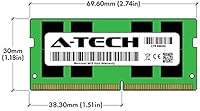
  • Module Dimensions: Each stick measures 2.74 x 1.18 x 0.15 inches, consistent with the standard SODIMM physical footprint.
  • Operating System: Compatible with Windows-based systems; Linux compatibility is generally supported but should be verified per system.
  • Release Date: This kit was first made available in November 2018 and remains an active, non-discontinued product.

Related Reviews
A-Tech 32GB DDR4 3200MHz SODIMM Laptop RAM
80%
91%
Value for Money
74%
Compatibility Range
93%
Installation Ease
83%
Performance Improvement
86%
Build & Module Quality
More
A-Tech 32GB DDR4 2133MHz Desktop RAM
79%
88%
Value for Money
94%
Installation Ease
69%
Compatibility
86%
Stability & Reliability
61%
Memory Speed
More
Adamanta 32GB DDR4 2666MHz Laptop RAM
77%
71%
Compatibility
88%
Installation Ease
83%
Performance Gain
84%
Value for Money
91%
Single-Slot Capacity
More
A-Tech 16GB DDR4 3200MHz SODIMM Laptop RAM
78%
83%
Compatibility
91%
Installation Ease
78%
Performance Uplift
86%
Value for Money
74%
Build Quality
More
A-Tech 8GB DDR4 2666MHz SODIMM Laptop RAM

81%
93%
Value for Money
91%
Installation Ease
78%
Compatibility Range
82%
Performance Impact
84%
Build & Module Quality
More
A-Tech 8GB DDR4 2400MHz SODIMM Laptop RAM
82%
91%
Value for Money
68%
Compatibility
88%
Ease of Installation
78%
Performance Improvement
83%
Reliability & Longevity
More
Adamanta 32GB DDR4 2400MHz SODIMM Laptop RAM
77%
86%
Value for Money
91%
Installation Ease
63%
Compatibility
74%
Performance
82%
Build Quality
More
A-Tech 8GB DDR4 2133MHz SODIMM Laptop RAM
81%
91%
Value for Money
67%
Compatibility Range
93%
Installation Experience
88%
System Stability
74%
Performance Uplift
More
A-Tech 8GB DDR4 3200 MHz SODIMM Laptop RAM
89%
91%
Performance Boost
95%
Ease of Installation
89%
Value for Money
88%
System Compatibility
90%
Speed and Responsiveness
More
A-Tech 32GB DDR4 3200MHz Desktop RAM
81%
91%
Installation Ease
74%
System Compatibility
83%
Performance at Rated Speed
86%
Value for Money
82%
Long-term Reliability
More

FAQ

The most reliable method is to check your laptop's official specifications page or user manual for the supported memory type, maximum capacity, and speed. Look specifically for DDR4 SODIMM support and whether your machine can handle 32GB total. Sites like Crucial's compatibility checker can also cross-reference your model quickly. Do not assume compatibility based on brand alone — the memory type, speed ceiling, and slot count all need to line up.

Yes, you can install just one of the 16GB modules if your laptop has a single slot or if you want to keep an existing stick. However, you will lose the dual-channel performance benefit, which requires two matched modules installed in the correct slots. Single-channel is still a valid upgrade — just understand you are leaving some bandwidth on the table compared to the full kit configuration.

In most cases, no. The A-Tech 32GB DDR4 2133MHz SODIMM Laptop RAM follows the JEDEC standard, so most laptops will detect it automatically at the correct 2133MHz speed on first boot. A small number of systems may boot at a lower speed by default and require a manual profile selection in BIOS, but this is uncommon and straightforward to fix if it happens.

It works in many models from those brands, but not all of them. Some business-class and enterprise laptops from these manufacturers have BIOS-level restrictions that only allow approved memory modules to run. Check your specific model number against A-Tech's compatibility list or contact their support team before ordering if you are unsure.

It is generally not recommended to mix RAM kits from different manufacturers, speeds, or capacities. Doing so can cause instability, force the system to run all memory at the lowest common speed, or prevent dual-channel from activating. For best results, replace your existing memory entirely with this matched pair rather than adding to it.

If you regularly run a browser with many tabs open alongside productivity apps, video calls, and background processes, 16GB can start to feel tight. Upgrading to 32GB gives the system enough headroom that it stops having to move data in and out of virtual memory, which is noticeably slower. For light users who mainly browse and stream, 16GB is usually sufficient — the jump to 32GB is most impactful for multitaskers and anyone running virtual machines or memory-hungry creative apps.

A-Tech covers this under their lifetime warranty. Most buyers who have dealt with a dead-on-arrival module report that the replacement process was handled without much friction — contact their support, describe the issue, and they will work through it with you. Keeping your order details and packaging makes the process faster.

Some older Intel-based Mac laptops that use DDR4 SODIMM memory are compatible with third-party modules like these, but Apple's more recent systems use soldered or proprietary memory that cannot be upgraded at all. Check your specific Mac model carefully — if it lists DDR4 SODIMM as user-upgradeable memory, this kit is worth looking into, but Apple hardware can be finicky with non-OEM parts.

This depends on your laptop manufacturer's policy. In many regions, consumer protection laws limit a manufacturer's ability to void a warranty solely because third-party components were installed. That said, some manufacturers do include memory in their warranty exclusions if modified. It is worth checking your laptop's warranty documentation or contacting the manufacturer directly if this is a concern for you.

Not automatically — your laptop's motherboard needs to support dual-channel operation, and the modules must be installed in the correct paired slots. Most modern laptops with two RAM slots support dual-channel by design, and installing a matched pair like this kit will activate it. If your laptop has more than two slots, consult the manual to identify which pairs should be populated first.