
Overview

The Zalman P10 Micro-ATX Mini Tower Case makes a strong case for compact builds that refuse to compromise on looks or build quality. Constructed from alloy steel and plastic with panoramic tempered glass covering both the front and side, this small-form-factor tower has a presence that belies its footprint. It sits comfortably in the mid-range tier — not quite budget, but not pushing into enthusiast pricing either. One 120mm ARGB fan comes pre-installed at the rear, so you are not starting from zero. The overall package feels deliberate: a compact chassis built for builders who want visual impact without graduating to a full ATX enclosure.

Features & Benefits

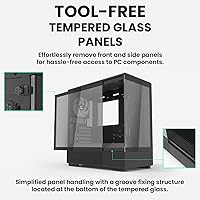
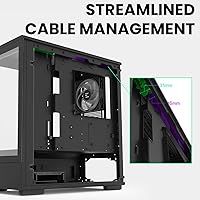
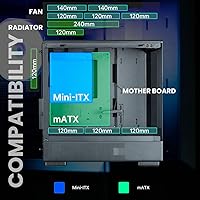
The frameless glass panels on the front and side are genuinely easy to remove — no fighting with screws or clips — which makes cleaning or swapping parts far less frustrating than it sounds on paper. The pre-installed ARGB fan connects via a 3-pin header, giving you lighting control without needing a separate controller out of the box. GPU clearance stretches to 384mm, which covers virtually every current consumer card. Up top, you can fit a 240mm radiator, and the rear accommodates a 120mm, so liquid cooling options are real, not theoretical. The cable management routing is thoughtfully laid out, keeping things tidy behind that glass side panel.

Best For

This compact mATX case is an easy recommendation for builders who want a sharp-looking rig without the bulk of a mid-tower. If you are working with a smaller desk or a tighter shelf and still need room for a high-end GPU, space-conscious gaming builds are where this chassis really earns its keep. It also suits first-time builders well — the pre-installed fan and intuitive layout lower the barrier to getting started. Anyone planning a 240mm AIO cooler in a compact enclosure will find the top radiator support a welcome inclusion. Just go in knowing the 175mm PSU cap will rule out some longer modular units.

User Feedback

Owners of the Zalman P10 tend to come away satisfied, with most praise centered on the glass panels delivering a premium look that punches above this price tier. Cable management also draws consistent compliments — people appreciate that the interior does not immediately become a tangled mess. That said, a few honest concerns surface regularly. The PSU length cap at 175mm has caught some buyers off guard, particularly those pairing it with larger fully modular units. And while the single included fan gets the job done at idle, anyone running demanding hardware will want to budget for extra airflow. A 4.2-star average across 55 ratings feels earned and accurate.

Pros

  • Panoramic frameless tempered glass on both the front and side looks sharp and is easy to remove for cleaning or modding.
  • GPU clearance of up to 384mm means most current high-end graphics cards fit without any compromise.
  • Top radiator support for up to 240mm makes liquid cooling a realistic option in a compact chassis.
  • The pre-installed 120mm ARGB fan connects via a standard 3-pin header, giving you lighting control right away.
  • Cable management routing is well thought out, keeping the interior tidy behind the glass side panel.
  • CPU cooler height allowance of 173mm accommodates a wide range of tower air coolers without clearance headaches.
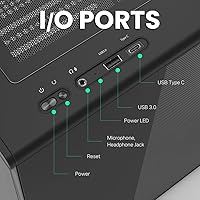
  • Front panel includes USB Type-C, USB 3.0, and two USB 2.0 ports — a solid and practical I/O lineup.
  • Build quality feels solid for the price tier, with alloy steel construction giving the chassis real rigidity.
  • First-time builders benefit from a manageable interior layout that does not punish inexperience.
  • The compact footprint frees up meaningful desk space compared to full-size mid-tower alternatives.

Cons

  • The 175mm PSU length cap rules out many popular fully modular power supplies, which is a real compatibility risk.
  • Only one fan is included — thermal performance under heavy load will require additional fan purchases.
  • With 55 ratings total, the long-term reliability data is still limited compared to more established cases.
  • The plastic elements, while functional, can feel less premium up close compared to all-steel competitors at a similar price.
  • Compact dimensions mean cable routing, while manageable, leaves less slack and margin for error than larger cases.
  • The ARGB fan requires a 3-pin header on your motherboard or a separate controller — not all budget boards have this.
  • PSU installation with the 175mm limit may require careful pre-planning, especially for builders reusing an existing power supply.
  • Limited internal space can make simultaneous installation of a radiator and multiple storage drives feel cramped.

Ratings

The scores below reflect our AI-driven analysis of verified buyer reviews for the Zalman P10 Micro-ATX Mini Tower Case, sourced globally and filtered to exclude incentivized, bot-generated, and outlier feedback. Every category has been scored to transparently represent both what this compact mATX case genuinely does well and where real-world builders have run into friction. The result is an honest, balanced picture to help you decide whether this chassis belongs in your next build.

Build Quality
83%
The alloy steel frame feels rigid and well-constructed for the price tier, and buyers consistently note that the chassis does not flex or creak during assembly. The tempered glass panels, both front and side, are thick enough to feel premium when handled, which matters a lot when you are investing in a build meant to sit on your desk for years.
Some users point out that the plastic accents — particularly around panel edges — feel noticeably cheaper than the steel body, which creates a slight inconsistency in the overall finish. A handful of buyers also noted minor sharp edges inside the chassis during cable routing, which is a small but real annoyance during the build process.
Aesthetic Design
91%
The panoramic frameless tempered glass on both the front and side is the single biggest reason people choose this case over competitors at the same price point. Reviewers frequently describe the finished build as looking far more expensive than it actually is, especially with ARGB lighting bouncing off the interior components behind that unobstructed glass.
The design is unapologetically RGB-forward and glass-heavy, which is a deliberate style choice that not everyone shares. Builders who prefer a subdued, blacked-out aesthetic with no visible lighting will find the included ARGB fan and prominent glass panels work against the look they are going for.
Panel Usability
87%
The frameless glass panels remove cleanly without tools, which makes routine dust cleaning far less tedious than on cases that require unscrewing panels every time. Several builders specifically praised this feature when documenting their builds, noting it encourages them to actually maintain the case interior over time rather than leaving dust to accumulate.
Because the panels are frameless, they rely entirely on friction and retention points to stay in place, and a few users reported that the fit feels slightly loose after repeated removal cycles. There is also essentially no protection if a panel is accidentally dropped during cleaning, so handling them requires more care than a framed alternative.
Cable Management
84%
The routing layout inside this small-form-factor tower is genuinely well-planned for its size class, with dedicated channels and pass-throughs that help keep the visible interior clean behind the glass panel. First-time builders in particular praised how intuitive the layout is, reporting cleaner results than they expected from their first build.
The compact dimensions do impose real limits — there is less slack space behind the motherboard tray than in a full mid-tower, and thicker cable bundles from fully modular PSUs can make the rear panel bulge slightly. Builders reusing older cable sets with less flexibility may find the tight routing channels more frustrating than newcomers working with fresh modular cables.
Cooling Potential
72%
28%
The top radiator support for a 240mm AIO is the standout cooling feature, giving builders a legitimate liquid cooling option in a compact chassis without resorting to more expensive specialty cases. The overall fan mounting options — up to three 120mm slots on top plus the rear — are genuinely expansive for the size class.
The single included rear fan is simply not enough for a thermally demanding build, and buyers running high-TDP CPUs paired with power-hungry GPUs noticed temperature creep before adding additional fans. Airflow out of the box is a starting point, not a complete solution, and the cost of supplementary fans should be factored into the total build budget.
GPU Compatibility
93%
A 384mm GPU clearance is one of the strongest specs in this chassis and a genuine competitive advantage at this price tier — it means flagship triple-fan cards from both AMD and NVIDIA slot in without compromise. Buyers upgrading from older, smaller cases specifically highlighted the relief of not having to measure twice before purchasing their graphics card.
While the length clearance is excellent, the compact chassis width means very thick or unusually wide cards may have less breathing room around them than in a mid-tower, which can subtly affect GPU temperatures under sustained load. This is unlikely to be a dealbreaker for most cards, but it is worth checking airflow results for your specific GPU model if thermals are a priority.
PSU Compatibility
58%
42%
The rear-mounted PSU bay is logically positioned and helps separate the power supply heat zone from the main component area, which is a thoughtful layout choice that improves overall thermal management inside the chassis. Builders using standard non-modular or shorter semi-modular PSUs report no issues whatsoever with the installation process.
The 175mm PSU length cap is a firm and frequently painful limitation — many popular fully modular units from leading brands like Corsair, EVGA, and Seasonic exceed this length, forcing buyers to either repurchase a shorter PSU or reconfigure their build plans entirely. This is the single most common negative callout across user reviews and deserves serious consideration before committing.
Front Panel I/O
79%
21%
Having USB Type-C alongside USB 3.0 and two USB 2.0 ports on the front panel is a practical and forward-looking I/O layout that covers most daily connectivity needs without requiring rear-panel access. USB Type-C in particular is increasingly essential for connecting modern peripherals and external drives quickly during a session.
There is no dedicated headphone and microphone combo jack noted among the front panel features, which some desktop users find genuinely inconvenient if their audio setup relies on front-panel access. For the price tier, the I/O lineup is solid but not exceptional, and builders coming from cases with more extensive front-panel connectivity may notice the difference.
Radiator Support
81%
19%
240mm top radiator support in a micro-ATX chassis is not a given at this price point, and the Zalman P10 handles it without awkward fitment compromises that plague some competing compact cases. Builders running 240mm AIOs report clean installation with enough clearance to route tubes without undue stress on the fittings.
The rear position supports only a single 120mm radiator, which limits push-pull configurations and restricts total cooling surface area for builders trying to run both a CPU and GPU liquid cooling solution simultaneously. Custom loop enthusiasts will quickly feel the spatial constraints, and the case is better suited to a single AIO than a more elaborate water cooling setup.
Value for Money
82%
18%
At its price point, the combination of panoramic frameless glass panels, a pre-installed ARGB fan, generous GPU clearance, and AIO radiator support is genuinely competitive with cases that cost noticeably more. Buyers repeatedly describe it as feeling like more case than they paid for, particularly when they see the finished build through the glass side panel.
The PSU length restriction and the need to purchase additional fans to achieve adequate airflow mean the true cost of the build is higher than the case price alone suggests. Builders on tight budgets should factor in at least one or two additional case fans and potentially a shorter replacement PSU when calculating the real total outlay.
Assembly Experience
78%
22%
The interior layout is logical enough that first-time builders consistently report a smoother experience than they anticipated, and the pre-installed rear fan removes one installation step from an already busy process. The cable management channels are clearly designed with the builder in mind rather than as an afterthought.
The tight dimensions make installing a 240mm radiator and routing all cables simultaneously a bit of a puzzle, especially for builders with larger hands who find working in compact spaces frustrating. A few users also noted that the standoff placement for Micro-ATX boards could be more clearly marked, which caused brief confusion during motherboard installation.
Fan Inclusion
66%
34%
Having any pre-installed fan is better than none, and the included 120mm ARGB unit is at least visually appealing and functional at lower system loads, giving the build a finished look right out of the box. The 3-pin header connection is standard enough to work with most motherboards without adapter hassle.
A single 120mm fan in the rear is genuinely inadequate as the only active cooling in any build that goes beyond light office or media use, and this is where honest buyer feedback gets most critical. The fan itself is not particularly high-performance — it is an aesthetic inclusion as much as a functional one, and treating it as a complete airflow solution will lead to disappointing thermal results.
Noise Levels
74%
26%
At low to moderate system loads, buyers report the case runs quietly enough for shared office or bedroom use, particularly when the included fan is running at reduced RPM through PWM control on compatible motherboards. The steel construction does a reasonable job of containing component noise compared to thinner-gauge chassis at similar prices.
Under heavy gaming loads with additional fans added, the open-air feel of the glass front panel means there is less sound dampening than in cases designed with acoustic foam or filtered front panels. Builders who prioritize near-silent operation under load may find this chassis underwhelming without significant investment in quiet fan selections.
Dust Management
63%
37%
The removable glass panels make it straightforward to access the interior for periodic cleaning, and the ease of panel removal genuinely encourages more regular maintenance habits among owners who might otherwise avoid the chore. Some buyers noted this as a meaningful lifestyle benefit over cases that require more disassembly to clean thoroughly.
The case lacks dedicated dust filters on key intake points, which means dust accumulates inside the chassis at a faster rate than on cases with filtered mesh panels. In environments with pets or higher ambient dust levels, buyers report needing to clean the interior more frequently than they initially expected, which offsets some of the convenience of the removable panels.

Suitable for:

The Zalman P10 Micro-ATX Mini Tower Case is a strong fit for builders who want a visually polished compact rig without the desk footprint of a full-size mid-tower. If you are working with a micro-ATX motherboard and want room for a powerful modern GPU — think cards in the 300mm-plus range — this chassis handles that without breaking a sweat. It is also a genuinely good option for first-time builders who want a forgiving interior layout, a pre-installed fan to get started, and glass panels that make the build feel rewarding to look at once it is done. Anyone planning a 240mm AIO cooler in a smaller enclosure will appreciate that the top radiator support is there without needing to hunt for a specialty case. Desk setups where space is a real constraint but aesthetics still matter will find this small-form-factor tower a practical and good-looking solution.

Not suitable for:

Builders with larger fully modular power supplies should check their PSU dimensions carefully before committing — the 175mm length cap is a firm limit that rules out some popular high-wattage modular units, and that is not a minor footnote. The Zalman P10 Micro-ATX Mini Tower Case also ships with only one rear fan, which means anyone planning a thermally demanding build with a high-TDP CPU and a power-hungry GPU will need to budget for additional case fans from the start. If you are expecting a fully silent or heavily optimized airflow setup out of the box, this chassis will require extra investment to get there. Full ATX motherboards are simply not compatible here, so anyone looking to use an extended ATX or standard ATX board needs to look elsewhere. Finally, builders who prefer a more understated or blacked-out look with no RGB elements may find the included ARGB fan and glass-forward design more than they bargained for aesthetically.

Specifications

  • Form Factor: Supports Micro-ATX and Mini-ITX motherboards, making it compatible with a wide range of compact builds.
  • Dimensions: The chassis measures 16.46 x 8.5 x 16.61 inches, offering a compact footprint without severely restricting internal component space.
  • Weight: The case weighs 13.44 lbs unloaded, reflecting its alloy steel and tempered glass construction.
  • Materials: Built from alloy steel and plastic with frameless tempered glass panels on both the front and side.
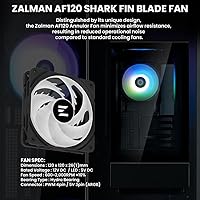
  • Included Fan: One 120mm ARGB shark-fin blade fan comes pre-installed at the rear, connected via a 3-pin header.
  • Top Fan Support: The top of the chassis supports up to three 120mm fans or two 140mm fans for expanded airflow configurations.
  • Top Radiator: The top panel accommodates a single 120mm or a 240mm radiator, enabling practical AIO liquid cooling setups.
  • Rear Radiator: The rear of the case supports one 120mm radiator or fan, which is occupied by the pre-installed unit.
  • GPU Clearance: Graphics cards up to 384mm in length are supported, covering virtually all current consumer-grade GPUs.
  • CPU Cooler Height: Tower air coolers up to 173mm tall are compatible, fitting most mainstream and high-performance air cooling solutions.
  • PSU Limit: Power supply units must not exceed 175mm in length due to the compact rear-mount PSU bay dimensions.
  • PSU Mount: The power supply is rear-mounted, which helps separate heat zones and keeps cabling organized toward the back of the chassis.
  • Front Panel I/O: The front I/O includes one USB Type-C port, one USB 3.0 port, and two USB 2.0 ports for broad device connectivity.
  • Panel Design: Both the front and side panels are frameless tempered glass and are designed to be easily removable without tools for cleaning or access.
  • Cooling Method: The case supports both air and water cooling configurations, with dedicated mounting points for fans and radiators across the top and rear.
  • Color Options: Available in Black and White variants, allowing builders to match the chassis to their overall system aesthetic.
  • Best Seller Rank: Ranked number 592 in the Computer Cases category on Amazon, reflecting solid market traction for a relatively recent release.
  • User Rating: Holds a 4.2 out of 5 star average based on 55 customer ratings at the time of this review.

Related Reviews
Antec VSK3000E-U3 Micro ATX Mini Tower Case
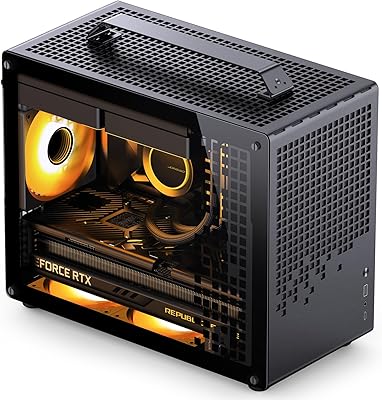
72%
78%
Build Quality
86%
Value for Money
57%
Cooling Performance
83%
Front I/O & Connectivity
84%
Drive Bay Versatility
More
Jonsbo Z20 Micro-ATX Mini Tower Case
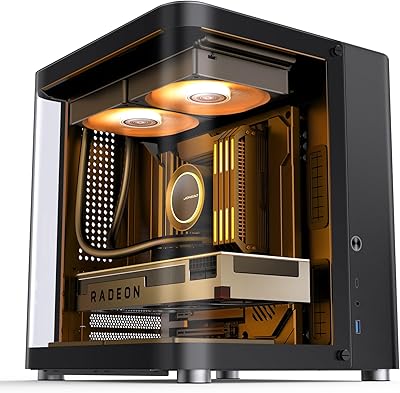
80%
93%
Build Quality & Materials
91%
Portability & Carrying Handle
78%
Internal Layout & Compatibility
89%
GPU Clearance & Large Component Support
87%
Cooling Support & Thermal Flexibility
More
Jonsbo TK-1 Micro-ATX PC Case
76%
91%
Build Quality
93%
Aesthetic Design
74%
Thermal Performance
72%
Hardware Compatibility
86%
Value for Money
More
Antec NX200 M Micro-ATX Mini-Tower Computer Case
84%
87%
Cooling Performance
83%
Build Quality
88%
Ease of Setup
80%
Size and Space Efficiency
84%
Storage Options
More
Zalman S2 ATX Mid-Tower PC Case
76%
88%
Airflow Performance
63%
Build Quality
91%
Value for Money
86%
Ease of Assembly
84%
Cooling Expandability
More
Zalman T6 ATX Mid Tower PC Case
71%
83%
Value for Money
67%
Build Quality
71%
Airflow & Cooling
79%
Interior Space & Layout
76%
Cable Management
More
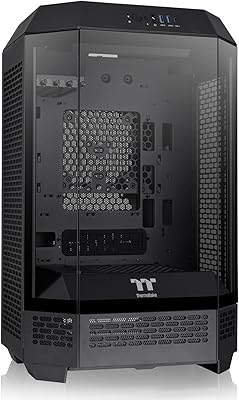
Thermaltake Tower 300 Black Micro-ATX Case

84%
88%
Cooling Performance
90%
Build Quality
85%
Design and Aesthetics
82%
Size and Compatibility
80%
Ease of Setup
More
Zalman S3 ATX Mid-Tower PC Case
74%
83%
Value for Money
71%
Build Quality
58%
Airflow & Cooling Performance
86%
Ease of Assembly
67%
Acrylic Side Panel
More
Zalman S4 Mid-Tower ATX PC Case

75%
72%
Build Quality
88%
Value for Money
91%
Ease of Assembly
67%
Airflow Performance
63%
Cable Management
More
SilverStone FARA H1M Mid-Tower Micro-ATX Case
82%
91%
Airflow Performance
88%
Build Quality
85%
Cooling Options
65%
Cable Management
82%
Aesthetics
More

FAQ

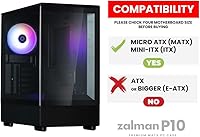
No, it will not. This chassis is designed strictly for Micro-ATX and Mini-ITX boards, so a standard ATX motherboard is too large to fit. If you are planning an ATX build, you will need a different case.

Unfortunately, no. The PSU bay in this small-form-factor tower has a hard length limit of 175mm, which rules out many longer fully modular units. Before buying, check your PSU specs carefully — this is one of the most common compatibility surprises buyers run into.

Yes, the top of the case supports a 240mm radiator, so a 240mm AIO is a realistic option. Just keep in mind that if you are also installing multiple storage drives or have a tall GPU, you will want to plan your component layout before building to avoid clearance conflicts.

The pre-installed fan uses a standard 3-pin ARGB header, so you can connect it directly to a compatible header on your motherboard for software-based lighting control. If your motherboard does not have an ARGB header, you will need a separate ARGB controller to manage it.

Yes, both panels are designed to come off without a fight. Zalman built them to be frameless and tool-free to remove, which makes cleaning the glass or accessing internals far less of a chore than on cases with traditional screw-mounted panels.

You can add up to three 120mm or two 140mm fans across the top, plus the rear position is already occupied by the included fan. That gives you meaningful room to expand airflow, which is worth doing if you are running a thermally demanding build.

It can accommodate hardline or soft-tubing loops in a limited capacity given the compact size, but most builders using this chassis opt for an AIO radiator rather than a full custom loop. The space constraints make custom loops technically possible but practically challenging.

The case supports graphics cards up to 384mm long, which covers essentially every mainstream consumer GPU currently on the market, including high-end triple-fan models from both AMD and NVIDIA.

Both black and white color variants exist, so if your build aesthetic leans toward a lighter look, the white version is a real option. The core specifications and dimensions are the same across both colors.

That is the rated maximum, so a cooler right at 173mm should technically fit, but it is always smart to leave a small buffer if you can. Coolers in the 155mm to 165mm range will give you more peace of mind and easier panel installation without any close-call stress.