Overview

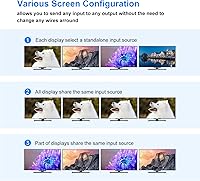
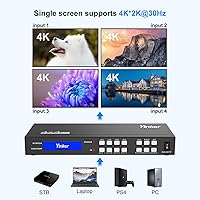
The Yinker HD414 4x4 HDMI Matrix Switch occupies a practical middle ground in the AV accessories market — capable enough for real installations, yet accessible enough that you don't need an engineering background to configure it. Released in 2023, it lets you connect four HDMI sources and route any of them to any combination of four displays simultaneously, eliminating the tedious cable-swapping that simpler setups demand. It tops out at 4K at 30Hz, with the ability to downscale to 1080P when your screens aren't all the same resolution. The unit itself is compact — roughly 10 by 4 inches — and sits on a desktop rather than mounting in a server rack.

Features & Benefits

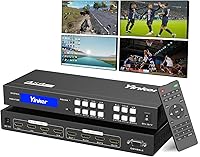
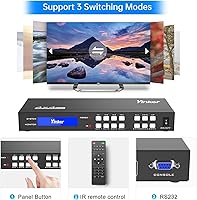
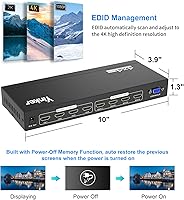
What separates this HDMI matrix switch from basic switchers is the combination of control flexibility and signal intelligence packed into one unit. You can switch sources from the backlit front panel, use the IR remote from across the room, or send RS232 serial commands — handy if you're tying this into a control system like Crestron or a custom automation setup. The built-in EDID management is genuinely useful: it auto-scans connected displays and stores 16 profiles, which resolves the handshake failures common when mixing display brands. Power-off memory restores your last routing configuration after a power cycle, a small but meaningful detail for any fixed or semi-permanent installation.

Best For

This 4x4 matrix switcher fits well in a handful of specific scenarios. In a small conference room, it lets staff route a laptop, desktop, or external source to any screen independently — no cable juggling required. Home theater users managing multiple consoles and streaming devices will appreciate distributing signals to a projector, television, and monitor simultaneously. Security monitoring stations benefit from four-screen simultaneous display without any source conflicts. AV integrators handling modest commercial projects will value the RS232 support for lightweight automation without the cost of enterprise hardware. It's less suited for workflows that demand 4K at 60Hz or large-scale, multi-zone video distribution.

User Feedback

With roughly 100 verified ratings and a 4.0 average, the Yinker matrix unit has earned a generally favorable reception — though not without some honest criticism. Buyers frequently highlight easy initial setup and working EDID management as standout positives, especially compared to cheaper alternatives that fail on mixed-brand display configurations. The IR remote receives mixed marks: it works reliably up close, but some users report inconsistency beyond about 15 feet. A recurring complaint in lower-rated reviews involves the RS232 documentation, which many integrators find too sparse for confident control system implementation. A handful of buyers also mentioned the chassis running noticeably warm during extended use, though no one flagged actual overheating or failures.

Pros

  • Routes any of four HDMI sources to any combination of four displays simultaneously, eliminating cable swapping entirely.
  • EDID management with 16 built-in profiles reliably prevents the handshake failures common when mixing display brands.
  • Power-off memory restores your last routing configuration automatically after a power cycle — genuinely useful in fixed installs.
  • Three control methods (front panel, IR remote, RS232) give flexibility for both casual users and integrators.
  • The onboard LCD screen lets you check routing status at a glance without a separate app or interface.
  • Supports Dolby TrueHD and DTS-HD audio passthrough, so high-quality audio is not sacrificed in the signal chain.
  • Compact desktop footprint makes it easy to tuck into an AV cabinet or place on a shelf without occupying rack space.
  • Saves and recalls up to 16 display scenes, useful for venues or meeting rooms with recurring setup configurations.
  • Signal transmission holds up to 50 feet on standard HDMI cable, covering most typical room distances without signal boosters.
  • At its price point, this 4x4 matrix switcher offers a feature set that would cost significantly more from major AV brands.

Cons

  • 4K output is capped at 30Hz, which is a noticeable limitation for gaming, fast video, or newer 60Hz-native displays.
  • The IR remote loses reliability beyond roughly 15 feet, which is frustrating in larger rooms or deep cabinet installs.
  • RS232 command documentation is thin, leaving integrators to troubleshoot or source command references independently.
  • Not rack-mountable, ruling it out for professional AV installations where structured rack builds are standard.
  • No audio breakout ports mean you cannot extract or redirect audio independently from the HDMI signal chain.
  • The chassis runs noticeably warm during extended continuous use, which may raise concerns in poorly ventilated spaces.
  • Yinker is a newer brand with limited long-term support history, making warranty follow-through harder to predict.
  • Only 100 verified ratings means the reliability picture is still forming compared to more established alternatives.

Ratings

The scores below reflect our AI-driven analysis of verified global buyer reviews for the Yinker HD414 4x4 HDMI Matrix Switch, with spam, bot-generated, and incentivized feedback actively filtered out before scoring. Each category is weighted against real-world usage patterns reported by actual buyers, from AV integrators to home theater enthusiasts. Both the strengths that earned repeat purchases and the friction points that drove negative reviews are transparently reflected in every score.

Signal Routing Reliability
83%
Most buyers report that the core switching function works consistently once the unit is properly configured, with sources routing cleanly to assigned displays without dropout during normal operation. In conference room and home theater environments, the matrix holds assigned routing without requiring constant user intervention.
A subset of users experienced intermittent signal loss or handshake failures when mixing display brands or using older HDMI cables, particularly at the 4K resolution setting. These issues tend to surface during initial setup rather than long-term use, but they add friction for less experienced installers.
EDID Management
78%
22%
The auto-scan EDID function genuinely resolves compatibility issues that plague cheaper switchers, particularly when connecting a mix of monitors, TVs, and projectors that have different native resolution support. Buyers setting up mixed-display environments praised this feature for eliminating the blank-screen problems they had with previous devices.
While the 16 built-in profiles cover most common scenarios, the documentation explaining which profile to choose for a given display combination is sparse. Users without prior EDID experience often had to experiment through profiles by trial and error rather than following clear guidance.
4K Performance
67%
33%
For static content, presentations, digital signage, and standard video playback, the 4K at 30Hz output looks crisp and color-accurate, with solid 4:4:4 chroma handling that preserves image fidelity across all connected displays. Buyers using this in boardrooms and security monitoring setups found the resolution more than adequate.
The 30Hz ceiling is a genuine limitation that disappointed buyers expecting a full 4K at 60Hz experience, especially for gaming or high-motion video content. Several reviewers noted that fast-scrolling content and action scenes exhibit a subtle but perceptible choppiness compared to a true 60Hz signal.
Ease of Setup
74%
26%
Most non-technical buyers found the initial hookup straightforward — plug in sources and displays, power on, and use the front panel buttons to assign routing. The LCD status screen removes a lot of guesswork by confirming active connections without any external software.
The user manual lacks detail for anything beyond basic switching, leaving buyers who want to configure EDID profiles, scene memory, or RS232 commands largely on their own. Several reviewers mentioned needing to search for supplemental guidance online before they could complete their intended setup.
IR Remote Usability
61%
39%
At short distances with a clear line of sight, the included IR remote responds promptly and covers the basic switching functions without requiring you to physically reach the unit. For desktop or shelf installations in smaller rooms, it works adequately for occasional source changes.
Buyer complaints about the IR remote are notably consistent — reliability drops off sharply beyond roughly 15 feet, and performance inside an AV cabinet with a smoked glass door is poor. For larger rooms or enclosed rack-style installs, the remote is essentially unreliable and users default to front panel buttons.
RS232 Control
58%
42%
The presence of RS232 is a real differentiator at this price tier, and integrators who have worked with the command set report that the switching responses are fast and stable once the correct baud rate and command strings are confirmed. It integrates reasonably well with basic Crestron and custom serial control setups.
The RS232 command documentation shipped with the unit is widely criticized as incomplete, with missing or unclear command references that force integrators to reverse-engineer behavior or contact support. For a feature primarily targeting professional installers, this documentation gap is a meaningful pain point.
Build Quality
69%
31%
The metal chassis feels solid relative to what buyers expect at this price point, and the backlit buttons have a firm, tactile response that holds up well through repeated daily use. Several buyers noted it looks and feels more substantial than similarly priced plastic competitors.
The unit runs noticeably warm during extended continuous operation, which raised concerns among buyers using it in enclosed or poorly ventilated cabinets. The included IR remote feels lightweight and cheap relative to the main unit, and a few buyers reported remote buttons that feel inconsistent.
Audio Passthrough
77%
23%
Dolby TrueHD and DTS-HD audio pass through cleanly over HDMI to compatible receivers and soundbars, which home theater users found reassuring. In practice, audio sync and quality held up well across multiple simultaneous outputs during normal media playback.
The absence of any dedicated audio output — no analog, optical, or ARC support — limits flexibility for setups where audio needs to be routed independently from the video signal. Buyers hoping to extract audio to a separate amplifier or speaker system will need additional hardware.
Power-off Memory
84%
The automatic configuration restore after a power cycle is one of the most consistently praised features among buyers who use this in fixed installations. Boardroom managers and security room operators specifically highlighted this as reducing the need for staff to reconfigure the unit after outages.
The feature works as advertised in the vast majority of reported cases, though a small number of users noted the unit occasionally defaulted to a generic state rather than the saved configuration after an abrupt power loss. This is an edge case, but relevant for mission-critical deployments.
Scene Memory & Presets
72%
28%
The ability to save and recall up to 16 routing configurations makes this 4x4 matrix switcher genuinely practical for venues or meeting rooms that rotate between recurring presentation setups. Switching between saved scenes via the front panel is fast and requires no reconfiguration from scratch.
The preset save and recall process is not intuitive, and the manual provides minimal guidance on how to store custom scenes reliably. A few buyers accidentally overwrote saved configurations during normal use and had no clear way to recover them.
Downscaling Capability
79%
21%
The ability to feed 4K sources to 1080P displays simultaneously with automatic downscaling is practically useful for mixed environments where not all screens have been upgraded to 4K. Buyers managing older projectors alongside newer TVs found this feature saved them from needing separate signal converters.
Downscaling works reliably for most standard source and display combinations, but a handful of users reported resolution negotiation issues when connecting certain older 1080P projectors that did not respond well to the downscaled signal without manual EDID profile selection.
Value for Money
81%
19%
For buyers who need RS232 control, EDID management, and multi-source routing in a single unit, the price-to-feature ratio is difficult to match at this tier. AV integrators in particular noted that comparable functionality from established brands costs considerably more.
Buyers who purchased primarily for 4K gaming or high-refresh display applications felt the value proposition weakened significantly once they hit the 30Hz ceiling. For those use cases, the perceived value drops because the core resolution limitation affects the product's primary function.
Compatibility
71%
29%
The switcher works reliably with a broad range of mainstream source devices — laptops, gaming consoles, streaming sticks, Blu-ray players — and connects without issue to most modern flat-panel TVs and monitors that support HDMI 1.4.
Compatibility becomes less predictable with older HDCP-sensitive content delivery devices and certain legacy projectors, where handshake failures require EDID profile workarounds. Users with niche or older hardware should be prepared for some trial-and-error during initial configuration.
Brand Trust & Support
56%
44%
Buyers who reached out to Yinker directly generally reported receiving a response, and the brand appears to engage with Amazon review feedback more actively than some lesser-known competitors. The 100-plus verified ratings give at least some baseline signal on real-world reliability.
Yinker is a relatively new brand without the long-term track record that gives buyers confidence in warranty follow-through or firmware support over time. Several buyers expressed hesitation about long-term service availability, which is a legitimate concern for a unit intended for semi-permanent installation.

Suitable for:

The Yinker HD414 4x4 HDMI Matrix Switch is a strong fit for anyone who regularly needs to route multiple video sources to multiple displays without physically swapping cables. Small business owners setting up conference rooms will find the flexible source-to-display routing genuinely practical — any laptop, desktop, or media player can feed any screen independently at a moment's notice. Home theater enthusiasts juggling consoles, streaming boxes, and a mix of TVs or projectors will appreciate being able to distribute signals to all screens simultaneously. Security installers and monitoring stations benefit from the multi-source, multi-display capability in a single compact unit. AV integrators handling lightweight commercial automation projects will also value the RS232 support, which allows this switcher to respond to serial control commands from a broader room control system without requiring expensive enterprise-grade hardware.

Not suitable for:

Buyers who need 4K at 60Hz output should look elsewhere — the Yinker HD414 4x4 HDMI Matrix Switch tops out at 4K at 30Hz, which is a real limitation if you're working with fast-motion content, high-refresh gaming, or modern displays that expect a full 60Hz 4K signal. It is also not rack-mountable, so anyone building a structured AV rack for a professional installation will need a different form factor. The RS232 documentation has drawn complaints from integrators who need precise command references, meaning it may frustrate anyone planning deep control system integration without supplemental research. Those managing more than four sources or more than four displays will outgrow this unit quickly, as there is no expansion capability. Finally, buyers who prioritize brand pedigree and long-term manufacturer support may hesitate, since Yinker is a relatively young brand with a limited service track record compared to established AV names.

Specifications

  • HDMI Inputs: The unit accepts four HDMI input sources simultaneously, allowing connection of devices such as laptops, gaming consoles, Blu-ray players, or streaming boxes.
  • HDMI Outputs: Four independent HDMI outputs distribute signals to four displays simultaneously, with full flexibility to route any input to any output.
  • Max Resolution: Maximum supported output resolution is 4K at 30Hz with full 4:4:4 chroma sampling and 36-bit color depth.
  • Downscaling: The unit can downscale 4K sources to 1080P at 60Hz, enabling mixed-resolution display setups where not all screens support 4K.
  • HDMI Version: Built on the HDMI 1.4B specification, which supports standard 4K, 3D video, and full audio format passthrough.
  • HDCP Support: Compliant with HDCP 1.2 content protection, ensuring compatibility with most commercially protected video content.
  • Audio Formats: Passes through PCM, DSD, Dolby TrueHD, and DTS-HD Master Audio formats over HDMI without additional processing or conversion.
  • Control Methods: Three control options are available: backlit front panel buttons, an included IR remote, and RS232 serial control for integration with automation systems.
  • EDID Management: Supports auto-scan EDID detection along with 16 built-in EDID profiles to resolve handshake and compatibility issues across mixed display configurations.
  • Scene Memory: Stores and recalls up to 16 custom routing scenes, allowing quick switching between pre-configured source-to-display assignments.
  • Power-off Memory: Automatically restores the last active routing configuration after a power cycle, eliminating the need to manually reconfigure after outages.
  • Signal Range: Transmits signal reliably up to 50 feet using standard HDMI 1.4 or 2.0 cable, and up to 65 feet when using a fiber HDMI cable.
  • Dimensions: The unit measures 10 x 3.9 x 1.3 inches and is designed for desktop placement rather than standard 1U rack mounting.
  • Weight: The device weighs 2.4 pounds, making it light enough for flexible placement on a shelf, cabinet, or AV furniture.
  • Front Display: An onboard LCD information screen shows current matrix routing status and configuration details without requiring any external software or app.
  • Model Number: Official model identifier is HD414, manufactured and sold under the Yinker brand.
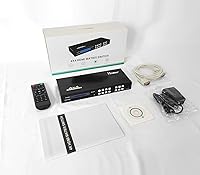
  • Package Contents: Each unit ships with the matrix switch, one RS232 cable, one IR remote control, and a printed user manual; batteries are not included.

Related Reviews
MT-VIKI MT-HD44L-DE 4x4 HDMI Matrix Switch

76%
91%
Control Flexibility
86%
Web GUI & Remote Access
84%
EDID Management
82%
Video Signal Quality
63%
4K Resolution Support
More
StarTech VS222HDQ 2x2 HDMI Matrix Switch
74%
88%
Build Quality
91%
Switching Reliability
83%
EDID Emulation
31%
4K and Resolution Support
86%
Ease of Setup
More
OREI BK-402A 8K eARC HDMI Matrix Switch 4x2
80%
88%
Signal Reliability & Handshake
84%
Audio Extraction Quality
91%
Routing Flexibility
82%
EDID Management
89%
Value for Money
More
OREI UHD-402D 4x2 HDMI Matrix Switch
78%
88%
Video Signal Quality
84%
Audio Extraction
71%
ARC Implementation
82%
EDID Management & Downscaling
86%
Setup & Ease of Use
More
OREI UHD-404R 4x4 HDMI Matrix Switcher
81%
88%
Signal Reliability
86%
4K Performance
91%
Downscaling Capability
79%
HDR & Audio Passthrough
84%
Setup & Ease of Use
More
OREI UHD48-EX230-K 4x4 HDMI Matrix Extender
78%
88%
Signal Stability
84%
4K & HDR Performance
61%
Installation Experience
82%
IR Control Functionality
79%
Build Quality & Enclosure
More
OREI UHDS-401A
OREI UHDS-401A
71%
74%
4K Signal Reliability
83%
Audio Extraction Quality
51%
ARC Functionality
86%
Format Compatibility
62%
Build Quality & Design
More
Portta N2MT42AX 4x2 HDMI Matrix
78%
83%
Signal Reliability
88%
4K & HDR Performance
86%
Audio Extraction Quality
91%
EDID Management
72%
ARC Functionality
More
TCNEWCL KS-801 8-Port HDMI KVM Switch
78%
88%
Ease of Setup
91%
Port Capacity & Scalability
74%
Video Quality & Resolution
69%
Switching Speed & Reliability
83%
IR Remote Control
More
MT-VIKI MT-801HK-C 8-Port HDMI KVM Switch
78%
83%
Value for Money
88%
Ease of Setup
76%
Build Quality
69%
Switching Performance
71%
Display Quality
More

FAQ

Yes, absolutely. This HDMI matrix switch can function as a splitter, sending a single source to all four outputs simultaneously. You can also mix and match — for example, sending one source to two screens and a different source to the other two. It gives you full flexibility.

It does support 4K, but the ceiling is 4K at 30Hz, not 60Hz. For movies, presentations, and general display use, 30Hz is perfectly fine and you likely won't notice a difference. Where it becomes an issue is gaming or fast-motion video, where 30Hz can feel slightly less smooth compared to a native 60Hz signal. If your TV is your primary gaming display, keep that in mind.

EDID is the way displays communicate their capabilities — resolution, refresh rate, audio support — to the source device. Without proper EDID handling, you can end up with blank screens, no audio, or resolution mismatches when mixing brands or display types. This 4x4 matrix switcher manages EDID automatically and lets you choose from 16 built-in profiles, which solves most of those handshake headaches without manual tinkering.

RS232 is a serial communication protocol that lets external control systems — like Crestron, AMX, or custom automation setups — send switching commands to the unit programmatically. If you're a regular home user or setting up a small conference room and plan to switch sources manually, you don't need it at all. It's mainly relevant for AV integrators or anyone building a room where everything is automated from a central controller.

Unfortunately, no. The unit is designed for desktop use and does not conform to standard 1U rack dimensions. It measures 10 x 3.9 x 1.3 inches, so it works well on a shelf or inside an AV cabinet, but you cannot bolt it into a traditional equipment rack.

It passes audio through alongside the video signal over HDMI, supporting PCM, DSD, Dolby TrueHD, and DTS-HD. What it does not have is a dedicated analog or optical audio output, so you can't break the audio out separately — it stays embedded in the HDMI signal going to whichever display or receiver is connected.

No. The power-off memory function saves your last active routing configuration, and the unit restores it automatically when power returns. This is particularly useful in permanent installations like boardrooms or security rooms where you don't want staff reconfiguring it every time there's a power blip.

Using a standard HDMI 1.4 or 2.0 cable, signal integrity holds up to about 50 feet. If you need more distance, switching to a fiber HDMI cable extends that to around 65 feet. Beyond those lengths you'd want an HDMI extender or a different distribution solution altogether.

Buyer feedback is mixed on this one. At close range — say, within 10 to 12 feet with a clear line of sight — it works without issue. Beyond about 15 feet, some users report inconsistent response, particularly if the unit is inside a cabinet. If your setup requires controlling it from across a larger room, the front panel buttons or RS232 control will be more dependable.

Most users find the basic setup straightforward — connect your sources and displays, power it on, and use the front panel buttons to assign inputs to outputs. The LCD screen helps confirm what's happening without guesswork. Where things get trickier is advanced configuration like custom EDID profiles or RS232 integration, which requires reading the manual carefully. For everyday switching use, though, it doesn't require any specialized knowledge.