Overview

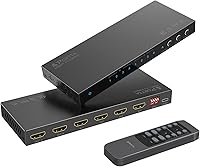
The Portta N2MT42AX 4x2 HDMI Matrix is a compact switch that routes any of four source devices to two displays simultaneously, with each output showing an independently chosen input. Portta has been making HDMI signal gear long enough to get the basics right, and this shows in the spec sheet: HDMI 2.0b with 18Gbps bandwidth and 4K 60Hz 4:4:4 are genuinely competitive figures at this price point. Control comes via either the front-panel buttons or the included IR remote, so you rarely need to reach behind your rack. With over 1,200 Amazon ratings averaging 4.2 stars and a top-20 category rank, the 4x2 matrix switch has earned its place as a solid mid-range option.
Features & Benefits

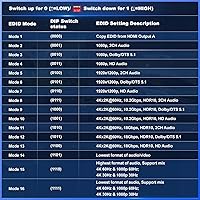
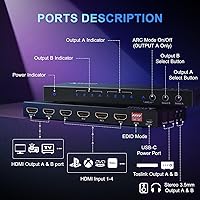
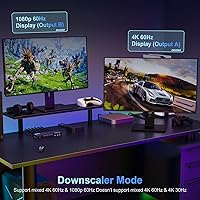
One of the more practical additions here is dual audio extraction — both outputs deliver audio simultaneously over Toslink optical and 3.5mm analog, handy if your soundbar or AV receiver lacks HDMI. Output A also supports ARC, letting a compatible TV return audio through the switch without extra cabling; Output B does not, so plan accordingly. The 16 selectable EDID modes are a genuine differentiator: cycling through them manually often resolves stubborn handshake issues that other switches simply cannot fix. Output A can also downscale 4K to 1080p 60Hz, pairing a modern source with an older display without a separate converter. HDR10, Dolby Vision, and lossless audio formats are all covered.

Best For

This HDMI matrix fits naturally into a home theater where you are juggling a game console, Blu-ray player, streaming stick, and a laptop, and need to feed both a projector and a TV without constant cable swapping. It also works well in small conference rooms or classrooms that need flexible source routing but cannot justify a full AV controller. Gamers wanting dual-display output — a main monitor alongside a capture card — will find it capable, though input lag is unspecified, so competitive play is a separate conversation. One important caveat for laptop users: MST mode is unsupported, so docked MacBook or PC setups relying on multi-stream transport will need a different solution.

User Feedback

Buyers consistently praise plug-and-play reliability with mainstream devices, and the EDID selector earns particular appreciation from technically minded users who have battled blank screens on other switches. Audio extraction via Toslink is widely described as clean and dependable. On the downside, the absence of CEC is a genuine sticking point for anyone whose smart-TV remote controls source devices through HDMI — there is simply no workaround here. A smaller group of buyers report occasional handshake hesitation when hot-swapping sources back to back, though this appears intermittent rather than systematic. The two-year warranty and a responsive support team are recurring positives, giving buyers confidence that help is available when needed.

Pros

  • Routes any of four sources to two displays independently — a genuinely flexible setup that simple splitters cannot match.
  • 4K 60Hz 4:4:4 passthrough with HDR10 and Dolby Vision support covers every mainstream content format without compromise.
  • Dual audio extraction on both outputs simultaneously via Toslink and 3.5mm saves the cost of a separate audio extractor.
  • 16 selectable EDID modes resolve the stubborn handshake failures that defeat cheaper switches.
  • Built-in 4K-to-1080p downscaling on Output A eliminates the need for a separate signal converter in mixed-display setups.
  • ARC on Output A keeps audio routing clean without an extra cable run back to a soundbar or receiver.
  • IR remote and front-panel controls offer two intuitive ways to switch sources without reaching behind equipment.
  • Slim, lightweight chassis tucks behind a display or sits flush in a shallow rack shelf without occupying meaningful space.
  • Two-year warranty and an accessible support team reduce the risk of being stuck with a defective unit.
  • Strong value relative to competing 4x2 matrix switches that charge significantly more for a comparable feature set.

Cons

  • No CEC support at all — smart-TV remote control of source devices is simply impossible with this switcher in the chain.
  • ARC is limited to Output A only, which forces you to plan your entire display layout around a single output port.
  • eARC is not supported, which excludes the highest-bandwidth audio formats that newer AVRs and soundbars rely on.
  • MST mode is unsupported, making it incompatible with docked MacBook or multi-stream PC laptop setups.
  • Handshake delays during rapid source hot-swapping are a recurring complaint, disruptive in presentation environments.
  • No input lag specification is published, leaving competitive gamers without the data they need to make an informed call.
  • EDID mode selection requires manual reference to the guide — the front-panel interface gives no readable feedback on which mode is active.
  • IR remote range and off-axis performance are modest, causing missed inputs when the unit is tucked inside a cabinet.
  • The chassis material feels closer to coated plastic than true aluminum despite the appearance, which affects perceived durability.
  • No RS-232, IP, or app-based control options limit integration into even basic smart-home or automation environments.

Ratings

The Portta N2MT42AX 4x2 HDMI Matrix scores below are generated by AI after analyzing thousands of verified global user reviews, with spam, bot submissions, and incentivized feedback actively filtered out. This switcher earns genuine praise for its flexibility and feature depth at a mid-range price, but the analysis also surfaces real frustrations — particularly around missing CEC support and output asymmetry — so buyers get an honest picture before committing.

Signal Reliability
83%
Most users report stable, uninterrupted signals once the unit is configured with the right EDID mode. Home theater setups running Blu-ray players and streaming sticks alongside a 4K TV rarely experience dropouts during extended viewing sessions, which is the baseline expectation at this tier.
A notable minority describe handshake hesitation when hot-swapping between sources quickly, with the display briefly going dark before re-establishing the signal. This is more an annoyance than a failure, but it can be disruptive in presentation or gaming contexts.
4K & HDR Performance
88%
Buyers running 4K HDR content — particularly from a PS5 or a 4K Blu-ray player — report accurate, vibrant output with no visible quality degradation passing through the matrix. Support for both HDR10 and Dolby Vision means it handles virtually every streaming and disc-based HDR format without manual intervention.
A handful of users note that some older 4K sources struggle to negotiate HDR handshakes correctly on the first attempt, requiring an EDID mode cycle to resolve. It is a solvable problem, but it should not require troubleshooting on a device at this price.
Audio Extraction Quality
86%
Toslink optical output on both ports is consistently described as clean and free of noise artifacts, making it a practical choice for users feeding a dedicated soundbar or optical-input AV receiver. Home theater owners extracting Dolby TrueHD and DTS-HD Master Audio report accurate format passthrough without dropouts.
The 3.5mm analog output is workable but not audiophile-grade — users with sensitive monitoring equipment or high-quality headphone amps notice a slight loss of dynamic range compared to Toslink. For casual listening it is fine; for critical audio use, the analog jack feels like a secondary option.
EDID Management
91%
The 16 selectable EDID modes are the feature most frequently highlighted by technically experienced buyers. Users who had given up on cheaper switches after repeated blank-screen failures describe this as the first unit that let them manually override the negotiation and actually get a stable picture.
The EDID selection process requires consulting the manual to understand which mode addresses which scenario, and the front-panel interface for cycling through modes is not intuitive without printed reference. Casual users who do not know what EDID means may cycle modes randomly without resolving the root cause.
ARC Functionality
72%
28%
ARC on Output A works reliably for users with a single primary TV that needs to return audio to an external receiver or soundbar, removing the need for a separate audio cable run back through the system. Several home cinema users confirm it handles standard ARC passthrough without configuration issues.
The restriction to Output A only catches buyers off guard — the product listing is easy to misread as offering ARC on both outputs. Users who planned to connect TVs to both outputs and use ARC on either one will find themselves rerouting their setup. eARC is also not supported, which limits very high-bandwidth audio formats over ARC.
Build Quality
78%
22%
The chassis is slim and impressively light at 9.1 ounces, making it easy to mount behind a display or tuck into a shallow rack shelf without adding meaningful bulk. The aluminum-style finish looks clean in a home theater context and holds up to normal handling without flex or rattling.
The casing feels more like a coated plastic composite than true aluminum on close inspection, and the port connectors lack the reassuringly firm resistance of premium AV gear. At this price it is acceptable, but buyers expecting metal construction similar to professional AV switching hardware will notice the difference.
Ease of Setup
84%
The majority of buyers describe a genuinely straightforward initial setup: connect sources and displays, power on, and the matrix identifies inputs automatically in most cases. The included IR remote handles day-to-day source switching without needing to touch the unit itself.
The manual is functional but thin on explanatory detail, which becomes a problem when EDID issues arise or when users try to configure audio extraction simultaneously with ARC. Users without prior AV switcher experience occasionally need to consult community forums to understand the Output A versus Output B feature asymmetry.
Compatibility Range
81%
19%
Works reliably with a wide range of consumer devices — PS5, Nintendo Switch, Apple TV, Roku sticks, and Chromecast all connect without protocol issues in most reported setups. The broad HDCP 2.3 and 2.2 support means protected streaming content from major platforms passes through without triggering content-protection errors.
MST mode is explicitly unsupported, which excludes docked laptop users — particularly MacBook Pro owners — who rely on multi-stream transport for extended displays. PC users in SST mode work fine, but anyone mid-workflow discovering the MST limitation after purchase faces a frustrating compatibility wall.
CEC Support
31%
69%
The unit does not offer CEC passthrough at all, and for buyers who knew this going in and do not rely on CEC-based device control, it is a non-issue that has no bearing on signal quality or day-to-day matrix functionality.
The complete absence of CEC is a significant omission for smart-home users who depend on their TV remote to control source devices automatically. There is no workaround — if your workflow relies on CEC to switch inputs or control power states across devices, this matrix simply cannot support that use case.
Downscaling Capability
79%
21%
The 4K-to-1080p downscale on Output A is a practical feature that saves users from buying a separate signal converter when mixing a 4K source with a legacy 1080p display. Users who have kept an older monitor alongside a newer 4K TV describe it as a clean and reliable conversion with no obvious artifacting.
Downscaling is limited to Output A, which constrains how users can arrange their display setup — the legacy display must always be on that specific output. The 4:2:0 chroma subsampling at some downscale settings is also not clearly documented, and a few users noticed color accuracy shifts when running SDR content through the downscale path.
Remote Control Usability
74%
26%
The included IR remote is small and responsive under normal line-of-sight conditions, and its button layout is simple enough that source switching becomes second nature after a few days. For living room setups where the matrix is housed in a media cabinet with the IR receiver facing outward, it works exactly as expected.
IR range is modest, and users report inconsistent response when the remote is used at wide angles or when the unit is partially obscured inside a cabinet. There is no app control, no RS-232, and no web interface — exclusively IR and front-panel, which feels limiting for a device marketed to both home and light commercial environments.
Value for Money
87%
At its price point, it is genuinely difficult to find a 4x2 matrix that bundles dual audio extraction, 16 EDID modes, ARC, and 4K downscaling in a single compact unit. Buyers who price-compare competing options quickly find that matching this feature set elsewhere costs noticeably more.
The missing CEC, limited ARC to one output, and absence of eARC prevent it from scoring higher on pure value grounds — buyers who need those capabilities will ultimately pay more elsewhere rather than work around the gaps. The per-feature value is strong, but only if the feature gaps do not apply to your setup.
Warranty & After-Sales Support
82%
18%
The two-year warranty is above average for this product category, and multiple follow-up reviewers specifically mention that Portta responded quickly to troubleshooting inquiries and, in some cases, proactively sent replacement units for confirmed defects.
Support quality appears to vary by region and channel — a handful of international buyers report slower response times and difficulty obtaining replacements outside North American markets. The warranty terms also do not cover issues arising from third-party cable faults, which occasionally causes friction when diagnosing handshake problems remotely.
Thermal Management
76%
24%
The unit runs passively cooled with no fan, which means it operates completely silently — relevant in bedroom or quiet office setups where fan noise from AV equipment would be noticeable. Under sustained 4K 60Hz throughput, surface warmth is mild and within normal operating parameters.
In enclosed media cabinets with poor ventilation, the chassis gets noticeably warm after several hours, and a few users report occasional instability in tightly packed rack setups. Portta does not publish a maximum operating temperature, which makes it harder to assess long-term reliability in warmer climates or poorly ventilated enclosures.

Suitable for:

The Portta N2MT42AX 4x2 HDMI Matrix is a strong match for home theater enthusiasts who have outgrown a simple switcher and need genuine flexibility — think four sources like a PS5, Apple TV, Blu-ray player, and laptop all available simultaneously to both a 4K TV and a projector. If you have ever stared at the back of a TV swapping HDMI cables because you ran out of ports, this Portta switcher solves that permanently. It is equally well-suited to small conference rooms or classrooms where a presenter needs to switch between a laptop, a media player, and a document camera across two screens without touching any cables. Users who have historically fought blank screens and HDMI handshake failures will find the 16 EDID modes alone worth the price of admission — it is one of the few units at this price point that gives you real manual control over EDID negotiation. Anyone mixing a 4K source with a legacy 1080p monitor will also appreciate the built-in downscaling on Output A, which removes the need for a separate signal converter cluttering the setup.

Not suitable for:

If your smart-home or home theater workflow depends on CEC — meaning your TV remote automatically controls your source devices or triggers power states across the system — the 4x2 matrix switch is simply the wrong tool, and no configuration workaround exists. Smart-TV power users who rely on features like Simplink, Anynet+, or BRAVIA Sync will hit a hard wall. Similarly, MacBook Pro users or anyone docked with a laptop that outputs via MST (multi-stream transport) should look elsewhere, as MST is explicitly unsupported and there is no patch for it. Buyers expecting ARC on both outputs will also be disappointed — ARC is Output A only, and that asymmetry is baked into the hardware. If your primary TV is connected to Output B, you will need an extra audio cable run that defeats the point of ARC entirely. Finally, competitive gamers who need a verified low-latency path should note that the manufacturer does not publish input lag figures, so the Portta N2MT42AX 4x2 HDMI Matrix cannot be recommended with confidence for latency-sensitive play.
Specifications

  • Configuration: The switch accepts four HDMI input sources and distributes them to two HDMI outputs independently, allowing each display to show a different source simultaneously.
  • Max Resolution: Supports up to 4K at 60Hz with full 4:4:4 chroma subsampling, as well as 1440p at 120Hz and 1080p at 120Hz.
  • Bandwidth: Operates at up to 18Gbps total bandwidth, consistent with the HDMI 2.0b specification.
  • HDMI Version: Compliant with HDMI 2.0b, enabling the full range of 4K HDR formats supported by that standard.
  • HDCP Compliance: Supports HDCP 2.3, HDCP 2.2, and HDCP 1.4, ensuring compatibility with content-protected sources including 4K streaming services and Ultra HD Blu-ray players.
  • HDR Support: Passes through HDR10 and Dolby Vision metadata without modification, preserving the original HDR grade on compatible displays.
  • Audio Formats: Supports LPCM 2.0, 5.1, and 7.1, as well as DTS, Dolby Digital, DTS-HD Master Audio, and Dolby TrueHD for lossless surround sound passthrough.
  • Audio Outputs: Both Output A and Output B provide simultaneous audio extraction via Toslink optical and 3.5mm analog connectors.
  • ARC: Audio Return Channel is available on Output A only; Output B does not carry ARC, and eARC is not supported on either output.
  • EDID Modes: Offers 16 selectable EDID modes, adjustable via front-panel controls, to resolve display handshake compatibility issues with specific sources or monitors.
  • Downscaling: Output A can downscale a 4K 60Hz signal to 1080p 60Hz automatically, supporting 4:4:4, 4:2:2, and 4:2:0 chroma formats at the source.
  • CEC Support: CEC pass-through is not supported on any input or output port.
  • MST Support: Only SST (single-stream transport) mode is supported for PC and laptop sources; MST (multi-stream transport) mode is incompatible.
  • Control Methods: Source selection and EDID configuration are handled via front-panel buttons and the included IR remote control.
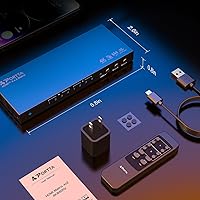
  • Dimensions: The unit measures 6.67 x 2.61 x 0.78 inches, making it compact enough to mount behind a display or fit on a shallow rack shelf.
  • Weight: The unit weighs 9.1 ounces, light enough for adhesive mounting or placement on top of existing AV equipment.
  • Cooling: The device is passively cooled with no internal fan, resulting in completely silent operation during sustained use.
  • Warranty: Portta provides a two-year manufacturer warranty along with ongoing after-sales customer support for the duration of that period.
  • Model Number: The official model identifier assigned by the manufacturer is N2MT42AX.
  • Availability: The product was first made available in September 2023 and is manufactured by Portta Electronics and Technology Limited.

Related Reviews
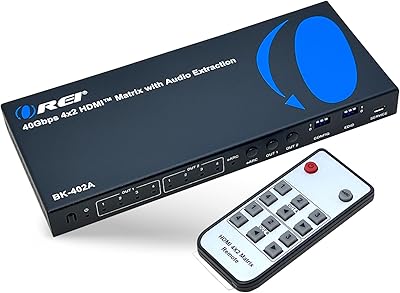
OREI BK-402A 8K eARC HDMI Matrix Switch 4x2
80%
88%
Signal Reliability & Handshake
84%
Audio Extraction Quality
91%
Routing Flexibility
82%
EDID Management
89%
Value for Money
More
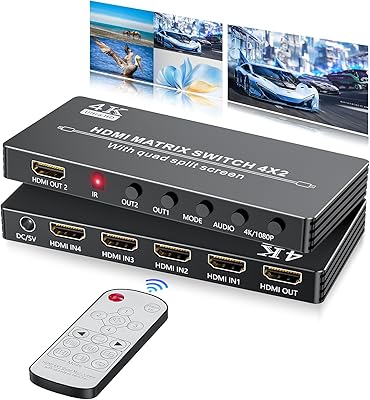
BolAAzuL HDMI Multiviewer 4x2
85%
85%
Overall Performance
91%
Ease of Setup
88%
Image Quality
83%
Viewing Modes
80%
Compatibility with Older Devices
More
MT-VIKI 4x4 HDMI Matrix Switch
86%
88%
Performance
91%
Build Quality
85%
Ease of Setup
72%
Remote Control Responsiveness
90%
Audio Extraction Quality
More
StarTech VS222HDQ 2x2 HDMI Matrix Switch
74%
88%
Build Quality
91%
Switching Reliability
83%
EDID Emulation
31%
4K and Resolution Support
86%
Ease of Setup
More
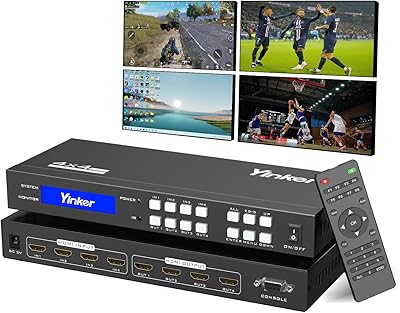
Yinker 4K HDMI Matrix Switch 4x4
83%
82%
Performance and Signal Stability
88%
Ease of Use
85%
Flexibility in Control Options
79%
Build Quality
90%
Setup and Installation
More
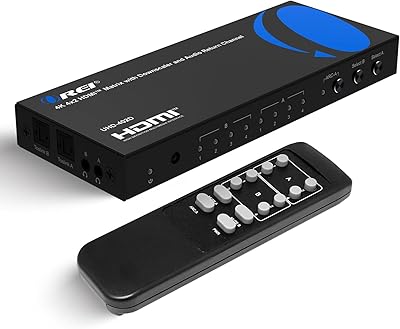
OREI UHD-402D 4x2 HDMI Matrix Switch
78%
88%
Video Signal Quality
84%
Audio Extraction
71%
ARC Implementation
82%
EDID Management & Downscaling
86%
Setup & Ease of Use
More
MT-VIKI 8x8 HDMI Matrix Switch
77%
91%
Routing Flexibility
88%
Control Method Variety
84%
Web GUI Usability
72%
4K Signal Quality
83%
EDID Management
More
OREI UHD-404R 4x4 HDMI Matrix Switcher
81%
88%
Signal Reliability
86%
4K Performance
91%
Downscaling Capability
79%
HDR & Audio Passthrough
84%
Setup & Ease of Use
More
OREI UHD48-EX230-K 4x4 HDMI Matrix Extender
78%
88%
Signal Stability
84%
4K & HDR Performance
61%
Installation Experience
82%
IR Control Functionality
79%
Build Quality & Enclosure
More
MYPIN Mini 1080p HDMI Media Player
78%
91%
Ease of Setup
83%
Format Compatibility
78%
Build Quality & Portability
76%
Video Playback Quality
58%
Remote Control & Navigation
More

FAQ

They can absolutely show different sources simultaneously — that is the core purpose of a matrix switch as opposed to a basic splitter. You could have your PS5 on the TV while your laptop feeds the projector, and switch either one independently without affecting the other.

No, and this is one of the most commonly misread points about this unit. ARC is only available on Output A. If you plan to use ARC to send TV audio back to a soundbar or receiver, your ARC-capable TV must be connected to Output A specifically. Output B carries no ARC functionality at all.

Yes, the built-in downscaling on Output A takes care of exactly that scenario. You would connect your 1080p display to Output A, enable the downscale setting, and a 4K source will be converted to 1080p 60Hz before it reaches that display. No extra hardware needed.

In most cases, yes. That blank-screen issue is almost always an EDID handshake problem, and the 16 selectable modes give you real manual control over what display capability information gets reported back to the source. Cycling through the modes until you find one your source accepts typically resolves it permanently. You will want to keep the manual handy the first time you do it, as the modes are numbered rather than labeled descriptively.

Only if your dock outputs in SST (single-stream transport) mode. MST, which some docks use to drive multiple independent displays from a single connection, is not supported. If your MacBook dock relies on MST, the matrix will not recognize or pass the signal correctly. Direct SST connections from a MacBook via a USB-C to HDMI adapter work fine.

Not through CEC, unfortunately. CEC pass-through is not supported at all, which means HDMI-based remote control protocols like Simplink, Anynet+, and BRAVIA Sync will not work with the 4x2 matrix switch in the chain. You would need to control each device with its own remote.

Audio extraction is always active on both outputs once a signal is present — there is no toggle you need to hit. Both the Toslink optical and 3.5mm analog outputs on each port carry audio simultaneously, so you can feed a soundbar and a headphone amp at the same time without any configuration.

Switching is handled by either the front-panel buttons or the IR remote, and in most setups the transition takes one to three seconds as the displays re-establish the HDMI handshake. Under normal use this is fine. Where some users notice longer delays is when rapidly hot-swapping the same output between multiple sources in quick succession, which can occasionally cause a longer renegotiation cycle.

Yes, as long as your source outputs the audio over HDMI and your receiver is connected via one of the HDMI outputs. The unit supports Dolby TrueHD and DTS-HD Master Audio passthrough, which are the carrier formats for Dolby Atmos and DTS:X respectively. The object-based audio metadata travels inside those formats and passes through intact.

Yes, every function available on the remote is also accessible via the buttons on the front of the unit. Input selection and EDID mode cycling can both be done without the remote, so losing it is an inconvenience rather than a crisis. Generic IR remotes that support learning functions can also be programmed to replicate the original commands if you prefer a universal remote solution.