
Overview

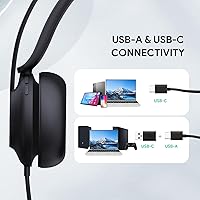
The Yealink UH37 is a mid-range wired USB headset built squarely for remote workers and call center professionals who need reliable, certified audio without spending $100 or more. At $64.59, it sits in a crowded space between budget picks and premium options like the Jabra Evolve2 30 or Poly Blackwire series. It ships with both USB-A and USB-C cables, a genuinely practical touch for anyone juggling a desktop at the office and a laptop at home. With a 4.2-star average across 245 ratings and a top-100 ranking in Computer Headsets on Amazon, it has earned enough real-world use to be worth a serious look.

Features & Benefits

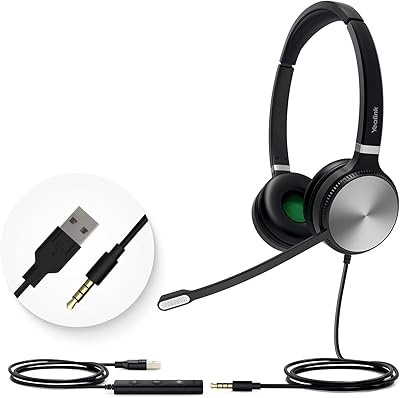
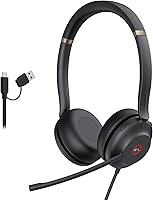
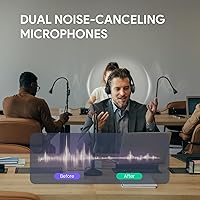
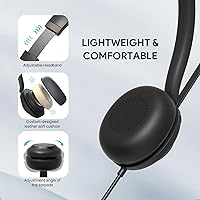
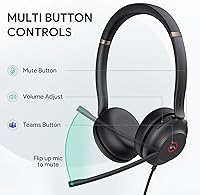
The boom microphone is where this USB headset earns much of its credibility. It uses dual noise-cancelling mics, but worth noting is that the noise control is passive rather than active — so it handles moderate background noise well, not a loud open office. The flip-to-mute boom is fast and intuitive; no fumbling for a button mid-call. On-ear shell controls handle volume, call management, and a dedicated Teams button without ever touching your screen. The 32mm dynamic drivers auto-switch between call and music modes, and the breathable leather ear cups stay comfortable after several hours, backed by a flexible metal headband that holds its shape.

Best For

This wired office headset makes the most sense for people who live on Teams or Zoom calls throughout the workday. The dual-cable setup — one USB-A, one USB-C — is a real advantage if you regularly move between machines. Call center agents will appreciate the durable metal build and no-fuss controls. It is less suited for very loud environments, since the noise isolation is passive rather than electronic. Those wanting wireless freedom or active noise cancellation should look at higher price tiers. But for a remote or hybrid worker who needs certified UC audio at a reasonable price, this headset hits a practical sweet spot.

User Feedback

Buyers consistently praise microphone clarity as a standout strength — call recipients reportedly hear speech well even in moderately noisy home setups. Teams integration draws positive notes too, with the one-touch activation working reliably right out of the box. On the downside, some users with larger heads mention headband pressure becoming noticeable over extended sessions, and a handful flag that ear cushions lose their softness with prolonged daily use. Cable length comes up occasionally as a frustration for desktop setups. No widespread driver issues on Windows are reported, though a small number of Mac users note needing to adjust audio settings manually after connecting.

Pros

  • Call recipients consistently report hearing voices clearly, even in moderately noisy home settings.
  • Both USB-A and USB-C cables are included, covering nearly every modern device without adapters.
  • The one-touch Teams button genuinely works as advertised on Windows with no extra setup.
  • At 140g, the UH37 is light enough to wear for hours without neck or head fatigue.
  • The flip-to-mute boom arm is fast and instinctive — far quicker than hunting for an on-screen button.
  • Metal headband construction gives it a more durable, premium feel than all-plastic rivals at this price.
  • Dynamic EQ switches automatically between call and music modes, making background listening genuinely pleasant.
  • Plug-and-play on Windows means most users are up and running within a minute of first connecting it.
  • Priced competitively against certified alternatives, it delivers solid UC-ready performance without overpaying.

Cons

  • Passive noise cancellation has real limits in loud or open-plan environments — do not expect active-level filtering.
  • Users with larger heads report noticeable headband pressure after extended sessions of three or more hours.
  • Synthetic leather ear cups show peeling and cracking for some users after six to twelve months of daily wear.
  • Mac users often need to manually configure audio settings, making the setup less truly plug-and-play.
  • No companion app means you cannot customize EQ settings, remap controls, or check firmware status.
  • The Teams activation button does not function as a shortcut on Zoom or other non-Teams platforms.
  • Cable length frustrates some desktop users whose PC towers sit on the floor or away from the desk.
  • Touch-sensitive ear shell controls can register accidental inputs when adjusting the fit mid-call.
  • No carrying case or pouch is included, leaving the ear cups unprotected when traveling between locations.

Ratings

The Yealink UH37 has been evaluated by our AI system after analyzing hundreds of verified global user reviews, with spam, bot-generated, and incentivized submissions actively filtered out to ensure the scores reflect genuine buyer experiences. Across remote workers, call center agents, and hybrid office professionals, the ratings below capture both where this wired office headset genuinely delivers and where it falls short. Strengths and frustrations are weighted equally so you get an honest picture before buying.

Microphone Clarity
86%
Call recipients consistently report hearing voices clearly, even when the speaker is in a moderately noisy home environment. The dual-mic boom setup picks up speech well at a natural talking distance, and users on Teams and Zoom calls note they rarely get asked to repeat themselves.
In genuinely loud spaces — think open-plan offices with multiple talkers nearby — the passive mic design starts to struggle. A few users noted that keyboard noise and HVAC hum still bleeds through, which can be distracting for the person on the other end of the call.
Noise Cancellation
63%
37%
For home offices and quiet rooms, the passive isolation does a reasonable job of muffling ambient sound. Users working in low-to-moderate noise settings report a noticeably cleaner call experience compared to budget headsets without any mic filtering.
This is passive noise cancellation only — no active electronic processing — so it has real limits. Buyers expecting the kind of background suppression you get from higher-end headsets with active noise cancellation will be disappointed, particularly in busy or open environments.
Comfort for Extended Use
74%
26%
At just 140g, the UH37 sits lightly on the head, and most users report no significant discomfort during the first two to three hours of wear. The breathable leather ear cups are softer than typical foam pads found on cheaper headsets, and the flexible metal headband adjusts without feeling flimsy.
Users with larger heads flag that the headband pressure becomes noticeable after the three-hour mark, and a handful report mild ear warmth from the leather cups during longer sessions. The ear cup padding has also been noted to compress and lose some softness after several months of daily use.
Build Quality
81%
19%
The metal headband gives the UH37 a more substantial, durable feel than plastic-only competitors at this price point. Most users comment that it feels solid in hand and holds up well through daily pack-and-go use between home and office.
The plastic ear cups and housing, while functional, do show scratches and light wear over time. A few buyers noted the headband swivel feels slightly loose after extended use, though no reports of it breaking entirely.
USB Compatibility
91%
Shipping with both USB-A and USB-C cables is a practical advantage that users genuinely appreciate. Workers who alternate between an older desktop at the office and a modern USB-C laptop at home can do so without adapters or hunting for the right cable.
Both cables are included but only one can be used at a time, and a small number of users wished for a longer cable for desktop setups where the PC tower sits on the floor. Cable management could be tidier for fixed workstation users.
Teams Integration
88%
The Microsoft Teams certification is not just a marketing badge here — the one-touch Teams button genuinely works as advertised, letting users join or manage calls without clicking around on screen. IT admins and remote workers alike appreciate the plug-and-play reliability on Windows.
Mac users report a less consistent experience, with some needing to manually configure audio input and output settings after each connection. The Teams button functionality also does not carry over to non-Teams platforms, so Zoom users miss out on that quick-access shortcut.
Audio Quality for Listening
77%
23%
The 32mm drivers and auto-switching dynamic EQ mean music sounds noticeably fuller than you would expect from a call-focused headset. Background listening during deep-work sessions is genuinely enjoyable, with decent stereo separation for the price.
Bass response is modest, and audiophiles or users accustomed to dedicated music headphones will find the sound profile fairly flat. The music mode is a welcome bonus, but it is clearly secondary to call performance in the overall tuning.
Call Controls Usability
79%
21%
On-ear shell controls for volume, mute, call answer, and Teams activation are well-placed and responsive. Users who frequently toggle between muted and live during busy meeting days find the controls intuitive after a short learning curve.
Touch-based controls can occasionally register accidental inputs, particularly when adjusting the headset on the ear. A small number of users would prefer physical tactile buttons for more reliable operation during fast-paced calls.
Flip-to-Mute Reliability
83%
The boom arm flip-to-mute mechanism is quick and instinctive — flipping it up to mute mid-conversation feels natural and does not require looking away from the screen. Users who frequently need to mute in busy household environments find it one of the most useful physical features.
The mute status indicator is not highly visible at a glance, so a few users have accidentally rejoined calls while still believing they were muted. A more prominent LED mute indicator would resolve this entirely.
Platform Compatibility
82%
18%
Out of the box, the UH37 works reliably with Zoom, Teams, Google Meet, and most other UC platforms without driver installation on Windows. For call center environments running Cisco or Avaya softphones, users report generally solid compatibility.
Platform-specific features beyond basic audio — like the Teams button — do not translate to other apps. Mac compatibility works for audio but requires manual setup, and a handful of Linux users report inconsistent device recognition.
Value for Money
76%
24%
At $64.59 with dual-cable connectivity, Teams certification, and a metal-reinforced build, the UH37 offers more than most headsets in its price band. Buyers coming from cheaper $30 to $40 options notice an immediate step up in microphone and build quality.
Competing headsets like the Jabra Evolve2 30 or Poly Blackwire 3220 sit in a similar range and offer active noise cancellation or better software ecosystems. For buyers who do their research, the UH37 is good value but not a clear runaway winner at this price.
Weight and Portability
84%
At 140g, this wired office headset is noticeably lighter than many similarly priced competitors. Hybrid workers who carry it between locations daily appreciate that it does not add meaningful weight to a laptop bag, and it folds down reasonably compact.
The included cables add some bulk if you carry both. There is no included carrying pouch or case, which is a small but real omission for users who want to keep the ear cups protected in transit.
Software and Driver Experience
68%
32%
For the vast majority of Windows users, the headset is truly plug-and-play with no additional software required. Teams integration works natively, and most users report zero setup friction when first connecting the headset.
There is no dedicated companion app for EQ customization or firmware updates, which limits long-term tunability. Mac users occasionally face audio routing issues, and the lack of a software hub means troubleshooting requires manual OS-level adjustments.
Ear Cushion Durability
61%
39%
The leather ear cups feel comfortable and look professional out of the box. For users in their first few months of ownership, the cushioning holds up well and does not flatten noticeably with regular use.
Over six to twelve months of daily use, multiple buyers report that the leather surface begins to peel or crack, which is a common issue with synthetic leather at this price tier. Replacement cushions are not readily listed as accessories, which is a longer-term ownership frustration.
Setup and First-Use Experience
89%
Unboxing and getting started is straightforward — plug in, select the audio device in your OS, and the headset is ready to use within a minute. First-time users and less tech-savvy buyers appreciate how little friction is involved in the initial setup.
The included documentation is minimal, and users who want to understand advanced features like the dynamic EQ switching have to dig into online resources. A more detailed quick-start guide would improve the out-of-box experience.

Suitable for:

The Yealink UH37 is a strong fit for remote and hybrid workers who spend the bulk of their day on Teams or Zoom calls and need a reliable, certified headset without crossing into premium price territory. If your work life revolves around back-to-back video meetings, the one-touch Teams button and flip-to-mute boom will save you real time and frustration compared to juggling on-screen controls. It also makes practical sense for anyone who alternates between a USB-A desktop at the office and a USB-C laptop at home, since both cables are included in the box. Call center agents who need a durable, no-fuss wired headset that works out of the box with major softphone platforms will find it a dependable daily tool. At $64.59, it offers a meaningful step up from budget sub-$40 options without demanding the budget of a Jabra or Poly flagship.

Not suitable for:

Buyers who work in genuinely loud environments — open-plan offices, shared workspaces, or homes with kids and background noise — should think carefully before choosing the Yealink UH37, because its noise cancellation is passive only and will not suppress ambient sound the way active systems do. If you need electronic background noise filtering so callers cannot hear your surroundings, you will need to step up to a headset with active noise cancellation, even if it costs more. Users with larger heads may find the headband pressure uncomfortable after three or more hours, making this a harder sell for full-day marathon call schedules. It is also not a strong choice for Mac-first users who want plug-and-play simplicity, since audio routing sometimes requires manual configuration. And if you are looking for a companion app to fine-tune EQ or customize controls, this wired office headset offers no software ecosystem to speak of.

Specifications

  • Brand: Manufactured by Yealink, a professional communications hardware company known for UC-focused devices.
  • Model: UH37, part of Yealink's third-generation USB headset lineup released in May 2024.
  • Connectivity: Wired connection via two included cables: one USB-A and one USB-C, allowing use across a wide range of desktops, laptops, and mobile devices.
  • Driver Size: 32mm dynamic audio drivers deliver stereo sound with an auto-switching dynamic EQ that transitions between call mode and music mode.
  • Microphone: Dual boom-mounted microphones with passive noise cancellation and a flip-to-mute mechanism for instant privacy control.
  • Noise Control: Passive noise cancellation only — no active electronic noise processing is present in this headset.
  • Controls: Touch-sensitive controls on the ear shell manage call answer/end, volume up/down, mute toggle, and one-touch Microsoft Teams activation.
  • Certifications: Officially Microsoft Teams certified, enabling native Teams call controls and one-touch meeting access on compatible Windows systems.
  • Ear Cushions: Soft synthetic breathable leather ear cups designed to reduce heat and pressure during extended wear sessions.
  • Headband: Flexible metal headband construction provides durability and adjustable fit while keeping overall weight low.
  • Weight: 140g (4.9 oz) total headset weight, making it one of the lighter options in the mid-tier professional USB headset category.
  • Ear Placement: On-ear (supra-aural) design that rests on the outer ear rather than fully enclosing it.
  • Compatible Platforms: Works out of the box with Microsoft Teams, Zoom, Google Meet, and most major UC softphone platforms.
  • Compatible Devices: Compatible with desktop computers, laptops, and USB-C-enabled mobile devices across Windows and macOS environments.
  • Cable Feature: Cables are described as retractable for easier management during transport or at a fixed workstation.
  • Dimensions: Product dimensions are approximately 7.64 x 8.15 x 20.91 inches as packaged, including the boom arm at full extension.
  • Materials: Constructed from a combination of flexible metal for the headband and durable plastic for the ear cup housing and shell.
  • Input Interface: USB input only — no 3.5mm analog jack option is available on this model.
  • Water Resistance: Not water resistant; the UH37 is intended for indoor professional use only and should be kept away from moisture.
  • Price: Retail price is $64.59, positioning it in the competitive mid-tier professional headset segment below premium UC brands.

Related Reviews
Yealink YHS33 Headset
87%
91%
Comfort for Extended Use
88%
Sound Quality
85%
Noise Cancellation Effectiveness
83%
Build Quality
90%
Ease of Use / Setup
More
Yealink MeetingBar A10
82%
88%
Setup & Installation
91%
Video Quality
89%
Audio Clarity
76%
AI Speaker Tracking
84%
Build Quality
More
Yealink UH34 Wired Headset
85%
89%
Comfort for Long Use
84%
Noise Cancellation Performance
88%
Audio Quality
75%
Compatibility with Devices
86%
Build Quality and Durability
More
Yealink UH36
Yealink UH36
79%
84%
Microphone Quality
67%
Comfort & Fit
88%
Call Performance
63%
Build Quality
71%
Sound Quality for Music
More
Yealink UH35 USB Headset
80%
83%
Microphone Clarity
88%
Wearing Comfort
79%
Build Quality
63%
Ear Pad Durability
93%
Plug-and-Play Setup
More
Yealink WH67 Wireless DECT Headset
85%
91%
Comfort for Long Calls
88%
Audio Quality (Call Clarity)
85%
Noise-Canceling Microphone
68%
Bluetooth Connectivity
80%
Battery Life
More
Yealink W70B Phone Base Station
84%
91%
Call Quality
70%
Ease of Setup
88%
Voice Clarity
87%
Reliability
92%
Security Features
More
Yealink BH76 Plus Bluetooth Headset
88%
91%
Comfort for All-Day Wear
85%
Active Noise Cancellation (ANC) Performance
94%
Battery Life
88%
Audio Quality for Calls
89%
Microphone Clarity
More
Yealink WH63 DECT Wireless Headset
86%
93%
Wireless Range & Mobility
88%
Comfort & Ergonomics
91%
Call Quality & Noise Cancellation
78%
Battery Life
89%
Compatibility with Communication Platforms
More
Yealink A10 4K Video Conference Camera
86%
91%
Video Quality
88%
Audio Clarity
85%
Ease of Setup
92%
AI Features (Auto-framing & Speaker Tracking)
78%
Software Usability
More

FAQ

It works on Mac for basic audio — plug it in and your system will recognize it as an audio device. That said, some Mac users report needing to manually select it as the input and output source in System Settings each time they connect. The Teams activation button does not function on macOS the same way it does on Windows, so that shortcut is essentially Windows-only.

No driver installation is needed on Windows — it is plug-and-play from the moment you connect it. There is no companion app for this headset, which keeps setup simple but also means there is no way to customize EQ settings or remap controls through software.

The Yealink UH37 uses passive noise cancellation only, which means it physically blocks some ambient sound through the ear cup design but does not electronically filter it out. In a relatively quiet home office it performs well, but in genuinely noisy environments — like a house with young children or a loud open space — callers on the other end may still pick up background sounds. If active noise cancellation is a hard requirement, you will need to look at a higher price tier.

It works fine with Zoom for audio — the microphone and speakers function normally across all major platforms. The Teams certification mainly adds the one-touch Teams activation button; that specific shortcut will not do anything useful in Zoom or other apps, but everything else works as expected.

Use whichever matches the available port on your computer. Both cables deliver the same audio quality and functionality, so the choice is purely about what your device supports. If you have both port types available, USB-A tends to be slightly more universally stable across older systems, though USB-C works equally well on modern laptops.

Most users find the first two to three hours very comfortable thanks to the light 140g weight and the soft ear cushions. Beyond that, some people — especially those with larger heads — report that headband pressure becomes noticeable. If you regularly work marathon call days, it is worth trying it for a full day before committing, as comfort is subjective and the on-ear design can cause some ear warmth over time.

Flipping the boom arm upward away from your mouth activates the mute function automatically — there is no button to press. It is fast and intuitive once you get used to it. The main caveat is that there is no bright LED or strong visual indicator to confirm mute status at a glance, so a few users have accidentally rejoined calls while thinking they were still muted.

Out of the box they feel soft and comfortable, but synthetic leather ear cushions at this price point do tend to show wear over time. Some users report the surface beginning to crack or peel after six to twelve months of heavy daily use. Replacement ear cushions are not prominently available as official accessories, which is worth factoring in if longevity is important to you.

Cable length is a recurring complaint from desktop users, particularly those with tower PCs on the floor. If your USB port is more than a meter or so from your seated head position, the included cable may feel short. A USB extension cable is an inexpensive fix, but it is something to be aware of before buying.

At around the same price point, the Jabra Evolve2 30 and Poly Blackwire 3220 both offer active noise cancellation, which this wired office headset does not. Where the UH37 has an edge is the dual-cable flexibility and the included USB-C option, which Jabra's base Evolve2 30 does not always provide at the same price. If mic noise suppression in louder environments is your top priority, the Jabra or Poly options may be worth the stretch; if you need dual-cable compatibility and solid Teams certification at a fair price, the UH37 is a competitive choice.