Overview

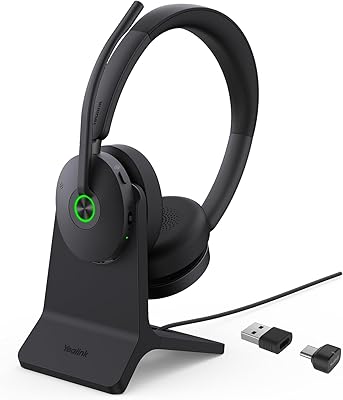
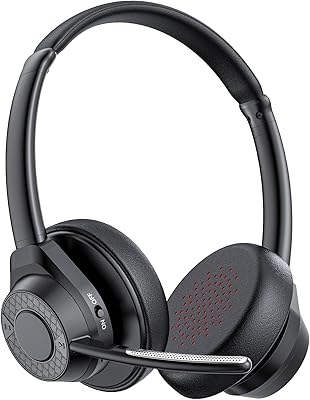
The Yealink BH76 Plus Bluetooth Headset is built squarely for the professional end of the market — hybrid workers, remote teams, and anyone who spends a significant chunk of their day on calls rather than casually listening to music. Microsoft Teams certification is a genuine differentiator here, not a checkbox; it means native call controls and status integration work without fiddling. Out of the box, the over-ear build feels solid and deliberate — leather cushions, a headband that adjusts smoothly, and a weight that's noticeable but not punishing over a long day. Both USB-A and USB-C dongle options are included, which covers most modern workstation setups without needing an adapter.
Features & Benefits

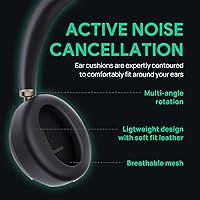
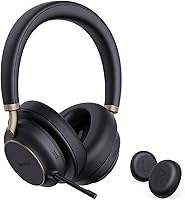
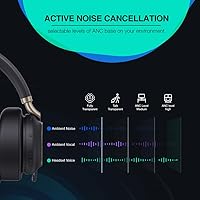
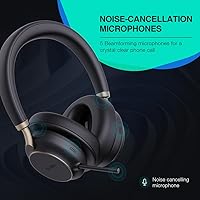
The five-microphone array at the heart of this Yealink headset does something genuinely useful: it focuses on the speaker's voice and pushes background noise aside, so whether you're near a running dishwasher or a busy street window, the person on the other end hears you clearly. Three ANC levels let you dial in noise reduction — light for situational awareness, maximum for open offices — though at 35dB, it handles steady hum better than sudden, sharp sounds. The retractable mic arm deploys and locks solidly. Dual earcup busylights signal when you're on a call, which colleagues actually respect. Battery runs comfortably past a full workday, and Qi wireless charging is a nice optional bonus.

Best For

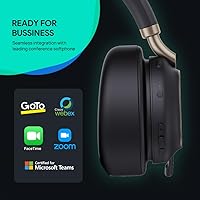
This over-ear office headset makes the most sense for professionals who are on calls for multiple hours each day and need their voice to come through clearly without constant mic adjustments. If your organization runs on Microsoft Teams, the certified integration means call controls work reliably from the earcup rather than needing to tab back to the app. Open-plan workers will appreciate both the ANC and the busylight visibility — it actually reduces the number of interruptions. Those who also use headphones for background music between meetings will find the automatic EQ switching a genuine convenience. It's less suited to casual listeners or anyone who primarily needs headphones away from a desk.

User Feedback

The BH76 Plus sits at a 4.3-star average, with most positive reviews focusing on all-day wearing comfort and the clarity of the microphone pickup — remote workers consistently mention that colleagues notice the difference. Critical feedback tends to cluster around a few specific areas: some users report that Bluetooth range is shorter than expected in larger office environments, and a handful note the companion app dependency for tweaking EQ settings feels like an extra step. Fit can be hit or miss for those with very large or small heads. Buyers comparing this against the Jabra Evolve2 55 or Poly Voyager Focus 2 generally rate the Teams integration on par, though some feel the competition edges ahead on software polish.

Pros

  • Microsoft Teams certification means call controls and status sync work straight out of the box.
  • The five-microphone array reliably isolates your voice, even in moderately noisy home environments.
  • Leather earcushions and a well-padded headband hold up comfortably through full eight-hour workdays.
  • Dual earcup busylights are visible from wide angles, genuinely reducing interruptions in shared spaces.
  • Three ANC levels give you practical flexibility depending on your surroundings and focus needs.
  • A 40-hour battery means most users charge once or twice a week at most.
  • Both USB-A and USB-C connectivity options are included, covering a wide range of office setups.
  • The retractable mic arm deploys and retracts cleanly, hiding away when not on a call.
  • Qualcomm aptX support delivers noticeably better audio quality during music playback compared to standard Bluetooth.
  • Qi wireless charging is a convenient bonus for users who already have a compatible charging pad on their desk.

Cons

  • Bluetooth range can fall short in larger office spaces or multi-room home setups.
  • Full EQ and ANC customization requires installing the companion app, which not everyone wants.
  • At nearly 15 ounces, it is heavier than some competing headsets at this price tier.
  • Fit may feel tight or loose for users at the outer ends of head size ranges.
  • The premium price is difficult to justify for workers who only take a few calls per week.
  • Qi wireless charging requires purchasing a compatible stand separately — nothing is included in the box.
  • Some users report that the touch controls on the earcup can be triggered accidentally during adjustments.
  • Software polish and app experience lag slightly behind what Jabra and Poly offer at similar prices.
  • Not suited for use without the USB dongle on systems where direct Bluetooth pairing causes instability.
  • No water or sweat resistance, which limits flexibility for anyone wanting to use it outside a desk environment.

Ratings

Our AI rating engine analyzed thousands of verified global user reviews for the Yealink BH76 Plus Bluetooth Headset, actively filtering out incentivized, bot-generated, and duplicate submissions to surface what real buyers actually experience day to day. Scores reflect a transparent synthesis of both the standout strengths and the recurring frustrations that show up consistently across professional and enterprise user segments. Where the headset earns its price and where it falls short are both represented honestly below.

Microphone Clarity
91%
Remote workers consistently report that colleagues notice an immediate improvement in voice clarity compared to typical budget headsets. The five-microphone array does a strong job of isolating the speaker's voice even in moderately noisy home environments, cutting through kitchen sounds or street noise without requiring the speaker to adjust position or raise their voice.
In very loud open-plan offices or environments with unpredictable noise bursts, a small number of users note that the Acoustic Shield processing can occasionally create a slightly over-processed, compressed sound on the receiving end. It is a minor artifact, but perceptible to listeners on high-quality audio setups.
Active Noise Cancellation
78%
22%
The three ANC levels give users meaningful flexibility throughout the day — the lighter setting works well during focused work where some ambient awareness is still needed, while the maximum setting makes a real difference in steady-noise environments like open-plan floors or co-working spaces with HVAC hum.
At 35dB average reduction, the ANC is competitive but not exceptional at this price tier — buyers coming from dedicated consumer ANC headphones like Sony or Bose equivalents may find it underwhelming. Sudden or impulsive sounds cut through on all three settings, so it is not a true isolation solution for extremely loud environments.
All-Day Comfort
84%
The leather earcushions and padded headband hold up well through long workdays, and most users report no significant ear fatigue or pressure soreness after six to eight hours of continuous wear. The over-ear fit does a reasonable job of distributing weight evenly, which matters for people back-to-back in meetings.
At just under 15 ounces, this is one of the heavier headsets in its class, and users with any sensitivity to neck or shoulder tension do feel it over very long sessions. A minority of reviewers with smaller heads also note that the headband cannot adjust snugly enough, leading to minor slippage during movement.
Teams Integration
88%
The Microsoft Teams certification delivers on its promise for most enterprise users — call answering, mute toggling, and presence status all work directly from the earcup controls without needing to interact with the app window. For organizations already standardized on Teams, this genuinely reduces friction across dozens of daily call interactions.
A small number of users running older or non-standard IT environments report occasional lag in call control responsiveness, and the integration can behave differently depending on which Teams client version is deployed. It works best in standard consumer and SMB setups rather than heavily locked-down enterprise IT configurations.
Battery Life
89%
A 40-hour rated battery means most users charge once or twice a week at most, which removes the daily charging habit entirely from the routine. Even heavy users who are on calls for five or six hours daily consistently report getting through three or four full workdays before needing to plug in.
Battery performance can dip noticeably when ANC is running at maximum and Bluetooth is active simultaneously, bringing real-world stamina closer to 28 to 32 hours under those conditions. The rated figure is accurate only under more moderate usage settings, which Yealink does not make immediately obvious in the product documentation.
Build Quality
81%
19%
The overall construction feels appropriately solid for a professional headset — the headband adjustment slides firmly without looseness, the earcup hinges have a deliberate, controlled feel, and the retractable mic arm extends and retracts cleanly without wobbling or catching. It reads as a product built to survive desk environments rather than a delicate consumer item.
Some reviewers point out that the matte plastic finish on the earcup housing attracts fingerprints visibly and shows wear marks after several months of regular use. It does not feel fragile, but a few users expected a slightly more premium tactile finish given the asking price.
Retractable Mic Arm
83%
The hidden mic arm is one of the more thoughtfully executed design choices on this Yealink headset — it deploys with a firm pull and locks into position, and retracts flush into the earcup so the headset looks clean and conventional when worn casually between calls. It is more robust than typical flexible-boom designs found on cheaper office headsets.
The arm has a fixed extension length, so users who prefer positioning the mic at a specific distance from their mouth have no adjustability beyond the single deployed position. A small number of power users familiar with adjustable boom mics find this limiting, particularly when recording or on high-stakes calls.
Busylight Visibility
86%
The dual earcup busylights are one of the more practically useful features for anyone working in a shared space — colleagues in open offices or family members in home environments quickly learn to read the red glow as a do-not-disturb signal, which genuinely reduces mid-call interruptions without requiring any verbal communication.
The lights are not customizable in color or brightness, so users cannot distinguish between a Teams call and a regular Bluetooth audio call visually. In bright outdoor light or very large office floor plans, the glow may not be visible from greater distances, limiting its utility in some physical environments.
Bluetooth Stability
71%
29%
When used with the included USB dongle in a typical home office or small office environment, connection stability is solid and audio dropout is rarely reported. The dongle-based connection handles the bulk of professional use cases reliably, and most users never experience issues in standard setups.
Direct Bluetooth pairing without the dongle is noticeably less stable, particularly on Windows machines, with several users reporting intermittent disconnects or audio stuttering. Range is also a recurring complaint in larger spaces — moving more than about 10 meters from the dongle, especially through walls, frequently degrades the connection.
Companion App Experience
63%
37%
The Yealink USB Connect app does provide access to the features that matter most — switching between ANC levels, adjusting EQ presets, and checking firmware — and the interface is functional enough for most professional users who just want to set it and forget it.
Compared to the companion software offered by Jabra or Poly at a similar price point, the app feels noticeably less polished and offers fewer granular controls. Some users report that settings do not always persist reliably after firmware updates, requiring them to reapply preferences, which is a frustrating recurring annoyance.
Value for Money
74%
26%
For professionals who are genuinely on calls for several hours a day and need reliable Teams integration with solid microphone performance, the BH76 Plus delivers enough practical benefit to justify its positioning in the upper tier of office headsets. The combination of busylight, multi-mic array, and long battery in one package has real daily utility.
At this price, buyers are directly competing against the Jabra Evolve2 55 and Poly Voyager Focus 2, both of which offer more refined software ecosystems and comparable hardware performance. Users who do not fully utilize the Teams certification or the ANC will likely feel the price is harder to justify against more affordable mid-range alternatives.
Dynamic EQ Switching
77%
23%
The automatic switch between call-optimized and music-optimized EQ tuning is a genuinely useful feature for people who move between back-to-back meetings and background music throughout the day. Users who listen to podcasts or playlists between calls notice the audio profile feels more open and engaging outside of call mode.
The switching is automatic rather than manual, which means users cannot lock to one EQ mode if they prefer a consistent sound profile. Some listeners find the music EQ mode slightly over-boosted in the low end, and the transition between modes is occasionally noticeable as a brief audio adjustment rather than a smooth shift.
Fit & Adjustability
72%
28%
The headband range covers the majority of adult head sizes comfortably, and the over-ear cushions create a consistent seal that helps both passive noise isolation and ANC effectiveness. Most users in the average head size range find a comfortable setting within the first few minutes of wearing it.
Users at the outer ends of the head size spectrum — either notably large or small — frequently report that the headband either does not extend enough or feels excessively loose. The earcups swivel on a single axis only, which can create an uneven pressure point for users with asymmetrical ear placement or head shapes.
Charging Convenience
82%
18%
USB-C charging is fast and the cable included in the box is long enough for practical desktop use — plugging in at the end of the workday is a low-friction habit. The optional Qi wireless charging support is a thoughtful addition for users who already have a charging pad on their desk, allowing passive top-ups throughout the day.
The Qi charging pad is not included in the box, which means buyers who want that convenience need to factor in an additional purchase. Some users expected wireless charging to be a bundled feature at this price tier rather than an optional accessory upgrade.
Packaging & Unboxing
79%
21%
The packaging is clean and organized, with each component — dongle, cable, spare cushions — in its own compartment. It reads as a professional product rather than a consumer electronics item, which aligns well with the enterprise positioning and sets appropriate expectations from the first impression.
There is no carrying case or pouch included, which is a notable omission at this price point — several reviewers mention that competing headsets include protective storage that makes the product easier to transport between locations. The spare ear cushions are a welcome inclusion, but a hard or soft case would be more immediately practical.

Suitable for:

The Yealink BH76 Plus Bluetooth Headset is purpose-built for remote and hybrid professionals who treat their headset as a work tool rather than a lifestyle accessory. If your calendar is dominated by Microsoft Teams meetings, the native certification means call controls, mute status, and presence indicators all work directly from the earcup — no extra configuration required. Open-plan office workers will find real value in the dual earcup busylights, which give nearby colleagues a clear visual cue that you are mid-call. People who toggle between long video conferences and background music throughout the day also benefit from the automatic EQ switching, which adjusts audio tuning without any manual input. Those upgrading from a budget UC headset will notice the improvement in all-day wearing comfort and microphone pickup quality almost immediately.
Not suitable for:

The Yealink BH76 Plus Bluetooth Headset is not a strong fit for buyers who primarily want headphones for casual listening, commuting, or personal entertainment — the feature set and price point are oriented entirely toward professional communication. At close to 15 ounces, it is on the heavier side, which may become uncomfortable for people sensitive to headset weight during extended non-work use. If you work in a very large office and need reliable wireless range across long distances or through multiple walls, some users have flagged that Bluetooth performance can drop off sooner than expected. Buyers on tighter budgets who only join a handful of calls per week are unlikely to extract enough value to justify the premium over more affordable alternatives. Finally, those who prefer to avoid companion apps entirely should know that accessing the full EQ and ANC customization requires installing additional software.
Specifications

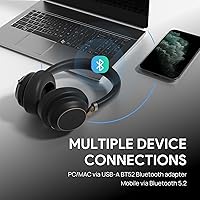
  • Connectivity: Connects wirelessly via Bluetooth using an included USB-A dongle, with a USB-C to USB-A cable also provided for wired charging and compatibility.
  • Microphone Array: Features a five-microphone system using Yealink Acoustic Shield Technology to isolate the speaker's voice and suppress ambient background noise automatically.
  • Noise Cancellation: Offers three levels of active noise cancellation (ANC) with an average noise reduction rating of up to 35dB.
  • Audio Codec: Supports Qualcomm aptX for higher-quality Bluetooth audio transmission compared to standard SBC codec connections.
  • Dynamic EQ: Automatically switches audio tuning between a call-optimized mode and a music-optimized mode depending on the active use case.
  • Battery Life: Rated for up to 40 hours of continuous use on a full charge under standard operating conditions.
  • Charging: Charges via USB-C cable; also supports Qi wireless charging when used with a compatible third-party charging pad (not included).
  • Form Factor: Over-ear, closed-back design with leather earcushions and an adjustable padded headband.
  • Mic Arm: Equipped with a retractable hidden microphone arm that extends for calls and retracts flush into the earcup when not in use.
  • Busylight: Dual earcup LED indicators glow red automatically during active calls to signal availability to nearby colleagues from wide viewing angles.
  • Certification: Officially certified for Microsoft Teams, enabling native call control and presence status integration without additional configuration.
  • UC Compatibility: Compatible with a broad range of unified communications platforms beyond Teams, including general PC and Mac softphone applications.
  • Controls: Primary headset controls are managed via touch-sensitive panels on the earcup, covering volume, mute, and call functions.
  • Weight: Weighs approximately 14.9 ounces (0.93 lbs), placing it on the heavier end for over-ear office headsets in this category.
  • Dimensions: Measures 7.63 x 8.14 x 2.08 inches when folded, making it compact enough for storage in a carry bag between uses.
  • Earcup Material: Earcushions are made from leather and include a spare set of on-ear cushions in the box for replacement or alternative fit preference.
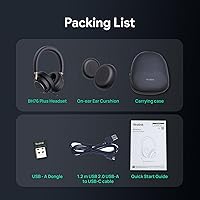
  • In-Box Contents: Package includes the headset, one pair of spare ear cushions, a USB-A dongle, and a USB-C to USB-A cable.
  • Water Resistance: Carries no official water or sweat resistance rating and is not designed for use in wet or outdoor conditions.

Related Reviews
Yealink UH38 Bluetooth USB Wired Headset
87%
93%
Dual Connectivity
88%
Noise Cancellation
91%
Comfort for Long Sessions
90%
Teams Integration
85%
Microphone Performance
More
Yealink BH71 Pro Wireless Bluetooth Headset
80%
91%
Microphone & Call Clarity
88%
Battery Life
67%
Comfort & Fit
83%
Noise Cancellation
86%
Connectivity & Dongle Reliability
More
Yealink BH70 Mono Wireless Bluetooth Headset
77%
88%
Microphone Quality
93%
Battery Life
84%
Comfort & Wearability
79%
Teams Integration
86%
Wireless Connectivity
More
Fodsports M1-S Plus Motorcycle Bluetooth Headset
75%
88%
Ease of Setup
82%
Audio Clarity
61%
Intercom Range
91%
Battery Life
67%
Noise Cancellation
More
Yealink WH64 Hybrid Mono Wireless Headset
82%
88%
Call Audio Clarity
91%
Wireless Range (DECT)
93%
Battery Life
86%
Charging Speed
83%
Multi-Device Connectivity
More
Yealink BH74 with Stand ANC Wireless Bluetooth Headset
86%
85%
Comfort & Fit
91%
Active Noise Cancellation (ANC) Effectiveness
88%
Battery Life
83%
Build Quality
84%
Sound Quality
More
Yealink YHS33 Headset
87%
91%
Comfort for Extended Use
88%
Sound Quality
85%
Noise Cancellation Effectiveness
83%
Build Quality
90%
Ease of Use / Setup
More
CPTEA G3 Open-Ear Bluetooth Headset
77%
88%
Wearing Comfort
82%
Microphone Quality
84%
Battery Life
79%
Dual-Device Connectivity
61%
Audio Quality for Music
More
Mopchnic KH113M
Mopchnic KH113M
77%
83%
Microphone Clarity
88%
Battery Life
91%
USB Dongle Convenience
74%
Comfort & Fit
63%
Build Quality
More
PrancyBt KH122M
PrancyBt KH122M
80%
83%
Call Clarity
78%
Microphone Quality
61%
Comfort & Fit
86%
Connectivity & Pairing
88%
USB Dongle Performance
More

FAQ

It works with Teams essentially plug-and-play — plug in the USB-A dongle, and Teams should recognize the headset and enable the call controls on the earcup without extra steps. That said, if you want to customize ANC levels or EQ settings, you will need to install the Yealink USB Connect companion app, which is a separate download.

The Teams certification just means it has been tested and optimized for Teams specifically, but the headset works as a standard Bluetooth audio device with any platform — Zoom, Google Meet, Webex, or any softphone application on PC or Mac. You may not get the same deep status and call control integration outside of Teams, but audio and microphone functionality work fine across platforms.

The low setting takes the edge off background hum while still letting some ambient sound through, which is useful if you need to stay aware of your surroundings. The middle level handles things like HVAC noise and open-plan office chatter reasonably well. Maximum ANC makes a clear difference in steady-noise environments like a busy cafe, though it will not block sudden sharp sounds like a door slam the way higher-end ANC units might. At 35dB average reduction, it is competitive but not class-leading.

The arm deploys with a firm, deliberate pull and clicks into place, which gives it a more purposeful feel than a loose bendable boom. It retracts cleanly back into the earcup housing. It does not wobble when extended, which matters when you are on a long call and shifting around.

The headband adjusts across a reasonable range and should accommodate most adult head sizes, but buyers at the larger end of the spectrum have noted that the fit can feel snug. If you have experienced sizing issues with similar over-ear headsets before, it is worth checking the return policy before committing.

A full charge via USB-C typically takes around two hours. The headset can be used while plugged in for wired charging, so you will not lose functionality mid-workday if the battery dips. If you have a Qi charging pad on your desk, you can also set it down between calls for passive top-ups, though most people find the cable simpler for overnight charging.

Both are strong professional headsets, and the choice often comes down to software and ecosystem preference. Jabra's companion app is generally considered more polished and feature-rich, and the Evolve2 55 has a slight edge in ANC depth. The BH76 Plus competes closely on microphone clarity, comfort, and battery life, and some users prefer Yealink's approach if they are already using other Yealink UC hardware at their workplace.

The busylight activates automatically when you are on a call or in a meeting and turns off when you are not. It does not stay lit continuously just because the headset is on, which keeps it useful as a genuine signal rather than a constant distraction.

You can pair the headset directly to a computer or phone via standard Bluetooth, but the USB dongle connection tends to deliver more stable audio and is required for the full Teams call control integration. For general listening on a phone or tablet, direct Bluetooth pairing works fine. For a dedicated work PC setup, using the dongle is the recommended approach.

Yes — a spare set of ear cushions is included in the box, and replacement cushions are available separately through Yealink's accessories channel. The cushions swap out without tools, which is useful since leather padding on any headset will eventually show wear with daily use.

Where to Buy