Overview

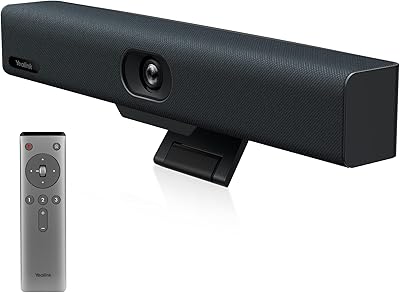
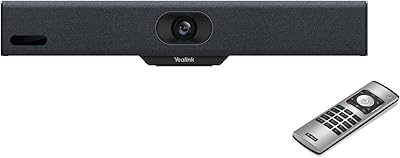
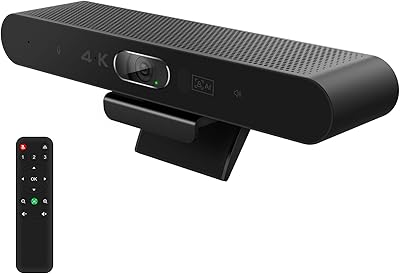
The Yealink MeetingBar A10 Conference Room Camera System is built for one job: replacing the tangle of separate cameras, microphones, speakers, and compute boxes that clutter most conference rooms. The whole thing runs on Android 11, which means it connects directly to Microsoft Teams Rooms or Zoom Rooms natively — no laptop, no dongle, no external PC required. You plug in power and HDMI, and you have a functional meeting room. It carries Microsoft Teams certification, which matters to IT teams vetting hardware for enterprise rollouts. Just keep in mind this is purpose-built for a dedicated room, not a personal desk setup.
Features & Benefits

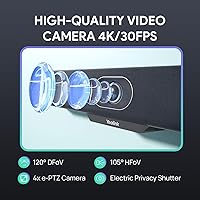
The camera side is where this all-in-one video bar earns its keep. A 4K CMOS sensor paired with a 120-degree wide-angle lens covers the full room without anyone having to reposition or manually tilt the unit. The AI Auto Framing and Speaker Tracking features handle focus automatically — when someone new speaks up or walks in mid-call, the 4x e-PTZ zoom adjusts without intervention. Audio quality holds up well too, with eight MEMS microphones using beamforming and echo cancellation to isolate voices clearly. One standout detail: the electric lens cap closes automatically when the unit is idle, giving hardware-level privacy rather than relying purely on software.

Best For

The MeetingBar A10 fits best in dedicated rooms hosting four to eight people — small boardrooms, executive huddle spaces, or branch office meeting rooms. Businesses already standardized on Microsoft Teams Rooms or Zoom Rooms will find it the most natural fit, since it runs those platforms directly without any additional compute hardware. IT departments managing multiple rooms across locations will also appreciate the remote device management capabilities, which allow firmware updates and diagnostics without sending someone on-site. If you are still running a webcam duct-taped to a monitor next to a Bluetooth speakerphone, this is a clean, consolidated upgrade. Rooms with inconsistent lighting conditions will benefit from the automatic brightness adjustment too.

User Feedback

Early adopters of the A10 conference system consistently point to cable-free installation as a highlight — most report having it running in under an hour. The AI framing also earns praise, though some note it takes a beat to catch up when participants shift positions suddenly. The main complaint that surfaces repeatedly is the built-in speaker; at 5W, it holds up in a small huddle room but loses presence in larger spaces, and several users recommend pairing it with external audio in those cases. Long-term reliability feedback is still accumulating given the product's relatively recent release, though IT teams have responded positively to the remote management software.

Pros

  • Single-bar form factor eliminates the usual tangle of separate camera, speakerphone, and compute device cables.
  • Android 11 OS runs Microsoft Teams Rooms or Zoom Rooms natively, with no external laptop or PC required.
  • The 120-degree wide-angle lens covers an entire small conference room without any manual repositioning.
  • AI Auto Framing and Speaker Tracking keep the camera focused on active participants without anyone touching a control.
  • The electric lens cap closes automatically when the unit is idle, providing real hardware-level privacy rather than software-only protection.
  • Eight MEMS microphone arrays deliver clean, echo-free audio even in rooms with hard or reflective surfaces.
  • Microsoft Teams certification gives IT procurement teams a pre-validated, enterprise-ready hardware option.
  • Remote management software lets IT administrators update, diagnose, and reconfigure units across multiple sites without traveling.
  • Most users report having the room fully operational within an hour, with minimal technical complexity during initial setup.

Cons

  • The built-in 5W speaker is adequate for a small huddle room but noticeably thin in any larger or noisier space.
  • It cannot function as a simple USB webcam — it requires a dedicated room environment and proper network configuration.
  • Android 11 limits platform flexibility; organizations outside the Teams or Zoom ecosystems will struggle to extract full value.
  • The premium price tier is difficult to justify for rooms that host video calls only occasionally or infrequently.
  • AI framing can lag visibly when participants enter the room or shift positions abruptly mid-call.
  • Long-term reliability data is still limited given how recently this product reached the market.
  • Restricted or highly locked-down corporate network environments may require extra IT effort to get Wi-Fi and Bluetooth functioning correctly.
  • The 4K resolution advantage is only noticeable if both the display and the video call platform actually support and stream at that resolution.

Ratings

The Yealink MeetingBar A10 Conference Room Camera System earned its scores through AI-driven analysis of verified global buyer feedback, with automated filtering applied to remove incentivized, bot-generated, and duplicate reviews before any scoring was applied. Ratings reflect both where this all-in-one video bar genuinely delivers and where real buyers have run into consistent frustrations — strengths and pain points carry equal weight. Whether you are comparing certified video bars side by side or evaluating a first dedicated room deployment, the scorecard below is built to give you an honest picture before you commit.
Video Quality
88%
In rooms with consistent lighting, the 4K CMOS sensor delivers noticeably sharper video than typical conference cameras. Faces remain clear and recognizable even when the wide-angle lens is taking in the full room, and the automatic brightness compensation means backlit windows behind participants do not wash out the image the way they do with lesser hardware.
The 4K advantage can feel overstated in practice — most video conferencing platforms cap their stream resolution well below 4K, so the full benefit is rarely realized unless you are recording locally. Some users also note that perceived image quality depends heavily on what the receiving platform compresses it down to, which is entirely outside this camera's control.
Microphone Quality
86%
Eight MEMS microphone arrays make a genuine difference in rooms where voices come from different directions or distances from the unit. Beamforming and echo cancellation work together to keep the audio clean even in rooms with hard parallel walls that typically cause noticeable reverb on cheaper systems, and remote participants consistently report hearing the room clearly.
A handful of users mention that the noise suppression can occasionally clip soft voices or cut the tail end of sentences when background noise is significant, as the AI filtering sometimes over-corrects. It performs best in purpose-built or acoustically treated spaces rather than open-plan environments with spillover noise bleeding in from adjacent areas.
AI Framing Accuracy
79%
21%
When a meeting is in steady flow with participants seated in fixed positions, the Auto Framing works reliably and keeps the composition well-balanced. Speaker Tracking is particularly appreciated during presentations where the speaker moves around the room, removing any need for a camera operator or manual pan adjustments to follow the action.
The AI framing has a short but perceptible delay when someone enters mid-call or multiple people shift positions simultaneously, sometimes creating a brief jarring zoom motion on screen. Users in fast-paced meetings where participants move around frequently or speak over each other report the tracking can feel slightly behind real-time action.
Setup & Installation
91%
Installation is one of the most consistently praised aspects across verified deployments — most IT professionals report a room going from unboxing to fully operational in under an hour. The minimal cable footprint of power and HDMI only leaves very little to troubleshoot, significantly reducing the stress commonly associated with conference room hardware rollouts.
Organizations deploying into rooms with locked-down corporate Wi-Fi policies or strict network segmentation have flagged that the network configuration step can add unexpected time to an otherwise smooth installation. First-time users unfamiliar with Android-based room systems may also need a brief orientation to navigate the platform setup screens with confidence.
Speaker Output
58%
42%
In a true small huddle room with four to six participants seated around a compact table, the built-in 5W speaker handles audio playback without obvious deficiencies and remote voices come through clearly enough for normal conversation. For its stated intended use case — a dedicated small room — it does what it promises without requiring anything additional.
This is the most frequently cited complaint across all user feedback — the 5W speaker loses presence as room size grows, and in spaces larger than a small huddle room or with HVAC background noise, volume simply falls short. Multiple IT deployments note that adding an external speaker is essentially mandatory for medium-sized rooms, adding meaningfully to total system cost.
Privacy Features
93%
The hardware electric lens cap is consistently praised as a standout differentiator — it closes automatically when the system is idle and opens when a call begins, giving meeting participants and IT security teams a physical privacy guarantee rather than relying on a software-only camera disable. In corporate environments where privacy compliance matters, this physical safeguard is genuinely and repeatedly valued.
A small number of users note that the motorized cap mechanism introduces a minor point of mechanical wear over many months of daily use, and a few raise questions about the long-term durability of the motor itself. There is also no easily visible indicator to confirm from across the room whether the cap is currently open or closed.
Remote Management
84%
IT administrators managing multi-room deployments across different office locations consistently highlight remote management as one of the system's most practical real-world strengths. Being able to push firmware updates, run diagnostics, and adjust configuration settings without traveling to each room saves meaningful time and operational overhead, especially for lean IT teams covering multiple sites.
Some IT teams note that the Yealink USB Control Software has a learning curve for administrators not already familiar with Yealink's ecosystem, and documentation could be more detailed in certain advanced configuration areas. Users managing mixed-vendor environments also point out the software is proprietary to Yealink products and does not integrate with third-party device management platforms.
Build Quality
82%
18%
The physical build feels appropriately solid for fixed conference room hardware — the bar is compact with no flex or rattling parts noted in user feedback. At 1.56 pounds, it is light enough to mount on a display without complex bracketing, and the port connections and exterior finish hold up well under the demands of daily meeting room use.
Long-term durability data is still limited given the product's relatively recent market launch, so it is too early to draw firm conclusions about how the hardware ages over two or three years of continuous use. A few users also mention that the unit can shift position on smooth display surfaces if not secured with a dedicated mounting solution.
Value for Money
67%
33%
For organizations replacing a genuine tangle of separate camera, speakerphone, compute stick, and cable management components, the all-in-one consolidation has real financial logic — fewer devices to procure, fewer support contracts, and a single management point. IT teams running multi-room deployments note that time saved on configuration and ongoing maintenance partly offsets the upfront investment.
The premium price tier is a hard sell for rooms used infrequently or for teams not yet committed to a certified room system deployment. Buyers who later discover they still need an external speaker or advanced mounting hardware find the total cost climbing well above what competing alternatives would have required for the same outcome.
Platform Compatibility
77%
23%
For organizations already running Microsoft Teams Rooms or Zoom Rooms, the certified integration works exactly as advertised — the platform UI launches natively, device provisioning is straightforward, and the experience stays consistent across multiple room deployments. The Teams certification in particular gives enterprise procurement teams a pre-validated, low-risk hardware choice they can document and defend.
Organizations outside the Teams or Zoom ecosystems — running Google Meet Rooms, Cisco Webex, or other platforms as their primary video solution — will find this system poorly matched to their needs, as native app support simply is not there. There is also no fallback USB webcam mode, so if your platform is not natively supported, the limitation cannot be easily worked around.
Lighting Adaptability
83%
The automatic brightness optimization is a practical differentiator for real-world conference rooms where natural light through windows shifts significantly throughout the day. Users in rooms with inconsistent lighting report that faces remain well-exposed and clearly visible without anyone adjusting camera settings before each call, removing a common and repetitive pre-meeting friction point.
In very low-light environments — think a room with no artificial ceiling lights and heavy window blinds drawn — the brightness optimization helps but cannot fully compensate, and visible image noise begins to appear. A small number of users also report that auto-exposure can take a moment to stabilize when lighting conditions shift suddenly, such as blinds being opened during an active call.
Cable Management
89%
Reducing an entire room system to just a power cable and an HDMI run is a genuinely appreciated outcome for facilities managers and IT teams who have spent years untangling the mess of separate webcam, speakerphone, and compute devices. Multiple users specifically cite the clean, two-cable installation as a key reason they have standardized on this all-in-one form factor.
Adding an external speaker — which many users ultimately do for medium-sized rooms — reintroduces at least one extra cable and a second device, partially undermining the minimalist setup story. Organizations adding a wired network connection on top of power and HDMI also note that cable routing through wall channels is still needed for a truly clean and professional-looking installation.
Software & Firmware
74%
26%
The Android 11 foundation gives the system a familiar app-based interface that Teams and Zoom users recognize immediately, with no proprietary UI layer to learn from scratch. Early users note that Yealink has been responsive with software improvements since the initial release, with several performance-related patches deployed within the first months of the product being in the market.
Android 11 is already an older OS version, raising reasonable questions about how long security patches and platform updates will be actively supported on this hardware going forward. Some users in highly controlled enterprise environments also report occasional app compatibility edge cases where strict IT policies restricting Android app permissions create unexpected friction.

Suitable for:

The Yealink MeetingBar A10 Conference Room Camera System is built for businesses that want to consolidate their meeting room hardware into a single, manageable appliance rather than stitching together a camera, speakerphone, and compute box from different vendors. It hits its sweet spot in small-to-medium rooms — roughly four to eight people around a table — where its wide-angle lens and AI framing can cover everyone without any manual repositioning. Organizations that have already standardized on Microsoft Teams Rooms or Zoom Rooms will find the setup unusually straightforward, since the Android 11 OS runs those platforms natively without needing a separate PC or laptop in the room. IT teams managing meeting rooms across multiple locations will also get genuine value from the remote management software, which allows firmware updates and diagnostics without dispatching anyone on-site. If your current setup is a mismatched combination of a third-party webcam, a Bluetooth speakerphone, and a laptop acting as the room computer, this all-in-one video bar is a direct, far cleaner replacement for that entire stack.

Not suitable for:

The Yealink MeetingBar A10 Conference Room Camera System is not the right choice for every buyer, and it is worth being upfront about those limitations before committing. If you are shopping for a webcam to place on a personal desk monitor for individual calls, this unit is significantly overbuilt and overpriced for that purpose — it is a room appliance, not a personal peripheral. Large conference rooms hosting more than eight to ten people will likely find the built-in 5W speaker insufficient; the audio output does not carry well in a bigger space, and you would need to add an external speaker system, which adds both cost and complexity. Buyers expecting a simple plug-and-play USB camera that works with any laptop out of the box will be disappointed, as the A10 operates as a standalone room system running its own OS rather than functioning as a USB device. If your organization has not committed to a certified Teams Rooms or Zoom Rooms deployment, the hardware investment becomes much harder to justify, and some of its most useful features will go unused.
Specifications

  • Video Resolution: Captures and encodes video at full 4K (3840×2160), delivering sharp image quality when paired with a compatible display and conferencing platform.
  • Camera Sensor: Uses a 1/2.8-inch CMOS sensor that handles varied lighting conditions, including dim or backlit environments, with automatic brightness compensation built in.
  • Field of View: The fixed wide-angle lens covers 120 degrees horizontally, capturing all participants in a standard small-to-medium conference room without requiring any physical camera adjustment.
  • Digital Zoom: Supports 4x electronic PTZ (e-PTZ) zoom, used by the AI Speaker Tracking feature to digitally close in on the active speaker without any mechanical movement.
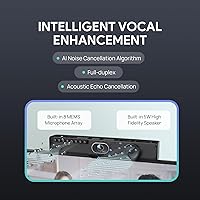
  • Microphone Array: Equipped with 8 MEMS microphone elements arranged to enable precise voice pickup, directional beamforming, and full-duplex audio across the room.
  • Audio Processing: Applies acoustic echo cancellation (AEC), dereverberation, AI noise suppression, and beamforming to produce clean, natural-sounding audio for remote participants.
  • Speaker Output: Houses a single built-in 5W speaker suitable for audio playback in small huddle rooms; larger or noisier spaces will likely require an external speaker for adequate volume.
  • Operating System: Runs Android 11 as a standalone compute platform, enabling native Microsoft Teams Rooms or Zoom Rooms operation without any additional PC, laptop, or compute stick.
  • Certifications: Carries official Microsoft Teams certification, confirming the hardware and software meet Microsoft standards for a fully validated Teams Rooms deployment.
  • Connectivity: Connects via Bluetooth, Wi-Fi, and HDMI, offering flexible installation options and display output without depending solely on wired network infrastructure.
  • Privacy Feature: Includes a motorized electric lens cap that closes automatically when the device is not in an active call, providing a hardware-level privacy safeguard beyond software-only controls.
  • AI Features: Offers AI Auto Framing, which adjusts the visible frame based on participant count and position, alongside AI Speaker Tracking, which digitally zooms toward whoever is speaking.
  • Dimensions: Measures 2.7 × 15 × 3.3 inches, forming a compact horizontal bar designed to sit on top of or below a conference room display.
  • Weight: Weighs 1.56 pounds, light enough to mount on a standard display bracket without requiring heavy-duty mounting hardware.
  • Power: Powered via a dedicated power connection with video output over HDMI, keeping the cable footprint smaller than typical multi-device room configurations.
  • Remote Management: Compatible with Yealink USB Control Software, enabling IT administrators to perform remote configuration, firmware updates, and diagnostic checks without physically visiting the room.
  • Video Format: Records and streams in MOV format, consistent with Android-based media handling on the device.
  • Audio Formats: Supports AAC and PCM audio formats for recording and playback, covering standard conferencing and media output requirements.

Related Reviews

Yealink UVC34 All-in-One Conference Camera System
81%
93%
Ease of Setup
88%
Video Quality
61%
Digital Zoom Performance
84%
Audio Clarity
79%
AI Auto-Framing
More
TONGVEO 4K Conference Room Camera System
78%
83%
AI Auto-Tracking Performance
78%
Video Quality
58%
Digital Zoom Quality
74%
Speakerphone Audio Clarity
91%
Ease of Setup
More
Yealink MeetingBar A10
82%
88%
Setup & Installation
91%
Video Quality
89%
Audio Clarity
76%
AI Speaker Tracking
84%
Build Quality
More
NexiGo P610 10X Optical Zoom PTZ Camera
78%
88%
Zoom Performance
83%
Image Quality
86%
PTZ Movement & Silence
79%
Preset & Remote Control
84%
Setup & Installation
More
RayBit SeeUp 4C
RayBit SeeUp 4C
74%
83%
Video Clarity
76%
AI Auto-Framing
78%
Speaker Tracking
71%
Built-in Microphone
67%
Built-in Speaker
More
TONGVEO PTZ 3X Wireless Conference Camera System
74%
74%
Wireless Connection Reliability
83%
Video Quality
71%
PTZ Control Responsiveness
78%
Speakerphone Audio Quality
89%
Ease of Setup
More
WyreStorm Halo VX10 Conference Room Camera
77%
83%
AI Tracking Accuracy
88%
Video Quality
58%
Digital Zoom Performance
84%
Microphone Clarity
67%
Speaker Volume & Quality
More
AV Access BizEye 90 Conference Camera
79%
88%
Video Clarity
83%
Low-Light Performance
84%
AI Auto Framing
79%
Presenter Tracking
71%
Individuals Gallery Mode
More
j5create JVU368 360° Conference Camera
74%
93%
Ease of Setup
86%
360° Coverage
74%
AI Tracking Accuracy
67%
Video Clarity
82%
Microphone Quality
More
SANNCE DVR-100 1TB 8CH Security Camera System
74%
83%
Daytime Image Quality
67%
Night Vision Performance
79%
Build Quality & Weatherproofing
74%
DVR Reliability & Performance
81%
Storage & Recording
More

FAQ

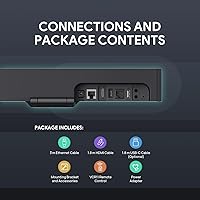
The Yealink MeetingBar A10 Conference Room Camera System runs entirely on its own — no laptop or external PC required. It operates on Android 11, so Microsoft Teams Rooms or Zoom Rooms launch directly on the device itself. You connect it to a display via HDMI, plug in power, and it functions as a complete standalone room system.
Yes, it supports both. While it carries official Microsoft Teams certification, the Android 11 OS also runs Zoom Rooms natively. The key thing to know is that it is designed for managed room deployments — meaning your organization will need a Teams Rooms or Zoom Rooms license to unlock the full experience. It is not aimed at casual personal Zoom calls from an individual account.

In a true small huddle room with four to six people seated close together, the 5W speaker is generally adequate. Once you push into a larger boardroom with eight or more seats, the volume can feel thin, especially if there is any ambient noise. Several IT administrators who have deployed the A10 conference system in bigger spaces recommend pairing it with a dedicated external speaker for reliable audio fill.

No, and this is a common point of confusion. This all-in-one video bar is a standalone room appliance running its own operating system — it does not present itself as a USB webcam to a connected laptop. If you need a simple plug-and-play camera for personal desk use, this is not the right product for that job.

It handles it reasonably well under normal conditions, though there is typically a one-to-two-second delay before the frame adjusts to include the new person. For standard meeting flow, most users find that pause acceptable. Where the framing occasionally struggles is when multiple people shift positions simultaneously, but those edge cases are infrequent in typical use.

The lens cap is a motorized physical cover that automatically closes over the camera element whenever the device is not in an active call, then opens again when a meeting starts. It gives you a tangible privacy guarantee rather than relying entirely on a software-level camera disable. You can also operate it manually using the included remote control if needed.

Most users report being fully up and running within an hour, and often faster. The main steps are positioning or mounting the bar, connecting HDMI and power, joining the network, and walking through the Teams Rooms or Zoom Rooms onboarding flow on the Android interface. There is no complicated driver installation or PC configuration involved.

Better than most standard conference webcams, yes. The 1/2.8-inch CMOS sensor paired with automatic brightness optimization helps compensate for backlighting and dim conditions without anyone touching a setting. It is not a perfect solution in extremely low-light environments, but for a typical office room with variable natural light, it adapts noticeably well.

That is genuinely one of the more practical advantages of this system. Using Yealink USB Control Software, IT administrators can push firmware updates, run diagnostics, and change configuration settings across multiple units remotely. For organizations rolling this out across several meeting rooms or branch locations, that capability can translate to real savings in time and operational overhead.

Honestly, call volume alone probably does not justify the outlay if meetings are infrequent. Where this system earns its keep is in consolidated hardware, reduced IT support burden, and the elimination of the usual mess of mismatched devices. If your team meets regularly, runs a certified Teams or Zoom deployment, and wants a low-maintenance room that just works, the case is strong. For a room hosting one or two light calls per week, a simpler and less expensive solution would likely serve you just as well.