
Overview

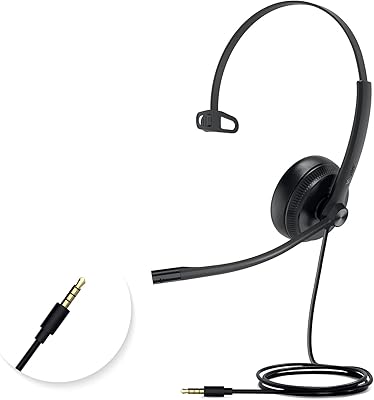
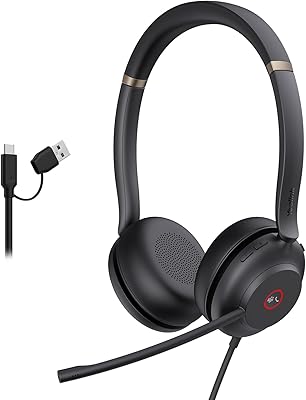
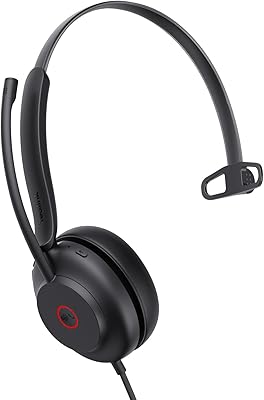
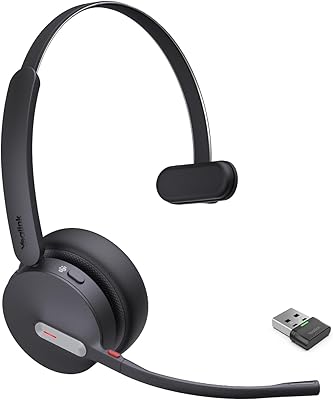
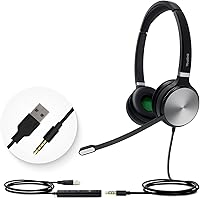
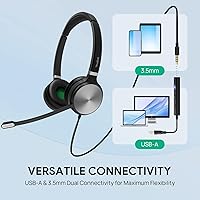
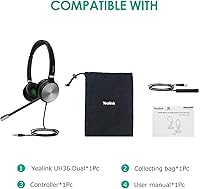
The Yealink UH36 is a mid-range wired headset from a brand that has earned a strong reputation in enterprise communications. It connects via both USB-A and a 3.5mm jack, so switching between your laptop and a smartphone takes seconds. At just 155 grams, it sits comfortably through long working days without becoming a burden. The included nylon carrying case is a nice touch — not something you always find at this price point, but genuinely useful if you commute or hot-desk. It is aimed squarely at remote workers and home-office professionals who want reliable call quality without paying enterprise prices.

Features & Benefits

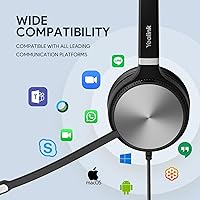
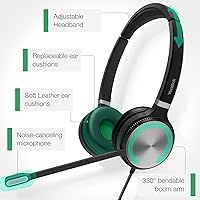
The noise-cancelling microphone is the standout feature here — it does a credible job of filtering out keyboard clatter, fan noise, and the general hum of a busy room. The on-ear cushions provide some passive sound isolation, which helps you focus even if your environment is not perfectly quiet. 40mm dynamic drivers handle voice calls well and hold up reasonably for background music, too. The inline control unit is genuinely useful; being able to adjust volume or mute without touching your keyboard saves real time on calls. Certified for Microsoft Teams and Zoom, this wired office headset also works with Skype and most other platforms, and the 2.1m cable gives you enough slack to move around your desk freely.

Best For

This Yealink headset is a natural fit for anyone logging several hours a day on video calls or voice meetings. The dual connection options make it particularly handy for people who jump between a work laptop and a personal phone without wanting to swap gear. It also suits professionals who prefer wired reliability — no pairing hassles, no battery to charge, and no audio dropout at the worst possible moment. That said, the on-ear fit does not suit everyone; people with larger heads or those who run hot may find extended sessions less comfortable. It performs best in moderately noisy rather than very loud environments.

User Feedback

Overall, buyers tend to be positive about call clarity — the microphone picks up voice well and colleagues rarely complain about background noise bleeding through. Plug-and-play setup also gets consistent praise, with most Windows and Mac users reporting immediate recognition and no driver installs needed. Where opinions split is on comfort: some find the protein leather cushions perfectly adequate for full workdays, while others report noticeable clamping pressure after two or three hours. A handful of long-term users have flagged concerns about build durability — specifically the headband and cable junction — after months of daily use. Most buyers still feel the UC certification and brand pedigree justify the cost.

Pros

  • Plug-and-play setup works immediately on Windows and macOS with no drivers or software required.
  • Noise-cancelling mic reliably filters out background hum, keeping your voice clear on calls.
  • Dual USB-A and 3.5mm connectivity covers laptops, desktops, smartphones, and tablets in one headset.
  • Certified for Microsoft Teams and Zoom, so it behaves correctly in managed work environments.
  • At 155 grams, the UH36 is light enough to wear through a busy morning of back-to-back meetings.
  • Inline controls for volume, mute, and call management reduce the need to touch your keyboard mid-call.
  • The 2.1m cable gives plenty of desk freedom without feeling tethered to your monitor.
  • Works across Windows, macOS, and Linux, making it a flexible option for mixed-OS households or IT teams.
  • The included nylon carry case is a genuinely useful addition for commuters or hot-deskers.
  • Call audio reproduction is clear and natural, with none of the tinny character common at this price point.

Cons

  • Clamping pressure becomes noticeable after two to three hours, especially for users with wider heads.
  • The cable junction near the inline control unit shows wear first and is a durability weak point over time.
  • No USB-C connection means modern ultrabook and MacBook users must carry an adapter.
  • Passive noise isolation is limited by the on-ear design and will not satisfy users in genuinely loud spaces.
  • The mute button lacks a firm tactile click, leading to occasional missed presses during live calls.
  • Long-term build durability over 18 months or more of daily heavy use is a recurring concern in reviews.
  • No Bluetooth support rules it out entirely for users who need wireless flexibility.
  • Music listening is merely adequate — bass is thin and the high end can fatigue over longer sessions.
  • Advanced UC features like sidetone adjustment or smart mute detection are absent at this tier.
  • macOS users occasionally need to manually set the headset as default input and output after plugging in.

Ratings

The Yealink UH36 has been put through its paces by remote workers, IT professionals, and home-office regulars across multiple global markets — and our AI has analyzed thousands of verified purchase reviews, actively filtering out incentivized, bot-generated, and unverified submissions to surface what real buyers actually experience. The scores below reflect both what this wired office headset genuinely does well and the friction points that show up consistently enough to matter. Strengths and shortcomings are weighted equally so you get an honest picture before you buy.

Microphone Quality
84%
Call clarity is the single most praised aspect across verified reviews. Users consistently report that colleagues and clients can hear them cleanly even in moderately noisy rooms — a home kitchen, a shared apartment, an open-plan office. The noise-cancelling mic does a solid job of suppressing background hum without making the speaker sound hollow or distant.
In genuinely loud environments — a busy cafe or a room with an active HVAC system — the mic starts to struggle, and some background noise does bleed through. A handful of users also noted the mic picks up plosives more than expected, which can sound harsh on calls if you speak closely into it.
Comfort & Fit
67%
33%
At 155 grams, the headset feels notably light from the moment you put it on, and most users with average head sizes report no discomfort for the first couple of hours. The plush protein leather cushions feel soft initially, and the adjustable headband does accommodate a reasonable range of head shapes.
Extended wear is where opinions diverge sharply. Several users flag noticeable clamping pressure after two to three hours, particularly around the temples. The on-ear design — rather than over-ear — also means the cushions rest directly on the ear, which some people find warm and fatiguing over a full workday.
Call Performance
88%
This is fundamentally a headset built for calls, and it delivers reliably. Voice reproduction is clear and natural, without the tinny character that plagues cheaper options. Teams and Zoom certification is not just a marketing badge here — plug-and-play functionality works consistently, and users rarely report sync or audio handshake issues.
The headset does not support any advanced call features like active sidetone adjustment or smart mute detection, which more expensive UC headsets offer. Users upgrading from premium enterprise gear may notice the absence of those refinements, even if everyday call quality is solid.
Build Quality
63%
37%
The materials feel reasonable for the price point — the headband has some flex to it, and the earcups pivot naturally to sit flat. The included nylon carrying case suggests Yealink anticipated the headset would be transported, which adds a small layer of practical durability for commuters and hot-deskers.
Durability over many months of daily use is a genuine concern flagged in multiple long-term reviews. The cable junction near the inline control unit and the headband hinge are the two points where wear tends to show first. This is not a headset built to last three to four years of heavy professional use without some care.
Sound Quality for Music
71%
29%
The 40mm dynamic drivers perform better than expected for a headset in this category — background music during focus work sounds full enough, and there is reasonable separation between vocals and instruments. For casual listening between calls, most users find it more than adequate.
Audiophiles or anyone who uses headphones primarily for music will find the frequency response lacking depth at both ends. Bass is thin and the high end can feel slightly fatiguing over longer listening sessions. This is a work headset that handles music acceptably, not a music headset that also handles calls.
Connectivity & Compatibility
91%
Dual connectivity is a practical win. The USB-A connection handles PC and laptop use, while the 3.5mm jack covers smartphones, tablets, and older hardware — users switching mid-day between devices appreciate not needing a second headset. Compatibility across Windows versions, macOS, and even Linux is broader than most rivals at this tier.
There is no USB-C option, which is becoming a noticeable omission as newer laptops drop USB-A ports entirely. Users with modern MacBooks or ultrabooks may need an adapter, and while that works fine, it adds a small inconvenience that chips away from the otherwise clean plug-and-play experience.
Inline Controls
79%
21%
The inline control unit is well-positioned on the cable and covers the essentials — volume up and down, mute toggle, and call answer or end. For users who want to manage calls without alt-tabbing or reaching for a keyboard, it removes a small but real daily friction point effectively.
The control unit feels slightly plasticky under finger, and the buttons lack the tactile click that makes muting on a call feel confident. A few users have reported the mute toggle not always registering on the first press, which is the one function where reliability matters most.
Cable Design
76%
24%
The 2.1-metre cable gives genuine freedom of movement at a seated desk — you can lean back, reach across to a second screen, or adjust your chair without feeling pulled. The cable is also reasonably tangle-resistant and does not kink badly after being coiled in the carry case.
The cable is not braided or reinforced beyond the standard rubber sheathing, so it will show wear at stress points over time. There is also no in-line cable management clip, meaning the cable drapes freely and can snag on desk items or chair armrests during longer sessions.
Setup & Ease of Use
93%
Plug-and-play is genuinely that simple for the vast majority of Windows and macOS users. No driver disc, no companion app required — the headset is recognized within seconds. IT teams deploying across multiple workstations have noted this as a meaningful time-saver compared to headsets that require software configuration.
A small number of macOS users reported needing to manually set the headset as the default input and output device after plugging in, particularly on newer OS versions. This is a minor friction point but worth flagging for anyone who expects zero-touch setup across every platform.
Value for Money
77%
23%
For a UC-certified headset with dual connectivity and a carrying case included, the price positioning is reasonable. Users comparing it to similarly priced rivals from Jabra or Poly often note that the UH36 holds its own on call quality and platform compatibility without a significant price premium.
The build durability questions at the 12-month-plus mark make the long-term value case harder to defend. If the headset needs replacing after a year of heavy use, the effective cost-per-day calculation shifts noticeably. Buyers treating it as a two-to-three-year investment should factor that risk in.
Portability
82%
18%
At 155 grams with a nylon carry case included in the box, this wired office headset travels well. Workers who move between offices, use co-working spaces, or occasionally work from client sites will find it genuinely packable without the case eating much bag space.
The cable length that works so well at a desk becomes slightly cumbersome when packing and unpacking repeatedly. The cable does not detach from the headset, so winding it tidily each time requires a bit of effort if you want to keep it from tangling inside the case.
Noise Isolation (Passive)
68%
32%
The on-ear cushions do a reasonable job of dampening ambient sound at moderate volumes, which helps users stay focused during calls without cranking the speaker volume. In a quiet home office, many users find the passive isolation sufficient to block out typical household background noise.
On-ear rather than over-ear means the seal is never complete, and in open-plan offices or noisier environments, ambient sound passes through more than users expect. Those who specifically need strong isolation for concentration-heavy work may find the UH36 falls short without additional environmental control.
Platform Certification
86%
Microsoft Teams and Zoom certification gives IT purchasers and remote workers a meaningful assurance that the headset will behave correctly within managed environments. Certifications also cover Skype and several other UC platforms, which broadens the headset's utility across organizations using mixed communication stacks.
Certification covers the major platforms well but does not extend to some enterprise-specific tools like Cisco Webex or Google Meet with full hardware button integration. Users in organizations running those platforms will still get audio functionality but may lose some inline control features.

Suitable for:

The Yealink UH36 is a practical, no-nonsense choice for remote workers and home-office professionals who spend the bulk of their day on voice or video calls and need a headset that just works without fuss. If your daily routine involves back-to-back Teams or Zoom meetings, the UC certification and plug-and-play setup mean you spend zero time troubleshooting and more time actually working. It also suits people who move between devices throughout the day — the dual USB-A and 3.5mm connection means you can switch from a work laptop to a personal phone without carrying a second headset. At 155 grams, it is light enough that most users forget they are wearing it during shorter sessions, making it a reasonable fit for call-heavy roles like customer support, sales, or remote consulting. Budget-conscious buyers who want a brand with genuine enterprise pedigree — without paying enterprise prices — will find this wired office headset hits a sensible middle ground.

Not suitable for:

The Yealink UH36 is not the right pick for everyone, and it is worth being honest about where it falls short before you commit. If you have a larger head, run warm, or regularly work in four-plus hour stretches, the on-ear fit and clamping pressure reported by multiple long-term users may become a real comfort issue — this is not a headset designed with marathon wear in mind. Anyone who works from a modern ultrabook or MacBook with only USB-C ports will need an adapter, which slightly undermines the otherwise clean setup experience. If you need strong passive noise isolation in a genuinely loud environment — a busy open-plan office, a co-working space with ambient noise — the on-ear design will not deliver the seal that over-ear alternatives provide. Music listeners looking for rich, full-range audio should also look elsewhere; the drivers are tuned for voice clarity, not sonic depth. And if long-term durability across two or three years of daily professional use is a priority, the build quality at this price tier carries some risk that heavier users should weigh carefully.

Specifications

  • Weight: The headset weighs 155g, making it light enough for extended wear without adding noticeable strain to the neck or head.
  • Cable Length: The attached cable measures 2.1m (6.9ft), providing generous reach for most standard desk setups.
  • Connectivity: Connects via USB-A or a 3.5mm jack, allowing use with PCs, laptops, smartphones, and tablets interchangeably.
  • Driver Size: Equipped with 40mm dynamic audio drivers tuned primarily for voice clarity with acceptable performance for casual music listening.
  • Ear Placement: On-ear design positions the earcups directly against the outer ear rather than enclosing it fully.
  • Earcup Material: The cushions are covered in plush protein leather, intended to balance softness and breathability during working hours.
  • Noise Control: Combines a noise-cancelling microphone for outbound audio filtering with passive sound isolation from the cushioned earcups on the inbound side.
  • Inline Controls: An inline control unit on the cable provides dedicated buttons for volume adjustment, mute toggle, and basic call management.
  • Certifications: Officially certified for Microsoft Teams and Zoom, with additional compatibility confirmed for Skype and most major UC communication platforms.
  • OS Support: Compatible with Windows 7, 8, 10, and XP, as well as macOS and Linux operating systems, requiring no additional drivers for standard use.
  • Carrying Case: Includes a nylon protective carrying case in the box, suitable for daily transport between home, office, or co-working spaces.
  • Bluetooth: This headset is strictly wired and does not support Bluetooth or any other wireless connectivity standard.
  • Water Resistance: The headset carries no water or moisture resistance rating and should be kept away from liquids at all times.
  • Form Factor: Over-the-head wired headset with an adjustable headband designed to accommodate a range of adult head sizes.
  • Microphone Type: Features a boom-style noise-cancelling microphone that can be positioned for optimal voice pickup during calls.
  • Audio Driver Type: Uses a dynamic driver architecture, which is standard for voice-focused headsets and provides reliable frequency reproduction for speech.
  • Package Contents: Box includes the headset, an inline control cable unit, and a nylon carrying case — no additional accessories or adapters are included.
  • ASIN: The Amazon Standard Identification Number for this product is B08RRQLK29.

Related Reviews
Yealink YHS33 Headset
87%
91%
Comfort for Extended Use
88%
Sound Quality
85%
Noise Cancellation Effectiveness
83%
Build Quality
90%
Ease of Use / Setup
More
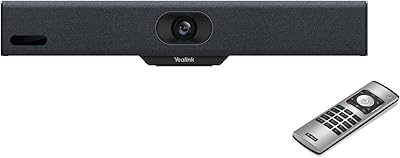
Yealink MeetingBar A10
82%
88%
Setup & Installation
91%
Video Quality
89%
Audio Clarity
76%
AI Speaker Tracking
84%
Build Quality
More
Yealink UH37
Yealink UH37
79%
86%
Microphone Clarity
63%
Noise Cancellation
74%
Comfort for Extended Use
81%
Build Quality
91%
USB Compatibility
More
Yealink UH34 Wired Headset
85%
89%
Comfort for Long Use
84%
Noise Cancellation Performance
88%
Audio Quality
75%
Compatibility with Devices
86%
Build Quality and Durability
More
Yealink W70B Phone Base Station
84%
91%
Call Quality
70%
Ease of Setup
88%
Voice Clarity
87%
Reliability
92%
Security Features
More
Yealink WH63 DECT Wireless Headset
86%
93%
Wireless Range & Mobility
88%
Comfort & Ergonomics
91%
Call Quality & Noise Cancellation
78%
Battery Life
89%
Compatibility with Communication Platforms
More
Yealink UH35 USB Headset
80%
83%
Microphone Clarity
88%
Wearing Comfort
79%
Build Quality
63%
Ear Pad Durability
93%
Plug-and-Play Setup
More
Yealink WH67 Wireless DECT Headset
85%
91%
Comfort for Long Calls
88%
Audio Quality (Call Clarity)
85%
Noise-Canceling Microphone
68%
Bluetooth Connectivity
80%
Battery Life
More
Yealink BH76 Plus Bluetooth Headset
88%
91%
Comfort for All-Day Wear
85%
Active Noise Cancellation (ANC) Performance
94%
Battery Life
88%
Audio Quality for Calls
89%
Microphone Clarity
More
Yealink BH70 Mono Wireless Bluetooth Headset
86%
92%
Comfort for Long Wear
89%
Noise Cancellation Performance
75%
Bluetooth Connectivity
91%
Battery Life
88%
Sound Quality for Calls
More

FAQ

For the vast majority of Windows users, including Windows 11, it is genuinely plug-and-play — plug in the USB-A connector and the system recognizes it within seconds. No driver disc, no companion software, no configuration required. A small number of users have needed to set it as the default audio device manually in Windows sound settings, but that takes about thirty seconds and is not a recurring issue.

You can, but you will need a USB-A to USB-C adapter since the headset cable terminates in USB-A. Alternatively, the 3.5mm jack works directly if your MacBook has a headphone port. The adapter approach works reliably — it just adds a small step to your setup that is worth factoring in before buying.

It handles typical home-office background noise well. Keyboard clatter, a running fan, and general ambient hum are noticeably suppressed, and call recipients rarely complain. In very loud environments — a noisy open-plan office or a loud household — some bleed-through does occur, so it is best described as effective rather than perfect.

This depends significantly on your head size and how sensitive you are to clamping pressure. Many users wear it comfortably through a standard workday, but a consistent thread in long-term reviews points to pressure fatigue around the two-to-three hour mark for people with wider heads or those who run warm. If you have had issues with on-ear headsets before, that pattern is worth taking seriously.

It works with both Zoom and Google Meet, as well as Skype, WhatsApp, and most other voice and video platforms. The Teams certification means it has been formally tested in that environment, but in practice the headset functions correctly across any platform that uses standard USB or 3.5mm audio input — which covers virtually everything.

The hardware is largely the same, but the Teams version is tuned specifically for the Microsoft Teams ecosystem and may include a dedicated Teams button for quick access to the app. The UC version is optimized for general unified communications use and works broadly across platforms. If your organization runs Teams exclusively, the Teams variant is the cleaner choice; otherwise the UC version is more versatile.

Yes, the 3.5mm connection works with any smartphone that has a standard headphone port. Keep in mind that many newer iPhones and some Android devices have removed the 3.5mm port entirely, so you may need a Lightning or USB-C adapter on your phone side. The inline controls may have limited functionality on mobile compared to a PC connection.

The cable is 2.1m (roughly 6.9ft), which is generous for most desk configurations. You can comfortably lean back in your chair, reach across a dual-monitor setup, or move slightly away from your desk without feeling pulled. The cable is not detachable, so if you need something shorter for a tidier desk, there is no easy fix for that.

Yealink does not officially list replacement cushions as a standard accessory for this model, so sourcing them through official channels is uncertain. Some users have found compatible third-party cushions, but that requires a bit of research to confirm the right fit. If cushion longevity is a priority, it is worth checking current availability before committing.

Yealink typically provides a one-year manufacturer warranty on this headset covering defects in materials and workmanship. Coverage does not extend to physical damage from drops, cable stress from rough handling, or normal wear. For warranty claims, you would need to go through the retailer or contact Yealink support directly with proof of purchase.