
Overview

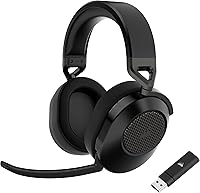
The Corsair HS65 Wireless sits comfortably in the mid-range of Corsair's headset lineup — a brand that has earned its place on gaming desks through years of reliable peripherals. This wireless headset's main pitch is flexibility: dual wireless connectivity means you can run low-latency 2.4GHz for gaming and flip to Bluetooth for mobile without buying a second headset. Out of the box, the carbon colorway looks clean and understated, and the build feels more substantial than the price might suggest. Just calibrate expectations going in — this is built around comfort and versatility, not reference-grade audio reproduction.

Features & Benefits

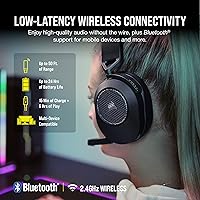
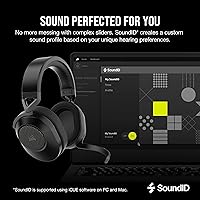
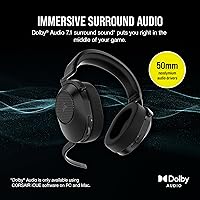
The 2.4GHz wireless connection is where this headset earns its keep for gaming — Bluetooth introduces enough latency that you can actually feel it during fast-paced play, so having a dedicated low-latency radio for your PC or PS5 matters. The Bluetooth 5.2 handles the rest: phone calls, switching to a tablet, casual listening. Sound through the 50mm drivers is full and well-balanced for gaming, and the Dolby 7.1 on PC delivers real positional awareness, even if it won't impress audiophiles. Sonarworks SoundID in iCUE lets you tune the sound profile to your preference, which is a useful option for those who bother. The aluminum headband keeps weight manageable across long gaming sessions, and battery life in practice lives up to the advertised day-long runtime.

Best For

Corsair's mid-range headset hits a specific sweet spot: it's built for players who game across multiple platforms and don't want to juggle separate headsets. If you're regularly moving between a PC, PS5, and your phone, the ability to swap connections without re-pairing is a real convenience. Long-session comfort is another strong point — three to four hours in, the lightweight build doesn't wear you down the way heavier flagship headsets can. That said, Xbox players should know upfront that there's no native wireless support for Microsoft's platform, which catches a lot of buyers off guard. Audiophiles chasing flat, accurate sound reproduction should also look elsewhere. This headset is for the mid-core gamer who wants reliable all-day performance without spending flagship money.

User Feedback

Sitting at 4.2 stars across well over 2,000 ratings, this wireless headset has a broad base of satisfied owners — and the feedback is consistent enough to be useful. Comfort during long sessions and easy platform-switching come up consistently as real highlights, along with battery life that tracks close to what Corsair advertises. The criticisms are worth knowing: the microphone handles party chat adequately, but it won't satisfy streamers or anyone who cares about voice clarity. The leatherette ear cups can trap heat noticeably during warmer sessions. A handful of users also find the iCUE software heavier on system resources than they'd like, though it's entirely optional if you'd rather skip it.

Pros

  • Dual wireless modes let you game with zero-lag 2.4GHz and switch to Bluetooth for calls without any re-pairing.
  • Battery life in real-world use holds up across a full weekend of gaming on a single charge.
  • The lightweight build stays comfortable through three-to-four hour sessions without pressure or fatigue.
  • Dolby Audio 7.1 on PC delivers useful positional cues in competitive games, not just a marketing checkbox.
  • PS5 users get Sony Tempest 3D support, adding genuine audio depth in compatible titles.
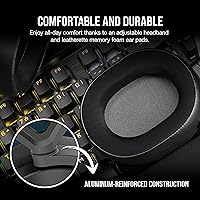
  • The aluminum-reinforced headband gives the structure a sturdier feel than the price suggests.
  • Fast charge time means a short break is enough to recover significant battery before your next session.
  • Platform coverage across PC, Mac, PS5, PS4, and mobile reduces the need for multiple headsets.
  • The flip-to-mute mic design is simple, reliable, and does not require navigating any software menu.

Cons

  • The microphone is adequate for party chat but noticeably underwhelming for streaming or any recorded voice work.
  • Leatherette ear cups trap heat during long sessions, which becomes a real comfort issue in warm environments.
  • No Xbox wireless support — a dealbreaker that is easy to miss and difficult to work around after purchase.
  • iCUE software is entirely optional but resource-heavy when installed, drawing more CPU and RAM than users expect.
  • The headset cannot be used wirelessly while charging, so a dead battery mid-session means a hard stop.
  • Ear cup foam shows signs of compression and softness loss after several months of daily use.
  • The plastic on the ear cup housings feels noticeably cheaper than the aluminum headband it sits alongside.
  • No carry case is included, making travel storage awkward for LAN events or commutes.
  • Bluetooth range in congested wireless environments falls noticeably short of what the spec implies.

Ratings

The Corsair HS65 Wireless has been scored by our AI after analyzing thousands of verified buyer reviews from global markets, with spam, bot activity, and incentivized feedback actively filtered out. Scores reflect the honest consensus of real-world users — not marketing claims — so both the standout strengths and the recurring frustrations are represented transparently. The result is a rating picture that mid-range wireless headset shoppers can actually trust when making a decision.

Wireless Connectivity
88%
The 2.4GHz connection holds up reliably across a full room, and users consistently report zero noticeable lag during fast-paced online gaming. Switching between the wireless dongle and Bluetooth for a phone call mid-session is smooth enough that most people stop thinking about it after the first week.
A small number of users report occasional 2.4GHz dropout when the USB dongle is placed behind a desktop tower or far from line of sight. Bluetooth range in practice falls shorter than the spec suggests in environments with a lot of wireless interference.
Comfort & Fit
86%
For three-to-four hour gaming sessions, the lightweight build and memory foam ear cups hold up better than heavier competitors at similar prices. The adjustable headband distributes weight well enough that most users forget they're wearing it during long campaigns or ranked matches.
The leatherette ear cups trap heat noticeably during longer sessions, especially in warmer rooms — a recurring complaint that shows up across user reviews in warmer climates. Users with larger heads have flagged that the clamping force can become uncomfortable after extended wear.
Audio Quality
78%
22%
The 50mm drivers deliver a full, warm sound signature that works well for gaming — explosions and footsteps both come through clearly, and spatial cues are genuinely useful in competitive titles on PC. PS5 users in particular appreciate the Tempest 3D integration, which adds real depth to supported games.
The sound tuning leans toward bass emphasis, which some users find fatiguing over time and others simply prefer — it is not a neutral or flat profile. Music listeners and anyone coming from a higher-end headset will notice a ceiling on detail retrieval, particularly in the high-frequency range.
Microphone Quality
61%
39%
The flip-to-mute mechanism is practical and reliable — flipping it up cuts the mic instantly, which is useful during chaotic squad sessions. For standard party chat on PS5 or Discord on PC, voice clarity is sufficient to communicate without complaints from teammates.
Streamers and content creators will find the microphone clearly underwhelming — it picks up enough room noise to be distracting and lacks the presence of a dedicated external mic. Multiple users specifically call out that voice recordings sound thin and muffled compared to what the headset price might lead you to expect.
Battery Life
91%
Real-world battery performance tracks closely to the advertised runtime, which is not always the case with wireless headsets in this category. Users routinely report getting through a full weekend of gaming on a single charge without needing to plan around battery anxiety.
The headset does not support charging while in use over the wireless dongle, so if you forget to charge and the battery dies mid-session, you are either done or scrambling for the USB cable. A low-battery alert would also be a welcome addition that some users note is missing.
Build Quality & Durability
82%
18%
The aluminum-reinforced headband is the standout structural element — it resists flex and gives the headset a sturdier feel than fully plastic competitors at this price point. The overall construction inspires enough confidence that most users are not worried about it surviving daily desk-to-couch use.
The plastic used on the ear cup housings and adjustment sliders feels noticeably cheaper than the headband itself, creating a slight inconsistency in the build experience. A few long-term owners have reported the ear cup foam compressing and losing some of its original softness after six-plus months of regular use.
Multi-Platform Compatibility
83%
The ability to hop between a PC, PS5, and a mobile device without swapping headsets is the single biggest practical advantage this headset offers, and users who rely on it say it genuinely reduces desk clutter and setup friction. PS4 backward compatibility adds extra value for anyone still running both console generations.
There is no native wireless support for Xbox — a limitation that catches buyers off guard frequently enough to warrant a dedicated mention before purchase. Nintendo Switch users can connect via Bluetooth, but the 2.4GHz dongle option is not available there, which limits the low-latency experience to non-Switch platforms.
Software & Customization
69%
31%
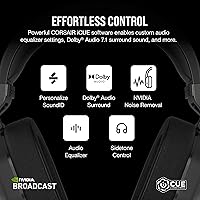
Sonarworks SoundID inside iCUE gives users a way to tune the sound profile to personal preference, which is a genuinely useful feature for those who invest the time in it. EQ adjustments and the ability to toggle surround modes without leaving the game are appreciated by users who like having control.
iCUE has a well-documented reputation for being resource-heavy, and several users report measurable CPU and RAM usage that feels disproportionate to what the software does. The headset functions perfectly without the software installed, which is how many users end up running it after trying iCUE and uninstalling.
Value for Money
84%
Relative to what comparable wireless headsets offer at this price tier, the combination of dual-mode wireless, Corsair build quality, and long battery life represents solid value. Most buyers conclude that they got what they paid for — and for the multi-platform use case specifically, the value proposition holds up well.
Users who push into streaming, content creation, or serious audio listening will quickly feel the limits of the hardware and question whether the price was justified. At full retail, it competes directly with alternatives that offer better microphone performance or superior audio tuning, which makes the decision less clear-cut.
Ease of Setup
89%
Plug in the USB dongle, power on the headset, and it connects — most users are up and running in under two minutes without touching any software. Bluetooth pairing follows standard protocol and poses no learning curve for anyone who has paired a wireless device before.
Windows users occasionally report needing to manually select the headset as the default audio device after first setup, which is a minor but recurring friction point. Those who want to use iCUE for sound customization will need to account for a longer initial setup process.
Surround Sound Performance
74%
26%
Dolby Audio 7.1 on PC produces convincing directional audio in open-world and tactical games — the kind where hearing footsteps from a specific angle genuinely affects gameplay decisions. PS5 users with Tempest 3D-supported titles report a similar benefit, making this a practical advantage over stereo-only headsets at this price.
The virtualized surround processing can add a slightly artificial quality to the soundstage that some users find distracting in story-driven games or when listening to music. Turning off surround and using the headset in stereo is actually preferred by a portion of users, particularly for music and films.
Charging Experience
77%
23%
The roughly ninety-minute charge time is fast enough to recover significant battery between sessions, and the USB-C charging port is a welcome modern standard that fits into most existing cable setups. Users appreciate not needing a proprietary cable.
As noted, you cannot use the headset wirelessly while it charges, which is a meaningful constraint if you are the type to forget to charge overnight. There is no visual battery indicator on the headset itself beyond a basic LED, so gauging remaining charge requires checking iCUE or waiting for an audio cue.
Weight & Portability
80%
20%
At under ten ounces, this wireless headset sits on the lighter end of the over-ear gaming category, which directly contributes to its strong comfort scores in long-session use. It folds down reasonably compactly and travels well in a bag for LAN events or commutes.
There is no included carry case or pouch, which is a minor omission that users traveling with it have flagged. The headset does not fold flat enough to sit naturally in a backpack side pocket, so it tends to occupy more bag space than users expect.

Suitable for:

The Corsair HS65 Wireless was built with a specific type of gamer in mind: someone who plays across multiple platforms and wants one headset that handles all of them without friction. If you split your time between a PC and a PS5, the ability to switch between the low-latency 2.4GHz connection and Bluetooth without re-pairing is a genuine daily convenience rather than a novelty feature. This also suits players who log three to five hour sessions regularly and need something that won't cause fatigue — the lightweight build and memory foam ear cups hold up well across long evenings in a way that heavier headsets simply don't. Casual to mid-core gamers who want a recognizable, well-built brand name without paying flagship prices will find the value proposition hard to argue with. It also works well for anyone who takes calls or listens to music between gaming sessions, since the Bluetooth mode handles everyday audio duties competently.

Not suitable for:

The Corsair HS65 Wireless has clear limitations that make it a poor fit for certain buyers, and it is worth being direct about them before a purchase. If you primarily game on Xbox, stop here — there is no native wireless support for Microsoft's platform, and this is the single most common source of frustrated post-purchase reviews. Streamers and anyone who relies on voice clarity for content creation will quickly outgrow the microphone, which handles party chat acceptably but lacks the presence and noise rejection that a dedicated mic or a higher-end headset provides. Audiophiles and music-first listeners who expect a flat, accurate sound signature will find the bass-forward tuning unsatisfying, and no amount of EQ adjustment in iCUE fully corrects it. If you game primarily in a warm room or live in a hot climate, the leatherette ear cups are likely to become a genuine comfort issue during longer sessions. Finally, buyers who want a true flagship audio experience — class-leading soundstage, premium materials throughout, studio-grade microphone — will need to spend considerably more than this headset costs.

Specifications

  • Connectivity: Connects via a dedicated 2.4GHz USB wireless dongle for low-latency gaming and Bluetooth 5.2 for mobile devices and secondary audio sources.
  • Wireless Range: Reaches up to 50ft over the 2.4GHz connection and approximately 30ft over Bluetooth under typical indoor conditions.
  • Battery Life: Rated for up to 24 hours of continuous use on a full charge, with a charge time of approximately 1.5 hours via USB-C.
  • Driver Size: Each ear cup houses a 50mm neodymium dynamic audio driver tuned specifically for gaming audio reproduction.
  • Frequency Response: Audio response covers 20Hz to 20KHz, spanning the full range of human hearing from deep bass to upper treble.
  • Sensitivity: Driver sensitivity is rated at 114 dB, meaning the headset can produce loud, clear output at relatively low power draw.
  • Impedance: Impedance is rated at 32 Ohm, making the headset easy to drive from standard consumer audio sources without an amplifier.
  • Microphone: Features an omni-directional, flip-to-mute boom microphone that physically disconnects the mic signal when rotated upward.
  • Surround Sound: Supports Dolby Audio 7.1 virtual surround on PC and Mac, and Sony Tempest 3D spatial audio on PlayStation 5.
  • Weight: The headset weighs 9.6 oz (approximately 0.6 lbs), placing it on the lighter end of the over-ear wireless gaming category.
  • Ear Cup Material: Oval over-ear cups are lined with leatherette-wrapped memory foam padding designed to create a passive noise-isolating seal.
  • Frame Construction: The headband is reinforced with an internal aluminum structure, adding rigidity and resistance to flex without significantly increasing weight.
  • Compatible Platforms: Officially supported on PC, Mac, PlayStation 5, PlayStation 4, and Bluetooth-enabled mobile devices; no native Xbox wireless support.
  • Software: Optional Corsair iCUE software provides access to Sonarworks SoundID personalized EQ, surround sound controls, and headset firmware updates.
  • Charging Port: Charges via a USB-C port, allowing use with most modern charging cables already in a typical gaming setup.
  • Control Interface: Onboard controls include a volume wheel and push-button inputs for power, connection switching, and audio mode selection.
  • Earpiece Shape: Ear cups are oval-shaped and sized to fit fully over the ear for an over-ear wearing style rather than resting on the ear.
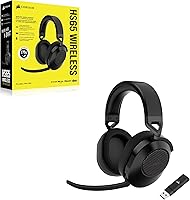
  • Included Accessories: The package includes the USB-C charging cable and the 2.4GHz wireless USB dongle; no carry case or extension cable is included.

Related Reviews
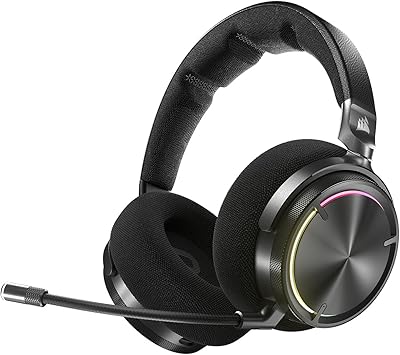
Corsair Virtuoso MAX Wireless Gaming Headset
86%
88%
Sound Quality
85%
Noise Cancellation
94%
Battery Life
90%
Build Quality
89%
Comfort for Extended Use
More
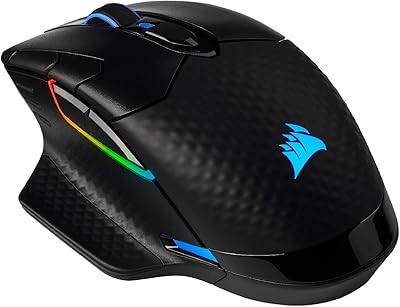
Corsair Dark Core RGB Pro SE
81%
93%
Wireless Connectivity
89%
Sensor Performance
91%
Polling Rate
88%
Qi Wireless Charging
86%
Battery Life
More
Arteck HW192 Wireless Keyboard and Mouse Combo
78%
78%
Build Quality
72%
Typing Experience
63%
Mouse Comfort & Ergonomics
81%
Battery Life
69%
Wireless Connectivity
More
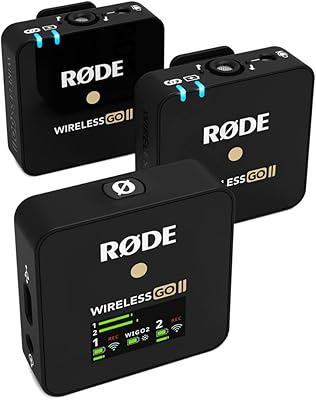
RØDE Wireless GO II
RØDE Wireless GO II
84%
92%
Audio Clarity
86%
Signal Reliability
97%
Internal Backup Recording
94%
Portability & Weight
91%
Setup Speed & Ease of Use
More
Yoto Wireless Headphones
87%
89%
Comfort and Fit
91%
Battery Life
85%
Sound Quality
94%
Portability
92%
Safety Features
More
3Dconnexion SpaceMouse Wireless
87%
89%
Ergonomics & Comfort
92%
Precision & Performance
91%
Battery Life
88%
Connectivity & Versatility
84%
Ease of Use
More
Logitech Wireless Touchpad
84%
80%
Performance
85%
Ease of Use
88%
Wireless Connectivity
83%
Build Quality
82%
Ergonomics
More
Occiam T9 Wireless Earbuds
87%
95%
Battery Life
87%
Sound Quality
82%
Build Quality
88%
Comfort & Fit
90%
Waterproof Performance
More
Vassink Ergonomic Wireless Mouse
84%
88%
Ergonomics & Comfort
81%
Build Quality
89%
Battery Life
91%
Quietness of Buttons
85%
Ease of Use
More
Nequga T21 Wireless Earbuds
84%
88%
Sound Quality
74%
Active Noise Cancellation (ANC)
93%
Battery Life
85%
Comfort and Fit
80%
Build Quality
More

FAQ

No — and this is worth knowing before you buy. The Corsair HS65 Wireless uses a 2.4GHz USB dongle that is not compatible with Xbox's proprietary wireless protocol. You can technically connect via Bluetooth if your Xbox setup supports it, but you will not get the low-latency wireless experience the headset is designed around. If Xbox is your primary platform, this is a genuine dealbreaker.

Yes, and this is one of the more practical things the HS65 Wireless does well. The 2.4GHz dongle handles your PS5 connection while Bluetooth handles your phone, and switching between the two is a button press rather than a full re-pairing process. Most users get used to the workflow within a day or two and stop thinking about it.

Honestly, no. The microphone is fine for party chat and Discord calls — teammates will hear you clearly in a normal environment — but it does not have the presence or noise rejection that streaming or content creation requires. If voice quality is a priority, you would be better served by pairing this headset with a separate USB or XLR microphone.

Not at all. The Corsair HS65 Wireless works perfectly as a plug-and-play device without any software installed. iCUE is only needed if you want to access Sonarworks SoundID EQ customization or toggle surround sound modes. Many users skip it entirely and are happy with the default sound profile.

Based on user feedback, the battery performance remains close to the advertised runtime for the first year of regular use. Like any lithium-ion battery, gradual capacity reduction is expected over time, but most owners have not flagged this as a concern within a typical ownership window. Avoiding full discharges before recharging will help preserve long-term battery health.

Not wirelessly — if the battery runs out, you would need to connect the USB-C cable and either wait for a charge or accept that the session is paused. The headset does not support pass-through wireless use while charging, which is a limitation worth planning around if you tend to forget to charge overnight.

Corsair does sell replacement ear cushions compatible with the HS line, and they are available through Corsair's own store and some third-party accessory sellers. The stock leatherette ear cups are known to compress and lose some softness after heavy use, so having a replacement path is genuinely useful for long-term owners.

This depends on your environment. In a temperature-controlled room, most users report three-to-four hour sessions without significant heat buildup. In warmer rooms or during summer months, the leatherette material does trap heat noticeably — it is one of the most consistent complaints in long-term user feedback. Mesh or fabric ear cup alternatives can help if this becomes an issue.

It is more useful than marketing language suggests, particularly in tactical shooters where directional audio matters. The positional cues on PC with Dolby 7.1 enabled are genuine enough that some competitive players keep it on by default. That said, it is virtual surround processing, not true multi-driver hardware, so it will not satisfy anyone expecting a reference-grade spatial audio experience.

The HS65 Wireless sits competitively in its tier primarily because of its dual-wireless flexibility and long battery life — most direct competitors at this price offer one or the other, not both. Where it gives ground is microphone quality and audio neutrality; a few alternatives in the same bracket offer better mic performance or a more balanced sound tuning. If platform flexibility and all-day comfort are your priorities, it holds its own. If sound accuracy or voice quality matters more, it is worth comparing against alternatives before committing.