Overview

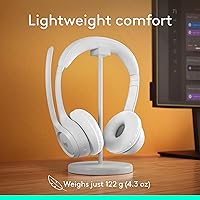
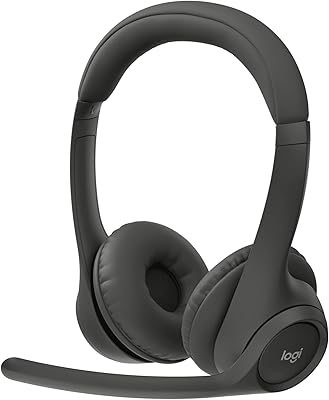
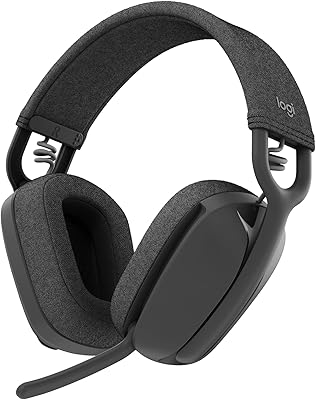
The Logitech Zone 300 Wireless Bluetooth Headset sits squarely in the mid-range of the work headset market, built for remote and hybrid professionals who need reliable daily communication without overspending. At just 122 grams, all-day wearability is the headline benefit — this is a headset designed to stay on your head through back-to-back meetings. Bluetooth 5.1 keeps it connected across Windows, macOS, ChromeOS, iOS, and Android, which matters if you regularly hop between devices. One important note upfront: this wireless work headset is tuned for calls, not critical listening. Its on-ear form factor means some users may feel pressure building after extended sessions compared to over-ear alternatives.

Features & Benefits

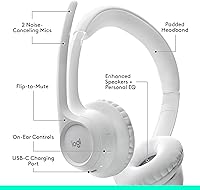
The mic situation on the Zone 300 is genuinely one of its strongest attributes. The dual beamforming microphone on the extended boom does a solid job cutting out keyboard noise, HVAC hum, and the general chaos of a shared home environment — call recipients rarely know you are working from a busy space. Battery life is equally practical: a full charge gets you through a complete workday and then some, and a quick five-minute top-up buys you an additional hour if you forget to charge overnight. The 30-meter wireless range gives you room to move freely. If you want to fine-tune the experience, the LogiTune app lets you adjust EQ and sidetone — though most users will not need it.

Best For

This Logitech headset makes the most sense for people whose workday is dominated by calls — Zoom, Teams, Google Meet, phone calls, all of it. If you are switching between a laptop and a phone multiple times per day, the Bluetooth pairing and cross-platform compatibility handle that without fuss. The lightweight design is a real advantage for those who struggle with headset fatigue; at just over 120 grams, it barely registers after a few hours. It also earns its spot for multi-OS households where one headset needs to work across a MacBook, a Chromebook, and an Android phone. If your priority is hi-fi music listening, though, a different category of headset would serve you better.

User Feedback

Buyer sentiment around this wireless work headset skews positive, with mic clarity and comfort drawing the most consistent praise. People working in noisy apartments or busy households frequently note that colleagues on the other end have zero complaints about audio quality. On the comfort front, opinions diverge a bit: most users are fine for a full eight-hour day, but a vocal minority finds the on-ear pressure accumulates over longer stretches — something over-ear wearers will not encounter. Music playback gets described as adequate rather than impressive, which is fair given the headset's purpose. The LogiTune app earns mention as a handy extra rather than a necessity, and replaceable earpads are a quiet but appreciated long-term value detail.

Pros

  • The dual beamforming mic consistently delivers clean call audio even in noisy home environments.
  • At 122 grams, this wireless work headset barely registers on your head during a full workday.
  • Battery life comfortably covers a full workday without needing a midday charge.
  • A five-minute quick charge recovers roughly an hour of talk time — a genuine lifesaver on rushed mornings.
  • Bluetooth 5.1 pairs reliably across Windows, Mac, ChromeOS, iOS, and Android without driver headaches.
  • The flip-to-mute mic is fast, intuitive, and requires no button hunting during live calls.
  • A 30-meter wireless range gives you real freedom to step away from your desk mid-call.
  • Replaceable earpads extend the usable life of the headset beyond what most competitors offer at this price.
  • The LogiTune app adds useful customization — EQ, sidetone, firmware — for those who want it, without being required.
  • Works With Chromebook certification gives multi-OS households one less compatibility concern to worry about.

Cons

  • On-ear pressure can become noticeable and uncomfortable for some users after four or more hours of continuous wear.
  • Music playback quality is mediocre — adequate for background listening but underwhelming for anything more attentive.
  • The plastic construction feels functional rather than premium and may not inspire confidence in long-term durability.
  • There is no active noise cancellation for the listener, only mic-side noise suppression — a meaningful distinction in loud spaces.
  • Replacement earpads, while available, are sold separately and add to the total cost of ownership over time.
  • The LogiTune app occasionally draws complaints about being clunky or slow to connect with the headset.
  • No 3.5mm wired fallback means you are out of options if the battery runs completely flat at a bad moment.
  • On-ear fit can be polarizing for users who have grown accustomed to the full seal of over-ear headphones.

Ratings

The scores below reflect an AI-driven analysis of verified global user reviews for the Logitech Zone 300 Wireless Bluetooth Headset, with spam, bot-generated, and incentivized feedback actively filtered out before scoring. Each category is rated independently, so both the genuine strengths and the recurring frustrations surface with equal weight. The result is an honest, data-grounded picture of how this wireless work headset actually performs in real daily use — not how the marketing describes it.

Microphone Quality
84%
Remote workers consistently report that colleagues on calls rarely complain about background noise, even when working from kitchens, shared apartments, or open-plan offices. The beamforming pickup pattern does a good job isolating voice from ambient hum, keyboard clatter, and HVAC noise during long meeting days.
In very loud environments — a busy coffee shop or a home with young children nearby — the noise suppression starts to show its limits. A handful of users noted that the mic occasionally picks up sudden sharp sounds that the algorithm fails to filter in real time.
Comfort & Wearability
78%
22%
At 122 grams, the Zone 300 is light enough that most users genuinely forget they are wearing it during a four-hour morning block of meetings. The padded headband distributes weight evenly, and many buyers specifically call out that it does not leave the familiar pressure ridge that heavier headsets cause.
The on-ear design is a dividing line in user feedback. People with larger ears or those accustomed to over-ear cups frequently mention that the pads start pressing uncomfortably after about four to five hours, and a few users report slight redness around the ear after full-day sessions.
Battery Life
88%
Getting through a full eight-hour workday without reaching for the charging cable is the norm rather than the exception for most buyers. The quick-charge feature — five minutes for roughly an hour of talk time — has saved more than a few users who forgot to charge overnight before an important meeting day.
The rated 16-hour talk time is achievable under ideal conditions, but real-world usage at higher volume levels tends to land closer to 13 to 14 hours. A small number of users also report that battery capacity noticeably degrades after 12 to 18 months of daily use.
Call Clarity
86%
This is the category where the Zone 300 earns its strongest endorsements. Users on video conferencing platforms like Zoom and Teams report that their audio comes through cleanly and consistently, and the flip-to-mute feature gets specific praise for making it easy to cut the mic without fumbling for a button.
A few users working in environments with very inconsistent background noise — construction nearby, for instance — found that the automatic processing occasionally introduced a subtle processing artifact or slight hollowness to the voice pickup that peers noticed on sensitive setups.
Audio Quality (Music & Media)
61%
39%
For background listening during focused work — ambient music, podcasts, or casual YouTube viewing — the 30mm drivers deliver a sound that is clear and inoffensive. Volume gets loud enough without distortion, and the audio latency at 20 milliseconds keeps it acceptably in sync for most video content.
Anyone expecting this headset to double as a serious listening device will be underwhelmed. The low end is thin, soundstage is narrow, and there is little separation between instruments in complex tracks. This is a call headset that happens to play music, not a music headset that also takes calls.
Build Quality
67%
33%
The headset feels solid enough for daily desk use, and the hinges on the earcups move smoothly without any creaking. The boom arm has a firm detent when positioned, so it holds its angle reliably through a workday without sagging toward your mouth.
The all-plastic construction is the most common aesthetic criticism buyers raise. It does not feel cheap, but next to metal-reinforced competitors it reads as clearly entry-to-mid-tier. A few users also report that the headband finish is prone to showing fingerprints and light scratches after several months.
Wireless Connectivity
83%
Bluetooth 5.1 delivers a stable, low-dropout connection in typical home and office environments, and the 30-meter range is genuinely useful for anyone who steps away from their desk mid-call to grab a coffee or move around a small office. Multi-device pairing works reliably across different operating systems.
Occasional users in environments with heavy Bluetooth congestion — dense apartment buildings or shared coworking spaces with many devices — report intermittent brief dropouts. Switching between a paired laptop and a phone is functional but requires a manual disconnect step rather than happening automatically.
Device Compatibility
91%
Broad cross-platform support is one of the clearest strengths here. Chromebook users in particular appreciate the Works With Chromebook certification, which removes the usual uncertainty around peripheral compatibility. Switching between a MacBook for work and an Android phone for personal calls during the day works without friction for the majority of buyers.
A small number of users report that Bluetooth audio profiles occasionally default to lower-quality codec settings on certain Android devices, requiring a manual adjustment. There is also no USB dongle option for users who need a wired-USB fallback on locked-down corporate machines.
Value for Money
82%
18%
At its price point, this wireless work headset offers a combination of brand reliability, call-quality performance, and battery life that is difficult to match from lesser-known alternatives. The replaceable earpads add meaningful long-term value by extending the usable life of the headset past what most competitors at this tier offer.
Buyers who push into slightly higher price territory can access over-ear designs with better passive isolation and richer audio — making the value calculation more nuanced for those who want the headset to serve double duty for media consumption. The plastic build also makes some buyers feel the price could be sharper.
Ease of Setup
93%
Pairing is straightforward on every major platform — most users report being connected and on a call within two to three minutes of unboxing. There are no drivers to install, no dongles to manage, and no account creation required unless you choose to use the LogiTune app.
A handful of users report that re-pairing after a factory reset or switching the headset to a new primary device is less intuitive than the initial setup, requiring a trip into the Bluetooth settings rather than a one-button process. The manual could also be clearer on the multi-device pairing workflow.
Mic Mute Functionality
87%
The physical flip-to-mute boom is one of those features that sounds minor until you use it daily. Being able to silence yourself mid-sentence without looking for a button — just a quick upward flip — becomes second nature fast, and users who switch to this headset from software-mute-only devices rarely want to go back.
The mute state is not always immediately obvious in a noisy room since the only feedback is a subtle audio tone rather than a visible LED indicator. A few users on video calls have accidentally unmuted themselves by brushing the boom arm without realizing it.
App Experience
63%
37%
For users who want more than the out-of-box defaults, the LogiTune app provides genuinely useful controls — particularly the sidetone slider, which lets you dial in exactly how much of your own voice you hear during calls. Firmware update delivery through the app is also reliable and low-friction.
The app itself draws mixed feedback: it is not required, which is a plus, but when users do install it they sometimes find it slow to detect the headset or inconsistent about retaining settings between sessions. The mobile version of LogiTune gets notably worse reviews than the desktop build.
Weight & Portability
81%
19%
The 122-gram weight makes this one of the lighter Bluetooth headsets in its category, and the earcups fold flat enough to toss into a laptop bag without much fuss. Commuters and hybrid workers who carry the headset between home and an office find it genuinely portable compared to bulkier over-ear alternatives.
There is no included carrying case or pouch, which feels like a small omission at this price point. The folded profile, while compact, is not especially protected during transit, and the plastic finish shows scuffs after a few weeks of bag-rattling without a sleeve.
Noise Isolation (Passive)
54%
46%
The on-ear design does provide some degree of passive noise reduction by covering the ear, and for typical home office background noise — a running dishwasher, distant street sounds — it reduces enough ambient noise to keep you focused during calls without active cancellation.
There is no active noise cancellation for the listener, and the on-ear seal is inherently less isolating than over-ear cups. Users in genuinely loud environments — open offices, households with small children, or urban apartments — will hear a meaningful amount of external noise leaking in during calls and focused listening.

Suitable for:

The Logitech Zone 300 Wireless Bluetooth Headset is an excellent fit for remote and hybrid workers whose days revolve around video calls, virtual meetings, and phone conversations. If you spend six or more hours a day on Zoom or Teams, the lightweight 122-gram build means you are unlikely to finish the day with the familiar ache that heavier headsets cause. The broad Bluetooth 5.1 compatibility across Windows, macOS, ChromeOS, iOS, and Android makes it a natural pick for anyone juggling multiple devices — say, a work laptop in the morning and a personal phone in the afternoon. Chromebook users in particular benefit from the official Works With Chromebook certification, which eliminates compatibility guesswork. Budget-conscious buyers who want a trusted brand name and dependable call quality without crossing into premium territory will find this wireless work headset hits a practical sweet spot.

Not suitable for:

The Logitech Zone 300 Wireless Bluetooth Headset is not the right tool if your primary use case is music listening, content creation, or any scenario where audio reproduction quality really matters. The 30mm dynamic drivers deliver perfectly serviceable sound for calls, but they are not tuned for the richness or soundstage that dedicated headphones offer, and anyone expecting that will be disappointed. The on-ear design is also worth thinking through carefully: unlike over-ear cups that fully enclose the ear, on-ear pads rest directly on the ear and can cause real discomfort for people with sensitive ears or unusually large ears during sessions longer than four or five hours. If you work in an extremely loud environment — a busy call center floor or a construction-adjacent space — the passive isolation here is modest and may not be sufficient. Buyers who need active noise cancellation for their own listening comfort, rather than just mic-side noise suppression, should look at a higher-tier category entirely.

Specifications

  • Bluetooth Version: The headset uses Bluetooth 5.1, providing a stable and efficient wireless connection with supported devices.
  • Wireless Range: It maintains a wireless range of up to 30 meters (approximately 98 feet) in open conditions.
  • Battery Life: A full charge delivers up to 20 hours of listening time and up to 16 hours of continuous talk time.
  • Quick Charge: A 5-minute quick charge adds approximately one hour of talk time when the battery is running low.
  • Charging Time: Charging from empty to full takes approximately 2 hours via the included USB cable.
  • Weight: The headset weighs just 122 grams, making it one of the lighter options in its category.
  • Driver Size: Audio is delivered through 30mm dynamic drivers with a custom-tuned diaphragm configuration.
  • Impedance: The headset has an impedance rating of 32 Ohm, standard for consumer Bluetooth headsets.
  • Microphone: The boom mic uses dual beamforming elements with noise-canceling algorithms to suppress ambient background noise.
  • Mic Mute: The boom arm includes a flip-to-mute function that silences the microphone when rotated upward.
  • Audio Latency: Bluetooth audio latency is rated at 20 milliseconds, suitable for calls and video conferencing.
  • Compatibility: The headset is compatible with Windows, macOS, ChromeOS, iOS, iPadOS, and Android devices via Bluetooth.
  • Certification: The Zone 300 carries official Works With Chromebook (WWCB) certification from Google.
  • Form Factor: This is an on-ear headset, meaning the earpads rest on the outer ear rather than enclosing it fully.
  • Material: The headset body and headband are constructed primarily from plastic with padded contact surfaces.
  • Earpads: The earpads are user-replaceable and can be purchased separately to extend the product's usable life.
  • App Support: The optional LogiTune app (available for Windows and macOS) enables EQ adjustment, sidetone control, and firmware updates.
  • Headphone Jack: A 3.5mm headphone jack is present on the headset for optional wired audio output use cases.
  • In-Box Contents: The package includes the headset and a charging cable; no USB dongle or carrying case is included.
  • Audio Latency: Bluetooth audio latency is rated at 20 milliseconds, which is well within acceptable range for voice calls and conferencing.

Related Reviews

Logitech Zone 301 Wireless Bluetooth Headset
73%
84%
Microphone Quality
81%
Call Clarity
71%
Comfort & Fit
78%
Battery Life
76%
Wireless Connectivity
More
Logitech Zone Wired
Logitech Zone Wired
79%
88%
Microphone Clarity
91%
Call Performance
74%
Comfort & Wearability
83%
Build Quality
67%
Sound Quality for Music
More
Logitech K480 Multi-Device Bluetooth Keyboard
79%
93%
Multi-Device Switching
91%
Cross-Platform Compatibility
88%
Battery Life
84%
Built-In Device Cradle
72%
Typing Comfort
More
Corsair HS65 Wireless
80%
88%
Wireless Connectivity
86%
Comfort & Fit
78%
Audio Quality
61%
Microphone Quality
91%
Battery Life
More
Yealink BH70 Mono Wireless Bluetooth Headset
77%
88%
Microphone Quality
93%
Battery Life
84%
Comfort & Wearability
79%
Teams Integration
86%
Wireless Connectivity
More
COOSII SGH300-07 Wireless Bluetooth Headset
76%
83%
Comfort & Fit
78%
Microphone Quality
81%
Battery Life
86%
Connectivity & Pairing
63%
Sound Quality
More
Logitech Zone Vibe 100
86%
94%
Wearing Comfort
91%
Microphone Utility
89%
Multi-Device Connectivity
62%
Passive Noise Isolation
87%
Call Audio Quality
More
Yealink BH71 Pro Wireless Bluetooth Headset
80%
91%
Microphone & Call Clarity
88%
Battery Life
67%
Comfort & Fit
83%
Noise Cancellation
86%
Connectivity & Dongle Reliability
More
Logitech G733 LIGHTSPEED Wireless Gaming Headset
79%
88%
Wearing Comfort
91%
Wireless Performance
86%
Battery Life
84%
Microphone Quality
76%
Sound Quality
More
TECKNET TK-HS012 Bluetooth On-Ear Headset
79%
83%
Microphone Quality
88%
Battery Life
61%
Comfort & Fit
81%
Bluetooth Stability
76%
Dual-Device Pairing
More

FAQ

Yes, the Zone 300 connects over standard Bluetooth, so it works with Zoom, Microsoft Teams, Google Meet, and virtually any other conferencing platform without any special setup or drivers. Just pair it and select it as your audio device.

The headset supports switching between a computer and a phone, but it does not maintain simultaneous active connections to two devices at once. You can pair it to multiple devices and switch between them, though you will need to disconnect from one before the other takes over.

The dual beamforming mic does a genuinely solid job of picking up your voice while reducing background noise like keyboard clicks, HVAC systems, and general room chatter. People on the other end of calls typically notice clean audio even in moderately noisy spaces. It is not a studio-grade solution, but for everyday work calls it handles real-world environments well.

It is an on-ear design, meaning the earpads sit directly on your ears rather than surrounding them. For most people, this is comfortable for a full workday, but if you are sensitive to ear pressure or have worn over-ear headsets exclusively, it is worth being aware that some users find on-ear designs less comfortable after four or five hours of continuous use.

Not at all. The Logitech Zone 300 Wireless Bluetooth Headset works perfectly well straight out of the box without ever installing LogiTune. The app is purely optional and mainly useful if you want to adjust the EQ, tweak the sidetone level, or install firmware updates — nice extras, but not requirements for everyday use.

Sidetone is the feature that lets you hear your own voice through the headset while you are speaking. Some people find it helpful because it prevents them from talking too loudly; others find it distracting. The LogiTune app lets you dial it up or down to your preference, or turn it off entirely.

When you rotate the boom arm up toward the headband, the mic mutes automatically. Flip it back down and it unmutes. It is a quick, tactile action you can do without looking, which makes it genuinely useful during live calls when you need to mute in a hurry.

For most people, yes. The 16-hour talk time rating gives you plenty of buffer for a standard eight-to-nine-hour workday, even accounting for the gap between rated and real-world performance. Forgetting to charge the night before is less of a crisis too, since five minutes on the charger buys you about an hour of talk time.

Yes, the earpads on this wireless work headset are designed to be user-replaceable. Logitech sells replacement earpads separately, which is a practical detail that extends the life of the headset well beyond what you would get from a unit with fixed, non-removable pads.

It handles music fine for casual background listening, but it is honestly tuned and optimized for voice calls rather than music playback. The 30mm drivers produce decent sound, but if music quality is a priority for you, a dedicated pair of headphones will serve you better. Think of the audio as a pleasant bonus rather than a headline feature.

Where to Buy