Overview

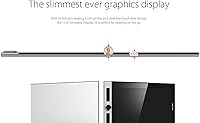
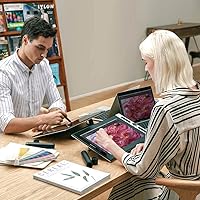
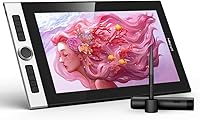
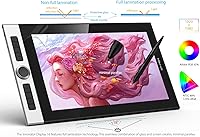
The XP-Pen Innovator 16 15.6″ Pen Display sits in a competitive mid-range category where artists need a capable screen without lugging around something the size of a small suitcase. At just 9mm thin, it is noticeably slimmer than most rivals in this size class — pick it up and the difference registers immediately. The 15.6-inch form factor is a practical choice: large enough to work comfortably in Photoshop or Clip Studio Paint, compact enough to slip into a backpack. Full-lamination technology is a genuine differentiator here, reducing the gap between pen tip and pixel for a more natural drawing feel. Just be clear: this drawing monitor competes well on value, but it is not a Cintiq.
Features & Benefits

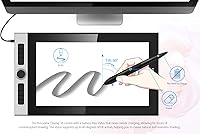
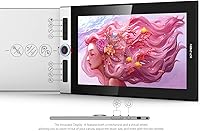
The full-laminated IPS panel covers 92% of the Adobe RGB color space, and in practice that means illustration work in Krita or Clip Studio Paint looks genuinely rich rather than washed out — a real win at this price tier. The battery-free passive stylus handles 8192 levels of pressure sensitivity and tilts up to 60 degrees, which makes shading strokes feel surprisingly natural during long sessions. Eight fully programmable express keys let you keep your most-used shortcuts within thumb's reach. The three-in-one cable does tidy up the desk nicely. The honest caveat worth stating plainly: 1080p on 15.6 inches is workable but noticeably less sharp than QHD alternatives, so detail-heavy line art will show the limitation.

Best For

The Innovator 16 makes the most sense for art and design students who want a genuine screen-based drawing experience without spending Wacom Cintiq money. Freelance illustrators and comic artists who move between locations will appreciate the slim profile and 3.09-pound weight — it fits in a bag without drama. Hobbyists stepping up from a screenless tablet for the first time will find this pen display immediately rewarding. It is a less obvious choice for working professionals whose output demands pixel-perfect precision, where a QHD panel would matter more. On both Windows and macOS, driver setup is generally painless, which removes one friction point that tends to frustrate first-time buyers of displays in this category.

User Feedback

Across several hundred ratings, the Innovator 16 holds a 4.2-star average — a solid result that reflects genuine satisfaction with some consistent caveats attached. Buyers regularly praise the slim build quality and color accuracy, noting that the display looks better out of the box than they expected at this tier. On the downside, the 1080p resolution draws recurring criticism from users doing intricate line work, and a handful mention needing a few extra steps to get drivers running properly on first setup. Stand stability splits opinion — adequate for relaxed sketching sessions, but prone to slight wobble under heavier pressure. Long-term users occasionally flag pen nib wear, though the included spare nibs take some edge off that concern.

Pros

  • Full lamination visibly reduces parallax, making on-screen drawing feel far more natural than non-laminated alternatives in this price range.
  • 92% Adobe RGB color coverage produces genuinely vibrant, lifelike colors straight out of the box with minimal calibration needed.
  • The battery-free stylus never needs charging, so long drawing sessions are never interrupted by a dead pen.
  • At 9mm thin and under 3.5 pounds, the Innovator 16 is one of the more portable options in the 15-inch pen display category.
  • 8192 levels of pressure sensitivity and 60-degree tilt support give the stylus a responsive, expressive feel during shading and brushwork.
  • Eight fully customizable express keys can be mapped to your most-used shortcuts in Photoshop, Krita, or Clip Studio Paint for faster workflows.
  • The slim, black-and-silver design looks and feels more premium than the price tag suggests — first impressions are consistently positive.
  • Broad Windows and macOS compatibility means setup is straightforward for most users without needing obscure drivers or workarounds.
  • The three-in-one cable genuinely reduces desktop cable clutter compared to multi-cable setups on older pen displays.

Cons

  • 1080p resolution on a 15.6-inch panel produces noticeably soft edges on fine linework compared to QHD alternatives.
  • The included stand wobbles under heavy drawing pressure, which becomes distracting during fast, gestural strokes.
  • Driver updates occasionally break pen pressure recognition on macOS, requiring a reinstall after some system updates.
  • The three-in-one cable is shorter than ideal and restricts desk layout flexibility when connecting to laptops with awkwardly placed ports.
  • Pen nibs wear down faster than expected under regular use, and long-term users may need to reorder replacements sooner than anticipated.
  • Express key assignments can reset unexpectedly after driver updates, forcing users to reconfigure their shortcut layout from scratch.
  • Screen coating shows cleaning marks and minor abrasion near the center drawing zone more visibly over time than harder-coated alternatives.
  • Edge-zone cursor offset is still detectable in the outermost corners, affecting precision work close to the screen borders.
  • The plastic rear panel flexes slightly under pressure and picks up micro-scratches during regular transport in bags.
  • Activation threshold at the lightest pen pressure levels is slightly high, making extremely delicate hatching or feather-light strokes less reliable.

Ratings

The scores below for the XP-Pen Innovator 16 15.6″ Pen Display were generated by our AI after analyzing verified buyer reviews from multiple global markets, with spam, bot-submitted, and incentivized feedback actively filtered out. The Innovator 16 earns its 4.2-star reputation in most areas, though not without real trade-offs that serious buyers should weigh carefully. Both the genuine strengths and the recurring frustrations are reflected honestly in each category score.
Color Accuracy
88%
The 92% Adobe RGB coverage is a standout at this price tier, and illustrators working in Clip Studio Paint or Krita consistently note that colors look vivid and well-calibrated straight out of the box with minimal adjustment needed. For character design and editorial illustration, the gamut coverage holds up well in practical use.
A small subset of buyers doing print-focused work found that the factory calibration drifts slightly in cooler tones, requiring a manual color profile tweak to get accurate results. It is not a dealbreaker, but photographers using it as a secondary editing display may notice the gap versus a hardware-calibrated panel.
Display Sharpness
62%
38%
For casual illustration, comic sketching, and general design work, the 1920x1080 resolution is functional and the IPS panel keeps contrast looking respectable. Most beginner and intermediate users report that the image quality feels satisfying during everyday drawing sessions.
On a 15.6-inch panel, 1080p yields a pixel density that falls noticeably short of QHD competitors, and artists doing detailed linework or fine typography will spot the softness along diagonal edges. This is the single most common complaint in long-term reviews and the clearest gap between this drawing monitor and pricier alternatives.
Full Lamination & Parallax
84%
The full-lamination construction closes the visual gap between pen tip and cursor noticeably compared to non-laminated budget displays, and users transitioning from older screenless tablets frequently highlight how much more natural the experience feels. Inking comics and doing tight linework benefits directly from the reduced parallax.
A handful of users who have used premium laminated displays from Wacom or Huion note that edge-zone cursor offset is still detectable at the outer corners, which can affect precision work near the frame. It is better than non-laminated panels but not quite at the level of top-tier alternatives.
Stylus Performance
86%
The battery-free passive stylus feels well-balanced in hand during extended drawing sessions, and the 8192-level pressure curve is responsive enough for expressive brushwork in Photoshop and Procreate-style desktop apps. The 60-degree tilt support adds a layer of naturalness to shading that cheaper styli simply cannot match.
Some users note that the stylus feels slightly light for those accustomed to heftier Wacom Pro Pen alternatives, which can affect tactile confidence during precise work. Pen nib wear has also been flagged in longer-term reviews, and while replacement nibs are included, power users may find themselves cycling through them faster than expected.
Build Quality & Design
83%
The 9mm slim profile genuinely stands out — it looks and feels more premium than the price tag suggests, and the black-and-silver finish holds up well under daily studio handling. Multiple buyers specifically mention that the build quality surprised them positively after unboxing.
The plastic chassis, while slim, does flex slightly under applied pressure on the back panel, which may concern buyers who transport it frequently in a crowded bag. A few users also report that the matte surface on the rear picks up micro-scratches over time more visibly than expected.
Portability
81%
19%
At 3.09 pounds and 9mm thin, this pen display is one of the more carry-friendly options in the 15-inch class, and freelance illustrators who commute between studio and client offices appreciate that it slides into a standard laptop sleeve without bulk. The included stand and pen holder bundle into a reasonably compact travel kit.
The three-in-one cable, while tidier than separate cables, is fixed in length and can feel restrictive when connecting to a laptop in a coffee shop or classroom setup where ports are awkwardly positioned. A longer or detachable cable option would improve the travel experience further.
Express Keys & Shortcuts
74%
26%
The eight programmable keys are well-positioned along the left edge and can be customized to handle frequently used operations like undo, brush resize, zoom, and layer switching across Photoshop, Clip Studio Paint, and Krita. Artists who take the time to configure them properly report a meaningful workflow improvement.
The tactile feedback on the keys is softer than ideal — they register reliably but do not have the satisfying click that makes shortcut keys feel confident to use in flow. A few users also mention that XPPen driver updates occasionally reset custom key assignments, requiring a reconfiguration.
Driver & Software Experience
67%
33%
For the majority of buyers on Windows 10 and modern macOS versions, the initial driver installation works without significant trouble, and the companion software allows reasonably detailed customization of pen pressure curves and express key mappings. Setup is generally faster than some competing brands.
A recurring theme across reviews is that driver friction spikes during OS updates — particularly on macOS — where the driver occasionally loses pen pressure recognition and requires a reinstall or permission reset. This is not a universal problem but appears consistently enough across feedback to treat as a known risk rather than a rare edge case.
Stand Stability
66%
34%
The included stand does the core job — it props the display at a usable angle and reduces hand fatigue compared to working flat. For light sketching and casual illustration sessions, it holds position adequately and the fact that it is included at no extra cost adds practical value.
Under heavier drawing pressure or rapid stroking motions, the stand exhibits noticeable wobble, and a number of users have resorted to placing a non-slip mat beneath it to compensate. Artists who draw with firm, fast gestures will likely find it frustrating enough to consider a third-party stand or arm mount.
Cable & Connectivity
71%
29%
The three-in-one cable consolidates power, display signal, and data into a single connection point, which genuinely reduces desktop clutter and makes the initial setup straightforward for new users. Most buyers appreciate not having to hunt for a separate power adapter.
USB-C single-cable passthrough is not supported on all host machines, and some users with older laptops report needing an additional adapter to get both video and power running simultaneously. The cable itself is also on the shorter side, limiting desk arrangement flexibility.
Pen Pressure & Tilt Sensitivity
82%
18%
The 8192-level pressure sensitivity translates into a smooth, graduated response when working with pressure-sensitive brushes in Photoshop or Krita, and artists doing ink-style illustration find the light-to-heavy stroke transition feels natural without requiring significant driver adjustment.
At the very lightest pressure levels, some users note a subtle activation threshold where the pen does not register until a hair more pressure is applied, which affects extremely delicate hatching techniques. This is more noticeable in fine-art workflows than in graphic design or comic production.
Value for Money
84%
Stacked against the features on offer — full lamination, 92% Adobe RGB, a capable passive stylus, and a genuinely slim design — the Innovator 16 delivers a compelling package for students and budget-conscious freelancers who cannot justify Wacom Cintiq pricing. Most buyers feel the value proposition holds up well after extended use.
Buyers who step up expecting near-premium results in every category may feel the 1080p screen and occasional driver friction chip away at the overall value story. It is excellent value within its tier, but spending more does get you meaningfully better hardware.
Screen Coating & Glare Handling
73%
27%
The matte anti-glare coating on the panel keeps reflections manageable in moderately lit studio environments and diffuses harsh overhead light well enough that most users do not feel the need to reposition the display constantly. It also gives the pen a slightly textured drawing surface that some artists prefer over glossy alternatives.
In bright natural light or near large windows, the coating struggles and glare becomes a distraction that affects color perception during work sessions. Over time, a handful of long-term users also note that the coating begins to show cleaning marks and minor abrasion near frequently-used screen areas.
Long-Term Durability
69%
31%
For the first year of regular use, the majority of buyers report no hardware failures or significant degradation, and XP-Pen has a reasonable track record for honoring warranty claims within the brand's standard support window. Build materials feel solid enough for daily studio use.
Beyond the one-year mark, a subset of reviews flag minor issues including screen coating wear near the drawing center, loosening stand joints, and occasional stylus connector wear. Nothing catastrophic, but buyers expecting a five-year workhorse may want to factor in potential accessory replacement costs.
OS & App Compatibility
77%
23%
Compatibility across Windows 10 and macOS is broadly reliable, and the display works well with major creative applications including Photoshop, Clip Studio Paint, Krita, and Affinity Designer without requiring manual workarounds. Linux compatibility, while not officially supported, is reported as functional by technically inclined users.
Compatibility with some niche or older creative apps can require manual pressure curve calibration, and macOS users on the most recent OS versions sometimes encounter a brief lag between driver updates from XP-Pen and Apple security permission changes. It is manageable but not entirely friction-free.

Suitable for:

The XP-Pen Innovator 16 15.6″ Pen Display is a strong fit for art and design students who want their first real screen-based drawing experience without committing to professional-tier pricing. If you spend your days sketching characters in Clip Studio Paint, roughing out comic panels, or working through digital painting fundamentals in Krita, this drawing monitor delivers the color richness and pen responsiveness to make that work genuinely enjoyable. Freelance illustrators and creators who move between locations will appreciate just how easily it fits into a backpack alongside a laptop — at 9mm thin and under 3.5 pounds, it does not feel like a burden on commute days. Hobbyists stepping up from a screenless tablet for the first time will find the full-laminated panel transforms how connected they feel to their work, since drawing directly on-screen with reduced parallax is a meaningful shift from drawing blind. Home studio artists who prioritize color accuracy for illustration or photo-based compositing will also find the 92% Adobe RGB gamut punches well above this price bracket.
Not suitable for:

Buyers expecting a professional production workhorse should think carefully before purchasing the XP-Pen Innovator 16 15.6″ Pen Display, because the 1080p resolution at 15.6 inches is a real limitation for detailed linework, fine typography, or pixel-level retouching work where sharpness matters. Working professionals who have used a Wacom Cintiq or a QHD pen display will almost certainly feel the step down in screen clarity, and that gap does not diminish with familiarity — it simply becomes something you tolerate or do not. This drawing monitor is also a less ideal choice for artists who draw with consistently heavy, fast-gesture strokes, since the included stand introduces noticeable wobble under that kind of pressure and replacing it with a proper monitor arm adds cost and complexity. Users on frequently updated macOS versions should also be aware that driver compatibility occasionally lags behind OS releases, which can mean a frustrating day of troubleshooting after a system update. If your workflow demands color accuracy close to the DCI-P3 standard, or if you regularly deliver print-ready work requiring tightly calibrated output, a more professionally oriented display will serve you better.

Specifications

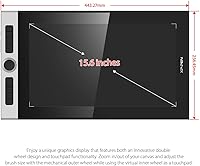
  • Screen Size: The active drawing area measures 15.4 inches diagonally within a 15.6-inch full display panel.
  • Resolution: The display outputs at 1920x1080 (Full HD), delivering a pixel density suited to general illustration and design work.
  • Panel Type: A full-laminated IPS LCD panel eliminates the air gap between the glass and display layer, reducing parallax for more accurate pen-to-cursor alignment.
  • Color Gamut: The screen covers 92% of the Adobe RGB color space, enabling rich, accurate color representation for illustration and photo-composite workflows.
  • Pressure Sensitivity: The passive stylus supports 8192 levels of pressure sensitivity, allowing fine-grained control over line weight and brush opacity.
  • Tilt Support: The stylus recognizes tilt angles up to 60 degrees, enabling natural shading and calligraphic stroke variation.
  • Stylus Power: The included stylus is entirely battery-free, drawing power passively from the display surface with no charging required.
  • Express Keys: Eight fully programmable shortcut keys are built into the left edge of the device and can be remapped via the XP-Pen driver software.
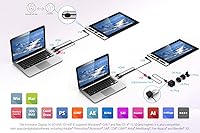
  • Connectivity: The display connects via a single three-in-one USB cable that carries power, video signal, and data through one connection point.
  • Profile Thickness: The device measures just 9mm at its thinnest point, placing it among the slimmest pen displays in the 15-inch category.
  • Dimensions: Overall physical dimensions are 17.44 x 10.08 x 0.35 inches, making it comparable in footprint to a 15-inch laptop.
  • Weight: The display weighs 3.09 pounds, light enough for regular transport in a standard laptop bag or backpack.
  • OS Compatibility: The device is officially compatible with Windows 7, 8, and 10, as well as macOS X 10.10 and all subsequent versions at time of launch.
  • Model Number: The official model identifier for this unit is Innovator ID160F, used when referencing drivers, firmware, and XP-Pen support documentation.
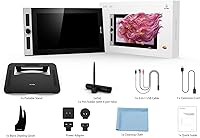
  • Included Accessories: In the box, buyers receive a portable adjustable stand, a pen holder, a set of replacement pen nibs, and the three-in-one connection cable.
  • Brand & Manufacturer: The device is designed and manufactured by XP-Pen (XP PEN), a brand with an established presence in the mid-range graphics tablet and pen display market.
  • Launch Date: This model was first made available for purchase in June 2020 and remains an active, non-discontinued product in XP-Pen's lineup.
  • Interface Standard: Connectivity relies on USB, with the three-in-one cable terminating in connections compatible with standard USB-A and USB-C host ports depending on adapter use.

Related Reviews
XP-Pen Artist 16 2nd Pen Display
86%
92%
Display Quality
85%
Stylus Performance
78%
Ease of Setup
88%
Build Quality
90%
Ergonomics/Comfort
More
ASUS ProArt Display PA169CDV 15.6” 4K Pen Display
87%
94%
Color Accuracy
89%
Portability
90%
Touchscreen Responsiveness
85%
Build Quality
92%
Wacom Pen Precision
More
GAOMON PD1220 11.6-inch Pen Display
78%
86%
Display Clarity
89%
Full Lamination Quality
88%
Pen Performance
74%
Color Accuracy
83%
Build Quality & Durability
More
FMC 15.6-Inch Wireless Portable Monitor
73%
74%
Wireless Connectivity
83%
Display Quality
89%
Portability
71%
Ease of Setup
67%
Build Quality
More
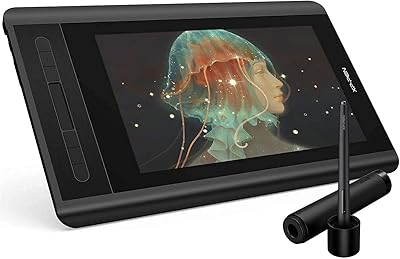
XP-Pen Artist 12 11.6-inch Pen Display
78%
88%
Pen Performance
82%
Display Quality
79%
Build Quality
63%
Ease of Setup
74%
Shortcut Keys & Touch Bar
More
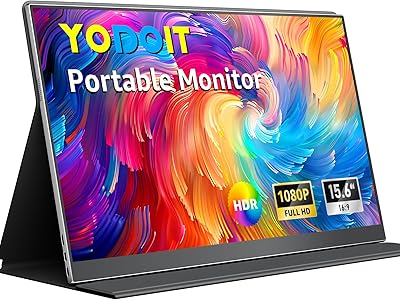
Yodoit Portable Monitor PTM15 15.6″ FHD IPS Display
85%
89%
Display Quality
94%
Portability & Design
85%
Connectivity
92%
Ease of Setup
61%
Audio Quality
More
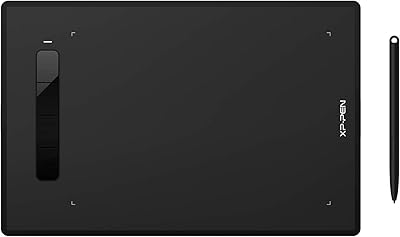
XP-Pen Star G960S Graphics Drawing Tablet
79%
91%
Value for Money
88%
Pen Sensitivity & Response
89%
Active Area Size
78%
Android Compatibility
74%
Build Quality & Feel
More
HP G9 Laptop, Intel Core i5-1235U, 16GB RAM, 1TB SSD, 15.6″ FHD Display
82%
89%
Performance
78%
Display Quality
82%
Battery Life
91%
Build Quality
85%
Software & Productivity
More
HP 15 Intel N100 16GB/256GB
77%
88%
Value for Money
83%
Everyday Performance
91%
RAM & Multitasking
67%
Display Quality
72%
Build Quality & Portability
More
Topmonitor P15.6/2.5K Portable Monitor 15.6-inch 2560×1680
86%
94%
Display Quality
90%
Portability/Size/Weight
91%
Color Accuracy
87%
Connectivity (USB-C, HDMI)
85%
Build Quality
More

FAQ

Yes, in most cases it does. Once you install the XP-Pen driver, pressure sensitivity and tilt recognition activate automatically in Photoshop, Clip Studio Paint, Krita, and most other major drawing applications. You may want to fine-tune the pressure curve in the driver settings to match your personal drawing style, but the out-of-box experience is solid for both apps.

It depends on the nature of your work. For character illustration, comic production, and general digital painting, 1080p is workable and most artists adapt quickly. However, if you regularly work on fine linework, detailed typography, or pixel-level retouching, you will notice softness along diagonal edges that a QHD display would handle better. It is an honest trade-off at this price point.

The three-in-one cable handles power, video, and data in a single connection, so no separate power brick is needed for most setups. That said, some older laptops or desktop configurations may require a USB hub or adapter to deliver enough power through the cable simultaneously. If your machine has a modern USB-C or USB 3.0 port, you are very unlikely to run into any issues.

The Wacom Cintiq remains the benchmark in pen display hardware, particularly for pen tracking accuracy, driver maturity, and build longevity. The Innovator 16 closes much of the gap on core drawing feel and color quality, but Wacom still has an edge in edge-zone accuracy, software polish, and long-term durability. The question really comes down to whether you can justify the significant price difference that Wacom commands — for students and hobbyists, this drawing monitor makes a strong case for itself.

For relaxed, controlled drawing sessions it works fine and keeps the display at a comfortable angle. The issue appears when you draw with heavier pressure or fast, wide strokes — under those conditions, some wobble is noticeable. If you draw with a firm hand consistently, you may want to look at a third-party stand or a monitor arm for a more stable setup.

Yes, it works on macOS and the setup process is generally straightforward. The persistent issue is that XP-Pen driver updates do not always align immediately with major macOS releases — after an OS update, some users temporarily lose pen pressure recognition until a matching driver version is released. It is usually resolved within a few weeks, but it is worth knowing before you buy if you update macOS frequently.

Nib wear rate depends heavily on how hard you draw and whether you have the screen texture set high. Under regular daily use, many artists find nibs last several months, but heavy-handed drawers may go through them faster. A set of replacement nibs is included in the box, and XP-Pen sells additional nib packs directly through their website and various online retailers, so sourcing them is not a problem.

The XP-Pen driver software supports application-specific profiles, which means you can assign one set of shortcuts for Photoshop and a completely different layout for Krita or Clip Studio Paint, and the display will switch between them automatically when you switch apps. It takes a bit of time to set up initially, but once configured it is one of the more useful features of the device for artists who use multiple programs.

The matte anti-glare coating is reasonably durable under normal use, but it can show abrasion near the center drawing zone over months of heavy use. For cleaning, use a dry or very lightly dampened microfiber cloth and wipe gently — avoid paper towels, alcohol-based cleaners, or any solvent, as these can degrade the coating over time. A screen protector designed for pen displays is a worthwhile investment if long-term coating preservation matters to you.

Honestly, yes — it is one of the better entry points into screen-based drawing at this price. The full-laminated panel makes the transition feel natural because there is very little visual offset between where your pen tip lands and where the cursor appears. Most first-time pen display users report that the learning curve is shorter than they expected, and the color accuracy makes work feel more rewarding immediately compared to drawing blind on a screenless tablet.

Where to Buy