Overview

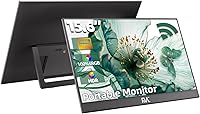
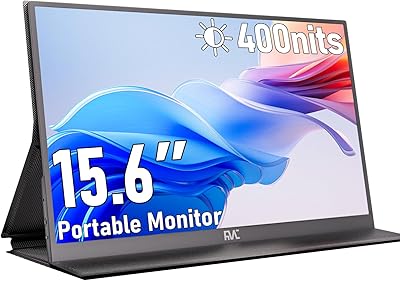
The FMC 15.6-Inch Wireless Portable Monitor enters a crowded mid-range market with a genuinely useful pitch: unplug from cable clutter and extend or mirror your laptop or phone display entirely over Wi-Fi. Using Miracast for Android and Windows devices or AirPlay for Apple gear, setup requires no drivers or dongles — just power it on and connect. The 15.6-inch IPS-ADS panel and built-in adjustable stand give it a practical edge over flat, stand-less competitors in the same price range. That said, if you need a second screen for fast-paced gaming or color-critical editing, this cable-free second display simply is not built for those jobs.

Features & Benefits

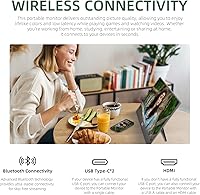
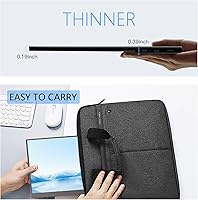
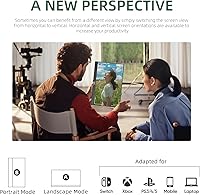
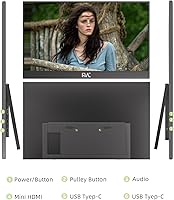
Wireless connectivity is the headline here. The FMC screen extender supports both Miracast and AirPlay, covering Android, Windows, and Apple devices without any software installation. On the display side, the 1080p IPS-ADS panel is genuinely sharp for everyday tasks — crisp text, decent color, and a 178-degree viewing angle that makes shared-screen collaboration practical. HDR and Low Blue Light modes round out the panel specs nicely. Two full-featured USB-C ports and a mini HDMI input give you wired fallback options when Wi-Fi is unreliable. The stand rotates into portrait mode for document reading or coding. At 3.01 lbs and under a third of an inch thick, it actually fits in a laptop bag without drama.

Best For

This wireless portable monitor shines most in productivity-focused, on-the-go situations. Remote workers who hop between a home office and client sites will appreciate the ability to set up a second screen in seconds without hunting for an open outlet or a matching cable. Students benefit from the portrait mode, which is surprisingly useful for reading long documents or stacking browser windows vertically. Travelers presenting decks from a MacBook or Windows laptop will find the wireless mirroring genuinely reliable for that use case. It also works well as a permanent lightweight desk companion when VESA-mounted. Where it falls short is sustained video streaming or any task demanding low display latency — that is simply not what this screen is designed for.

User Feedback

Buyers consistently praise the easy wireless setup and the quality of the IPS panel relative to the asking price — several mention being surprised by how good text looks at 1080p on this size screen. The built-in stand also earns positive remarks for feeling stable rather than wobbly. On the flip side, latency during video playback is a recurring frustration, with some users reporting noticeable lag when streaming content wirelessly. A handful mention compatibility hiccups with older laptops or phones that needed firmware updates before connecting reliably. A few buyers found the setup manual thin on detail, making initial configuration trial-and-error. The 2-year replacement warranty gets mentioned as a genuine confidence booster, particularly for a lesser-known brand entering this space.

Pros

  • Wireless setup via Miracast and AirPlay works across Android, Windows, and Apple devices with no driver installation.
  • The 1080p IPS-ADS panel produces sharp, readable text that genuinely holds up for daily productivity use.
  • Portrait mode support makes it one of the more versatile portable screens at this price point.
  • At just over 3 lbs and under a third of an inch thick, this cable-free second display fits easily into a laptop bag.
  • Two full-featured USB-C ports plus a mini HDMI input mean you have wired fallback options when Wi-Fi is not available.
  • The built-in adjustable stand feels stable and covers a wide enough angle range for most desk or table scenarios.
  • Everything you need to get started — USB-A, USB-C, HDMI cable, and adapter — ships in the box.
  • VESA mounting compatibility makes it a flexible option for users who want a wall or arm-mounted setup.
  • The 2-year replacement warranty adds meaningful peace of mind for a relatively new brand in this category.
  • Low Blue Light mode is a small but practical touch for people using this screen during long work sessions.

Cons

  • Wireless latency during video streaming or fast-moving content is a recurring frustration reported by multiple buyers.
  • Occasional connection drops have been noted, particularly in Wi-Fi-congested environments like open offices or cafes.
  • Some older laptops and phones require firmware updates or specific settings before the wireless connection works reliably.
  • The instruction manual is thin on detail, making the initial setup process more trial-and-error than it should be.
  • Build materials lean toward plastic, which some buyers find underwhelming relative to the asking price.
  • The 16:10 aspect ratio, while useful for productivity, can feel awkward when watching standard 16:9 video content.
  • No built-in battery means the screen always needs a power source, limiting truly untethered use cases.
  • Compatibility nuances across device brands mean the experience is not equally smooth for every user out of the box.

Ratings

The scores below for the FMC 15.6-Inch Wireless Portable Monitor were generated by our AI system after analyzing verified purchase reviews from buyers worldwide, with spam, bot activity, and incentivized feedback actively filtered out. Each category reflects the honest balance of praise and frustration that real users reported — nothing is softened to protect the brand, and nothing is exaggerated. Where this screen earns its stripes and where it falls short are both represented transparently.

Wireless Connectivity
74%
26%
For everyday productivity tasks like document editing, video calls, and web browsing, the Miracast and AirPlay connection holds up well enough that most users stop thinking about it after initial setup. Remote workers who switch between a home office and a hotel room consistently mention how liberating it is to skip the cable hunt entirely.
Latency is the recurring complaint that pulls this score down. Users streaming video or working with fast-moving content report a noticeable lag that breaks the experience, and connection drops in congested Wi-Fi environments — like open-plan offices or coffee shops — come up with enough frequency to be a real concern.
Display Quality
83%
The 1080p IPS-ADS panel earns genuine praise for text clarity — buyers frequently mention how readable documents and spreadsheets look even in bright ambient light. The wide 178-degree viewing angle means sharing the screen during a presentation or with a colleague beside you works without any color shift or dimming.
For anything beyond productivity use, the display shows its limits. Color accuracy falls short of what a photographer or video editor would need, and HDR support, while present, is modest in real-world impact rather than the dramatic improvement some buyers expected based on the spec listing.
Portability
89%
At just over 3 lbs and less than a third of an inch thick, this screen genuinely disappears into a laptop bag without adding noticeable weight. Frequent travelers and commuters specifically call out how easy it is to carry alongside a 15-inch laptop without the setup feeling like hauling equipment.
The power dependency is the main portability caveat — there is no built-in battery, so you always need a USB-C power source nearby, which means a power bank or outlet is a constant requirement. That one constraint limits true untethered mobility more than the weight ever does.
Ease of Setup
71%
29%
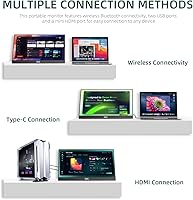
Users with modern Windows laptops and recent iPhones or MacBooks report a fairly smooth first connection experience, especially when the monitor auto-displays the three wireless connection options on boot. For the target audience of non-technical remote workers, the no-driver approach is a genuine convenience.
The instruction manual draws consistent criticism for being too sparse, leaving first-time users to troubleshoot through trial and error. Buyers with older laptops, less common Android skins, or devices requiring firmware updates before connecting report a noticeably rougher onboarding process that dampens first impressions.
Build Quality
67%
33%
The overall structure holds together well for a screen in this price tier — the chassis does not flex alarmingly, and the built-in stand feels stable on a flat desk surface without wobbling during normal use. Several buyers note it looks more presentable in a professional setting than they expected from the price.
The plastic construction is a point of friction for buyers who handle premium hardware daily. Some describe a slightly hollow feel to the chassis, and a handful mention minor fit-and-finish inconsistencies around the port area — nothing that affects function, but enough to make the build feel budget-conscious up close.
Built-in Stand
81%
19%
The adjustable stand supporting a 180-degree range and portrait mode is one of the more appreciated physical features among buyers. Being able to flip to vertical orientation for coding or long-form document reading without needing an external stand or accessory is a practical advantage that competitors at this price often skip.
On soft or uneven surfaces — a couch arm, a fabric laptop sleeve, or a slightly sloped cafe table — the stand loses its firmness and can shift during use. A few buyers also mention that the angle locks are not perfectly precise, occasionally letting the screen drift slightly from the chosen position.
Wired Fallback
78%
22%
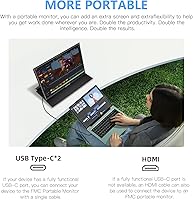
Having both USB-C and mini HDMI options as backup connections gives buyers a useful safety net when wireless performance is unreliable. The inclusion of all relevant cables in the box means most users can switch to a wired connection without a trip to a store or an extra online order.
The mini HDMI port requires a specific cable rather than the more common full-size HDMI, which can catch buyers off guard when they want to connect to a display port on a TV or projector. The port placement on the unit also receives minor criticism for being slightly awkward to reach during cable switching.
Compatibility
69%
31%
For mainstream devices — current MacBooks, Surface laptops, Samsung Galaxy phones, and Windows 11 PCs — compatibility is generally solid out of the box. The dual-protocol wireless approach covering both AirPlay and Miracast means the screen does not favor one ecosystem over another.
Edge-case compatibility issues come up regularly enough to warrant caution. Older Android devices, custom OS builds, and some budget Windows laptops require firmware updates or manual settings changes before wireless display functions properly, and the manual provides little guidance for navigating those situations.
Value for Money
72%
28%
For a user who primarily needs a wireless second screen for light productivity in multiple locations, the price-to-functionality ratio is reasonable. Buyers who use it regularly for work travel or remote setups tend to feel the investment was justified, particularly given the in-box accessory bundle that eliminates additional purchases.
Users who encounter frequent wireless drops, compatibility issues, or feel underwhelmed by the build quality relative to the asking price are more likely to feel the value proposition does not hold. At this price tier, competing wired portable monitors offer a more consistent experience, which makes the wireless premium feel harder to justify for some.
Customer Support & Warranty
82%
18%
The 2-year replacement policy — where FMC commits to replacing rather than repairing defective units — is a meaningful differentiator that buyers mention with genuine appreciation. In a category crowded with no-name brands offering minimal post-purchase support, this policy provides tangible peace of mind.
Actual support response experiences vary more than the policy would suggest. A subset of buyers report slower-than-expected response times or back-and-forth communication before warranty resolutions are reached, which tempers the goodwill the replacement policy generates.
Wireless Latency
58%
42%
For static desktop tasks — reading, typing, spreadsheet work — the wireless latency is low enough that most productivity-focused users adapt quickly and stop noticing it within a few sessions. In calm Wi-Fi environments, the delay is short enough not to disrupt a normal work rhythm.
Any use case involving video, animation, or real-time screen interaction exposes the latency clearly. Buyers who purchased this screen hoping to stream movies wirelessly or use it for casual gaming consistently report the lag as disruptive enough to abandon those use cases entirely.
Portrait Mode Usability
77%
23%
Rotating the screen into portrait orientation for reading, coding, or stacking browser windows vertically is one of the more underrated practical benefits, and users who discovered it tend to rely on it heavily. Students especially highlight portrait mode as a productivity boost for long research sessions.
The physical rotation requires manually adjusting the stand and then changing OS display settings, which adds a few steps to the workflow each time. There is no automatic rotation sensor, so users who switch orientations frequently find the process slightly repetitive across a workday.
Instruction Manual
44%
56%
The manual covers the basic initial setup flow clearly enough for users with straightforward device combinations, and the three-option wireless menu shown on boot helps orient new users without needing to read much documentation at all.
Beyond the basics, the manual offers little practical help. Troubleshooting guidance is nearly absent, compatibility notes for specific device combinations are missing, and users who run into connection or firmware issues are effectively left to search online forums for answers — a frustrating experience for a mid-range product.
Screen Size Suitability
80%
20%
The 15.6-inch size lands in a genuinely useful sweet spot for portable secondary use — large enough to comfortably extend a workspace or run a separate application window, yet compact enough to use on a standard coffee shop table alongside a laptop without dominating the available surface.
Users who come from larger desktop monitors sometimes find the 15.6-inch panel insufficient as a productivity companion, particularly when trying to run multiple windows side by side. The 16:10 aspect ratio also creates minor black bars during standard 16:9 video playback that a small number of buyers find distracting.

Suitable for:

The FMC 15.6-Inch Wireless Portable Monitor is a strong fit for remote workers and hybrid professionals who regularly move between locations and want a second screen without packing a cable kit. If you spend time in hotel rooms, co-working spaces, or coffee shops and need to extend your laptop display for spreadsheets, video calls, or multi-tab browsing, this screen delivers that without much friction. MacBook and Windows laptop users who rely on AirPlay or Miracast will find the wireless connection genuinely practical for everyday productivity tasks. Students who want a larger canvas for research or reading — especially in portrait mode — will get real value from the adjustable stand and slim carry profile. It also works for anyone who wants a lightweight VESA-mountable panel for a minimalist desk setup without committing to a full-size monitor.

Not suitable for:

Buyers who need a high-performance display for gaming, fast-action video editing, or color-graded creative work should look elsewhere — the FMC 15.6-Inch Wireless Portable Monitor is not built for those demands. Wireless display technology inherently introduces latency, and that gap becomes noticeable during anything requiring real-time screen response, such as competitive gaming or scrubbing through video timelines. The 60Hz refresh rate and IPS-ADS panel, while solid for text and static visuals, do not match the precision standards that photographers, videographers, or graphic designers typically require. Users working in environments with congested or unreliable Wi-Fi may also run into connection instability that interrupts their workflow. If you expect plug-and-play perfection with every device out of the box, be prepared for occasional compatibility troubleshooting depending on your laptop model or phone firmware.

Specifications

  • Screen Size: The display measures 15.6 inches diagonally, offering a practical working area for productivity tasks without being too bulky to carry.
  • Resolution: Native resolution is 1920x1080 pixels (Full HD 1080p), delivering sharp text and clear visuals for everyday office and productivity use.
  • Panel Type: The screen uses an IPS-ADS panel, which provides consistent color reproduction and wide viewing angles compared to standard TN panels.
  • Refresh Rate: The display runs at 60Hz, which is standard for productivity-focused monitors but not suited for high-frame-rate gaming.
  • Viewing Angle: The IPS-ADS panel supports up to 178 degrees of horizontal and vertical viewing angle, making shared viewing comfortable from most positions.
  • Color Gamut: The monitor covers 100% of its rated color gamut, providing reasonably vivid colors for general content consumption and document work.
  • HDR Support: HDR (High Dynamic Range) is supported, adding contrast depth to compatible content on devices that output an HDR signal.
  • Low Blue Light: A built-in Low Blue Light mode is available to reduce eye strain during extended work or study sessions.
  • Wireless Protocols: The monitor supports Miracast for Android and Windows devices, and AirPlay for Apple devices, enabling cable-free screen extension or mirroring.
  • Ports: Two full-featured USB-C ports and one mini HDMI port are included, providing wired connectivity options alongside the wireless modes.
  • In-Box Cables: The package includes a USB-A cable, a USB-C cable, a mini HDMI cable, and an adapter, covering most common wired connection scenarios.
  • Stand: A built-in adjustable stand supports a full 180-degree angle range and allows both landscape and portrait (vertical) orientation.
  • VESA Mounting: Two VESA mounting holes are included on the rear of the unit, making it compatible with standard monitor arms and wall mounts.
  • Dimensions: The monitor measures 14.5 x 9 x 0.3 inches, keeping the profile slim enough to fit alongside a laptop in most standard bags.
  • Weight: The unit weighs 3.01 lbs, which is light enough for regular travel without adding significant bulk to a carry bag.
  • Aspect Ratio: The screen uses a 16:10 aspect ratio, offering slightly more vertical screen real estate than the more common 16:9 format.
  • Model Number: The official model number is 15.6-Wireless, as designated by the manufacturer FMC.
  • Warranty: FMC provides a 2-year warranty under which defective units are replaced outright rather than sent for repair.

Related Reviews
FMC 15.6-Inch 4K Portable Gaming Monitor
87%
93%
Display Quality
91%
Portability & Design
85%
Touchscreen Performance
88%
Build Quality
90%
Connectivity
More
FMC 15.6-inch 2.5K Portable Monitor 400 nits
86%
89%
Display Quality
94%
Portability
87%
Gaming Performance (144Hz)
78%
Brightness
91%
Connectivity
More
Topmonitor P15.6/2.5K Portable Monitor 15.6-inch 2560×1680
86%
94%
Display Quality
90%
Portability/Size/Weight
91%
Color Accuracy
87%
Connectivity (USB-C, HDMI)
85%
Build Quality
More
Westinghouse 15.6 Inch Portable Monitor

82%
88%
Display Quality
92%
Portability
86%
Connectivity Options
94%
Ease of Setup
80%
Build Quality
More
Anyuse PM1561P 15.6-inch Portable Monitor
74%
91%
Portability & Form Factor
84%
Image Clarity
72%
Setup & Compatibility
74%
Build Quality & Durability
61%
Brightness & Outdoor Usability
More
CAPERAVE 15.6-inch Portable Monitor
85%
88%
Display Quality
92%
Portability
93%
Setup and Ease of Use
90%
Compatibility
80%
Gaming Performance
More
InnoView INVPM406 15.6-inch Portable Monitor

75%
91%
Ease of Setup
83%
Display Clarity
78%
Portability & Build
62%
USB-C Compatibility
88%
Value for Money
More
LUMIPIX 15.6-Inch Portable Monitor
84%
91%
Portability
89%
Display Quality
93%
Ease of Setup
87%
Connectivity
84%
Build Quality
More
VILVA V156F1 15.6-inch Portable Monitor

69%
74%
Display Quality
61%
Portability
82%
Connectivity & Compatibility
67%
Build Quality
83%
Value for Money
More
HotYeah 15.6-inch Portable Monitor
86%
91%
Display Quality
95%
Portability & Weight
88%
Compatibility & Connectivity
89%
Ease of Use & Setup
60%
Speaker Quality
More

FAQ

The wireless connection for display mirroring and extension is genuinely cable-free, but the monitor itself still needs a power source — you will need to connect it to a USB-C power supply or a power bank. The wireless part refers to the video signal only, not power delivery.

Yes, AirPlay is supported, so MacBooks running a compatible version of macOS can mirror or extend wirelessly without any additional software. That said, make sure your macOS is reasonably up to date, as older versions may have limited AirPlay output support.

For static or slow-moving content — documents, spreadsheets, web browsing, video calls — the latency is barely perceptible for most users. Where it becomes more obvious is during video playback or anything with fast on-screen motion, so keep expectations realistic if you plan to stream content wirelessly on it.

Absolutely. The FMC 15.6-Inch Wireless Portable Monitor includes both USB-C and mini HDMI ports, and all the necessary cables ship in the box, so switching to a wired connection is straightforward if wireless proves unreliable in your environment.

Yes, the built-in stand supports portrait orientation, and physically rotating the screen is simple. You will also need to adjust the display rotation setting in your operating system, which takes just a few seconds in Windows or macOS display preferences.

Yes, any Android phone or tablet that supports Miracast can mirror to this screen wirelessly. The experience varies slightly depending on the phone brand and Android version, so if your device is older or uses a heavily customized Android skin, it is worth checking Miracast compatibility first.

Wireless display performance is directly affected by your network environment. In congested spaces like conference centers or shared offices, you may experience connection drops or increased latency. The wired HDMI and USB-C options are your best fallback in those situations.

Most buyers report the stand as solid and stable on a flat desk surface, and the wide angle adjustment range works well in practice. On uneven or soft surfaces it can be a bit wobbly, but on a standard desk or table it holds position reliably.

No. The box includes a USB-A cable, a USB-C cable, an HDMI cable, and an adapter, so the most common wired scenarios are covered right away. You will need your own USB-C power source to run the screen, but that is typically a standard phone charger or laptop charger.

FMC covers the screen for two years and their stated policy is to replace defective units rather than repair them, which is a more buyer-friendly approach than most brands at this price point. If you run into a quality issue, reach out to FMC customer support directly with your order details.




