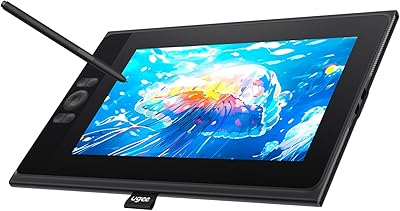
XP-Pen Artist 12 11.6-inch Pen Display
Overview
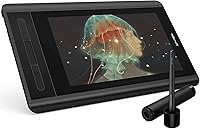
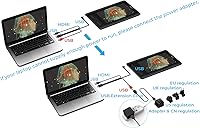
The XP-Pen Artist 12 11.6-inch Pen Display sits comfortably in the entry-to-mid-range segment, aimed at students and hobbyists who are ready to step up from a screenless tablet to something they can draw on directly. The compact 11.6-inch footprint is genuinely practical — it won't dominate your desk, and at two pounds it's easy to reposition without fuss. The full HD IPS panel is laminated, which is a meaningful inclusion at this price point. One thing worth knowing upfront: connection requires HDMI and USB-A ports, so owners of modern USB-C-only laptops will need an adapter before they can get started. In a crowded market, XP-Pen has built a credible reputation as a Wacom alternative that won't drain your budget.
Features & Benefits
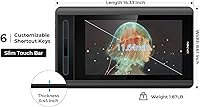
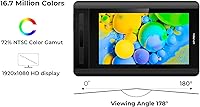
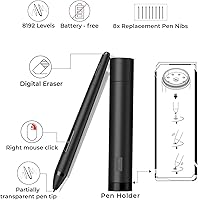
The battery-free P06 stylus is one of the first things you notice — its hexagonal grip feels remarkably close to holding an actual pencil, and the eraser end is a small but genuinely useful detail for anyone used to traditional media. With 8192 levels of pressure sensitivity, it handles light sketching and heavy line work without missing a beat. The screen arrives with an anti-reflective protector already applied, so there's no scrambling for aftermarket accessories. Six customizable shortcut keys and a touch bar cover zooming and scrolling without pulling your hands off the pen. The 72% NTSC color gamut works well for illustration and comic work, but if print-accurate color is essential to your process, this drawing monitor has a ceiling worth knowing about before you buy.
Best For
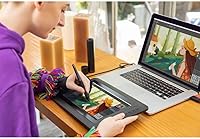
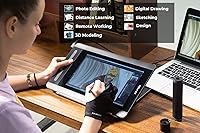
The Artist 12 is a strong fit for anyone making the jump from a basic screenless tablet to a display they can draw on directly — that shift alone tends to unlock a lot of creative confidence. Art students and hobbyists will appreciate how manageable the size is, whether on a cramped student desk or a small home setup. Remote teachers annotating slides or writing equations during live video calls will also get solid use out of it. Comic artists and illustrators working in Clip Studio or MediBang should feel right at home. What it isn't is a professional production tool for color-critical print work. But for most people considering this pen display, it punches well above what its price tag might suggest.
User Feedback
With nearly 12,000 ratings averaging 4.3 stars, this pen display has clearly earned broad buyer confidence. Most reviewers highlight the natural pen feel and pressure responsiveness as the standout qualities — exactly the things that matter most during long drawing sessions. Build quality also earns consistent praise. On the less positive side, driver software can be temperamental on certain Windows configurations, and parallax is noticeable toward the screen edges. The adapter requirement catches some buyers off guard, particularly those with newer laptops. Long-term owners tend to forgive these friction points, frequently noting that XP-Pen's customer support is responsive and that the lifetime technical assistance is a genuine reassurance when something doesn't work as expected.
Pros
- The battery-free P06 stylus feels remarkably close to a real pencil, making the transition from traditional media natural.
- Full lamination meaningfully reduces the gap between pen tip and cursor, improving drawing accuracy at the center of the screen.
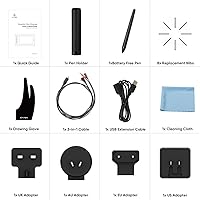
- Eight replacement nibs are included, so you won't need to budget for restocking anytime soon.
- Six remappable shortcut keys genuinely speed up common actions in Photoshop, Clip Studio, and similar apps.
- The anti-reflective screen protector arrives pre-applied — no fumbling with aftermarket films required.
- At two pounds with a slim profile, the Artist 12 fits comfortably on small student desks without dominating the workspace.
- Broad software and OS compatibility means it works across Windows, macOS, and Linux without major configuration headaches.
- XP-Pen's lifetime technical support gives long-term owners a meaningful safety net when software issues arise.
- The hexagonal pen barrel prevents rolling off the desk and provides a more ergonomic grip during long sessions.
- Nearly 12,000 verified ratings averaging 4.3 stars reflect unusually consistent buyer satisfaction for a product at this price tier.
Cons
- Driver software can be temperamental — settings occasionally reset after system restarts, requiring manual reconfiguration.
- No adapter is included, which is a real hidden cost for users with USB-C-only laptops.
- Parallax becomes noticeably worse toward the screen edges, affecting precision work away from the center.
- The 72% NTSC color gamut is inadequate for print-critical or professional color-grading workflows.
- Shortcut key buttons have been reported to develop a mushy feel over extended use.
- The touch bar can trigger accidental zoom or scroll actions during fast or side-swiping pen strokes.
- Driver updates have occasionally introduced temporary regressions, disrupting pressure sensitivity or calibration.
- The included artist glove is basic and poorly sized for users with larger hands.
- Tilt response, while technically present, is noticeably less refined than what higher-end pen displays deliver.
- First-contact customer support responses can feel generic, requiring follow-up exchanges before reaching a real solution.
Ratings
The XP-Pen Artist 12 11.6-inch Pen Display earned its scores through AI analysis of thousands of verified global buyer reviews, with spam, bot activity, and incentivized feedback actively filtered out before any scoring was applied. The results reflect where this drawing monitor genuinely excels for students, hobbyists, and educators — and where real users hit friction. Both the strengths and the honest shortcomings are baked into every number you see below.
Pen Performance
Display Quality
Build Quality
Ease of Setup
Shortcut Keys & Touch Bar
Screen Glare & Anti-Reflective Coating
Portability & Desk Footprint
Software Compatibility
Value for Money
Parallax & Cursor Accuracy
Pen Grip & Ergonomics
Driver Software & Configuration
Customer Support & Warranty
Included Accessories
Suitable for:
The XP-Pen Artist 12 11.6-inch Pen Display is a well-matched pick for students and hobbyists who are ready to make the leap from a screenless drawing tablet to one they can actually see their work on — that transition alone tends to accelerate creative growth significantly. Art and design students on a tight budget will appreciate that the laminated full HD IPS panel and capable battery-free stylus deliver a genuinely functional drawing experience without requiring a premium investment. Digital illustrators and comic artists working in Clip Studio Paint, SAI, or MediBang will find the pressure sensitivity and tilt response more than adequate for their day-to-day workflows. Remote teachers and online educators are also a strong fit — annotating slides, writing equations, or marking up documents live on a display screen is far more intuitive than trying to do the same on a trackpad or mouse. Anyone with a small desk setup will appreciate how little space this drawing monitor demands compared to larger alternatives, and the two-pound weight makes repositioning or light travel between rooms completely painless.
Not suitable for:
The XP-Pen Artist 12 11.6-inch Pen Display is not the right tool for professional designers or photographers whose work demands accurate, print-ready color reproduction — the 72% NTSC color gamut has a real ceiling, and colors that look vibrant on screen can shift noticeably in print. Buyers who work on a modern laptop with only USB-C ports should be aware that an adapter is required and is not included in the box, which adds cost and a setup step that can frustrate an otherwise straightforward experience. Users who expect driver software to be rock-solid out of the box may also hit friction — configuration issues and occasional settings resets are a recurring theme in long-term owner feedback, and troubleshooting takes patience. Professional illustrators or animators who work across the full drawing surface will notice parallax increasing toward the screen edges, which can interrupt precision work. If you need a self-contained, standalone creative device that works without being tethered to a desktop or laptop, this drawing monitor is not designed for that use case — it is entirely dependent on a host computer to function.
Specifications
- Screen Size: The active drawing area measures 11.6 inches diagonally, offering a compact but workable surface for illustration, annotation, and digital sketching.
- Resolution: The display outputs at 1920x1080 Full HD, delivering sharp linework and fine detail across the entire drawing surface.
- Panel Type: An IPS panel is used, providing wide viewing angles and consistent color representation across the screen without significant shift when viewed from the side.
- Color Gamut: The display covers 72% NTSC (equivalent to 100% sRGB), which is suitable for screen-based illustration but falls short of professional print-production standards.
- Full Lamination: The display uses full lamination technology, reducing the visual gap between the pen tip and the drawn line, particularly noticeable at the center of the screen.
- Screen Protector: An anti-reflective matte screen protector is factory-applied, helping to diffuse glare under typical indoor lighting conditions without requiring an additional purchase.
- Stylus Model: The included P06 is a battery-free passive stylus with a hexagonal barrel, an eraser end, and 8192 levels of pressure sensitivity.
- Pressure Levels: The stylus supports 8192 levels of pressure sensitivity, allowing nuanced control over line weight and opacity in compatible drawing applications.
- Tilt Support: The P06 stylus supports tilt recognition, enabling shading and brush angle variations similar to traditional media techniques.
- Shortcut Keys: Six physical shortcut keys are included along the left edge of the device and can be individually remapped through the XP-Pen driver software.
- Touch Bar: A slim touch-sensitive bar sits alongside the shortcut keys and can be configured to control zoom level or scroll direction within supported applications.
- Connectivity: The device connects to a host computer via a standard HDMI port for display output and a USB-A port for power and pen data — no wireless connection is supported.
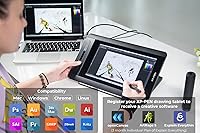
- OS Compatibility: Compatible operating systems include Windows 7, 8, 10, and 11 (32/64-bit), macOS 10.10 and later, and select Linux distributions with driver support.
- Dimensions: The unit measures 14.33 x 8.58 x 0.31 inches, keeping the physical footprint manageable for compact desk setups.
- Weight: The device weighs 2 pounds, making it straightforward to reposition on a desk or carry between workspaces without significant effort.
- Pen Nibs: Eight replacement pen nibs are included in the box, stored in the multi-function pen holder which also serves as a nib-removal tool.
- Warranty: XP-Pen provides a one-year limited hardware warranty alongside a lifetime technical support commitment for registered devices.
- Software Bundle: Registering the device on the XP-Pen website grants access to a choice of ArtRage 5, openCanvas, or Explain Everything at no additional cost.
Related Reviews
XP-Pen Artist 16 2nd Gen Pen Display
GAOMON PD1220 11.6-inch Pen Display
XP-Pen Magic Drawing Pad 12.2-inch
XP-Pen Innovator 16 15.6″ Pen Display
XP-Pen Artist 22 2nd Gen Pen Display
XP-Pen Star G960S Graphics Drawing Tablet
ASUS Vivobook L210 11.6-inch Laptop

ASUS ProArt Display PA169CDV 15.6” 4K Pen Display
Thinlerain HD-116 11.6-inch Portable Monitor