XOPPOX D161 15.6″ Pen Display Tablet
Overview
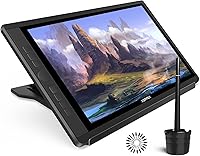
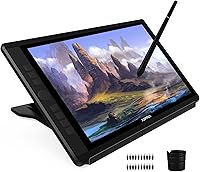
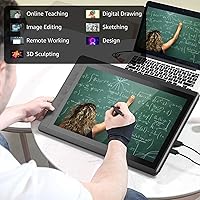
The XOPPOX D161 15.6″ Pen Display Tablet sits in a competitive budget segment where lesser-known brands have to earn trust through specs and real-world performance rather than name recognition. Unlike screenless drawing tablets, having an actual display to draw on changes the experience considerably — you see exactly where your pen lands, which cuts down on the learning curve. Keep in mind this is not a standalone device; it needs a computer to function. If you go in expecting a professional studio tool, you will be disappointed. But as an entry point for hobbyists, students, and anyone curious about digital art, it offers a lot for the price.
Features & Benefits
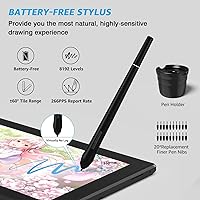
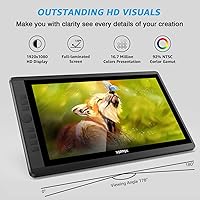
The 15.6-inch IPS panel is full-laminated, which means the glass sits flush against the display layer — less air gap, less parallax, and colors that feel truer to life. With 120% sRGB coverage, the XOPPOX drawing monitor handles everyday illustration and photo editing well, though color-critical professional work would demand something more calibrated. The battery-free stylus registers 8192 levels of pressure and up to ±60° of tilt, which translates into genuinely expressive line variation. An adjustable stand ships in the box — that is not a given at this price. One caveat: if you are switching from another brand's tablet, you will need to fully uninstall its drivers first, or you will run into conflicts.
Best For
This drawing tablet with screen makes the most sense for students picking up digital illustration for the first time, and for educators who need to annotate lessons visually on screen. Hobbyists who have been using a screenless tablet and want to see their strokes in real time will find the upgrade immediately satisfying. It also works well for photographers who want a tactile pen input for retouching without spending heavily on a premium display. On the flip side, professional colorists or motion designers who rely on factory-calibrated accuracy should look at more established options. One hard limitation: Chrome OS is entirely unsupported, so Chromebook users need to look elsewhere.
User Feedback
Across roughly 193 ratings, the pen display holds a solid 4.0-star average — respectable for a newcomer brand. Buyers consistently highlight screen clarity as a standout for the price, and most find the stylus responsive enough for everyday illustration work. The included stand also earns frequent appreciation. Where things get more mixed is setup: Mac users mention jumping through a few extra hoops with system permissions after driver installation, and anyone migrating from a different tablet brand needs to fully remove previous drivers first. Chrome OS incompatibility trips up buyers who miss the fine print. Long-term durability data is still thin, but customer support responsiveness appears generally solid based on available user reports.
Pros
- The full-laminated IPS screen significantly reduces parallax, so your pen strokes appear exactly where you expect them.
- At 15.6 inches, the drawing surface is genuinely usable — not a cramped compromise like smaller budget displays.
- The battery-free stylus never needs charging, which removes one persistent annoyance from daily creative workflows.
- 8192 levels of pressure sensitivity and ±60° tilt support give expressive line control that holds up in real illustration work.
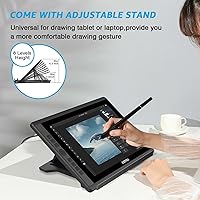
- An adjustable stand ships in the box — a practical inclusion that many competitors leave out at this price.
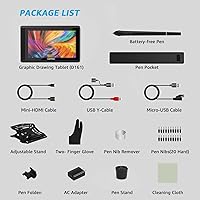
- 20 replacement nibs is a generous bundle that means you likely will not need to buy extras for a long time.
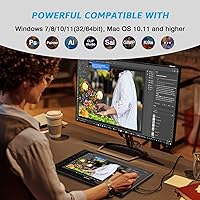
- Compatible with Photoshop, Illustrator, Clip Studio Paint, and SAI right out of the box with driver installation.
- A 12-month warranty backed by lifetime technical support is a reassuring commitment for a lesser-known brand.
- Users consistently praise the screen clarity relative to what this drawing tablet with screen costs.
- The USB connectivity keeps setup straightforward — no wireless pairing or additional dongles required.
Cons
- Driver installation requires fully removing any previous tablet brand software first, which can catch users off guard.
- Mac users face an extra layer of setup involving system permissions and a mandatory restart before the tablet works.
- Chrome OS is entirely unsupported, making this a non-starter for Chromebook owners regardless of workarounds.
- The brand has a limited track record, so long-term reliability data is still thin compared to established competitors.
- Color accuracy at 92% NTSC is adequate for casual use but will not satisfy anyone doing color-critical professional work.
- The device cannot function independently — it always requires an active computer connection, with no standalone mode.
- Build quality feedback from long-term users is sparse, making it harder to assess how the hardware holds up over years of use.
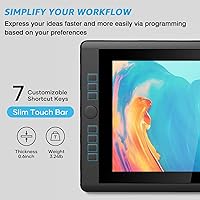
- The pen has only two shortcut buttons, which may feel limiting for artists who rely heavily on customizable controls.
- At nearly 6 pounds packaged, portability is workable but not as effortless as lighter, more compact alternatives.
- Customer support quality, despite the lifetime support promise, remains difficult to verify consistently across user reports.
Ratings
The XOPPOX D161 15.6″ Pen Display Tablet has been scored by our AI rating engine after analyzing verified global user reviews, with spam, bot-submitted, and incentivized feedback actively filtered out before scoring. The result is an honest, data-driven breakdown that surfaces both what this drawing tablet genuinely gets right and the friction points real buyers consistently run into. Every category score reflects the full spectrum of user sentiment — not just the highlights.
Display Quality
Stylus Performance
Value for Money
Setup & Driver Experience
Build Quality
Screen Size & Workspace
Software Compatibility
Color Accuracy
Pen Comfort & Ergonomics
Included Accessories
Mac Compatibility
Customer Support
Stand Quality
Anti-Glare Performance
Suitable for:
The XOPPOX D161 15.6″ Pen Display Tablet is a strong match for students, hobbyists, and self-taught digital artists who want a real screen to draw on without spending heavily on a brand-name alternative. If you have been using a screenless tablet and constantly struggle with the hand-eye disconnect, upgrading to a display tablet at this price point is a practical step that removes a lot of frustration. Online tutors and teachers who annotate lessons or demonstrate techniques live will find the 15.6-inch screen large enough to work comfortably without dominating a desk. Photographers who do occasional retouching work — cropping, masking, local adjustments — will appreciate the pen input without needing a color-critical professional display. As long as you are running Windows or Mac and have a computer to pair it with, this drawing tablet with screen delivers genuine utility for everyday creative work.
Not suitable for:
The XOPPOX D161 15.6″ Pen Display Tablet is not the right tool for professionals whose work depends on precise, factory-calibrated color output — 92% NTSC coverage is decent for casual use, but it falls short of what print designers, retouchers, or motion artists typically require. Chromebook users should skip it entirely, as Chrome OS is explicitly unsupported and there are no workarounds. If you already use another brand's drawing tablet and are not comfortable uninstalling its drivers cleanly, the setup process could become a genuine headache. Buyers expecting a standalone device — something that works independently without a laptop or desktop — will be disappointed, as this pen display requires a computer connection at all times. And if long-term brand support and a proven track record matter to you, XOPPOX is still an unknown quantity compared to more established players in the space.
Specifications
- Screen Size: The active display area measures 15.6 inches diagonally, providing a comfortable working surface for illustration and annotation tasks.
- Resolution: The IPS panel outputs a full 1920x1080 HD resolution, delivering sharp detail across the entire drawing surface.
- Panel Type: A full-laminated IPS panel is used, which eliminates the air gap between glass and display layer to reduce parallax and improve viewing consistency.
- Color Gamut: The display covers 120% sRGB and approximately 92% NTSC, suitable for casual creative work though not factory-calibrated for professional color production.
- Color Depth: The screen renders up to 16.7 million colors, supporting smooth gradients and detailed tonal work in everyday illustration and editing.
- Viewing Angle: IPS technology enables a 178° viewing angle, so color and contrast remain consistent when viewed from almost any position.
- Pressure Sensitivity: The battery-free stylus supports 8192 levels of pressure sensitivity, allowing for expressive variation in line weight and brush dynamics.
- Tilt Support: The stylus detects up to ±60 degrees of tilt, enabling natural shading and brush angle effects in compatible software.
- Stylus Power: The pen is entirely battery-free, drawing power passively from the tablet so it never needs charging or battery replacement.
- Pen Buttons: Two programmable shortcut buttons are built into the pen body for quick access to common functions like undo or eraser toggle.
- Replacement Nibs: Twenty replacement pen nibs are included inside the pen holder, providing a substantial long-term supply without additional purchases.
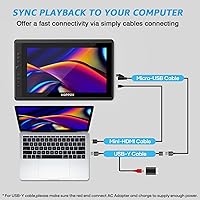
- Connectivity: The tablet connects to a computer via USB, with no wireless or Bluetooth option available.
- Compatible OS: Supported operating systems include Windows 7, 8, 10, and 11 (32/64-bit) and Mac OS 10.11 and higher; Chrome OS is explicitly unsupported.
- Included Stand: An adjustable stand ships in the box, allowing the user to set a comfortable working angle without a separate accessory purchase.
- Model Number: The official model designation is D161, used to identify the correct driver package on the XOPPOX support website.
- Package Weight: The full retail package weighs 5.94 pounds, accounting for the tablet, stand, stylus, pen holder, and all included accessories.
- Package Dimensions: The retail box measures 19.5 x 12.5 x 4 inches, relevant for shipping expectations and storage planning.
- Warranty: A 12-month manufacturer warranty is included, covering defects and hardware failures from the date of purchase.
- Technical Support: XOPPOX offers lifetime technical support after purchase, including driver downloads, installation guides, and electronic user manuals via their official website.
- Software Compatibility: The tablet is confirmed compatible with major creative applications including Photoshop, Illustrator, Clip Studio Paint, Painter, and SAI.
Related Reviews

ASUS ProArt Display PA169CDV 15.6” 4K Pen Display
GAOMON PD156Pro 15.6″ Pen Display Tablet
GAOMON PD1220 11.6-inch Pen Display
FMC 15.6-Inch Wireless Portable Monitor
Artisul D16 15.6-inch Pen Display
Wacom Intuos3 PTZ431W Wide Format Pen Tablet
Yodoit Portable Monitor PTM15 15.6″ FHD IPS Display
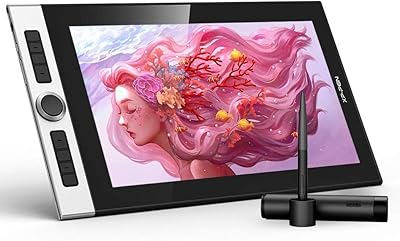
XP-Pen Innovator 16 15.6″ Pen Display
TUOHAITIME K10 11-inch Android Tablet