GAOMON PD156Pro 15.6″ Pen Display Tablet
Overview
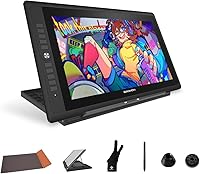
The GAOMON PD156Pro 15.6″ Pen Display Tablet sits in a sweet spot of the pen display market — capable enough for serious hobbyists and semi-professional artists, without demanding a premium price for the privilege. The standout feature is the fully laminated screen, which puts it ahead of many alternatives at a similar cost. One cable connects it to your laptop, you flip open the foldable stand, and you’re drawing within minutes. That kind of setup convenience matters. It won’t outperform high-end professional displays in every technical respect, but it covers the essentials well and does so at a price most independent artists can actually justify.
Features & Benefits
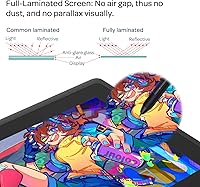
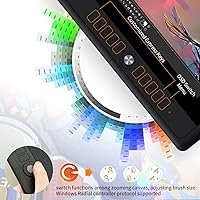
The full-lamination technology is the feature that most directly affects your drawing experience. Without an air gap between the cover glass and the display panel, your pen feels like it’s touching the actual image rather than hovering above it — a subtle difference that becomes very obvious once you’ve tried it. Pen accuracy is strong thanks to high-level pressure sensitivity and a responsive report rate that keeps up even during fast, confident strokes. The tilt recognition adds expressiveness to brushwork in programs that support it. Color output is vivid and wide-gamut, though serious color-grading work may still need some manual calibration. The 10 shortcut keys and dial are genuinely useful once configured, and the single cable setup keeps your desk tidy.
Best For
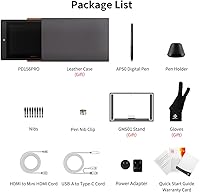
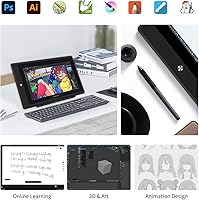
This drawing monitor is a natural fit for anyone upgrading from a basic screenless tablet who wants the experience of actually seeing their hand on the canvas. Anime and illustration artists in particular will appreciate the color range and the pen accuracy for fine linework. Students and freelancers benefit from how light and portable it is — pack it in the included leather case, toss it in a bag, and it travels without issue. Online educators and streamers who annotate or sketch during live sessions will find the shortcut keys and dial genuinely speed things up. If you want laminated display quality without the commitment of a flagship price, this is a category worth considering.
User Feedback
Across a broad base of buyer reviews, the GAOMON 15.6-inch tablet earns consistent praise for its color accuracy, the satisfying feel of the matte surface under the stylus, and the welcome simplicity of the single-cable connection. Portability comes up often — people appreciate being able to move it between a home desk and a studio or classroom without drama. On the critical side, driver installation is the most common friction point; it’s not broken, but it’s not always smooth, and Windows users tend to have an easier time than Mac users. The dial key is hit-or-miss depending on which software you use. Overall satisfaction is high, but go in with realistic expectations around initial setup.
Pros
- Full lamination eliminates the gap between pen and image, making drawing feel far more intuitive than non-laminated alternatives.
- The matte anti-glare surface reduces eye strain and holds up well under bright studio lighting.
- Pen response is fast and accurate enough for confident, expressive brushwork across a wide range of drawing software.
- Color output is vivid and wide-gamut, covering most illustration and anime art needs without extra calibration.
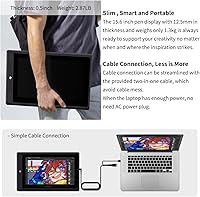
- A single 3-in-1 cable handles power and display, which keeps your workspace clean and travel setup minimal.
- Ten customizable shortcut keys and a dial wheel genuinely speed up repetitive tasks once configured to your workflow.
- At under 3 pounds, this drawing monitor is easy to carry between home, school, or a studio.
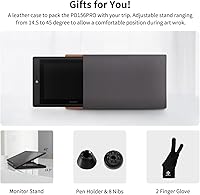
- The included foldable stand and leather carrying case add real practical value straight out of the box.
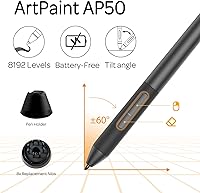
- The battery-free stylus never needs charging, so it is always ready when you are.
- A strong rating across a large number of buyer reviews points to consistent real-world satisfaction.
Cons
- Driver installation can be finicky, particularly on certain Mac configurations, and may require troubleshooting before first use.
- The dial key’s usefulness is software-dependent and largely limited to Windows 10 and above environments.
- FHD resolution is adequate but may feel dated to artists upgrading from a high-resolution monitor setup.
- Color calibration controls are basic, which is a limitation for workflows where precise color output really matters.
- The screen size, while portable, may feel cramped for artists who prefer working on large canvases with fine detail.
- No built-in color profiles or hardware calibration support means initial color accuracy varies and requires manual adjustment.
- Some users report that express key mappings reset or need reconfiguring after driver updates.
- The stand offers limited angle adjustments, which may not suit every ergonomic preference during long drawing sessions.
Ratings
The scores below reflect an AI-driven analysis of verified buyer reviews for the GAOMON PD156Pro 15.6″ Pen Display Tablet, drawn from thousands of real-world user experiences worldwide, with spam, bot-generated, and incentivized reviews actively filtered out. Each category is scored independently to give you an honest, granular picture of where this drawing monitor genuinely excels and where it falls short. Both the enthusiasm of satisfied artists and the frustrations of users who hit roadblocks are transparently represented here.
Pen Accuracy & Responsiveness
Screen Quality
Full Lamination Quality
Driver & Software Setup
Matte Surface & Drawing Feel
Portability & Form Factor
Shortcut Keys Usability
Dial Key Functionality
Color Accuracy
Stylus Ergonomics & Grip
Single-Cable Convenience
Build Quality & Durability
Value for Money
Tilt Sensitivity in Practice
Suitable for:
The GAOMON PD156Pro 15.6″ Pen Display Tablet is a strong match for hobbyists and intermediate digital artists who are ready to move beyond a screenless tablet but aren’t yet at the stage where they need professional-grade hardware. Anime and illustration artists will find the wide color range and responsive pen particularly well-suited to detailed linework and vibrant character art. Students juggling limited budgets and limited desk space will appreciate how light and slim it is — it slips into a bag without adding serious weight to your day. Freelancers who work from coffee shops, co-working spaces, or client offices benefit from the single-cable setup, which makes packing up and getting started again almost effortless. Online educators and streamers who need to sketch, annotate, or demonstrate techniques live will also get real value from the programmable shortcut keys and dial wheel, which reduce the constant need to reach for a keyboard mid-session.
Not suitable for:
The GAOMON PD156Pro 15.6″ Pen Display Tablet is not the right tool for professional studios where color-critical output — think print production, commercial illustration, or professional photo retouching — demands factory-calibrated, hardware-profiled displays. The FHD resolution, while perfectly adequate for most drawing work, will feel limiting to artists accustomed to higher-resolution panels when working on highly detailed pieces at close range. Mac users should be aware that driver compatibility has caused frustration for some buyers, and while it is not a universal issue, it is common enough to warrant caution if macOS is your primary environment. The dial key, though a nice addition in concept, relies on Microsoft’s Radial protocol, meaning its functionality is inconsistent outside of Windows 10 and above, and even then it depends on the application. Anyone expecting a no-compromise professional display at this price will come away disappointed — this is a capable mid-range option, not a flagship.
Specifications
- Screen Size: The active drawing area spans 15.6 inches diagonally, offering a comfortable working surface for illustration and design work.
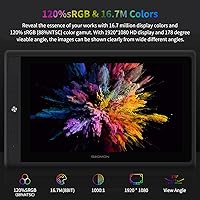
- Resolution: The display outputs at 1920x1080 full HD, delivering sharp, clear visuals suitable for detailed digital artwork.
- Color Gamut: Covers 120% of the sRGB color space, producing vivid, saturated colors appropriate for illustration, anime, and graphic design workflows.
- Display Type: Fully laminated panel with a pre-applied anti-glare matte film that reduces parallax and diffuses ambient light for a paper-like drawing feel.
- Pen Pressure: The included AP50 stylus registers pressure across a wide sensitivity range, enabling expressive line variation from the lightest sketch to the heaviest stroke.
- Report Rate: The stylus communicates with the display at 266 points per second, keeping pen tracking responsive even during fast, fluid gestures.
- Tilt Recognition: Supports up to 60 degrees of tilt recognition, allowing artists to vary brush edges and shading angles the way they would with a traditional media tool.
- Stylus Type: Battery-free AP50 stylus with two customizable side buttons requires no charging and is ready to use at all times.
- Shortcut Keys: Includes 10 fully programmable express keys that can be mapped to any function within compatible drawing and design software.
- Dial Key: A multi-function dial wheel follows the Microsoft Radial protocol, enabling on-the-fly adjustments to brush size, zoom, or other parameters in supported Windows applications.
- Connectivity: Connects to a host computer via a single 3-in-1 cable combining HDMI and USB signals, allowing the tablet to draw power directly from a compatible laptop port.
- Weight: The unit weighs 2.86 pounds, keeping it light enough for regular transport between work locations.
- Thickness: At approximately 12mm thin, the tablet has a slim profile that slides easily into a bag or backpack alongside other gear.
- OS Compatibility: Compatible with Windows 7 and all later versions, as well as macOS 10.12 Sierra and newer, though driver experience may vary between platforms.
- Software Support: Works with major creative applications including Photoshop, Clip Studio Paint, Illustrator, Krita, FireAlpaca, MediBang, SAI 2, and SketchBook Pro, among others.
- Included Stand: Ships with a foldable monitor stand that supports multiple viewing and drawing angles to suit different ergonomic preferences.
- Carrying Case: A fitted leather carrying case is included in the box, providing basic scratch and impact protection during transport.
- Dimensions: Physical footprint measures approximately 13.54 x 7.62 inches with a depth of roughly 0.1 inches at its thinnest point.
Related Reviews

ASUS ProArt Display PA169CDV 15.6” 4K Pen Display
GAOMON PD1220 11.6-inch Pen Display
XOPPOX D161 15.6″ Pen Display Tablet
Artisul D16 15.6-inch Pen Display
FMC 15.6-Inch Wireless Portable Monitor
Wacom Intuos3 PTZ431W Wide Format Pen Tablet
XP-Pen Innovator 16 15.6″ Pen Display
Yodoit Portable Monitor PTM15 15.6″ FHD IPS Display
GAOMON M10K PRO 10×6.25 Drawing Tablet