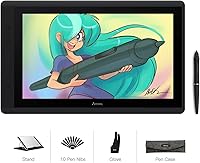
Overview

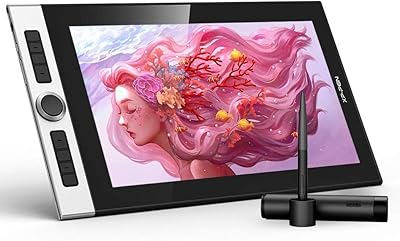
The Artisul D16 15.6-inch Pen Display sits comfortably in the mid-range of the pen display market, targeting hobbyists and semi-professional digital artists who want a real screen without paying a premium. The full-laminated IPS panel with anti-glare film is a genuine upgrade over screenless tablets — you're drawing directly on what you see, which changes the experience noticeably. At 3.42 pounds, it's portable enough to move between rooms or pack for occasional trips, though calling it ultralight would be a stretch. One important thing to clarify upfront: this drawing monitor requires a wired USB connection to a computer at all times. It is not a standalone device.

Features & Benefits

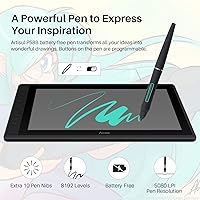
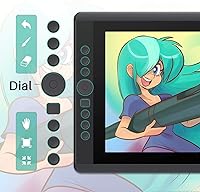
The battery-free P58B stylus is one of the strongest selling points here — 8192 levels of pressure sensitivity means your light sketching strokes and heavy ink passes actually register differently, which matters when you're working on detailed illustrations. Full lamination is what makes this feel like a proper drawing surface rather than a glass pane you're poking at from a distance. The color coverage sits at 76% Adobe RGB, which is solid for most illustration and design work, but worth knowing if you're prepping assets for professional print production. The seven shortcut keys and programmable dial handle undo, brush sizing, and canvas navigation without breaking your flow, and the six-angle stand helps you find a comfortable working position.

Best For

This drawing monitor is a natural fit for students and hobbyists stepping up from a screenless tablet for the first time — having the screen and pen in the same place makes the adjustment feel much less steep. It also works well as a second monitor for online teachers who need to annotate or sketch during live sessions. Graphic designers working in Photoshop or Illustrator will find the resolution and color range more than adequate for most daily tasks. The shortcut layout and dial are both fully remappable, so left-handed users get the same comfortable experience without workarounds. Just keep in mind it is not well suited for color-critical professional print work.

User Feedback

Across more than 600 ratings, the Artisul D16 holds a 4.2-star average — a score that reflects genuine satisfaction rather than hype. The pressure responsiveness and battery-free stylus feel are the two things buyers mention most positively, with many noting it punches above its price class compared to better-known brands. Where things get more mixed is around the driver software. Installation is not difficult exactly, but it is not plug-and-play either — some users hit configuration snags that took real troubleshooting to sort out. The stand also draws divided opinions; some find it sturdy enough, others less so. Build quality concerns are a minority view, but worth factoring in if long-term durability is high on your list.

Pros

  • Battery-free stylus means no charging interruptions during long creative sessions.
  • 8192 pressure levels translate subtle and heavy strokes accurately across most major drawing software.
  • Full lamination noticeably reduces parallax, making pen-to-cursor alignment feel natural and precise.
  • Seven programmable shortcut keys and a customizable dial reduce repetitive menu navigation significantly.
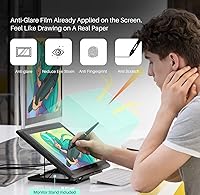
  • Anti-glare film cuts down eye strain during extended work sessions under bright ambient lighting.
  • Works out of the box with Photoshop, Illustrator, Clip Studio Paint, SAI, and Corel Painter.
  • Six-angle adjustable stand lets you find a comfortable working position without buying extra accessories.
  • Ambidextrous shortcut remapping makes this drawing monitor genuinely practical for left-handed artists.
  • Broadly positive ratings across hundreds of reviews suggest consistent real-world satisfaction at this price tier.

Cons

  • Driver installation is not plug-and-play and has caused a recurring frustration for multiple users.
  • Stand rigidity disappoints some buyers, with noticeable flex during heavier or faster pen strokes.
  • USB-only wired connection means the display is always tethered — no wireless or standalone option exists.
  • 76% Adobe RGB coverage rules out this pen display for professional print or color-critical workflows.
  • No pen tilt support limits brush angle simulation for artists who rely on that technique.
  • 1920×1080 resolution can feel constraining when working on large canvases with fine, intricate detail.
  • Plastic build materials feel less premium to some users compared to similarly priced competing displays.
  • Post-update driver conflicts have caused setup headaches for a subset of users on both Windows and Mac.
  • Customer support access routes through the retail order system, which some buyers find slow and indirect.

Ratings

Our scoring for the Artisul D16 15.6-inch Pen Display was generated by AI after analyzing thousands of verified buyer reviews from global markets, with automated filters applied to remove incentivized, duplicate, and bot-generated submissions. Each score reflects the honest distribution of real user satisfaction across thirteen product-specific categories. Areas where this drawing monitor earns genuine praise are recognized, and areas where real buyers consistently hit friction are scored accordingly — no category has been softened or padded.

Pen Performance
88%
The battery-free P58B stylus is the most consistently praised feature, with 8192 pressure levels delivering real variation between light sketches and heavy linework in Photoshop or Clip Studio Paint. Buyers upgrading from entry-level screenless tablets repeatedly note how natural and responsive the pen feels during detailed illustration sessions.
The absence of tilt recognition is a meaningful gap for artists who rely on brush angle variation to simulate traditional media. Those with complex tilt-dependent brush presets in Corel Painter or SAI will need to adjust their workflow or consider a different pen system entirely.
Display Quality
79%
21%
The full-laminated IPS panel makes a genuine difference when drawing for extended periods under desk lamps or near windows. The 178-degree viewing angle keeps colors consistent whether you are working upright or at a steep tilt, which matters during side-by-side composition review sessions.
At 1920×1080, working on large detailed canvases can feel limiting when zoomed out to see the full composition at once. The display is not factory-calibrated either, so some buyers spend real time manually adjusting brightness and color temperature before the output feels properly dialed in.
Color Accuracy
61%
39%
For illustration, character design, and web-focused graphic work, the 76% Adobe RGB coverage produces colors that are pleasing and consistent enough for daily output. Buyers working exclusively on digital assets — social media graphics, webcomics, online portfolios — report no meaningful issues with how their finished work looks across screens.
Anyone comparing files from this pen display against a wider-gamut monitor will notice the difference immediately, particularly in saturated greens and blues. Professional photographers, brand identity designers, and anyone preparing artwork for commercial print should treat the 76% Adobe RGB figure as a genuine barrier, not a minor footnote.
Value for Money
86%
This is where the Artisul D16 earns its strongest and most consistent praise. Buyers repeatedly draw favorable comparisons to competing brands that charge significantly more for similar or only marginally better specifications, making this drawing monitor a compelling entry point into the pen display category.
Buyers who pushed this display into more demanding professional workflows found that the limitations in color accuracy and build rigidity eventually justified upgrading. The value proposition holds firmly for its intended mid-range audience, but professionals testing it at budget prices tend to reach its ceiling faster than expected.
Driver & Software
54%
46%
When the driver runs cleanly, the configuration options are genuinely useful — shortcut keys and the dial can be remapped per-application, which artists switching between multiple programs will appreciate. Users who persist through the initial setup generally report reliable day-to-day performance once everything is properly configured.
Driver-related complaints are among the most recurrent across verified reviews, with users citing installation confusion, functionality drops after OS updates, and the occasional need to reinstall entirely. This is not a plug-and-play experience, and buyers who are not comfortable with basic software troubleshooting may find the ongoing maintenance genuinely frustrating.
Build Quality
67%
33%
The slim 0.65-inch profile and lightweight plastic construction keep the unit easy to position on a desk without unnecessary bulk. For hobbyists and students using it at a fixed workstation, the build holds up adequately for consistent daily use without obvious structural concerns.
The stand attracts the most consistent build-related criticism — a number of users describe noticeable flex or wobble during active drawing at steeper angles. The plastic body also feels less substantial than competing displays in a similar price range, and a few buyers report visible surface wear after extended use.
Ergonomics & Stand
72%
28%
Six adjustable angles give users enough flexibility to find a comfortable drawing position without purchasing a separate arm or stand. Both right- and left-handed artists can remap all controls to their preferred orientation, which meaningfully reduces physical strain during longer creative sessions.
The stand's fixed angle increments mean some users settle for close-enough rather than an ideal tilt, particularly those who prefer very low or very steep drawing angles. A continuously adjustable arm would resolve this, but adding one represents an additional investment on top of the base purchase price.
Shortcut Keys & Dial
83%
The seven programmable keys and customizable dial draw consistent praise from artists who dislike breaking creative flow to reach the keyboard. Remapping undo, brush size, and canvas zoom to the dial in particular proves to be a meaningful workflow improvement once users take time to configure it.
Users with complex modifier-key workflows in professional Illustrator or Photoshop environments may find seven keys limiting compared to competing displays offering ten or more. The dial also lacks tactile click stops, which some users find less precise when making fine, incremental adjustments to brush size or zoom level.
Software Compatibility
84%
Compatibility across major creative applications is broad and reliable, covering Photoshop, Illustrator, Clip Studio Paint, SAI, Corel Painter, and Manga Studio without requiring workarounds. Online teachers using annotation or presentation tools alongside drawing apps also report smooth, consistent operation across the most common platforms.
Linux is not officially supported, which excludes a subset of digital artists working in open-source environments. A small number of users have also reported reduced functionality after major macOS version updates, with driver patches not always arriving as quickly as their workflows demand.
Portability
69%
31%
At 3.42 pounds with a slim profile, this drawing monitor fits in most padded laptop bags and is easy to move between rooms or carry to a classroom or studio. The compact footprint also means it does not dominate a desk the way larger professional displays do.
The mandatory wired USB connection significantly limits real-world portability — you always need a nearby computer, a stable flat surface, and active cable management. It is not a device you can quickly unpack and use in a coffee shop or during a commute, despite the manageable physical weight.
Setup & Connectivity
63%
37%
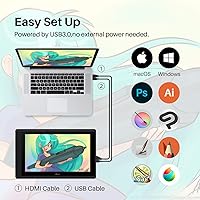
For users comfortable with driver installations, the initial setup process is fairly logical — download the driver, connect via USB, calibrate, and remap shortcuts. The USB connection itself is stable once established, with no reported latency or random disconnection issues during normal drawing sessions.
USB-only connectivity is a hard constraint that reduces compatibility with newer laptops that have moved away from full-size USB-A ports. Combined with the driver configuration curve, the first-use experience requires considerably more patience than many buyers anticipate when they first unbox the unit.
Screen Lamination
81%
19%
Full lamination is one of the most impactful design choices on this display — removing the air gap between the glass and panel brings the cursor visually close to the pen tip, which noticeably improves the drawing experience compared to non-laminated alternatives at the same price point.
While parallax is greatly reduced, it is not entirely eliminated, and users with high calibration expectations coming from premium displays may notice a residual offset near the screen corners. Recalibrating through the driver usually helps, but it is an extra step not everyone expects to need after initial setup.
Anti-Glare Coating
76%
24%
The factory-applied anti-glare film performs well in typical home studio lighting, reducing reflections from overhead LEDs and diffusing window glare without introducing significant image haze. Buyers who draw near bright windows specifically mention its effectiveness in keeping the screen readable throughout a full workday.
In very bright or direct sunlight environments, the coating reduces but does not eliminate eye strain, and some users notice a faint texture haze over fine linework when zoomed in closely. The film is also not user-replaceable if damaged or scratched, which is a practical limitation worth factoring in.

Suitable for:

The Artisul D16 15.6-inch Pen Display is well matched to hobbyists, art students, and self-taught digital illustrators who are ready to move beyond a screenless tablet but are not yet ready — or willing — to spend on a professional-tier display. The full-laminated screen and battery-free stylus together create a drawing experience that feels considerably more intuitive than working blind on a standard graphics tablet, which makes the learning curve much gentler for newcomers. Online teachers and remote educators will also find it genuinely practical as a second monitor with pen input, enabling real-time annotation during lessons without needing a separate tool. Graphic designers working on social media assets, web graphics, or client illustrations in Photoshop or Illustrator will have more than enough screen space and color accuracy for most everyday tasks. Both left- and right-handed artists are accommodated, since the shortcut keys and dial can be fully remapped to suit either orientation.

Not suitable for:

The Artisul D16 15.6-inch Pen Display is not the right fit for professionals whose work demands color-critical accuracy — the 76% Adobe RGB coverage falls short of what print designers, photographers, or brand identity specialists typically need for production-ready output. Anyone expecting a standalone drawing device will be disappointed; this drawing monitor requires a permanent wired USB connection to a computer, which limits flexibility in ways some buyers underestimate before purchasing. Users who prefer a straightforward plug-and-play setup should know upfront that the driver configuration can require real patience, and a recurring subset of owners has reported issues after software updates. Those who need genuine portability for commuting or fieldwork may find the tethered, computer-dependent setup more restrictive than the weight alone would suggest. Buyers prioritizing long-term build durability above all else may be better served investing in a more robustly constructed display from a competing brand.

Specifications

  • Screen Size: The display measures 15.6 inches diagonally, providing a spacious active drawing area well suited to detailed illustration and design work.
  • Display Type: The panel is a full-laminated IPS type, meaning the glass surface and display panel are bonded together with no air gap between them.
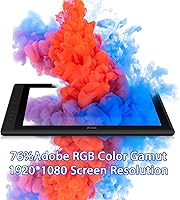
  • Resolution: Native screen resolution is 1920×1080, delivering sharp, clear detail for everyday illustration, graphic design, and online teaching tasks.
  • Color Gamut: Color coverage reaches 76% of the Adobe RGB color space, adequate for most illustration and web-focused design work but below the threshold recommended for professional print production.
  • Viewing Angle: The IPS panel supports a 178-degree viewing angle, keeping colors and contrast consistent when the screen is viewed from wide off-center positions.
  • Anti-Glare Film: A factory-applied anti-glare film is bonded to the screen surface, reducing reflections and helping minimize fingerprint buildup during extended drawing sessions.
  • Pen Model: The included stylus is the P58B, an electromagnetic resonance pen that operates without a battery and requires no charging at any point.
  • Pressure Levels: The P58B stylus detects 8192 discrete levels of pressure, enabling fine variation between light sketch strokes and heavy, saturated linework.
  • Pen Resolution: Stylus input resolution is 5080 LPI, capturing highly precise positional data across the full active drawing surface.
  • Reading Rate: The pen reports input at 223 PPS (points per second), producing smooth, lag-free stroke tracking even during fast gestures or complex linework.
  • Shortcut Keys: Seven physical shortcut keys are built into the unit and can each be remapped to custom functions through the Artisul driver software.
  • Quick Dial: A single programmable dial provides one-handed control over functions such as brush size, canvas zoom, and page scrolling, all configurable via the driver.
  • Stand: The bundled stand adjusts across six preset angles, allowing the display to be tilted to a comfortable drawing position without purchasing additional accessories.
  • Weight: The unit weighs 3.42 pounds, making it manageable for desk use and occasional transport between rooms or locations.
  • Dimensions: Physical dimensions are 16.69 × 10.31 × 0.65 inches, with a slim profile that sits neatly on most standard desk setups.
  • Connectivity: The display connects to a host computer via USB only; no wireless or Bluetooth connection option is available on this model.
  • OS Support: Compatible operating systems include Windows 7 and later and macOS 10.12 and later; Linux is not officially supported by Artisul.
  • Warranty: Artisul provides a one-year limited warranty, with support accessed through the purchase order system on the retail platform where the unit was bought.

Related Reviews

ASUS ProArt Display PA169CDV 15.6” 4K Pen Display
87%
94%
Color Accuracy
89%
Portability
90%
Touchscreen Responsiveness
85%
Build Quality
92%
Wacom Pen Precision
More
FMC 15.6-Inch Wireless Portable Monitor
73%
74%
Wireless Connectivity
83%
Display Quality
89%
Portability
71%
Ease of Setup
67%
Build Quality
More
XP-Pen Innovator 16 15.6″ Pen Display

76%
88%
Color Accuracy
62%
Display Sharpness
84%
Full Lamination & Parallax
86%
Stylus Performance
83%
Build Quality & Design
More
Topmonitor P15.6/2.5K 15.6-inch Portable Monitor

77%
91%
Image Sharpness
87%
Color Accuracy
93%
Portability
82%
Connectivity
88%
Value for Money
More
HP 15.6-inch Laptop 15-ef0021nr, Ryzen 3 3200U, 8GB RAM, 256GB SSD

82%
92%
Value for Money
85%
Performance
83%
Build Quality
89%
Portability
81%
Battery Life
More
Dell Inspiron 3593 15.6-inch Laptop
68%
74%
Everyday Performance
81%
SSD Speed & Storage
52%
Display Quality
63%
Battery Life
57%
Build Quality
More
HotYeah 15.6-inch 1080P Portable Monitor
76%
83%
Display Quality
62%
Brightness & Visibility
91%
Portability & Design
88%
Value for Money
93%
Setup & Ease of Use
More
Vonxury 16L Water-Resistant Laptop Backpack
79%
93%
Value for Money
91%
Organization Layout
88%
Laptop Protection
89%
Weight & Portability
74%
Water Resistance
More
InnoView INVPM406 15.6-inch Portable Monitor
75%
91%
Ease of Setup
83%
Display Clarity
78%
Portability & Build
62%
USB-C Compatibility
88%
Value for Money
More
GAOMON PD1220 11.6-inch Pen Display
78%
86%
Display Clarity
89%
Full Lamination Quality
88%
Pen Performance
74%
Color Accuracy
83%
Build Quality & Durability
More

FAQ

Yes, this pen display requires an active wired USB connection to a PC or laptop at all times. It has no onboard processor and cannot operate independently, so you will always need a computer nearby. It is a display and input device, not a standalone tablet.

It is not quite as simple as plugging in a mouse. You will need to download and install the Artisul driver from the manufacturer website, and some users report needing to restart the driver or their computer after system updates push through. Setting aside 20-30 minutes for the initial setup is a reasonable expectation, and keeping the driver current tends to prevent most of the recurring issues other buyers have described.

No, the P58B stylus does not support tilt recognition. If your workflow depends on tilt-sensitive brushes — common in certain inking styles or oil-painting simulations — this is a genuine limitation worth factoring into your decision before purchasing.

Yes, you can use this pen display as a standard extended monitor during normal computer work. Keep in mind that the 1920×1080 resolution and color coverage are well suited to everyday productivity but are not calibrated for color-sensitive professional tasks.

For digital illustration, social media graphics, and web design, the color output is entirely workable. For professional photography retouching or commercial print preparation, 76% Adobe RGB falls short of what most production workflows require. Photographers and print designers with strict color accuracy needs should look at displays with wider gamut coverage.

The Artisul D16 15.6-inch Pen Display is fully remappable for left-handed use. Both the shortcut key assignments and the dial function can be customized through the driver software, and the display orientation can be rotated so that all the physical controls sit on the correct side for a left-handed artist.

No. This drawing monitor is only compatible with Windows PCs and Mac computers connected via USB. It will not work with iPads, Android tablets, Chromebooks, or smartphones. If you need a drawing device that operates without a traditional computer, you would need a different product category entirely.

The P58B stylus does come with replacement nibs included in the box. Nibs gradually wear down with heavy use — this can take several months for most people — and swapping them out is straightforward using the included nib removal tool. Replacement nib packs are also available separately from Artisul.

Full lamination significantly reduces parallax on this display compared to non-laminated alternatives. In practice, the cursor tracks very close to the pen tip, which most users find natural and comfortable. Any residual offset is minimal and can typically be corrected through the calibration tool built into the driver settings.

Three and a half pounds is manageable, but once you factor in the cable, a laptop, and a bag, you are carrying a meaningful amount of gear. It fits in most standard laptop bags and works well for moving between home and a nearby studio or classroom. It is best thought of as a portable home setup rather than something you would casually pull out at a café, especially since the wired connection means you need a stable flat surface to use it properly.

Where to Buy