X9 Performance Large Print Backlit Keyboard
X9 Performance Large Print Backlit Keyboard — image 1
X9 Performance Large Print Backlit Keyboard — image 2

X9 Performance Large Print Backlit Keyboard — image 3
X9 Performance Large Print Backlit Keyboard — image 4
X9 Performance Large Print Backlit Keyboard — image 5
X9 Performance Large Print Backlit Keyboard — image 6
X9 Performance Large Print Backlit Keyboard — image 7
X9 Performance Large Print Backlit Keyboard — image 8
X9 Performance Large Print Backlit Keyboard — image 9
77%
23%

Overview

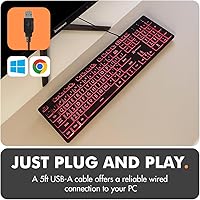
The X9 Performance Large Print Backlit Keyboard is best understood as an accessibility tool first and a budget peripheral second. It was designed for a specific person — someone who has squinted at tiny key labels one too many times, or whose eyes simply don't tolerate a poorly lit standard board. Unlike compact, trimmed-down keyboards that dominate the market, this large-print keyboard preserves the full 104-key layout, which matters more than people expect when every key needs to be visible and reachable. Plug in the USB-A cable and it works instantly — no drivers, no software to configure. Build quality is functional, not premium, and that is an honest trade-off at this price tier.

Features & Benefits

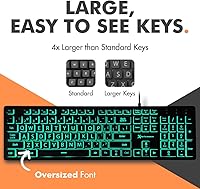
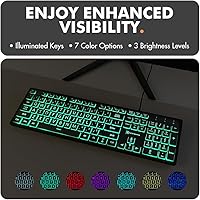
The key print on this backlit accessibility keyboard is noticeably larger than what you find on a standard board — the difference is real, not just marketing. For anyone who has ever had to lean in close just to read a key in low light, that distinction matters. Seven backlight colors with three brightness levels cover most situations: a soft blue at low brightness works well for evening use, while brighter settings handle well-lit environments too. The 14 shortcut keys handle everyday tasks like volume and media controls without hunting through menus. The 5-foot cable gives enough reach for desktop tower setups, and the keys are quiet enough for shared rooms or offices. A two-year warranty rounds things out.

Best For

This backlit accessibility keyboard makes most sense for people who want clarity over performance. Seniors and elderly users who have struggled with standard keyboards — because the labels are too small or low-light conditions turn typing into guesswork — will find this a genuine upgrade in day-to-day comfort. It also works well for anyone with low-vision needs who benefits from high-contrast, clearly labeled keys with adjustable backlighting. The wired USB connection is a solid fit for home and office desktops where Bluetooth dropouts or dead batteries simply are not worth the hassle. Beginners who want to start typing without any technical fuss will find this about as simple as it gets. Those chasing tactile feedback or fast typing speed should look elsewhere.

User Feedback

Across hundreds of reviews, the X9 keyboard holds a 4.2-star rating, and the pattern in the feedback is fairly consistent. Most buyers say the large key labels genuinely make a difference — not a placebo effect, but a real reduction in typing errors, especially for users who previously misread keys under poor lighting. The backlight is praised for being easy to switch and bright enough to be useful. Where reviews turn more critical is around build quality: the housing feels light and somewhat hollow, and some long-term users have raised durability concerns after months of daily use. The key feel is functional but flat — those used to mechanical boards will notice, but it rarely bothers the intended audience. Most still consider it good value for the problem it solves.

Pros

  • Key legends are noticeably larger than on standard keyboards, reducing typos and eye strain.
  • Seven backlight colors with three brightness levels handle a wide range of lighting conditions.
  • Full 104-key layout means no compromises on key availability compared to compact alternatives.
  • Plug-and-play USB-A connection works instantly — no drivers or software installation needed.
  • The 14 dedicated shortcut keys make everyday tasks like volume and media control effortless.
  • At 1.17 pounds with a low-profile design, this large-print keyboard is easy to reposition.
  • A five-foot cable is long enough to comfortably reach desktop towers tucked under desks.
  • Quiet key action makes it well-suited for shared living spaces or open office environments.
  • The two-year warranty provides meaningful reassurance for buyers cautious about off-brand peripherals.

Cons

  • The plastic housing feels noticeably lightweight, giving it a less durable, almost fragile impression.
  • Key feedback is flat and mushy — experienced typists will find the feel unsatisfying.
  • No wireless option means the X9 keyboard is limited to desks where cable management is practical.
  • Some long-term users have raised concerns about key legends fading after months of heavy use.
  • Backlight colors cannot be customized beyond the seven pre-set options — no per-key programming available.
  • Compatibility is limited to PC and Chrome OS; Mac users may encounter layout frustrations.
  • At full size, this backlit accessibility keyboard may feel bulky on smaller or cluttered desks.
  • No wrist rest is included, which may be a drawback for users who type for extended periods.

Ratings

Our scores for the X9 Performance Large Print Backlit Keyboard were generated by AI after analyzing thousands of verified global user reviews, with spam, bot-driven, and incentivized submissions actively filtered out. The result is a balanced picture of where this backlit accessibility keyboard genuinely earns its place and where real buyers have run into frustration. Both strengths and pain points are reflected transparently across every category below.

Key Legibility
91%
This is the single most praised aspect across the entire review pool. Users consistently report that the oversized legends make a tangible difference in daily typing accuracy, especially in low-light environments. Seniors and low-vision users in particular describe it as the first keyboard where they could actually read every key without straining.
A small but notable group of long-term users reports that the key legends can begin to fade after several months of heavy use, which undermines the core accessibility promise. The contrast remains strong when new, but durability of the print over time is a legitimate concern worth watching.
Accessibility Design
88%
The combination of large print, adjustable backlight, and full-size layout addresses multiple accessibility needs at once rather than just one. Users setting this up for elderly relatives frequently note that the keyboard removes both a visual and a confidence barrier, making the computer feel less intimidating overall.
There is no tactile differentiation between keys for users who rely on touch cues in addition to visual ones, and no high-contrast keycap color options beyond the standard black. For users with more advanced accessibility needs, these omissions may limit how fully the board serves them.
Ease of Setup
94%
Plug-and-play performance is exactly what it sounds like here — users report zero setup friction across Windows PCs, laptops, and Chromebooks. For non-technical buyers, especially those setting this up for a parent or grandparent, the absence of any driver or software requirement is a genuine relief and a frequently cited reason for a five-star review.
Mac users occasionally find the experience less smooth, with certain shortcut keys behaving unexpectedly under macOS. It is a narrow edge case, but it does come up often enough in reviews to flag as a real limitation for anyone in the Apple ecosystem.
Value for Money
84%
Among buyers who purchased this specifically for accessibility reasons, satisfaction with the price-to-utility ratio is high. The backlight, large legends, and full layout together represent a feature set that would typically cost considerably more in a specialized accessibility product, and most buyers feel they got a fair deal.
Users who bought this expecting a sturdy, long-lasting peripheral at this price point sometimes feel the build underdelivers on the implicit promise of durability. The value equation holds up well in the short term but becomes shakier for anyone expecting a three-plus-year lifespan without issues.
Key Size & Spacing
86%
The full-size layout with properly spaced keys is a meaningful differentiator from compact boards, where keys are cramped and errors are common for users with reduced fine motor control. Multiple reviewers specifically mention fewer accidental keystrokes and a more confident typing rhythm after switching to the X9 keyboard.
The key spacing, while better than compact alternatives, is not dramatically different from any standard full-size board — so users who need truly oversized physical keys, not just larger legends, may find the improvement less impactful than expected.
Backlight Quality
76%
24%
The seven color options and three brightness levels are more than enough for practical everyday use. Most users find a comfortable setting quickly, and the ability to dim the backlight for evening use without turning it off entirely is a frequently appreciated detail, especially for users who work or browse at night.
This is not a gaming-grade or programmable RGB backlight — the colors are uniform across all keys and cannot be customized per key or in patterns. Users who saw flashy product images and expected dynamic lighting effects tend to feel the reality is more modest than the marketing implies.
Build Quality
57%
43%
The build is functional and adequate for light to moderate daily use. For buyers who simply need a working, readable keyboard at home and do not subject it to heavy-handed typing or frequent transport, the construction holds up reasonably well within a normal usage window.
The hollow, lightweight plastic housing is the most common complaint across critical reviews. It flexes noticeably under pressure, and the overall feel does not inspire confidence in multi-year durability. Users who have owned more substantial peripherals will likely find the build underwhelming from the moment they pick it up.
Typing Feel
62%
38%
For the target audience — users who prioritize visibility over tactile performance — the membrane key response is perfectly adequate. Casual typists who draft emails, browse the web, or fill in forms will find nothing objectionable about the basic feedback the keys provide during everyday tasks.
Anyone who has spent time on a mechanical keyboard or even a higher-quality membrane board will immediately notice that the key travel feels short and the response feels mushy. Frequent typists who work at a keyboard for hours daily may find it fatiguing in a way that a better-built board would not be.
Noise Level
82%
18%
The quiet membrane switches earn consistent praise from users in shared environments — open-plan offices, living rooms, and bedrooms where a clicky board would disturb others. Several reviewers specifically bought this board over louder alternatives after roommates or partners complained about keyboard noise.
A small number of users note a subtle rattling sound from some keys during rapid typing, which suggests inconsistency in key stabilizer quality. It is not universal, but it does appear across enough reviews to indicate a quality-control variance in the manufacturing process.
Shortcut Keys
77%
23%
The 14 dedicated shortcut keys for media, volume, and navigation work reliably on Windows without any driver setup. Older users and beginners who previously had to dig through menus to adjust volume or pause a video find these one-press shortcuts genuinely convenient during daily computer use.
The shortcut key labels are relatively small compared to the main key legends, which feels like a missed opportunity given the board's accessibility focus. On macOS and some Chromebook configurations, several shortcuts function differently or not at all without manual remapping.
Cable & Connectivity
74%
26%
The five-foot USB-A cable handles the majority of real-world desktop setups comfortably, reaching towers placed under desks or to the side without pulling taut. Wired reliability is also a meaningful advantage for users who have had frustrating experiences with Bluetooth keyboards dropping connections.
The cable is not braided or reinforced, and a handful of reviewers have noted fraying near the USB connector after extended use. There is also no wireless option for users who prefer a cleaner desk setup, which limits the board's flexibility compared to dual-mode alternatives.
Durability
55%
45%
Under light use — occasional browsing, email, or document work — the board holds together adequately and does its job without obvious failure points in the short term. Buyers who use it a few hours a day rather than as a primary work tool tend to report fewer complaints about longevity.
The durability picture across long-term reviews is concerning. Key legends fading, plastic clips cracking, and keys becoming inconsistent in feel after twelve to eighteen months of regular use are recurring themes. The two-year warranty helps, but the underlying build suggests it was not designed for heavy daily use over several years.
Compatibility
71%
29%
For Windows and Chrome OS users, compatibility is essentially plug-and-play with no configuration required. The keyboard performs reliably across a wide range of PC desktops and laptops, which covers the vast majority of its target audience without any friction.
Mac compatibility is not officially supported, and real-world Mac user experiences are mixed at best — some keys label incorrectly and shortcuts often require workarounds. The board is also USB-A only, so users with newer thin laptops that lack a USB-A port will need a separate adapter.
Warranty & Support
79%
21%
A two-year warranty with an accessible return policy is a meaningful commitment for a keyboard at this price tier, and buyers mention it as a confidence-builder when comparing this large-print keyboard against cheaper, warranty-free alternatives. X9 Performance support responses are generally described as prompt and cooperative.
Some users report the warranty claim process requires more back-and-forth than expected, and coverage terms can feel ambiguous for issues like legend fading, which sits in a gray area between normal wear and a defect. The support experience appears inconsistent depending on when and how contact is made.

Suitable for:

The X9 Performance Large Print Backlit Keyboard is purpose-built for people who find standard keyboards genuinely difficult to use — not because they lack ability, but because most keyboards are designed without visibility in mind. Seniors and elderly users who have experienced the frustration of hitting the wrong key in dim lighting will feel the difference immediately. It also serves low-vision users well, since the oversized, high-contrast legends combined with adjustable backlighting make key identification far easier than squinting at a standard board. People who rely on wired connections for reliability — common in home offices and living room desktop setups — will appreciate the no-dropout, plug-and-play experience. Beginners who want zero technical setup, and family members who need an accessible option for a non-technical relative, will both find this a practical and honest solution.

Not suitable for:

The X9 Performance Large Print Backlit Keyboard is not the right tool for users who care deeply about the typing experience itself. Anyone accustomed to mechanical keyboards — or even a decent membrane board with firm, responsive feedback — will find the key feel underwhelming and somewhat mushy. The build material is lightweight in a way that feels more fragile than substantial, which may concern users who need something that holds up to heavy daily use over several years. This backlit accessibility keyboard also lacks wireless functionality, so users who need a clean, cable-free desk setup are better served by a Bluetooth option. Those who want an RGB keyboard for gaming or a productivity setup with per-key customization software will be disappointed — the backlight here is practical and simple, not programmable or flashy. If long-term durability is the primary concern, spending more on a sturdier board is probably the smarter call.

Specifications

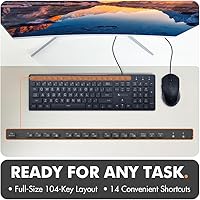
  • Layout: Full-size 104-key layout with a standard QWERTY configuration and no keys removed or relocated.
  • Shortcut Keys: Includes 14 dedicated shortcut keys for common tasks such as volume control, media playback, and navigation.
  • Backlight Colors: Supports 7 selectable backlight colors across the full keyboard simultaneously.
  • Brightness Levels: Backlight brightness is adjustable across 3 distinct levels to suit different ambient lighting conditions.
  • Connection Type: Connects via a USB-A plug with no additional adapter, receiver, or software required.
  • Cable Length: The attached USB cable measures 5 feet, providing enough reach for most standard desktop tower placements.
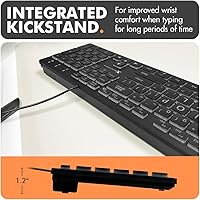
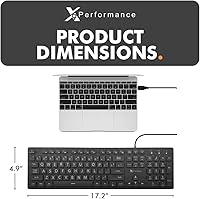
  • Dimensions: The keyboard body measures 17.2″ long by 4.9″ wide by 1.2″ tall at its highest point.
  • Weight: Total unit weight is 1.17 pounds, making it lightweight and easy to reposition on a desk.
  • Compatibility: Designed for use with Windows PCs, desktop computers, laptops, and Chromebooks via USB-A connection.
  • Key Feature: Keys feature oversized printed legends with high-contrast characters for improved readability at a glance.
  • Sound Profile: Key switches are membrane-type and operate quietly, making the board suitable for shared or noise-sensitive environments.
  • Color: Available in black with backlit legends that remain clearly visible across all supported backlight color modes.
  • Warranty: X9 Performance covers this keyboard with up to a 2-year warranty backed by customer support and easy returns.
  • Setup Required: No drivers or software installation is required; the keyboard is fully operational as soon as it is plugged in.
  • Brand: Manufactured and sold by X9 Performance, a brand focused on accessible and practical computer peripherals.

Related Reviews
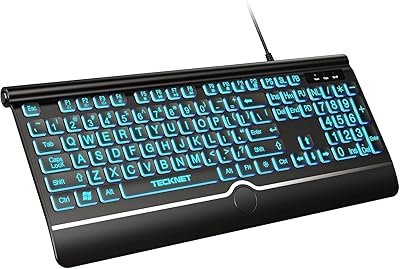
TECKNET TK-KB029 Large Print Backlit Keyboard
79%
93%
Key Legibility
88%
Backlight Quality
79%
Wrist Rest Comfort
62%
Typing Feel
67%
Build Quality
More
SABLUTE KB113 Large Print Backlit Keyboard
76%
93%
Key Readability
81%
Backlight Functionality
96%
Ease of Setup
72%
Typing Comfort
63%
Build Quality
More
MARVO WK712 Large Print Backlit Keyboard
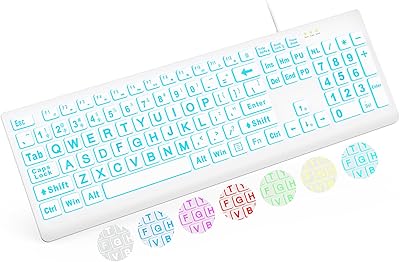
85%
89%
Typing Comfort
72%
Build Quality
95%
Key Font Visibility
81%
RGB Lighting Customization
94%
Ease of Setup
More
Luzarriba Large Print Backlit Wireless Keyboard and Mouse Combo
78%
91%
Key Visibility & Readability
94%
Ease of Setup
67%
Backlight Quality
83%
Wireless Reliability
61%
Mouse Comfort & Usability
More
Azio KB512 Large Print Keyboard
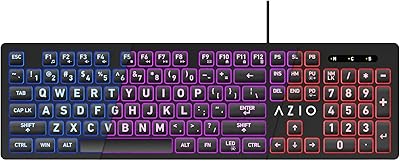
76%
93%
Key Legibility
78%
Backlight Quality
96%
Ease of Setup
57%
Typing Feel
62%
Build Quality & Durability
More
KOPJIPPOM Large Print Wireless Keyboard and Mouse Combo
78%
91%
Key Visibility & Legibility
83%
Backlight Quality
88%
Battery Life & Charging
76%
Typing Feel & Noise Level
61%
Mouse Performance
More
Fonicer Large Print Wireless Keyboard and Mouse
85%
91%
Ease of Use for Visually Impaired Users
89%
Quiet Operation
87%
Comfort and Ergonomics
83%
Wireless Connectivity
93%
Key Size and Visibility
More
Dilter Large Print Wired USB Keyboard
88%
91%
Ease of Use
96%
Key Visibility
83%
Typing Comfort
94%
Setup/Installation
85%
Build Quality
More
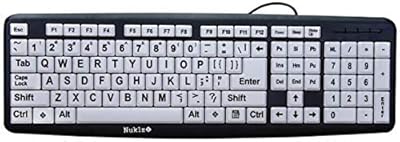
Nuklz N Magnus 125 Large Print Keyboard
85%
94%
Ease of Use
89%
Typing Comfort
96%
Key Visibility
83%
Build Quality
92%
Compatibility
More
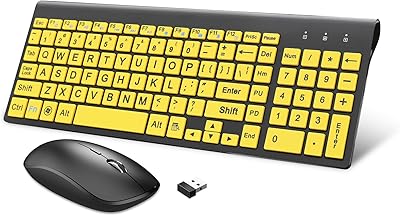
HXMJ Wireless Large Print Keyboard and Mouse Set E68 Yellow
86%
88%
Typing Comfort
91%
Visibility and Readability
89%
Wireless Connectivity
85%
Ergonomics
73%
Key Softness
More

FAQ

It is fully plug-and-play. Just connect the USB-A cable to your computer and you can start typing immediately. There are no drivers to download and no software to install, which makes it especially convenient for users who prefer to keep things simple.

Yes, the X9 Performance Large Print Backlit Keyboard is compatible with both Windows PCs and laptops, as well as Chromebooks. As long as your device has a USB-A port, you are good to go.

The backlight is controlled directly from the keyboard using dedicated function keys — no software needed. You can cycle through the 7 available colors and step through the 3 brightness levels without ever opening a settings menu.

The difference is real and visible. The printed legends on the keys are meaningfully larger than what you find on a typical board, which makes a genuine difference for anyone who has had to squint or lean in close while typing.

Honestly, it is one of the easier options available for non-technical users. The setup involves nothing more than plugging in the cable, and the large key labels remove most of the guesswork during typing. The shortcut keys for volume and media are also straightforward and clearly placed.

This backlit accessibility keyboard is not officially listed as Mac-compatible, and some key labels and shortcuts may not map correctly to macOS. If you are a Mac user, it is worth checking with X9 Performance support before purchasing, as basic typing may work but the experience could be inconsistent.

The keyboard is functional for everyday use, but it is worth being upfront: the build feels lightweight, and some long-term users have raised questions about key legend durability after extended heavy use. The two-year warranty helps cover that uncertainty, but this is not a board built to the same standard as a premium mechanical keyboard.

For most standard desk and tower setups, the 5-foot cable is sufficient. If your tower is in an unusually deep cabinet or positioned well away from your desk surface, you might want to measure first just to be safe.

Yes, the membrane keys are noticeably quieter than mechanical alternatives. You will not be drawing attention across a shared workspace. It is a solid choice for environments where noise is a consideration.

X9 Performance offers up to a two-year warranty along with customer support and an easy return policy. For an accessory at this price point, that level of backing is reassuring and sets it apart from many other budget-tier keyboards that offer little to no after-purchase support.

Where to Buy