Overview

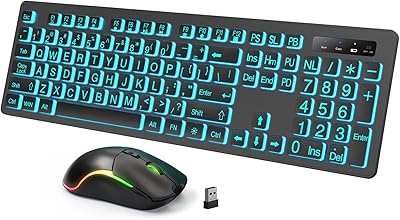
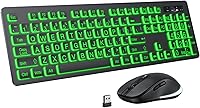
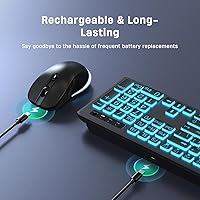
The KOPJIPPOM Large Print Wireless Keyboard and Mouse Combo entered the market in early 2024 as a practical solution for anyone who has ever squinted at a standard keyboard trying to find the right key. This is not a flashy enthusiast peripheral — it sits squarely in the budget-friendly accessibility space, targeting seniors, low-vision users, and anyone tired of hunting for tiny letters. It sports a full-size layout, oversized printed legends, and a seven-color backlit system, all powered by a single USB receiver. USB-C recharging replaces the usual disposable battery routine entirely.
Features & Benefits

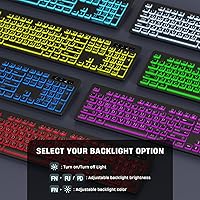
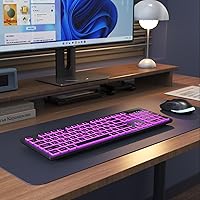
The seven backlight colors — adjustable across three brightness levels — are genuinely useful here, not just decorative. Typing in a dimly lit room is a completely different experience when the keys are actually visible. The quiet, tactile keystrokes keep noise down in shared spaces like living rooms or small offices. A single nano-receiver handles both the keyboard and mouse, which is tidier than juggling multiple USB dongles. The built-in lithium polymer battery is rated for up to 2,000 hours on standby, and a smart auto-off feature cuts the backlight after two minutes of inactivity to conserve power. Compatibility covers Windows XP through Windows 11, Chromebook, and Smart TVs — though Mac users should know that multimedia keys have limited functionality.

Best For

This backlit keyboard combo is an obvious pick for older adults or anyone dealing with low vision — the oversized legends reduce eye strain and the backlight genuinely helps in darker environments. It also works well for home office or living-room setups where squinting at a keyboard under poor lighting is an everyday annoyance. Because it recharges over USB-C, the usual frustration of hunting for AA batteries is completely gone, which is a quiet but real convenience. Casual typists who want a bit of color without committing to a high-end RGB rig will find the lighting attractive. Zero driver installation makes setup fast and stress-free for less tech-savvy users.

User Feedback

With a 4.2-star average across more than 650 ratings, this large-print wireless set has earned a largely positive reception. Buyers consistently praise the key visibility and backlight brightness, with many noting it has made computing noticeably easier for aging family members. The USB-C charging convenience comes up often too — people appreciate skipping battery runs entirely. That said, not everyone is fully satisfied. Some users find the mouse feels a bit light and plasticky. Mac owners have flagged multimedia key limitations as a genuine frustration, consistent with the brand's own disclaimer. Build quality and mouse tracking draw mixed mentions — adequate for casual daily use, but likely underwhelming for anyone who needs precision or long-term durability.

Pros

  • Oversized key legends are genuinely readable, making a real difference for seniors and low-vision users.
  • Seven backlight colors with three brightness levels offer useful flexibility for dim or dark environments.
  • USB-C recharging eliminates the ongoing cost and hassle of disposable AA batteries.
  • A single shared USB receiver for both devices means only one port used and no pairing process.
  • Plug-and-play setup works instantly on Windows — no drivers, no software, no configuration needed.
  • Quiet keystroke actuation is noticeably gentler than typical membrane keyboards in shared spaces.
  • Wireless range holds reliably up to 33 feet, covering most living-room or home-office distances comfortably.
  • At this price, the rechargeable battery life and backlit accessibility features offer strong value for casual users.
  • Chromebook and Smart TV compatibility extends usefulness beyond the standard desktop or laptop setup.

Cons

  • The backlight shuts off automatically after two minutes with no option to extend or disable the timer.
  • Mouse build quality feels lightweight and hollow, with tracking that underwhelms on anything beyond basic tasks.
  • No battery indicator light on the keyboard means the first warning of low power is often sudden failure.
  • Keycap legends on high-use keys show wear relatively quickly, which is ironic given the large-print focus.
  • Mac multimedia keys are non-functional, making this a poor fit for Apple users who rely on the function row.
  • The mouse drains its battery faster than the keyboard, creating mismatched recharge cycles.
  • Shallow key travel and limited tactile feedback can increase typo rates during longer writing sessions.
  • Dense wireless environments may cause occasional brief dropouts, though this is not unique to this combo.
  • No compact or tenkeyless variant exists, making the 17-inch width impractical for very small desks.

Ratings

The KOPJIPPOM Large Print Wireless Keyboard and Mouse Combo has been scored by our AI system after processing hundreds of verified global user reviews, with spam, bot-generated, and incentivized feedback actively filtered out. The scores below reflect a transparent, balanced picture — genuine strengths are recognized alongside the real frustrations buyers have encountered. Whether this backlit keyboard combo is the right fit depends heavily on who is using it and what they actually need.
Key Visibility & Legibility
91%
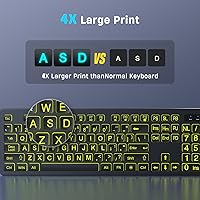
This is where the combo earns its keep. Users with aging eyesight or mild visual impairments consistently report that the oversized legends are a night-and-day improvement over standard keyboards. Several buyers purchased it specifically for elderly parents and noted that daily computer use became noticeably less frustrating for them.
A small number of users found that the contrast between the key legends and the keycap surface fades under very bright ambient lighting, making the letters look slightly washed out. It is not a dealbreaker, but it is worth noting for users in brightly lit rooms who are relying on the contrast alone rather than the backlight.
Backlight Quality
83%
Seven color options and three brightness levels give users real flexibility for different lighting conditions and personal taste. Evening typists and bedroom PC users especially appreciated being able to dial down the brightness to a gentle glow without completely disabling the backlight.
The backlight auto-shuts off after two minutes of inactivity, which some users find annoying during slow-paced tasks like reading or video calls. There is no way to extend or disable this timer, which becomes a recurring irritation for users who pause frequently while typing.
Battery Life & Charging
88%
Switching from disposable AA batteries to a built-in rechargeable cell is one of the most appreciated aspects of this set. Buyers frequently mention that the battery lasts weeks between charges under normal daily use, and the included USB-C cable means most people already have a compatible charger on hand.
A few users noted the mouse battery drains noticeably faster than the keyboard, leading to the mild inconvenience of charging them at different intervals. There is also no battery indicator light on the keyboard itself, so the only warning that power is low tends to be an abrupt drop in responsiveness.
Typing Feel & Noise Level
76%
24%
The keys strike a decent balance between soft actuation and tactile feedback, and buyers in shared households or open-plan home offices have commented positively on how quiet the typing experience is. It is not silent, but it is noticeably quieter than most membrane keyboards at a similar price.
Enthusiasts or fast typists may find the key travel a bit shallow and the overall feel somewhat mushy compared to mid-range mechanical options. The quietness comes at the cost of crispness — there is minimal feedback on each keystroke, which can contribute to more typos during extended writing sessions.
Mouse Performance
61%
39%
For basic browsing, email, and casual document work, the included mouse does its job without causing headaches. The wireless connection is reliable at normal desk distances, and the scroll wheel is smooth enough for everyday navigation tasks.
The mouse is clearly the weaker half of this combo. It feels lightweight and hollow, and the tracking can feel imprecise during tasks that require more careful cursor placement. Users who do any kind of image editing or even detailed spreadsheet work will likely want to swap it out for a dedicated mouse.
Wireless Reliability
84%
The 2.4GHz connection holds up well in typical home and office environments, with no significant lag or dropout reported during normal use. The 33-foot range is more than sufficient for the average desk setup, and the plug-and-play USB receiver means there is no pairing process to navigate.
A handful of users in environments with significant wireless interference — such as apartments with many overlapping networks — reported occasional brief disconnections. This is not unique to this product, but it is worth flagging for users in dense urban settings or offices with heavy wireless traffic.
Build Quality & Durability
63%
37%
The keyboard chassis feels reasonably sturdy for the price tier, and the keycaps show acceptable resistance to fading under normal conditions. For light daily home use, most buyers have not reported structural issues within the first several months of ownership.
The overall construction reads as budget plastic, and the mouse in particular has generated comments about it feeling fragile. Several longer-term users noted that the keycap legends on high-frequency keys like E, A, and the spacebar show wear faster than expected, which somewhat undercuts the core large-print value proposition.
Mac Compatibility
44%
56%
The keyboard does function on Mac OS at a basic level — standard alphanumeric typing and navigation work without issue. For users who only need to type documents or browse on a Mac, the core functionality is there.
Multimedia keys — volume control, media playback, brightness — do not work properly on Mac, and this limitation is significant enough that it deserves a clear warning before purchase. Mac users who rely on those function row shortcuts will find the experience incomplete and likely frustrating in daily use.
Windows Compatibility
93%
On Windows, this rechargeable keyboard and mouse behaves exactly as expected from the moment the receiver is plugged in. Windows 10 and Windows 11 users in particular report zero configuration headaches, which is genuinely appreciated by less tech-savvy buyers.
Users on older Windows versions like XP or Vista may find that some extended function keys do not register correctly, though this affects a very small subset of buyers. No meaningful Windows-specific issues surfaced across modern operating systems.
Setup & Ease of Use
94%
Plug-and-play is not an exaggeration here — buyers consistently describe the setup as taking under a minute. For the target demographic of older or less tech-comfortable users, the complete absence of driver installation or Bluetooth pairing steps is a meaningful practical advantage.
The USB receiver is stored inside the mouse compartment, which is sensible in theory but has confused several buyers on first unboxing who could not locate it. The product documentation could be clearer about this, as a few reviews mention contacting support unnecessarily because of the confusion.
Value for Money
86%
At this price point, getting a rechargeable combo with USB-C charging, multi-color backlighting, and oversized legends represents solid value. Buyers who bought it as an accessibility-focused gift for a parent or grandparent almost universally felt they got more than their money's worth.
The value calculation depends heavily on not needing the mouse to perform beyond basic tasks. If the mouse needs replacing sooner than expected, the total cost of ownership climbs, and the value proposition weakens somewhat compared to buying a quality keyboard alone.
Portability & Weight
78%
22%
At under 2 pounds for the full combo, this large-print wireless set is light enough to be moved between rooms or packed for travel without much hassle. The full-size layout does mean it takes up a fair amount of bag space, but that is expected for any standard keyboard.
The keyboard is 17 inches wide, which is standard for a full-size layout but limits options for users with very compact desk setups or those hoping to use it with a small laptop stand. There is no tenkeyless or compact variant available.
Aesthetic & Design
72%
28%
The backlit color modes give the keyboard a more interesting look than plain office peripherals, and the all-black finish is clean and inoffensive for most desk setups. Users who wanted a touch of color in their workspace without buying a high-end gaming keyboard found this a satisfying compromise.
The aesthetic is functional rather than distinctive — it reads clearly as a budget peripheral. The mouse design in particular lacks any visual polish, and the two devices do not feel like they were designed as a cohesive pair beyond sharing the same black color.
Chromebook & Smart TV Compatibility
79%
21%
Buyers using Chromebooks have reported smooth basic functionality, which is a genuine bonus given that Chromebook accessories compatibility is often an afterthought. Smart TV users pairing the combo for streaming navigation also found it worked reliably without any additional configuration.
Extended multimedia controls behave inconsistently on non-Windows platforms, which mirrors the Mac situation to a degree. For Smart TV users who want full remote-like functionality from the keyboard, some keys will simply not perform as expected depending on the TV operating system.

Suitable for:

The KOPJIPPOM Large Print Wireless Keyboard and Mouse Combo is genuinely well-matched to older adults and users with low vision or mild visual impairments who find standard keyboards frustrating to use daily. If you are setting up a PC for a parent or grandparent who keeps mistyping because the keys are too small to read easily, this is one of the more practical and affordable solutions available right now. It also suits home office workers or living-room PC users who frequently work in dim conditions and want a backlit keyboard without paying a premium for one. Because setup is completely plug-and-play with no software required, it is a strong pick for less tech-savvy users who just want something that works immediately out of the box. Chromebook and Windows 11 users will find full compatibility with no configuration headaches, and the rechargeable design makes it a convenient long-term choice for anyone tired of buying replacement batteries.
Not suitable for:

The KOPJIPPOM Large Print Wireless Keyboard and Mouse Combo has real limitations that make it the wrong choice for several types of buyers. Mac users who depend on the full function row — volume, brightness, media controls — will find that those keys simply do not work correctly, and no firmware or driver update resolves this. Productivity-focused typists who spend long hours writing will likely find the key travel shallow and the tactile feedback insufficient for sustained comfortable use. The bundled mouse is adequate at best, and anyone who needs reliable cursor precision for design work, spreadsheets, or detailed editing will almost certainly want to replace it. Power users or gamers looking for performance RGB and responsive hardware should look elsewhere — the backlight on this set is decorative rather than functional in any competitive sense. Finally, buyers who prioritize long-term durability should be aware that the build materials are firmly budget-grade, and keycap legends on frequently used keys may show wear faster than expected.
Specifications

  • Connectivity: Both keyboard and mouse connect via a single 2.4GHz USB nano-receiver, providing a stable wireless link up to 33 feet from the host device.
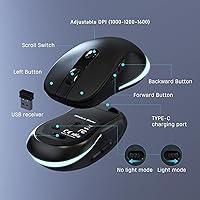
  • USB Receiver Storage: The nano-receiver is stored inside the mouse body when not in use, reducing the risk of misplacing it during transport or storage.
  • Backlight Colors: The keyboard offers 7 selectable backlight colors with 3 adjustable brightness levels to suit different lighting conditions and personal preferences.
  • Auto Backlight Off: The backlight automatically shuts off after 120 seconds of inactivity to conserve battery charge, and reactivates on the next keypress.
  • Battery Type: Both devices are powered by built-in lithium polymer batteries, eliminating the need for disposable AA or AAA cells.
  • Charging Interface: A USB-C charging cable is included in the box, allowing the keyboard and mouse to be recharged using widely available modern chargers.
  • Standby Time: The combo is rated for up to 2,000 hours of standby time under normal use conditions with the backlight managed efficiently.
  • Key Style: Full-size layout with oversized printed letter legends designed for high legibility, targeting users who find standard keycap text too small to read comfortably.
  • Keyboard Dimensions: The keyboard measures 17 x 7.5 x 1.6 inches, consistent with a standard full-size desktop keyboard footprint.
  • Combo Weight: The combined weight of the keyboard and mouse is 1.76 pounds, making the set reasonably light for a full-size peripheral combo.
  • OS Compatibility: Compatible with Windows 2000, ME, XP, Vista, 7, 8, 10, and 11, as well as Chromebook and Smart TVs; Mac OS is supported for basic typing but multimedia keys have limited functionality.
  • Wireless Range: The 2.4GHz wireless connection maintains a reliable signal at distances up to 33 feet between the receiver and the devices.
  • Typing Mechanism: The keyboard uses quiet membrane-style tactile switches designed to reduce keystroke noise in shared or quiet environments.
  • Power Switch: Both the keyboard and mouse include a dedicated hardware power switch, allowing users to fully cut power when the devices are not in use.
  • Market Rank: As of the data collected, this combo holds a Best Sellers Rank of number 44 in the Computer Keyboard and Mouse Combos category on Amazon.
  • User Rating: The combo carries an average rating of 4.2 out of 5 stars based on 658 verified user ratings at time of review.
  • Release Date: The product was first made available for purchase in March 2024, making it a relatively recent entry in the accessible peripherals market.
  • Manufacturer: The combo is manufactured by KOPJIPPOM, a brand focused on accessible and budget-friendly computer peripherals.

Related Reviews

Luzarriba Large Print Backlit Wireless Keyboard and Mouse Combo
78%
91%
Key Visibility & Readability
94%
Ease of Setup
67%
Backlight Quality
83%
Wireless Reliability
61%
Mouse Comfort & Usability
More
Fonicer Large Print Wireless Keyboard and Mouse
85%
91%
Ease of Use for Visually Impaired Users
89%
Quiet Operation
87%
Comfort and Ergonomics
83%
Wireless Connectivity
93%
Key Size and Visibility
More
HXMJ Wireless Large Print Keyboard and Mouse Set E68 Yellow

86%
88%
Typing Comfort
91%
Visibility and Readability
89%
Wireless Connectivity
85%
Ergonomics
73%
Key Softness
More
Arteck HW192 Wireless Keyboard and Mouse Combo
78%
78%
Build Quality
72%
Typing Experience
63%
Mouse Comfort & Ergonomics
81%
Battery Life
69%
Wireless Connectivity
More
Letton Wireless Keyboard and Mouse Combo
83%
89%
Design & Aesthetics
81%
Ergonomics & Comfort
75%
Wireless Connectivity
90%
Battery Life
92%
Value for Money
More
VEILZOR UK418 Wireless Keyboard and Mouse Combo

81%
91%
Value for Money
84%
Typing Comfort
89%
Noise Level
82%
Wireless Reliability
76%
Mouse Ergonomics
More
HP 18H24AA Wireless Keyboard and Mouse Combo
79%
91%
Value for Money
93%
Ease of Setup
74%
Keyboard Typing Experience
63%
Mouse Comfort & Ergonomics
86%
Wireless Reliability
More
Vssoplor Wireless Keyboard and Mouse Combo
82%
91%
Value for Money
84%
Keyboard Typing Experience
61%
Mouse Ergonomics
88%
Wireless Connectivity & Stability
72%
Battery Life
More
EDJO Wireless Keyboard and Mouse Combo
76%
88%
Value for Money
94%
Ease of Setup
71%
Keyboard Typing Feel
63%
Mouse Performance
86%
Wireless Connectivity & Range
More
GUKJOB Wireless Keyboard and Mouse Combo
87%
88%
Typing Experience
91%
Design & Aesthetics
75%
Battery Life
95%
Ease of Setup
72%
Build Quality
More

FAQ

The nano-receiver is tucked inside a small compartment in the mouse itself, not loose in the packaging. Check the underside or battery bay of the mouse and it should be there. If you genuinely cannot locate it, the manufacturer recommends reaching out to their support team directly.

No, it is fully plug-and-play. Just insert the USB receiver into any open USB port on your computer and both the keyboard and mouse should be recognized automatically within seconds. There is no software, app, or driver installation required.

It turns off automatically after about two minutes of inactivity to save battery. As soon as you start typing again, the backlight comes back on. There is no setting to disable or extend this auto-off timer, which is worth knowing if you tend to pause frequently while working.

Basic typing and mouse navigation work fine on Mac OS, so if all you need is to type documents or browse the web, you will be okay. However, the multimedia function keys — things like volume control, media playback, and screen brightness — are not fully compatible with Mac and will likely not respond as expected. If those shortcuts are important to your workflow, this set may frustrate you on Apple systems.

Both devices charge via the included USB-C cable, the same type used by most modern Android phones. Under typical daily use with the backlight active, most users find they need to charge every few weeks rather than days. The stated standby time is up to 2,000 hours, though real-world figures vary depending on how often the backlight is running.

Yes, both are supported. The 2.4GHz receiver works with Smart TVs and Chromebooks the same way it does with a Windows PC — just plug it in and start using it. Keep in mind that some extended function keys may behave inconsistently depending on the specific TV operating system.

The large-print legends are printed onto the keycaps rather than being laser-etched or double-shot molded, which means they can show wear on high-frequency keys over time with heavy daily use. For light to moderate use, most buyers have not reported significant fading within the first several months, but it is a fair concern for anyone who types heavily every day.

For standard tasks like browsing, email, and document work it performs adequately without any major issues. That said, the mouse is the weaker part of this combo — it feels lightweight, and the tracking is not precise enough for tasks requiring careful cursor control, like graphic editing or detailed spreadsheet work. If you do those things regularly, you may want to pair the keyboard with a separate mouse.

It is genuinely one of the simpler setups available. There is one USB receiver to plug in and a power switch on each device — that is essentially the entire setup process. No accounts, no apps, no pairing buttons. For someone who just needs it to work without fuss, it is a solid choice.

Only one device can be charged at a time since a single USB-C cable is included and each device has its own charging port. The keyboard and mouse do tend to drain at slightly different rates, so you may find yourself charging them on different days. It is a minor inconvenience rather than a serious limitation for most users.