
Overview

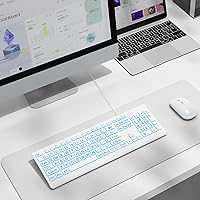
The SABLUTE KB113 Large Print Backlit Keyboard entered the market in late 2024 and has already climbed into the top 100 Computer Keyboards on Amazon — a meaningful feat for a brand-new release. It is a straightforward wired peripheral built around one clear idea: make typing accessible to anyone who finds standard key labels too small to read comfortably. The plastic body weighs just over 1.3 lbs, keeping it light enough to move between rooms without fuss. A 5.2 ft USB-A cable provides adequate reach for most desk setups, and with no batteries or charging in the picture, you simply plug it in and start typing.

Features & Benefits

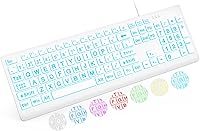
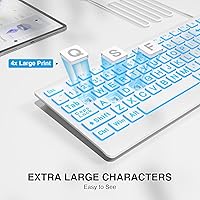
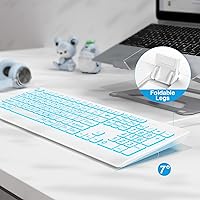
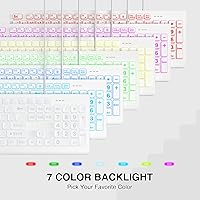
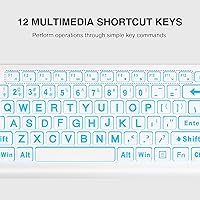
The most immediately noticeable thing about this large-print keyboard is how much easier those key legends are to read — printed at 4x the standard size, they make a genuine difference for anyone working under poor lighting or dealing with fading eyesight. The backlight adds real usability on top: seven colors, eight brightness levels, and four cycling modes let you dial in a soft ambient glow or something more vivid for a darker room. A foldable stand on the underside adjusts the typing angle to ease wrist fatigue during long sessions. Mac users, though, take note: multimedia shortcut keys do not function fully on macOS, which is a practical limitation worth knowing before committing.

Best For

This accessible wired keyboard makes the most sense for seniors and low-vision users who have given up squinting at cramped key labels — the oversized printing alone justifies the buy for that group. Students and home-office workers on a tight budget will also appreciate how little friction is involved: nothing to configure, nothing to charge, and it handles everyday typing without complaint. It works especially well in dim or variable-light environments thanks to the adjustable backlight. Power users hunting for programmable macros, tactile mechanical switches, or full macOS support should look elsewhere. But for straightforward, plug-in simplicity, it does exactly what it sets out to do.

User Feedback

Because the SABLUTE backlit board only reached shelves in December 2024, the reviewer pool is still growing — keep that context in mind when weighing early ratings. Early buyers consistently praise the key readability improvement, with several noting a noticeable difference for aging eyes or users with visual impairments. The main criticism centers on key feel: the membrane switches are quiet, but typists used to tactile or clicky feedback often describe them as softer than expected. A handful of buyers also raise questions about legend durability over heavy daily use — a fair concern that only more time in the field will fully resolve.

Pros

  • Key legends are 4x larger than standard, making letters genuinely easy to read without leaning in.
  • Seven backlight colors with eight brightness levels give real flexibility for different lighting environments.
  • Plug-and-play USB-A setup means absolutely no drivers, software, or configuration required.
  • The wired connection eliminates input lag and removes any concern about battery life mid-task.
  • A foldable rear stand lets you adjust the typing angle to reduce wrist strain during long sessions.
  • At just over 1.3 lbs, this large-print keyboard is light enough to move between rooms or desks easily.
  • The 5.2 ft cable gives comfortable reach without forcing your PC tower onto the desk surface.
  • Four distinct backlight modes make it simple for first-time backlit keyboard users to find a setting they like.
  • Early buyers with visual impairments specifically note a meaningful improvement in day-to-day typing confidence.
  • No batteries needed — bus-powered over USB means one less thing to manage or replace.

Cons

  • Membrane switches feel soft and imprecise to anyone accustomed to tactile mechanical feedback.
  • Multimedia shortcut keys do not work correctly on macOS, which is a real limitation for Apple users.
  • The all-plastic build has noticeable flex under firm typing pressure, which affects perceived durability.
  • Long-term durability of the oversized key printing is still an open question given the recent launch date.
  • No wireless option exists, so users who prefer a clean, cable-free desk setup are out of luck.
  • Backlight colors may appear less vivid in brightly lit rooms than the product photos suggest.
  • The full-size QWERTY layout offers no compact or tenkeyless variant for users with limited desk space.
  • There is no dedicated software for remapping keys or saving custom lighting profiles.
  • The key travel and actuation weight may feel too light for heavy typists who prefer resistance.
  • With limited real-world review volume so far, long-term reliability data remains genuinely thin.

Ratings

The SABLUTE KB113 Large Print Backlit Keyboard scores here reflect AI-assisted analysis of verified buyer reviews gathered globally, with spam, incentivized, and bot-generated feedback actively filtered out before scoring. Ratings are derived from real usage patterns across seniors, low-vision users, students, and home-office workers — the core audiences this accessible wired keyboard targets. Both the genuine strengths and the recurring frustrations are weighted honestly, so the scores below tell the full story, not just the flattering parts.

Key Readability
93%
This is where the large-print keyboard earns its keep without argument. Users with aging eyesight, macular degeneration, or general low vision consistently describe the oversized legends as a genuine quality-of-life improvement over anything they have used before. Even in moderate room lighting, the bold lettering is visible at a comfortable viewing distance.
A small number of touch-typists note that the exaggerated label size feels visually busy once muscle memory is established, though this is more of a personal preference than a functional flaw. In very bright ambient light, the contrast between the white keycaps and printed characters can wash out slightly for some users.
Backlight Functionality
81%
19%
The combination of seven colors and eight brightness levels gives users far more control than most budget keyboards offer, and buyers in dim work environments specifically appreciate being able to dial the glow down to a subtle, eye-friendly level. Cycling through modes is handled entirely through on-board key combinations, so no app or software is ever needed.
Several buyers report that the backlight colors look more vivid in marketing photos than they appear in person, particularly the cooler tones like blue and purple, which can look washed out on white keycaps under indoor lighting. The four lighting modes, while functional, are limited compared to more feature-rich boards in higher price tiers.
Ease of Setup
96%
Plug in the USB-A cable and you are typing — there is genuinely nothing else to do. Buyers who describe themselves as non-technical, including many seniors setting this up independently, repeatedly highlight how refreshing it is to have a peripheral that works without a setup wizard, driver download, or account creation.
The wired-only nature means setup requires a free USB-A port, which is becoming less common on newer ultra-thin laptops that favor USB-C exclusively. Users with such devices would need an adapter, adding a small friction point that undercuts the otherwise zero-hassle experience.
Typing Comfort
72%
28%
The foldable rear stand makes a real difference for users who type for extended periods, and several buyers note reduced wrist fatigue compared to flat keyboards they had used previously. The quiet membrane action is also appreciated in shared spaces like open-plan offices and library study rooms.
Typists who have used mid-range or enthusiast mechanical keyboards find the membrane keys too soft and indistinct, with a mushy bottom-out feel that makes fast, accurate typing less satisfying. The single fixed tilt angle from the rear stand also limits ergonomic customization for users with specific wrist positioning needs.
Build Quality
63%
37%
The lightweight plastic construction does what it needs to do for a daily-use budget peripheral — it holds its shape on a flat desk surface and does not feel fragile out of the box. For users who simply need a functional, low-maintenance board at the office or kitchen desk, the build is adequate for the price point.
Pressing firmly in the center of the keyboard produces a noticeable flex, which reduces the sense of solidity during heavier typing sessions. The all-plastic housing also picks up fingerprints and smudges readily on the white surface, and the overall construction does not inspire confidence about multi-year durability under daily heavy use.
Key Legend Durability
58%
42%
In the short time since the keyboard launched, early buyers have not widely reported any fading or peeling of the large-print legends under normal use conditions. For occasional or light daily typists, the print appears to hold up reasonably well through the first several months of ownership.
Because this board only reached market in December 2024, there is genuinely not enough long-term data to rate this category with confidence. Keyboards at this price tier typically use pad-printed legends rather than laser-etched or double-shot molded keycaps, which historically wear faster under the friction of heavy daily use — a real concern for core users who type for hours each day.
Cable Quality & Length
77%
23%
The 5.2 ft cable handles the vast majority of standard desk configurations without any issue, comfortably reaching from a keyboard tray to a tower tucked beneath the desk. Buyers consistently note that the cable feels adequately flexible and does not develop kinks or stiffness with regular use.
The cable is permanently attached with no detachable option, meaning a damaged cable requires replacing the entire keyboard rather than just swapping a cord. Users with desks positioned far from their PC — or those with very long cable-management paths — occasionally find 5.2 ft slightly short for their specific setup.
macOS Compatibility
44%
56%
Basic typing functions work without issue on macOS, and the backlight controls respond normally regardless of the operating system in use. For Mac users who only need a simple large-print typing board and do not rely on shortcut keys, day-to-day use is functional.
The multimedia shortcut keys — volume, playback, screen brightness — do not function properly on macOS, which is a meaningful gap for users who rely on those controls throughout their workday. SABLUTE acknowledges this limitation in the product description, but buyers who overlook that note often express frustration after purchase, making this the most common complaint from Mac-based reviewers.
Noise Level
84%
The membrane switches produce a soft, muted keystroke that sits comfortably in shared environments — open offices, co-working spaces, and households where loud clacking would be disruptive. Multiple buyers specifically switched to this accessible wired keyboard from noisier boards and describe the quiet action as a meaningful daily improvement.
For users who find auditory feedback motivating or reassuring during fast typing, the quiet membrane action can feel deadened and uninspiring. There is no tactile bump before actuation either, which means the quietness comes at the cost of the typing feedback that many experienced keyboard users depend on for accuracy.
Value for Money
88%
Within its target audience — seniors, low-vision users, and budget-conscious home-office workers — this large-print keyboard delivers exactly what it promises at a price point that undercuts many competitors offering far fewer accessibility-focused features. The no-battery, no-software, no-fuss approach aligns well with what buyers in this segment actually need.
For general typists without a specific need for oversized key legends, the value calculation shifts unfavorably — there are more capable keyboards with better build quality and switch feel available at similar prices. The narrow feature set only represents strong value if large-print legibility is the primary requirement.
Backlight Color Accuracy
61%
39%
Users who set the backlight to warmer tones — particularly red and yellow — generally find the colors match expectations and provide a pleasant warm glow in dim conditions. The ability to turn the backlight off entirely is also appreciated by users who want the large-print benefit without any glow.
Cooler colors like blue, green, and purple tend to appear noticeably more muted on white keycaps than product imagery implies, particularly in rooms with ambient overhead lighting. A subset of buyers describe feeling misled by the vibrant marketing photos, which represent the colors under ideal darkroom conditions rather than typical use environments.
Weight & Portability
82%
18%
At just over 1.3 lbs, this accessible wired keyboard is light enough to carry between a home office and a living room setup without any inconvenience. Buyers who use it on a lap tray or portable desk surface note that the weight feels well-distributed and unobtrusive.
The attached cable adds practical bulk when transporting the keyboard, since it cannot be detached and must be coiled and managed separately. The full-size layout also means it takes up more bag space than compact or tenkeyless alternatives, which limits its appeal as a travel peripheral.
Response & Latency
91%
Wired keyboards inherently sidestep the latency concerns that plague budget wireless peripherals, and this board is no exception — keystrokes register immediately and consistently during regular typing sessions. Users who previously struggled with input lag on wireless or Bluetooth boards describe the responsiveness as a straightforward, noticeable improvement.
There is little meaningful differentiation in latency between this keyboard and any other competently built wired USB board, so this advantage is real but not unique. The wired connection also means the cable itself becomes a mild inconvenience if your desk layout involves frequent repositioning of the keyboard.

Suitable for:

The SABLUTE KB113 Large Print Backlit Keyboard was clearly built with a specific audience in mind, and for that audience it genuinely delivers. Seniors dealing with fading eyesight will find the oversized key legends a real, practical improvement over any standard board they have likely used for years. Users with low vision or conditions like macular degeneration will benefit similarly — the high-contrast lettering paired with adjustable backlighting makes a combination that is hard to find at this price point. Students and budget-conscious home-office workers who want a dependable, no-maintenance peripheral will also feel right at home here, since plugging in a USB cable is the full extent of setup. Anyone working in a dim environment — a home theater PC, a low-lit study, or a nighttime workstation — will appreciate the ability to dial down the backlight to a subtle glow without fussing with software or drivers.

Not suitable for:

The SABLUTE KB113 Large Print Backlit Keyboard is a focused tool with a narrow remit, and buyers outside that remit will likely feel the limitations quickly. Typists who rely on tactile or clicky feedback from mechanical switches will find the membrane keys here noticeably soft and underdistinct — this is not a board that rewards fast, nuanced typing in the way a true mechanical keyboard does. Mac power users should also think twice: while basic typing works fine, the multimedia shortcut keys do not function properly on macOS, which is a genuine workflow disruption if you depend on those keys daily. Anyone looking for wireless freedom, programmable layouts, dedicated media controls, or custom RGB software will find this large-print keyboard too basic by design. And buyers expecting premium build quality — a sturdy aluminum plate, minimal flex, or satisfying keycap texture — should know the all-plastic construction reflects the accessible price tier honestly, not aspirationally.

Specifications

  • Model Number: This keyboard is manufactured by SABLUTE under the model designation KB113.
  • Dimensions: The keyboard measures 17.76 x 6.77 x 1.26 inches, making it a standard full-size footprint.
  • Weight: The unit weighs 1.32 lbs, keeping it light enough for easy repositioning on a desk or lap tray.
  • Key Legend Size: Printed key legends are 4x larger than those found on a typical standard keyboard.
  • Switch Type: The keyboard uses membrane switches, which produce a quieter, softer keystroke compared to true mechanical switches.
  • Layout: The keyboard features a full-size QWERTY layout with a standard US key arrangement.
  • Backlight Colors: Seven distinct backlight colors are available, selectable through dedicated on-board key combinations.
  • Brightness Levels: Users can adjust backlight intensity across eight incremental brightness levels to suit their environment.
  • Backlight Modes: Four lighting modes are supported, including steady-on, color cycling, and backlight-off options.
  • Cable Type: Connectivity is provided via a permanently attached USB-A cable with no detachable or replacement option.
  • Cable Length: The integrated USB-A cable measures 5.2 ft, giving reasonable reach between the keyboard and most desktop or tower setups.
  • Power Source: The keyboard is bus-powered entirely through the USB connection, requiring no batteries or external power adapter.
  • OS Compatibility: Full functionality is supported on Windows, Vista, and Chrome OS; macOS is compatible for basic typing but multimedia shortcut keys have limited support.
  • Tilt Adjustment: A foldable plastic stand on the underside of the keyboard raises the rear edge to provide a more ergonomic typing angle.
  • Material: The keyboard housing and keycaps are constructed from plastic, keeping the overall build lightweight and affordable.
  • Color: This model is available in white, with backlit legends that remain visible across all seven color settings.
  • Availability Date: The KB113 first became available for purchase in December 2024.
  • Best Sellers Rank: Within months of launch, the keyboard reached a ranking of number 92 in the Amazon Computer Keyboards category.

Related Reviews
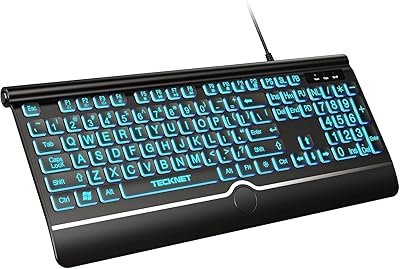
X9 Performance Large Print Backlit Keyboard
77%
91%
Key Legibility
88%
Accessibility Design
94%
Ease of Setup
84%
Value for Money
86%
Key Size & Spacing
More
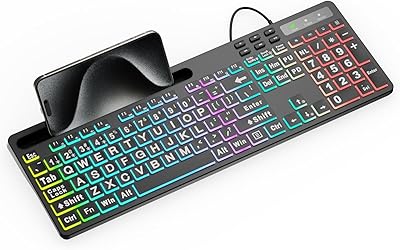
TECKNET TK-KB029 Large Print Backlit Keyboard
79%
93%
Key Legibility
88%
Backlight Quality
79%
Wrist Rest Comfort
62%
Typing Feel
67%
Build Quality
More
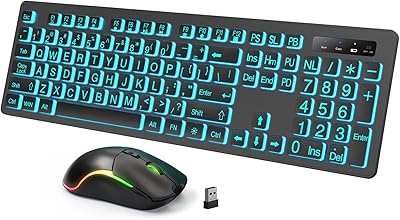
MARVO WK712 Large Print Backlit Keyboard
85%
89%
Typing Comfort
72%
Build Quality
95%
Key Font Visibility
81%
RGB Lighting Customization
94%
Ease of Setup
More
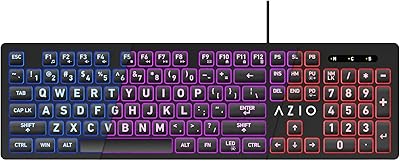
Luzarriba Large Print Backlit Wireless Keyboard and Mouse Combo
78%
91%
Key Visibility & Readability
94%
Ease of Setup
67%
Backlight Quality
83%
Wireless Reliability
61%
Mouse Comfort & Usability
More
Azio KB512 Large Print Keyboard
76%
93%
Key Legibility
78%
Backlight Quality
96%
Ease of Setup
57%
Typing Feel
62%
Build Quality & Durability
More
KOPJIPPOM Large Print Wireless Keyboard and Mouse Combo
78%
91%
Key Visibility & Legibility
83%
Backlight Quality
88%
Battery Life & Charging
76%
Typing Feel & Noise Level
61%
Mouse Performance
More
Fonicer Large Print Wireless Keyboard Mouse Combo
76%
94%
Key Legibility
91%
Ease of Setup
67%
Wireless Reliability
53%
Mouse Performance
83%
Value for Money
More
Dilter Large Print Wired USB Keyboard
88%
91%
Ease of Use
96%
Key Visibility
83%
Typing Comfort
94%
Setup/Installation
85%
Build Quality
More
Nuklz N Magnus 125 Large Print Keyboard
85%
94%
Ease of Use
89%
Typing Comfort
96%
Key Visibility
83%
Build Quality
92%
Compatibility
More
HXMJ Wireless Large Print Keyboard and Mouse Set E68 Yellow
86%
88%
Typing Comfort
91%
Visibility and Readability
89%
Wireless Connectivity
85%
Ergonomics
73%
Key Softness
More

FAQ

No software or drivers are needed at all. You plug the USB-A cable into your computer and it is ready to use within a few seconds. This applies to Windows, Chrome OS, and basic use on macOS as well.

Most functions work fine on macOS, including standard typing and backlight controls. The one real caveat is that the multimedia shortcut keys — things like volume and media playback — do not fully cooperate with macOS. If those shortcuts are part of your daily workflow, that is worth factoring in before buying.

The printed legends on this large-print keyboard are four times the size of what you find on a standard board. In practice, that is a very noticeable difference — the letters are bold and easy to read even from a slight distance, which is the whole point for users with low vision or aging eyesight.

For low-light environments, the backlight is genuinely practical rather than decorative. With eight brightness levels and four modes, you can set it to a subtle glow that just outlines the keys without being distracting, or ramp it up for a darker room. The seven color options are a nice touch, though in a brightly lit office the backlight is less noticeable.

The SABLUTE KB113 Large Print Backlit Keyboard was essentially designed with that exact scenario in mind. The oversized, high-contrast key legends are a meaningful improvement for anyone with reduced vision, and the plug-and-play setup means no technical hassle for someone who just wants to type. Pairing the large print with a low backlight in the evening makes it especially easy to use.

The cable is 5.2 ft long, which covers most standard desk setups comfortably. If your tower is tucked under a desk or off to one side, that length should be more than adequate. It is a fixed cable, so there is no option to swap it for a longer one if your setup has unusual spacing.

The membrane switches on this accessible wired keyboard are on the quieter side — they produce a soft, muted click rather than the sharp clack of a mechanical board. Most people in shared offices or open workspaces find the noise level acceptable for day-to-day typing.

There is a foldable plastic stand on the underside that props up the rear edge of the keyboard, giving you a gentle upward tilt. It is a single fixed angle rather than multiple positions, but most users find it enough to keep wrists at a more comfortable level during long sessions.

That is a fair concern with any printed keycap, and since this keyboard only launched in late 2024, long-term durability data is still limited. Early buyers have not widely reported fading yet, but it is something worth monitoring if you are a very heavy daily typist. Keyboards at this price tier generally use pad-printed legends rather than laser-etched ones, which can wear more quickly under intense use.

This model is wired only — there is no Bluetooth or wireless variant. That is actually a deliberate advantage for users who want zero input lag and no battery management, but if a cable-free setup is important to you, this one will not fit the bill.