Overview

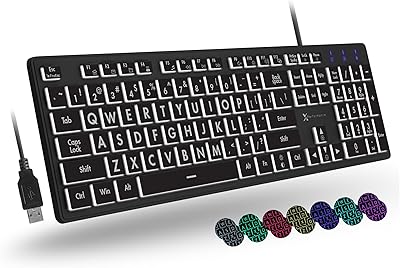
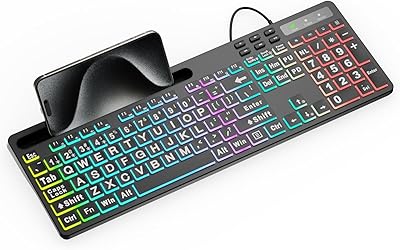
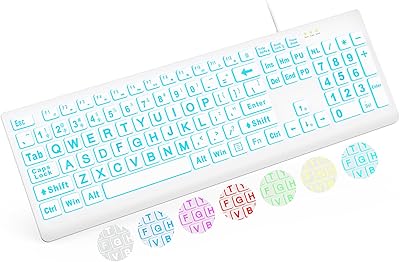
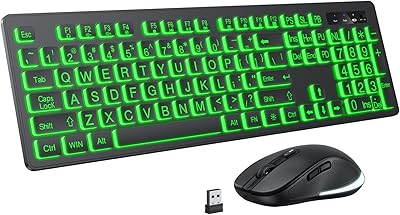
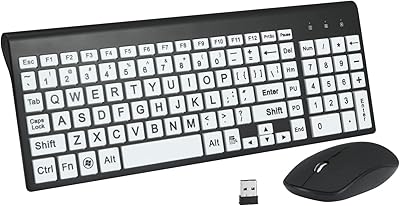
The Nuklz N Magnus 125 Large Print Keyboard offers a straightforward and user-friendly typing solution, especially designed for those with vision impairments or beginners. This full-size keyboard features large print keys with high contrast, making it easy to read and type. Thanks to its plug-and-play design, it works immediately once plugged into a USB port, without needing additional software or drivers. Compatible with both Windows and MacOS, this keyboard provides a hassle-free, accessible experience for a wide range of users.
Features & Benefits

The Nuklz N Magnus 125 offers several key features that set it apart. Its high-contrast black and white keys ensure that every letter stands out, aiding those with visual impairments. The quiet, comfortable membrane keys provide a smooth typing experience, making it ideal for long typing sessions. Additionally, with no installation required, users can simply plug it in and start typing. This easy setup and functionality make it a highly practical choice for anyone seeking a simple, effective keyboard.

Best For

This keyboard is perfect for seniors, visually impaired individuals, and those just starting to type. The large, easily readable keys are great for beginner typists who need extra guidance. Additionally, the Nuklz N Magnus 125 works well for anyone seeking a simple wired keyboard without unnecessary frills. If you need a reliable and accessible typing solution without any technical setup, this keyboard is a solid choice for daily use, whether at home or in an office setting.

User Feedback

Overall, users have shared positive experiences with this keyboard, particularly appreciating the large, clear letters on the keys. Many have found the quiet typing action and soft feel of the keys a welcome feature, especially for extended typing sessions. However, some users noted that the lack of backlighting can be an issue in low-light environments. While this might be a drawback for some, it doesn't diminish the overall ease of use and comfort provided by the keyboard.

Pros

  • The large print keys significantly improve visibility for users with poor eyesight.
  • Its plug-and-play design makes it easy to set up without the need for additional software.
  • The high-contrast black and white keys provide excellent readability in various lighting conditions.
  • Quiet, soft membrane keys ensure a comfortable typing experience, reducing typing noise.
  • Ideal for beginners, offering a simple and intuitive layout for those just learning to type.
  • Compatible with both Windows and MacOS, making it versatile across different systems.

Cons

  • The lack of backlighting makes it difficult to use in low-light environments.
  • Some users find the membrane keys less responsive than mechanical alternatives.
  • Its basic design may not satisfy users looking for advanced keyboard features.
  • The full-size layout may be too large for those with limited desk space.
  • Lacks programmable or customizable keys for users with specialized needs.
  • May not be durable enough for heavy or frequent use in demanding environments.

Ratings

After analyzing verified user reviews worldwide, across multiple languages and platforms, the scores for the Nuklz N Magnus 125 Large Print Keyboard reflect both its strengths and pain points. Spam, bot/incentivized, duplicated, and off-topic reviews have been filtered out to ensure only authentic, high-quality feedback informed these results. Buyers appreciate the large, readable keys and simple setup, while some note areas for improvement, such as the lack of backlighting for low-light use. Overall, the keyboard's value shines through for those with visual impairments or beginners seeking an accessible, no-fuss typing experience.

Ease of Use
94%
Many users find this device incredibly easy to use, especially seniors or those with visual impairments. The large print keys are clear and easy to read, while the plug-and-play setup allows anyone to start typing right away. It's a hassle-free experience with no complicated instructions or software to install.
Some users noted that while the keyboard is simple to use, it lacks customizable features, which might be a limitation for advanced users or those looking for more personalization. Additionally, the absence of backlighting can be inconvenient for people who often work in dim environments.
Typing Comfort
89%
The membrane keys offer a smooth typing experience with minimal noise, which many buyers appreciate, especially those who need a quieter keyboard for shared spaces. The soft key action makes it comfortable for extended typing sessions, whether it's for work or personal use.
While most find the typing action comfortable, a few users felt that the keys could be a bit too soft, leading to less tactile feedback. Those accustomed to mechanical keyboards may not find the typing experience as satisfying or responsive as they would prefer.
Key Visibility
96%
The high-contrast black and white keys are a standout feature, making it extremely easy to read the letters. This is especially appreciated by seniors and individuals with visual impairments, as the large print ensures high visibility, even in low light. It's a major selling point for anyone who struggles with standard keyboard text sizes.
While the large print is ideal for readability, some users noted that the keys could benefit from a bit more texture or grip, especially for users who are not familiar with touch typing. In certain cases, the contrast can also be a bit stark for people with certain visual preferences.
Build Quality
83%
The keyboard's build feels solid for its price, with a durable design that holds up well in everyday use. It's lightweight and portable, making it easy to carry between different workspaces or store when not in use. For the most part, the materials and construction seem reliable for everyday tasks.
A few users pointed out that the overall build quality could be sturdier, especially when typing at a faster pace. Some felt that the keyboard feels a bit flimsy and could use more rigidity to improve long-term durability.
Compatibility
92%
The broad compatibility with both Windows and MacOS is one of the strongest points of this keyboard. It's truly plug-and-play, which means it works immediately without any drivers or software required. Users appreciate that it can be used across different platforms seamlessly, adding to its versatility.
While most users find the compatibility flawless, a few mentioned minor issues with special function keys not mapping correctly on some MacOS devices. This may be an issue for users looking for advanced key customization beyond the basics.
Setup Process
98%
Setting up this keyboard is effortless—simply plug it in via USB, and it's ready to use. This straightforward setup process is particularly beneficial for seniors and those with little technical experience. The keyboard works right out of the box with no need for extra steps or software installations.
A small number of users reported that the cable length was shorter than expected, which can limit where the keyboard can be comfortably placed in certain setups. However, this issue is easily mitigated with a USB extension cord if needed.
Value for Money
91%
For the price, this keyboard offers excellent value, providing key features like large print keys and simple functionality without the added cost of unnecessary extras. Buyers feel they’re getting a solid, practical product that delivers on its promises, especially for those with specific needs like visual impairments.
While the keyboard offers great value for basic tasks, some users wish it had more premium features, like backlighting or customizable keys. For those seeking a more feature-packed, high-end model, this may feel like a more basic option.
Quietness of Keys
85%
The membrane keys provide a relatively quiet typing experience compared to mechanical keyboards. This is appreciated in shared environments where noise can be distracting. Many users find the soft, quiet feedback suitable for office work or home use.
Some users felt the keys were too soft and lacked the satisfying click that other keyboard types offer. People who prefer a more tactile or clicky feel might not find the typing experience as enjoyable as they would with other keyboard types.
Backlighting
52%
48%
For those who need a basic keyboard with good key visibility during the day or in well-lit rooms, the lack of backlighting is not a major issue. The high-contrast keys are sufficient for most users in typical lighting conditions.
The lack of backlighting is a significant drawback for users who often work in dimly lit environments or at night. Many buyers mentioned that this feature would have greatly improved their experience, especially for seniors or those with low vision who rely on clear key visibility in all lighting conditions.
Design Aesthetics
78%
22%
The simple, clean design of this keyboard is appreciated by users who prefer no-frills functionality. Its minimalist look blends well in both home and office settings, and the focus is clearly on usability over aesthetics.
Some users felt that the design could be more modern or visually appealing. The lack of any significant stylistic features means it may not be as attractive to users who care about the look of their tech accessories.
Durability
77%
23%
The keyboard is made from sturdy materials that hold up well under normal use. It’s lightweight yet feels adequately strong for everyday tasks, offering decent durability without feeling fragile or cheap.
Several users noted that the durability of the keyboard is not as high as other models in its price range. Some found that the keys started to wear out after extended use, and the plastic body may not withstand heavy, prolonged use in some cases.
Functionality for Seniors
95%
This keyboard’s large print keys, high contrast, and simple setup make it an ideal choice for seniors. Many users highlight how it’s easy to use, improves typing accuracy, and reduces eye strain, making it especially helpful for those with limited vision.
While the keyboard is well-suited for seniors, some may find it too basic in terms of features. For tech-savvy users or those who need additional customization, it might not offer enough versatility.
Customer Support
70%
30%
Some users have found that the brand offers decent customer support, especially in resolving basic issues like product defects or questions about compatibility. Response times are generally quick for straightforward inquiries.
Several buyers had mixed experiences with customer service, especially for more complicated issues. Some mentioned delays in responses or difficulty getting a resolution, which could be frustrating for those who need fast assistance.

Suitable for:

The Nuklz N Magnus 125 Large Print Keyboard is an excellent choice for seniors or individuals with visual impairments who need a simple, easy-to-read keyboard. Its large, high-contrast keys make it highly accessible for those who struggle with standard keyboards. It's also ideal for beginners or those learning to type, as the clear, bold characters and quiet, comfortable typing experience reduce frustration and improve accuracy. Additionally, its plug-and-play functionality makes it an excellent option for users who prefer a hassle-free setup across both Windows and MacOS devices, without the need for extra drivers or installation steps. Whether for home or office use, this keyboard suits anyone seeking simplicity and enhanced readability in their typing experience.

Not suitable for:

While the Nuklz N Magnus 125 Large Print Keyboard is perfect for those seeking ease of use and visibility, it may not be suitable for more tech-savvy users who need advanced features. The lack of customizable keys and backlighting may be a drawback for those who often work in low-light environments or require additional personalization for their workflow. Those who prefer mechanical keyboards or need a more tactile, responsive typing experience might find the soft membrane keys less satisfying. Moreover, users who require extensive function key support or customization for their specific software may find this keyboard too basic for their needs. In short, it’s not the right choice for those looking for a feature-rich or highly customizable keyboard.

Specifications

  • Keyboard Type: Membrane keyboard providing a quiet and smooth typing experience.
  • Connectivity: Wired USB connection ensures plug-and-play compatibility with no installation required.
  • Key Layout: Full-size layout with large print keys for improved readability.
  • Key Contrast: High contrast black and white keys for clear, easy-to-read characters.
  • Key Size: Large print keys, ideal for users with visual impairments or beginners.
  • Compatibility: Compatible with both Windows and MacOS operating systems.
  • Target Audience: Designed for seniors, visually impaired users, and beginner typists.
  • Dimensions: Measures 18 x 7 x 1.5 inches, providing a standard full-size keyboard experience.
  • Weight: Weighs approximately 1.1 pounds, making it lightweight and easy to move.
  • Special Features: No installation required; the keyboard is ready to use once plugged in.
  • Typing Experience: Quiet, membrane keys offer a soft and comfortable typing experience with minimal noise.
  • Backlighting: Lacks backlighting, which can be a challenge in low-light environments.
  • Material: Constructed with lightweight plastic, making it easy to carry but not built for heavy-duty use.
  • USB Port: Uses a standard USB Type-A connector for easy plug-and-play use.
  • Color Scheme: Features a black and white high-contrast color scheme, ideal for visibility.
  • Warranty: Warranty information is provided by the manufacturer; check for details at the time of purchase.

FAQ

Setting up this large print keyboard is simple. Just plug the USB cable into any available USB port on your Windows or MacOS device. No additional drivers or installation is required, and the keyboard should be ready to use immediately.

Yes, the keyboard is fully compatible with both Windows and MacOS systems. It uses a standard USB connection, so it works with any computer or laptop that supports USB devices.

The large print keys make it much easier to see the characters, which is particularly helpful for visually impaired users or those with limited vision. The high contrast black and white color scheme further enhances readability.

No, the keyboard does not feature backlighting. Users have mentioned that in low-light settings, it can be a bit challenging to read the keys. If backlighting is a priority, this may not be the best option for you.

The keyboard features quiet, soft membrane keys that offer a smooth and comfortable typing experience. Many users find the typing action pleasant, with little noise, making it ideal for shared spaces or quiet environments.

Yes, this keyboard is an excellent choice for seniors or beginner typists. The large, easy-to-read keys and the plug-and-play functionality make it incredibly user-friendly for those who are just getting started or need clear, readable keys.

This keyboard is made of lightweight materials, which makes it easy to transport. While it is sturdy enough for everyday use, some users have reported that it may not be the most durable option for heavy typing or long-term use in high-stress environments.

This keyboard is designed for general typing and everyday use, not for gaming or high-performance tasks. It lacks features like mechanical keys, fast response times, or customizable key profiles, so gamers or users with high-performance needs might find it lacking.

The keyboard measures 18 x 7 x 1.5 inches, which is a standard full-size layout. While it's not particularly bulky, it may take up a decent amount of desk space, especially for those with compact workstations or minimal desk areas.

Yes, the membrane keys make the keyboard relatively easy to clean. You can wipe it down with a damp cloth to remove dust and dirt. However, keep in mind that it doesn't have removable keycaps, which may make deeper cleaning slightly more challenging.