Fonicer Large Print Wireless Keyboard Mouse Combo


Overview
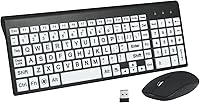
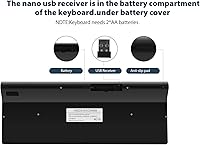
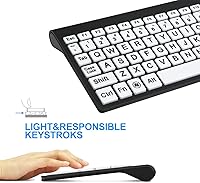
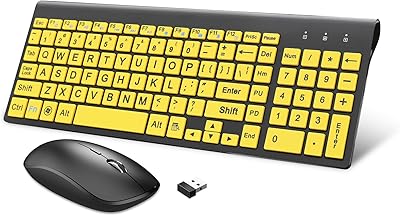
The Fonicer Large Print Wireless Keyboard Mouse Combo is a straightforward accessibility-focused input set built for people who need to actually see what they're typing. Seniors, low-vision users, and anyone learning the keyboard layout will find the oversized, high-contrast legends a genuine relief compared to the tiny printed characters on standard keyboards. It connects via a 2.4G wireless receiver — no software installation needed — and works across Windows, Mac, and Chromebook systems right out of the box. One thing worth knowing upfront: the keyboard and mouse share a single USB nano-receiver, so you're only giving up one port for the whole setup. At its price point, expect solid function over premium build quality.
Features & Benefits
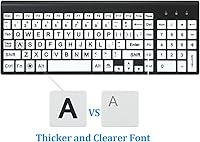
The oversized key legends are the headline feature here — printed large and in high contrast, they're easy to read even in dim lighting, which makes a real difference if fading eyesight or a poorly lit desk is a factor. The keyboard itself is full-size with 101 keys, measuring just under 15 inches wide but only about three-quarters of an inch thick, so it can slip into a laptop bag without much fuss. The scissor-switch mechanism keeps keystrokes quiet and responsive, cutting down on the clatter you'd get from older membrane designs. A gentle built-in slope gives the wrist a comfortable resting angle during longer sessions. Both devices run on AA batteries and share that single receiver.
Best For
This accessibility keyboard set is an especially good fit for older adults who've found themselves squinting at standard keyboards or making frequent typos because the key labels are just too small to read confidently. It suits people managing conditions like macular degeneration or other low-vision challenges, where clear, legible key markings can meaningfully reduce daily frustration. Beginner typists — particularly younger children — also benefit from the visual clarity. For anyone working in a shared home office or living room setup, the wireless, clutter-free design is a practical plus. And since the keyboard is slim and relatively light at just over a pound, frequent travelers who still want a proper full-size layout will find it a reasonable travel companion.
User Feedback
With a 4.3-star rating across more than 700 reviews, the overall reception is clearly positive. Buyers consistently mention key visibility as the standout strength — the large print makes a real difference for the people this set is intended for. Setup gets praised too, as does the low noise level. The mouse is where things get more mixed; some users flag sluggish cursor movement or inconsistent tracking, though re-plugging the receiver or swapping batteries tends to resolve it. The fact that both devices run on AA cells — three in total — is a mild friction point for anyone who prefers not to stock disposable batteries. Still, the overall verdict aligns well with what this accessibility keyboard set was designed to do.
Pros
- Oversized, high-contrast key legends are immediately readable, even in poor or dim lighting conditions.
- Plug-and-play setup requires no drivers — insert the receiver and start typing right away.
- Compatible with Windows, Mac, and Chromebook out of the box, no configuration needed.
- Scissor-switch keys are noticeably quieter than typical membrane keyboards, a real daily-use comfort.
- Both keyboard and mouse share one USB nano-receiver, keeping port usage to a minimum.
- Full-size 101-key layout gives users every key they need without layout compromises.
- At just over a pound and under an inch thick, it travels easily in a laptop bag.
- The built-in wrist slope keeps hands at a comfortable angle during longer typing sessions.
- A strong 4.3-star average across hundreds of verified buyers signals consistent everyday reliability.
Cons
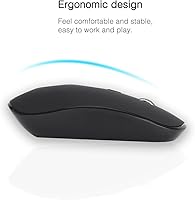
- The bundled mouse is basic — cursor tracking can feel sluggish or imprecise straight out of the box.
- Occasional wireless connectivity drops require re-plugging the receiver, which interrupts workflow unexpectedly.
- Both devices run on AA batteries, adding an ongoing replacement cost and supply to manage.
- Build materials feel plastic-heavy and lightweight in hand, raising questions about long-term durability.
- No rechargeable or wired mode exists, a drawback for eco-conscious or low-maintenance buyers.
- Mouse sensitivity issues reported by multiple buyers point to inconsistent quality control at this price tier.
- Key legends on budget keyboards can wear or fade with heavy daily use over time.
- No indicator lights for Caps Lock or Num Lock, which can cause silent, hard-to-spot input errors.
Ratings
The Fonicer Large Print Wireless Keyboard Mouse Combo has been evaluated through an AI-driven analysis of verified global buyer reviews, with spam, bot-generated responses, and incentivized feedback actively filtered out to ensure every score reflects genuine user experience. The ratings below cover this combo's standout accessibility strengths alongside its real-world limitations, with nothing softened or omitted. Both what works well and what frustrates actual buyers are transparently represented across every category.
Key Legibility
Ease of Setup
Wireless Reliability
Mouse Performance
Value for Money
Build Quality
Typing Comfort
Battery Life
OS Compatibility
Noise Level
Ergonomics
Portability
Key Feel
Accessibility Design
Durability
Suitable for:
The Fonicer Large Print Wireless Keyboard Mouse Combo was clearly built with a specific audience in mind, and for that audience it delivers genuine, practical value. Seniors who struggle to make out the small legends on standard keyboards will notice the difference immediately — the oversized, high-contrast characters cut down on guesswork and miskeys in a way that actually matters day to day. People managing low-vision conditions such as macular degeneration or glaucoma will find this a more comfortable daily driver than anything designed for the general market. It also works well for children just starting to learn the keyboard, since being able to clearly see each key removes a barrier that often slows down the learning process. Anyone running a straightforward home or office setup on Windows, Mac, or Chromebook can insert the USB receiver and be typing almost immediately, with no software or configuration headaches. Travelers who want the comfort of a full-size layout without hauling something heavy will appreciate that it weighs just over a pound and slips into most laptop bags.
Not suitable for:
The Fonicer Large Print Wireless Keyboard Mouse Combo is not the right choice for power users, creative professionals, or anyone who puts a premium on precision hardware. The mouse bundled in the set is basic by any reasonable measure — users who depend on smooth, accurate cursor control for design work, photo editing, or even just heavy spreadsheet use will likely find the tracking frustrating after a short time. Those who have already invested in a quality standalone mouse may find the included one redundant and disappointing enough to be a net negative in the package. The battery-powered design means ongoing AA cell consumption for both devices, which adds a recurring cost and hassle that rechargeable or wired alternatives avoid entirely. Build quality reflects the entry-level price point, so buyers expecting the durability or tactile refinement of a mid-range peripheral should look elsewhere. If wireless stability is a hard requirement — say, in a professional or healthcare setting where connectivity drops are genuinely disruptive — the reconnection issues flagged by some verified buyers make this a risky fit.
Specifications
- Brand: This keyboard and mouse set is manufactured by Fonicer, a brand focused on accessible computing peripherals.
- Model: The official model identifier is B082R3XGGS, which is useful for warranty inquiries or support requests.
- Wireless Type: Both devices connect via a shared 2.4G radio-frequency nano-receiver that plugs into a single USB port on the host machine.
- Key Count: The keyboard features a full 101-key layout covering all standard alphanumeric, function, and navigation keys.
- Dimensions: The keyboard measures 14.57 x 5.51 x 0.79 inches, offering a full-size footprint while staying slim enough for travel.
- Weight: The keyboard unit weighs approximately 1.05 pounds, light enough to slip into a standard laptop bag without adding noticeable bulk.
- Switch Type: Keys use a scissor-switch mechanism that delivers a low-travel, quiet keystroke with tactile feedback on each press.
- Power Source: The combo requires 3 AA batteries in total across both devices, which are not included in the package.
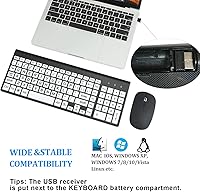
- OS Support: The set works out of the box with Windows Vista, 7, 8, 10, and above, as well as Mac OS and Google Chromebook.
- Key Design: Key legends are printed in an oversized, high-contrast format specifically to aid readability for users with low vision or in poorly lit environments.
- Noise Level: Both the keyboard keys and mouse buttons are engineered for low-noise operation, making the combo suitable for quiet or shared workspaces.
- Ergonomics: A built-in slope angle positions the keyboard at a gentle incline designed to reduce wrist strain during extended typing sessions.
- Receiver Type: A single shared USB nano-receiver manages wireless communication for both the keyboard and mouse simultaneously, using just one host USB port.
- User Rating: The combo carries a 4.3-out-of-5-star average rating based on 724 verified customer reviews.
- Market Rank: It holds a rank of number 271 in the Computer Keyboard and Mouse Combos category, reflecting consistent and sustained sales performance.
- Launch Date: The product was first made available for purchase in December 2019.
Related Reviews
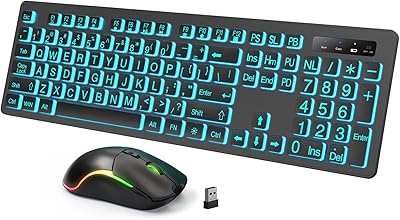
Luzarriba Large Print Backlit Wireless Keyboard and Mouse Combo
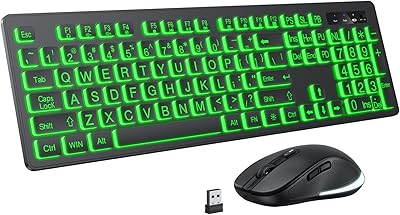
KOPJIPPOM Large Print Wireless Keyboard and Mouse Combo
HXMJ Wireless Large Print Keyboard and Mouse Set E68 Yellow

Arteck HW192 Wireless Keyboard and Mouse Combo

JOYACCESS Wireless Keyboard and Mouse Combo

ULSOU Wireless Ergonomic Keyboard and Mouse Combo

Mobifice Retro Wireless Keyboard and Mouse Combo

KNOWSQT Wireless Keyboard and Mouse Combo

FOPETT Retro Wireless Keyboard and Mouse Combo
