Overview

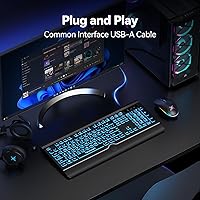
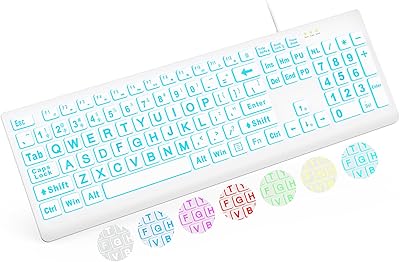
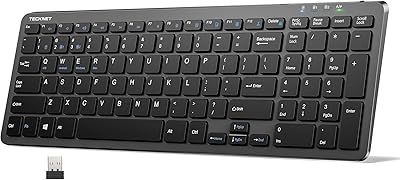
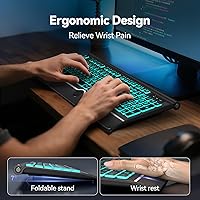
The TECKNET TK-KB029 Large Print Backlit Keyboard arrived on the market in late 2024 and has quietly built a solid reputation among users who find standard keyboard lettering frustratingly small. It's a full-size membrane keyboard with oversized key legends and a seven-color backlight — a combination that isn't common at this price point. What stands out immediately is that a wrist rest is included in the box, something you'd usually pay extra for. Setup couldn't be simpler: plug the USB-A cable into any available port and you're typing within seconds. No software, no drivers, nothing to configure.
Features & Benefits

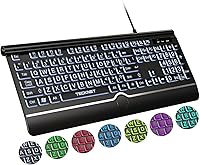
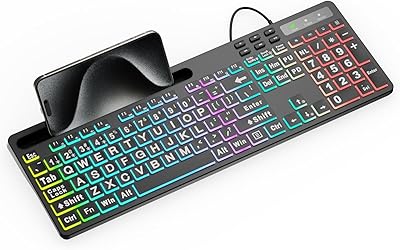
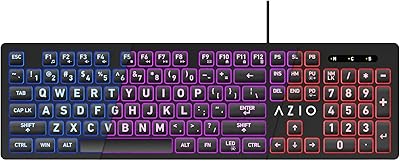
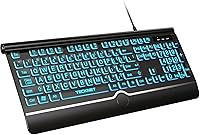
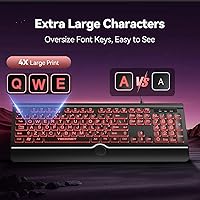
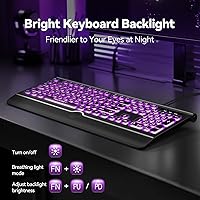
The key legends on this large-print keyboard are noticeably larger than what you'd find on a typical office keyboard — a real difference when you're squinting across a dimly lit desk. The backlight offers seven color options at three brightness levels, with both steady and breathing modes available. For night work, the amber setting is easy on the eyes. Typing feel is soft and quiet, with 3.2mm of key travel and a light actuation force that suits steady, deliberate typists. The 15-degree tilt angle feels natural after an hour of use, and the wrist rest — which sits flush against the keyboard's base — provides genuine cushioning rather than just token padding. Spill resistance is a nice practical touch too.

Best For

This accessibility keyboard is genuinely well-matched for adults over 40 who've started to notice how small standard key labels have become. It's also a strong pick for anyone working in low-light conditions — the combination of big legends and a bright backlight makes a meaningful difference at night. Students and office workers on a budget who want basic ergonomic support without spending more will appreciate what's included here. That said, it's worth being clear about who this isn't for: fast typists and gamers who prefer the tactile snap of mechanical switches will find the soft membrane feel underwhelming. Mac users should also note that multimedia keys have partial compatibility limitations.

User Feedback

Buyers consistently praise the key legibility and how well the backlight illuminates the oversized legends, particularly for evening use. The wrist rest gets positive mentions too, though a handful of users note it can shift slightly during longer sessions since it isn't locked in place. Build quality is the most divisive topic — most find the plastic body adequate for desk use, but a few expected something sturdier. The membrane typing feel draws the expected pushback from anyone used to mechanical boards. Plug-and-play performance across Windows versions earns reliable praise, while Mac users occasionally flag the multimedia key limitations. Long-term legend durability remains to be fully proven given the keyboard's recent release.

Pros

  • Oversized key legends make a real, immediate difference for low-vision users and anyone who types in dim lighting.
  • Seven backlight colors with three brightness levels let you match the keyboard to your environment rather than forcing a one-size setting.
  • Wrist rest is included in the box — a practical bonus that most competing keyboards charge extra for.
  • Plug-and-play setup works reliably across Windows versions without requiring driver downloads or admin access.
  • The quiet membrane switches are office-friendly and won't draw stares in shared or open-plan workspaces.
  • Full 104-key layout with a dedicated numpad suits data entry, spreadsheet work, and anyone who uses numbers frequently.
  • Spill-resistant design adds a layer of everyday protection that is easy to take for granted until you actually need it.
  • At this price tier, the combination of backlight, wrist rest, and accessibility-focused design represents strong overall value.

Cons

  • The wrist rest is not secured to the keyboard body and shifts forward during active typing sessions.
  • Membrane typing feel will disappoint anyone transitioning from a mechanical or even a semi-mechanical keyboard.
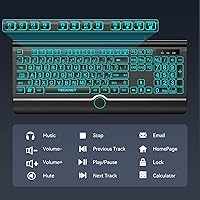
  • Multimedia function keys do not work fully with macOS, limiting usefulness for Mac users without workarounds.
  • The fixed tilt cannot be adjusted beyond the fold-out stands, which may not suit all wrist angles or desk heights.
  • Long-term legend durability cannot yet be verified, since the keyboard only launched in late 2024.
  • The non-detachable cable means a single cable fault makes the entire unit unusable and non-repairable.
  • Lightweight plastic construction creates a flex sensation near the edges that some users find unsatisfying.
  • No tenkeyless version exists for buyers who want large-print legends but a smaller desk footprint.

Ratings

The TECKNET TK-KB029 Large Print Backlit Keyboard has been evaluated using AI-driven analysis of verified global user reviews, with spam, bot-generated, and incentivized feedback actively filtered out before scoring. The ratings below reflect real-world experiences from everyday buyers — including seniors, office workers, and low-vision users — and transparently capture both what this accessibility keyboard does well and where it falls short.
Key Legibility
93%
The oversized key legends are the single most praised aspect across user reviews. Buyers who previously relied on sticky labels or magnifiers report that they can finally type confidently without squinting. This is especially valuable for evening use or under artificial office lighting.
A small number of users with severe visual impairments noted that while the legends are larger than average, they still wished for even higher contrast on certain color backlight settings. The improvement is real, but it has a ceiling for those with significant sight loss.
Backlight Quality
88%
Seven color options with three brightness levels give users meaningful control over their workspace atmosphere. The amber low-blue-light mode in particular has earned praise from night-shift workers and people who type after dark without wanting to strain their eyes.
A few users found the breathing mode distracting during focused work and wished they could disable it more intuitively. Backlight bleed around key edges is occasionally mentioned on lighter settings, which slightly reduces the crispness of the legends at maximum brightness.
Wrist Rest Comfort
79%
21%
Having a wrist rest included without paying extra is genuinely appreciated, especially among users who type for several hours a day. It sits flush with the keyboard base and provides soft cushioning that reduces forearm fatigue during long document sessions or data entry work.
The wrist rest is not locked in place, which means it can drift forward during active typing sessions. Users who type with heavy hands report having to reposition it periodically, which breaks flow. It also shows surface wear faster than the keyboard body itself.
Typing Feel
62%
38%
The soft membrane switches are quiet enough for shared office spaces and library environments, which is exactly the use case this keyboard targets. The 45g actuation force feels light and forgiving for users who type slowly and deliberately rather than aggressively.
Anyone coming from a mechanical keyboard will find the membrane feel noticeably mushy and lacking tactile feedback. This is the most common point of frustration in user reviews, and it is a legitimate concern — the soft travel simply does not satisfy typists who value responsiveness.
Build Quality
67%
33%
The keyboard holds up well under normal daily office use and the spill-resistant design has saved a few buyers from coffee-related disasters. The keycaps feel solid and the legends show no early signs of fading, which is encouraging for a plastic-bodied board at this price.
The plastic chassis feels noticeably lightweight, and some users describe a slight flex when pressing keys near the edges. It does not feel fragile, but it does not feel premium either — which may matter to buyers who prefer a more substantial desk presence.
Ease of Setup
97%
Plug-and-play performance is consistently praised across Windows versions from 7 through 11. Users in office environments frequently mention setting it up on shared or locked-down computers without needing admin permissions to install drivers, which is a practical advantage.
Mac users occasionally report that multimedia function keys do not behave as expected without additional configuration. This is a known limitation rather than a defect, but it catches some buyers off guard who assumed full cross-platform compatibility.
Value for Money
91%
The combination of large-print legends, backlit keys, ergonomic tilt, and an included wrist rest at this price tier is hard to argue with. Buyers consistently express surprise at how much is included in the box relative to what they paid.
Buyers seeking a long-term investment may find themselves replacing it sooner than expected if they type heavily every day, given the plastic construction. At this price point the value is excellent, but durability expectations should be calibrated accordingly.
Ergonomic Design
74%
26%
The 15-degree fixed tilt angle suits most users who prefer a slightly elevated keyboard position, and the full-size layout means hands stay in a natural position without cramping. Users doing extended data entry particularly appreciate the dedicated numeric keypad on the right.
The tilt is fixed and non-adjustable beyond the fold-out stands, which may not suit every wrist position. Users with specific ergonomic requirements — or those advised by a physiotherapist to use a negative-tilt setup — will find this limiting.
Noise Level
86%
The membrane switches keep typing noise low enough for open-plan offices and shared spaces without feeling completely deadened. Multiple buyers mention using this in libraries or quiet work environments without drawing complaints from nearby colleagues.
It is not as whisper-quiet as a dedicated silent keyboard with dampened switches. Users who work in truly noise-sensitive environments — recording spaces or late-night setups in shared bedrooms — may notice the bottom-out sound is still audible up close.
Backlight Customization
71%
29%
Switching between colors and brightness levels is handled directly from the keyboard without any software, which keeps things straightforward for non-technical users. The variety of modes means most people can find a setting that works for their lighting conditions.
There is no per-key lighting control and no software to fine-tune the experience, which is expected at this price. Users who want zone lighting or saved profiles will be disappointed, and the mode-cycling process can feel trial-and-error without a manual nearby.
Compatibility
83%
Windows compatibility is comprehensive, covering versions from the early 2000s through Windows 11, which makes this keyboard usable on older hardware in schools or legacy office setups. Raspberry Pi support is a nice bonus for hobbyist and educational users.
Mac compatibility is only partial, with multimedia keys not fully functional out of the box. This is disclosed in the product listing, but it still generates frustration in reviews from users who primarily work across both platforms.
Key Legend Durability
69%
31%
Early signs from buyers who have used the keyboard for several months show no meaningful fading on the oversized legends, which is encouraging. The wear-resistant coating appears to perform well under regular daily use in office conditions.
Because this keyboard only launched in late 2024, long-term durability data beyond six months is limited. The three-year no-fade claim cannot yet be independently verified by the user community, so some skepticism about that specific claim is reasonable.
Cable & Connectivity
78%
22%
The fixed USB-A cable is long enough for most standard desk setups and connects reliably without signal dropouts. Users appreciate not needing a wireless connection or batteries, especially in shared environments where Bluetooth pairing can be a headache.
The cable is not detachable, which means a damaged cable renders the entire keyboard unusable. A few buyers also noted that cable routing is slightly awkward depending on desk configuration, as the exit point is centered at the top rather than the side.
Size & Desk Footprint
72%
28%
The full-size 104-key layout gives users everything they need in one board, including a numpad, without requiring a separate peripheral. For desk setups with adequate space, the dimensions feel well-proportioned and stable during use.
At over 17 inches wide, this is not a compact keyboard, and users with smaller desks or those trying to leave room for a full mouse pad may find the footprint tight. There is no tenkeyless variant for buyers who want the large legends without the numpad.

Suitable for:

The TECKNET TK-KB029 Large Print Backlit Keyboard is a strong match for adults over 40 who find themselves leaning closer to their screen just to read standard keycaps — a frustration that compounds quickly during long work sessions. Seniors who have switched to larger-text displays and larger-font software but never addressed the keyboard are the exact buyer this was designed for. It also works well for anyone temporarily dealing with vision challenges, whether from post-surgery recovery, eye fatigue, or light sensitivity, since the adjustable backlight lets you dial down to a softer glow without sacrificing legibility. Office workers and students on a tight budget who want basic ergonomic support — a proper tilt angle and a wrist rest — without spending significantly more will find the included accessories genuinely useful rather than token additions. Schools, libraries, and shared workstations benefit particularly from the plug-and-play simplicity, since there are no drivers to install and no settings to reconfigure between users.
Not suitable for:

If you are a touch typist who relies on tactile feedback to know when a keypress has registered, the TECKNET TK-KB029 Large Print Backlit Keyboard will likely frustrate you within days — the soft membrane switches simply do not provide the crisp bump that experienced typists or mechanical keyboard users expect. Gamers should also look elsewhere, as the membrane design and lack of anti-ghosting or per-key customization make it unsuitable for fast-paced or precision input scenarios. Mac power users will run into limitations with the multimedia keys, which only partially function under macOS, making this a suboptimal daily driver for anyone deeply embedded in the Apple ecosystem. If desk space is already at a premium, the wide full-size footprint — over 17 inches across — may crowd out mouse room in a way that becomes genuinely inconvenient. Finally, buyers who want a keyboard that feels reassuringly solid and heavyweight should temper their expectations, as the lightweight plastic chassis, while functional, does not convey the durability of more expensive options.
Specifications

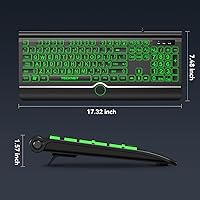
  • Dimensions: The keyboard measures 17.56 x 8.11 x 1.57 inches, making it a full-footprint board that requires adequate desk space.
  • Weight: The unit weighs 1.76 pounds, which is light for a full-size keyboard with an attached wrist rest.
  • Switch Type: Membrane switches are used throughout, offering a soft and quiet keystroke rather than a tactile or clicky mechanical feel.
  • Key Travel: Each key has 3.2mm of travel distance, which sits within the typical range for membrane office keyboards.
  • Actuation Force: Keys require approximately 45g of force to actuate, resulting in a light touch that suits steady, deliberate typists.
  • Layout: Full-size 104-key QWERTY layout includes a dedicated numeric keypad, navigation cluster, and standard function row.
  • Keycap Legend Size: Key legends are printed at approximately 4 times the size of standard keyboard characters for improved readability.
  • Backlight Colors: Seven backlight color options are available, including white, amber, red, blue, green, cyan, and purple.
  • Brightness Levels: Three brightness levels are supported alongside both steady constant-light and animated breathing modes.
  • Tilt Angle: The keyboard ships with a fixed 15-degree typing angle, supplemented by fold-out rear stands for additional elevation.
  • Wrist Rest: A cushioned wrist rest is included in the box and sits flush against the front edge of the keyboard without a locking mechanism.
  • Connection: The keyboard connects via a fixed USB-A (USB 2.0) cable and requires no drivers, software, or external power source.
  • Compatibility: Fully supported on Windows 2000 through Windows 11, Vista, and Raspberry Pi 3 and 4; macOS is partially supported with multimedia key limitations.
  • Spill Resistance: The keyboard features a spill-resistant construction intended to protect against minor liquid incidents during everyday desk use.
  • Keycap Durability: Keycaps are coated with a wear-resistant layer rated by the manufacturer for up to 3 years of fade-free use under normal conditions.
  • Keystroke Lifespan: The membrane switch mechanism is rated for up to 50 million keystrokes across the keyboard's operational lifespan.
  • Material: The chassis and keycaps are constructed from plastic, keeping the overall weight low at the cost of a premium feel.
  • Model Number: The official model designation is TK-KB029, manufactured and sold under the TECKNET brand.

Related Reviews
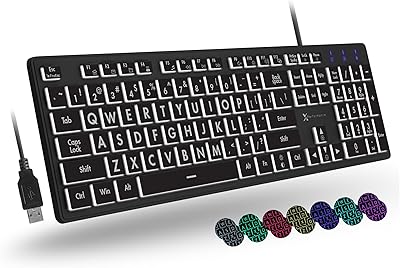
X9 Large Print Backlit Keyboard
86%
94%
Ease of Use
88%
Visibility of Keys
85%
Typing Comfort
82%
Backlighting Customization
80%
Build Quality
More
SABLUTE Large Print Backlit Keyboard KB113
87%
91%
Ease of Use for Visual Impairments
88%
Customizable Backlighting
87%
Ergonomics and Wrist Comfort
65%
Compatibility with macOS
84%
Typing Speed and Accuracy
More
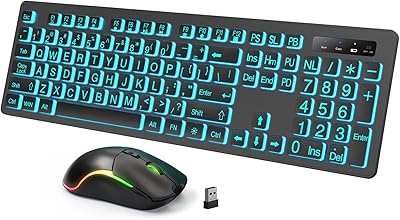
MARVO WK712 Large Print Backlit Keyboard
85%
89%
Typing Comfort
72%
Build Quality
95%
Key Font Visibility
81%
RGB Lighting Customization
94%
Ease of Setup
More
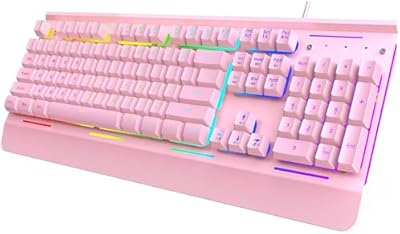
Luzarriba Large Print Backlit Wireless Keyboard and Mouse Combo
78%
91%
Key Visibility & Readability
94%
Ease of Setup
67%
Backlight Quality
83%
Wireless Reliability
61%
Mouse Comfort & Usability
More
Azio KB512 Large Print Keyboard
76%
93%
Key Legibility
78%
Backlight Quality
96%
Ease of Setup
57%
Typing Feel
62%
Build Quality & Durability
More
TECKNET TK-KB002 Gaming Keyboard
86%
89%
Comfort and Ergonomics
93%
RGB Customization
88%
Key Responsiveness
90%
Durability and Build Quality
84%
Water Resistance
More
Dilter Large Print Wired USB Keyboard
88%
91%
Ease of Use
96%
Key Visibility
83%
Typing Comfort
94%
Setup/Installation
85%
Build Quality
More
KOPJIPPOM Large Print Wireless Keyboard and Mouse Combo
78%
91%
Key Visibility & Legibility
83%
Backlight Quality
88%
Battery Life & Charging
76%
Typing Feel & Noise Level
61%
Mouse Performance
More
Fonicer Large Print Wireless Keyboard and Mouse
85%
91%
Ease of Use for Visually Impaired Users
89%
Quiet Operation
87%
Comfort and Ergonomics
83%
Wireless Connectivity
93%
Key Size and Visibility
More
TECKNET TK-KB041 Wireless Keyboard
80%
91%
Value for Money
78%
Typing Feel & Key Response
93%
Noise Level
82%
Multi-Device Switching
63%
Build Quality & Materials
More

FAQ

No, nothing to install at all. Just plug the USB-A cable into an available port and it works immediately. This is one of the things buyers consistently appreciate — it works on locked-down office computers and school machines where you cannot install software.

Noticeably larger — the legends are printed at roughly four times the size of what you would find on a standard keyboard. In practice, this means you can read the keys comfortably from a normal sitting distance without leaning in, even in moderate lighting.

It sits flush against the front edge of the keyboard but is not physically locked or clipped in place. It stays put during relaxed typing, but if you type with heavier strokes or push the keyboard around frequently, it can shift forward and need repositioning.

You can absolutely lock it to a single color and brightness level. The mode cycling is manual, controlled by dedicated keys on the keyboard, so it only changes when you tell it to. There is no automatic rotation unless you set it to breathing mode.

It will connect and the standard keys will work fine, but the multimedia function keys — things like volume control and media playback shortcuts — do not fully cooperate with macOS without additional setup. If you are a Mac user who relies heavily on those shortcut keys, this is worth factoring into your decision.

Yes, at medium or high brightness the keys are clearly visible in a completely dark environment. The amber color mode at lower brightness is particularly popular for nighttime use since it is easier on the eyes than white or blue light.

The spill-resistant design handles minor splashes and drips reasonably well — a knocked-over glass nearby or a few drops from a coffee cup should not immediately kill it. That said, it is not waterproof, so a full liquid pour directly onto the board is still a risk and you should dry it quickly if that happens.

It really is. There are no account logins, no app downloads, and no pairing processes. Plug it in and every key works. The only thing worth explaining upfront is how to change the backlight color if they want to, but even that is a single keypress.

The manufacturer rates the keycap coating for up to three years of fade-free use, and early user reports from the months since launch are positive — no meaningful fading reported yet. That said, the keyboard is still relatively new, so long-term real-world confirmation beyond six months is limited.

That depends on what you are used to. For someone who types at a relaxed pace and prioritizes legibility and wrist comfort, it works well for extended sessions. If you are a fast typist or someone who expects tactile feedback from each keystroke, the soft membrane feel will likely feel unsatisfying after a while and a mechanical option might suit you better.