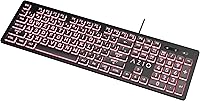
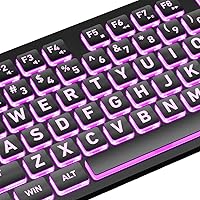
Overview

The Azio KB512 Large Print Keyboard is built around a simple premise: not everyone can read tiny key labels, and that shouldn't stop anyone from using a computer comfortably. Designed with accessibility in mind, it targets seniors, low-vision users, and anyone tired of squinting at faded or miniature legends. It connects via USB with no drivers needed, runs on membrane switches, and keeps the price firmly in budget territory. This isn't a board for mechanical keyboard enthusiasts chasing tactile feedback — it's a practical daily driver for people who simply want to type without frustration.

Features & Benefits

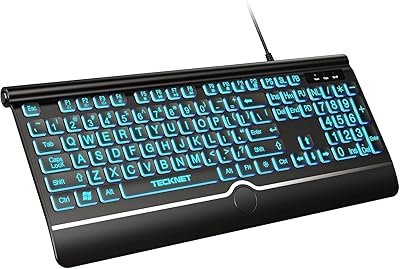
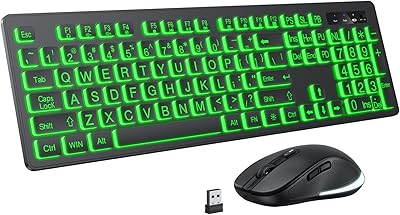
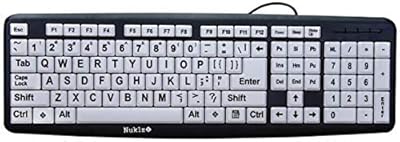
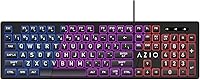
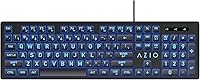
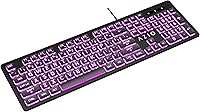
The oversized key legends — reportedly four times larger than what you'd find on a standard keyboard — are the headline feature here. In low-light conditions, you can toggle between red, blue, or purple backlighting, which adds a welcome layer of visibility without the complexity of full RGB. A built-in wrist rest runs along the bottom edge, offering modest ergonomic relief during lighter sessions — though it won't replace a dedicated wrist pad for marathon typing. Multimedia hotkeys for volume and playback round things out, and the plug-and-play USB setup means you're typing within seconds of plugging it in.

Best For

This large-print keyboard finds its strongest audience among seniors and users with low vision or eye strain who have long struggled with standard keyboards. It's also a natural fit for shared home computers — the kind sitting in a living room or kitchen where family members of varying ages take turns. Budget-conscious students who want backlit keys without spending on a premium board will find it more than capable for everyday tasks. If you work in a dim home office or simply hate hunting for keys in poor lighting, the colored backlight delivers real day-to-day comfort.

User Feedback

With nearly 8,000 ratings and a 4.5-star average, this accessibility keyboard has clearly resonated with its intended audience. Buyers consistently highlight how easy it is to set up and how readable the keys are right out of the box. Backlight brightness earns steady praise from those typing in darker rooms. On the downside, users accustomed to tactile or mechanical switches often find the membrane action a bit soft and uninspiring. The wrist rest draws mixed reactions — appreciated for short sessions, but limited for longer ones. Some long-term owners also report keycap print wear appearing sooner than expected under heavy daily use.

Pros

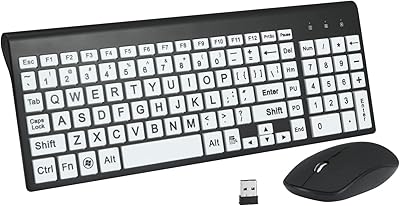
  • Oversized key legends make letters immediately readable, even in average ambient lighting.
  • Three backlight color options add practical low-light visibility without complex software.
  • Truly plug-and-play — no drivers, no setup steps, just connect and start typing.
  • Full-size layout with number pad suits data entry and everyday home office tasks.
  • Quiet membrane keys are considerate of others in shared or noise-sensitive spaces.
  • At its price point, no comparable backlit large-print keyboard offers this feature set.
  • Lightweight at just one pound, making it easy to reposition or store when not in use.
  • The built-in wrist ledge provides enough support for casual, shorter typing sessions.
  • Nearly 8,000 verified ratings averaging 4.5 stars signals broad, sustained satisfaction.
  • Multimedia hotkeys for volume and playback are genuinely useful during daily computer use.

Cons

  • Membrane switches offer minimal tactile feedback, leading to more errors during fast typing.
  • Keycap print can visibly wear down within months under heavy daily use.
  • No white backlight option limits readability for users who find color-tinted keys harder to parse.
  • Backlight brightness is fixed with no dimming control, which can feel too intense in dark rooms.
  • Hotkey functionality is significantly reduced on Mac and Linux operating systems.
  • The wrist rest is too narrow and shallow to help users with ongoing wrist or joint discomfort.
  • Backlight illumination is uneven, with edges noticeably dimmer than the center of the board.
  • The non-reinforced USB cable may not hold up well if the keyboard is frequently moved or unplugged.
  • No compact or tenkeyless variant is available for users with limited desk real estate.
  • Windows 10 is the listed compatible OS, leaving users on older or non-Windows systems underserved.

Ratings

The Azio KB512 Large Print Keyboard has been scored by our AI system after analyzing thousands of verified global buyer reviews, with spam, bot-generated, and incentivized feedback actively filtered out. Scores reflect real-world usage patterns across the keyboard's core strengths and genuine pain points — nothing is glossed over. Both the areas where this accessibility keyboard truly delivers and the spots where it falls short are transparently represented below.

Key Legibility
93%
This is the one area where buyers across all demographics agree: the oversized key legends make an immediate, tangible difference. Seniors and low-vision users in particular describe finally being able to type without leaning in or second-guessing which key they just pressed. That clarity holds even in average room lighting.
A small number of users with more severe visual impairments noted that while the print is larger, the contrast on certain keys could be higher. The legends are bold, but the color differentiation between standard and function keys is minimal, which can still cause confusion for some users.
Backlight Quality
78%
22%
The three backlight options — red, blue, and purple — are genuinely useful for typing in dim conditions. Users working late at night or in low-light home offices appreciate having at least some color variety without dealing with complicated software or RGB control panels.
The backlighting is not individually adjustable in brightness, and there is no white light option — a common request from users who find red or purple tones harder to read under. Some reviewers noted the illumination is uneven across keys, with edges appearing noticeably dimmer than the center.
Ease of Setup
96%
Plug it in and start typing — that is genuinely the entire experience. No driver disc, no software download, no pairing process. For the target audience of seniors or less tech-savvy users, this zero-friction setup is a meaningful advantage that gets repeatedly called out in reviews.
Because it is Windows-centric by design, a small number of users on Mac systems reported limited functionality with certain hotkeys. It works as a basic keyboard on macOS, but the multimedia shortcuts and some key mappings do not translate cleanly outside of Windows 10.
Typing Feel
57%
43%
For casual typing — emails, browsing, light document work — the membrane keys get the job done without much complaint. The low-profile design keeps finger travel short, which some users actually prefer, and the quiet actuation is a plus in shared spaces or quiet households.
Anyone coming from a mechanical keyboard will find the membrane action flat and unsatisfying. There is little tactile feedback to confirm a keypress, which leads to more typos during faster typing sessions. Long-form writers and frequent typists consistently flag this as the keyboard's most significant limitation.
Build Quality & Durability
62%
38%
The keyboard feels reasonably solid for its price tier — it does not flex noticeably under pressure and sits flat without wobbling. Short-term users rarely have structural complaints, and for occasional or light daily use, the construction holds up without issue.
Long-term reviewers raise valid durability concerns. Keycap print wear starts appearing on the most-used keys within several months of heavy daily use for some owners. The overall plastic construction, while functional, does not inspire confidence for users expecting years of heavy-duty reliability.
Wrist Rest Comfort
61%
39%
Having a built-in wrist rest at this price point is a genuine bonus — it keeps your wrists slightly elevated during shorter typing sessions and removes the need to buy a separate accessory for light use. Casual users who type in bursts rather than sustained stretches find it adequate.
The wrist rest is narrow and offers minimal cushioning. Anyone who types for extended periods will likely find it insufficient — it is more of a palm ledge than a true ergonomic support. Several reviewers with wrist or carpal tunnel concerns specifically noted it did not reduce discomfort over longer sessions.
Multimedia Hotkeys
74%
26%
The dedicated media keys for volume control and playback are a practical addition that users genuinely use. Adjusting audio during a video call or pausing music without switching windows is a small but appreciated convenience, especially for home office users who keep multiple apps running.
The hotkey labels are not always intuitive, and there is no printed legend key guide included in the box. A few users had to look up which function key combination triggered which shortcut, which undercuts the keyboard's otherwise simple, no-fuss appeal.
Value for Money
88%
At its price point, this large-print keyboard delivers an honest, functional package. Buyers comparing it to alternatives in the accessibility keyboard space consistently note they could not find a backlit large-print option with this combination of features for less money elsewhere.
The value calculus shifts if the keyboard wears out within a year under heavy use. A few buyers who needed to replace it within 12 to 18 months felt the cost-per-use ratio was less favorable than expected, particularly when accounting for the print degradation issue.
Cable & Connectivity
81%
19%
The USB cable is a practical length for most desk setups — long enough to reach a tower PC on the floor without pulling tight, but not so long that it creates clutter. Wired connectivity also means zero latency and no battery management, which many users actively prefer.
The cable is not braided or reinforced at the connector ends, which raises minor long-term durability questions for users who frequently unplug and move the keyboard. There is also no cable management routing on the underside of the board.
Key Spacing & Layout
79%
21%
The full-size layout with standard key spacing feels familiar and immediately comfortable for touch typists. Number pad inclusion is a genuine asset for users who handle data entry or financial tasks, and the overall layout avoids any unusual key relocations that might trip up new users.
The keyboard is on the wider side due to the full layout, which may not suit smaller desks or users who prefer a more compact form factor. There is no tenkeyless or compact version available, so buyers with tight desk real estate have limited options within this product line.
Noise Level
83%
Membrane switches keep the sound profile notably quiet — a real-world advantage for shared offices, bedrooms, or households where noise sensitivity matters. Users who previously used louder mechanical boards mention the quieter typing experience as a welcome change in communal spaces.
While quiet overall, the keycap rattle on some units has been noted as slightly louder than expected for a membrane board. It is not distracting in isolation, but in a truly silent room, the hollow plastic sound on each press can become noticeable over time.
Backlighting Color Options
66%
34%
Having three distinct backlight colors gives this keyboard a modest visual personality that plain unlit alternatives lack. For users who simply want something that looks a bit more modern on their desk, the purple option in particular draws positive comments for its appearance in dim lighting.
The absence of white or cool-blue backlight is a gap that affects practical readability for some users. The available color options were clearly chosen for aesthetics rather than maximum legibility, and for a keyboard marketed toward low-vision users, that is a missed opportunity.
Compatibility
71%
29%
For Windows users — the clear primary audience — compatibility is effectively universal. It works reliably across Windows 7 through 10 without any additional configuration, and basic typing functionality carries over to other operating systems without issue.
Mac and Linux users get a functional keyboard but lose access to several hotkey features. The keyboard is not advertised as cross-platform, but buyers who try it on non-Windows systems occasionally express frustration at the reduced functionality without advance warning.

Suitable for:

The Azio KB512 Large Print Keyboard is purpose-built for anyone who has ever squinted at a keyboard and wished the letters were just a little bigger. It is an especially strong match for seniors who want to stay independent with their computer use without relying on workarounds like keyboard stickers or magnification software. Low-vision users and those with early-stage macular degeneration or similar conditions will find the oversized legends a genuine quality-of-life improvement for everyday tasks like browsing, emailing, and video calls. It also works well on a shared family computer where multiple generations take turns — the large print and simple plug-and-play setup remove friction for the less tech-savvy members of the household. Budget-conscious students or home office workers who just need a reliable, quiet, backlit keyboard for routine daily use will get solid value here without overspending.

Not suitable for:

The Azio KB512 Large Print Keyboard is not the right fit for anyone who cares about typing feel, tactile feedback, or switch quality. Writers, coders, or heavy typists who spend hours at the keyboard each day will likely find the soft membrane action fatiguing and imprecise — it simply does not deliver the responsiveness that productive, fast typists rely on. Mac users should also think twice, as the hotkeys and some key mappings are optimized for Windows and will not function fully outside that ecosystem. If you are looking for a compact or tenkeyless layout because desk space is tight, this keyboard's full-size footprint with number pad may not fit comfortably in your setup. And while the built-in wrist rest sounds like an ergonomic bonus, users managing chronic wrist issues or carpal tunnel syndrome will need a proper ergonomic keyboard or a dedicated wrist pad — this one's ledge is too minimal to provide meaningful therapeutic support.

Specifications

  • Brand: Manufactured by Azio, a brand known for accessibility-focused and specialty input devices.
  • Model: KB512, a full-size wired membrane keyboard designed for high-legibility use.
  • Dimensions: The keyboard measures 17.68″ in length, 5.91″ in width, and 1.38″ in height.
  • Weight: The unit weighs approximately 1 pound, making it lightweight for a full-size keyboard.
  • Connectivity: Connects via a standard USB-A wired connection with no wireless or Bluetooth option.
  • Key Type: Uses membrane switches, offering quiet, low-profile key presses with minimal tactile feedback.
  • Key Legend Size: Key legends are approximately 4 times larger than those found on conventional keyboards.
  • Backlight Colors: Supports three LED backlight color options: red, blue, and purple.
  • Wrist Rest: Features a slim built-in wrist rest integrated along the bottom edge of the keyboard frame.
  • Hotkeys: Includes dedicated multimedia and quick-access hotkeys for functions such as volume control and media playback.
  • Driver Requirement: No drivers or software installation are required; the keyboard is fully plug-and-play upon USB connection.
  • Compatible OS: Officially compatible with Windows 10; basic functionality works on earlier Windows versions and other operating systems.
  • Power Source: Powered entirely through the USB connection; no batteries or external power adapter are needed.
  • Color: Available in black with backlit key legends that are visible under all three lighting color modes.
  • Layout: Full-size layout includes a dedicated numeric keypad, function row, and standard alphanumeric key arrangement.
  • BSR Ranking: Ranked #544 in the Computer Keyboards category on Amazon at time of evaluation.
  • User Rating: Holds a 4.5 out of 5 star average rating based on approximately 7,956 verified user ratings.
  • Keyboard Profile: Low-profile key construction reduces finger travel distance, which suits casual and moderate typing use.

Related Reviews
X9 Large Print Backlit Keyboard
86%
94%
Ease of Use
88%
Visibility of Keys
85%
Typing Comfort
82%
Backlighting Customization
80%
Build Quality
More
TECKNET TK-KB029 Large Print Backlit Keyboard
79%
93%
Key Legibility
88%
Backlight Quality
79%
Wrist Rest Comfort
62%
Typing Feel
67%
Build Quality
More
KOPJIPPOM Large Print Wireless Keyboard and Mouse Combo
78%
91%
Key Visibility & Legibility
83%
Backlight Quality
88%
Battery Life & Charging
76%
Typing Feel & Noise Level
61%
Mouse Performance
More
SABLUTE Large Print Backlit Keyboard KB113
87%
91%
Ease of Use for Visual Impairments
88%
Customizable Backlighting
87%
Ergonomics and Wrist Comfort
65%
Compatibility with macOS
84%
Typing Speed and Accuracy
More
Dilter Large Print Wired USB Keyboard
88%
91%
Ease of Use
96%
Key Visibility
83%
Typing Comfort
94%
Setup/Installation
85%
Build Quality
More
MARVO WK712 Large Print Backlit Keyboard
85%
89%
Typing Comfort
72%
Build Quality
95%
Key Font Visibility
81%
RGB Lighting Customization
94%
Ease of Setup
More
Fonicer Large Print Wireless Keyboard and Mouse
85%
91%
Ease of Use for Visually Impaired Users
89%
Quiet Operation
87%
Comfort and Ergonomics
83%
Wireless Connectivity
93%
Key Size and Visibility
More
Nuklz N Magnus 125 Large Print Keyboard
85%
94%
Ease of Use
89%
Typing Comfort
96%
Key Visibility
83%
Build Quality
92%
Compatibility
More
Luzarriba Large Print Backlit Wireless Keyboard and Mouse Combo
78%
91%
Key Visibility & Readability
94%
Ease of Setup
67%
Backlight Quality
83%
Wireless Reliability
61%
Mouse Comfort & Usability
More
HXMJ Wireless Large Print Keyboard and Mouse Set E68 Yellow
86%
88%
Typing Comfort
91%
Visibility and Readability
89%
Wireless Connectivity
85%
Ergonomics
73%
Key Softness
More

FAQ

No installation needed at all. Just plug the USB connector into any available port on your Windows PC and it will be recognized immediately. There are no drivers to download and no setup wizard to sit through — it is genuinely ready to use within seconds.

It will function as a basic keyboard on a Mac, meaning you can type normally without any issues. However, the dedicated multimedia hotkeys and some function key shortcuts are mapped for Windows and will not all translate correctly in macOS. If you primarily use a Mac and rely on media keys, that is worth knowing before you buy.

The key legends are roughly four times larger than what you would find on a standard keyboard. For most users with low vision or eye strain, that difference is immediately noticeable and genuinely useful — you can read the keys clearly from a normal seated distance without leaning in.

Unfortunately, no. The backlight has a single fixed brightness level — you can switch between red, blue, and purple colors, but there is no dimming option. In a very dark room some users find the illumination a bit strong, while others wish it were brighter in well-lit environments. It is a one-size-fits-all setting.

For short bursts of typing it is a welcome addition, but it is not a serious ergonomic feature. The wrist rest is narrow and has no cushioning — it is essentially a shallow ledge built into the keyboard frame. If you type for hours at a stretch or have wrist discomfort, you would be better off pairing this keyboard with a dedicated padded wrist rest.

This is one of the more common complaints from long-term owners. Under heavy daily use, some users report visible fading on the most frequently used keys within several months. Lighter or occasional users tend not to experience this as quickly. It is a real durability consideration if you type a lot every single day.

No, it uses membrane switches. That means the keys are quieter and have a softer, mushier feel compared to mechanical alternatives. If you are used to the click and tactile bump of a mechanical board, this large-print keyboard will feel noticeably different — not bad for casual use, but a meaningful trade-off for heavy or fast typists.

It depends on the device. Any TV or console that accepts standard USB keyboards in HID mode should recognize it for basic text input. However, the multimedia hotkeys and special functions are specifically designed for Windows PC use and will likely not work as intended on non-PC platforms.

The cable is a practical length suited to most standard desk setups — long enough to reach a desktop tower placed on the floor without pulling tight, but not excessively long. The exact cable length is not officially published by Azio, but user feedback generally describes it as adequate for home and office desk configurations.

It is genuinely one of the more thoughtful options for that scenario. The large, easy-to-read keys remove one of the most common sources of frustration for older users, and the plug-and-play setup means they do not need technical help to get started. Pair it with a larger monitor and readable font settings on the PC, and you have a setup that can make a real practical difference for someone who finds standard keyboards hard to navigate.