Overview

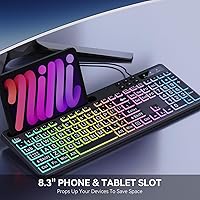
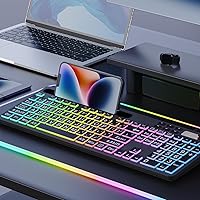
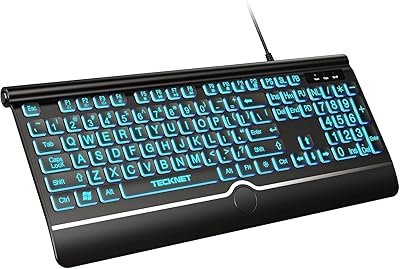
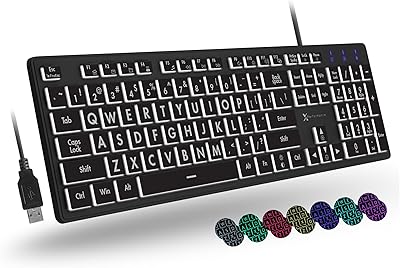
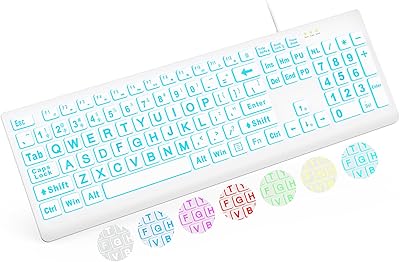
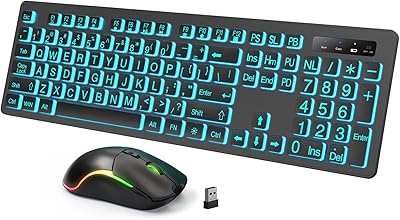
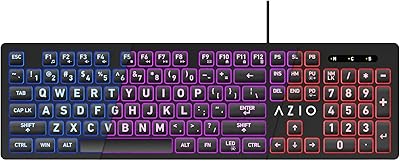
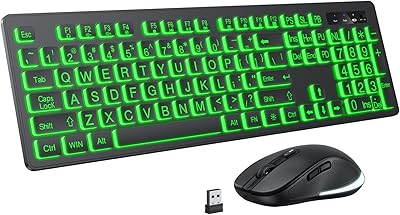
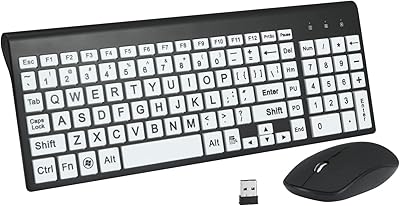
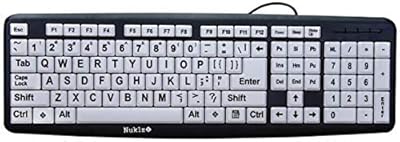
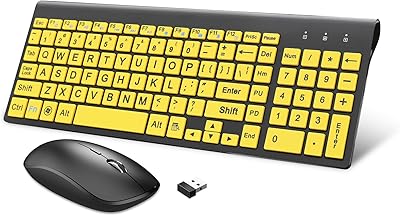
The MARVO WK712 Large Print Backlit Keyboard is a wired, full-size keyboard designed for those who need enhanced visibility and comfort while typing. This keyboard features large, legible key fonts that are ideal for seniors and visually impaired users. The RGB backlighting adds a colorful touch, while the 8.3-inch cradle allows for convenient multitasking by holding your phone or tablet. With a quiet typing experience, it’s perfect for shared spaces where noise reduction is important. Overall, it’s a well-rounded keyboard suited to various users seeking a comfortable, easy-to-use solution.
Features & Benefits

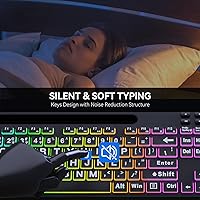
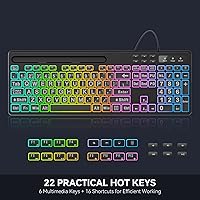
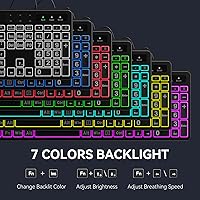
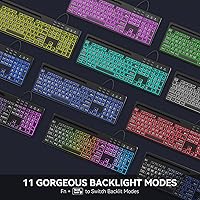
This keyboard comes with a range of features that make it stand out. The 7 RGB colors and 11 lighting modes offer full customization, allowing users to choose a style that suits their preferences. The built-in tablet/phone holder enhances productivity by freeing up desk space and improving multitasking. The plug-and-play setup ensures a hassle-free experience, with no software installation required. Additionally, the silent keys provide a quiet typing experience, making it ideal for office or home environments. The keyboard’s large print keys and easy-to-read font help users type comfortably and accurately.

Best For

The MARVO WK712 is a great option for a variety of users. It is perfect for office workers who need better visibility while typing in low-light conditions. The large print keys and high-contrast colors make it especially useful for seniors or those with visual impairments. Beginners will also find it easy to use due to its intuitive layout and simple setup. Additionally, those who enjoy customizing their workspace will appreciate the RGB lighting modes, which add a fun, personalized touch to their desk. Overall, it’s a versatile keyboard for anyone needing a clearer, more comfortable typing experience.

User Feedback

User reviews highlight several positive aspects of this keyboard. Many appreciate the clear key fonts that make typing easier, especially for those with low vision. The quiet typing experience is another standout feature, with many mentioning it’s a great choice for shared or quiet spaces. A few users enjoy the RGB lighting modes, finding them a fun and customizable addition to the keyboard. However, some feedback mentions the build quality could be more robust, with a few users reporting that the plastic feels a bit flimsy. Overall, the keyboard has received praise for its functionality and accessibility.

Pros

  • Large, clear key fonts are especially beneficial for seniors and visually impaired users.
  • The quiet key switches make this keyboard ideal for working in shared or quiet spaces.
  • RGB lighting customization with 7 colors and 11 modes adds a fun touch to the typing experience.
  • The built-in phone/tablet holder is a convenient feature for multitaskers.
  • Plug-and-play setup with no software required simplifies installation for all users.
  • The keyboard's solid build quality ensures it can handle everyday use without issues.

Cons

  • Some users may find the key switches too soft, lacking tactile feedback for those who prefer a clicky response.
  • The plastic build may feel less premium and could be prone to wear with heavy use.
  • Gamers looking for advanced customization or macro support may find the keyboard limiting.
  • The 5.25ft cable may not be long enough for setups that require a more spacious desk arrangement.
  • A few users reported that the RGB lighting modes are not as bright as expected in well-lit rooms.
  • While the phone/tablet holder is useful, it may not be sturdy enough for larger devices or prolonged use.

Ratings

After analyzing verified user reviews worldwide, the scores for the MARVO WK712 Large Print Backlit Keyboard reflect a broad range of authentic feedback from diverse platforms and languages. Spam, bot, and incentivized reviews were filtered out, ensuring only high-quality insights informed the results. Both strengths and pain points are reflected in the following ratings, offering a well-rounded view of what users truly think about this device.

Typing Comfort
89%
Many users find the quiet key switches of this large print keyboard ideal for long typing sessions. The soft, silent typing experience reduces finger fatigue and is especially appreciated in quiet environments like libraries or shared workspaces. The keys are responsive yet non-disruptive, making it comfortable for everyday use.
However, some users feel that the silent keys may not provide enough tactile feedback for those who prefer a more pronounced keypress. A few have also mentioned that the key action feels a bit too soft, making it harder to gauge typing accuracy for fast typists.
Build Quality
72%
28%
Several reviewers compliment the overall solid build of this device, noting that it feels sturdy and durable despite its plastic construction. The keyboard is designed to withstand regular use without showing immediate signs of wear, and its weight provides stability while typing.
However, some buyers have pointed out that the materials feel somewhat cheap, especially the keycaps, which can wear down over time. A few also noted that the plastic frame doesn't have a premium feel, which may detract from the overall experience.
Key Font Visibility
95%
Users with low vision, in particular, love the large, clear key fonts that make it easy to read each letter. The high contrast between the key labels and the background significantly enhances visibility, and many note that it makes typing easier and less straining on the eyes, especially during long sessions.
A very small number of customers mentioned that while the font size is great for readability, some may find the keys look a bit oversized or cluttered. This can be a minor downside for users who prefer more compact or minimalistic designs.
RGB Lighting Customization
81%
19%
The customizable RGB lighting with 7 colors and 11 modes is a highlight for many users who enjoy personalizing their setup. The ability to cycle through lighting modes without the need for software installation is a convenient feature, and it adds a fun, customizable touch to the keyboard.
On the downside, some users feel the RGB colors and modes are a bit too basic compared to more premium keyboards. A few have also pointed out that the lighting can sometimes appear uneven or not as bright in certain settings, especially in well-lit rooms.
Ease of Setup
94%
Many users appreciate how easy it is to set up this backlit keyboard. The plug-and-play feature with the 5.25ft USB-A cable ensures that there's no need to install additional software or drivers. The keyboard works seamlessly with both Windows and Mac systems, making it ideal for hassle-free use right out of the box.
Some users who were expecting more advanced features or software customization were disappointed by the lack of configuration options. The plug-and-play nature means that advanced users won't be able to personalize the lighting or create macros without external software.
Phone/Tablet Holder Usability
78%
22%
The built-in 8.3-inch phone/tablet holder is a useful feature for those who need to multitask. It's particularly appreciated by users who need to reference their phone or tablet while working at the keyboard, such as during video calls, reading, or following along with tutorials.
However, a few users noted that the tablet holder could be slightly more sturdy. Some felt that it was not as secure as they'd hoped, particularly when using heavier devices, and occasionally experienced slipping or instability when typing vigorously.
Silent Key Switches
88%
The silent key switches are one of the standout features, providing a smooth and near-silent typing experience. This is especially beneficial in shared spaces or for late-night typists who need to minimize noise disturbance. Many users find this feature makes it much easier to type without distracting others.
On the flip side, some users who prefer keyboards with more pronounced feedback mentioned that the keys felt too soft for fast typing. This lack of tactile feedback might make it harder to know when a key has been pressed, which could affect typing speed and accuracy for certain users.
Compatibility with Different OS
90%
The wide compatibility with both Windows and Mac operating systems is a big plus for users who work across different devices. Many buyers found it incredibly convenient to use without needing additional drivers or software, and switching between operating systems was smooth and effortless.
While it works well on both platforms, some Mac users mentioned that the keyboard lacks certain Mac-specific shortcuts or customizations. Additionally, a few Windows users mentioned that certain lighting features could be more refined for specific system configurations.
Overall Design & Aesthetics
83%
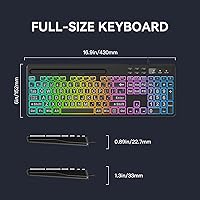
The overall design is sleek and functional, with a full-size layout and RGB backlighting that gives it a modern look. Many users appreciate the keyboard's compact feel despite being full-size, and the clean, minimalistic design fits well with most desk setups.
However, some users find the design a bit too basic, especially when compared to other RGB keyboards that feature more advanced aesthetics. A few users also mentioned that the color choices for the keycaps were limited and did not provide as much customization as they would have liked.
Value for Money
92%
Overall, the value for money is highly praised. The MARVO WK712 provides a solid mix of features, including large print keys, RGB lighting, and a quiet typing experience, all at an affordable price point. Buyers feel they are getting a lot of functionality and quality for what they paid.
Some users mentioned that while the price is reasonable, there are certain premium features (such as more robust lighting controls or higher-end materials) that could have been included for an even better value. Despite these small critiques, most felt it offered great overall value.
Durability Over Time
70%
30%
The keyboard holds up well for most users over time, with many stating that it continues to function properly even after extended use. The sturdy construction and solid build are appreciated by those who require a reliable device for everyday tasks.
However, a few users noted that the keyboard started to show signs of wear after several months, especially with the keycap labels fading and the plastic frame becoming scratched. Some users also found that the keys became less responsive over time.
Noise Levels in Quiet Spaces
90%
This keyboard excels in quiet environments due to its silent key switches, which produce little to no noise during typing. Users in shared spaces, such as offices or dorm rooms, find it ideal for working without disturbing others, making it a great option for those who value low noise levels.
On the downside, users who prefer keyboards with more pronounced feedback or sound may not enjoy the completely silent typing experience. Some mentioned they missed the more tactile response and audible click that some mechanical keyboards provide.

Suitable for:

The MARVO WK712 Large Print Backlit Keyboard is an excellent option for seniors or visually impaired users who struggle with small key fonts. Its large, clear key labels and high-contrast design make typing easier and less straining on the eyes. Office workers, especially those in low-light conditions, will appreciate the customizable RGB backlighting and the ability to adjust the colors and modes for a more personalized work setup. Additionally, this backlit keyboard is ideal for anyone who needs a quiet typing experience in shared spaces, like libraries or open offices. The built-in tablet holder adds a layer of convenience for multitaskers who want to keep their phone or tablet within easy reach while typing.
Not suitable for:

While the MARVO WK712 offers a lot of great features, it may not be the best fit for users who prefer more tactile feedback when typing. Those who enjoy a clicky or more responsive keypress may find the silent switches too soft. Gamers or users who need more advanced customization options, such as macros or detailed lighting control, might feel limited by the keyboard's plug-and-play design, which doesn't support software for deeper adjustments. Additionally, people who need a high-end, premium feel may find the build quality to be somewhat lacking, as the plastic frame and keycaps can appear and feel less durable over time, especially with heavy use.

Specifications

  • Keyboard Type: Wired full-size keyboard with a USB-A connection.
  • Key Font: Larger-than-usual font for improved legibility, especially for seniors and users with low vision.
  • Backlighting: RGB backlighting with 7 colors and 11 customizable lighting modes.
  • Cable Length: 5.25-foot USB-A cable provides ample reach for most desk setups.
  • Compatibility: Compatible with both Windows and Mac systems without requiring additional software.
  • Tablet Holder: Built-in 8.3-inch cradle for holding smartphones or tablets, ideal for multitasking.
  • Key Switch Type: Silent key switches for a quieter typing experience in shared or quiet environments.
  • Dimensions: 16.9 x 6 x 0.89 inches, providing a full-size layout without feeling overly bulky.
  • Weight: 1.54 pounds, a sturdy yet manageable weight for stable typing.
  • Design: Ergonomically designed for comfort with a full-size key layout and quiet operation.
  • Lighting Control: Lighting modes are easily adjustable using dedicated keys on the keyboard itself.
  • Plug-and-Play: Easy to set up with no software installation required—just plug and use.
  • Target Audience: Ideal for visually impaired users, seniors, office workers, and beginners.
  • Special Features: Customizable RGB lighting and an integrated tablet holder enhance versatility.
  • Materials: Built with durable plastic, though some users note it's not as rugged as premium models.
  • Key Travel: Key switches offer a quiet and soft typing experience, with moderate key travel.
  • Use Case: Great for low-light environments, with easily adjustable lighting and clear key fonts.
  • Warranty: Comes with a standard warranty to cover defects in materials or workmanship.

FAQ

The MARVO WK712 Large Print Backlit Keyboard features large, easy-to-read key fonts, making it especially helpful for seniors or anyone with low vision. The RGB backlighting with adjustable lighting modes further enhances visibility, allowing users to customize the keyboard to their needs.
Yes, this keyboard is compatible with both Windows and Mac systems. Simply plug it in via the USB-A cable, and it will work without the need for additional drivers or software.

Setting up the keyboard is simple—just plug it into a USB-A port on your computer. To customize the RGB lighting, press the dedicated lighting control keys to switch between colors and modes. You can choose from 7 colors and 11 lighting effects.

Yes, the keyboard uses silent key switches, which reduce typing noise significantly, making it a great option for shared spaces or environments where noise is a concern.

The built-in 8.3-inch cradle is designed to hold most smartphones and tablets. While it works well for smaller devices, larger tablets like an iPad Pro may not fit securely or could become unstable when typing for long periods.

The keyboard comes with a 5.25-foot USB-A cable, which should be sufficient for most desk setups. However, if you have a particularly large desk or prefer a more flexible arrangement, you may need a longer cable or an extension.

No, this keyboard does not require any additional software or drivers for customization. The RGB lighting modes and effects are easily adjustable via the keyboard’s built-in control keys, making setup and use straightforward.

The keyboard is built with a solid structure and should hold up well for regular use. However, some users have noted that the plastic construction might not be as durable as higher-end models, particularly for those who type aggressively.

While the MARVO WK712 is suitable for general typing and office work, its quiet switches and lack of advanced gaming features (such as macro keys or mechanical switches) make it less ideal for competitive gaming.

The MARVO WK712 is a wired keyboard, so it does not rely on battery power. When plugged into your laptop or desktop, the RGB lighting will not drain any internal battery, ensuring that it operates consistently without affecting power usage.