Overview

The FLYTOCCA N3 16-Inch Portable Monitor enters a crowded market with a straightforward pitch: a compact second screen that actually fits in your bag. FLYTOCCA is a relatively new name in this space, but the N3 holds its own against more established brands. What sets it apart from the sea of 15.6-inch options is its 16:10 aspect ratio, which gives you a touch more vertical space — genuinely useful when scrolling through documents or juggling multiple windows. At its price point, this is a solid everyday portable display, not a color-grading workstation. Manage those expectations and it delivers well.
Features & Benefits

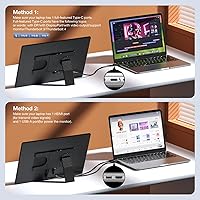
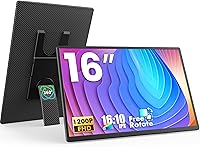
The extra vertical real estate from the 16:10 panel is the first thing you notice — it's a meaningful upgrade over the typical widescreen format when reading long documents or writing code. The rotatable, detachable kickstand is flexible, though one caveat upfront: auto-rotation is not supported, so switching between portrait and landscape requires a manual trip into your display settings. That's a minor inconvenience once you know about it. The matte coating handles indoor glare well, and setup is refreshingly simple — plug in via USB-C or HDMI and you're running instantly. The built-in speakers are thin but functional for calls and casual video.

Best For

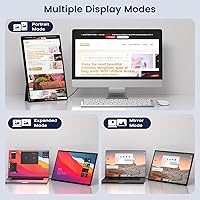
This travel display is a natural fit for remote workers and digital nomads who hop between cafés, co-working spaces, and hotel rooms. Students will appreciate the extra screen space for keeping reference material open while writing, and the portrait mode is surprisingly practical for reading long articles or reviewing vertical content. Professionals who present frequently will find the extend and mirror modes straightforward to use. Casual gamers can get decent mileage out of it too, though competitive gaming isn't really its sweet spot. If you regularly switch between content orientations or just want a reliable second screen without carrying heavy gear, this portable monitor makes a strong case.

User Feedback

Buyers consistently highlight the easy plug-and-play setup and the kickstand's flexibility as genuine strengths, with many noting the 16:10 format feels like a noticeable step up from the usual portable options. Build quality gets positive marks for the price tier. On the flip side, some users have run into black screen issues when connected to USB-C ports that don't deliver enough power — plugging into a powered hub or wall adapter typically resolves it. A handful also mention the brightness is fine indoors but falls short in very bright outdoor environments. The manual orientation switch catches a few people off guard initially, but most adapt quickly.

Pros

  • The 16:10 aspect ratio gives noticeably more vertical screen space than most portable monitors at this price.
  • Plug-and-play setup over USB-C or HDMI works reliably across Windows, macOS, and compatible Android devices.
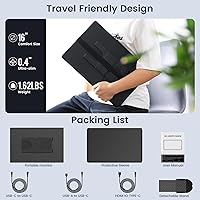
  • At under 1.5 lbs and less than an inch thick, this travel display fits into a laptop bag without issue.
  • The matte panel handles indoor glare well in everyday environments like offices and coffee shops.
  • The rotatable kickstand lets you switch between landscape and portrait orientation without buying a separate accessory.
  • Solid build quality feels more premium than the price tier typically delivers.
  • The included protective cover shields the screen during transit at no extra cost.
  • Built-in speakers handle basic audio needs for calls and casual video without needing external gear.
  • Three display modes — extend, mirror, and portrait — cover most real-world productivity and presentation scenarios.

Cons

  • Auto-rotation is not supported; switching orientations requires a manual change in your OS display settings every time.
  • Power supply sensitivity is a documented issue — insufficient USB-C wattage can cause black screens or flickering.
  • Brightness tops out at a level that works indoors but falls short in brightly lit or outdoor environments.
  • Color reproduction is average at best, making it unsuitable for any color-sensitive creative work.
  • USB-C compatibility depends entirely on the host device supporting DisplayPort Alt Mode, which not all ports do.
  • The plastic chassis picks up fingerprints easily and may show scuffs with regular bag use over time.
  • Built-in speaker audio is thin and gets drowned out in anything louder than a quiet room.
  • FLYTOCCA is a newer brand with a limited track record, which may concern buyers thinking about long-term reliability.
  • The protective cover attachment feels less secure than expected, raising minor doubts about screen safety in a packed bag.

Ratings

The FLYTOCCA N3 16-Inch Portable Monitor has been evaluated by our AI system after analyzing verified purchaser reviews from global marketplaces, with spam, bot-generated, and incentivized feedback actively filtered out. The scores below reflect a balanced picture of where this travel display genuinely delivers and where real buyers have run into friction. Both the standout strengths and the recurring pain points are represented transparently so you can make a confident buying decision.
Portability & Form Factor
91%
At just under 1.5 lbs and less than two-thirds of an inch thick, this portable monitor slides into a laptop bag without adding noticeable bulk. Commuters and frequent flyers specifically call out how easy it is to pack alongside a 15-inch laptop without feeling overburdened.
The included protective cover, while useful, adds a small amount of thickness that a few users find slightly awkward when fitting everything into a tighter sleeve. It is a minor trade-off, but worth noting for those with compact bags.
Display Quality
78%
22%
The 1920x1200 resolution on a 16:10 panel produces a noticeably sharper and taller image than the standard 1080p widescreen alternatives at this price range. Text is crisp for document work, and colors look pleasing enough for everyday productivity and casual media consumption.
This is not a color-accurate panel, and users doing any kind of photo editing or design work will quickly notice the limitations. Color reproduction is adequate for general use but falls short of what creative professionals would expect, even at this price tier.
Brightness & Outdoor Usability
63%
37%
Indoors, the 300 nit brightness handles typical office lighting and dim café environments reasonably well. For video calls, document review, and casual streaming in controlled lighting, most users find it perfectly workable without needing to max out the settings.
Step outside or sit near a sunny window and the display struggles visibly. Several buyers noted the screen becomes difficult to read in direct sunlight or brightly lit spaces, which is a real limitation for anyone who works outdoors or in very well-lit environments regularly.
Matte Screen & Glare Resistance
83%
The matte coating meaningfully reduces reflections in everyday indoor settings like coffee shops, co-working spaces, and airport lounges. Users appreciate not having to constantly reposition themselves to avoid glare bouncing off the screen during long work sessions.
Matte coatings inherently soften perceived sharpness compared to glossy panels, and a small number of users feel it slightly dulls colors. It is a common trade-off in portable displays, but those coming from a glossy laptop screen may notice the difference initially.
Stand & Orientation Flexibility
74%
26%
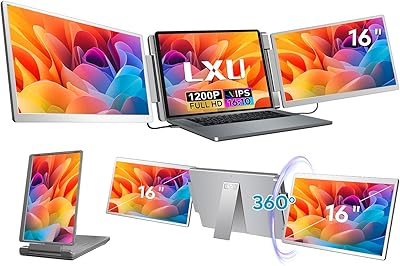
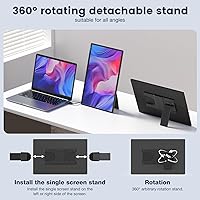
The 360-degree rotatable kickstand is a genuine selling point — being able to flip the display into portrait mode without a separate accessory is genuinely useful for reading long articles, reviewing code, or vertical content. The stand feels sturdy and holds its angle reliably on flat surfaces.
Auto-rotation is not supported, which catches a meaningful number of buyers off guard. Switching between landscape and portrait requires manually changing the display orientation in your operating system settings every time, which adds friction for users who switch modes frequently throughout the day.
Connectivity & Compatibility
77%
23%
Plug-and-play functionality over USB-C with DisplayPort Alt Mode or HDMI means setup takes under a minute with no driver installation. The FLYTOCCA N3 works reliably across Windows laptops, MacBooks, and even some Android devices with a capable USB-C port.
Compatibility hinges entirely on having the right port with full video output support, and that trips up a portion of buyers. Laptops with USB-C ports that only handle charging or data transfer — not video — will not work, and the listing could be clearer about this distinction upfront.
Power Supply Reliability
58%
42%
When connected to a sufficiently powerful USB-C source or an external power adapter, this travel display runs stably without issues. Users who power it from a wall outlet or a high-wattage hub report no problems with flickering or screen blackouts during extended sessions.
Power sensitivity is the most documented frustration among buyers. Black screens, flickering, and failure to wake from sleep have all been reported when the monitor draws power from USB-C ports that cannot deliver adequate wattage. Connecting to an external power source fixes it, but it is an extra step that undermines the plug-and-play appeal.
Built-in Speakers
61%
39%
Having any built-in audio is a practical convenience for travel — enough for a video call, a quick YouTube clip, or a presentation without hunting for external speakers. For a slim portable monitor, the inclusion itself is appreciated by most buyers.
The audio quality is thin and tinny, which is expected given the physical constraints of the chassis. Volume tops out at a level that works fine in quiet rooms but gets drowned out easily in noisier environments. No one should buy this display primarily for its audio.
Build Quality & Materials
82%
18%
For a mid-range portable monitor, the FLYTOCCA N3 feels more solid than its price suggests. The chassis does not flex noticeably during normal use, and the overall fit and finish have earned consistent praise from buyers who expected something more budget-feeling.
A handful of users noted the plastic body picks up fingerprints easily and can show minor scuff marks with regular bag use over time. It is not fragile, but it also does not have the premium heft of more expensive options, and long-term durability remains an open question for a newer brand.
Setup & Ease of Use
89%
The out-of-box experience is straightforward — connect the cable, select your display mode, and you are working within a couple of minutes. No software installs, no complicated menu diving. First-time portable monitor users consistently highlight this as a strength.
The manual orientation switching requirement is the one friction point that disrupts an otherwise smooth user experience. New users also occasionally need a moment to figure out the stand assembly, though most find it intuitive after the first use.
Aspect Ratio & Screen Real Estate
87%
The 16:10 aspect ratio is a tangible advantage over the 16:9 standard that dominates portable monitors at this price. That extra vertical space makes a real difference when split-screening documents, browsing long web pages, or using productivity apps side by side.
For video content specifically, the taller panel means thin black bars appear when watching standard 16:9 video, which bothers some users. It is a minor visual quirk, and most productivity-focused buyers quickly decide the trade-off is worth it.
Protective Cover & Accessories
72%
28%
The included cover doubles as a stand in some configurations and keeps the screen protected during transit, which is a practical inclusion that saves buyers from sourcing a separate case. Users appreciate that it is included in the box rather than sold separately.
The cover material feels somewhat basic and does not inspire confidence for protecting the display against anything beyond light scratching. A few users reported the magnetic attachment feeling less secure than expected, raising minor concerns about the screen staying protected in a packed bag.
Value for Money
84%
Taken as a complete package — 16-inch 16:10 display, flexible kickstand, matte panel, plug-and-play connectivity, and a protective cover included — this travel display offers genuine value at its price point. Most buyers feel they received more than they paid for, especially relative to competitors in the same bracket.
The power supply sensitivity issue and the lack of auto-rotation are real limitations that knock off some of the value proposition. Buyers who need a truly hassle-free experience and are willing to spend more would likely be better served by a higher-tier option from a more established brand.

Suitable for:

The FLYTOCCA N3 16-Inch Portable Monitor is a strong match for remote workers and digital nomads who regularly set up in cafés, co-working spaces, or hotel rooms and need a dependable second screen without hauling heavy gear. Students will get real mileage out of the extra vertical screen space — keeping lecture notes open on one side while researching on the other is genuinely more comfortable on a 16:10 panel than on a standard widescreen portable display. Professionals who present to small groups will appreciate how quickly the mirror and extend modes activate without any driver fuss. It also suits casual gamers looking for a portable screen on a reasonable budget, and anyone who regularly flips between reading long documents in portrait mode and standard landscape work will find the rotatable kickstand a practical convenience rather than a gimmick.
Not suitable for:

The FLYTOCCA N3 16-Inch Portable Monitor is not the right call for anyone who needs color accuracy for photo editing, video grading, or graphic design work — the panel simply is not calibrated to professional standards, and pushing it into that role will lead to frustration. Buyers who plan to use it primarily outdoors or in very bright environments should also look elsewhere, as the brightness level is adequate for controlled indoor settings but genuinely struggles in sunlit conditions. If you need auto-rotation — the kind that flips the display automatically when you turn the stand, the way your phone does — this monitor does not support it, and manually digging into display settings every time you switch orientations gets old fast. Users with USB-C ports that only handle charging or basic data transfer will also run into compatibility headaches, and those who want a truly zero-fuss portable solution may find the power supply sensitivity more annoying than they anticipated.
Specifications

  • Screen Size: The display measures 16 inches diagonally, offering slightly more viewing area than the 15.6-inch portable monitors that dominate this category.
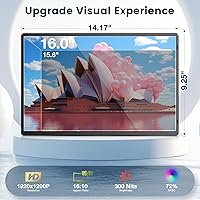
  • Resolution: Native resolution is 1920x1200 pixels, delivering sharp, detailed imagery with a bit more vertical pixel density than standard 1080p panels.
  • Aspect Ratio: The 16:10 aspect ratio provides a taller canvas than conventional 16:9 widescreen displays, which is particularly useful for document work and vertical content.
  • Panel Surface: A matte anti-glare coating is applied to the screen surface to reduce reflections in bright indoor environments.
  • Brightness: Maximum brightness is rated at 300 cd/m², which is sufficient for typical indoor use but may feel limited in very bright or sunlit settings.
  • Dimensions: The monitor measures 14.17 x 9.25 x 0.59 inches, making it slim enough to slip into most standard laptop sleeves and backpack compartments.
  • Weight: The unit weighs 1.46 lbs without the cover, keeping the total carry weight well within comfortable daily bag limits.
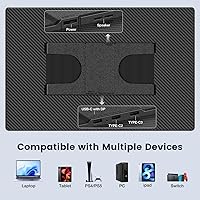
  • Connectivity: Input options include USB-C with DisplayPort Alt Mode, a full-size HDMI port, and a USB-A port used primarily for supplemental power delivery.
  • Power Supply: The monitor can draw power through a compatible USB-C connection, but an external power source is recommended when the host device cannot deliver sufficient wattage.
  • Display Modes: Supports three display configurations: extended desktop for multitasking, mirror mode for presentations, and portrait orientation for vertical content viewing.
  • Stand Type: Features a 360-degree rotatable and detachable kickstand that allows free-angle adjustment in both landscape and portrait positions without requiring a separate stand accessory.
  • Auto-Rotation: Automatic screen rotation is not supported; switching display orientation must be done manually through the operating system display settings.
  • Built-in Audio: Two built-in speakers are integrated into the chassis, providing basic stereo audio output for calls, presentations, and casual media playback.
  • Protective Cover: A fitted protective cover is included in the box to shield the screen from scratches and minor impacts during transport.
  • Driver Requirement: No driver installation is required; the monitor operates as a plug-and-play device on Windows, macOS, and compatible USB-C Android devices.
  • Model Number: The official model designation is N3, as assigned by the manufacturer FLYTOCCA.
  • Warranty: FLYTOCCA provides a 12-month quality warranty backed by 24-hour customer support accessible through their seller storefront.
  • Manufacturer: Designed and sold by FLYTOCCA, a consumer electronics brand that entered the portable monitor segment in early 2025.

Related Reviews
LXU 16-inch Portable Monitor S11
81%
88%
Display Quality
83%
Portability & Size
91%
Ease of Setup
75%
Compatibility with Devices
85%
Ergonomics & Flexibility
More
WUAWE 16-inch Portable Gaming Monitor
83%
91%
Portability
89%
Display Quality
94%
Setup Ease
56%
Sound Quality
78%
Build Quality
More
UPERFECT 16006DD 16″ 4K Portable Monitor
77%
83%
Brightness Performance
91%
Display Sharpness
74%
Color Accuracy
88%
Build Quality
76%
Portability
More
InnoView 16-inch Portable Monitor INVPM405 01B
85%
89%
Display Quality
94%
Portability and Size
90%
Gaming Performance
84%
Build Quality
88%
Color Accuracy
More
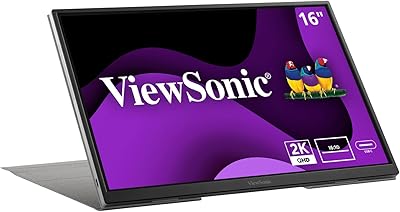
ViewSonic VG1656-2K 16-inch Portable Monitor
86%
94%
Portability & Weight
90%
Display Quality & Resolution
85%
Setup & Installation
88%
Build Quality & Durability
72%
Gaming Performance
More
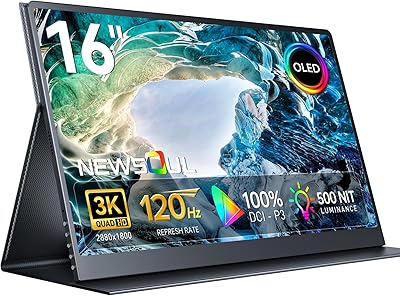
Newsoul M160B04 16″ OLED Portable Monitor
77%
93%
Image Quality
89%
Portability
86%
Color Accuracy
84%
Gaming Performance
58%
Brightness & Glare
More
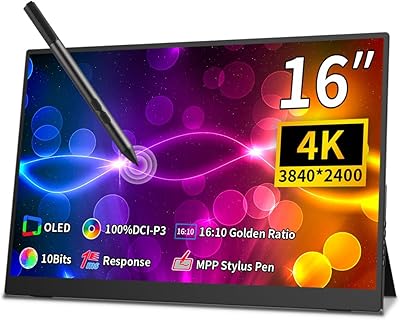
Magedok 16-inch 4K OLED Touchscreen Portable Monitor
85%
91%
Display Quality
89%
Portability
75%
Touchscreen Performance
65%
Brightness in Bright Environments
88%
Gaming Performance
More
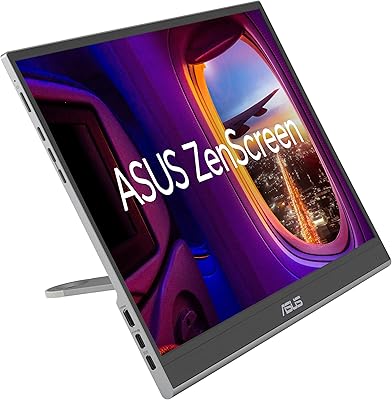
ASUS ZenScreen Touch 16-inch Portable Monitor (MB16AMTR)
87%
94%
Portability & Weight
88%
Touchscreen Functionality
72%
Battery Life
85%
Display Quality
90%
Connectivity Options
More
ASUS ZenScreen MQ16AHE 16-inch OLED Portable Monitor
86%
94%
Display Quality
91%
Portability
86%
Build Quality
88%
Connectivity
93%
Color Accuracy
More
ViewSonic TD1656-2K 16-inch Touchscreen Portable Monitor
80%
93%
Display Sharpness
74%
Touch Responsiveness
91%
USB-C Connectivity
88%
Portability
86%
Build Quality
More

FAQ

Yes, provided your MacBook has a USB-C or Thunderbolt port that supports DisplayPort Alt Mode — which most modern MacBook Air and MacBook Pro models do. A single USB-C cable handles both video signal and power in that case, so you genuinely do not need a separate adapter or power brick.

The root cause is almost always an underpowered USB-C connection. Some laptops have USB-C ports that can output video but cannot simultaneously deliver enough power to run the display at full brightness. The fix is straightforward: connect the monitor to an external USB-C power adapter or a powered hub at the same time, and the black screen issue goes away for the vast majority of users.

You can, and the rotatable kickstand makes the physical flip easy. The catch is that auto-rotation is not supported, so after you physically turn the stand to portrait position, you also need to go into your display settings and manually change the orientation there. It is a one-time adjustment each time you switch modes rather than something that happens automatically.

Yes for the Nintendo Switch in docked mode via HDMI — just connect the HDMI cable and power the monitor separately using the USB-A port and a standard USB charger. For PlayStation, it also works over HDMI the same way. Keep in mind you will need to handle audio separately since the console audio routes through the HDMI signal, and the built-in speakers will handle it at a basic level.

It is a solid casual viewing experience indoors — colors are decent, text is sharp, and the matte coating keeps reflections manageable. The 16:10 aspect ratio does mean thin black bars appear when watching standard 16:9 widescreen content, which most people quickly stop noticing. It is not a panel for a home theater setup, but for watching something on a flight or in a hotel room it works well.

Absolutely. The HDMI input works independently of USB-C, so any Windows laptop with a standard HDMI output will connect without issues. In that configuration you will want to power the monitor separately using the included USB-A cable connected to a USB charger or a port on your laptop.

For a portable monitor in this price range, the build is notably solid. The chassis does not flex under normal handling, and the overall finish feels more considered than many budget competitors. It is plastic throughout, which means it will pick up minor scuffs over time with regular bag use, but most buyers report it feels sturdier than they expected when it arrived.

In shaded outdoor conditions it is usable, but in direct sunlight it genuinely struggles. The brightness ceiling is adequate for typical indoor environments but does not have the extra headroom needed to compete with bright ambient light. If outdoor use in sunny conditions is a regular requirement, you would be better served by a display rated significantly higher in nits.

The box includes a USB-C to USB-C cable, a mini HDMI to HDMI cable, and a USB-A to USB-C power cable, along with the protective cover. For most laptop users, everything needed for a first connection is already there. If your laptop only has full-size HDMI out and you want the cleanest setup, you may want a standard HDMI cable since the included one is mini HDMI on the monitor side.

It works well in a home office too, particularly if desk space is tight or you want a secondary display you can easily move around or stow away. The kickstand holds a stable angle on a desk, and plug-and-play connectivity means you can unplug it and take it on a trip without any reconfiguration. That said, if the monitor is going to sit in one spot permanently, a traditional desktop monitor in the same price range will typically offer better brightness, color accuracy, and ergonomic flexibility.