Overview

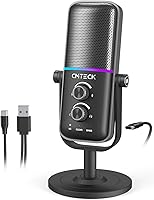
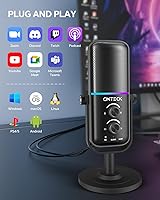
The CMTECK XM600 USB Microphone arrived early in 2025 as a practical option for anyone who wants a real step up from a headset mic without committing serious money. Built from aluminum rather than the cheap plastic common at this price, it feels noticeably more solid on the desk. The plug-and-play USB-C setup means no driver installations, no configuration headaches — just plug in and you are live. A six-foot cable gives you enough reach to position the mic wherever it sounds best, which matters more than most people realize. For a microphone ranking in the top 500 of its category this early after launch, it is off to a solid start.

Features & Benefits

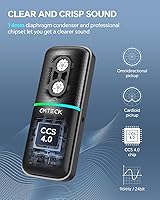
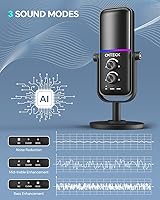
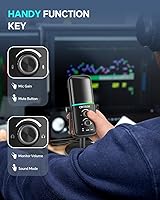
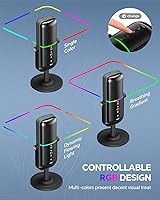
The XM600 packs a surprising amount of control for an entry-level mic. The dual polar patterns are the standout: cardioid mode tightens focus on your voice and rejects ambient noise from the sides, which is exactly what you want when gaming or recording solo. Flip to omnidirectional and it picks up the room — useful for group video calls or a casual roundtable podcast. Three onboard sound modes let you shape your tone without touching any software; the noise reduction setting is the most practically useful of the three. A side gain dial and a top-mounted mute button round things out, and the red LED mute indicator means you will never accidentally go silent mid-stream.

Best For

This USB mic is best suited to people who are just getting serious about their audio. If you are a streamer or content creator who has been getting by on a gaming headset, the XM600 is a clear upgrade that will not strain your budget. Console gamers on PS4 or PS5 will appreciate how simple the connection is — no adapters, no setup menus. Students and remote workers who spend hours on Zoom or Teams will benefit from the noise reduction mode on crowded or noisy calls. The omnidirectional pattern makes it a reasonable pick for small group recordings too, though for anything requiring professional broadcast clarity, you would want to look further up the price range.

User Feedback

Buyers tend to highlight ease of setup and the build quality as genuine surprises — people do not expect aluminum construction and a solid-feeling gain dial at this price point. The RGB lighting gets positive mentions too, particularly from gamers who care about desk aesthetics. On the critical side, some users report that pushing the gain dial high introduces background noise bleed, so the sweet spot is somewhere in the middle range. A few buyers note that the three sound modes are subtle rather than dramatic in effect, so do not expect them to fix a poor recording environment. The mute LED visibility and responsive button press are consistently praised as practical and reliable during live sessions.

Pros

  • Plug-and-play USB-C setup works instantly on PC, PS4, and PS5 with zero driver installation required.
  • Aluminum housing feels noticeably more durable than plastic competitors at the same price point.
  • The red LED mute indicator gives instant visual confirmation during live streams or calls.
  • Dual polar patterns add real versatility — cardioid for solo recording, omnidirectional for group setups.
  • A six-foot cable provides practical flexibility in positioning the mic on larger desks or setups.
  • Onboard gain dial lets you adjust mic sensitivity without touching any software or system settings.
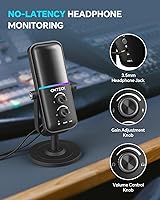
  • Zero-latency headphone monitoring keeps your voice in sync while recording, which many budget mics skip entirely.
  • RGB lighting is a genuine aesthetic bonus for gamers, with customizable modes that double as a mute status indicator.
  • Strong early sales ranking suggests broad buyer satisfaction for an entry-level microphone launched in early 2025.

Cons

  • Cranking the gain dial too high introduces noticeable background noise bleed into recordings.
  • The three sound modes produce subtle differences; buyers expecting dramatic tonal shifts may be underwhelmed.
  • Single mono channel limits usefulness for any multi-source or instrument recording scenario.
  • No XLR output means the XM600 cannot grow with you if you later invest in an audio interface.
  • Boundary form factor sits flat rather than on a traditional stand, which may not suit all desk arrangements.
  • No included shock mount or pop filter means additional purchases may be needed for cleaner vocal recordings.
  • AI noise reduction helps in mild situations but struggles in genuinely noisy or reverberant rooms.
  • Limited to USB power only, so it cannot be used with most smartphones or tablets without an adapter.

Ratings

Our AI has analyzed verified buyer reviews for the CMTECK XM600 USB Microphone from across major global markets, actively filtering out incentivized, bot-generated, and duplicate feedback to surface what real users consistently experience. The scores below reflect both the genuine strengths that make this entry-level mic stand out and the honest pain points that prospective buyers should weigh before purchasing.

Value for Money
91%
For buyers coming from headset mics or built-in laptop audio, the XM600 delivers a noticeable quality jump at a price that does not require much deliberation. Reviewers repeatedly describe it as punching above its weight class, particularly given the aluminum build and onboard controls that most rivals skip at this tier.
A small number of users feel that once you factor in the audio ceiling — especially the noise bleed at higher gain settings — the value proposition narrows slightly for anyone who records in less-than-ideal acoustic environments. The feature set is strong, but raw audio quality alone would not justify the price without the extras.
Ease of Setup
94%
Plug-and-play via USB-C is the single most praised aspect of this mic across buyer reviews. Gamers connecting it to a PS5 for the first time, students jumping on a Zoom call, or streamers setting up mid-session all highlight that it works instantly without drivers, configuration menus, or technical knowledge.
A handful of users on older Windows machines report a brief delay before the mic is recognized as the default input device, requiring a manual selection in system sound settings. This is a minor inconvenience rather than a real flaw, but it catches a few first-time buyers off guard.
Audio Clarity
72%
28%
For casual streaming, Discord calls, and Zoom meetings, the XM600 produces clean, intelligible voice audio that is a clear step above integrated laptop or monitor microphones. The noise reduction mode genuinely helps in mildly noisy spaces like home offices or shared rooms.
Buyers with more critical ears — or those comparing it to mid-range condenser mics — notice a ceiling in detail and warmth, particularly in the upper vocal frequencies. Background room noise can become apparent when gain is pushed past the midpoint, which limits its usefulness in untreated recording spaces.
Build Quality
83%
The aluminum housing consistently surprises buyers who expect plasticky construction at this price point. The gain dial has a satisfying resistance to it, and the overall unit feels stable on the desk rather than lightweight and hollow. Multiple reviewers specifically contrast it favorably against other budget mics they have owned.
The base design, while functional, does not include a non-slip pad on all units, and a few buyers report minor wobble on smooth desk surfaces. The cable connection point at the mic body also draws occasional concern about long-term durability with repeated plug-and-unplug cycles.
Mute Button & LED
89%
The top-mounted mute button with its red LED indicator is one of the most practically useful features on the XM600 for anyone who streams or takes live calls. Reviewers describe the LED as bright and visible even in well-lit rooms, and the single-press activation is consistently described as fast and responsive.
A small subset of users note that the mute button can feel slightly mushy after extended use, raising minor concerns about tactile longevity. The LED itself, while visible, could benefit from being slightly larger for those using the mic at arm's length on a wider desk setup.
Polar Pattern Versatility
78%
22%
Having both cardioid and omnidirectional modes in a mic at this price point is genuinely useful and not something all budget competitors offer. Users running small group podcast recordings or household video calls particularly appreciate being able to switch to omnidirectional without buying a second mic.
Switching between polar patterns is not as intuitive as it could be, and a few buyers report needing to consult the instructions to locate the toggle. The omnidirectional mode, while functional, picks up room reflections noticeably in larger or livelier spaces, which can muddy group recordings.
Sound Mode Usefulness
67%
33%
The three onboard sound modes — Noise Reduction, Mid-Treble Boost, and Bass Boost — give users a way to shape their audio without opening any software, which is a legitimate convenience during live streams or calls. Noise Reduction in particular gets positive mentions from users in busy home environments.
Many buyers describe the tonal differences between modes as subtle to the point of being hard to distinguish on consumer-grade playback equipment. Those expecting a meaningful sonic transformation between Bass Boost and Mid-Treble Boost often come away underwhelmed, and the modes do little to compensate for a poor recording environment.
RGB Lighting
86%
Gamers and streamers with RGB-themed desk setups are consistently pleased with the lighting quality, describing it as vibrant and well-implemented for a mic in this category. The ability to cycle through solid, breathing, and flowing modes gives enough visual variety to integrate well with broader desk aesthetics.
Users who prefer a clean, minimal workspace or professional video call background find the RGB difficult to disable entirely, and the exact steps to turn off the lighting are not clearly documented. A dedicated off mode would address this complaint from the non-gaming segment of the user base.
Gain Control
74%
26%
The physical side dial for gain adjustment is a practical touch that remote workers and streamers use regularly to compensate for different microphone placements or voice volumes. Being able to dial sensitivity up or down without touching a computer screen mid-session is a small but meaningful quality-of-life feature.
The gain dial has a limited sweet spot — users report that the lower third of the range can feel too quiet, while the upper third introduces noise. In practice, most users find themselves keeping it fixed in one mid-range position rather than using it dynamically as intended.
Headphone Monitoring
76%
24%
Zero-latency monitoring is a feature that budget mics often omit entirely, so its inclusion here is appreciated by streamers and podcasters who want to hear themselves in real time. Buyers who have used mics with delayed monitoring note the difference immediately and consider it a genuine advantage.
The headphone output volume is on the quieter side according to several reviewers, and there is no dedicated volume knob for the monitoring output separate from the system volume. Users with higher-impedance headphones may find the output level insufficient for comfortable in-ear monitoring.
Cable Quality & Length
81%
19%
The 6-foot cable is consistently called out as a practical advantage, particularly for users with deeper desks or unconventional monitor setups where a shorter cable would restrict placement options. The cable itself feels reasonably robust and does not introduce interference noise in standard testing environments.
A few buyers report that the cable is slightly stiff, which can cause the mic to shift position on lighter desk surfaces due to cable tension. There are also isolated reports of the USB-C connector fitting loosely in certain laptop ports, though this appears to be a port-compatibility issue rather than a cable defect.
Compatibility
92%
Working across PC, Mac, PS4, and PS5 without any proprietary software is a real strength that expands the practical user base significantly. Console gamers especially benefit from this, since USB audio compatibility on PlayStation can be inconsistent with third-party mics — but the XM600 handles it reliably.
There are no confirmed reports of macOS or Linux compatibility issues, but the product documentation focuses primarily on Windows and PlayStation, leaving Mac users to verify independently. Smartphone and tablet use requires additional adapters and is not officially supported by the manufacturer.
Desk Footprint & Form Factor
71%
29%
The compact boundary-style base keeps the mic stable and low-profile, which suits smaller desk setups where a full mic arm or tall stand would feel intrusive. It integrates naturally into a gaming or work desk without dominating the surface space.
The flat boundary design offers no height or angle adjustment, which means users who prefer to speak down into a mic rather than across it will find the fixed positioning limiting. Without an included adapter, pairing it with a standard mic arm requires sourcing a compatible mount separately.

Suitable for:

The CMTECK XM600 USB Microphone is a strong fit for anyone stepping up from a built-in laptop mic or gaming headset for the first time. Casual streamers and YouTubers who want cleaner audio on a tight budget will find it covers the basics well without requiring any technical setup knowledge. Gamers on PC, PS4, or PS5 benefit particularly from the visual mute indicator — knowing at a glance whether you are live or silenced is genuinely useful mid-session. Remote workers and students who spend long hours on video calls will appreciate the noise reduction mode, which takes the edge off keyboard clicks and room noise in everyday environments. The omnidirectional pattern also makes this USB mic a reasonable choice for small group recordings or roundtable discussions where multiple voices need to be captured from a single desktop mic.

Not suitable for:

Anyone serious about audio production, broadcast-quality podcasting, or professional voice work should look past the XM600 and invest in a higher-tier condenser or XLR setup. This entry-level microphone operates in a price range where compromises are real: pushing the gain dial high introduces background noise bleed, and the three sound modes, while useful, are not a substitute for proper acoustic treatment or post-production tools. Content creators whose audience has come to expect polished, studio-grade audio will likely find the limitations noticeable, particularly in less-than-ideal recording spaces. The mono single-channel output and boundary form factor also mean it is not designed for instrument recording or more demanding studio applications. If your workflow involves audio interfaces, XLR cables, or multi-track recording, this mic simply was not built for that environment.

Specifications

  • Brand: Manufactured by CMTECK, model designation XM600.
  • Connector: Uses a USB Type-C connector for power and audio data transfer.
  • Compatibility: Works with Windows and Mac PCs, laptops, PS4, and PS5 consoles via plug-and-play.
  • Polar Patterns: Supports two selectable polar patterns: cardioid and omnidirectional.
  • Sound Modes: Offers three onboard sound modes: Noise Reduction, Mid-Treble Boost, and Bass Boost.
  • RGB Lighting: Features customizable RGB lighting with solid color, breathing, and flowing animation modes.
  • Mute Control: Top-mounted mute button triggers instant silencing with a red LED indicator when active.
  • Gain Control: Side-mounted rotary dial allows manual microphone sensitivity adjustment without any software.
  • Cable Length: Includes a 6-foot (approximately 1.8m) USB cable for flexible desk or room placement.
  • Form Factor: Boundary desktop form factor designed to sit flat on a desk surface.
  • Dimensions: Unit measures 8 x 3 x 7 inches (L x W x H).
  • Weight: Weighs approximately 0.317 ounces, making it lightweight and easy to reposition.
  • Material: Housing is constructed from aluminum for improved durability over typical plastic alternatives.
  • Channels: Records in mono with a single audio channel output.
  • Monitoring: Includes zero-latency headphone monitoring via an onboard headphone output jack.
  • Power Source: Powered entirely through the USB connection; no external power adapter is required.
  • Launch Date: First made available on Amazon in January 2025.

Related Reviews
Neat Microphones Skyline USB Desktop Condenser Microphone
89%
94%
Audio Quality
91%
Ease of Use
89%
Build Quality
90%
Mute Button Functionality
92%
Value for Money
More
AIRHUG 21 USB Microphone
82%
83%
Audio Clarity
74%
Noise Reduction
96%
Ease of Setup
67%
Build Quality
91%
Mute Button & LED Indicator
More
ROCCAT Torch USB Microphone
86%
92%
Audio Quality
88%
Ease of Use
85%
Microphone Sensitivity
89%
Versatility (Pickup Patterns)
91%
RGB Lighting & Visual Feedback
More
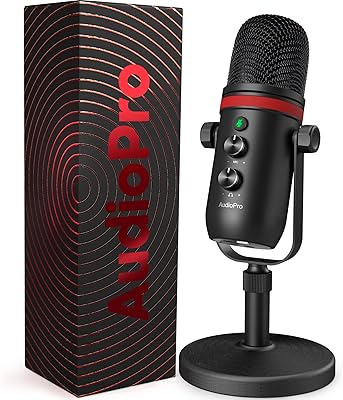
AUDIOPRO X5
AUDIOPRO X5
77%
94%
Ease of Setup
78%
Voice Clarity
67%
Background Noise Rejection
82%
Build Quality
88%
Onboard Controls
More
YEYIAN AGILE USB Microphone
85%
88%
Sound Quality
94%
Ease of Setup
85%
Noise Reduction
79%
Build Quality
92%
Compatibility with Devices
More
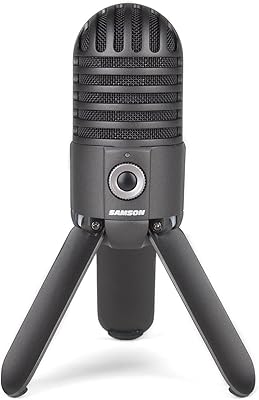
Samson Meteor USB Microphone
86%
89%
Audio Quality
95%
Ease of Use
83%
Build Quality
91%
Portability
94%
Setup Process
More
Fifine K054
Fifine K054
79%
93%
Value for Money
78%
Audio Clarity for Voice
96%
Ease of Setup
81%
Build Quality
88%
Mute Button & LED Indicator
More
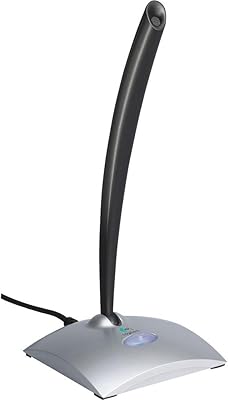
Logitech USB Desktop Gooseneck Microphone
73%
93%
Ease of Setup
79%
Voice Clarity
71%
Noise Isolation
68%
Build Quality
82%
Gooseneck Flexibility
More
RØDE NT-USB Microphone
87%
94%
Sound Quality
92%
Ease of Setup
89%
Build Quality
85%
Noise Isolation
87%
Mic Sensitivity
More
JLab Talk USB Microphone
89%
94%
Audio Clarity
91%
Directional Pattern Versatility
96%
Ease of Setup
82%
Build Quality
87%
Portability
More

FAQ

Yes, the XM600 connects directly via USB and is recognized by both PS4 and PS5 without needing adapters or additional software. Just plug it into an available USB port on the console and it should be ready to use within seconds.

Cardioid mode focuses pickup directly in front of the mic and rejects sound from the sides and rear, making it the better choice for solo streaming, gaming commentary, or recording your own voice. Omnidirectional mode picks up sound from all directions equally, which is more useful when you have two or three people gathered around the same mic for a group call or casual podcast recording. For most solo use cases, cardioid is the right setting.

No driver installation is required. The CMTECK XM600 USB Microphone is a plug-and-play device that Windows and macOS recognize automatically as a standard USB audio input. You may need to select it as your default input device in your system sound settings, but that is a quick one-time step.

Yes, this USB mic includes a headphone jack on the unit itself that provides zero-latency monitoring, meaning you hear your voice in real time without any noticeable delay. This is especially handy during live streams or recordings where audio sync matters.

The differences are real but subtle rather than dramatic. Noise Reduction is the most practically useful for everyday calls and streams, as it takes the edge off keyboard noise and light background sounds. Mid-Treble Boost adds a bit of presence and clarity to voices, while Bass Boost thickens the low end slightly. Do not expect them to transform the audio completely, but they do offer a useful degree of tone shaping without touching any software.

Pushing the gain dial to its highest setting can introduce audible background noise bleed, which is common in budget microphones. For most voices and normal speaking distances, keeping the gain in the mid-range produces the cleanest results. If you find yourself needing maximum gain, try moving the mic a bit closer to your mouth instead.

The mic sits on its own boundary-style base, so it is designed to rest flat on a desk without a separate stand. If you prefer an elevated or angled position, you would need to purchase a compatible mic arm or stand adapter separately, as neither is included in the box.

You can cycle through the RGB modes using the controls on the mic, and some users report being able to turn the lights off entirely depending on the mode cycle. If consistent RGB-free use is important to you, it is worth checking the current firmware behavior, as options can vary slightly between unit batches.

Yes, since the mic appears as a standard USB audio device, it works with OBS, Discord, Zoom, Teams, and virtually any other software that lets you select an audio input. No special configuration is needed beyond selecting it as your input source in the application settings.

The aluminum housing gives the XM600 a noticeably more solid feel than the all-plastic designs common among budget USB mics. It is not going to withstand heavy drops, but for everyday desk use it holds up well and does not feel flimsy when adjusting the gain dial or pressing the mute button.