Overview

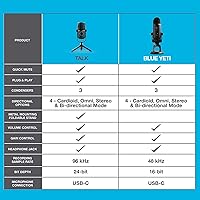
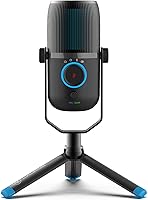
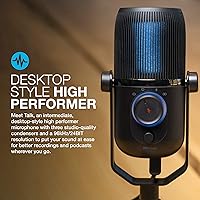
The JLab Talk USB Microphone sits in a comfortable middle ground for creators who've outgrown their laptop's built-in mic but aren't ready to spend serious money on a full recording chain. What sets it apart from most USB mics at this price is the three-condenser capsule array — most competitors pack a single capsule and call it a day. Plug it in and it works immediately, no drivers, no configuration headaches. The 96kHz/24-bit resolution is a genuine differentiator here; you don't often see that spec combination below the sixty-dollar mark. Just keep expectations grounded: this is a capable all-rounder for home and remote use, not a substitute for a large-diaphragm studio setup.
Features & Benefits

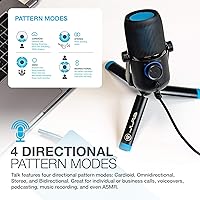
The JLab Talk's most practical advantage is its four polar patterns — cardioid for focused solo recording, omnidirectional for capturing a whole room, stereo for instruments with natural width, and bidirectional for face-to-face interviews across a desk. Recording at 96kHz/24-bit means your audio captures fine detail that standard 44.1kHz recordings simply compress away. The on-body knobs for gain and volume are genuinely useful during live sessions, and the quick-mute button saves you in those awkward mid-stream moments. A 3.5mm headphone jack lets you monitor your own voice in real time with no audible delay. The 6.5-foot USB-C cable gives you enough slack to position the mic comfortably without wrestling your laptop closer.

Best For

This desktop USB mic is an especially good fit for podcasters and streamers who want the freedom to switch recording setups without buying additional hardware. Remote workers tired of sounding hollow on video calls will notice an immediate difference. Hobbyist musicians tracking acoustic guitar or light vocals at home will find the audio resolution more than adequate. ASMR creators and voiceover artists can take real advantage of the omnidirectional and bidirectional modes for their specific needs. If you're still running a basic single-pattern mic and find yourself wishing for more control over how your recordings sound, this multi-pattern microphone is a logical, well-priced next step.

User Feedback

Across roughly 490 ratings and a 4.2-star average, the JLab Talk earns consistent praise for the noticeable audio improvement it delivers over built-in laptop and webcam mics, and buyers appreciate that setup genuinely takes under a minute. That said, the all-plastic body is a point of friction — it works fine, but it doesn't feel as solid as some rivals at similar prices. The gain control is another dividing line: some users dial it in quickly, while others find the sensitivity range tricky to manage without picking up room noise. A small number of Linux users have flagged compatibility quirks, and omnidirectional mode can pull in unwanted background noise in less-than-quiet spaces. Solid performer overall, with a few rough edges worth knowing.

Pros

  • Four polar patterns in one unit eliminates the need to buy separate microphones for different recording scenarios.
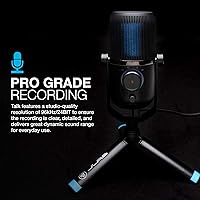
  • 96kHz/24-bit resolution captures noticeably more audio detail than standard USB mics at a similar price.
  • Plug-and-play setup works immediately on Windows and Mac with zero driver installation required.
  • The quick-mute button is genuinely useful during live streams or calls when you need instant silence.
  • Zero-latency headphone monitoring lets you catch audio problems in real time rather than after the fact.
  • The 6.5-foot USB-C cable provides enough reach to position the mic without rearranging your entire desk.
  • Three condenser capsules give this desktop USB mic a technical edge over most single-capsule competitors.
  • Standard 5/8-inch thread mount means it works with camera tripods and most common mic stands you may already own.
  • On-body volume and gain knobs allow quick adjustments without touching your computer mid-session.

Cons

  • The all-plastic body feels noticeably lightweight and less durable compared to metal-bodied rivals at a similar price.
  • Omnidirectional mode picks up significant background noise in anything less than a quiet, treated room.
  • The gain knob sensitivity can be tricky to manage, making it easy to accidentally introduce distortion or hiss.
  • A small but consistent group of users report compatibility issues on Linux and certain older operating systems.
  • No physical indicator shows which polar pattern is currently selected, which can cause confusion mid-session.
  • At 1.6 pounds, the mic is heavier than it looks and may feel top-heavy on lightweight or budget desk stands.
  • The included stand or base offers limited adjustability, so most users will want a separate boom arm for ideal positioning.
  • Customer support experiences from JLab have been mixed, with some buyers reporting slow resolution on warranty claims.

Ratings

The scores below for the JLab Talk USB Microphone were generated by our AI system after analyzing verified buyer reviews from multiple global markets, with spam, bot-submitted, and incentivized feedback actively filtered out before any scoring took place. The result is an honest picture of where this desktop mic genuinely performs well and where real users have hit frustrating limits. Both the strengths and the recurring pain points are reflected transparently so you can make a fully informed call.
Sound Clarity
83%
Most buyers notice an immediate and substantial jump in audio quality compared to webcam mics or laptop built-ins, particularly on voice recordings. The 96kHz/24-bit resolution gives spoken word a natural warmth and detail that holds up well in podcast edits and stream replays.
At higher gain settings, some users report a subtle but noticeable hardness in the upper midrange that can make voices sound slightly harsh. It does not match the smoothness of XLR condenser mics at twice the price, and discerning listeners will notice the difference.
Polar Pattern Versatility
88%
Having cardioid, omnidirectional, stereo, and bidirectional modes on a single USB mic is genuinely uncommon at this price tier, and buyers regularly cite it as the primary reason they chose this multi-pattern microphone over simpler alternatives. The ability to switch for a two-person interview or a room recording without buying extra gear is a practical, real-world advantage.
There is no visual indicator showing which pattern is currently active, so users who switch modes frequently during sessions have to keep mental track or risk recording in the wrong setting. Omnidirectional mode in particular can be tricky to use effectively in untreated rooms.
Ease of Setup
93%
Plug-and-play operation is one of the most consistently praised aspects across buyer reviews — users report being fully set up and recording within two minutes of opening the box. Windows and Mac recognition is nearly universal, and the long USB-C cable means most desk configurations are accommodated without awkward stretching.
A small but recurring group of Linux users report that the driver-free experience does not always hold up on their systems, requiring manual configuration to get stable audio input. Older Windows installations have also occasionally needed a system restart before the mic is properly recognized.
Background Noise Rejection
61%
39%
In cardioid mode, the JLab Talk handles typical home office noise reasonably well, rejecting sound coming from the sides and rear well enough that keyboard clicks and light ambient noise stay largely in the background during recordings.
Omnidirectional mode in anything less than a quiet, acoustically treated space is a real problem — HVAC systems, traffic, and nearby conversations all come through with uncomfortable clarity. Even cardioid mode struggles when gain is pushed higher, and there is no onboard noise gate or processing to compensate.
Build Quality
58%
42%
The physical controls — knobs and mute button — feel mechanically solid and respond with satisfying clicks and smooth rotation. The overall form factor is stable on a desk and the mic does not wobble or shift during use, which matters during live sessions.
The all-plastic construction is a consistent point of criticism from buyers who expected something more substantial at this price. The body feels hollow when tapped, and a few users have reported stress marks or cracks appearing near the cable connector after several months of regular use.
Gain Control Usability
63%
37%
Having a physical gain knob rather than a software slider is appreciated by streamers and podcasters who need to make quick adjustments mid-session without alt-tabbing into an audio panel. The control range is wide enough to handle both quiet acoustic environments and louder sound sources.
The usable sweet spot on the gain knob is frustratingly narrow for many users — a small turn can mean the difference between too quiet and distorted. Buyers who record in varying acoustic environments find themselves constantly readjusting rather than setting it once and forgetting it.
Headphone Monitoring
79%
21%
Zero-latency headphone monitoring is genuinely useful and works as advertised — plugging standard headphones into the 3.5mm jack gives you an accurate, real-time feed of what the mic is capturing with no disorienting echo or delay. Vocalists and podcasters who monitor while recording particularly value this feature.
The headphone output volume is not as loud as some users would prefer, and there is no dedicated headphone volume knob separate from the main volume control. Users with high-impedance headphones may find the output underpowered for comfortable monitoring levels.
Value for Money
77%
23%
When you price out what four polar patterns, 96kHz/24-bit resolution, and on-body controls would cost individually from competing brands, this desktop USB mic represents a reasonable package deal for intermediate users. Buyers upgrading from budget single-pattern mics consistently feel the jump in capability justifies the spend.
Users who discover the build quality limitations after purchase often feel the pricing implies a more durable product than they received. At this price point, a few competing mics offer metal construction with slightly fewer features, and some buyers feel that trade-off would have been preferable.
Mounting & Desk Compatibility
74%
26%
The standard 5/8″ mount thread means this mic fits directly onto most boom arms and desk stands buyers already own, which saves money and reduces compatibility anxiety. The cable length gives enough freedom to position the mic at a natural speaking distance without pulling taut.
The included base stand provides very limited height and angle adjustment, so most users end up needing a separate boom arm to get the mic at an ideal position relative to their mouth. At 1.6 pounds, the mic can feel top-heavy on cheaper lightweight stands.
Software Compatibility
71%
29%
The mic works reliably as a standard USB audio device across OBS, Audacity, GarageBand, Adobe Audition, and most major podcast recording platforms without any manual configuration. Most users are recording within minutes of first connection regardless of which software they use.
Linux support is inconsistent and essentially undocumented — users on those systems are on their own if problems arise. A handful of reports also flag issues with older versions of macOS and Windows 10 builds, where the mic appears connected but audio input is not passed through correctly.
Stereo Recording Quality
68%
32%
The stereo mode produces a genuinely wider soundstage than most USB mics at this tier can manage, making it a decent option for recording acoustic guitar or piano where spatial feel matters. Users who have tested it for light music production report it captures left-right separation credibly.
The stereo image, while present, lacks the depth and precision of dedicated stereo mics or a properly spaced pair of cardioid mics. For serious music production, the stereo mode feels more like a bonus feature than a core capability, and heavy processing may still be needed in the mix.
Quick Mute Functionality
86%
The dedicated mute button is one of those features that sounds minor until you actually need it mid-stream or mid-call. Buyers consistently mention it as a practical daily-use win — one tap and you are silent without scrambling through software controls or pulling cables.
The mute button does not have an LED status light on some unit variants, making it unclear at a glance whether the mic is live or muted. A few users have also noted the button press can produce a faint audible thump in the recording if pressed during active capture.
Portability
55%
45%
The mic is self-contained with no external power supply needed and the USB-C cable tucks away cleanly, making it reasonably straightforward to move between a home desk and an office setup. No driver installation means it works wherever you plug it in.
At 1.6 pounds and nearly 9.5 inches tall, this is unambiguously a desktop mic — it is bulkier than it photographs and does not pack neatly into a bag without a dedicated case. Users who anticipated something more compact for travel or mobile recording tend to be disappointed.
Long-Term Durability
54%
46%
Short-term reliability is generally fine — most buyers report no functional issues in the first several months of regular use. The controls and capsules continue to perform consistently through normal desktop recording sessions.
Longer-term durability is a legitimate concern based on user reports: the plastic housing shows wear, and the area around the USB-C connector is particularly vulnerable to stress if the cable is regularly connected and disconnected. JLab warranty support responsiveness has received mixed reviews, which compounds the concern.

Suitable for:

The JLab Talk USB Microphone is a strong fit for content creators who have hit the ceiling of their laptop's built-in audio and want a meaningful upgrade without committing to a complex recording setup. Podcasters and streamers will particularly appreciate having four pickup pattern options in a single unit — being able to switch from cardioid for solo recording to bidirectional for a two-person interview is a real convenience that usually costs more at this tier. Remote workers who spend hours on video calls will notice the jump in vocal clarity almost immediately compared to webcam microphones. Hobbyist musicians tracking acoustic instruments or doing light vocal work at home will find the 96kHz/24-bit resolution more than adequate for their needs. ASMR creators and voiceover artists who need nuanced control over how sound is captured from different directions will also feel right at home with this desktop USB mic.
Not suitable for:

The JLab Talk USB Microphone is not the right tool for anyone expecting professional broadcast or studio-grade results. If you record in a noisy or acoustically untreated space, the omnidirectional mode in particular can pull in a frustrating amount of background sound, and the gain control requires patience to dial in correctly — it is not as forgiving as higher-end alternatives with more refined preamps. Buyers who prioritize build quality and tactile premium feel will be disappointed by the all-plastic construction, which functions fine but does not inspire confidence over the long term. Professional voice actors, serious musicians, or podcasters with a dedicated treated recording space would be better served investing in an XLR condenser microphone paired with a proper audio interface, where the quality ceiling is considerably higher. Linux users or those running older operating systems should also verify compatibility before purchasing, as a subset of users have reported driver-free operation is not always truly frictionless on non-mainstream platforms.
Specifications

  • Capsule Array: Three studio-quality condenser capsules work together to support the mic's four directional pickup modes.
  • Sample Rate: Records at up to 96kHz, capturing a wider range of audio detail than the 44.1kHz standard found on many entry-level USB mics.
  • Bit Depth: 24-bit resolution delivers a broader dynamic range, reducing the chance of clipping during louder recordings.
  • Polar Patterns: Supports four pickup patterns: cardioid, omnidirectional, stereo, and bidirectional, selectable directly on the unit.
  • Frequency Response: Captures audio across the full 20Hz to 20kHz range, covering everything from deep bass tones to high-frequency detail.
  • Signal-to-Noise Ratio: A 95dB signal-to-noise ratio means the mic produces very little self-noise relative to the audio signal it captures.
  • Audio Sensitivity: Sensitivity is rated at 9dB, suited for picking up voices and instruments at typical desktop recording distances.
  • Headphone Output: A 3.5mm headphone jack provides real-time, zero-latency monitoring so you can hear exactly what the mic is capturing.
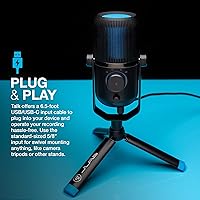
  • Cable: Includes a 6.5-foot USB-C cable, giving enough length to position the mic comfortably without straining the connection.
  • Mount Thread: Features a standard 5/8″ threaded base compatible with most microphone stands, boom arms, and camera tripods.
  • Dimensions: Measures 9.25 x 7.68 x 7.68 inches, making it a full-size desktop mic rather than a compact travel unit.
  • Weight: Weighs 1.6 pounds, which is heavier than it may appear and worth considering when choosing a stand or arm.
  • Body Material: Constructed primarily from plastic, which keeps costs down but results in a lighter feel than metal-bodied competitors.
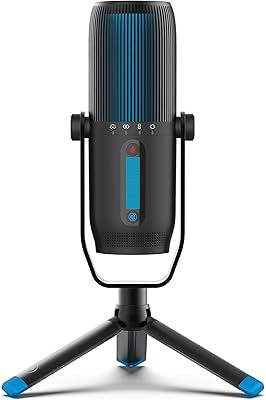
  • Controls: On-body controls include a gain knob, a volume knob, and a dedicated quick-mute button for live-use flexibility.
  • Connectivity: Compatible with both USB-A and USB-C ports, making it usable across a wide range of laptops, desktops, and camera rigs.
  • Driver Requirement: Fully plug-and-play with no driver installation required on Windows, Mac, or compatible camera hardware.
  • Platform Support: Officially compatible with Windows and Mac; Linux compatibility is not guaranteed and has produced mixed results among users.
  • Channels: Supports up to three channels of audio, enabling the stereo and multi-pattern recording modes the mic is designed for.

Related Reviews

JLab Talk Pro USB Microphone
75%
83%
Audio Clarity
88%
Polar Pattern Versatility
92%
Ease of Setup
58%
Build Quality
81%
Value for Money
More
Neat Microphones Skyline USB Desktop Condenser Microphone
89%
94%
Audio Quality
91%
Ease of Use
89%
Build Quality
90%
Mute Button Functionality
92%
Value for Money
More
Logitech USB Desktop Gooseneck Microphone
73%
93%
Ease of Setup
79%
Voice Clarity
71%
Noise Isolation
68%
Build Quality
82%
Gooseneck Flexibility
More
YEYIAN AGILE USB Microphone
85%
88%
Sound Quality
94%
Ease of Setup
85%
Noise Reduction
79%
Build Quality
92%
Compatibility with Devices
More
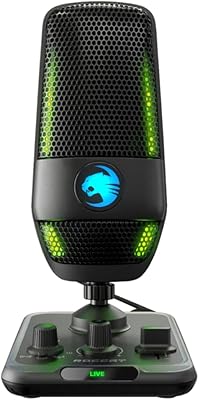
ROCCAT Torch USB Microphone
86%
92%
Audio Quality
88%
Ease of Use
85%
Microphone Sensitivity
89%
Versatility (Pickup Patterns)
91%
RGB Lighting & Visual Feedback
More
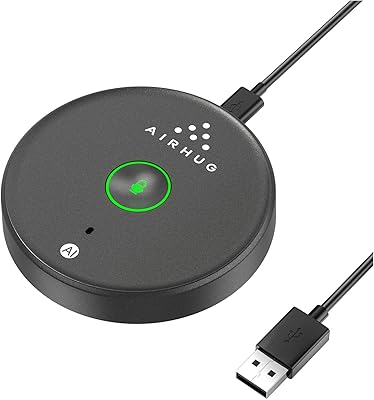
AIRHUG 21 USB Microphone
82%
83%
Audio Clarity
74%
Noise Reduction
96%
Ease of Setup
67%
Build Quality
91%
Mute Button & LED Indicator
More
CMTECK XM600 USB Microphone
81%
91%
Value for Money
94%
Ease of Setup
72%
Audio Clarity
83%
Build Quality
89%
Mute Button & LED
More
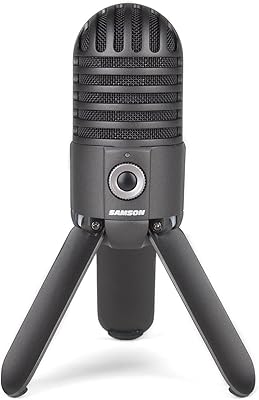
Samson Meteor USB Microphone
86%
89%
Audio Quality
95%
Ease of Use
83%
Build Quality
91%
Portability
94%
Setup Process
More
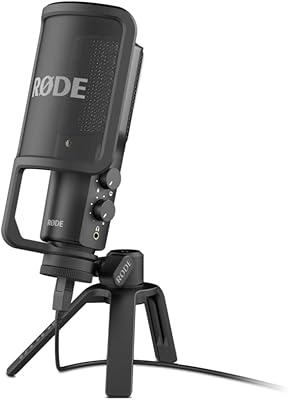
RØDE NT-USB Microphone
87%
94%
Sound Quality
92%
Ease of Setup
89%
Build Quality
85%
Noise Isolation
87%
Mic Sensitivity
More
AUDIOPRO X5
AUDIOPRO X5
77%
94%
Ease of Setup
78%
Voice Clarity
67%
Background Noise Rejection
82%
Build Quality
88%
Onboard Controls
More

FAQ

No, the JLab Talk USB Microphone is genuinely plug-and-play on Windows and Mac. You plug it in and your computer recognizes it as an audio input almost immediately. No drivers, no companion apps required.
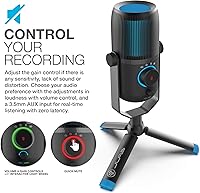
There is a pattern selector on the body of the mic itself, so you do not need to open any software to switch modes. The four options are cardioid for solo voice, omnidirectional for picking up a whole room, stereo for instruments, and bidirectional for two people facing each other across the mic.

The included cable is USB-C on the microphone end, but JLab ships it with adapters that allow connection to standard USB-A ports as well. Most modern setups are covered without needing to buy anything extra.

Yes. There is a 3.5mm headphone jack on the unit that lets you plug in any standard headphones and hear your voice in real time. The monitoring has no audible delay, so it does not feel disorienting to use during long recording sessions.

It depends on which pattern you use. Cardioid mode is the most forgiving in noisy environments because it focuses on sound coming directly in front of the mic and rejects a lot from the sides and rear. Omnidirectional mode, on the other hand, picks up sound from all directions and will capture background noise much more aggressively, so stick to cardioid if your space is less than quiet.

The base has a standard 5/8″ threaded mount, which is the same size used by most microphone stands, boom arms, and camera tripods. If you have an existing stand from another mic, there is a good chance this desktop USB mic will fit right onto it.

The gain knob does make a real difference in how loud or sensitive the mic is, but user feedback is a bit split on how easy it is to dial in. Some people find the right spot quickly, while others find the range between too quiet and too distorted is narrower than they would like. Starting with the knob at about the halfway point and adjusting from there tends to work well as a starting approach.

Yes, because the mic appears to your computer as a standard USB audio device, it works with virtually any recording or streaming software that lets you select your input source. That includes Audacity, GarageBand, OBS, Adobe Audition, and most podcast recording platforms.

The body is plastic, which is worth knowing upfront. It is not flimsy and the controls feel solid enough, but if you are used to handling all-metal microphones you will notice the difference in hand feel. For regular desk use it holds up fine; it is not the kind of mic you would want to drop repeatedly.

It handles both reasonably well. The 96kHz/24-bit resolution gives it enough headroom to capture acoustic instruments like guitar or piano with decent clarity. That said, this multi-pattern microphone is an intermediate tool, not a professional studio piece, so if you are recording music with serious production intent you will eventually want to step up to an XLR setup with a dedicated audio interface.

Where to Buy