Overview

The Western Digital PC SN530 256GB NVMe SSD is a replacement-focused internal drive built around the compact M.2 2230 form factor — a distinction that matters enormously if your laptop doesn't accommodate the far more common 2280 length. It belongs to WD's mainstream mobile lineup, priced accessibly enough to make sense as both a repair part and a modest storage bump. Worth noting upfront: it ships as a bare drive, with no bracket, screws, or accessories of any kind. With 88 verified ratings averaging 4.6 out of 5 stars, buyer satisfaction is notably strong for what is essentially a utilitarian component.

Features & Benefits

The 2230 format — roughly 30mm shorter than the standard 2280 — is the defining characteristic here. That shorter length is what makes thin-and-light laptops tick, and it's non-negotiable for devices engineered around it. Beyond physical fit, the PCIe Gen3 x4 NVMe interface puts this compact NVMe drive well ahead of any SATA-based option in real-world read and write speeds. The 256GB capacity isn't massive, but it's adequate for a clean OS install or a focused working environment. At under two-tenths of an ounce, it's effectively weightless in practice. Western Digital's SN530 controller has a solid track record in OEM laptop deployments, lending genuine confidence in long-term reliability.

Best For

This WD replacement drive is a natural fit for anyone dealing with a dead or undersized OEM SSD in a laptop that uses the M.2 2230 slot — think certain Microsoft Surface Pro and Surface Laptop models, along with select Dell machines. Repair technicians who need affordable, brand-name NVMe drives on hand will also find it a sensible stock item. Steam Deck owners have put it to use as a storage upgrade as well. What it isn't designed for is high-end enthusiast workloads — speeds are respectable but not cutting-edge. If your device takes a 2230 and you want dependable everyday performance without overspending, this drive fits the brief cleanly.

User Feedback

Across verified purchases, the SN530 2230 SSD earns consistent praise for fitting correctly in M.2 2230 slots where off-brand alternatives sometimes fall short. Surface and Dell users specifically call out hassle-free installation as a standout positive. The speed improvement over original OEM SATA drives gets noted regularly as well. On the downside, buyers are clear that cloning software and an external M.2 enclosure must be sourced separately — nothing ships in the box. A number of reviewers also stress the importance of confirming your specific laptop model supports the 2230 slot before ordering. Compatibility verification is the one step that separates a smooth upgrade from an avoidable return.

Pros

  • Genuine M.2 2230 form factor fits correctly in slim laptops and compact devices where standard 2280 drives won't physically seat.
  • PCIe Gen3 x4 NVMe interface delivers a meaningful real-world speed advantage over older SATA-based drives.
  • Western Digital's brand backing and proven SN530 controller platform offer solid confidence for a drive at this price tier.
  • Confirmed drop-in compatibility with Microsoft Surface Pro, Surface Laptop, and select Dell thin-and-light models.
  • Weighs just 0.176 ounces — essentially zero impact on the host system's overall weight.
  • Ranked #523 in Internal Solid State Drives on Amazon, signaling strong sustained demand and buyer trust.
  • 4.6 out of 5 stars across 88 verified reviews reflects consistently positive real-world installation and performance outcomes.
  • Accessible price point makes this compact NVMe drive viable for budget-conscious repairs without sacrificing brand reliability.
  • Steam Deck and handheld PC owners report successful use as an internal storage upgrade.

Cons

  • Ships as a bare OEM-style drive with zero accessories — no enclosure, no mounting screw, no cloning software included.
  • 256GB capacity will feel limiting quickly for users who store large media libraries, game installations, or creative project files.
  • Buyers must independently verify their specific laptop model accepts M.2 2230 before ordering — a step that catches many people off guard.
  • No retail packaging or warranty documentation typically included, which can complicate support claims compared to boxed consumer SSDs.
  • Cloning an existing drive requires purchasing or sourcing a separate M.2 USB enclosure, adding cost and steps to the process.
  • Sequential speeds are competitive for the price tier but won't satisfy users comparing against Gen4 NVMe drives available at similar or slightly higher prices.
  • Review sample size of 88 ratings is relatively small, making it harder to fully assess long-term reliability trends.
  • The SN530 2230 SSD is not suited for desktop builds or standard laptops — its niche form factor limits resale flexibility if plans change.

Ratings

Our editorial team analyzed verified buyer feedback for the Western Digital PC SN530 256GB NVMe SSD using an AI-assisted scoring model that actively filters out incentivized, duplicate, and bot-generated submissions to surface what real users actually experienced. Scores reflect a balanced view across performance, usability, and value — including the friction points that polished marketing copy tends to leave out. Both the strengths that keep buyers satisfied and the trade-offs that have prompted criticism are transparently represented in every category below.

Form Factor Accuracy
93%
Buyers consistently report the drive seats perfectly in M.2 2230 slots on Surface Pro, Surface Laptop, and select Dell machines — no trimming, no adapters needed. For a niche format where even slight dimensional deviations cause real installation headaches, the SN530 delivers a confident, proper fit every time.
A notable share of buyer frustration stems not from the drive itself but from ordering without first confirming their laptop actually uses a 2230 slot. The drive is entirely incompatible with 2280 slots, so a wrong assumption results in a return with no workaround whatsoever.
NVMe Read/Write Speed
78%
22%
Users upgrading from older SATA-based OEM drives describe meaningfully faster boot times and noticeably snappier application launches in everyday use. PCIe Gen3 x4 bandwidth handles browsing, document editing, and light media work without any perceivable lag, which satisfies the core audience well.
Sequential speeds fall short of Gen4 alternatives that are now available at comparable or slightly higher price points. For users running large database workloads, 4K video editing pipelines, or frequent bulk file transfers, the Gen3 ceiling becomes a tangible constraint rather than an acceptable compromise.
Installation Ease
86%
Most reviewers describe the drive swap itself as straightforward once the laptop is open — the M.2 connector requires no tools and clicks in confidently without wiggling or alignment frustration. Several Surface and Dell users note the drive seated cleanly on the first try, making the physical installation the easy part of the job.
The challenge is rarely the SSD — it is safely opening the host device. Thin laptops with proprietary Torx screws, fragile ribbon cables, and glued enclosures raise the difficulty significantly for less experienced users, and the bare drive ships with zero installation guidance to help bridge that gap.
Value for Money
84%
For a genuine Western Digital NVMe drive in the increasingly scarce M.2 2230 format, the pricing makes sense for individual repairs and for technicians stocking drives for client machines. Brand reliability and confirmed compatibility in a niche form factor justify the cost for most buyers who've done their homework.
Unbranded 2230 drives exist at lower price points, and the SN530 does not undercut those alternatives sharply enough to make the brand premium feel like an obvious win. Buyers handling a single one-time repair may find the value proposition tight rather than compelling when compared against the cheapest available options.
Device Compatibility
76%
24%
The SN530 2230 SSD is confirmed working across several real-world platforms — multiple Surface Pro and Surface Laptop generations, select Dell ultrabooks, and the Steam Deck — giving buyers targeting these devices a solid foundation of community-verified evidence before they commit to purchasing.
Compatibility is not universal across all M.2 2230 hardware. Some laptops enforce proprietary NVMe allowlists or non-standard slot implementations that can silently block third-party drives from being recognized. Buyers with less common machines face genuine uncertainty that no amount of marketing language can fully resolve.
Build Quality
82%
18%
Manufactured to Western Digital's OEM standards, the drive consistently arrives without physical defects, and buyer reports of DOA units or early failures are rare across the reviewed sample. The compact blue PCB feels reassuringly solid for a component that weighs under two-tenths of an ounce.
As an OEM-sourced spare, there is no independent retail-grade quality inspection documentation to reference, and packaging inspection on arrival is minimal at best. A small subset of broader SN530 community reports mention occasional controller-related issues over multi-year deployments, though these remain rare within this listing's sample size.
Storage Capacity
61%
39%
For a replacement drive focused on returning a broken machine to working order, 256GB comfortably handles a Windows installation, core productivity software, and an active working file set without constant storage juggling. Cloud-first users and those with external drives find the capacity perfectly adequate for the role.
Buyers planning to use this as their only storage for games, media libraries, or large development environments will outgrow 256GB faster than expected. Higher-capacity 2230 options from the same seller are not readily available, leaving storage-hungry users without a clear upgrade path within the same product line.
Brand Trustworthiness
91%
Western Digital's OEM storage track record is long and well-established — the SN530 platform powered millions of laptops before surfacing as a replacement component, and repair technicians who've used WD drives professionally for years carry that confidence into their purchasing decisions without hesitation.
Because this drive is sold as an OEM spare rather than a retail product, warranty terms are meaningfully less transparent than those of a boxed consumer WD drive. Some buyers have encountered friction when trying to confirm coverage directly with WD support, which subtly undercuts the trust the brand name otherwise earns.
Packaging & Presentation
44%
56%
For buyers who know exactly what they are ordering, the minimal bare-drive shipment is perfectly acceptable — the drive arrives protected enough for transit, and experienced technicians have no need for retail boxing they would simply discard anyway.
First-time buyers expecting a consumer experience are frequently caught off guard by the plain packaging, and the absence of any anti-static labeling or product documentation leaves less experienced buyers questioning whether the drive inside is genuinely new. It reads as surplus stock rather than a retail purchase, which erodes confidence for some.
Accessory Inclusion
31%
69%
For seasoned technicians who already own a USB M.2 enclosure, a mounting screw set, and cloning software, the bare-drive approach avoids inflating the price with accessories they would never use. From a pure component procurement standpoint, there is a rational case for keeping it minimal.
The complete absence of accessories — no enclosure for cloning, no mounting screw, no software of any kind — is a genuine friction point for first-time upgraders who assumed one purchase would cover the full job. Sourcing these items separately adds both unexpected cost and research time to what looked like a simple transaction.
Long-term Durability
79%
21%
The SN530 platform has years of OEM deployment history in laptops running under sustained daily workloads, lending real-world credibility to its durability beyond controlled lab conditions. Buyers who have owned the drive for a year or more frequently circle back in reviews to confirm continued reliable operation.
With only 88 ratings in this listing, the sample size is too small to draw statistically meaningful conclusions about long-term failure rates. TBW endurance specifications are also not prominently disclosed for this OEM variant, leaving durability-focused buyers without the standardized data they would normally factor into a storage decision.
Power Efficiency
83%
Laptop users across multiple device types report no noticeable battery drain attributable to the storage upgrade specifically, consistent with the SN530 platform's mobile-optimized power profile. The low thermal output also means the drive coexists comfortably inside thermally constrained thin-and-light enclosures without creating secondary heat issues.
PCIe Gen3 NVMe draws more power at both idle and load than newer ultra-low-power 2230 alternatives purpose-built for handheld and mobile efficiency. Buyers who depend heavily on battery runtime through intensive workloads may see a marginal but measurable impact compared to what a next-generation low-power M.2 drive could provide.
Heat Management
72%
28%
Under everyday workloads — browsing, office applications, light media playback — the compact NVMe drive runs cool enough that thermal throttling is essentially never reported as a concern by buyers using it in its intended replacement role. The short physical footprint also minimizes heat-generating surface area inside compact chassis.
During sustained sequential writes, such as large data migrations or full-drive cloning operations, some users in tightly sealed chassis notice brief performance dips consistent with thermal throttling. No heatsink or thermal pad is included to manage this, leaving buyers in the most confined laptop designs to address it independently if it becomes an issue.

Suitable for:

The Western Digital PC SN530 256GB NVMe SSD is purpose-built for a specific, well-defined audience: anyone who needs to replace or upgrade an internal drive in a laptop that physically requires the shorter M.2 2230 form factor. This is the drive to reach for when a Surface Pro, Surface Laptop, or certain Dell thin-and-light machines has a failing OEM SSD or simply ran out of headroom on a cramped factory-installed drive. DIY repair technicians will appreciate having a reliable, name-brand NVMe option at an accessible price point — it removes the gamble of sourcing no-name drives for client work. Steam Deck owners and users of other compact handheld PCs that accept M.2 2230 drives have also found this a practical internal upgrade. If your device is confirmed to use the 2230 slot and you need honest NVMe performance without chasing flagship specs, this compact NVMe drive delivers exactly what it promises.

Not suitable for:

The Western Digital PC SN530 256GB NVMe SSD is a poor fit for buyers who haven't first confirmed their laptop accepts the M.2 2230 form factor — ordering without that verification is the most common source of returns and frustration. If your machine uses the standard M.2 2280 slot, this drive simply won't be the right length, and there's no workaround. Power users running demanding workloads — video editing, large database operations, or heavy virtualization — will likely find 256GB of storage exhausted quickly and should budget for a higher-capacity option from the start. This is also not a plug-and-play retail product: it arrives as a bare drive with no enclosure, no cloning software, and no installation guide, so buyers expecting a boxed consumer experience will be caught off guard. Anyone uncomfortable sourcing tools and software independently should factor that additional effort into their decision before purchasing.

Specifications

  • Capacity: This drive provides 256GB of NVMe flash storage, suited for operating system installation and everyday working files.
  • Form Factor: M.2 2230 format measures 22mm wide and 30mm long, making it significantly shorter than the far more common M.2 2280 standard.
  • Interface: Uses a PCIe Gen3 x4 NVMe interface, delivering substantially faster throughput than any SATA-based M.2 drive.
  • Brand: Manufactured by Western Digital, a well-established storage company with a long history of OEM and consumer-grade drive production.
  • Series: Part of the PC SN530 lineup, a platform originally developed by Western Digital for integration into mainstream OEM laptop systems.
  • Model Number: The exact model identifier for this configuration is SDBPTPZ-256G-1012, specific to the 256GB M.2 2230 variant.
  • Installation: Designed for internal installation only, seating directly into a compatible M.2 2230 slot on a laptop or compact system motherboard.
  • Weight: The drive weighs just 0.176 ounces, adding negligible mass to any host system.
  • Package Dimensions: Packaged dimensions measure 3.86 x 2.92 x 0.16 inches, reflecting the minimal footprint of a bare OEM-style drive shipment.
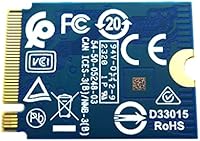
  • PCB Color: Features a blue PCB, consistent with Western Digital's SN-series OEM drive aesthetic.
  • Compatible Devices: Intended for laptops and compact systems equipped with an M.2 2230 slot, including select Microsoft Surface and Dell models.
  • Release Date: First made available on Amazon in June 2022.
  • Amazon Ranking: Holds a Best Sellers Rank of #523 in the Internal Solid State Drives category on Amazon, reflecting consistent demand.
  • User Rating: Carries an average rating of 4.6 out of 5 stars based on 88 verified customer ratings.
  • Accessories Included: Ships as a bare drive only — no mounting hardware, enclosure, cloning software, or documentation is included in the package.

Related Reviews
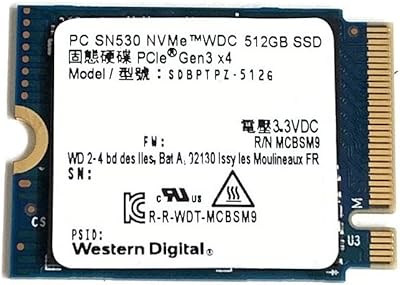
Western Digital SN530 512GB 2230 NVMe SSD

81%
96%
Form Factor Compatibility
93%
Installation Ease
71%
Read/Write Performance
78%
Real-World Speed Consistency
88%
Boot & App Load Times
More
Western Digital SN700 1TB NVMe SSD

90%
94%
Sequential Read Performance
89%
Write Performance
92%
Reliability and Endurance
95%
Compatibility with NAS
91%
Latency in Multi-User Environments
More
WD Red SN700 2TB NVMe SSD
83%
91%
NAS Workload Performance
89%
Endurance & Longevity
88%
NAS Compatibility
86%
Installation Experience
67%
Thermal Management
More
WD Green SN350 2TB NVMe SSD
82%
92%
Value for Money
83%
Read Speed Performance
58%
Sustained Write Performance
94%
Installation Ease
88%
Thermal Management
More
Western Digital 1TB WD Green SN350 NVMe SSD
85%
92%
Performance (Read Speed)
89%
Value for Money
88%
Durability & Shock Resistance
90%
Ease of Installation
75%
Write Speed
More
WD Green SN350 500GB NVMe SSD
77%
91%
Value for Money
88%
Everyday Speed
61%
Write Performance
86%
Compatibility
79%
Long-term Reliability
More
Western Digital WD Blue SN570 2TB NVMe SSD
84%
88%
Read Speed Performance
63%
Sustained Write Performance
91%
Value for Money
94%
Installation & Compatibility
89%
Long-Term Reliability
More
WD Red SN700 4TB NVMe SSD
79%
93%
NAS Compatibility
86%
Sustained Performance
88%
Endurance & Longevity
67%
Thermal Management
91%
Installation Experience
More
WD Red SN700 500GB NVMe SSD

82%
88%
Sustained Performance
84%
NAS Compatibility
91%
Endurance & Longevity
69%
Value for Money
63%
Thermal Management
More
Western Digital 2TB WD Blue SN580 NVMe SSD
89%
91%
Performance
94%
Speed (Read/Write)
88%
Build Quality
92%
Value for Money
90%
Durability/Endurance
More

FAQ

The most reliable method is to pull up the service manual for your specific laptop model — search for it by model number on the manufacturer's support page or on iFixit. Look for the M.2 slot specification in the storage section. If your device is a thin ultrabook or compact system, there's a reasonable chance it uses 2230, but always confirm before ordering since a 2280 drive will not physically fit in a 2230 slot without modification.

Many Surface Pro and Surface Laptop models do use the M.2 2230 form factor, and buyers have confirmed successful installations in several Surface generations. That said, compatibility varies by exact model and revision, so cross-check your specific Surface model number against a verified compatibility list or the relevant iFixit teardown guide before purchasing.

You'll typically need a small Torx or Phillips screwdriver to open your laptop chassis and secure the drive — the exact bit size depends on your machine. The SSD itself simply slots into the M.2 connector with no tools required. A plastic spudger is also handy when prying open thin laptop housings without scratching the casing.

No — this WD replacement drive arrives as a completely bare unit with nothing else in the package. To migrate your current operating system and files, you'll need to separately purchase or borrow a USB M.2 enclosure and use a free cloning tool such as Macrium Reflect or Clonezilla. Factor that into your planning before you crack open your laptop.

Yes, the Steam Deck uses an M.2 2230 slot, and this SN530 2230 SSD has been confirmed to work in it by multiple users. Just keep in mind that the Steam Deck community has documented some nuances around drive compatibility, so a quick check of the current Steam Deck upgrade guides is worth doing before you start disassembling your device.

It's quite noticeable. NVMe PCIe Gen3 x4 drives typically reach sequential read speeds around 2,000 to 2,400 MB/s, while a SATA SSD tops out near 550 MB/s. In practice, you'll feel this most in boot times, application launch speeds, and large file operations — it's not a subtle difference when coming from an older SATA drive.

If your desktop motherboard has an M.2 slot that supports the 2230 length, it will physically work there too. However, most desktop boards are designed for 2280 drives, and some require a specific mounting standoff for 2230. Check your motherboard manual carefully — this compact NVMe drive was not designed with desktop use in mind, so it's worth verifying rather than assuming.

This is where things get a bit murky with OEM-style drives. Western Digital generally covers its SN530 drives under a limited warranty, but since this is sold as a spare or replacement part rather than a retail-boxed product, warranty terms may differ from what you'd get with a boxed consumer SSD. Check the seller's listed warranty policy and contact WD support directly with your serial number to confirm coverage before you need it.

The biggest differences are form factor, generation, and packaging. Retail drives like the SN580 are Gen4, come in the standard 2280 length, include clear consumer warranty documentation, and target general buyers. This SN530 is Gen3, in the shorter 2230 format, and is sold as an OEM component — meaning less retail polish but access to a form factor that retail drives rarely cover. If you need 2230 specifically, there aren't many brand-name alternatives at this price.

The Western Digital PC SN530 256GB NVMe SSD uses a standard M.2 connector with no cables, so the physical installation is genuinely straightforward once you're inside the laptop. The harder part is safely opening your specific machine without cracking the chassis — a detailed iFixit guide for your laptop model takes most of the guesswork out of that step. If you're patient, willing to follow instructions carefully, and comfortable handling small screws, this is very manageable as a first repair.

Where to Buy