


Overview

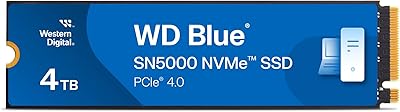
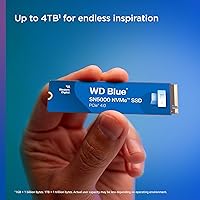
The Western Digital WD Blue SN5000 500GB SSD lands in a crowded Gen 4 NVMe market and makes a solid case for itself without demanding a premium price. For anyone upgrading from an aging SATA drive or building a budget-friendly PC, this WD Blue SSD hits a practical sweet spot. It uses the M.2 2280 form factor, which fits the vast majority of modern motherboards and laptops without any fuss. Western Digital also bundles Acronis True Image migration software, genuinely useful for first-timers moving their data over. One honest caveat: 500GB is a reasonable starting point for an OS and core apps, but it can feel tight sooner than you would expect.

Features & Benefits

Running on PCIe Gen 4.0, the SN5000 can hit sequential read speeds around 5,000 MB/s under benchmark conditions — though in everyday use, the difference shows up most clearly in boot times and large file transfers rather than casual browsing or document work. The M.2 2280 form factor keeps installation straightforward: slot it in, secure the screw, done. Western Digital's nCache 4.0 technology helps keep write speeds consistent during mixed tasks, which matters when you are juggling multiple applications simultaneously. The drive is also remarkably light at under a quarter of an ounce, making it a natural fit for slim laptops and compact builds where every gram counts.

Best For

This NVMe drive makes the most sense for people who want a real performance upgrade without going overboard on cost. Students running Windows 11 machines or home office workers who just need apps to open fast will find this WD Blue SSD delivers exactly that. Gamers on a budget will notice shorter load screens, though 500GB will not hold a large game library for long. It is also a strong pick for anyone replacing an HDD or old SATA SSD — the jump in day-to-day responsiveness is hard to miss. Creative hobbyists handling moderate file sizes, like photo editing or light video work, will find the performance more than adequate.

User Feedback

With over 7,600 ratings and a 4.7-star average, buyer confidence in the SN5000 is hard to ignore. Most reviewers point to the easy installation and the immediate, noticeable improvement over their old drive. The Acronis migration tool earns specific praise for making the whole transition stress-free, a genuine plus for less technical users. The most common complaint centers on storage running out faster than expected — 500GB goes quickly once games, videos, or raw photo libraries enter the picture. A smaller group flags that real-world speeds can fall short of peak figures depending on the motherboard. Overall, buyers consistently feel this WD Blue SSD delivers on value for its tier.

Pros

  • PCIe Gen 4.0 interface brings a significant speed advantage over older SATA and Gen 3 NVMe drives.
  • M.2 2280 form factor fits nearly every modern motherboard and laptop without adapters or hassle.
  • Free Acronis True Image software makes migrating from an old drive surprisingly painless.
  • Boot times and app launch speeds improve noticeably compared to HDDs and budget SATA SSDs.
  • nCache 4.0 technology helps keep write performance stable during mixed, everyday workloads.
  • Western Digital is a trusted brand with a long track record in consumer storage reliability.
  • Lightweight build at under a quarter of an ounce suits compact and ultra-thin system builds.
  • Strong real-world buyer satisfaction backed by thousands of verified ratings.
  • Available in larger capacities for users who want the same platform with more room to grow.
  • Installation is straightforward enough that most users can complete the upgrade in under ten minutes.

Cons

  • 500GB fills up faster than expected, especially once games, photos, or video files enter the mix.
  • Peak sequential speeds quoted are benchmark figures that rarely reflect typical everyday performance.
  • Real-world throughput can vary noticeably depending on the motherboard, cooling, and system configuration.
  • No built-in heatsink means thermal throttling is possible in poorly ventilated or compact builds under sustained loads.
  • Buyers on Gen 3 systems will not see the full performance benefit this drive is capable of.
  • The endurance figures cited are for the top-tier 4TB model; the 500GB variant has a lower TBW rating.
  • Acronis True Image requires a download and registration, which can frustrate users expecting offline software.
  • Not ideal as a sole drive for anyone storing large media libraries or running storage-heavy applications.
  • Competitive Gen 4 alternatives exist at similar price points, so it is worth comparing before committing.

Ratings

Our AI-generated scores for the Western Digital WD Blue SN5000 500GB SSD were produced by analyzing thousands of verified global buyer reviews, with automated filtering applied to remove incentivized, bot-generated, and outlier feedback. The result is an honest, balanced snapshot that reflects both what real users genuinely appreciate and where this NVMe drive falls short in practice. Strengths and frustrations are weighted equally so you can make a confident, informed decision before buying.

Read Performance
88%
Users upgrading from SATA drives or older hard disks consistently report a dramatic improvement in boot times and application load speeds. In everyday desktop use — opening browsers with dozens of tabs, launching creative tools, or starting up Windows 11 — the SN5000 feels noticeably snappier than anything in the Gen 3 or SATA category.
The headline sequential read figures are benchmark numbers that do not always translate to daily tasks. Users running older Gen 3 motherboards or systems with shared bandwidth slots report that real-world speeds land meaningfully below what the spec sheet suggests.
Write Performance
79%
21%
For typical mixed workloads — saving project files, installing software, downloading updates — the nCache 4.0 technology does a decent job of keeping write operations feeling fluid and consistent. Users working with moderate file sizes, like photo libraries or document archives, rarely hit a wall during normal sessions.
Sustained write performance under continuous heavy loads, such as large video file transfers or lengthy disk imaging sessions, can taper off once the cache is saturated. A minority of users noticed speed drops during prolonged write-heavy tasks, which is a known characteristic of drives in this price tier.
Value for Money
93%
This is where the SN5000 earns its strongest praise across user reviews. Buyers repeatedly express surprise at getting genuine PCIe Gen 4 performance at a price that used to buy a mid-range Gen 3 drive. For students, home office workers, or first-time PC builders, the cost-to-performance ratio feels genuinely compelling.
A handful of buyers feel the value calculation shifts when comparing larger-capacity models, where competitors occasionally undercut WD on price per gigabyte. At the 500GB tier specifically, the value is hard to argue with, but shoppers should always run a quick price comparison before committing.
Installation Ease
94%
Across thousands of reviews, easy installation is one of the most consistently repeated positives. The M.2 2280 form factor slots directly into virtually every modern motherboard without adapters, and the physical process takes only a few minutes even for first-timers. Many buyers mention completing the entire hardware installation before their coffee finished brewing.
A small number of users with older or budget motherboards encountered compatibility questions around slot configuration and BIOS NVMe settings. These are system-level issues rather than drive defects, but they can catch less experienced builders off guard if they have not verified their motherboard specs in advance.
Data Migration (Acronis)
86%
The bundled Acronis True Image software receives genuine appreciation, particularly from users who have never cloned a drive before. Being able to transfer an entire Windows installation — apps, files, settings — without a fresh install removes one of the biggest anxiety points around upgrading storage for less technical buyers.
Activation requires registering with Western Digital's website and downloading the software, which adds a few extra steps that some users find fiddly. Occasionally, users report that the download process or license registration is less smooth than expected, particularly if they miss the redemption window.
Compatibility
91%
The standard M.2 2280 size means this NVMe drive slots into a remarkably wide range of systems, from full-size ATX desktops to slim ultrabooks and compact mini-PCs. Users across many different system builds report a straightforward, no-adapter-needed installation experience the vast majority of the time.
Users with very old platforms that lack an M.2 slot entirely, or those running AMD systems with early Ryzen chipsets that do not support Gen 4, will not get the full benefit. A small subset of laptop users found that their specific model had an M.2 slot occupied or inaccessible without voiding a warranty.
Storage Capacity
67%
33%
For its intended role — housing a Windows installation, core productivity apps, and a moderate software library — 500GB is adequate and keeps the system drive clean and fast. Users who treat it as a dedicated OS and apps drive, pairing it with a secondary storage drive, report being perfectly satisfied with the capacity.
This is the most polarizing aspect of the 500GB variant. A significant number of buyers admit the drive filled up faster than expected, especially once game installs, video files, or growing photo libraries entered the picture. Several reviewers explicitly recommend going straight to 1TB if budget allows, calling 500GB a short-sighted choice for all-in-one use.
Thermal Performance
74%
26%
Under everyday computing conditions — web browsing, office work, light gaming, software development — the SN5000 runs cool enough that thermal throttling is a non-issue. Most users in standard mid-tower or laptop configurations report zero problems with heat during typical daily use.
In compact cases with limited airflow, or during prolonged heavy workloads like large file migrations or disk-intensive tasks, temperatures can climb to the point where throttling kicks in. Users without a motherboard heatsink cover over the M.2 slot may want to invest in an inexpensive aftermarket heatsink for peace of mind.
Build & Reliability
89%
Western Digital's reputation for reliable consumer storage products carries real weight here, and the SN5000 largely lives up to it. Long-term owners report consistent performance over months of daily use, and the brand's five-year warranty provides meaningful reassurance for buyers concerned about drive longevity.
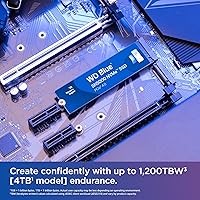
Like any flash-based storage, the endurance rating on the 500GB model is proportionally lower than the headline 1,200 TBW figure cited for the 4TB version. For very write-intensive professional workflows, this is worth factoring in, though for typical home or office use it is unlikely to be a practical concern.
Real-World Speed Consistency
76%
24%
For the workloads most buyers actually run — booting Windows, launching applications, copying files in the low gigabyte range — the SN5000 delivers speeds that feel consistently fast and predictable. Users do not report the erratic performance spikes sometimes associated with cheaper or lesser-known NVMe brands.
Sequential speed figures from benchmarks can create expectations that daily use does not always meet, and some buyers express mild disappointment when running their own speed tests. System configuration, slot bandwidth sharing, and thermal conditions all play a role in how consistently the drive hits its upper performance range.
Software Ecosystem
81%
19%
Beyond Acronis True Image, Western Digital's dashboard software gives users a straightforward way to monitor drive health, check firmware versions, and run diagnostics without needing third-party tools. This kind of basic ongoing management capability is something buyers of cheaper, generic NVMe drives often miss.
The WD Dashboard software is functional but not particularly polished, and some users find the interface dated compared to what competitors like Samsung offer. Acronis True Image also requires periodic re-download for major updates rather than updating silently in the background, which is a minor but occasionally noticed inconvenience.
Packaging & Accessories
72%
28%
The drive arrives well protected for shipping, and Western Digital includes the Acronis license information clearly in the box, making it easy to find without digging through documentation. For buyers doing their first NVMe install, the presentation is clean and uncomplicated.
There are no physical extras in the box — no mounting screw, no heatsink, no installation guide beyond a basic card. Buyers whose motherboard accessory bag is lost or incomplete may need to source an M.2 mounting screw separately, which is a small but avoidable friction point.
Brand Trust
92%
Western Digital is one of the few storage brands that virtually every PC builder recognizes by name, and that familiarity translates directly into buyer confidence. Users frequently cite the WD brand as a deciding factor over lesser-known alternatives at similar price points, even when the specs look comparable on paper.
Brand trust, while generally well-earned, can sometimes lead buyers to skip closer comparisons with competitors that occasionally offer better performance or capacity per dollar. A few users note that WD's premium on brand recognition means you are not always getting the absolute best technical specification for the money.

Suitable for:

The Western Digital WD Blue SN5000 500GB SSD is a strong fit for anyone making their first jump into Gen 4 NVMe storage without wanting to spend heavily to get there. Students and home office users will appreciate how noticeably faster a system feels after replacing an old hard drive or SATA SSD — boot times drop, apps snap open, and general multitasking just feels more responsive. Budget-conscious PC builders who need a reliable, well-supported drive for a Windows installation and core software will find this WD Blue SSD hits the mark cleanly. It also works well for casual gamers who want shorter load times but are not trying to store an entire library on one drive. The included Acronis True Image migration software makes it a particularly approachable option for less technical users who dread the idea of reinstalling everything from scratch.

Not suitable for:

The Western Digital WD Blue SN5000 500GB SSD is not the right choice for buyers who plan to use it as a single, all-purpose drive for gaming, video editing, or large media libraries. Five hundred gigabytes sounds reasonable until a few AAA games, a photo archive, and a handful of software installs start sharing the space — at which point storage anxiety sets in fast. Power users who need sustained write performance under heavy, continuous workloads may want to look at higher-endurance options with more robust thermal headroom. Those with older systems using PCIe Gen 3 slots will not get the full performance benefit this NVMe drive is capable of delivering. If you are a content creator working with large raw video files daily, the 500GB capacity and the endurance rating of the smaller variants make this a tough sell as your primary workhorse drive.

Specifications

  • Brand: Manufactured by Western Digital Technologies, Inc., a well-established name in consumer and professional storage solutions.
  • Model Number: The specific model identifier for this drive is WDS500G4B0E, part of the SN5000 series.
  • Capacity: This drive offers 500GB of usable storage, suitable for an operating system, core applications, and moderate file libraries.
  • Interface: It connects via a PCIe Gen 4.0 x4 NVMe interface, which is the current mainstream standard for high-speed internal storage.
  • Form Factor: The M.2 2280 form factor means the drive is 22mm wide and 80mm long, fitting the most common M.2 slot found in modern desktops and laptops.
  • Read Speed: Sequential read speeds reach up to 5,000 MB/s under optimal benchmark conditions, though real-world performance will typically be lower during everyday tasks.
  • Write Speed: Sequential write speeds are rated up to 5,000 MB/s for the top-capacity model; the 500GB variant performs at a somewhat lower sustained write rate.
  • Cache Technology: Western Digital nCache 4.0 Technology is used to buffer write operations and help maintain consistent performance during mixed workload sessions.
  • Endurance: The lineup's maximum endurance rating reaches 1,200 TBW on the 4TB model; the 500GB variant carries a proportionally lower TBW rating suited to everyday use.
  • Installation Type: This is an internal drive designed to be installed directly into a compatible M.2 slot on a desktop motherboard or laptop mainboard.
  • Compatible Devices: The SN5000 is compatible with desktop PCs, laptops, and mini-PCs that include an M.2 PCIe Gen 3 or Gen 4 slot.
  • Weight: The drive weighs just 0.201 ounces, making it one of the lightest storage upgrades available and ideal for thin and light systems.
  • Included Software: Western Digital includes a free download code for Acronis True Image, a data migration tool that helps users transfer their existing drive contents to the new SSD.
  • Available Capacities: The SN5000 family is available in multiple capacity options scaling up to 4TB, giving buyers room to choose based on storage needs and budget.
  • Hardware Platform: This drive is designed for use in PC-based systems running compatible operating systems such as Windows 10 and Windows 11.
  • ASIN: The Amazon Standard Identification Number for this specific variant is B0D7MKQKXZ.
  • First Available: This product was first listed for sale on June 28, 2024, making it a relatively recent addition to the WD Blue lineup.
  • Color: The drive carries Western Digital's signature blue label, consistent with the WD Blue product family branding.

Related Reviews
Western Digital 500GB WD Blue SN570 NVMe SSD
87%
94%
Performance Speed
90%
Ease of Installation
88%
Reliability
92%
Value for Money
85%
Power Efficiency
More
WD Blue SN5000 4TB NVMe SSD
87%
91%
Sequential Read Performance
88%
Sequential Write Performance
96%
Storage Capacity
67%
Thermal Management
93%
Endurance & Longevity
More
Western Digital WD Blue 500GB M.2 SSD
82%
83%
Real-World Read Speed
81%
Write Performance
91%
Installation Experience
88%
Long-Term Reliability
74%
Value for Money
More
WD Red SA500 500GB NAS SSD
83%
91%
NAS Compatibility
88%
Read Performance
74%
Write Performance
93%
24/7 Reliability
89%
Installation Ease
More
Western Digital 2TB WD Blue SN580 NVMe SSD
89%
91%
Performance
94%
Speed (Read/Write)
88%
Build Quality
92%
Value for Money
90%
Durability/Endurance
More
Western Digital WD Blue SN570 2TB NVMe SSD
84%
88%
Read Speed Performance
63%
Sustained Write Performance
91%
Value for Money
94%
Installation & Compatibility
89%
Long-Term Reliability
More
WD Red SN700 500GB NVMe SSD
82%
88%
Sustained Performance
84%
NAS Compatibility
91%
Endurance & Longevity
69%
Value for Money
63%
Thermal Management
More
Western Digital WD Blue SA510 1TB SSD
83%
83%
Read & Write Speed
88%
Everyday Responsiveness
91%
Installation & Compatibility
86%
Value for Money
89%
Long-Term Reliability
More
Western Digital 1TB WD Blue SN570 NVMe SSD
87%
92%
Performance
91%
Value for Money
88%
Ease of Installation
94%
Read/Write Speed
85%
Power Efficiency
More
Western Digital 1TB WD Blue SN550 NVMe SSD
88%
93%
Performance
91%
Read Speed
88%
Write Speed
89%
Ease of Installation
90%
Compatibility
More

FAQ

Yes, the SN5000 is backward compatible with PCIe Gen 3 slots. You will not get the full Gen 4 speeds, but it will still work and perform significantly better than any SATA SSD or hard drive you might be replacing.

It depends on how many games you want to keep installed at once. Modern AAA titles can easily eat 50 to 100GB each, so 500GB fills up faster than most people expect. If gaming is your primary use case, consider bumping up to a 1TB or 2TB model from the same family. The 500GB option works fine as a boot and apps drive if you have a secondary storage drive alongside it.

Just a small Phillips-head screwdriver to secure the drive to the M.2 standoff on your motherboard. The physical installation itself takes only a few minutes, and most motherboards include the necessary screw in the accessory box.

Once you download and activate it using the code Western Digital provides, Acronis lets you clone your existing drive to the new one. That means your operating system, settings, installed apps, and files all transfer over without needing a fresh Windows install. It is straightforward enough for most non-technical users to follow.

You will notice it most in boot times and large file transfers. Day-to-day tasks like browsing or editing documents will feel snappier, though not dramatically different. The biggest jump in perceived speed tends to come when you are moving files in bulk or launching storage-heavy applications.

No, there is no heatsink included. Most M.2 slots on modern motherboards include their own heatsink covers, and for everyday workloads this drive runs cool enough without one. If you are doing prolonged heavy transfers in a poorly ventilated case, adding a basic M.2 heatsink is an inexpensive precaution.

Western Digital covers the SN5000 with a five-year limited warranty, which is standard for drives in this category and a reassuring commitment for a mid-range product.

Technically yes, if you have an M.2 NVMe USB enclosure. However, the drive is designed and optimized for internal use, and using it externally via USB will bottleneck its speed considerably. It is not the intended use case, but it will function.

The WD Black SN850X is a premium performance drive aimed at enthusiasts and demanding gamers, with higher sustained speeds and better thermal performance. The SN5000 trades some of that headroom for a more accessible price point. For everyday PC use, students, or home office work, the SN5000 is more than capable and the performance gap will not be noticeable in typical daily tasks.

It can matter, yes. Some motherboards have multiple M.2 slots but only one or two support PCIe Gen 4 speeds; others may share bandwidth with the GPU slot. Check your motherboard manual to identify which slot is designated for a primary Gen 4 NVMe drive, and install the SN5000 there for the best performance.

Where to Buy