Overview

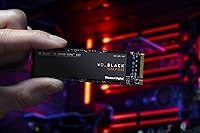
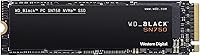
The Western Digital SN750 1TB NVMe SSD arrived in 2019 as a serious contender in the WD Black performance lineup, and it has held its ground surprisingly well since. Sitting above budget SATA options but below cutting-edge Gen4 territory, the SN750 targets builders who want proven, reliable performance without chasing the absolute bleeding edge. The M.2 2280 form factor and PCIe Gen3 x4 interface make it compatible with a wide range of desktops and laptops, and the 1TB capacity hits a practical sweet spot — enough for your OS, core applications, and a healthy rotation of installed games.
Features & Benefits

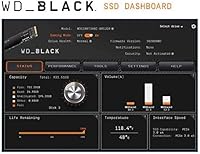
Raw speed is where this NVMe drive makes its case most clearly. Sequential reads up to 3,470 MB/s translate to noticeably snappy boot times and faster level loads compared to any SATA drive. The 3D NAND flash underneath helps with long-term endurance, which matters if you're writing large files regularly. WD also bundles its Black SSD Dashboard, which includes a Gaming Mode option — though in practice the real-world impact of that mode is modest at best, so treat it as a nice extra rather than a headline reason to buy. One important note: this is a pure NVMe drive and will not work in a SATA slot.

Best For

This WD Black drive is a strong fit for anyone building or refreshing a mid-range gaming PC or laptop where an M.2 2280 slot is available. If you're still running a mechanical hard drive or an older SATA SSD, the speed difference here will feel substantial in everyday use. It also suits enthusiasts who want a recognizable, trustworthy brand without stretching the budget toward premium Gen4 options. Builders who appreciate having software tools for monitoring drive health and temperatures will find the dashboard genuinely useful, even if they never touch Gaming Mode.

User Feedback

Owners consistently praise installation simplicity and the drive's steady day-to-day reliability — it tends to just work, without fuss. Longevity feedback has been largely positive, with WD's brand reputation reinforcing buyer confidence over time. The criticisms worth noting: without a heatsink, the drive can run warm under sustained heavy loads, so airflow in your case matters. Some buyers also report that BIOS recognition required a quick settings adjustment on certain older motherboards. The comparison to the Samsung 970 Evo comes up often — most agree performance is comparable, making the SN750 a competitive alternative depending on pricing at the time of purchase.

Pros

  • Boot times and application launches improve dramatically compared to any SATA or HDD setup.
  • The standard M.2 2280 form factor drops into almost any modern desktop or laptop without modification.
  • 3D NAND flash contributes to strong long-term reliability under typical consumer workloads.
  • WD brand reputation gives buyers genuine peace of mind around longevity and warranty support.
  • The heatsink-free design keeps compatibility broad, including tight ITX and slim laptop configurations.
  • 1TB capacity comfortably handles an OS install, core applications, and a rotating game library.
  • The WD Black Dashboard provides useful drive health and temperature monitoring out of the box.
  • Installation is straightforward enough for first-time builders — physical fit and OS recognition are rarely issues.
  • Competes closely with the Samsung 970 Evo in real-world performance, often at a more favorable price.

Cons

  • Gaming Mode in the dashboard delivers negligible real-world benefit and overpromises in marketing materials.
  • No heatsink or thermal pad is included, which matters in poorly ventilated cases or compact laptops.
  • Sustained write speeds drop noticeably once the SLC cache is exhausted during heavy transfer sessions.
  • Some older motherboards require manual BIOS adjustments before the drive is detected on first boot.
  • Gen4 drives have closed the price gap significantly, making the long-term value case harder to argue.
  • The WD Black Dashboard software feels dated and has had inconsistent firmware update delivery for some users.
  • Linux and non-Windows users get no official dashboard support, limiting drive monitoring options.
  • Heavy modern game libraries can fill 1TB faster than expected, with several titles now exceeding 100GB each.

Ratings

The Western Digital SN750 1TB NVMe SSD has been put through its paces by builders, gamers, and everyday power users across the globe, and our AI rating system has synthesized thousands of verified purchase reviews — actively filtering out incentivized, duplicate, and bot-generated submissions — to produce the scores below. What you see reflects an honest cross-section of real ownership experiences, covering everything users love and the friction points they ran into. Both sides of the story are represented here, without softening the criticism.

Read Speed Performance
88%
Users coming from SATA drives consistently describe the jump in OS boot times and application launches as striking. Loading into large open-world games or booting a creative suite feels noticeably faster in daily use, and benchmarks from real owners closely match the advertised sequential read ceiling.
Against newer Gen4 drives, the performance gap is real and growing. Power users who later upgraded to a Gen4 option often noted the SN750 felt comparatively sluggish in back-to-back transfer scenarios, even if everyday responsiveness remained solid.
Write Speed & Sustained Throughput
79%
21%
For typical gaming workloads — installing titles, saving files, patching — write speeds hold up well. Users report smooth experiences during routine tasks, and the drive handles moderate sustained writes without noticeable throttling in well-ventilated cases.
Under prolonged heavy writes, such as large video file transfers or repeated game installs in quick succession, some users observed speed drops as the SLC cache fills. It is not a dealbreaker for most, but workstation-type users noticed it.
Thermal Management
63%
37%
The slim, heatsink-free design slots cleanly into tight M.2 slots on compact ITX builds and thin laptops where a heatsink would physically not fit. Most users in well-airflowed mid-tower cases reported no thermal issues during standard gaming sessions.
In confined cases with poor airflow, or in laptops with limited thermal headroom, the drive runs warm under sustained load. Several users reported thermal throttling during long game installs or large file operations, which is a meaningful concern for compact build owners.
Reliability & Longevity
91%
WD brand trust carries real weight here. A strong portion of long-term owners — many reporting two or more years of daily use — have experienced zero failures, and the 3D NAND construction appears to age gracefully under typical consumer workloads.
A small but vocal group of owners reported drive failures or detection issues after extended use, often flagged in the context of heavy write workloads. The failure rate appears low by category standards, but it exists and is worth noting for mission-critical use cases.
Installation & Compatibility
84%
The standard M.2 2280 footprint means it drops into virtually any modern motherboard or laptop with an M.2 slot. Most users describe a tool-and-screw installation that takes under five minutes, with the OS recognizing it immediately on first boot.
A subset of buyers — particularly those on older AMD platforms or certain budget motherboards — reported BIOS not detecting the drive until NVMe boot mode was enabled manually. It is a one-time fix, but it confused first-time builders who expected zero configuration.
Software & Dashboard Utility
67%
33%
The WD Black SSD Dashboard gives owners a clean interface to monitor drive health, temperature, and remaining lifespan. Users who care about drive monitoring appreciate having a dedicated tool rather than relying on third-party utilities.
Gaming Mode draws skepticism in user reviews, with many reporting no measurable real-world improvement after enabling it. The software also feels dated compared to competitor offerings, and some users found it occasionally failed to detect the drive after Windows updates.
Value for Money
82%
18%
At its typical street price, the SN750 lands in a competitive spot for Gen3 NVMe performance. Users who bought it as a primary gaming drive consistently describe it as money well spent, particularly when comparing it against the Samsung 970 Evo at similar price points.
As Gen4 drives have become more affordable, the value equation for the SN750 has shifted. Buyers who purchased recently rather than at launch often wonder whether a modest premium for a Gen4 option would have been the smarter long-term investment.
Form Factor & Build
86%
The bare M.2 stick form factor is exactly what most builders want — lightweight, compact, and unobtrusive. The black PCB finish looks clean on open builds, and the absence of a heatsink keeps compatibility broad across different slot configurations.
Without any bundled heatsink or thermal pad, buyers in hot systems need to source their own thermal solution separately. A few users noted the PCB feels slightly less robust than competitors when handled, though no functional issues were linked to this.
Gaming Load Time Impact
81%
19%
Gamers migrating from HDDs describe the difference as dramatic — titles that took over a minute to load are now fully in under fifteen seconds. Even users upgrading from older SATA SSDs report shorter level transition times in games that are storage-sensitive.
In titles that are not heavily storage-bound, the real-world difference versus a decent SATA SSD is smaller than many users expect. Some buyers felt slightly oversold on the gaming-specific benefits and found the improvement incremental rather than transformative in those cases.
OS & Application Responsiveness
87%
Running Windows from this drive feels crisp. Cold boots complete quickly, and frequently used applications — browsers, creative tools, productivity suites — open with a snappiness that makes the upgrade feel immediately worthwhile in a daily work or study setup.
After a few months of use, a handful of users reported that day-one snappiness mellowed slightly, which some attributed to drive fragmentation or background indexing. It remains fast by any objective standard, but the out-of-box experience is hard to sustain indefinitely.
Capacity Utilization
83%
1TB gives enough breathing room for an OS partition, a suite of installed games, and a media library without constant juggling. Users who previously managed on 500GB drives specifically called out the extra headroom as reducing daily storage stress meaningfully.
Heavy modern game libraries — especially with multiple titles exceeding 100GB each — can fill 1TB faster than expected. Several users wished they had opted for the 2TB variant, particularly given how storage-hungry newer releases have become.
Competitor Comparison
74%
26%
Head-to-head with the Samsung 970 Evo, many users consider the SN750 a legitimate alternative, especially when pricing favors WD. Brand loyalty aside, real-world performance differences between the two are narrow enough that most buyers would be satisfied with either.
In community forums and side-by-side tests, the 970 Evo still edges out the SN750 in write consistency and software polish. Buyers who researched thoroughly often concluded that the Samsung held a slight overall edge, making the WD drive a price-dependent decision.
Packaging & Unboxing
71%
29%
The drive arrives well-protected and correctly labeled. For enthusiast buyers who value a clean unboxing, the WD Black branding gives it a more premium feel than generic white-box alternatives at similar price points.
There are no accessories included — no heatsink, no thermal pad, no mounting screw. Budget-focused buyers building for the first time occasionally found themselves needing a small M.2 mounting screw not included in their motherboard box, which caused an unexpected delay.
Driver & Firmware Support
69%
31%
The drive works out of the box with standard NVMe drivers on Windows 10 and 11, and WD has issued firmware updates addressing early stability concerns. Users who kept the firmware current generally reported a stable, trouble-free experience over the drive's lifespan.
Firmware update delivery through the WD Dashboard has been inconsistent for some users, with a portion reporting the tool did not flag available updates reliably. A few Linux users also noted that the dashboard is Windows-only, limiting monitoring options on alternative operating systems.

Suitable for:

The Western Digital SN750 1TB NVMe SSD is a strong match for PC builders and gamers who want a meaningful performance upgrade without committing to the premium end of the market. If you are migrating from a mechanical hard drive or an aging SATA SSD, the speed difference in boot times, game loads, and application launches will feel immediately substantial in daily use. It is particularly well-suited for enthusiasts building mid-range gaming desktops or upgrading a gaming laptop with an open M.2 2280 slot, where the slim, heatsink-free design fits without complications. Buyers who value having a reputable brand name behind their storage — with a real software suite for drive health monitoring — will feel comfortable here. It also makes practical sense for students or home office users who want fast, reliable primary storage from a trusted manufacturer without stretching their budget toward cutting-edge Gen4 territory.

Not suitable for:

The Western Digital SN750 1TB NVMe SSD is not the right call for everyone, and it is worth being honest about where it falls short. If your workload involves sustained large file transfers — video editing, regular disk imaging, or frequent large game installs back to back — the drive can throttle once the cache fills, and a higher-endurance option would serve you better. Buyers who have already invested in a Gen4-capable motherboard and want to future-proof their storage should think twice, since Gen4 drives now occupy a similar price band and offer meaningfully higher ceilings. Anyone still running an older system with only SATA slots should know this drive simply will not work there — it is NVMe-only, full stop. If thermal headroom is tight in your build or laptop, the lack of a heatsink is a real consideration rather than a minor footnote. And if squeezing every last benchmark point matters to you, the Samsung 970 Evo and newer competitors edge it out in write consistency and software polish.

Specifications

  • Brand: Manufactured by Western Digital under the WD Black performance storage lineup.
  • Model Number: The exact model identifier for this drive is WDS100T3X0C.
  • Capacity: This drive offers 1TB of usable storage, part of a range spanning 250GB to 4TB.
  • Interface: Connects via PCIe Gen3 x4 using the NVMe protocol — not compatible with SATA slots.
  • Form Factor: Uses the M.2 2280 form factor, meaning it is 22mm wide and 80mm long.
  • Sequential Read: Rated sequential read speed reaches up to 3,470 MB/s under optimal conditions.
  • Flash Type: Built with 3D NAND flash memory for improved data density and write endurance over planar NAND.
  • Heatsink: This is a non-heatsink model, keeping the profile slim for compatibility with tight M.2 slots.
  • Dimensions: Physical dimensions measure 3.15 x 0.87 x 0.09 inches, making it extremely compact and lightweight.
  • Weight: The drive weighs just 0.27 ounces, adding negligible mass to any build or laptop.
  • Compatible Devices: Designed for internal installation in desktop PCs and laptops with an available M.2 NVMe slot.
  • Installation Type: Installed internally via a standard M.2 slot; no external power connector or cable is required.
  • Operating System: Compatible with Windows 10 and Windows 11 using standard NVMe drivers included with the OS.
  • Dashboard Software: WD Black SSD Dashboard is available for Windows, offering health monitoring, temperature tracking, and an optional Gaming Mode.
  • Gaming Mode: Gaming Mode is a software toggle in the WD Black Dashboard intended to prioritize drive responsiveness during gaming sessions.
  • Color: The drive features a black PCB finish consistent with the WD Black product family aesthetic.
  • Endurance Rating: The 1TB capacity variant is rated for 600TBW (terabytes written), reflecting solid long-term durability for consumer workloads.
  • Warranty: Western Digital covers this drive with a five-year limited warranty from the date of purchase.

Related Reviews

Western Digital SN700 1TB NVMe SSD

90%
94%
Sequential Read Performance
89%
Write Performance
92%
Reliability and Endurance
95%
Compatibility with NAS
91%
Latency in Multi-User Environments
More
Western Digital 1TB WD Blue SN550 NVMe SSD
88%
93%
Performance
91%
Read Speed
88%
Write Speed
89%
Ease of Installation
90%
Compatibility
More
Western Digital 1TB WD Blue SN570 NVMe SSD
87%
92%
Performance
91%
Value for Money
88%
Ease of Installation
94%
Read/Write Speed
85%
Power Efficiency
More
Western Digital 1TB WD Green SN350 NVMe SSD
85%
92%
Performance (Read Speed)
89%
Value for Money
88%
Durability & Shock Resistance
90%
Ease of Installation
75%
Write Speed
More
WD My Passport SSD 1TB Portable Drive
83%
91%
Transfer Speed
88%
Build Quality
63%
Thermal Management
96%
Portability
89%
Data Security
More
Western Digital WD Green 1TB Internal SSD

83%
91%
Real-World Speed Improvement
63%
Sustained Write Performance
94%
Ease of Installation
88%
Value for Money
82%
Long-Term Reliability
More
WD Blue SN5000 4TB NVMe SSD
87%
91%
Sequential Read Performance
88%
Sequential Write Performance
96%
Storage Capacity
67%
Thermal Management
93%
Endurance & Longevity
More
Western Digital 2TB WD Red SN700 NVMe SSD
88%
93%
Performance
94%
Speed
90%
Endurance
89%
Reliability
92%
Compatibility with NAS Devices
More
Western Digital WD Red SN700 500GB NVMe SSD
87%
94%
Performance
91%
Endurance
88%
Compatibility with NAS systems
85%
Ease of Installation
89%
Speed under Load
More
WD Green SN350 2TB NVMe SSD

82%
92%
Value for Money
83%
Read Speed Performance
58%
Sustained Write Performance
94%
Installation Ease
88%
Thermal Management
More

FAQ

As long as your laptop has an M.2 slot that supports NVMe, the SN750 will fit and function correctly. The M.2 2280 size is the most common M.2 format, so it matches the slot in the vast majority of gaming and consumer laptops. Just double-check your laptop manual to confirm your slot supports NVMe and not SATA-only M.2.

No — this is a pure NVMe drive and it will not function over a SATA connection. It requires a PCIe Gen3 x4 M.2 slot to operate. If your system only has SATA ports or a SATA-only M.2 slot, you will need a different drive.

This happens on some older motherboards, especially certain AMD platforms. Go into your BIOS settings and look for an option related to M.2 or NVMe boot mode — switching it from legacy or SATA mode to NVMe or AHCI mode usually resolves it immediately. If detection still fails, try reseating the drive and ensuring the retaining screw is secure.

This model ships without a heatsink. For most mid-tower builds with decent airflow, that is fine during normal gaming or daily use. If you have a compact or hot-running system, picking up an aftermarket M.2 heatsink or thermal pad is a reasonable precaution to prevent throttling under sustained heavy loads.

Honestly, the real-world impact is modest for most users. Gaming Mode adjusts power states to keep the drive more responsive during gameplay, but the measurable difference in actual game load times tends to be minimal. It is worth trying if you want to squeeze out marginal gains, but it should not be a primary reason to choose this drive.

In day-to-day and gaming use, the two drives perform closely enough that most users would not notice a difference. The 970 Evo has a slight edge in sustained write consistency and its Magician software is generally considered more polished. That said, the SN750 is a legitimate alternative — if pricing favors WD at the time you are buying, it is not a compromise.

The drive is covered by a five-year limited warranty from Western Digital. WD's warranty support process is generally considered straightforward among consumers — you register the drive, submit a claim online with the serial number, and they handle replacement. User sentiment around WD warranty service is broadly positive.

It depends on the laptop. In models with good thermal design, the SN750 stays within acceptable ranges during gaming. In thinner or less ventilated laptops, sustained workloads — like a long game install or large file transfer — can push temperatures higher and trigger thermal throttling. If your laptop runs hot generally, monitoring drive temps with a tool like HWiNFO after installation is a good habit.

No additional drivers are needed. Windows 10 and Windows 11 both include native NVMe driver support, so the drive will be recognized and fully operational right after installation. The WD Black Dashboard software is optional and installed separately if you want the monitoring and Gaming Mode features.

For most gamers, yes. Modern titles have grown significantly in install size, and several major releases now exceed 100GB on their own. Going from 500GB to 1TB gives you meaningful breathing room to keep more games installed simultaneously without constantly uninstalling to free up space. If your current drive is also SATA-based, the speed improvement on top of the capacity gain makes the upgrade feel even more worthwhile.

Where to Buy