Overview

The WD My Cloud EX2 Ultra 24TB NAS sits at the upper end of WD's My Cloud lineup — a 2-bay network storage unit built for home power users and small offices that have outgrown USB drives and cloud subscriptions. The 24TB pre-populated configuration is a serious commitment, one that makes sense when you're managing years of accumulated data across multiple machines. What separates this WD network drive from cheaper entry-level options is its 1.3 GHz dual-core processor, which gives it enough headroom to handle concurrent users without grinding to a halt. It has been around long enough to earn a track record most newer entrants simply cannot match.
Features & Benefits

The dual-core processor and 1GB RAM are what make this 2-bay NAS feel genuinely capable rather than just adequately functional. You can run a backup job in the background while simultaneously streaming video to a TV and accessing files remotely — and it handles that load without obvious sluggishness. The automatic file sync across connected computers works quietly in the background, which is exactly what you want: set it once and forget it. The USB 3.0 port is a practical bonus, letting you plug in an external drive for quick one-click backups or to expand capacity. RAID mode flexibility means you can prioritize mirroring for safety or striping for speed.

Best For

This WD network drive is a natural fit for freelancers and small home offices that want a shared, high-capacity drive without paying monthly cloud fees indefinitely. If you are sitting on terabytes of 4K footage, RAW photo archives, or large audio projects, 24TB of local storage is genuinely liberating. It also works well for households with several computers where keeping files in sync manually has become a real headache. Anyone moving away from Dropbox or Google Drive for privacy or cost reasons will find the EX2 Ultra a credible alternative. That said, if you want granular control or a rich app ecosystem, competitors like Synology may be a better technical fit.

User Feedback

With over 8,800 ratings and a 4.2-star average, the EX2 Ultra has a broad base of real-world opinion to draw from. The most consistent praise centers on straightforward initial setup and dependable uptime — buyers regularly mention years of trouble-free operation. On the critical side, the WD My Cloud app draws complaints: connectivity hiccups and occasional failures to reconnect after firmware updates are recurring themes. The web dashboard gets the job done but feels dated, especially compared to Synology's DSM interface. Fan noise is also worth noting — not loud, but audible in a quiet home office. Long-term owners tend to rate it highly, which speaks to solid build durability over time.

Pros

  • 24TB of pre-populated local storage eliminates cloud subscription costs for high-volume data hoarders.
  • Automatic multi-computer file sync works quietly in the background without any manual effort.
  • Initial setup is straightforward enough for non-technical users to complete in under 30 minutes.
  • RAID mode options let you choose between maximum capacity and mirrored drive redundancy.
  • The USB 3.0 port enables fast one-click external drive backups as a second layer of protection.
  • Long-term owners consistently report solid hardware durability over multiple years of continuous operation.
  • Works natively with both Mac Time Machine and Windows mapped drives without any extra configuration.
  • The dual-core processor handles typical multi-user home office workloads without noticeable slowdown.

Cons

  • The My Cloud mobile app has a documented history of connectivity drops and post-firmware-update authentication failures.
  • Firmware updates occasionally cause permission resets or unexpected behavior that requires manual troubleshooting to fix.
  • The web management dashboard looks and feels outdated compared to competing NAS platforms at a similar price point.
  • Switching RAID modes after initial setup requires a full drive wipe, with no guided migration tool provided.
  • Fan noise is audible in quiet environments, particularly during overnight backup cycles or large transfers.
  • USB port compatibility is limited to specific drive formats, with minimal official documentation to guide users.
  • The 1GB of RAM becomes a bottleneck when running multiple intensive tasks simultaneously, such as transcoding and backup.
  • Live customer support response times are slow, with generic troubleshooting scripts that often miss the actual issue.

Ratings

The WD My Cloud EX2 Ultra 24TB NAS has accumulated over 8,800 verified ratings globally, giving us a substantial data set to work with. The scores below were generated by our AI engine after analyzing confirmed buyer reviews worldwide, actively filtering out incentivized, bot-generated, and low-quality feedback to surface what real owners actually experience. Both the standout strengths and the frustrating limitations are reflected honestly in each category.
Storage Capacity & Value
88%
Buyers consistently highlight the 24TB configuration as one of the most compelling reasons to choose this unit. For creative professionals juggling large RAW photo libraries or years of 4K video projects, having that much local storage on a single device — without a recurring subscription — feels like a meaningful return on a considered investment.
A handful of users feel the price premium over smaller configurations is steep if they do not actually need the full 24TB upfront. A few also noted that once filled, there is no simple upgrade path without opening the unit and replacing drives manually.
Ease of Setup
84%
A recurring theme in long-term owner reviews is how painless the initial setup was, even for people who had never configured a NAS before. The Quick Install guide and web-based setup wizard walk through network connection, drive formatting, and user account creation in a straightforward sequence that most buyers completed in under 30 minutes.
Some users ran into hiccups when connecting the unit to routers with stricter firewall configurations or non-standard subnets. A small but vocal group also found the initial firmware update prompt during setup caused confusion or temporary connectivity loss before the device stabilized.
Remote Access & App Reliability
61%
39%
When it works, the My Cloud mobile app genuinely delivers on its promise — users report being able to pull files from the office while traveling or stream a video to a phone on a different network without any special technical setup. The convenience factor for non-technical users is real.
App reliability is the most consistently criticized aspect across thousands of reviews. Spontaneous disconnections, sessions that fail to re-authenticate after a firmware update, and a mobile app that has gone through multiple versions with varying stability have frustrated a significant portion of owners. This is not an occasional complaint — it is a pattern.
Performance & Processing Speed
76%
24%
The dual-core processor handles the workload most home and small-office users actually throw at it: a backup job running in the background while a family member streams a movie and another device syncs files. Day-to-day performance for these typical scenarios is smooth and responsive enough that users rarely notice the hardware limitations.
Under heavier simultaneous demand — multiple 4K transcoding streams, large bulk transfers plus active remote access — the 1GB of RAM becomes a ceiling. Users running more intensive workflows report noticeable slowdowns, and those who have experience with higher-spec NAS units describe the processor as adequate rather than genuinely powerful.
Build Quality & Hardware Durability
82%
18%
Long-term owners are some of the most positive voices in the review pool, with multiple buyers noting two to four years of continuous operation without a drive failure or hardware fault. The enclosure feels solid and the drive trays are sturdy enough for a device that rarely gets handled once it is installed on a shelf.
The plastic enclosure, while functional, does not feel particularly premium given the price tier. A few users also noted that the charcoal finish attracts dust visibly, and the ventilation design means that dust accumulation inside the unit over years of operation is a legitimate long-term concern.
Fan Noise & Acoustics
63%
37%
Under light load, the fan runs quietly enough that users in moderately busy environments — a kitchen counter, a shared office, a living room cabinet — report not noticing it at all. Several buyers specifically mention being pleasantly surprised by how quiet it is compared to older NAS units they had used previously.
In a quiet home office or bedroom setup, the fan is audible, particularly during active transfers or backup cycles at night. Users who placed the unit near their desk rather than in a dedicated closet or equipment rack are the most likely to flag this as a meaningful quality-of-life issue.
Web Dashboard & Management UI
58%
42%
The browser-based dashboard covers the essentials — user management, share configuration, RAID status, and basic app installs — in a layout that is navigable without a manual. For users who just want to set it up once and rarely touch it again, the interface does its job without getting in the way.
Compared to Synology's DSM or QNAP's QTS, the WD interface feels several years behind. Options are buried, feedback during operations is minimal, and the overall design language looks like it has not received a meaningful refresh in a long time. Power users who want fine-grained control will quickly feel constrained.
RAID Configuration Flexibility
78%
22%
Having native RAID 0, RAID 1, JBOD, and spanning options on a consumer-focused NAS is genuinely useful. Users who want mirrored redundancy for peace of mind can set RAID 1 during initial setup, while those who prioritize raw capacity can opt for RAID 0 or JBOD without any complex CLI work.
Switching RAID modes after initial setup requires a full drive wipe and reconfiguration, which catches some users off guard if they change their mind after setup. There is no guided migration tool, so the process feels more manual and risky than it should be on a device marketed to non-technical buyers.
Automatic File Sync
79%
21%
The background sync functionality across multiple computers is one of the quieter successes of the EX2 Ultra. Users with two or three machines in a household report that files updated on one computer show up correctly on others without any manual intervention, which is exactly the use case the device was designed for.
Sync behavior can be inconsistent when a connected computer wakes from sleep or reconnects after a network drop — some users report delayed sync or missed updates in those scenarios. The sync client software is functional but not polished, and it occasionally needs a manual restart after system updates on the host computer.
USB 3.0 Expansion & Backup
74%
26%
The rear USB 3.0 port is a practical and underappreciated feature. Users who plug in an external drive for one-click backups find the process fast and reliable, and it provides a straightforward second layer of data protection without requiring any third-party software or cloud dependency.
The USB port only supports a limited range of file systems and drive formats, which has caught some users off guard when their external drive was formatted in an unsupported way. Documentation around supported formats is sparse, leading to unnecessary troubleshooting for what should be a simple plug-and-backup operation.
Network Transfer Speeds
72%
28%
Over a standard gigabit home network, large file transfers — moving a 20GB video archive, for example — complete at speeds that most users find acceptable. For bulk initial data loads or regular scheduled backups, the throughput is sufficient to finish overnight jobs without becoming a workflow bottleneck.
Transfer speeds do not consistently hit the theoretical ceiling of a gigabit connection, and users with faster internal SSDs notice the NAS becomes the limiting factor in their workflow. Wireless transfers specifically receive criticism for inconsistency, though that is largely a network infrastructure issue rather than a flaw unique to this device.
Platform Compatibility
81%
19%
Solid Mac and PC support out of the box is something buyers appreciate without always mentioning explicitly — it just works as expected with Time Machine on macOS and as a mapped network drive on Windows. There are no driver installs or compatibility patches required for standard use cases.
Linux support is limited and largely undocumented in the official materials, which matters to a small but enthusiastic segment of the buyer pool. Older macOS versions and some Windows legacy configurations have also generated compatibility complaints in the firmware update history.
Firmware Update Experience
54%
46%
When firmware updates go smoothly — which is the case for many users — the device simply restarts and resumes normal operation with no intervention required. Incremental updates have over time added minor feature improvements and addressed some earlier stability bugs that affected app connectivity.
Firmware updates are a notable source of frustration across the review base. Failed or interrupted updates have bricked units for a small number of users, and even successful updates have triggered app disconnections, share permission resets, or unexpected behavior that required a manual fix. The update process lacks the robustness buyers at this price point reasonably expect.
Documentation & Support
57%
43%
WD provides a reasonably detailed online knowledge base and community forums where common issues — particularly around remote access and RAID setup — are well documented. Experienced NAS users generally find answers to their questions without needing to contact support directly.
First-time NAS buyers frequently describe the documentation as assuming too much prior knowledge. Live support response times draw criticism for being slow, and some users report receiving generic troubleshooting scripts that did not address their specific firmware or app issue. For a device aimed partly at non-technical users, the support experience falls short.

Suitable for:

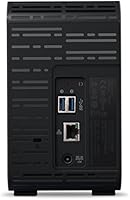
The WD My Cloud EX2 Ultra 24TB NAS is built for a specific kind of buyer: someone who has accumulated a serious amount of data and is tired of paying monthly fees to store it somewhere else. Freelance photographers and video editors will find the 24TB capacity genuinely freeing — no more juggling external drives or rationing what gets backed up. Small home offices with two to four users benefit from the centralized shared storage and automatic sync, which keeps everyone working from the same current files without any manual coordination. If you are migrating away from public cloud services for privacy or cost reasons, this WD network drive gives you a credible, locally controlled alternative that does not require a deep technical background to get running. It also works well as a long-term media archive for households managing large libraries of 4K video, music, or RAW photos across multiple computers.
Not suitable for:

The WD My Cloud EX2 Ultra 24TB NAS is not the right choice for buyers who need a polished, feature-rich management experience or who plan to run demanding applications directly on the device. If you are comparing it against Synology or QNAP units at a similar price, the software ecosystem and dashboard depth on those platforms are noticeably more mature — power users who want granular control, a wide app library, or Docker support will hit the ceiling here quickly. The My Cloud app's track record for reliability also makes this a poor fit for anyone who depends heavily on remote access as a primary workflow, rather than a convenient occasional feature. Buyers who work in a quiet home office or bedroom should factor in the fan noise during active transfers — it is not loud, but it is present. And if you are only managing a modest amount of data, the 24TB configuration represents more financial commitment than most casual users will ever need.
Specifications

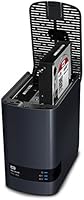
  • Drive Bays: The unit houses 2 internal drive bays, both pre-populated with mechanical hard drives in this 24TB configuration.
  • Total Capacity: Total raw storage capacity is 24TB across both drives, with usable capacity varying depending on the RAID mode selected.
  • Processor: A 1.3 GHz dual-core processor manages simultaneous tasks such as file transfers, media streaming, and remote access requests.
  • RAM: 1GB of DDR3 memory is onboard, supporting multitasking across backup jobs, user sessions, and network serving simultaneously.
  • Drive Type: Both installed drives are 3.5-inch mechanical hard disk drives (HDD), not solid-state, which affects transfer speed ceilings and acoustics.
  • RAID Support: Supports RAID 0, RAID 1, JBOD, and spanning modes, selectable during initial setup or reconfigurable with a full drive wipe.
  • USB Port: One USB 3.0 port is located on the rear panel, supporting external drive expansion and one-click backup functionality.
  • Network Interface: Connects to a local network via a single Gigabit Ethernet port, enabling wired LAN access from all connected devices.
  • Remote Access: Remote file access is handled through the WD My Cloud app, available for iOS and Android, as well as a browser-based portal.
  • Platform Support: Compatible with macOS (including Time Machine backup) and Windows (as a mapped network drive) out of the box, with limited Linux support.
  • Dimensions: The enclosure measures 6.1 x 3.9 x 6.75 inches (L x W x H), making it compact enough to sit on a desk shelf or in a cabinet.
  • Weight: The unit weighs 4.4 pounds fully loaded with both drives installed.
  • Color & Finish: Finished in charcoal with a matte plastic enclosure that is functional in appearance but attracts visible dust over time.
  • Power Supply: The device ships with an external AC power adapter; it does not have an internal power supply or battery backup capability.
  • Cooling: Active cooling is provided by an internal fan, which is audible during heavy transfers or backup operations in quiet environments.
  • Warranty: Western Digital provides a standard 2-year limited hardware warranty covering manufacturing defects on the enclosure and included drives.
  • Amazon Ranking: Ranked #463 in the Network Attached Storage (NAS) Devices category on Amazon at the time of this review.
  • User Rating: Holds a 4.2 out of 5 star average across more than 8,800 ratings on Amazon, reflecting a broadly positive but not unqualified reception.

Related Reviews
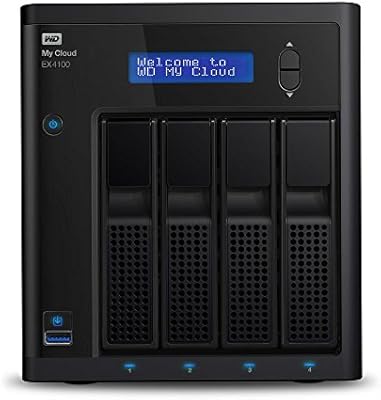
Western Digital My Cloud EX4100 8TB NAS
74%
83%
Transfer Speed Performance
89%
RAID Flexibility & Data Protection
86%
Plex Media Server Integration
78%
Remote Access & Connectivity
61%
My Cloud OS Software Experience
More
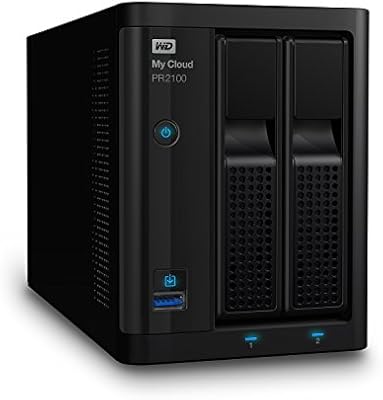
WD My Cloud Pro PR2100 20TB NAS
73%
83%
Setup & Initial Configuration
81%
Build Quality & Hardware Design
74%
Storage Performance & Throughput
88%
RAID Flexibility & Data Redundancy
79%
Media Streaming & Transcoding
More
WD My Cloud Home 8TB Personal Cloud Storage
62%
83%
Ease of Setup
51%
App Reliability
57%
Remote Access Performance
88%
Storage Capacity
31%
Data Redundancy & Safety
More
Ubiquiti Cloud Gateway Ultra (UCG-Ultra)
87%
89%
Performance
94%
Security Features (IDS/IPS)
85%
Ease of Setup
88%
Network Management
92%
Multi-Device Support
More
WD My Passport Ultra 1TB
86%
94%
Portability
90%
Data Transfer Speed
89%
Design & Build Quality
83%
Compatibility
88%
Security Features (Encryption)
More
WD My Passport Ultra 500GB
88%
91%
Data Transfer Speed
88%
Build Quality
94%
Portability
89%
Ease of Setup
85%
Backup Software Reliability
More
WD 5TB My Passport Ultra for Mac
84%
88%
Performance & Speed
92%
Data Security (Encryption & Password Protection)
85%
Ease of Use & Setup
90%
Mac Compatibility (Time Machine)
87%
Portability & Design
More
WD Elements 24TB Desktop Storage
84%
95%
Storage Capacity
88%
Data Transfer Speed
84%
Build Quality
85%
Durability/Shock Resistance
90%
Ease of Setup
More
WD Red 5TB NAS Hard Drive
84%
91%
Reliability for 24/7 Operation
77%
Performance (Speed)
89%
Energy Efficiency
85%
Ease of Integration
90%
Compatibility with NAS Systems
More
WD Red Pro 3TB NAS Hard Drive
86%
91%
Performance
88%
Reliability
92%
Compatibility with NAS Systems
65%
Noise Levels
89%
Ease of Setup
More

FAQ

Not really. The setup process is guided through a web browser and walks you through drive formatting, network connection, and user account creation step by step. Most buyers with no prior NAS experience report completing the initial setup in under 30 minutes. Where things can get complicated is if your home router has strict firewall settings, but for standard home network configurations it is genuinely plug-and-play.

In practical terms, yes — the EX2 Ultra can serve as a self-hosted alternative to public cloud storage, giving you remote file access and automatic sync without ongoing subscription fees. The key difference is that your data lives on hardware in your home, so you are responsible for its physical safety. If you want true off-site redundancy, you would still need a separate backup strategy alongside this device.

That depends entirely on which RAID mode you configured during setup. If you chose RAID 1 (mirroring), your data is duplicated across both drives and a single drive failure will not result in data loss — you can swap the failed drive and rebuild. If you chose RAID 0 or JBOD for maximum capacity, a single drive failure will likely mean data loss, so an additional backup is strongly recommended in those configurations.

During light activity — say, a single user browsing files or a background sync — the fan is quiet enough that most people do not notice it from across the room. During active large transfers or overnight backup jobs it becomes more audible, and users who place the unit on their desk in a quiet home office do flag it as noticeable. It is not disruptively loud, but it is not silent either.

Yes, Time Machine compatibility is built in and works without any third-party software or manual configuration. You simply designate a share on the device as a Time Machine backup destination from your Mac's system preferences. It has been a reliable setup for macOS users in the review base.

Yes, you can replace the installed drives with higher-capacity ones down the line, though the process requires opening the enclosure, manually swapping drives, and reconfiguring your RAID array — which typically means a full data migration first. There is no hot-swap upgrade path that preserves your data automatically, so planning ahead and having a backup before attempting any drive replacement is essential.

Remote access works well when conditions are right — stable home internet, a correctly configured router, and an up-to-date app version. The honest caveat is that the My Cloud app has a documented history of connectivity issues, particularly after firmware updates, which can require a manual reconnection or app refresh to resolve. It is a convenient feature for casual remote access, but not one to depend on for mission-critical workflows without a backup access method.

Yes, the device maps as a standard network drive on Windows and is compatible with Windows 10 and Windows 11. File access, automatic sync, and the web dashboard all function normally on current Windows versions. The desktop sync application may require a reinstall after major Windows updates, which is a minor inconvenience a small number of users have reported.

No. The core features — local network access, remote access via the My Cloud app, automatic sync, and RAID management — are all included with no subscription required. This is one of the stronger arguments for the device compared to hybrid NAS products or pure cloud storage at scale.

Synology's DSM software platform is widely considered more polished, with a richer app ecosystem, a more modern dashboard, and better community support for advanced features like Docker and virtual machines. The EX2 Ultra has the advantage of WD's brand familiarity, pre-populated drives, and a simpler setup experience for less technical users. If software depth and flexibility matter to you, Synology is the stronger platform; if you want a recognized brand, pre-loaded storage, and a no-fuss setup, this WD network drive is a competitive option.

Where to Buy