Overview

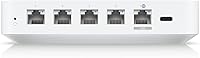
The Ubiquiti UCG-Ultra Cloud Gateway Router arrived in early 2024 as a smart middle ground — compact enough for a desk, capable enough to run a full UniFi Network stack. Let's be clear up front: this is not a Wi-Fi router. There is no wireless radio inside. The UCG-Ultra is a controller-plus-router that manages your UniFi ecosystem — switches, access points, cameras — from one small box. That distinction matters. If you are already in the UniFi world, this compact cloud gateway is an appealing upgrade over juggling a separate Cloud Key and gateway. If you are new to Ubiquiti, the ecosystem lock-in is real and worth understanding before you commit.
Features & Benefits

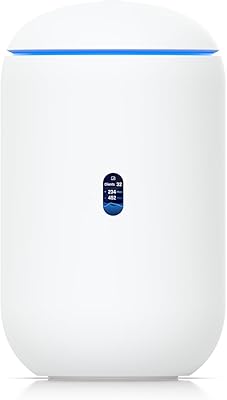
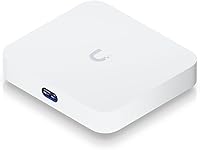
The UCG-Ultra packs a lot into a box not much bigger than a paperback. 1 Gbps routing handles most home and small-office connections comfortably, though enabling IDS/IPS — the built-in intrusion detection and prevention — does trim real-world throughput noticeably at line speed, so factor that in if you are pushing a true gigabit connection. Multi-WAN support lets you bond or failover across two internet connections, genuinely useful for businesses where downtime costs money. The embedded UniFi controller means no separate Cloud Key and no recurring subscription. Power comes via USB-C, and the small LCM status display on the front gives a live network readout without touching the app.

Best For

This UniFi gateway is purpose-built for people already living inside the UniFi ecosystem — or seriously planning to. If you are running UniFi switches, access points, or cameras and want to consolidate management onto a single low-footprint device, this compact cloud gateway is a clean answer. It also suits small offices and retail environments where managed networking matters but a full server rack does not make sense. Network admins wanting edge-level threat detection without enterprise pricing will find the IDS/IPS inclusion attractive. That said, if you have never touched a UniFi interface before, be honest with yourself — the learning curve is real, and simpler options exist for pure beginners.

User Feedback

Buyers are largely enthusiastic, with the device sitting at 4.8 out of 5 across a solid number of ratings. The most consistent praise centers on build quality and how much capability Ubiquiti packed into such a small footprint. People who replaced a standalone Cloud Key appreciate having the controller and routing consolidated without extra hardware cluttering a desk. On the less positive side, some owners report that throughput takes a meaningful hit when IDS/IPS is running at full tilt — worth testing in your specific setup before assuming full gigabit throughput. A smaller group found migrating existing devices from an old controller more involved than expected. Neither issue is a dealbreaker, but both are worth knowing going in.

Pros

  • Embeds the full UniFi Network controller so there is no need for a separate Cloud Key or hosted server.
  • Manages 30-plus UniFi devices and over 300 clients, which covers most small and medium office deployments comfortably.
  • Multi-WAN load balancing and failover adds genuine uptime resilience for businesses that cannot afford a dead connection.
  • USB-C power keeps the setup tidy and allows flexible desk or shelf placement without hunting for a barrel-connector adapter.
  • The front LCM display gives a live network status readout at a glance without opening the UniFi app.
  • IDS/IPS threat detection is included at no extra subscription cost, which is unusual at this price tier.
  • Compact tabletop form factor brings enterprise-grade management into spaces where a rack simply is not an option.
  • No mandatory cloud subscription — the controller runs locally, which matters for privacy-conscious deployments.
  • Strong real-world build quality reported by owners, with the device holding up well in always-on environments.
  • Straightforward upgrade path for existing Cloud Key users who want routing and control unified in one box.

Cons

  • No built-in wireless radio means you must budget for separate access points to get any Wi-Fi at all.
  • Enabling IDS/IPS at full gigabit speeds causes a noticeable throughput reduction that some users did not anticipate.
  • The UniFi interface has a real learning curve that can frustrate anyone without prior managed-network experience.
  • Migrating existing UniFi devices from an older controller to this UniFi gateway can be more involved than expected.
  • Deep vendor lock-in means switching away from the Ubiquiti ecosystem later becomes a costly and disruptive exercise.
  • Only two WAN ports limits redundancy options for larger or more complex multi-ISP setups.
  • The embedded controller, while convenient, means a hardware failure takes down both routing and network management simultaneously.
  • Occasional firmware updates have been reported to require device re-adoption, which is disruptive in production environments.

Ratings

The scores below reflect an AI-driven analysis of verified global buyer reviews for the Ubiquiti UCG-Ultra Cloud Gateway Router, with spam, bot-generated, and incentivized submissions actively filtered out before scoring. Each category is assessed against real-world usage patterns reported by home lab builders, IT admins, and small business owners who have deployed this device in live environments. Both standout strengths and genuine frustrations are represented transparently — no category has been inflated to flatter the product.

Build Quality
93%
Owners consistently note that the unit feels substantial and well-finished for its size, with nothing rattling or flexing under normal handling. The clean white enclosure holds up well in always-on deployments, whether sitting on a desk in a home office or tucked into a retail back-office cabinet.
A small number of users have noted that the white finish shows dust and fingerprints more readily than darker enclosures, which can be a minor annoyance in high-traffic spaces. No significant structural defects have been widely reported, but long-term durability beyond two years remains an open question for newer buyers.
Routing Performance
81%
19%
At 1 Gbps, the UCG-Ultra handles most residential and small-office internet connections without breaking a sweat when IDS/IPS is left disabled. Users on sub-gigabit plans — say 300 to 500 Mbps — report rock-solid throughput with no perceptible lag even under moderate client load.
The throughput hit when IDS/IPS is active at true gigabit speeds is real and has caught several buyers off guard. Users pushing a full 1 Gbps fiber connection with threat detection enabled have reported effective throughput dropping meaningfully, which undermines the headline spec for that specific use case.
IDS/IPS Security
78%
22%
Having active intrusion detection and prevention built in at this price point is genuinely uncommon, and network admins running small offices have praised it as a cost-effective way to add a meaningful security layer without a separate appliance. For businesses handling customer data or payment systems, even partial threat coverage at the edge is a real benefit.
The performance trade-off at gigabit speeds makes enabling IDS/IPS a deliberate decision rather than a simple toggle-and-forget feature. Some users also note that tuning the threat detection rules in the UniFi interface requires more networking knowledge than casual users typically have.
Ease of Setup
62%
38%
For buyers already familiar with the UniFi ecosystem, getting the UCG-Ultra online is fairly straightforward — plug in Ethernet, power up via USB-C, and the embedded controller is ready to adopt devices within a few minutes. Experienced admins report that initial deployment in a fresh environment is quicker than with older Ubiquiti setups that required a separate controller.
First-timers and those migrating from a previous UniFi controller face a steeper climb. Re-adopting existing devices does not always go smoothly, and the UniFi Network interface, while powerful, assumes comfort with concepts like VLANs and firewall rules that most consumer router users have never encountered.
Multi-WAN Reliability
88%
Small business owners who have configured dual-ISP setups report that failover kicks in quickly and transparently, keeping operations running during primary connection outages. Load balancing between two WAN sources also works reliably for offices where bandwidth distribution across links matters.
Configuration of multi-WAN policies is not particularly intuitive for users setting it up for the first time, and the documentation could be clearer on edge-case behavior during failover events. Buyers with more than two WAN sources will also hit a hard limit.
Embedded Controller Value
94%
Eliminating the need for a separate Cloud Key or self-hosted server is one of the most frequently praised aspects of this UniFi gateway — it saves money, reduces hardware footprint, and removes a single point of failure from the stack. Users upgrading from a Cloud Key Gen2 setup describe it as a meaningful consolidation that simplifies their network closet considerably.
Because routing and the controller are cohosted on the same hardware, a device failure takes both functions offline simultaneously, which some admins consider an unacceptable risk for critical deployments. There is also no straightforward way to separate these roles if your needs change later.
Client & Device Capacity
86%
The ability to manage 30-plus UniFi devices and keep 300-plus clients connected comfortably covers the vast majority of SMB environments without any tuning. Retail locations with dense device environments — multiple switches, a handful of access points, camera systems — sit well within these boundaries.
For larger deployments pushing toward enterprise scale, the ceiling on managed devices will start to feel limiting. Users planning significant infrastructure growth may find themselves outgrowing this compact cloud gateway faster than expected.
Power & Cabling Design
91%
USB-C power delivery is a practical choice that keeps the setup clean and allows the device to be placed wherever an outlet and Ethernet run exist, without needing a dedicated shelf for a bulky power brick. Buyers who have transitioned from older Ubiquiti gateways appreciate how much tidier the cabling situation becomes.
The included USB-C adapter is functional but not particularly long, which can limit placement options in some installations. If the adapter fails, sourcing a compatible replacement requires attention to the correct power spec, which is not immediately obvious on the packaging.
LCM Status Display
77%
23%
The small front display earns more appreciation than its size suggests — being able to confirm WAN connectivity, check active client counts, and glance at live throughput without opening a browser or app is a genuine convenience during troubleshooting or routine checks.
The display is quite small at 0.96 inches and the information it shows is limited to high-level status rather than actionable diagnostics. In a brightly lit office environment, the screen can be difficult to read from more than a foot or two away.
UniFi Ecosystem Integration
89%
Within the UniFi ecosystem, this compact cloud gateway acts as a true hub — switches, access points, cameras, and protect devices all fall under unified management with consistent policy enforcement across the stack. Admins managing distributed UniFi hardware report that having everything visible and configurable in one interface saves meaningful time.
The integration benefit only materializes if you are fully committed to Ubiquiti hardware. Any third-party device on your network is invisible to the controller, which creates blind spots in environments with mixed infrastructure.
Value for Money
87%
Compared to buying a separate UniFi gateway and Cloud Key, the UCG-Ultra consolidates two roles into one device at a price point that most SMB buyers consider fair given the capability on offer. The absence of any required subscription also improves the long-term cost picture compared to competitors that charge for cloud management access.
For buyers who only need basic routing and do not have an existing UniFi investment, the price feels harder to justify against capable consumer routers that include Wi-Fi. The value equation is tightly tied to how much of the UniFi feature set you actually plan to use.
Form Factor & Placement
92%
At just over a pound and with a footprint smaller than a hardback book, the UCG-Ultra fits into spaces where previous generations of Ubiquiti gear simply could not — a desk corner, a small wall-mounted shelf, or a retail display cabinet. The tabletop design makes it accessible to users who do not have a server rack.
The horizontal tabletop-only design means it cannot be rack-mounted or wall-mounted without third-party accessories, which is a minor inconvenience for professional network closet installations where vertical space is at a premium.
Software & Firmware Stability
74%
26%
Day-to-day stability is generally well-regarded, with most users reporting weeks or months of uninterrupted uptime after initial configuration is complete. The UniFi Network application embedded on the device receives regular updates that add features and address known issues.
A subset of users report that firmware updates have occasionally required device re-adoption or caused temporary disruption to managed hardware, which is disruptive in live business environments. Ubiquiti's update cadence, while active, has historically introduced regressions on some releases.
Documentation & Support
66%
34%
The wider UniFi community is large and active, and community-written guides cover most common setup scenarios in enough detail that experienced users can usually self-solve issues without contacting Ubiquiti directly. Official documentation has improved over the past year with more structured onboarding guides.
Ubiquiti's official customer support has a long-standing reputation for slow response times, and the official documentation for edge-case configurations can be thin. New UniFi users who hit migration or adoption issues often find themselves relying on forum posts rather than authoritative guidance.

Suitable for:

The Ubiquiti UCG-Ultra Cloud Gateway Router is built for people who are already operating inside — or actively building — a UniFi hardware ecosystem. Home lab enthusiasts running UniFi switches, access points, and cameras will find it a clean, low-footprint way to consolidate network management without a separate controller device or recurring cloud subscription. Small business owners and IT admins managing offices, retail spaces, or multi-tenant environments will appreciate the ability to handle 30-plus devices and hundreds of clients from a single compact box on a desk. The multi-WAN failover capability alone makes it worth serious consideration for any business where internet downtime translates to lost revenue. If you are coming from a Cloud Key Gen2 setup and want routing folded into the same device, this UniFi gateway is a very logical step up.

Not suitable for:

Anyone expecting the Ubiquiti UCG-Ultra Cloud Gateway Router to function as a wireless router will be immediately disappointed — there is no Wi-Fi radio inside, and you will still need separate access points to get devices on the air. Networking newcomers should think carefully before committing: the UniFi platform is powerful, but it assumes a working knowledge of concepts like VLANs, firewall rules, and network segmentation that most consumer router interfaces hide from you. If your internet plan tops out well below gigabit speeds and you plan to run IDS/IPS continuously, the throughput trade-off may feel more pronounced than the spec sheet implies. Buyers looking for a simple plug-and-play solution to replace a consumer router will find the setup process and the ecosystem dependency frustrating rather than rewarding. This compact cloud gateway also only makes sense if you are willing to invest in Ubiquiti hardware more broadly — used in isolation, much of its value disappears.

Specifications

  • Routing Throughput: The device delivers up to 1 Gbps of routing throughput under standard conditions, though enabling IDS/IPS will reduce real-world speeds.
  • Managed Devices: Supports management of 30 or more UniFi Network devices from a single embedded controller instance.
  • Client Capacity: Handles 300 or more connected network clients simultaneously, making it viable for dense small-to-medium business deployments.
  • WAN Support: Includes multi-WAN capability with both load balancing and automatic failover across multiple internet connections.
  • Security: Built-in IDS/IPS (Intrusion Detection and Prevention System) provides active threat monitoring at the network edge.
  • Status Display: A 0.96″ LCM screen on the front of the unit shows live network status including WAN IP, active clients, and throughput.
  • Power Input: Powered via USB-C; a compatible USB-C adapter is included in the box.
  • Dimensions: The unit measures 5 x 5.6 x 1.2 inches, designed for compact tabletop placement.
  • Weight: The device weighs 1.15 pounds, making it light enough for flexible desk or shelf mounting.
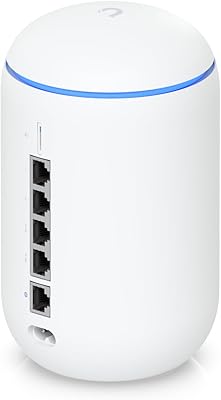
  • Connectivity: Connects to the network exclusively via Ethernet; there is no built-in wireless radio or Wi-Fi capability.
  • Controller Platform: Runs the full UniFi Network application natively on-device, eliminating the need for a separate Cloud Key or hosted server.
  • Cloud Subscription: No mandatory cloud subscription is required; the controller operates fully locally on the hardware.
  • Form Factor: Tabletop desktop design intended for placement on a desk, shelf, or inside a cabinet rather than rack mounting.
  • Color: Available in white with a clean, minimal finish consistent with the broader UniFi hardware lineup.
  • Manufacturer: Designed and manufactured by Ubiquiti Networks, a US-based company specializing in managed networking hardware.
  • Release Date: First made available in February 2024, positioning it as one of Ubiquiti's more recent compact gateway releases.
  • Included Accessories: The package includes the gateway unit and a USB-C power adapter; no Ethernet cables are included.
  • Ecosystem: Operates exclusively within the Ubiquiti UniFi ecosystem and is designed to manage other UniFi-branded hardware only.

Related Reviews

WD My Cloud EX2 Ultra 24TB NAS
72%
88%
Storage Capacity & Value
84%
Ease of Setup
61%
Remote Access & App Reliability
76%
Performance & Processing Speed
82%
Build Quality & Hardware Durability
More
MightyWiFi Mightywifi Cloud Mobile WiFi Router
87%
89%
Battery Life
93%
Global Coverage
87%
Ease of Use
75%
Connectivity Reliability
91%
Data Management via App
More
Ubiquiti AirRouter HP Indoor WiFi Router
82%
89%
Value for Money
91%
Ease of Setup
78%
WiFi Performance
85%
Build Quality
86%
Software/airOS Experience
More
MikroTik CCR2116-12G-4S+ Cloud Core Router
73%
93%
Routing Performance
88%
Value for Money
91%
RouterOS Flexibility
47%
Learning Curve
89%
BGP Stability
More
MikroTik CRS125-24G-1S-2HnD-IN Layer 3 Gigabit Switch
76%
91%
Value for Money
88%
Build Quality
89%
Port Density & Connectivity
53%
Wireless Performance
93%
Routing & Switching Capability
More
Ubiquiti AmpliFi Alien WiFi 6 Mesh Router
72%
83%
Wireless Performance
78%
Coverage & Range
86%
Device Handling Capacity
51%
Setup & Ease of Use
48%
Companion App Quality
More
Ubiquiti Dream Router Wi-Fi 6 Router
79%
93%
Network Stability & Reliability
54%
Setup & Initial Configuration
78%
Wi-Fi 6 Performance
91%
UniFi Controller Integration
74%
Value for Money
More
Ubiquiti UDR7 Dream Router Wi-Fi 7
77%
94%
Ecosystem Integration
83%
Wi-Fi Performance
61%
Hardware Port Selection
58%
Setup Experience
72%
Value for Money
More
GL.iNet GL-X3000 Spitz AX
82%
88%
Cellular Signal Performance
91%
Dual-SIM & Failover Reliability
84%
Wi-Fi 6 Local Network Speed
82%
VPN Performance
86%
Setup & Initial Configuration
More
LOOPS Dew Cloud Ultra Hydrating Hydrogel Face Mask - 5 pc
86%
91%
Hydration Effectiveness
88%
Skin Compatibility
95%
Ease of Use
90%
Immediate Results
85%
Scent/Fragrance
More

FAQ

No, it does not. This is a common point of confusion worth clearing up before purchase. The UCG-Ultra is a wired router and network controller — there is no wireless radio inside. To get Wi-Fi, you will need to pair it with one or more separate UniFi access points.

No, a cloud account is not required for local operation. The UniFi Network application runs directly on the hardware, so you can manage everything from your local network without signing in to Ubiquiti's cloud services. You can optionally link it for remote access, but it is not mandatory.

Yes, to some extent. At true gigabit speeds, enabling IDS/IPS does create a noticeable throughput reduction because the device is actively inspecting traffic. How much impact you see depends on your internet plan and the volume of traffic. If you are on a 200–400 Mbps connection, you are unlikely to notice much difference in day-to-day use.

No. The Ubiquiti UCG-Ultra Cloud Gateway Router manages only UniFi-branded hardware through the UniFi Network application. Third-party switches, routers, or access points cannot be adopted or configured through its controller interface.

In most cases it is manageable, but it does require a few deliberate steps. You will need to back up your existing controller configuration, restore it onto the UCG-Ultra, and then re-adopt your devices. Some users report that certain devices need manual re-adoption rather than automatically appearing. It is worth setting aside a maintenance window rather than expecting it to be a five-minute job.

Probably, unless you are already running UniFi access points or switches. If your home network is a modem, one router, and a handful of devices, something simpler would serve you better and be far easier to manage. This UniFi gateway really earns its place when you have a growing stack of UniFi hardware to coordinate.

The UCG-Ultra supports multi-WAN connectivity, allowing you to connect two internet sources and configure either load balancing or failover between them. This is one of its stronger practical features for businesses that cannot afford a single point of internet failure.

The 0.96″ LCM display shows at-a-glance network status including your current WAN IP address, the number of connected clients, and live throughput figures. It is a small but genuinely useful touch — handy for a quick sanity check without pulling up the full app.

The UCG-Ultra is fanless, so it operates in complete silence. This makes it well-suited for a home office desk or a quiet retail environment where fan noise from networking gear would be disruptive.

It is a step up in complexity. The hardware setup itself is simple — plug in power and Ethernet — but configuring the UniFi Network application involves concepts like network segmentation, firewall policies, and device adoption that consumer router interfaces typically abstract away. If you are willing to spend an afternoon reading Ubiquiti's documentation and exploring the interface, you can absolutely get there. Just do not expect it to feel like setting up a standard home router.

Where to Buy