Overview

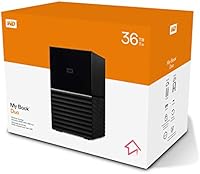
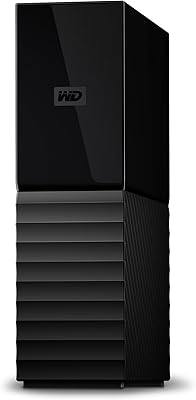
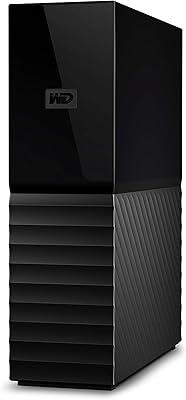
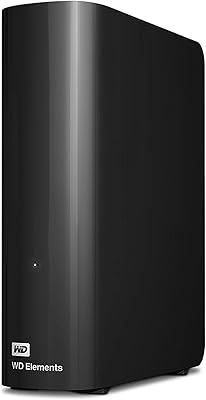
The WD My Book Duo 36TB Desktop RAID Drive packs two 3.5-inch hard drives into a single compact enclosure, shipping in RAID-0 by default to hand you the full 36TB of usable space right out of the box. It connects via USB-C or USB 3.1 Gen 1 and works with both Mac and PC without any complicated setup. Think of it as a high-capacity local storage workhorse aimed at creative professionals and small businesses who need serious desk-side storage but don't want the complexity of a full NAS. Worth noting upfront: this is a direct-attached drive — there's no Wi-Fi, no remote access, and no network sharing capability of any kind.
Features & Benefits

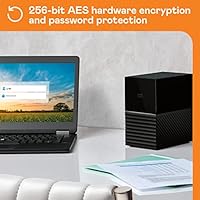
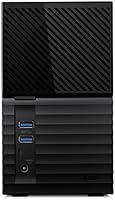
The 256-bit AES hardware encryption is one of the more practical standout features here — it runs at the chip level, so locking the drive with a password carries no noticeable performance penalty. Two integrated USB 3.0 hub ports let you plug in a keyboard, mouse, or other peripherals without reaching behind your computer. Bundled software includes WD Backup and a version of Acronis True Image, though that Acronis license is limited rather than a full perpetual subscription, so read the fine print. On paper, USB 3.1 Gen 1 supports up to 5 Gbps, but real-world throughput is capped by the mechanical drives inside — expect large-file transfers in the 150 to 200 MB/s range, not anywhere near the theoretical ceiling.

Best For

This dual-bay drive makes the most sense on a desktop workstation where raw, local capacity is the clear priority. Video editors juggling large 4K project files, photographers sitting on terabytes of RAW images, or anyone running Time Machine or Windows Backup to a dedicated destination will find the storage headroom genuinely useful. Small offices wanting basic redundancy without managing a full NAS can switch to RAID-1 mirroring and get real-time protection against a single drive failure — just know that switching modes requires a full reformat, so plan accordingly. The built-in USB hub is a small but practical desk-tidying bonus. If remote access or multi-user network sharing is on your list, this desktop RAID enclosure is simply not the right fit.

User Feedback

Across its 113 ratings, the My Book Duo sits at 3.9 stars — a decent but not emphatic score that reflects a genuinely split experience. Most buyers are happy with how painless setup is and appreciate getting this much local capacity in a relatively compact footprint. The most common frustration involves switching RAID modes: many reviewers were caught off guard learning that moving from RAID-0 to RAID-1 demands a full reformat, erasing everything first. Heat and noise are the other recurring complaints — under sustained workloads the enclosure can run warm and produce audible vibration, which matters in a quiet office. A smaller group of longer-term owners has flagged reliability concerns, making a separate offsite or cloud backup a sensible precaution rather than an optional one.

Pros

  • Setting up this dual-bay drive takes minutes out of the box — plug in, format if needed, and you are done.
  • 36TB of raw capacity is genuinely hard to fill, giving creative professionals room to grow without constant drive management.
  • Hardware-based 256-bit AES encryption protects sensitive data at rest without any measurable hit to transfer performance.
  • Switching to RAID-1 provides real peace of mind against a single drive failure with no extra hardware required.
  • Two built-in USB 3.0 hub ports are a practical desk-tidying bonus that many competing enclosures simply omit.
  • The compact footprint is impressive given that it houses two full-size 3.5-inch hard drives inside a single chassis.
  • Compatible with both Mac and PC out of the box, making it versatile for mixed-platform households or small offices.
  • Bundled backup software means you can schedule automated backups immediately without hunting for third-party tools.

Cons

  • Switching RAID modes requires a full reformat, so you will lose all existing data on the drives if you change configuration later.
  • Real-world transfer speeds are limited by the mechanical drives inside, not the USB interface, so do not expect blazing performance.
  • The Acronis True Image license bundled in the box is limited, not a full perpetual version, which may surprise buyers.
  • Audible vibration and mechanical noise during heavy workloads can be distracting in a quiet home office or studio.
  • Thermal management has drawn complaints from users running the enclosure hard in warm rooms for extended periods.
  • A subset of long-term owners has reported reliability concerns, making an independent off-site backup non-negotiable rather than optional.
  • No network or remote access capability at all, which is a significant blind spot at this storage capacity and price tier.
  • At 7.04 pounds, the enclosure is not something you will casually move around — this is genuinely a stay-on-the-desk solution only.

Ratings

Our AI rating engine analyzed verified global buyer reviews for the WD My Book Duo 36TB Desktop RAID Drive, actively filtering out incentivized, duplicate, and bot-generated submissions to surface what real users actually experience over time. The scores below reflect a transparent synthesis of both the genuine strengths and the documented pain points that owners consistently report, giving you a fully honest picture before you commit to a purchase.

Storage Capacity Value
88%
Getting 36TB of direct-attached storage in a single desktop unit is genuinely impressive, and most buyers feel the capacity justifies the investment when they consider what it would cost to cobble together the equivalent from individual drives. For video editors and photographers who routinely manage multi-terabyte project libraries, having that headroom in one place makes daily workflows significantly less stressful.
Buyers who opt for RAID-1 mode for redundancy immediately lose half the usable space, dropping to approximately 18TB, which can feel like a steep price for peace of mind. That trade-off catches some users off guard when they realize the headline capacity only applies in RAID-0 configuration.
Setup & Ease of Use
83%
Windows users can plug the My Book Duo in and start transferring files within minutes since it ships pre-formatted and ready in RAID-0. Mac users need a quick reformat via Disk Utility, but even that process is straightforward enough that non-technical buyers rarely report problems getting it running.
The WD software suite, while functional, feels dated compared to competing products, and discovering that switching RAID modes requires a full reformat is not communicated clearly enough during initial setup. A number of buyers learned this the hard way after already storing data on the drive.
RAID Functionality
72%
28%
Having both RAID-0 and RAID-1 available in a single consumer-friendly enclosure is a genuine advantage for small offices that want basic redundancy without investing in a full NAS device. Switching is handled through WD software rather than any physical mechanism, which keeps the hardware clean and simple.
The core frustration here is that changing RAID modes is a destructive operation — everything on the drive gets wiped, and that is buried in the documentation rather than prominently flagged. Several reviewers lost data because they assumed, reasonably, that switching to RAID-1 would simply mirror what they already had stored.
Transfer Performance
67%
33%
For large sequential transfers — dumping a batch of 4K footage or backing up a full Lightroom catalog — throughput in the 150 to 200 MB/s range is perfectly adequate and noticeably faster than a single mechanical drive. Most users doing bulk file moves find the speed acceptable for a stationary desktop workflow.
The USB 3.1 Gen 1 interface advertises up to 5 Gbps, but the mechanical drives inside are the real bottleneck, and buyers expecting speeds closer to that ceiling will be disappointed. Random I/O performance is also mediocre, which means tasks like running a virtual machine or working directly from the drive feel sluggish.
Build Quality
76%
24%
The enclosure feels solid and well-assembled, with a matte finish that resists fingerprints reasonably well and a chassis that does not flex or creak when moved. For a device intended to sit on a desk indefinitely, the physical construction inspires reasonable confidence.
At 7.04 pounds the unit is heavy, and the bottom feet do not grip surfaces especially well, which contributes to the vibration issue under load. A few long-term owners have noted that the exterior shows wear around the USB ports after extended use.
Noise & Vibration
54%
46%
During light use — occasional file access or low-intensity backups — the drive is quiet enough to fade into the background, and users who run it primarily overnight for scheduled backups rarely consider noise a real issue. Placing it on a padded surface helps dampen some of the low-frequency resonance.
Under sustained read and write operations, the mechanical hum and vibration are clearly noticeable, and in a quiet home office or audio production environment the sound is distracting enough to be a genuine annoyance. Multiple reviewers specifically flagged this as something they did not anticipate given the price tier.
Thermal Management
58%
42%
Under typical workloads in a well-ventilated room, temperatures stay within acceptable limits and do not appear to throttle performance noticeably. Users who run it in air-conditioned offices rarely raise temperature as a concern.
Extended heavy workloads in warm rooms push the enclosure to uncomfortable temperatures, with the chassis becoming noticeably hot to the touch. A handful of reviewers operating in warmer climates or in enclosed desk setups report that heat seems to correlate with the reliability problems they experienced over time.
Hardware Encryption
86%
The 256-bit AES hardware encryption is one of the most practically useful features on this desktop RAID enclosure — it activates at the chip level, so there is no CPU overhead and no perceptible slowdown when the drive is password-protected. For freelancers or small studios handling sensitive client data, this provides a meaningful layer of physical security without any software complexity.
The encryption is only as good as the password management around it, and WD's software for enabling and managing the password protection feels outdated and occasionally buggy on newer operating systems. Losing or forgetting the password means the data is permanently inaccessible — there is no recovery option, which is a real risk for less technically diligent users.
Backup Software
63%
37%
Having both WD Backup and Acronis True Image bundled in means buyers can get automated backups running on day one without purchasing additional software. For straightforward scheduled file backups, WD Backup handles the basics reliably.
The Acronis True Image license included is a limited version rather than the full perpetual product, which means users who rely on more advanced features will hit a paywall relatively quickly. WD Backup itself is functional but bare-bones, and neither application has kept pace with the polish of modern backup tools on the market.
Connectivity & Hub
79%
21%
The two built-in USB 3.0 hub ports are a thoughtful inclusion that lets users connect a keyboard, mouse, or USB dongle directly to the drive rather than reaching behind their computer. For desktop workstations with limited front-panel ports, this is a quietly useful feature that buyers appreciate once they start using it.
The hub ports are USB 3.0 rather than USB 3.1 or USB-C, which limits their usefulness for users with newer high-speed peripherals. Two ports may also feel insufficient for buyers who were hoping to replace a dedicated USB hub entirely.
Long-Term Reliability
61%
39%
The majority of buyers who have used this desktop RAID enclosure for a year or less report no hardware issues, and WD's reputation in the storage space provides some baseline confidence. Running in RAID-1 does provide a meaningful safety net against sudden drive failure.
A meaningful subset of longer-term reviewers report unexpected drive failures or enclosure issues after eighteen months or more of regular use, which is concerning at this price point. The pattern is consistent enough across reviews that treating an independent off-site or cloud backup as mandatory — not optional — is genuinely prudent advice.
Value for Money
74%
26%
Compared to building out equivalent raw capacity from individual drives plus a separate enclosure, this dual-bay drive offers reasonable bundled value, especially when you factor in the included encryption and backup software. For buyers whose priority is simplicity and consolidated capacity, the pricing feels defensible.
The premium price becomes harder to justify for buyers who later encounter reliability concerns, or those who discover they needed network access and have to buy a NAS anyway. Competing solutions at similar price points increasingly offer Thunderbolt connectivity or higher-speed interfaces that make the USB 3.1 Gen 1 ceiling feel dated.
Platform Compatibility
84%
Working with both Mac and PC without any driver installation is straightforward, and the drive plays nicely as a Time Machine destination on macOS or a Windows Backup target after the appropriate reformat. Cross-platform households find it easy to switch between operating systems without any compatibility headaches.
macOS users need to reformat before the drive is usable, and there is no exFAT option out of the box for buyers who genuinely want to share files between both platforms simultaneously. Compatibility with the very latest versions of macOS occasionally requires a firmware or software update from WD.
Physical Design
77%
23%
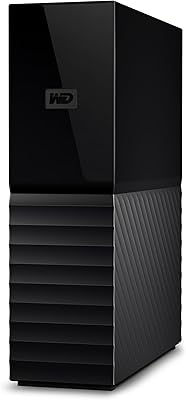
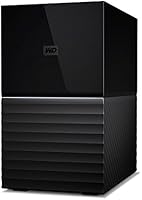
The black and grey two-tone finish looks professional on a desktop workstation without drawing attention to itself, and the compact footprint for a dual full-size drive unit is genuinely appreciated by users with limited desk space. The cable management is clean, with all ports neatly clustered at the rear.
The enclosure has no ventilation grille visible externally, which contributes to the heat retention complaints under heavy loads. Some users also feel the industrial styling, while inoffensive, looks noticeably utilitarian compared to more design-forward storage options available at comparable price points.

Suitable for:

The WD My Book Duo 36TB Desktop RAID Drive is built for people who need a serious amount of local storage sitting next to a workstation and don't want the hassle of building or managing a NAS. Video editors working with 4K or RAW footage will appreciate having that much headroom without juggling multiple drives, and photographers archiving large libraries will find the capacity genuinely comfortable rather than just barely adequate. Small office setups that want straightforward RAID-1 redundancy — real protection against a single drive dying — without buying into a full network-attached system will get exactly what they need here. The hardware-based encryption is a real practical benefit for anyone storing sensitive client work, since it protects data at rest without adding software complexity or slowing transfers down. Mac users running Time Machine and Windows users relying on scheduled backups will both find this dual-bay drive fits naturally into an existing backup workflow.
Not suitable for:

If you need to share storage across multiple computers on a network, stream media to devices around your home, or access your files remotely, the WD My Book Duo 36TB Desktop RAID Drive is categorically the wrong tool — it has no network capability, no Wi-Fi, and no remote access of any kind, full stop. Users who assume that spending this much on a storage device means getting NAS-like features will be disappointed, so clarify that expectation before buying. This desktop RAID enclosure is also a poor fit for anyone working in a quiet environment who is sensitive to ambient noise, since sustained read and write operations can produce noticeable vibration and mechanical hum. People who need fast random I/O for tasks like running virtual machines or working directly from a project drive will find the mechanical hard drives limiting regardless of the RAID mode. And if you are counting on RAID-1 as your only backup strategy, think again — RAID protects against hardware failure, not against accidental deletion, ransomware, or fire, so a separate off-site or cloud backup remains essential.
Specifications

  • Total Capacity: The enclosure provides 36TB of total storage across two internal 3.5-inch hard disk drives housed in a single chassis.
  • Drive Count: Two 3.5-inch hard disk drives are installed inside the enclosure at the factory and are not intended to be user-swapped.
  • RAID Modes: Supports RAID-0 (default, full 36TB usable) and RAID-1 (mirroring, approximately 18TB usable); switching modes requires a full reformat.
  • Interface: Connects via USB-C with USB 3.1 Gen 1 signaling (up to 5 Gbps theoretical) and is backward compatible with USB 3.0 ports.
  • Hub Ports: Two USB 3.0 Type-A hub ports are built into the rear of the enclosure for connecting additional peripherals directly.
  • Encryption: 256-bit AES hardware encryption is handled at the controller chip level and is activated via password through WD software.
  • Backup Software: Includes WD Backup for scheduled file backups and a limited version of Acronis True Image for system-level backup on Mac and PC.
  • Compatibility: Works with Mac and PC desktops and laptops running current operating systems; Mac users must reformat to APFS or HFS+ before use.
  • Dimensions: The enclosure measures 6.3 x 3.94 x 7.09 inches (L x W x H), making it compact for a dual full-size drive unit.
  • Weight: The unit weighs 7.04 pounds, reflecting the dual internal hard drives and reinforced external housing.
  • Color: Finished in a black and grey two-tone exterior that matches most desktop workstation aesthetics without drawing attention.
  • Form Factor: Designed as a stationary desktop external enclosure; it draws power from its own AC adapter rather than via USB bus power.
  • Transfer Speed: While the USB 3.1 Gen 1 interface supports up to 5 Gbps, real-world transfer speeds are typically 150 to 200 MB/s due to mechanical HDD limitations.
  • Brand: Manufactured by Western Digital Technologies, Inc., a long-established storage brand selling under the WD name.
  • Product Code: The model identifier is WDBFBE0360JBK-NESN, first listed on Amazon in March 2021 under ASIN B08YNSN3FL.

Related Reviews

WD My Book 18TB External Hard Drive
76%
93%
Storage Capacity & Value
67%
Transfer Speed & Performance
71%
Long-term Reliability
91%
Setup & Ease of Use
88%
Data Security & Encryption
More
WD My Book 26TB External Hard Drive
73%
96%
Storage Capacity
91%
Setup & Compatibility
67%
Transfer Speed
88%
Hardware Encryption & Security
71%
Backup Software
More
WD My Book 3TB Desktop External Hard Drive
71%
88%
Ease of Setup
83%
Reliability
71%
Transfer Speed
54%
Software Quality
86%
Hardware Encryption
More
WD My Book 16TB External Hard Drive
76%
96%
Storage Capacity
82%
Value for Money
91%
Setup & Ease of Use
84%
Build Quality
67%
Transfer Speed
More
WD My Book 22TB External Hard Drive
70%
94%
Storage Capacity
91%
Ease of Setup
67%
Transfer Speed
78%
Build Quality
61%
Drive Noise
More
WD 24TB My Book Desktop External Hard Drive
85%
95%
Storage Capacity
89%
Data Security
91%
Ease of Setup
87%
Build Quality
82%
Software Functionality
More
WD 12TB My Book Desktop External Hard Drive
85%
96%
Storage Capacity
88%
Ease of Use
92%
Data Security & Encryption
85%
Performance Speed
78%
Software/Backup Functionality
More
WD My Book Essential 1TB USB 2.0 Desktop External Hard Drive
84%
89%
Value for Money
91%
Ease of Use
87%
Backup Functionality
88%
Data Security
65%
USB Speed
More
WD Green 1TB 3.5-Inch Internal Hard Drive
75%
88%
Noise & Vibration
86%
Power Efficiency
54%
Read & Write Speed
67%
Long-Term Reliability
71%
Value for Money
More
WD Elements Desktop 3TB External Hard Drive
76%
94%
Ease of Setup
91%
Storage Capacity
74%
Transfer Speed
82%
Build Quality & Durability
63%
Noise Level
More

FAQ

The WD My Book Duo 36TB Desktop RAID Drive ships pre-formatted in RAID-0 and is ready to use on a Windows PC right out of the box. Mac users will need to reformat it to APFS or HFS+ using Disk Utility, which only takes a couple of minutes.
No, unfortunately. Changing RAID modes requires a full reformat of both internal drives, which wipes everything stored on them. Always back your data up somewhere else first, then switch modes and reload your files.

Yes, once you reformat the drive to a Mac-compatible file system, it works well as a dedicated Time Machine backup destination. A lot of Mac users buy this dual-bay drive specifically for that purpose given the generous capacity.

You can physically connect it since Thunderbolt ports accept USB connections, but the drive uses USB 3.1 Gen 1 and will not operate at Thunderbolt speeds. You are capped at standard USB 3.1 Gen 1 throughput regardless of what port you plug it into.

No. This desktop RAID enclosure has no network interface at all — no Ethernet, no Wi-Fi, and no remote access functionality. It is strictly a direct-attached device, meaning your computer must be physically connected via USB to read or write any files.

There is a noticeable low-frequency hum and some vibration during active transfers, especially under sustained workloads like large backups. During lighter activity it is fairly unobtrusive, but in a very quiet room or recording environment the mechanical noise is definitely audible.

No, the bundled Acronis license is a limited or time-restricted version rather than a full perpetual subscription. It is functional enough for getting started, but if you want the complete long-term feature set you would need to purchase a full Acronis license separately.

The 256-bit AES encryption runs through the drive controller chip, but it is not active until you set a password using WD Security software. Once enabled, the drive locks automatically whenever it is disconnected, and without the correct password the data is inaccessible even if someone removes the drives from the enclosure.

The answer depends entirely on your RAID mode. In RAID-0, a single drive failure means all data on the enclosure is lost with no recovery path from the remaining drive. In RAID-1, one drive mirrors the other in real time, so a single failure leaves your data intact on the surviving drive and gives you time to replace the failed unit.

It works with any computer that has a compatible USB port, laptops included. The desktop label refers to its form factor — it sits on a flat surface and uses its own AC power adapter rather than drawing power over USB, so it is not something you would pack in a bag for travel.