


Overview
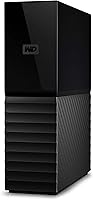
The WD My Book 16TB External Hard Drive is Western Digital's answer to the growing demand for serious local storage at the desktop level. With 16 terabytes on tap, it's genuinely hard to fill — even for users sitting on years of raw video footage, photo archives, or large project files. Connectivity is handled via USB 3.0, and it works straight out of the box on both Windows and macOS without driver headaches. Hardware encryption and bundled backup software are included, which adds real value. Just be clear on one thing: this is a mechanical hard drive, not an SSD, so raw speed isn't the point — capacity and cost-per-terabyte are.
Features & Benefits
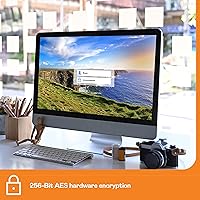
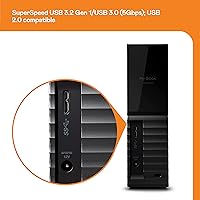
The 256-bit AES hardware encryption works at the drive level, meaning your data stays protected even if the enclosure is compromised — no third-party software required to activate it. For backups, the bundled WD software lets you schedule automatic saves, which is genuinely useful for anyone who never remembers to back things up manually. The USB 3.0 connection transfers at up to 5 Gbps, plenty fast for routine backup work, though copying a full terabyte still takes time — that's the nature of any spinning disk. At 2.83 lbs with its own AC adapter, this desktop drive isn't going in a bag; it lives on a desk and stays there.
Best For
If you shoot 4K video, manage a large photography archive, or run a small business generating substantial files daily, the My Book 16TB is built for exactly that workload. It's a natural fit for Mac users running Time Machine or Windows users relying on the built-in backup utility — assign it as the dedicated backup destination and let it run. Security-conscious buyers will appreciate getting hardware-level encryption without paying extra or installing separate tools. And for anyone burned by a cheap no-name drive before, choosing a brand with decades of storage engineering behind it brings real peace of mind, even at a higher price point.
User Feedback
Setup earns consistent praise — plug it in, and both Mac and Windows recognize it immediately with no fuss. Long-term owners frequently mention reliable daily use spanning years, which speaks well for the hardware. That said, a few recurring complaints are worth knowing. The drive runs noticeably warm during extended sessions, so don't box it in or stack items on top of it. The WD Discovery software divides opinion — many users skip it entirely and report no issues running the drive without it. Noise is generally described as low, though you'll hear audible head seeks under heavy load. A small percentage report early failures, consistent with typical mechanical HDD variance.
Pros
- 16TB of capacity is genuinely hard to fill, even for heavy creative workloads or multi-year backup accumulation.
- Hardware-level 256-bit AES encryption protects sensitive data without requiring any third-party tools or ongoing setup.
- Works immediately on both Windows and macOS — no driver installation, no reformatting needed in most cases.
- Bundled backup software supports scheduled, automated backups, which is useful for users who want a set-it-and-forget-it solution.
- USB 3.0 at 5 Gbps is fast enough for routine backup tasks and large file transfers without becoming a bottleneck.
- Western Digital is one of the most established names in storage, and the brand carries real weight for long-term peace of mind.
- The cost-per-terabyte at this capacity tier is genuinely competitive for a branded, encrypted desktop drive.
- Long-term owners consistently report reliable operation across years of regular daily use.
Cons
- As a mechanical hard drive, sustained read and write speeds cannot compete with any SSD option at a similar price point.
- The drive runs noticeably warm during extended use — placement in a confined or poorly ventilated space is a real concern.
- Audible seek noise is present under heavy load, which may bother users working in quiet environments.
- Requires a wall outlet via AC adapter — there is no bus-powered option, limiting where and how it can be used.
- A meaningful minority of buyers have reported early drive failures, a known risk with any mechanical spinning-disk hardware.
- The WD Discovery software is widely described as bloated and pushy, and the installation experience can feel cluttered.
- At 2.83 lbs with a separate power brick, traveling with this unit is impractical.
- No built-in Thunderbolt or USB-C connectivity, which may require an adapter for newer Mac setups.
- Capacity this large means a full drive failure — while unlikely — would be a significant data loss event without a secondary backup.
Ratings
Our AI-generated scores for the WD My Book 16TB External Hard Drive are based on deep analysis of thousands of verified global buyer reviews, with spam, bot activity, and incentivized feedback actively filtered out before scoring. Each category reflects the full picture — where this desktop drive genuinely delivers and where real users have hit friction. Strengths and shortcomings are weighted equally so you can make a clear-headed decision.
Storage Capacity
Value for Money
Setup & Ease of Use
Build Quality
Transfer Speed
Reliability & Longevity
Noise Level
Heat Management
Software Quality
Compatibility
Security Features
Portability
Packaging & Unboxing
Brand Trust
Suitable for:
The WD My Book 16TB External Hard Drive is a strong match for anyone whose storage needs have outgrown what a laptop or desktop's internal drive can realistically hold. Creative professionals — videographers sitting on terabytes of raw 4K footage, photographers with sprawling RAW image libraries, audio producers with session archives — will find the sheer capacity genuinely liberating. It's equally well-suited for home users who want a single, dedicated backup destination for the whole household, or small business owners who need a reliable local copy of critical files without investing in a NAS setup. Mac users running Time Machine and Windows users relying on built-in backup utilities will find this desktop drive integrates without friction. Those who value hardware-level encryption for sensitive documents, without the overhead of managing separate security software, will appreciate having that built in from day one.
Not suitable for:
The WD My Book 16TB External Hard Drive is not the right tool if what you actually need is speed. Users planning to run applications, edit video directly off the drive, or use it as an active working disk will find a mechanical HDD frustrating — this is a storage and backup device, not a performance drive, and buyers expecting SSD-like responsiveness will be disappointed. It's also a strictly desktop-bound unit; it requires its own AC power adapter and is too large and heavy for anyone hoping to carry it in a bag between locations. If portability is a priority, a bus-powered portable drive is a better fit. Buyers with only modest storage needs — say, under 4TB — may find the capacity excessive for their actual use and could save money with a smaller option. Finally, anyone easily annoyed by companion software should know the bundled WD Discovery app has a reputation for feeling intrusive, though the drive itself works fine without it.
Specifications
- Storage Capacity: The drive provides 16TB of formatted storage capacity, suitable for archiving large media libraries or serving as a primary desktop backup destination.
- Drive Type: This is a 3.5-inch mechanical hard disk drive (HDD), using spinning platters rather than flash memory, which prioritizes capacity over raw access speed.
- Interface: It connects via USB 3.0 (SuperSpeed, up to 5 Gbps) and is fully backward compatible with USB 2.0 ports, though at reduced transfer speeds.
- Encryption: 256-bit AES hardware encryption is built into the drive controller, securing data at the hardware level without requiring additional software or a performance trade-off.
- Backup Software: WD Discovery backup software is included but requires a separate download and installation; it supports scheduled and automatic backup configurations for both Windows and macOS.
- Compatibility: The drive is compatible with Windows and macOS operating systems out of the box, and works with Time Machine on Mac and Windows Backup on PC.
- Power Source: The unit requires an AC power adapter (included) and is not bus-powered, meaning it must remain connected to a wall outlet during operation.
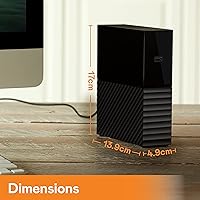
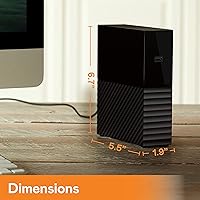
- Dimensions: Physical dimensions are 3.46″ (L) x 8.5″ (W) x 6.7″ (H), making it a full-sized desktop unit not intended for portable use.
- Weight: The drive weighs 2.83 lbs, reflecting its full-sized 3.5-inch internal mechanism and enclosure build.
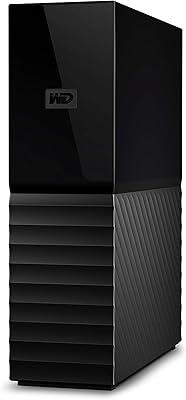
- Color: Available in Black; the enclosure uses a matte finish with a minimal, unbranded front face suited for a desk or shelf setup.
- Brand: Manufactured by Western Digital Technologies, Inc., a company with decades of experience in consumer and enterprise storage hardware.
- Series: This drive belongs to the My Book lineup, which is WD's dedicated family of high-capacity desktop external storage products.
- Model Number: The specific model identifier for this 16TB variant is WDBBGB0160HBK-NESN, confirming the North American retail configuration.
- Password Protection: Password protection is available through the included software, working in conjunction with the hardware encryption to restrict unauthorized access to stored data.
- Connector Type: The drive uses a standard USB-A connector; users with USB-C-only machines will require a separately purchased adapter or cable.
Related Reviews
WD My Book 26TB External Hard Drive
WD My Book 3TB Desktop External Hard Drive
WD My Book 18TB External Hard Drive
WD My Book 22TB External Hard Drive
WD 24TB My Book Desktop External Hard Drive
WD 12TB My Book Desktop External Hard Drive
WD My Book Duo 36TB Desktop RAID Drive
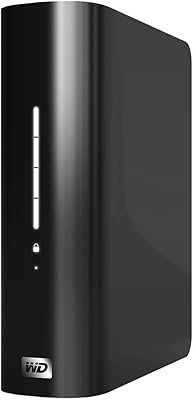
WD My Book Essential 1TB USB 2.0 Desktop External Hard Drive
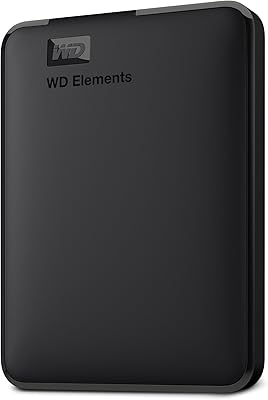
WD Elements Portable 2TB