Overview

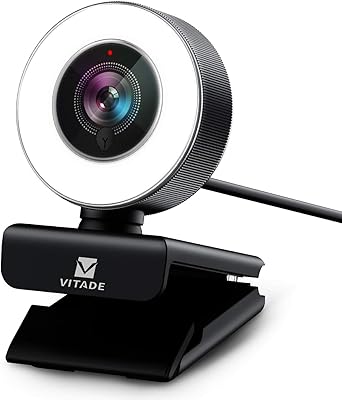
The VITADE 682H 1080P 60fps Webcam sits in an interesting spot — aimed squarely at creators, remote workers, and gamers who want genuinely smooth 60fps video without spending serious money. At this price tier, full HD footage at 60 frames per second is not a given, and that alone makes the 682H worth a closer look. The 360-degree rotating clip is a thoughtful physical touch that most competitors skip. One honest caveat: this is a manual focus camera, meaning you set it once and leave it. If you're expecting it to track your movements automatically, that's not what you're getting. Think of it as a competent, well-rounded mid-range webcam — not a Logitech Brio rival, but a solid step up from entry-level options.
Features & Benefits

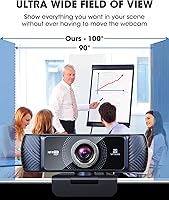
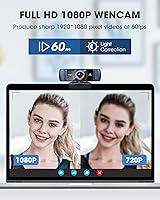
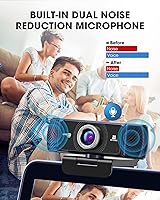
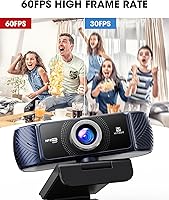
The 682H delivers 1080p video at 60fps, and in practice that higher frame rate makes your stream or video call look noticeably more fluid than the standard 30fps most budget webcams offer. The 100-degree wide-angle lens is generous enough to frame your whole desk setup without you having to push your chair back. Built-in dual microphones with noise cancellation are more capable than you might expect — they won't replace a dedicated USB mic, but they hold up well for Zoom calls and casual streams. Low-light correction engages automatically in dim rooms, though colors can shift slightly under warm or artificial lighting. Plug in the USB cable and it works instantly, no drivers needed, across Windows, Mac, Android, and Chrome OS.

Best For

This streaming webcam makes the most sense for people taking a first real step up — anyone moving from an old 720p or 30fps camera who wants a visible improvement without a major investment. Casual Twitch and YouTube streamers will appreciate the smoother footage, and compatibility with OBS, Xsplit, and Xbox means it fits naturally into most setups. Remote workers and students who need something reliable for daily calls will find it does the job without fuss. Where it falls short is with users who move around a lot on camera — the manual focus has to be adjusted by hand and won't adapt to you automatically. Professional video work is probably better served elsewhere.

User Feedback

With a 4.1-star average drawn from more than 2,000 ratings, the 682H has built a reasonably strong reputation among buyers. Most praise clusters around image clarity and the smoothness that 60fps brings to live footage — two things that genuinely distinguish it from cheaper alternatives. The built-in microphone also surprises people in a good way, performing better than the spec sheet might suggest. The most consistent criticism is the manual focus, which frustrates users who shift positions frequently during a call or stream. A smaller portion of reviewers flag color accuracy as uneven under mixed lighting. On a positive note, Vitade's customer support receives mentions for helping resolve a screen flicker issue tied to voltage frequency — a quirky but real problem some users encounter.

Pros

  • 60fps video delivers noticeably smoother motion than the 30fps webcams that dominate this price range.
  • The 100-degree wide-angle lens captures a broad field of view without needing to rearrange your entire desk.
  • Plug-and-play USB setup means no driver installation headaches across Windows, Mac, Android, and Chrome OS.
  • The 360-degree rotating clip offers flexible mounting that most competitors at this price simply do not offer.
  • Built-in dual microphones perform better than expected, reducing the need for a separate USB mic on casual calls.
  • Automatic low-light correction helps maintain a watchable image in dimly lit home office or bedroom setups.
  • Broad compatibility with OBS, Xsplit, Xbox, Skype, Zoom, and more makes it versatile across different use cases.
  • A 4.1-star average from over 2,000 buyers reflects consistent, real-world satisfaction rather than a thin review base.
  • Compact and lightweight at under 6 ounces, it does not add bulk to a monitor or laptop setup.

Cons

  • Manual focus cannot adjust on its own, so any shift in your sitting position may leave the image blurry.
  • Color accuracy drifts noticeably under artificial or mixed lighting, which can make skin tones look off.
  • Some users report a screen flicker issue tied to local voltage frequency that requires troubleshooting to resolve.
  • No tripod is included despite the clip being advertised as tripod-ready, which is a minor but real omission.
  • The CCD sensor has limitations in very low light that the automatic correction only partially compensates for.
  • Not a fit for anyone who needs the camera to track movement or adjust focus dynamically during a session.
  • Color and exposure consistency can vary between different streaming platforms and operating systems.
  • At a lightweight 5.7 ounces, the build quality feels functional rather than premium or durable long-term.

Ratings

Our AI-generated scores for the VITADE 682H 1080P 60fps Webcam were produced by analyzing thousands of verified global buyer reviews, with spam, bot-submitted, and incentivized feedback actively filtered out before scoring. Each category reflects the real distribution of satisfaction and frustration found across that review base — not an average of star ratings. Where buyers consistently flagged trade-offs, those are surfaced honestly alongside the genuine strengths.
Video Clarity
83%
Most buyers are genuinely impressed by how sharp the 1080p output looks during Zoom calls and Twitch streams, especially those upgrading from older 720p cameras. The jump in detail is immediately noticeable, and text on whiteboards or screens in the background tends to remain legible.
Fine detail can soften slightly in scenes with high contrast or fast-moving backgrounds, and the image occasionally looks over-sharpened in post-processing. It is a solid picture, but it does not hold up next to webcams in a higher price bracket.
Frame Rate Smoothness
88%
The 60fps output is the single most praised aspect of this webcam among streamers and gamers, and for good reason — motion during face cam overlays looks fluid rather than choppy, which makes a real difference in stream production quality. Buyers switching from 30fps cameras consistently describe the improvement as immediately visible.
A small number of users report that achieving a stable 60fps depends heavily on the host system's USB bandwidth and CPU load, with frame drops appearing on older machines running resource-heavy software simultaneously. This is more of a system compatibility caveat than a flaw in the webcam itself.
Low-Light Performance
67%
33%
The automatic low-light correction does a reasonable job of brightening the image in dim home offices or poorly lit bedrooms, making it more usable than many competitors at this price when the lighting is just slightly below ideal. For evening calls with a single desk lamp, most buyers find the result acceptable.
In genuinely dark rooms, the correction introduces noticeable noise and a washed-out quality that no amount of software tuning fully fixes. Colors lose their accuracy quickly once ambient light drops, and buyers who rely on the camera after dark without supplemental lighting frequently express disappointment.
Color Accuracy
61%
39%
Under natural daylight or a balanced white LED setup, the 682H produces colors that look natural enough for everyday video calls and casual streaming. Skin tones in particular hold up well in well-lit conditions, which is the scenario most remote workers and streamers encounter.
Under warm incandescent bulbs or mixed lighting — a very common home office situation — color balance shifts noticeably, making skin tones appear orange or overly warm. Buyers who care about accurate color representation for content creation frequently flag this as a recurring frustration.
Microphone Quality
78%
22%
For a built-in webcam microphone, the dual omni-directional setup punches above its weight — buyers regularly note that call participants can hear them clearly without needing a separate mic, and the noise cancellation does reduce consistent background hum like fans or air conditioning. It is a legitimate convenience for remote workers and students.
In louder environments or rooms with echo, the noise cancellation reaches its limits and background bleed becomes apparent. Streamers or podcasters with any serious audio standards will still want a dedicated microphone, as the built-in option lacks the warmth and depth a condenser mic provides.
Focus Usability
53%
47%
For users who sit at a fixed distance from their monitor — a typical desk setup — the manual focus works fine once calibrated. Setting it once for a standard seating position takes under a minute, and for stationary use cases like daily conference calls, it rarely needs readjustment.
The manual focus is the most consistently criticized aspect across the entire review base. Users who lean forward to reference documents, present physical items to the camera, or simply shift posture frequently find the image going soft with no automatic correction. For any dynamic use, this limitation becomes genuinely disruptive.
Wide-Angle Coverage
81%
19%
The 100-degree field of view is wide enough to comfortably frame a full desk setup, two monitors, or multiple people in a shared workspace without requiring the camera to be repositioned. Teachers, streamers with busy backgrounds, and group call participants all benefit from not having to rearrange their environment.
At the very edges of the frame, mild barrel distortion is visible — objects appear slightly curved, which is a normal characteristic of wide-angle optics at this price. For most use cases it is barely noticeable, but users who want a flat, undistorted image for professional video work may find it distracting.
Build Quality
66%
34%
The webcam feels solid enough for daily desk use, and the rotating clip mechanism in particular is sturdier than many users expect at this price. It grips monitor bezels and laptop lids securely without wobbling during calls or streams.
The plastic housing has a lightweight, budget feel that does not inspire long-term confidence, and several buyers note that the USB cable connection point on the unit feels less robust than ideal. It is built to function, not to last years of rough handling.
Mounting Flexibility
84%
The 360-degree rotating clip is a genuine differentiator — being able to angle the camera freely in any direction, rather than being limited to 90-degree stops like most competitors, gives users real flexibility for unconventional desk layouts or creative streaming angles. It also fits securely on monitors of varying thicknesses.
No tripod is included despite the clip being marketed as tripod-ready, which feels like a missed opportunity given the flexible design intent. Buyers who want to use the camera away from a monitor must source a compatible tripod separately, adding to the overall cost.
Setup & Compatibility
91%
Plug-and-play functionality is one of the most consistently praised practical aspects of this webcam. Buyers across Windows, Mac, Chrome OS, and Android report it being recognized instantly with no driver installation, making it particularly valuable for less technically confident users or those setting up in a hurry.
A subset of users on older Windows versions or certain USB 2.0 hubs report occasional recognition failures or instability that required switching ports. These are edge cases, but they are worth noting for anyone running legacy hardware.
Streaming Software Integration
86%
Compatibility with OBS, Xsplit, Streamlabs, and most major conferencing platforms is broadly confirmed by the buyer base, and the MJPEG and YUY2 format support means it integrates without any unusual configuration steps. Gamers using it as a face cam overlay report reliable, consistent behavior during long sessions.
A handful of buyers using less common or professional broadcast tools report needing to manually select the correct video format output to avoid latency or color space issues. This is a minor technical hurdle, but it can trip up less experienced users who expect everything to work automatically.
Value for Money
82%
18%
At its price point, the combination of 60fps output, a wide-angle lens, and a functional built-in microphone represents solid value — most competitors offering even one of those features charge meaningfully more. For a first proper streaming or conferencing camera, the package is hard to fault on cost grounds.
Buyers who have owned higher-end webcams and step down to this price tier tend to notice the compromises in color fidelity and focus behavior fairly quickly. The value proposition holds firmly for first-time buyers but weakens for anyone with a frame of reference for premium image quality.
Noise Cancellation Effectiveness
72%
28%
In typical home office conditions — keyboard clicks, light HVAC noise, or distant street sound — the noise cancellation works well enough that call participants rarely complain. For the majority of remote work scenarios, it reduces the distraction of ambient noise without making voices sound processed or hollow.
When background noise becomes more complex or louder — construction, household activity, or a running gaming PC fan directly beside the mic — the cancellation algorithm struggles and lets through a noticeable amount of bleed. It is not a substitute for acoustic treatment in a noisy room.
Customer Support Experience
74%
26%
Vitade's support team receives positive mentions specifically in the context of helping users resolve the screen flicker issue caused by voltage frequency mismatches — a nuanced technical problem that many brands simply do not address proactively. Buyers who reached out generally report a timely and knowledgeable response.
The support experience appears inconsistent across regions, with some international buyers noting slower response times and less tailored guidance. The flicker issue itself being a known recurring problem suggests a firmware or documentation fix would be a more scalable solution than case-by-case support.

Suitable for:

The VITADE 682H 1080P 60fps Webcam is a strong fit for anyone who wants a meaningful upgrade from an aging or basic webcam without committing to a premium price. Casual streamers on Twitch or YouTube will notice the difference that 60fps makes — motion looks smoother and more professional, which matters when your face cam is visible alongside gameplay. Remote workers and students who spend hours on Zoom, Google Meet, or Skype calls will appreciate the wide-angle lens and the built-in microphone that actually pulls its weight on a conference call. Gamers running OBS, Xsplit, or streaming directly to Xbox will find the 682H slots into those workflows with zero driver friction — plug it in and it works. It also suits anyone moving up from a 720p or 30fps webcam for the first time, where the jump in clarity and fluidity will feel like a genuine step forward.
Not suitable for:

If your work demands autofocus, the VITADE 682H 1080P 60fps Webcam will frustrate you quickly — the manual focus has to be adjusted by hand, and if you lean forward, step back, or shift in your chair often, the image can drift out of focus with no correction. Content creators who prioritize color accuracy for professional-grade recordings will find the color reproduction underwhelming, particularly under warm indoor lighting or mixed light sources. Anyone planning to use this for client-facing video production, polished YouTube content beyond casual streaming, or broadcast-quality output should look further up the price ladder. The lack of autofocus also makes it a poor choice for teachers or presenters who move around their space, hold up physical materials to the camera, or need the lens to track them dynamically. And if you need a tripod out of the box, note that none is included.

Specifications

  • Resolution: Captures video at 1920x1080 (Full HD), delivering sharp, detailed imagery suitable for streaming and conferencing.
  • Frame Rate: Records and streams at up to 60Hz, producing smoother motion than standard 30fps webcams.
  • Field of View: Features a 100-degree wide-angle lens that covers a broad area without requiring users to reposition their setup.
  • Focus Type: Uses manual focus, meaning the lens must be adjusted by hand to the desired focal distance rather than tracking subjects automatically.
  • Sensor Technology: Equipped with a CCD image sensor, which is the underlying hardware responsible for capturing light and converting it into video signal.
  • Video Formats: Supports MJPEG and YUY2 video output formats, ensuring compatibility with a wide range of streaming and recording software.
  • Microphone: Includes dual built-in omni-directional microphones with noise cancellation to reduce background interference during calls and recordings.
  • Low-Light Correction: Applies automatic low-light correction to maintain a usable image in dim environments such as home offices or bedrooms.
  • Connectivity: Connects via USB with full plug-and-play support, requiring no driver installation on supported operating systems.
  • Clip Rotation: The mounting clip rotates a full 360 degrees, allowing flexible positioning on monitors, laptop screens, or tripod mounts.
  • Tripod Mount: The universal clip is tripod-ready for use with standard tripods, though no tripod is included in the package.
  • Dimensions: Measures 2.7 x 1.5 x 3.5 inches, making it a compact unit that sits unobtrusively on most monitors or laptops.
  • Weight: Weighs 5.7 ounces, keeping the overall footprint light and easy to reposition without stressing a monitor bezel.
  • Compatibility: Works with Windows 7, 8, and 10, Mac OS 10.6 and above, Android 5.0 or higher, Chrome OS, and Xbox.
  • Software Support: Compatible with major platforms including Zoom, Skype, OBS, Xsplit, YouTube Live, Twitch, and other common conferencing or streaming applications.
  • Power Source: Powered entirely through the USB connection, with no external power adapter or separate power source required.
  • Aperture: Has a maximum aperture of f/2, which helps gather light in lower-brightness environments.
  • BSR Ranking: Holds a position of No. 251 in the Webcams category on Amazon, reflecting consistent long-term sales volume and buyer interest.

Related Reviews
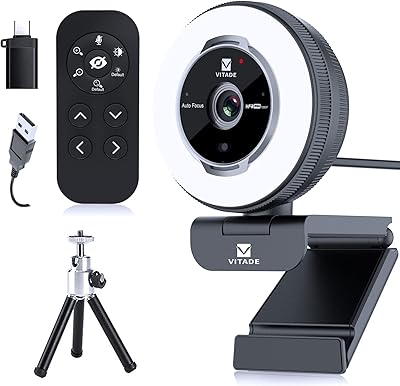
VITADE 862Pro 1080P Streaming Webcam
75%
78%
Video Quality
84%
Ring Light Performance
88%
Remote Control
91%
Ease of Setup
53%
Digital Zoom Quality
More
NBPOWER H782 1080p Webcam
85%
93%
Motion Fluidity
88%
Low-Light Performance
91%
Value for Money
96%
Setup Simplicity
74%
Autofocus Reliability
More
NexiGo N660P
NexiGo N660P
78%
83%
Video Quality
88%
Frame Rate Performance
74%
Autofocus Reliability
63%
Built-in Microphone Quality
66%
Software & Manual Controls
More
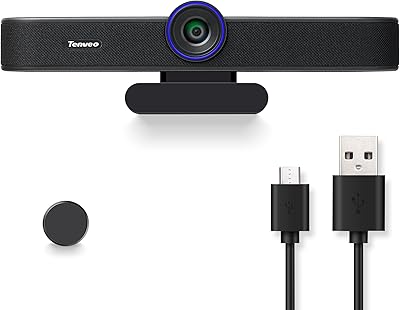
Tenveo VA300A
Tenveo VA300A
79%
83%
Video Quality
67%
Microphone Performance
61%
Built-in Speaker
86%
Video Smoothness (60fps)
78%
Wide-Angle Coverage
More
ROCWARE RC28 1080P Dual-Mic Webcam
79%
88%
Microphone Versatility
79%
Video Quality
52%
Low-Light Performance
94%
Ease of Setup
87%
Value for Money
More
Vitade 960A 1080P Webcam with Ring Light

77%
83%
Image Quality
88%
Ring Light Performance
74%
Autofocus Accuracy
62%
Microphone Quality
79%
Low-Light Performance
More
HuddleCamHD HC-WEBCAM-94
77%
83%
Video Quality (Daylight)
51%
Low-Light Performance
91%
Field of View
94%
Ease of Setup
57%
Audio Quality
More
Akyta 1080P Webcam
Akyta 1080P Webcam
82%
88%
Video Quality
85%
Audio Quality
94%
Ease of Setup
82%
Field of View
80%
Noise Reduction
More
ZIQIAN 1080P USB-C Webcam
74%
78%
Daytime Image Quality
54%
Low-Light Performance
94%
Plug-and-Play Setup
61%
Microphone Quality
76%
Wide-Angle Lens Coverage
More
Angetube 962 1080P Webcam with Ring Light
75%
78%
Video Quality
84%
Ring Light
71%
Autofocus Performance
62%
Microphone Quality
93%
Ease of Setup
More

FAQ

It is fully plug-and-play. Just connect it to your computer via USB and your operating system will recognize it automatically — no driver downloads or setup software needed. This applies across Windows, Mac, Chrome OS, and Android.

Yes, it works well with both OBS Studio and Xsplit. The camera outputs in MJPEG and YUY2 formats, which both applications support natively. Just select it as your video capture device in your software settings and you are ready to go.

Manual focus means there is a small ring on the lens that you turn by hand to bring the image into focus. Once you set it for your typical seating distance, it stays there. The downside is that if you regularly move closer or further from the camera, you will need to readjust it manually each time — unlike an autofocus webcam that does this on its own.

For casual calls and informal streaming, the built-in dual microphones hold up surprisingly well. Noise cancellation does reduce consistent background hum. That said, if you are recording podcasts, doing professional voiceover work, or streaming in a noisy environment, a dedicated USB microphone will give you noticeably better clarity.

The automatic low-light correction kicks in to brighten the image when lighting drops, and it does a reasonable job for casual use. Colors can shift slightly under warm bulbs or mixed lighting, so if you want the most accurate image, a small ring light or desk lamp pointed at your face will make a real difference.

Yes, it works with Mac OS 10.6 and all later versions. No drivers are needed — just plug it in and macOS will detect it. It is also compatible with popular Mac-friendly apps like FaceTime, Zoom, and Google Meet.

This is a known issue that some users experience, and it is typically related to a mismatch between the webcam's frame rate setting and your local electrical supply frequency. Vitade's customer support has been helpful in walking users through the fix, so reaching out to them directly is the fastest path to resolving it.

The clip includes a standard tripod-ready mount, so it works with most universal tripods. Keep in mind that no tripod is included in the box, so you would need to purchase one separately if that is how you plan to use it.

At 100 degrees, there is some mild barrel distortion at the outer edges of the frame, which is normal for wide-angle lenses. In practice, for a standard desk or face cam setup, the distortion is subtle enough that most viewers will not notice it during regular calls or streams.

Yes. The webcam supports Chrome OS and Android 5.0 or higher, so it is compatible with Chromebooks and Android tablets that have a full-size or USB-C adapter for a standard USB connection. Plug it in and it should be recognized automatically without any additional configuration.