

Overview
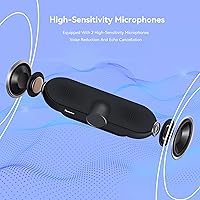
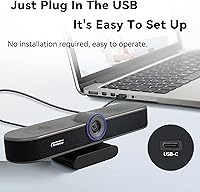
The Tenveo VA300A is a bar-style conference webcam that bundles full HD video, dual microphones, and a built-in speaker into a single USB-connected unit — no extra cables, no separate audio hardware to manage. It targets remote workers, small teams, and streamers who want a clean, clutter-free desk setup without sacrificing core functionality. Plug it in via the included Type-C cable and it works immediately on Windows, Mac, Linux, or Android — no driver needed. A removable privacy cover and flexible mounting options round out a thoughtful package that punches above the typical one-trick webcam. For a mid-range price, the all-in-one pitch is genuinely appealing.
Features & Benefits
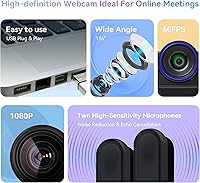
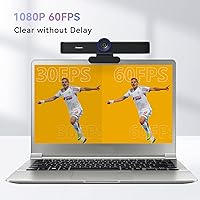
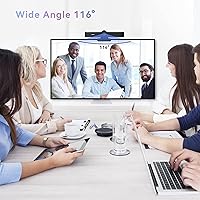
The real selling point of this all-in-one webcam bar is the 60fps video output. At thirty frames per second, quick hand gestures or turning your head can look choppy on a call — at sixty, motion stays fluid and natural, which matters especially for streamers or presenters who move around a lot. The 116-degree wide-angle lens captures a broad scene, ideal for showing a full workspace or multiple people, though users at the very edges may notice some barrel distortion. Autofocus and automatic exposure adjustment handle shifting light reliably. Having a speaker built in means one cable covers what used to require three separate devices.
Best For
This conference webcam fits a specific kind of buyer well. If you work from home and join calls on Zoom, Teams, or Google Meet daily, the combination of wide coverage and integrated audio means one device replaces a small pile of peripherals. Teachers running virtual classes will appreciate how the wide lens captures a whiteboard without stepping back or constantly adjusting the angle. Streamers on Twitch or YouTube benefit from the smoother frame rate without a dedicated capture setup. It also suits open-plan office workers needing basic noise suppression. Where it falls short: large conference rooms or anyone demanding broadcast-quality audio.
User Feedback
Buyers who have lived with the Tenveo webcam for a few months tend to land in a broadly positive place, but with real caveats worth noting. Setup earns consistent praise — most people have it running within minutes of unboxing. Video quality gets strong marks, particularly from anyone upgrading from an older camera. Where opinions split is audio: the microphones handle typical home-office conditions adequately, but in genuinely loud environments, noise cancellation falls short of a dedicated headset. The speaker works fine at a desk and struggles in larger spaces. A few buyers flag the lightweight plastic build, though the warranty coverage helps ease that concern.
Pros
- True plug-and-play setup — recognized instantly on Windows, Mac, Linux, and Android with zero driver installation.
- 60fps video output keeps motion fluid during presentations, live streams, and fast-paced tutorials.
- Wide-angle coverage captures a full desk scene or small group without constant camera repositioning.
- Built-in speaker eliminates the need for a separate audio output device on a personal desk.
- Autofocus and automatic light correction handle variable room lighting without any manual adjustment.
- A physical privacy cover provides tangible peace of mind, not just a software switch.
- Broad platform compatibility means it works reliably across Zoom, Teams, Google Meet, OBS, and more.
- Three-year warranty backed by responsive customer support is reassuring for a mid-range purchase.
- Monitor clip, tripod thread, and flat-stand options cover the most common mounting scenarios out of the box.
Cons
- Microphone noise cancellation struggles in open-plan offices or rooms with persistent ambient sound.
- Built-in speaker volume is too limited for any shared or slightly larger room environment.
- The plastic housing feels noticeably lightweight, raising mild concerns about durability over years of travel or daily handling.
- Edge distortion from the wide-angle lens can make faces or objects at the frame periphery appear warped.
- The privacy cover is a removable accessory, not a built-in shutter, making it easy to misplace.
- 60fps advantage disappears on conferencing platforms that cap video transmission frame rates.
- Autofocus can hunt visibly in rapidly shifting or mixed-lighting conditions, which is distracting during recorded content.
- Android support is listed but limited in practice, and some older Linux setups require minor manual audio configuration.
Ratings
The Tenveo VA300A earned its scores through AI-driven analysis of verified global buyer reviews, with spam, incentivized posts, and bot activity actively filtered out before any category was scored. The result reflects what real users consistently reported across months of daily use — from home offices and classroom setups to streaming desks and small meeting rooms. Both the strengths and the friction points are represented honestly, so you can weigh the trade-offs before buying.
Video Quality
Microphone Performance
Built-in Speaker
Video Smoothness (60fps)
Wide-Angle Coverage
Ease of Setup
Autofocus Reliability
Build Quality & Design
Compatibility
Value for Money
Mounting Flexibility
Privacy Cover
Noise Cancellation Depth
Customer Support & Warranty
Suitable for:
The Tenveo VA300A is a strong fit for remote workers and small teams who want to simplify their desk setup without sacrificing functional video and audio quality. If your current workflow involves jumping between Zoom, Teams, and Google Meet throughout the day, this all-in-one webcam bar removes the friction of managing separate microphone and speaker devices — one USB-C cable handles everything. Teachers and online educators will find the wide field of view particularly useful, since it captures a broad scene without requiring them to step back or constantly adjust the camera angle when referencing a whiteboard or physical materials. Budget-conscious streamers who need noticeably smoother video for OBS or YouTube will appreciate the 60fps output, which keeps motion looking natural during fast-moving demonstrations or gaming streams. It also suits people who share a workspace and want a physical privacy cover they can trust, rather than relying on a software toggle.
Not suitable for:
Buyers who work in genuinely noisy environments — shared offices, apartments near busy streets, or co-working spaces — will likely find that this all-in-one webcam bar does not deliver the audio isolation they need, and will end up supplementing it with a dedicated headset or desktop microphone anyway. The built-in speaker, while convenient for solo desk use, simply lacks the volume and clarity needed in a small meeting room with even modest ambient noise, so teams hoping to use the Tenveo VA300A as a room solution will be disappointed. Anyone who already owns a quality microphone setup should weigh whether the integrated audio hardware actually adds value, or whether they are effectively paying for redundant equipment. Content creators who prioritize clinical color accuracy — product photographers, for instance, or tutorial hosts who need true-to-life skin tones — may find the camera's processing a bit aggressive. Finally, users who need to mount the camera on very thin or unusually shaped monitors may encounter stability issues with the clip, which is sized for standard bezels.
Specifications
- Video Resolution: Records and streams at full 1080p resolution with a 60fps frame rate, delivering noticeably smoother motion than standard 30fps webcams.
- Image Sensor: Uses a 1/2.8-inch CMOS sensor with a 2.1MP effective resolution, providing solid light capture for a webcam in this category.
- Field of View: Features a 116-degree wide-angle lens that captures a broad scene, making it suitable for small groups or wide workspace views.
- Autofocus: Equipped with continuous autofocus and automatic light correction to maintain a clear, balanced image as lighting conditions or subject distance change.
- Microphones: Includes two built-in omnidirectional microphones with noise-cancellation processing and a stated pickup range of up to 5 meters.
- Built-in Speaker: Integrates a speaker directly into the camera bar, enabling full audio output without a separate device for personal desk or small-room use.
- Connectivity: Connects via USB using the included Type-C cable; no hub or adapter is required for standard USB-A ports with the appropriate cable end.
- Driver Requirement: Fully plug-and-play — no driver installation or companion software is needed on any supported operating system.
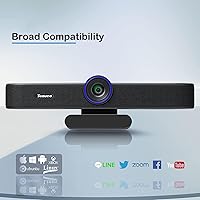
- OS Compatibility: Compatible with Windows 7, 8, 8.1, 10, and 11; Mac OS 10.10 and later; Linux; and Android operating systems.
- Platform Support: Works out of the box with major conferencing and streaming platforms including Zoom, Microsoft Teams, Google Meet, OBS, Webex, Twitch, and YouTube.
- Mounting Options: Supports three mounting configurations: flat desktop placement, monitor top-edge clip, and standard tripod thread attachment.
- Dimensions: Measures 8.26 inches long by 2.28 inches deep by 1.97 inches tall, fitting neatly along the top edge of most monitors.
- Weight: Weighs 1.19 pounds, making it light enough for frequent repositioning while still sitting stably on a monitor clip or tripod.
- Privacy Cover: Ships with a removable physical privacy cover that slides over the lens when the camera is not in use.
- Video Format: Outputs video in MJPEG format, which is the standard compression format used by most USB webcams for broad software compatibility.
- Power Source: Powered entirely through the USB connection via the included Type-C cable — no external power adapter or battery is required.
- Warranty: Backed by a three-year hardware warranty and lifetime technical support, with Tenveo committing to respond to inquiries within 12 hours.
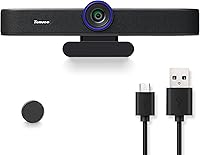
- In the Box: Package includes the webcam unit, the removable privacy cover, a Type-C USB cable, and a printed user manual.
Related Reviews
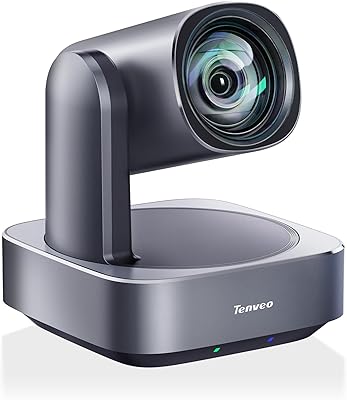
Tenveo VL12U 4K PTZ Camera