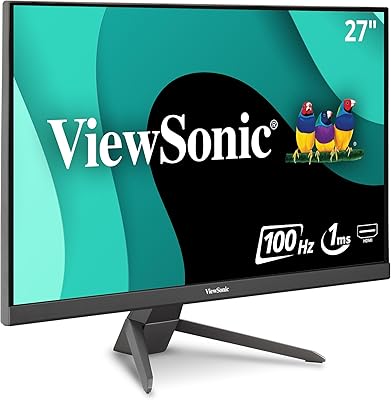
ViewSonic VX2718-PC-MHD 27-inch Curved Gaming Monitor
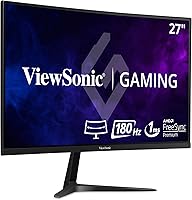
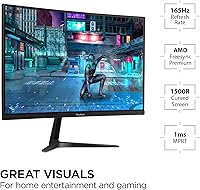
ViewSonic VX2718-PC-MHD 27-inch Curved Gaming Monitor — image 1
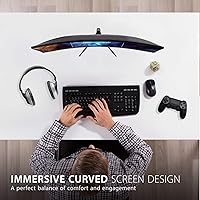
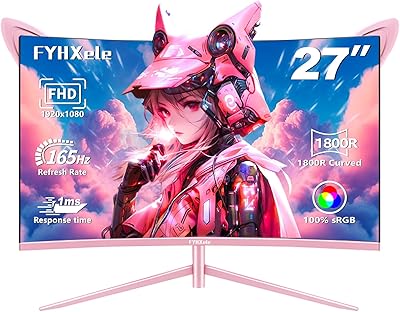
ViewSonic VX2718-PC-MHD 27-inch Curved Gaming Monitor — image 2
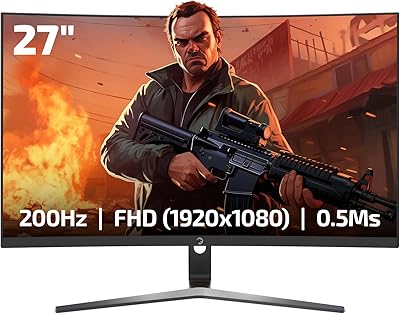
ViewSonic VX2718-PC-MHD 27-inch Curved Gaming Monitor — image 3
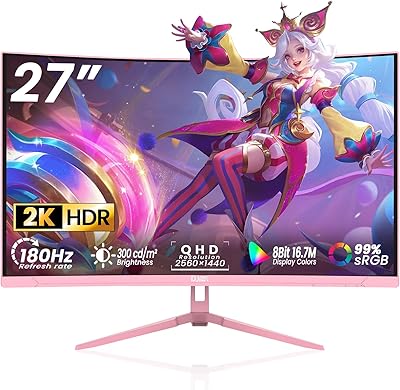
ViewSonic VX2718-PC-MHD 27-inch Curved Gaming Monitor — image 4
ViewSonic VX2718-PC-MHD 27-inch Curved Gaming Monitor — image 5
ViewSonic VX2718-PC-MHD 27-inch Curved Gaming Monitor — image 6
ViewSonic VX2718-PC-MHD 27-inch Curved Gaming Monitor — image 7
ViewSonic VX2718-PC-MHD 27-inch Curved Gaming Monitor — image 8
ViewSonic VX2718-PC-MHD 27-inch Curved Gaming Monitor — image 9
79%
21%

Overview

The ViewSonic VX2718-PC-MHD 27-inch Curved Gaming Monitor sits in a sweet spot for gamers who want real performance without spending a fortune. ViewSonic has built a solid reputation for delivering reliable, no-nonsense displays, and this curved gaming monitor continues that tradition. The 27-inch panel with a 1500R curve creates a genuinely immersive single-screen experience — the kind that makes flat monitors feel a little plain once you've adjusted. It runs 1080p resolution, which is a deliberate choice: push fewer pixels, and you can hit higher refresh rates without needing an expensive GPU. This is not a display built for color-critical work or professional content creation — it's built for gaming.

Features & Benefits

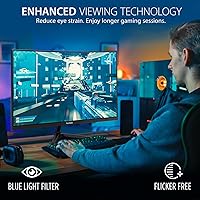
The 180Hz refresh rate is where this 27-inch curved display really earns its keep. In fast-paced shooters or racing games, motion is remarkably smooth — a genuine step up from the 144Hz panels many budget monitors top out at. The 1ms MPRT response time keeps ghosting in check, and FreeSync Premium handles screen tearing without demanding a high-end AMD or Nvidia card. The 1500R curvature feels natural rather than exaggerated, drawing your eyes into the screen without distortion at the edges. For longer sessions, the Flicker-Free backlight and Blue Light Filter actually help — not just marketing bullet points. Genre-specific visual presets for FPS, RTS, and MOBA games are a nice touch worth experimenting with.

Best For

This curved gaming monitor is an easy recommendation for anyone upgrading from a 60Hz flat panel — the jump in smoothness alone will feel dramatic. Budget-conscious competitive players who care more about fast refresh rates than pixel-perfect image quality will get the most out of it. The dual HDMI and DisplayPort inputs make it practical for people who switch between a gaming PC and a console without constantly swapping cables. The 27-inch footprint is spacious enough to feel immersive without overwhelming a standard desk. Gamers who play long sessions and come away with sore eyes may also find the comfort features genuinely useful, not just checkbox specs.

User Feedback

Across thousands of reviews, the ViewSonic VX2718-PC-MHD earns its strong rating with good reason. The most common praise centers on how immediately noticeable the smoothness upgrade feels, especially for buyers coming from slower panels. The value-to-performance ratio is a recurring talking point — people feel they got considerably more than expected. That said, honest feedback does surface a couple of friction points. The stand offers tilt only, with no height adjustment, which can be frustrating if your desk setup demands a specific eye level. Some buyers mention the OSD menu takes a few sessions to get used to. A subset of users notes that 1080p on a 27-inch panel looks slightly soft up close — a real trade-off worth understanding before you buy.

Pros

  • The 180Hz refresh rate delivers genuinely smooth motion in fast games, well above what most budget monitors offer.
  • FreeSync Premium works reliably to eliminate tearing, even with mid-range AMD graphics cards.
  • The 1500R curve adds real immersion on a single-monitor desk without feeling gimmicky or distorted.
  • Dual HDMI and DisplayPort inputs make multi-device switching practical for PC and console users alike.
  • Eye comfort features like Flicker-Free and Blue Light Filter hold up during long gaming sessions.
  • Genre-specific visual presets for FPS, RTS, and MOBA games offer a quick, useful image boost.
  • Owners consistently highlight the value relative to similarly priced flat monitors in the same category.
  • The 27-inch screen size fits most desk setups without overwhelming the space.
  • Setup is straightforward, and the display is ready to perform out of the box with minimal calibration.

Cons

  • The stand offers tilt adjustment only — no height, swivel, or pivot, which limits ergonomic flexibility.
  • At 1080p on a 27-inch panel, pixel density is lower than ideal, and softness is noticeable up close.
  • The OSD menu navigation has a learning curve and feels less intuitive than competing monitors at this price.
  • VA panel blacks are strong, but color accuracy and viewing angles lag behind IPS alternatives.
  • No height adjustment means buyers with specific ergonomic needs may need to budget for a separate monitor arm.
  • The 1ms MPRT spec applies only via DisplayPort, so HDMI users get a slightly different performance profile.
  • There is no USB hub built into this curved gaming monitor, which limits desk cable management options.
  • Buyers upgrading from a 144Hz panel will notice the 180Hz improvement, but it may not feel as dramatic as expected.

Ratings

Our AI rating system analyzed thousands of verified global purchases of the ViewSonic VX2718-PC-MHD 27-inch Curved Gaming Monitor, filtering out incentivized reviews and bot activity to surface what real everyday users actually experience. The scores below reflect a genuine cross-section of feedback — the strengths that keep buyers satisfied and the friction points that surface repeatedly across different setups and use cases. Nothing is glossed over.

Refresh Rate Performance
93%
The jump to 180Hz is the single most praised aspect of this curved gaming monitor across thousands of reviews. Buyers coming from 60Hz or even 144Hz panels describe the motion fluidity in shooters and racing games as immediately and dramatically noticeable, often calling it the best upgrade they made to their setup.
The 180Hz ceiling is only achievable via DisplayPort, which catches some buyers off guard when they connect over HDMI and see a lower maximum rate. For console users especially, the high refresh rate is largely inaccessible given current HDMI bandwidth limitations on this display.
Value for Money
91%
Across budget gaming monitor comparisons, the ViewSonic VX2718-PC-MHD consistently stands out as a strong performer relative to its price tier. Buyers frequently note that the combination of curved panel, 180Hz, and FreeSync Premium feels like a feature set that should cost considerably more.
A small segment of buyers feel the value calculation shifts once they account for needing to purchase a DisplayPort cable separately and potentially a monitor arm to compensate for the limited stand. Those added costs narrow the gap with slightly pricier but more fully equipped alternatives.
Gaming Smoothness
89%
FreeSync Premium works reliably with both AMD and compatible Nvidia GPUs, and most users report clean, tear-free gameplay without needing to tinker extensively with driver settings. In fast-paced titles like battle royale and MOBA games, the combination of high refresh rate and adaptive sync delivers a noticeably polished experience.
A portion of users with older or entry-level GPUs note that pushing frame rates consistently above 144fps to fully exploit the 180Hz ceiling requires a capable graphics card, which not everyone in this monitor's target audience owns. The listed 1ms MPRT response time is also measurement-method-specific and not universally representative.
Image Clarity
67%
33%
For gaming at a typical sitting distance of two to three feet, the 1080p image looks clean and sharp enough that most players are not distracted by pixel density during fast gameplay sessions. Colors on the VA panel have good saturation, and dark scenes benefit from the strong contrast typical of VA technology.
Sitting closer to the screen or switching between this display and a high-DPI laptop makes the 1080p-on-27-inch limitation noticeable — text in particular looks softer than on a smaller 1080p panel or a higher-resolution display. This is the most consistently debated trade-off among buyers doing their research.
Ergonomics & Stand
48%
52%
The physical footprint of the base is reasonably compact, and the initial setup is straightforward without requiring tools beyond what is included. For users whose desk height naturally positions the screen at a comfortable eye level, the out-of-box experience is acceptable.
The stand supports tilt adjustment only — no height, swivel, or pivot — which is a recurring and legitimate complaint from buyers who need even minor positional flexibility. Many users report needing to place books or risers under the monitor within the first week, or buying a separate arm, which adds friction and cost to an otherwise accessible purchase.
Eye Comfort
84%
Gamers who play two to four hour evening sessions report genuine relief from the Flicker-Free backlight compared to older monitors they replaced. The Blue Light Filter is adjustable in intensity through the OSD, making it practical for nighttime use without committing to a permanently warm color cast.
The Blue Light Filter noticeably shifts white balance toward warmer tones at higher intensity settings, which some users find distracting during daytime gaming or when watching content. A few reviewers also note that the filter does not fully compensate for screen brightness in dark rooms.
Connectivity
82%
18%
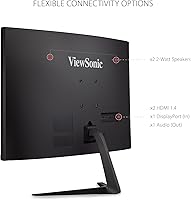
Having two HDMI ports and one DisplayPort input makes this 27-inch curved display genuinely practical for mixed-device setups — a gaming PC on DisplayPort and a console or laptop on HDMI, without needing a switch or re-cabling. Buyers running hybrid setups consistently praise this flexibility.
There is no USB hub built into the monitor, which limits cable management options on desks with multiple peripherals. Only one cable is typically included in the box, meaning DisplayPort users will need to source their own cable to unlock the monitor's full performance potential.
Contrast & Black Levels
86%
The VA panel delivers noticeably deeper blacks than the TN alternatives common at this price point, which makes a real difference in darker game environments and cinematic cutscenes. Users who play horror or atmospheric RPG titles specifically mention the contrast quality as a standout characteristic.
VA panels can exhibit some black smearing in fast-motion scenes, particularly in very dark environments — a known characteristic of the technology that a subset of buyers notice during high-speed gameplay. This is not unique to this monitor but is a factor worth understanding before purchasing.
OSD Usability
61%
39%
Once settings are configured to the user's preference, the OSD does not need frequent revisiting, and the genre-specific visual presets are a convenient shortcut for buyers who do not want to manually calibrate color and gamma settings for each game type.
The physical button placement on the back of the monitor is unintuitive, and the menu hierarchy takes multiple sessions to navigate confidently. Several reviewers describe accidentally changing settings when simply trying to adjust brightness, which becomes frustrating quickly.
Build Quality
77%
23%
The overall construction feels solid for the price tier — the panel has minimal flex, and the bezels are thin enough to look clean without feeling flimsy. Most buyers report no dead pixels, backlight bleed issues, or structural problems out of the box.
The plastic finish on the rear of the unit and the stand mechanism feel noticeably budget-grade on close inspection, and the tilt hinge lacks the dampened resistance found on pricier monitors. A small number of buyers report stand wobble on uneven surfaces.
Setup Experience
85%
Assembly from box to working display takes most buyers under fifteen minutes, and the monitor is recognized immediately by Windows and macOS without requiring driver installation. The out-of-box color and brightness settings are usable for gaming without immediate adjustment.
The lack of an included DisplayPort cable means buyers targeting 180Hz need to source one separately, which is a minor but avoidable friction point. The quick-start guide is minimal, and buyers looking to enable FreeSync properly may need to consult online resources.
Viewing Angles
71%
29%
For a single viewer seated directly in front of the display, the VA panel performs well, and the 1500R curvature helps maintain consistent image quality across the full width of the screen without noticeable color shift at the edges from a standard gaming position.
VA panels are not known for wide viewing angle performance, and anyone viewing the screen from a sharp side angle — a second person watching gameplay, for example — will see noticeable contrast and color degradation. This is a technology-level limitation rather than a manufacturing defect.
Noise & Heat
91%
The monitor runs completely silent with no fan or audible electrical noise, and it stays cool to the touch even after extended gaming sessions. Buyers who are sensitive to coil whine or buzzing from budget electronics are consistently pleased with how quiet this display operates.
There is very little to criticize here for typical home use, though a small number of buyers in warmer climates report the back of the unit getting mildly warm after several hours — nothing unusual or concerning for a display of this size, but worth noting for enclosed desk setups.

Suitable for:

The ViewSonic VX2718-PC-MHD 27-inch Curved Gaming Monitor is a strong match for gamers who want a meaningful performance upgrade without committing to a high-end budget. If you're still running a 60Hz flat panel and play fast-paced games — shooters, MOBAs, racing titles — the jump to 180Hz on a curved screen will feel like a substantial improvement in day-to-day play. It also works well for PC and console hybrid setups, since the dual HDMI and DisplayPort inputs mean you're not constantly re-cabling when you switch between devices. Gamers who log long evening sessions and frequently deal with eye fatigue will appreciate the Flicker-Free backlight and Blue Light Filter, which are genuinely helpful rather than just spec-sheet padding. The 27-inch footprint hits a practical sweet spot — immersive enough for single-monitor gaming, but not so large that it dominates a standard desk or bedroom setup.

Not suitable for:

Buyers who prioritize image sharpness and pixel density above all else should think carefully before choosing this 27-inch curved display. At 1080p across a 27-inch panel, the pixel density is lower than on a smaller 24-inch 1080p screen, and if you sit close to your monitor you may notice that text and fine details look softer than you'd like. Content creators, photographers, or anyone doing color-sensitive work will also find this monitor limiting — it is not built for wide color gamut accuracy or professional-grade calibration. The stand is another genuine drawback for ergonomics-conscious buyers: it tilts, and that's it. There is no height adjustment, swivel, or VESA mount compatibility advertised, which means if your desk and chair setup requires precise screen positioning, you may end up frustrated or spending extra on a third-party arm. If you're already on a 144Hz display and hoping for a dramatic visual leap, the step to 180Hz will be noticeable but not transformative.

Specifications

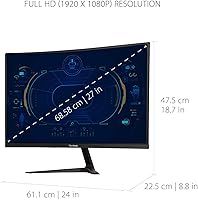
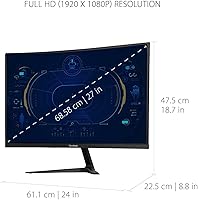
  • Screen Size: The panel measures 27 inches diagonally, providing a spacious viewing area suited for single-monitor gaming setups.
  • Panel Type: This display uses a VA (Vertical Alignment) curved panel, which delivers strong contrast ratios and deep blacks compared to typical TN panels.
  • Curvature: The screen features a 1500R curvature radius, designed to wrap the image naturally within the human field of view.
  • Resolution: Native resolution is 1920x1080 (Full HD), offering solid clarity for gaming at high refresh rates without demanding heavy GPU resources.
  • Refresh Rate: The panel supports a maximum refresh rate of 180Hz, enabling exceptionally smooth motion during fast-paced gameplay.
  • Response Time: Response time is rated at 1ms MPRT when connected via DisplayPort, minimizing motion blur in competitive gaming scenarios.
  • Adaptive Sync: FreeSync Premium support synchronizes the monitor's refresh rate with compatible AMD and Nvidia GPU output to eliminate screen tearing.
  • Connectivity: The monitor includes two HDMI ports and one DisplayPort input, supporting simultaneous connection of multiple devices.
  • Aspect Ratio: Standard 16:9 widescreen aspect ratio is used, compatible with virtually all gaming platforms and content formats.
  • Eye Care: Flicker-Free backlight technology and a built-in Blue Light Filter work together to reduce visual fatigue during extended use.
  • Visual Modes: Pre-configured display presets for FPS, RTS, and MOBA game genres allow quick image optimization without manual calibration.
  • Stand Adjustment: The included stand supports tilt adjustment only, with no height, swivel, or pivot functionality available out of the box.
  • Dimensions: The monitor measures 24 x 18.7 x 8.8 inches with stand attached, fitting comfortably on most standard desks.
  • Weight: Total unit weight with stand is 8.6 pounds, making it manageable for solo setup and repositioning.
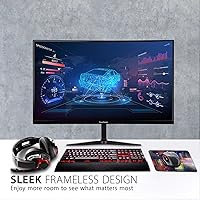
  • Color Finish: The monitor ships in a matte black finish with thin bezels on three sides for a clean, low-distraction look.
  • Compatibility: This display is compatible with Windows PCs, Macs, laptops, and gaming consoles that support HDMI or DisplayPort output.
  • Power Input: The monitor is rated for 240V input and ships with the appropriate power adapter for standard home outlet use.

Related Reviews
ViewSonic VX3258-PC-MHD 32-inch Curved 1080p Gaming Monitor
82%
91%
Gaming Performance
84%
Visual Quality
95%
Refresh Rate & Response Time
80%
Build Quality
70%
Ergonomics & Adjustability
More
ViewSonic VX3218-PC-MHD 32-inch Curved Gaming Monitor
72%
88%
Gaming Performance
79%
Image Quality
61%
Resolution Clarity
86%
Immersion & Curve
84%
Value for Money
More
ViewSonic VX2767-MHD 27-inch Gaming Monitor
82%
92%
Gaming Performance
88%
Display Quality
91%
Value for Money
85%
Build Quality
87%
Eye Comfort Features
More
Skytech Gaming Moonshadow 27-inch Curved Gaming Monitor
83%
88%
Image Quality
91%
Refresh Rate Performance
86%
Adaptive-Sync
83%
VA Panel Contrast
84%
Stand & Ergonomics
More
Sealan 27-inch Curved Gaming Monitor
82%
85%
Display Quality
90%
Ease of Setup
91%
Value for Money
87%
Performance in Gaming
83%
Color Accuracy
More
Gawfolk GF270C 27-Inch Curved Gaming Monitor
72%
83%
Value for Money
78%
Image Quality
81%
Refresh Rate Performance
74%
Response Time & Motion Clarity
62%
Build Quality
More
Great Voell 27-Inch Curved Gaming Monitor
86%
91%
Value for Money
89%
Display Quality
87%
Gaming Performance
84%
Eye Comfort
80%
Build Quality
More
CRUA CR270C 27″ Curved Gaming Monitor
71%
83%
Value for Money
78%
Image Quality
81%
Refresh Rate Performance
86%
Panel Contrast & Blacks
67%
Build Quality
More
Samsung S39C 27-Inch Curved Gaming Monitor
75%
83%
Picture Quality & Color Accuracy
88%
Curvature & Immersion
61%
Refresh Rate & Gaming Performance
86%
Eye Comfort & Long-Session Usability
79%
Build Quality & Aesthetics
More
GreBear BM27QA 27-inch Curved Gaming Monitor
65%
83%
Image Quality
78%
Gaming Performance
74%
Refresh Rate Value
61%
Build Quality
44%
Ergonomics & Adjustability
More

FAQ

FreeSync Premium works natively with AMD graphics cards, but most modern Nvidia GPUs also support FreeSync displays through Nvidia's G-Sync Compatible mode. Just enable it in your Nvidia Control Panel and you should get tear-free gameplay without issue.

It depends on how close you sit and how sharp your eyes are. At a normal gaming distance of around 2 to 3 feet, 1080p on 27 inches looks fine for gaming. If you sit very close or switch between this and a high-DPI laptop screen, you may notice the difference. For competitive gaming where refresh rate matters more than pixel count, most players find the trade-off worthwhile.

Yes, consoles connect easily via HDMI. Keep in mind that current-gen consoles cap out at 120Hz over HDMI 2.1, and this monitor uses HDMI 2.0, so you will be limited to 60Hz from a console. The 180Hz refresh rate is only achievable through the DisplayPort connection on a compatible PC.

The stand only tilts forward and back — there is no height adjustment, swivel, or pivot. If your desk or chair height means the screen naturally sits too low or too high, you will likely want to invest in a third-party VESA monitor arm to get it positioned properly.

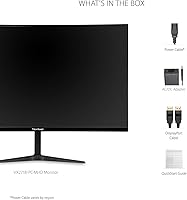
ViewSonic typically includes one HDMI cable in the box, but availability can vary by retailer and shipment batch. A DisplayPort cable is generally not included, so if you want to take full advantage of the 180Hz refresh rate and 1ms response time, you may need to purchase a DisplayPort cable separately.

The Blue Light Filter is adjustable through the monitor's OSD (on-screen display) menu, and you can set the intensity level or turn it off entirely. It is not permanently baked in, so you have control over how much filtering is applied depending on your preference or time of day.

The OSD is controlled via physical buttons on the back of the monitor, which some users find a bit awkward to locate at first. The menu structure itself is functional but not the most intuitive — it usually takes a session or two before navigating it feels natural. Once you have your settings dialed in, you likely will not need to visit it often.

Yes, it is compatible with Macs that have HDMI or DisplayPort output. Keep in mind that FreeSync does not function on macOS, and Macs typically cannot drive the display at 180Hz, but it will work as a standard extended or primary display without any issues.

The 1500R curvature is on the more noticeable end — more curved than a 1800R panel, but not extreme. Most people find it comfortable and immersive for gaming and general use. If you have never used a curved monitor, it looks more dramatic in photos than it feels in actual use.

The monitor's VESA compatibility is not officially confirmed in the standard product listing, so it is worth verifying with ViewSonic support or checking the manual before purchasing an aftermarket arm. If VESA mounting is a priority for your setup, confirm this detail before buying rather than assuming it is supported.