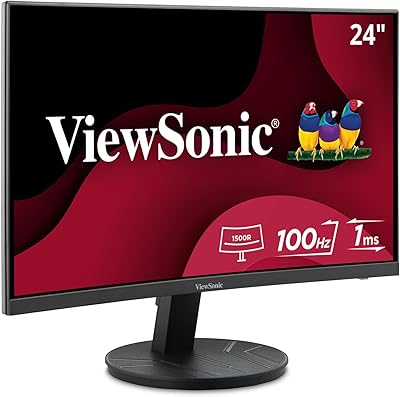
ViewSonic VX2428A 24-inch Gaming Monitor
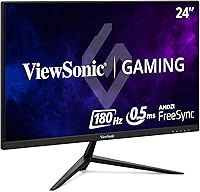
ViewSonic VX2428A 24-inch Gaming Monitor — image 1
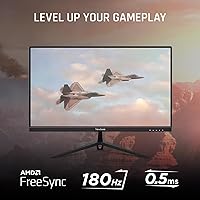
ViewSonic VX2428A 24-inch Gaming Monitor — image 2
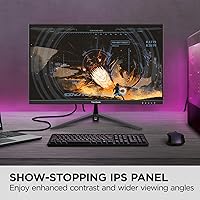
ViewSonic VX2428A 24-inch Gaming Monitor — image 3
ViewSonic VX2428A 24-inch Gaming Monitor — image 4
ViewSonic VX2428A 24-inch Gaming Monitor — image 5
ViewSonic VX2428A 24-inch Gaming Monitor — image 6
ViewSonic VX2428A 24-inch Gaming Monitor — image 7
77%
23%

Overview

The ViewSonic VX2428A 24-inch Gaming Monitor arrived on the market in mid-2024 as a genuinely compelling option for gamers who want real speed without spending heavily on a display. What makes this ViewSonic monitor stand out at its price point is the combination of a fast IPS panel with a high refresh rate — a pairing you typically see on more expensive screens. The matte surface reduces glare during daytime sessions, and at 24 inches, Full HD resolution looks sharp and clean without any obvious pixel density issues. It is not trying to be a premium flagship; it is trying to be the most capable monitor in its budget tier, and it largely delivers.

Features & Benefits

The 180Hz refresh rate here is a notable step up from the 144Hz panels that dominated budget gaming for years — motion in fast shooters and racing titles looks noticeably crisper. Paired with a sub-millisecond response time measured as MPRT, ghosting is kept to a minimum even during hectic on-screen action. FreeSync adaptive sync works across both AMD and NVIDIA setups, keeping things flexible regardless of your GPU. The IPS panel brings accurate colors and wide viewing angles that TN screens simply cannot match. There is also HDR10 support, though at 1080p it delivers a modest contrast improvement rather than the dramatic effect you would see on a high-end display. Still, eye-comfort features like Flicker-Free and a Blue Light Filter make a real difference during longer sessions.

Best For

This 24-inch IPS panel is a strong fit for gamers upgrading from older 60Hz or 75Hz monitors who want a genuine performance jump without a large outlay. If you are running a dual console-and-PC setup, the HDMI and DisplayPort inputs handle both without an adapter headache. Students and remote workers who also game will appreciate that the eye-comfort settings hold up all day — not just during evening play. Competitive players on a tight budget will find the fast refresh rate competitive-viable without paying for a premium esports screen. One honest caveat: the stand is stable but offers no height adjustment, so users who care about ergonomics may want to budget for a monitor arm.

User Feedback

With roughly 286 ratings and a 4.3-star average, the VX2428A has earned a solid early reception — though that pool is still modest, so trends should be read with some caution. Buyers frequently praise out-of-box color quality and how straightforward the initial setup is. Long-term owners note that late-night gaming sessions feel less fatiguing, which aligns with real-world use of the flicker-free design. The most consistent criticism targets the stand — it holds steady, but the lack of height adjustment frustrates those accustomed to ergonomic flexibility. HDR impressions lean toward cautious approval rather than enthusiasm. Against competing 24-inch monitors at a similar price, the phrase that surfaces most in positive reviews is simply good value.

Pros

  • The 180Hz refresh rate delivers noticeably smoother motion in fast-paced titles compared to typical 144Hz budget monitors.
  • IPS panel technology brings wide viewing angles and better color accuracy than TN alternatives at a similar price.
  • FreeSync adaptive sync works with both AMD and NVIDIA GPUs, keeping your options open.
  • The matte screen surface reduces glare effectively in bright rooms and shared spaces.
  • Flicker-Free and Blue Light Filter features hold up well during long work-and-gaming hybrid days.
  • Out-of-box color quality consistently draws praise from buyers who skip manual calibration.
  • Dual inputs — HDMI and DisplayPort — make it easy to connect a PC and console simultaneously.
  • At 24 inches, Full HD resolution looks clean and sharp with no obvious pixel density complaints.
  • Setup is straightforward; most users report being up and running within minutes of unboxing.
  • Early user satisfaction sits at a strong 4.3-star average, suggesting the VX2428A punches above its price class.

Cons

  • The stand has no height, tilt range, or pivot adjustment, which limits ergonomic flexibility for many desk setups.
  • HDR10 support exists on paper, but the real-world contrast improvement on a 1080p panel is modest at best.
  • HDMI 1.4 bandwidth limitations may frustrate users connecting newer consoles expecting higher frame rate output.
  • The review pool is still relatively small, making it harder to assess long-term durability with confidence.
  • No USB hub functionality means one fewer convenience for users with multiple peripherals to manage.
  • Resolution is capped at 1080p, which will feel limiting sooner for anyone considering an upgrade path to higher-res gaming.
  • Color enthusiasts or content creators needing factory calibration or wide color gamut coverage will find this panel insufficient.
  • The built-in speaker situation is absent entirely, requiring external audio for any sound output.

Ratings

The scores below for the ViewSonic VX2428A 24-inch Gaming Monitor were generated by our AI system after analyzing verified global buyer reviews, actively filtering out incentivized, bot-generated, and low-quality submissions to surface what real users consistently experience. Both the standout strengths and the frustrating trade-offs are reflected transparently in each category — no padding, no spin.

Gaming Performance
88%
Users coming from 60Hz or 75Hz panels consistently describe the jump to this refresh rate as one of the most immediately satisfying upgrades they have made. Fast shooters and racing titles in particular feel noticeably more responsive, with minimal ghosting reported during intense gameplay.
The performance ceiling is real — at 1080p, more demanding titles will eventually outpace what the panel can fully exploit, especially as GPU hardware improves. A handful of competitive players note they would prefer a 1440p option at a similar price for long-term playability.
Image Quality
79%
21%
The IPS panel produces accurate, well-balanced colors straight from the box, which buyers consistently praise — especially those who do not want to spend time calibrating settings manually. At 24 inches, 1080p resolution looks clean and sharp at normal desk distances without any obvious pixel density issues.
Color accuracy does not reach the level of factory-calibrated or wide-gamut panels, which limits its appeal for content creators or anyone who needs precision color work. Some users notice slight uniformity variation across the panel at lower brightness levels.
Refresh Rate & Smoothness
91%
The 180Hz ceiling gives this monitor a genuine edge over the 144Hz panels that dominate the same price range, and users report that the difference is tangible in fast-paced titles rather than just a marketing number. Adaptive sync integration keeps the experience tear-free across a wide range of frame rates.
The practical gap between 144Hz and 180Hz is smaller than the leap from 60Hz to 144Hz, so users expecting a dramatic transformation from a recent 144Hz monitor may find the upgrade less compelling than anticipated.
Response Time
86%
The MPRT-rated response keeps ghosting tightly controlled during high-speed gameplay, and most users report clean, crisp motion even in titles with fast camera movement or particle-heavy scenes. For a budget IPS panel, motion handling is genuinely above the category average.
MPRT is a motion-blur reduction measurement rather than a true pixel transition time, which means overdrive artifacts can occasionally appear at extreme settings. Users who dig into OSD options sometimes note a sweet spot between sharpness and artifact suppression requires a little tuning.
Eye Comfort
83%
Long-session users — students, remote workers, and gamers who play into the early hours — frequently call out the Flicker-Free backlight as a tangible benefit, describing noticeably less eye fatigue compared to their previous monitors after three or four hours of continuous use.
The Blue Light Filter setting does shift color temperature toward warmer tones, which some users find acceptable as a trade-off but others prefer to keep disabled during color-sensitive work. The filter is not as granular in its control range as dedicated software-based solutions.
HDR Performance
54%
46%
HDR10 support is present and does produce a subtle improvement in contrast depth when watching compatible streaming content or playing HDR-enabled titles, which users with no prior HDR experience tend to appreciate more than veterans.
Buyers with any HDR reference point consistently describe the effect as underwhelming — the panel lacks the peak brightness and local dimming needed to make HDR feel meaningful. At 1080p, it functions more as a checkbox feature than a genuine visual upgrade.
Build Quality
71%
29%
The panel chassis feels solid and well-assembled, with slim bezels that keep the overall footprint minimal on a desk. At this weight and price, the construction is appropriate for the market segment and does not feel flimsy or cheap to the touch.
The stand is the most consistent build-related criticism — it holds the panel steady but offers no height, swivel, or pivot adjustment, which frustrates users who need ergonomic flexibility. Several buyers move straight to a third-party monitor arm to compensate.
Ergonomics
47%
53%
The panel is lightweight enough to reposition without help, and VESA compatibility means users who invest in a monitor arm can achieve a wide range of positions relatively easily.
Out of the box, the ergonomic story is limited — tilt is the only available adjustment, and for taller users or those with specific posture needs, this is a meaningful daily frustration. It is one of the most frequently mentioned pain points in user reviews, often noted as the single hardware compromise buyers wish they had known about.
Connectivity
68%
32%
Having both HDMI and DisplayPort inputs covers the most common use cases well, and dual-input users running a PC and console simultaneously find the switching practical enough for everyday use.
The HDMI 1.4 port is a bottleneck that limits bandwidth, and users pairing this monitor with a newer console at higher frame rates may hit unexpected compatibility ceilings. The absence of a USB hub also means no added convenience for peripheral management.
Setup & Usability
87%
Assembly is quick and intuitive, with most buyers reporting a full setup in under ten minutes including cable management. The OSD menu is accessible and clearly laid out, making basic adjustments easy without consulting the manual.
Advanced OSD navigation can feel slightly sluggish compared to joystick-controlled menus on competing monitors. Users who prefer granular control over gamma or color temperature profiles may find the options somewhat limited.
Value for Money
89%
At its price point, getting a 180Hz IPS panel with FreeSync and eye-comfort features in a single package is genuinely difficult to match, and most buyers explicitly state it outperforms their expectations relative to what they paid.
A small number of users feel the ergonomic limitations and HDMI 1.4 port represent corners cut to hit the price target, and those trade-offs do affect the overall value calculation for buyers who factor long-term usability heavily into their purchase decisions.
Color Accuracy
74%
26%
For gaming and general media consumption, colors look vibrant and well-balanced without feeling oversaturated or artificially boosted. Users who watch a lot of streaming content alongside gaming report the picture holds up well across both use cases.
Those with a background in photo editing or graphic design will quickly notice the panel falls short of sRGB-accurate performance at its factory defaults. It is not calibrated for professional color work, and buyers expecting that level of precision should look elsewhere.
Glare & Visibility
82%
18%
The matte coating handles ambient light better than most glossy panels, and users in naturally lit home offices or shared spaces consistently mention this as a practical day-to-day advantage over competing monitors with glossy surfaces.
In very dark rooms, the matte coating can soften fine detail slightly compared to a glossy alternative, and some users note that blacks appear slightly less deep as a result. It is a minor trade-off that will only matter to users in controlled low-light environments.

Suitable for:

The ViewSonic VX2428A 24-inch Gaming Monitor is a smart pick for anyone stepping up from an older 60Hz or 75Hz display who wants a meaningful boost in motion clarity without a painful budget hit. Casual and competitive gamers alike will find the high refresh rate and fast response time genuinely useful in titles where split-second reactions matter. If you run a mixed setup — say, a PC for work and a console for evenings — the dual HDMI and DisplayPort inputs keep switching simple. Students and remote workers who game after hours will also appreciate that the eye-comfort features hold up across a full workday, not just a two-hour gaming session. The matte IPS panel handles bright room lighting better than glossy alternatives, making it a practical fit for shared spaces or home offices with windows.

Not suitable for:

The ViewSonic VX2428A 24-inch Gaming Monitor is not the right call for buyers chasing the sharpest possible image quality or a truly immersive HDR experience. Content creators who rely on color precision for professional work should look toward factory-calibrated panels with wider color gamuts. The stand offers no height or pivot adjustment, which is a real ergonomic limitation for taller users or those with specific desk setups — and that is a harder problem to overlook during eight-hour days. Anyone wanting to future-proof toward 1440p or 4K resolution will find this panel limiting sooner rather than later. The HDMI 1.4 port also caps bandwidth, which can matter if you are running a newer console at higher frame rates. With just over 280 ratings at the time of writing, the long-term reliability picture is still developing compared to more established models.

Specifications

  • Screen Size: The display measures 24 inches diagonally, a size well-suited to Full HD content without any noticeable loss in pixel sharpness at typical desk distances.
  • Resolution: Native resolution is 1920x1080 (Full HD), delivering a clean and sharp image at 24 inches with no software scaling required.
  • Panel Type: Uses an IPS (In-Plane Switching) panel, which provides wider viewing angles and more accurate color reproduction compared to TN alternatives in the same price range.
  • Refresh Rate: Rated at 180Hz, allowing the display to render up to 180 frames per second for visibly smoother motion in fast-paced games.
  • Response Time: Specified at 0.5ms MPRT (Moving Picture Response Time), which reduces motion blur and ghosting during rapid on-screen movement.
  • Adaptive Sync: Supports AMD FreeSync, which dynamically matches the monitor refresh rate to the GPU output to eliminate screen tearing and stuttering.
  • HDR Support: Compatible with HDR10 content, though the improvement in contrast and brightness range is modest given the 1080p panel and typical brightness ceiling.
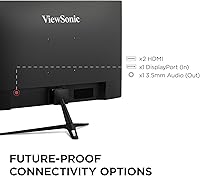
  • Inputs: Connectivity includes one HDMI 1.4 port and one DisplayPort input, supporting connection to both PCs and select gaming consoles.
  • Aspect Ratio: Standard 16:9 widescreen aspect ratio, compatible with the vast majority of PC games, console titles, and streaming content.
  • Screen Surface: Matte anti-glare coating reduces reflections from ambient light sources, making the panel more practical in bright or mixed-lighting environments.
  • Eye Comfort: Equipped with Flicker-Free backlighting and a built-in Blue Light Filter to reduce eye strain during extended viewing sessions.
  • Dimensions: The monitor measures approximately 21.3 x 16.6 x 7.2 inches with the stand attached, fitting comfortably on most standard desks.
  • Weight: Total weight with stand is 6.8 pounds, light enough for easy repositioning or mounting without assistance.
  • Stand Adjustment: The included stand supports basic tilt adjustment only, with no height, swivel, or pivot functionality provided out of the box.
  • VESA Compatibility: The panel supports VESA mounting, allowing users to attach a third-party monitor arm if additional ergonomic flexibility is needed.
  • Color: Available in black with a slim bezel design on three sides, keeping the overall look clean and unobtrusive on a desk.
  • Brand and Model: Manufactured by ViewSonic Corporation under model number VS19276, also marketed as the VX2428A.
  • Release Date: First made available in June 2024, making it a relatively recent addition to the budget gaming monitor segment.

Related Reviews

ViewSonic XG2431 24-Inch Gaming Monitor
86%
92%
Gaming Performance
88%
Display Quality
93%
Response Time
85%
Ergonomics and Comfort
89%
Visual Clarity
More
ViewSonic VX2467-MHD 24-inch Gaming Monitor
74%
91%
Value for Money
78%
Image Quality
83%
Gaming Performance
44%
Ergonomics & Adjustability
89%
Setup & Ease of Use
More
ViewSonic VX2418C 24-inch Curved Gaming Monitor
74%
88%
Gaming Performance
91%
Value for Money
63%
Image Quality
89%
Refresh Rate & Smoothness
82%
Eye Comfort
More
ViewSonic VG2456A 24-inch IPS Monitor
79%
92%
USB-C Docking Functionality
89%
Connectivity Range
86%
Ergonomics & Stand
63%
Display Sharpness
83%
Eye Comfort
More
ViewSonic VG2455 24-inch Monitor
83%
91%
Ergonomic Comfort
88%
Display Quality
94%
USB-C Connectivity
89%
Eye Care Features
75%
Build Quality
More
AOC G2490VXS 24″ Gaming Monitor
80%
88%
Gaming Performance
83%
Color Quality
86%
Contrast & Black Levels
91%
Refresh Rate & Smoothness
74%
Build Quality
More
AOC 24G4 24-inch Gaming Monitor
76%
93%
Refresh Rate Performance
78%
IPS Color Quality
84%
Motion Clarity
91%
Value for Money
87%
Adaptive-Sync Implementation
More
Raywego Q24B16 24-inch Curved Gaming Monitor
73%
88%
Refresh Rate Performance
84%
Contrast & Black Levels
91%
Value for Money
76%
Image Sharpness
47%
HDR Quality
More
Sealan 24-Inch Curved Gaming Monitor
86%
92%
Gaming Performance
88%
Visual Quality
91%
Refresh Rate Smoothness
85%
Design & Build
87%
Eye Care Features
More
DJiEX Z24B12 24-inch Gaming Monitor
84%
92%
Value for Money
87%
Display Quality
85%
Ergonomics and Comfort
89%
Color Accuracy
80%
Connectivity Options
More

FAQ

FreeSync works natively with AMD GPUs, but NVIDIA has supported FreeSync-compatible monitors through its G-Sync Compatible program for several years now. Most mid-range and recent NVIDIA cards will work with adaptive sync on the VX2428A without issues, though you may want to verify your specific GPU model is on NVIDIA's compatibility list.

Yes, you can connect a current-gen console using the HDMI port, but keep in mind the port is HDMI 1.4, which has bandwidth limitations. You will be able to game at 1080p and up to 120Hz on supported titles, but the HDMI 1.4 spec does not support 4K output, so you are getting the most out of it at 1080p gaming.

It holds up well for everyday work use. The IPS panel gives you decent color accuracy for documents, spreadsheets, and video calls, and the Flicker-Free backlight and Blue Light Filter make a real difference if you are staring at it for six or eight hours a day. It is not a professionally calibrated display, but for general productivity it is more than adequate.

Honestly, the difference between 144Hz and 180Hz is subtler than the jump from 60Hz to 144Hz — but it is still there. In fast shooters or racing games, motion feels a touch crisper and more fluid. If you are coming from a 60Hz monitor, the improvement will feel dramatic regardless of the exact ceiling.

Temper your expectations here. HDR10 support is present, but this is a 1080p IPS panel without a high peak brightness rating or local dimming. HDR-enabled content will look slightly better than SDR in terms of contrast, but it is nowhere near the HDR experience you get on a dedicated HDR display. Think of it as a bonus feature rather than a core selling point.

You can use a monitor arm. The panel is VESA-compatible, so if the stand's limited adjustability bothers you — no height or swivel movement — you can remove it and attach a third-party arm without any issues. Many buyers go this route specifically to get better ergonomic positioning.

Most buyers report being satisfied with the colors straight out of the box, which is a genuine plus at this price point. You may want to dial back the brightness slightly depending on your room lighting, but a full manual calibration is generally not necessary for everyday gaming or work use.

IPS panels at this price tier commonly show some degree of IPS glow in dark scenes, particularly in the corners. Backlight bleed varies unit to unit, as is typical for mass-produced displays. Most users at this price bracket report it as acceptable, but if you are very sensitive to glow in dark-room gaming, it is worth being aware of.

No, the VX2428A does not include built-in speakers. You will need external speakers or headphones for audio output, so factor that into your setup if you do not already have a separate audio solution.

Quite well, actually. The anti-glare matte coating does a solid job of diffusing reflections from windows or overhead lighting. It is noticeably better in bright environments than glossy panels, which is one of the practical reasons to prefer it for a desk that gets natural daylight.

Where to Buy