Overview

The ViewSonic VX2418C 24-inch Curved Gaming Monitor enters a crowded market with a straightforward pitch: solid gaming performance at a price that won't strain your wallet. ViewSonic has carved out a reliable niche in value-oriented displays, and this curved gaming monitor fits that mold well. Built around a 24-inch 1500R curved panel running at 1080p, it has been available since mid-2022 and quietly accumulated a strong sales record. Don't expect flagship-level color science or premium ergonomics — but if a high refresh rate and smooth motion are your top priorities, this is a capable, honest option for the money.
Features & Benefits

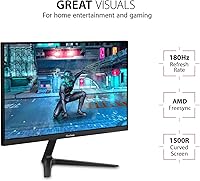
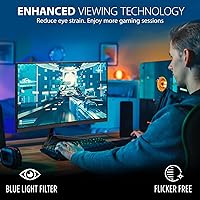
At the heart of this ViewSonic display is a 180Hz refresh rate paired with a 1ms MPRT response time — a combination that makes fast-paced shooters and MOBAs feel genuinely responsive. Pair that with AMD FreeSync Premium, and AMD GPU owners get tear-free gameplay without the added cost of G-Sync certification. The 1500R curve is moderate rather than dramatic; it adds a subtle sense of depth without distorting the image at the edges. Flicker-free backlighting and a built-in blue light filter are welcome additions for long sessions. Dual HDMI and DisplayPort inputs keep connectivity flexible, and the pre-set game modes offer a handy shortcut for dialing in the right look per genre.

Best For

This curved gaming monitor makes most sense for someone jumping up from a basic 60Hz display for the first time — the difference in motion clarity is immediately noticeable and hard to go back from. Budget-conscious gamers playing fast-paced competitive titles like CS2 or Valorant will get the most mileage out of the high refresh rate. It also works well as a dual-purpose setup for students who game in the evenings, thanks to the eye-comfort features built in. Console and PC hybrid users will appreciate having both inputs covered. Those chasing 1440p or higher pixel density, though, should look elsewhere — 1080p at 24 inches is fine, but it won't satisfy pixel-peepers.

User Feedback

With close to 6,000 ratings averaging 4.4 stars, the VX2418C has earned broad approval — and that consensus holds up when you read through the reviews. Buyers consistently praise the out-of-box setup, the smooth feel during gameplay, and the overall value relative to what you pay. On the critical side, a fair number of reviewers flag that the stand offers limited adjustability — tilt only, no height movement — which can genuinely bother ergonomics-conscious users. Some also note that color accuracy straight out of the box is average at best, and peak brightness may feel modest in a well-lit room. Not dealbreakers for most, but worth factoring in before committing.

Pros

  • The 180Hz refresh rate makes fast-paced gaming noticeably smoother compared to standard 60Hz displays.
  • AMD FreeSync Premium delivers reliable tear-free performance for Radeon GPU owners at no extra cost.
  • Setup is straightforward out of the box — most buyers report being up and running within minutes.
  • The matte panel surface cuts down on glare, making it easier to use near a window or lamp.
  • Built-in flicker-free backlighting and a blue light filter help reduce fatigue during long desk sessions.
  • Dual HDMI and DisplayPort inputs give flexible options for connecting a PC, laptop, or console.
  • Pre-set visual modes for FPS, RTS, and MOBA games offer a quick way to optimize the picture without manual fiddling.
  • At its price point, the VX2418C delivers performance specs that competing monitors often charge significantly more for.
  • The 1500R curved panel adds a subtle sense of depth that makes single-monitor gaming feel a bit more immersive.
  • Nearly 6,000 user ratings averaging 4.4 stars reflects consistent real-world satisfaction across a large buyer base.

Cons

  • The stand only tilts — no height adjustment or pivot, which limits ergonomic flexibility for many desk setups.
  • Out-of-box color accuracy is mediocre and will disappoint anyone who values accurate or vibrant image reproduction.
  • Peak brightness is on the lower side, making the display feel washed out in bright or sunlit rooms.
  • 1080p resolution starts to show its limits at 24 inches when viewing fine text or detailed still images.
  • NVIDIA GPU users cannot fully utilize FreeSync Premium on all configurations, reducing the value of the sync feature.
  • The 1ms spec refers to MPRT, not native response time — a distinction that matters in motion clarity comparisons.
  • Bezels are thin but the overall build feels plasticky, lacking the premium feel of pricier alternatives.
  • No USB hub or built-in speakers means extra clutter or accessories for users who need those conveniences.
  • Color gamut coverage is not specified for professional use cases, making it unsuitable for content work.
  • Limited brightness and contrast compared to IPS or OLED panels means dark scenes in games can look flat.

Ratings

The scores below for the ViewSonic VX2418C 24-inch Curved Gaming Monitor were generated by our AI engine after analyzing thousands of verified global user reviews, with spam, bot activity, and incentivized feedback actively filtered out. The result is a transparent breakdown that reflects both what this curved gaming monitor genuinely excels at and where real buyers ran into frustration. No category has been softened — if users had complaints, the score shows it.
Gaming Performance
88%
Users who play fast-paced shooters or MOBAs consistently describe gameplay as noticeably smoother compared to their previous 60Hz displays. The high refresh rate is the most frequently praised aspect, and many buyers say it was the single biggest quality-of-life upgrade they made to their setup.
A portion of competitive players note that the response time spec refers to MPRT rather than native panel transition speed, which creates some confusion when comparing to other monitors. A small subset found motion handling slightly less crisp than expected during very rapid camera sweeps.
Value for Money
91%
Across thousands of reviews, the price-to-performance ratio is the most consistently applauded factor. Buyers upgrading from aging or entry-level displays frequently describe the VX2418C as punching well above what they expected at this price tier, especially given the refresh rate and curved panel combination.
A handful of buyers feel the value calculation shifts if you factor in needing a VESA arm to compensate for the limited stand — that adds cost that was not obvious at purchase. For users who expected color accuracy comparable to pricier IPS monitors, the value proposition feels weaker.
Image Quality
63%
37%
For gaming in dimly lit rooms, the image holds up well enough — colors are punchy rather than accurate, which some gamers actually prefer for high-contrast action games. The matte surface prevents distracting reflections that can ruin immersion in brighter environments.
Color accuracy out of the box is average at best, and buyers who tried to calibrate it report limited headroom for improvement. At 1080p on a 24-inch panel, fine text and detailed still images look noticeably softer than on a 1440p display of similar size — a genuine drawback for mixed work-and-gaming setups.
Refresh Rate & Smoothness
89%
The jump from a standard refresh rate to what this display offers is immediately apparent — users describe scrolling, cursor movement, and in-game motion as feeling dramatically more fluid within minutes of switching. First-time high-refresh-rate buyers are among the most enthusiastic reviewers.
To unlock the maximum refresh rate, DisplayPort is required; HDMI users may find themselves capped lower depending on their source device, and some buyers only discovered this limitation after setup. Console users in particular may not reach the top refresh rate ceiling.
Eye Comfort
82%
18%
Long gaming and study sessions are where the flicker-free backlight and blue light filter earn their keep — users who spend four or more hours daily at their desks report noticeably less end-of-day eye strain compared to monitors lacking these features. Students mention this benefit almost as often as gamers do.
The blue light filter at higher settings introduces a warm color shift that bothers users doing color-sensitive work or watching movies. A few buyers note it feels like a software-level effect rather than a meaningfully engineered solution, and turning it off removes the benefit entirely.
FreeSync Performance
84%
AMD GPU owners consistently call out FreeSync Premium as a genuine, working benefit — not just a marketing label. Users pairing this display with mid-range Radeon cards report clean, tear-free gameplay across a variety of titles without any configuration headaches.
NVIDIA GPU users are left in a grey area: G-Sync compatibility varies by card generation and connection type, and several buyers with NVIDIA setups found adaptive sync either unreliable or simply unavailable on their configuration. This is a real limitation for a significant portion of the PC gaming market.
Stand & Ergonomics
44%
56%
The stand is sturdy enough that the monitor does not wobble during normal desk use, and assembly is genuinely simple — most users report it snaps together without tools in under five minutes. For buyers who are not picky about screen height, it gets the job done.
Tilt is the only adjustment available — there is no height, swivel, or pivot movement whatsoever. Taller users, those with multi-monitor arrangements, or anyone with specific ergonomic needs find this frustrating enough to immediately purchase a separate arm, which adds both cost and complexity to the setup.
Build Quality
67%
33%
The monitor feels appropriately solid for its weight class — nothing rattles, the panel sits stably on the stand, and the matte black finish resists fingerprints reasonably well during daily handling. For a budget display, buyers generally do not feel shortchanged on build integrity.
The plastic construction is a consistent point of criticism — the housing and stand neck flex noticeably when moved, and the overall feel does not inspire confidence compared to pricier alternatives. Several buyers describe it as feeling somewhat hollow, which detracts from the premium appearance the curved design aims to suggest.
Setup & Ease of Use
87%
Unboxing and initial setup consistently earn praise — the stand assembles quickly, the on-screen display menu is navigable without reading a manual, and the pre-set game modes let new users get a reasonable picture with minimal fuss. First-time monitor buyers specifically appreciate how painless the process is.
The OSD button layout on the back of the monitor is awkward to navigate by feel alone, and a few buyers report accidentally cycling through menus rather than selecting options. There is no joystick-style control, which has become standard on monitors in adjacent price brackets.
Brightness & Contrast
59%
41%
In a moderately lit or dim room the brightness level is sufficient for comfortable daily use, and the matte coating helps the image read clearly without needing maximum backlight. For late-night gaming sessions, most users find the default brightness setting perfectly workable.
Peak brightness is a recurring complaint among buyers in well-lit offices or near windows — the display can look washed out in direct ambient light. Contrast performance is also unremarkable for VA-adjacent expectations, with dark scenes in games appearing flat and lacking depth, which is noticeable in atmospheric or horror titles.
Connectivity
78%
22%
Having both HDMI and DisplayPort available covers the majority of real-world connection scenarios — users switching between a desktop PC and a laptop appreciate not needing an adapter. The input selection covers both older and newer devices without any dongles required.
Two inputs is functional but limiting for users who want to connect three or more devices simultaneously. There is no USB hub, no headphone jack on the monitor itself, and no USB-C port — omissions that are increasingly noticeable as competing monitors at similar prices begin to include at least one of these.
Curve & Immersion
72%
28%
The 1500R curve adds a tangible sense of screen wrap during gaming that flat-screen users find genuinely pleasant when switching over. Racing games and third-person adventure titles particularly benefit from the slight peripheral pull the curvature creates at normal desktop viewing distances.
Buyers expecting a dramatic immersive curve similar to ultrawide monitors will be underwhelmed — the 1500R radius is subtle and some users say they forget it is there during typical gaming sessions. It also introduces minor image distortion when viewing straight horizontal lines, which a few productivity-focused buyers found irritating.
Resolution & Sharpness
61%
39%
For pure gaming at close to mid viewing distances, 1080p on a 24-inch screen is perfectly playable and system-friendly — it puts less demand on the GPU, which is a genuine advantage for users with mid-range graphics cards who want to sustain high frame rates.
Anyone coming from a 1440p or higher display will notice the step down in sharpness almost immediately, particularly in text-heavy applications and detailed game environments. Buyers who use the monitor for both gaming and work report that 1080p feels constraining for side-by-side window layouts or spreadsheet-heavy tasks.

Suitable for:

The ViewSonic VX2418C 24-inch Curved Gaming Monitor is a strong fit for budget-conscious gamers who want a meaningful upgrade without spending a lot. If you're coming from a standard 60Hz display, the jump to 180Hz is immediately noticeable in day-to-day gaming — fast movements look cleaner, and competitive titles like shooters or MOBAs feel more responsive. Students setting up a first gaming and study station will appreciate the dual-purpose design: the eye-care features hold up during long work sessions, not just gaming marathons. AMD GPU owners get genuine value here since FreeSync Premium works reliably across a wide range of Radeon cards. Console and PC users who switch inputs regularly will also find the HDMI and DisplayPort combo practical rather than limiting.
Not suitable for:

The ViewSonic VX2418C 24-inch Curved Gaming Monitor is a harder sell for buyers who care deeply about image quality over raw speed. At 1080p on a 24-inch panel, pixel density is adequate but not sharp enough to satisfy anyone accustomed to a 1440p or 4K display — text and fine details look noticeably softer by comparison. Content creators, graphic designers, or anyone doing color-sensitive work should look elsewhere, as out-of-box color accuracy is average and brightness headroom is limited in well-lit rooms. The stand is tilt-only with no height or pivot adjustment, which is a real ergonomics drawback for taller users or multi-monitor setups. NVIDIA GPU owners also miss out on the adaptive sync benefits unless they have a card that supports FreeSync via HDMI.
Specifications

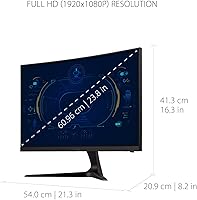
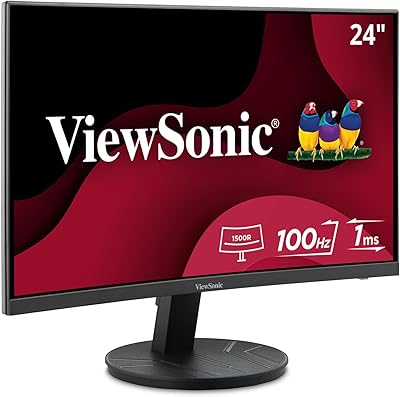
  • Panel Size: The display measures 24 inches diagonally, offering a compact footprint well-suited for single-monitor desk setups.
  • Resolution: Native resolution is 1920x1080 (Full HD), delivering a standard 1080p image across the full panel area.
  • Refresh Rate: The panel supports a maximum refresh rate of 180Hz, enabling noticeably fluid motion in fast-paced games.
  • Response Time: Rated at 1ms MPRT (Moving Picture Response Time), which reduces motion blur during rapid on-screen movement.
  • Curvature: The screen uses a 1500R curvature radius, producing a moderate wrap that adds depth without distorting edge content.
  • Aspect Ratio: Standard 16:9 widescreen aspect ratio, compatible with virtually all PC, console, and laptop video outputs.
  • Panel Surface: Matte anti-glare coating reduces reflections from ambient light sources, making it more usable in varied lighting conditions.
  • Sync Technology: AMD FreeSync Premium is supported, enabling adaptive sync to eliminate tearing and stuttering for compatible AMD GPU users.
  • Inputs: Connectivity includes one HDMI port and one DisplayPort input, supporting flexible connections to PCs, laptops, and consoles.
  • Eye Care: Flicker-Free backlight technology and a built-in Blue Light Filter are included to reduce eye strain during extended use.
  • Dimensions: The assembled monitor measures approximately 21.3 x 16.3 x 8.2 inches (W x H x D) including the stand.
  • Weight: Total unit weight with stand is 9.7 pounds, making it manageable for a single person to set up or reposition.
  • Color: Available in a matte black finish that blends with most standard gaming and office desk environments.
  • Power Input: Operates on 12 volts DC; a compatible power adapter is included in the box.
  • Brand: Manufactured by ViewSonic, a brand with a long-standing presence in the value and mid-range display market.
  • Model Number: The official model designation is VX2418C, which can be used to locate drivers, firmware, and support documentation on ViewSonic's website.
  • Release Date: This monitor first became available in June 2022 and remains an active, non-discontinued product in ViewSonic's lineup.

Related Reviews

ViewSonic XG2431 24-Inch Gaming Monitor
86%
92%
Gaming Performance
88%
Display Quality
93%
Response Time
85%
Ergonomics and Comfort
89%
Visual Clarity
More
ViewSonic VA2416C 24-inch Curved Monitor

79%
83%
Image Quality
79%
Refresh Rate & Smoothness
86%
Eye Comfort & Fatigue
77%
Curvature & Immersion
51%
Stand & Ergonomics
More
Sealan 24-Inch Curved Gaming Monitor

86%
92%
Gaming Performance
88%
Visual Quality
91%
Refresh Rate Smoothness
85%
Design & Build
87%
Eye Care Features
More
ViewSonic VX2467-MHD 24-inch Gaming Monitor
74%
91%
Value for Money
78%
Image Quality
83%
Gaming Performance
44%
Ergonomics & Adjustability
89%
Setup & Ease of Use
More
KTC 24-inch 1500R Curved Gaming Monitor
86%
94%
Gaming Performance
89%
Display Quality
92%
Value for Money
87%
Build Quality
83%
Ergonomics
More
Samsung CRG5 24-Inch Curved Gaming Monitor
78%
88%
Value for Money
83%
Image Quality
81%
Gaming Performance
86%
Curvature & Immersion
84%
FreeSync Performance
More
SANSUI ES-G24C1 24-inch Curved Gaming Monitor
74%
91%
Value for Money
86%
Gaming Performance
83%
Color & Image Quality
88%
Contrast & Black Levels
47%
Stand & Ergonomics
More
Z-Edge UG24 24-inch Curved Gaming Monitor
85%
88%
Gaming Performance
85%
Display Quality
81%
Build Quality
92%
Value for Money
89%
Ease of Setup
More
Sceptre C248W-1920RN 24-inch Curved Gaming Monitor
76%
91%
Value for Money
78%
Display Quality
83%
Curvature & Immersion
74%
Refresh Rate & Motion Clarity
67%
Build Quality & Design
More
Gawfolk GF245A 24.5-Inch Curved Gaming Monitor
72%
88%
Value for Money
79%
Image Quality
83%
Refresh Rate Performance
81%
Response Time
63%
Build Quality
More

FAQ

Yes, it will function as a standard display with any NVIDIA card. However, FreeSync Premium adaptive sync is officially supported only on AMD Radeon GPUs. Some NVIDIA cards support FreeSync over HDMI via their G-Sync Compatible mode, so it is worth checking your specific card's compatibility before assuming you get adaptive sync benefits.

The 180Hz refresh rate is achievable via DisplayPort. Over HDMI, the maximum supported refresh rate may be limited depending on your HDMI version and the connected device, so for the best performance, use the DisplayPort cable for PC gaming.

No, the stand only supports tilt adjustment. There is no height, swivel, or pivot functionality built in. If ergonomics matter to you, a third-party VESA monitor arm is a practical solution — the VX2418C supports standard VESA mounting.

MPRT stands for Moving Picture Response Time, which measures how long a pixel appears to the eye rather than how fast it physically transitions. It is different from the gray-to-gray response time you see on some spec sheets. In practice it means motion blur is reduced during fast movement, which is noticeable in shooters and action games, but it is not the same as a native 1ms panel transition speed.

It is a moderate curve — subtle enough that you barely notice it for productivity tasks like browsing or document work, but it does add a slight sense of depth during gaming. It is not as aggressive as some ultrawide curved monitors, so if you are expecting a dramatic wrap-around effect, this one is understated by comparison.

Yes, it connects via HDMI and works with both consoles. Keep in mind that current-gen consoles cap output at 120Hz over HDMI 2.1, and the monitor's HDMI port may not support the full 180Hz at that connection, so you will want to verify the refresh rate in your console's display settings after connecting.

When set to higher blue light reduction levels, there is a visible warm shift in the color temperature — this is normal for any hardware-level blue light filter. Most users find the lower or mid-range filter settings offer a good balance between eye comfort and color accuracy during longer sessions.

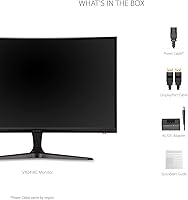
Typically the box includes the monitor panel, the stand base and neck, a power adapter, and at least one video cable. Exact cable inclusions can vary by retailer or region, so it is worth confirming before assuming both HDMI and DisplayPort cables are included.

Yes, the back of this ViewSonic display features a standard VESA 75x75mm mounting pattern, so it is compatible with most VESA-compatible monitor arms and wall mounts.

It holds up reasonably well for everyday use. The matte screen surface keeps glare manageable, and the flicker-free backlight is genuinely useful during long study or work sessions. Color accuracy is not its strong suit, so creative or design work is not ideal, but for documents, video calls, and web browsing it is a comfortable everyday display.