
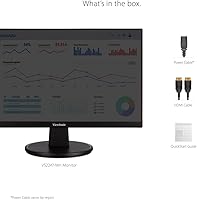
Overview

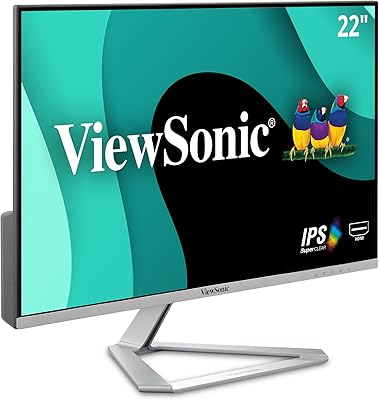
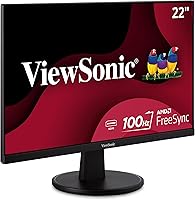
The ViewSonic VS2247-MH 22-Inch Monitor sits in a crowded budget segment, but it earns its place with a feature set that punches well above its price. Released in late 2021, it has stayed genuinely competitive — not because the field has stood still, but because ViewSonic packed in things you rarely see at this level: a 100Hz refresh rate, AMD FreeSync, and a fully adjustable stand. The matte panel and thin bezels keep any desk looking clean without demanding premium pricing. Sitting at #102 in Computer Monitors on Amazon, it has clearly found a broad audience, and that sustained ranking reflects real-world satisfaction rather than a brief spike.

Features & Benefits

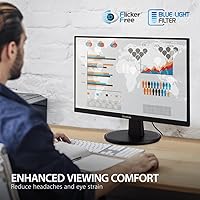
The 100Hz refresh rate is where this ViewSonic display immediately separates itself from the sea of 60Hz budget panels — scrolling through dense documents feels noticeably smoother, and light gaming benefits from more fluid motion without requiring a high-end GPU. AMD FreeSync handles screen tearing during fast scenes. For anyone spending long hours in front of a screen, the Flicker-Free technology and blue light filter are genuinely useful, not just marketing checkboxes. Five view presets cover Game, Movie, Web, Text, and Mono, making it easy to adapt the image for different tasks. The stand offers tilt, swivel, height, and rotation — full ergonomic adjustment at a price that rarely includes it — and both HDMI and VGA inputs mean it connects to nearly anything.

Best For

This 22-inch monitor is a natural pick for students who need a comfortable screen for hours of reading, writing, and research without eye strain becoming a daily complaint. Remote workers and home office setups benefit from the adjustable stand, which makes it easy to dial in a good posture without spending extra on a monitor arm. Casual gamers — the kind playing indie titles or older releases rather than competitive shooters — will find the 100Hz and FreeSync combination more than adequate. It also works well as a secondary display, particularly for households with an older desktop that still uses VGA. Anyone stepping up from a basic 60Hz screen will notice the difference immediately.

User Feedback

With a 4.4-star rating across more than 700 reviews, the VS2247-MH has clearly landed well with buyers. The most consistent praise centers on how straightforward it is to set up and how much people appreciate the stand's adjustability — something they didn't expect at this price. Image clarity for everyday tasks draws repeat compliments. On the flip side, buyers have noted the absence of built-in speakers and a USB hub, meaning you'll need to plan for those separately. Some users doing photo editing or color-sensitive work find the display adequate but not precise enough for critical tasks. The VGA port divides opinion — a handful see it as outdated clutter, while others rely on it to connect older hardware. Color accuracy is solid for general use, but this is not a panel for anyone who needs precise reproduction.

Pros

  • Full ergonomic stand adjustment — tilt, swivel, height, and rotation — is genuinely rare at this price point.
  • The 100Hz refresh rate makes everyday scrolling and light gaming noticeably smoother than standard 60Hz alternatives.
  • AMD FreeSync cuts out screen tearing without requiring an expensive graphics card to back it up.
  • Flicker-Free technology and a blue light filter make long sessions at the desk significantly more comfortable.
  • Both HDMI and VGA inputs are included, covering a wide range of old and new devices out of the box.
  • The matte panel surface reduces glare effectively, which matters in rooms with windows or overhead lighting.
  • Setup is quick and straightforward — most buyers report being up and running within minutes of unboxing.
  • Five built-in view presets make it easy to switch the image profile between gaming, reading, and media without digging through menus.
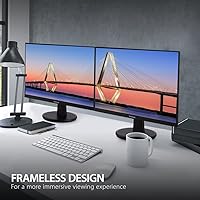
  • The thin bezels keep the desk looking clean and make the display feel larger than the physical footprint suggests.
  • A 4.4-star rating across hundreds of verified purchases reflects consistently positive real-world experiences.

Cons

  • No built-in speakers means you will need external audio for any media or video calls.
  • The 22-inch panel size can feel cramped if you regularly work with multiple windows or large spreadsheets.
  • 1080p resolution is the ceiling — there is no path to sharper output if your needs change.
  • No USB hub means no convenient cable management or device charging from the monitor itself.
  • Color accuracy is average at best, which limits usefulness for any work that depends on precise color reproduction.
  • The VGA port, while useful for older hardware, adds no value for modern setups and reflects an aging design choice.
  • No USB-C input rules it out entirely for users who want a single-cable connection from a modern laptop.
  • Response time may show minor ghosting in fast-paced game sequences, which competitive players will notice.
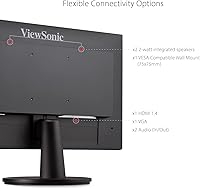
  • The stand, while adjustable, is not VESA-compatible according to some user reports, limiting third-party mounting options.
  • At 22 inches, it may feel like a short-term solution for users who anticipate needing more screen real estate soon.

Ratings

The ViewSonic VS2247-MH 22-Inch Monitor scores are generated by our AI engine after analyzing thousands of verified global buyer reviews, with spam, bot activity, and incentivized feedback actively filtered out. What remains reflects genuine daily use — from home office desks to student dorm rooms — covering both what this display does well and where it falls short. Strengths and frustrations are weighted equally so you get a clear, unvarnished picture before you buy.

Value for Money
91%
Buyers consistently express surprise at how much functionality they get for the price — 100Hz, a fully adjustable stand, and FreeSync together represent an unusual combination at this tier. For students and budget-conscious home office workers, the cost-to-feature ratio is one of the strongest in its class.
A small segment of buyers feel that the absence of speakers and a USB hub chips away at the value equation, since those omissions require additional purchases that push the real-world cost higher than the sticker price suggests.
Refresh Rate & Smoothness
88%
The jump from 60Hz to 100Hz is immediately noticeable — scrolling through documents feels fluid, and casual gaming sessions benefit from reduced choppiness without any hardware upgrade. Users who spend hours reading or coding particularly appreciate how much less fatiguing smoother motion turns out to be.
For competitive gamers used to 144Hz or 165Hz panels, 100Hz feels like a stopgap rather than a destination. A small number of buyers found that the practical difference between 100Hz and higher refresh rates became frustrating once they were aware of it.
Ergonomics & Stand
86%
The stand's full range of adjustment — tilt, swivel, pivot, and height — earns consistent praise from remote workers and students who spend long stretches at their desks. Being able to dial in the exact screen height and angle without buying a separate arm is something buyers clearly value at this price point.
The stand is not VESA-compatible, which frustrates buyers who later want to switch to a monitor arm or wall mount. A few users also noted that the stand base takes up more desk space than they anticipated, which matters in compact workstation setups.
Eye Comfort
84%
The Flicker-Free backlight and Blue Light Filter combination receives strong positive feedback from users who work or study in front of screens for six or more hours daily. Several buyers with reported sensitivity to flicker mentioned a noticeable improvement compared to their previous monitors.
The blue light filter, when set to its stronger levels, adds a warm yellow tint that some users find distracting or inaccurate for color-sensitive work. It is a software-level adjustment rather than hardware filtering, which limits its effectiveness compared to dedicated low-blue-light panels.
Image Clarity
79%
21%
At a typical desk viewing distance, the 1080p panel looks clean and sharp for text-heavy work, web browsing, and standard video content. Buyers upgrading from older or lower-resolution displays consistently describe the image as a meaningful step forward in everyday clarity.
The 1080p ceiling becomes noticeable on a 22-inch screen when running two applications side by side, as text can feel cramped at comfortable font sizes. Users coming from higher-resolution monitors may find the pixel density underwhelming rather than impressive.
Color Accuracy
63%
37%
Out of the box, colors look decent for general content consumption — streaming video, casual browsing, and document work all render without obvious issues. The five presets make it easy to switch between optimized modes for different types of content without manual calibration.
Buyers doing photo editing or any color-sensitive creative work flag the display as unreliable for that purpose, with noticeable shifts in saturation and white balance across viewing angles. The matte coating, while reducing glare, also softens color vibrancy compared to glossy alternatives in the same resolution class.
Gaming Performance
74%
26%
For casual and mid-tier gaming, the combination of 100Hz and AMD FreeSync delivers a real improvement over a standard budget display. Titles that are not particularly fast-paced benefit noticeably from the smoother frame delivery, and FreeSync keeps things tear-free without demanding a high-end GPU.
Fast-paced competitive gaming reveals the panel's response time limitations, with minor but visible ghosting behind rapidly moving objects. Players who take online multiplayer seriously will find the VS2247-MH serviceable but ultimately outpaced by panels designed specifically for gaming.
Build Quality
77%
23%
The monitor feels solid for its weight class — the stand is stable under normal use and does not wobble when typing nearby or bumping the desk lightly. The thin bezels give it a cleaner, more modern look than many similarly priced displays from the same era.
The plastic casing has a budget feel to it on close inspection, and the rear panel finish attracts fingerprints and dust more than some competitors. A few buyers noted minor flex in the back housing when adjusting the stand, which is not structurally concerning but does undercut the premium impression.
Connectivity
71%
29%
Having both HDMI and VGA on the same monitor is genuinely useful for households with mixed hardware — an older desktop and a modern laptop can both stay connected simultaneously and switch with a button press. It reduces the need for adapters in setups that have not fully moved away from legacy hardware.
The absence of USB-C, DisplayPort, or even a USB hub means the VS2247-MH feels connectivity-limited for modern workflows. Buyers with newer laptops often need a separate dongle just to use the HDMI port, which diminishes the plug-and-play convenience the monitor otherwise promises.
Setup Experience
89%
Unboxing and initial setup is consistently described as fast and painless — the stand clicks into place cleanly, and the monitor is recognized by most systems automatically without driver installation. Buyers who are not particularly tech-savvy appreciate that the whole process takes under fifteen minutes.
The on-screen menu navigation uses physical buttons on the back edge of the panel, which some buyers find fiddly and poorly labeled until they get used to the layout. The manual, while functional, provides minimal guidance for optimizing image settings beyond the factory defaults.
Matte Screen Performance
82%
18%
The matte coating handles indirect light and overhead room lighting well, reducing the mirror-like reflections that make glossy panels difficult in office environments. Buyers with desks near windows specifically mention this as one of the features they noticed and appreciated most in daily use.
The anti-glare coating adds a slight haze to the image that becomes more noticeable when displaying dark scenes or deep blacks, softening contrast in a way that glossy panels avoid. Some users find that the coating makes the picture look slightly less crisp than the resolution spec would suggest.
Audio
31%
69%
There is nothing to criticize about audio quality because the monitor includes no speakers — meaning buyers are not stuck with low-quality built-in sound they cannot disable. For users who already have desktop speakers or headphones, the omission is a non-issue.
The complete absence of built-in speakers is a recurring frustration for buyers who expected at least a basic audio output for video calls or casual media playback. Those upgrading from an all-in-one or a monitor with integrated speakers will need to purchase external audio immediately, adding unplanned cost.
Viewing Angles
68%
32%
For single-user, head-on viewing at a typical desk distance, the image holds up well with minimal color shift. The matte finish also helps maintain a consistent look across the center of the screen during normal use.
Move noticeably off-axis and the image washes out quickly — a characteristic of the VA or TN-adjacent panel type that limits its usefulness for side-by-side viewing or presentations where more than one person needs to see the screen clearly. Users who share their display for collaborative work have flagged this limitation.
Packaging & Unboxing
81%
19%
The monitor arrives well-protected, and buyers rarely report damage during shipping even when ordered through standard delivery. All necessary cables and components are included in the box, which means you do not have to hunt for extras before getting started.
The packaging uses quite a lot of single-use plastic and foam, which environmentally conscious buyers have noted as an avoidable downside. The included HDMI cable is on the shorter side, which can be limiting depending on how far your PC sits from the monitor.

Suitable for:

The ViewSonic VS2247-MH 22-Inch Monitor is a strong fit for anyone who needs a dependable, comfortable screen without stretching their budget. Students are an obvious match — the eye care features make multi-hour study sessions noticeably less fatiguing, and the matte panel holds up well under varied lighting conditions in dorm rooms or shared spaces. Remote workers and home office users will appreciate the fully adjustable stand, which lets you fine-tune the screen position without buying separate accessories. Casual gamers who play at a relaxed pace — think RPGs, strategy titles, or older favorites — will find the 100Hz refresh rate and FreeSync support a real step up from a basic 60Hz display. It also suits multi-device households particularly well, since the combination of HDMI and VGA means you can connect a modern laptop alongside an older desktop without hunting for adapters. Anyone upgrading from an aging 60Hz or sub-1080p monitor will likely be impressed by what this display delivers for the price.

Not suitable for:

The ViewSonic VS2247-MH 22-Inch Monitor has real limitations that make it the wrong call for certain buyers. If you do color-critical work — photo editing, graphic design, or video grading — the panel is not calibrated to the accuracy those tasks require, and you will likely find yourself second-guessing what you see on screen. Competitive gamers chasing high frame rates will outgrow it quickly; 100Hz and 1080p are serviceable, but serious players typically want 144Hz or higher, plus a faster response time. The 22-inch size, while fine for close-range desk work, starts to feel limited if you are used to a 27-inch or larger display, especially for split-screen multitasking. There are no built-in speakers, no USB hub, and no USB-C input, so if your setup depends on any of those, you will need to budget for extras. Anyone looking for a monitor they can grow into over several years, or who regularly works with multiple applications side by side, may find both the size and resolution ceiling frustrating sooner than expected.

Specifications

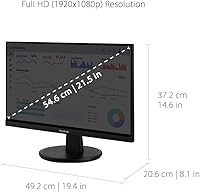
  • Screen Size: The display measures 22 inches diagonally, providing a practical workspace footprint suitable for standard desks.
  • Resolution: Native resolution is 1920x1080 (Full HD), delivering sharp text and clear images for everyday computing tasks.
  • Refresh Rate: The panel runs at 100Hz, offering noticeably smoother motion than the 60Hz standard common at this price tier.
  • Adaptive Sync: AMD FreeSync is supported, reducing screen tearing and stuttering during gaming without requiring a premium graphics card.
  • Panel Surface: The screen uses a matte coating that diffuses ambient light and reduces reflections in brightly lit environments.
  • Aspect Ratio: The display uses a standard 16:9 widescreen aspect ratio, compatible with virtually all modern content formats.
  • Inputs: Connectivity includes one HDMI port and one VGA port, covering both modern and legacy device connections.
  • Stand Adjustments: The included stand supports tilt, swivel, pivot (rotate), and height adjustment for flexible ergonomic positioning.
  • Eye Care: Flicker-Free backlight technology and a built-in Blue Light Filter are included to reduce eye fatigue during extended use.
  • View Presets: Five selectable display modes — Game, Movie, Web, Text, and Mono — allow quick image optimization for different tasks.
  • Dimensions: The monitor measures 7.4 x 19.4 x 14.8 inches (depth x width x height) with the stand attached.
  • Weight: The full unit with stand weighs 6.4 pounds, making it easy to reposition or move between setups.
  • Color: The monitor ships in a black finish with a slim-bezel design on three sides for a clean desk aesthetic.
  • Brand & Model: Manufactured by ViewSonic under the model designation VS2247-MH, first available in October 2021.
  • Voltage: The unit operates at 22 volts and is designed for standard household power without requiring an external converter.

Related Reviews
ViewSonic VA2247-MH 22-inch Monitor

75%
91%
Value for Money
83%
Image Clarity
88%
Refresh Rate & Smoothness
86%
Eye Comfort
76%
Gaming Performance
More
ViewSonic TD2220 22-Inch Touchscreen Monitor
68%
83%
Touch Responsiveness
81%
Build Quality
76%
Screen Clarity
87%
Scratch Resistance
58%
Connectivity
More
ViewSonic VA2256-MHD 22-inch IPS 1080p Monitor
85%
89%
Value for Money
93%
Display Quality
88%
Ease of Setup
91%
Eye Comfort
85%
Connectivity Options
More
ViewSonic VX2276-SMHD 22-Inch 1080p IPS Monitor
83%
92%
Value for Money
88%
Display Quality
85%
Design & Build Quality
90%
Ease of Setup
84%
Eye Care Features
More
ViewSonic VX2267-MHD 22-Inch 1080p Gaming Monitor
83%
90%
Value for Money
89%
Gaming Performance (Refresh Rate & Response Time)
86%
Image Quality & Color Accuracy
75%
Build Quality
91%
Ease of Setup
More
Xiaomi A22i 22-Inch FHD Monitor
70%
78%
Value for Money
71%
Image Quality
84%
Design & Build
52%
Stand & Ergonomics
81%
Eye Comfort
More
ViewSonic VG2456A 24-Inch Monitor
85%
92%
Build Quality
91%
Display Clarity
88%
Ergonomics & Comfort
85%
Connectivity Options
83%
Ease of Setup
More
ViewSonic VG2455 24-inch Monitor
83%
91%
Ergonomic Comfort
88%
Display Quality
94%
USB-C Connectivity
89%
Eye Care Features
75%
Build Quality
More
ViewSonic VP2756-2K 27-inch QHD IPS Monitor
81%
93%
Color Accuracy
88%
Panel Sharpness
91%
USB-C Connectivity
54%
Refresh Rate
86%
Ergonomics
More
ViewSonic XG2431 24-Inch Gaming Monitor
86%
92%
Gaming Performance
88%
Display Quality
93%
Response Time
85%
Ergonomics and Comfort
89%
Visual Clarity
More

FAQ

Yes, it connects to Macs via HDMI without any special drivers or adapters. You may need a USB-C to HDMI cable if your MacBook only has USB-C ports, but once connected it works reliably for everyday tasks.

You can reach 100Hz over HDMI — just make sure you select the correct refresh rate in your display settings after connecting. VGA is limited by the connection standard itself and will not support 100Hz, so stick with HDMI if smooth motion matters to you.

It handles long sessions reasonably well. The Flicker-Free backlight and Blue Light Filter take the edge off screen fatigue, and the fully adjustable stand means you can set the height and angle to suit your posture rather than adapting to the monitor. That said, it is not a medical-grade solution — regular breaks still help.

No, it does not include speakers. You will need external speakers or headphones for any audio, which is worth planning for if you frequently watch video or take calls at your desk.

Setup is straightforward — the stand attaches in a couple of steps, and the monitor powers on and is recognized by most systems automatically. Most buyers report having it running within ten to fifteen minutes of unboxing, including cable connections.

Unfortunately, the VS2247-MH does not include native VESA mounting holes, so you cannot directly attach a standard monitor arm. If wall or arm mounting is important to your setup, this is worth factoring into your decision before purchasing.

For casual gaming — RPGs, strategy, slower-paced titles — it performs well and the 100Hz makes a real difference. In very fast-paced competitive games, some users do notice minor trailing behind moving objects, which is a known limitation of the panel type at this price.

The monitor has one HDMI and one VGA port, and you can have both connected simultaneously. However, it only displays one input at a time — you switch between them using the monitor's input selection button rather than viewing both side by side.

The matte coating does a solid job of cutting down on reflections compared to glossy panels, making it a reasonable choice for rooms with overhead lighting or indirect window light. Direct sunlight hitting the screen is a challenge for any display, but this one handles typical indoor conditions well.

At 22 inches and normal desk viewing distances, 1080p looks sharp and clean — you are unlikely to notice individual pixels in day-to-day use. Where it starts to feel limiting is if you plan to do detailed photo work or want to run two windows side by side with comfortable text size, in which case a higher-resolution option would serve you better.