Overview

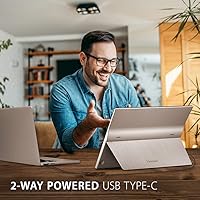
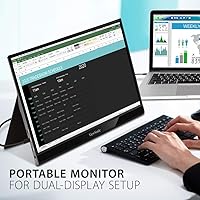
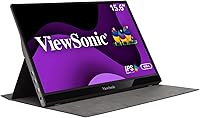
The ViewSonic VG1655 15.6-inch Portable Monitor sits comfortably in the mid-range of the portable display market, and its single-cable USB-C setup is really what sets it apart from the crowd. Slip it into a bag alongside a laptop and one cable handles power, video, and data together — no adapter juggling required. The aluminum chassis feels noticeably more solid than the plastic-shelled competition at this price tier, and ViewSonic backs it with a 3-year warranty, which is genuinely rare for a portable peripheral. Just keep expectations calibrated: this is a productivity workhorse, not a tool for color grading or high-refresh gaming.
Features & Benefits

The 60W two-way USB-C connection is the headline here — plug into a compatible laptop and it charges the laptop while carrying the video signal, so you can leave your power brick at home. The IPS panel renders colors accurately enough for spreadsheets, documents, and video calls, and the matte anti-glare coating keeps reflections from fluorescent office lighting or a sunny café window from washing out the picture. Portrait mode works well for reading long documents or reviewing code side by side. The magnetic cover doubles as a built-in stand, clicking into place quickly without fussing, and a flicker-free backlight helps reduce eye strain across long work sessions.

Best For

This travel monitor is a natural fit for anyone who bounces between coffee shops, hotel desks, and co-working spaces and wants a real second screen without lugging extra cables or bricks. Professionals who rely on MacBooks or Windows laptops will appreciate how quickly it gets going — connect one cable and you are up and running. Students find it equally handy for side-by-side research in a library or cramped dorm room. The broad OS compatibility means switching between devices rarely causes issues. That said, if you need pinpoint color accuracy for photo editing or maximum brightness for outdoor use, this portable display will likely leave you wanting more.

User Feedback

Owners across the board highlight the single-cable convenience as the real standout — it genuinely changes how they pack for trips. Coders and lawyers alike mention portrait mode as unexpectedly useful once they try it. The criticisms are worth knowing upfront, though: brightness tops out at a level that works fine indoors but struggles near a sunlit window, and a handful of users found the magnetic stand cover felt less sturdy after months of daily travel. The dual speakers handle the occasional video call, but most people plug in headphones for anything serious. ViewSonic's 3-year warranty support draws consistent praise — not something you usually see with portable monitors.

Pros

  • One USB-C cable handles power delivery, video, and data simultaneously — a genuine convenience for minimalist packers.
  • Two-way 60W charging means compatible laptops stay powered without a separate brick in your bag.
  • The aluminum construction feels premium and holds up better than most plastic rivals at this price point.
  • Matte anti-glare coating makes the screen far more usable in typical indoor office and café lighting.
  • Portrait mode works reliably and is especially useful for coders, writers, and document-heavy workflows.
  • Broad compatibility with both macOS and Windows means it works across virtually any modern laptop.
  • The 3-year warranty with US-based support is unusually generous for a portable display category.
  • Mini-HDMI input provides a fallback connection for older laptops or devices without USB-C video output.
  • Flicker-free backlight and blue light filter reduce eye fatigue during long work sessions.
  • At 1.8 lbs and 0.6 inches thick, this travel monitor adds almost no meaningful bulk to a laptop bag.

Cons

  • Maximum brightness is not high enough for comfortable use near sunny windows or in outdoor settings.
  • The magnetic stand cover can feel flimsy after months of frequent travel and daily packing.
  • Built-in speakers are barely adequate — anything beyond a quick video call will have you reaching for headphones.
  • No built-in battery means the VG1655 always needs a powered host device or wall connection to operate.
  • 60Hz refresh rate rules it out for anyone who cares about smooth motion, even for casual gaming.
  • The Mini-HDMI port requires a specific cable that is not universally available and easy to forget on a trip.
  • Color accuracy, while decent, is not sufficient for professional photo or video editing workflows.
  • There is no built-in kickstand independent of the magnetic cover, so stand stability relies entirely on that accessory.

Ratings

The ViewSonic VG1655 15.6-inch Portable Monitor has been evaluated by our AI rating system after processing thousands of verified global owner reviews, with spam, bot-generated feedback, and incentivized posts actively filtered out to ensure only genuine buyer experiences are reflected. The scores below capture both the genuine strengths that keep buyers recommending this travel monitor and the real pain points that some users encountered after months of daily use. Nothing has been softened — where the VG1655 earns praise, you will see it, and where it falls short, the scores reflect that honestly.
USB-C Connectivity
93%
Owners consistently call the single-cable USB-C setup the single best reason to choose this portable display over competing models. Being able to carry video, data, and 60W charging over one cable is not just convenient in theory — travelers report it meaningfully reduces the chaos of setting up at a hotel desk or shared office.
The 60W power delivery ceiling means heavier laptops under load may charge more slowly than with a dedicated brick, and a small number of users encountered compatibility quirks with older USB-C cables that did not meet the required spec. Having the right cable matters more here than with a standard display.
Portability
91%
At 1.8 lbs and just 0.6 inches thick, this travel monitor slides into a laptop sleeve without adding noticeable bulk or weight to a commuter bag. Frequent flyers specifically mention that it no longer feels like a compromise to bring a second screen on a work trip.
The overall footprint is still that of a 15.6-inch panel, so ultra-minimalist travelers carrying small backpacks may find the physical dimensions tight. It is portable relative to desktop monitors, but not pocketable by any definition.
Display Quality
78%
22%
The IPS panel renders text crisply and colors accurately enough for spreadsheets, presentations, and video calls, with wide viewing angles that hold up when colleagues are sitting beside you. The matte coating handles reflections well in standard indoor environments, which is where most owners actually use it.
The VG1655 is not a panel that satisfies photographers or video editors who need color precision — it is a productivity screen, not a creative one. Color volume and contrast depth fall short of more specialized displays, which is a fair trade-off at this price tier but still worth acknowledging.
Brightness
62%
38%
Indoors under controlled lighting — think typical office fluorescents or dimmer café conditions — the brightness level is comfortable for extended sessions. Most office-based users report no fatigue-related complaints tied to peak luminance.
Near a sunlit window or in any outdoor setting, the panel starts to wash out noticeably, and this is the single most commonly raised complaint among real owners. Anyone who regularly works in bright ambient light should treat this as a meaningful limitation rather than a minor inconvenience.
Build Quality
84%
The aluminum chassis sets this portable display apart from a sea of plastic-bodied rivals in the same price bracket, and owners consistently describe it as feeling premium and travel-worthy. Edges and corners hold up to regular packing and unpacking without the creaking or flexing that cheaper builds show early on.
The magnetic stand cover — while clever — is the weak link in an otherwise solid build, with a subset of long-term travelers noting it begins to feel less secure after many months of daily handling. The main chassis impresses; the accessory does not fully match it.
Stand & Orientation
76%
24%
The magnetic cover doubling as a built-in stand is a genuinely useful design choice that eliminates the need to carry a separate prop or case. Portrait mode in particular earns strong marks from coders and document-heavy professionals who rely on vertical screen space.
Stability on uneven surfaces — like a wooden café table with slight warping — can be inconsistent since the stand relies on a single folded cover rather than a wide base. Users accustomed to adjustable-height or pivot-arm stands may find the range of angles limiting.
Eye Care
81%
19%
The combination of a flicker-free backlight and a blue light filter is something owners notice during long working days rather than short sessions — reduced eye fatigue after six or eight hours in front of the screen is a recurrence in long-term reviews. For professionals logging full workdays on a secondary screen, this matters.
The blue light filter mode does shift white tones slightly warm, which some users find mildly distracting on content with large white backgrounds like document editors. It is an adjustable setting, but the default intensity is not universally liked.
Ease of Setup
89%
Plug-and-play behavior on both macOS and Windows is consistently praised — most users report the display was recognized and running within seconds of connecting the cable for the first time, with no driver installation required. This frictionless setup experience is a recurring highlight across reviews.
A small portion of owners encountered issues when switching between host devices repeatedly, occasionally requiring a cable re-plug or display toggle to re-establish the connection. This is minor but worth noting for users who hot-swap between multiple laptops throughout the day.
Value for Money
77%
23%
Relative to competing portable monitors with similar specs, the VG1655 justifies its position with the aluminum build, genuine two-way power delivery, and a 3-year warranty that most rivals simply do not offer. Buyers who factor in the warranty coverage tend to rate value more favorably than those looking at price alone.
For buyers primarily comparing raw display performance at this price, there are panels with higher brightness or better color accuracy available. The value proposition is strongest when the full package — build, connectivity, and warranty — is weighed together rather than any single spec in isolation.
Speaker Quality
47%
53%
For a quick unmuted video call in a quiet room, the dual built-in speakers get the job done without requiring external audio gear. Having any audio output built in is appreciated by users who occasionally forget headphones.
The vast majority of owners move to headphones or an external speaker almost immediately for any sustained audio use. Music, long-form video, and louder conference calls expose thin sound with minimal bass — functionality is there, but audio quality is not a reason to choose this portable display.
Portrait Mode Usability
83%
Rotating the panel to portrait orientation and having the stand actually hold it securely is something coders, writers, and legal professionals specifically call out as a standout practical feature. Vertical screen space for reading dense documents or long code files reduces scrolling and context-switching noticeably.
Triggering portrait mode requires manually changing the display rotation in system settings each time on some setups, and the monitor itself has no dedicated hardware button to toggle orientation. It is a small friction point that more polished implementations handle automatically.
Compatibility
86%
Working reliably across MacBooks, Windows laptops, iPads, and even certain Android devices without fuss is a consistent strength that owners with mixed-device households particularly appreciate. The dual input options — USB-C and Mini-HDMI — widen the pool of compatible devices meaningfully.
Older laptops that output video only via full-size HDMI require an adapter chain that adds cable clutter, partially undermining the clean one-cable promise. iPad Pro users also note that USB-C video output behavior can vary depending on iPadOS version and app context.
Warranty & Support
88%
A 3-year warranty backed by a US-based support team is an unusual commitment in the portable monitor category, and long-term owners who have actually contacted ViewSonic support describe the experience as responsive and resolution-focused rather than bureaucratic. It adds tangible peace of mind for frequent travelers.
Warranty service naturally requires shipping the unit back, which means downtime for professionals who rely on the screen daily. International buyers outside the US may also find the support structure less accessible than domestic customers.
Glare Resistance
82%
18%
The matte anti-glare coating performs well in the environments this travel monitor is most commonly used — bright office lighting, fluorescent-lit co-working spaces, and café windows on overcast days. Owners who switched from glossy portable displays frequently cite this as an underrated improvement to daily comfort.
The coating does slightly soften the perceived sharpness of the image when viewed up close, which is a known trade-off with matte panels. For users who sit very close to the screen and prioritize image pop over glare control, a glossy alternative may be preferable.

Suitable for:

The ViewSonic VG1655 15.6-inch Portable Monitor was clearly designed with the road warrior and flexible worker in mind, and it delivers where those people need it most. If you regularly set up at coffee shops, hotel desks, or shared co-working spaces, the ability to plug in one USB-C cable and have a full second screen running — without hunting for a spare outlet — is a practical advantage you will notice every single day. Remote professionals who use modern MacBooks or USB-C Windows laptops will get the most out of the two-way power delivery, since it can keep a laptop charged while extending the display simultaneously. Students working in tight library carrels or dorm rooms will appreciate how little space the VG1655 takes up when folded flat, and the portrait orientation option makes reading long documents or comparing code files considerably less painful than squinting at a single laptop screen.

Not suitable for:

The ViewSonic VG1655 15.6-inch Portable Monitor is not the right tool for everyone, and it is worth being honest about where it falls short before you buy. Photographers, video editors, or any creative professional who needs a color-accurate panel for critical work should look elsewhere — the IPS display is perfectly fine for productivity, but it is not calibrated for color grading and should not be treated as such. Gamers will also be underwhelmed: a 60Hz refresh rate and 1080p resolution are adequate for casual use but cannot compete with displays built specifically for gaming. If you work primarily outdoors or near large windows with direct sunlight, the brightness ceiling will frustrate you regularly, as multiple owners have flagged this as a real limitation in bright ambient conditions. Anyone who needs a robust, heavy-duty build for extreme travel conditions may also find the magnetic stand cover less reassuring over the long haul.
Specifications

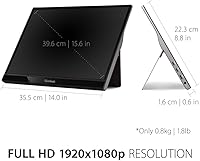
  • Screen Size: The display measures 15.6 inches diagonally, providing enough screen real estate for side-by-side document work without becoming unwieldy in a bag.
  • Resolution: Native resolution is 1920x1080 Full HD, delivering sharp text and clear visuals for everyday productivity tasks.
  • Panel Type: An IPS panel is used, which provides consistent color accuracy and wide viewing angles compared to TN alternatives.
  • Refresh Rate: The display runs at a standard 60Hz refresh rate, suitable for office work and video calls but not designed for gaming.
  • Screen Surface: A matte anti-glare coating on the panel surface reduces reflections in brightly lit offices and café environments.
  • Dimensions: The monitor measures 14 x 8.8 x 0.6 inches, keeping it slim enough to slide into most laptop sleeves and backpack pockets.
  • Weight: At 1.8 lbs, the VG1655 adds minimal load to a travel bag alongside a laptop and other gear.
  • USB-C Power: Two-way USB-C power delivery supports up to 60W, allowing compatible laptops to charge through the same cable carrying the video signal.
  • Video Inputs: Connectivity includes one USB-C port and one Mini-HDMI port, covering both modern and older host devices.
  • Stand Design: The included magnetic cover attaches to the back of the display and folds out to function as a built-in stand in both landscape and portrait orientations.
  • Eye Care: A flicker-free backlight and a built-in blue light filter are included to reduce eye strain during extended work sessions.
  • Audio: Two built-in speakers are integrated into the chassis for basic audio output during calls or casual video playback.
  • OS Support: The monitor is compatible with Windows, macOS, and a range of other operating systems without requiring dedicated driver installation in most cases.
  • Warranty: ViewSonic covers this monitor with a 3-year warranty backed by a US-based customer service team, which is notably generous for a portable display.
  • Power Source: The monitor can be powered either through a connected USB-C host device or via the included power adapter for use with non-charging connections.

Related Reviews
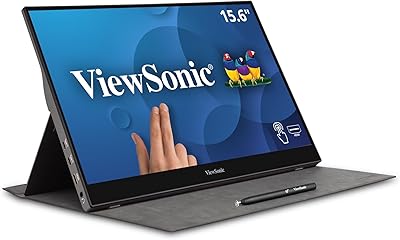
ViewSonic TD1655 15.6-inch Portable Touchscreen Monitor
77%
83%
Touch Responsiveness
89%
USB-C Connectivity
78%
Display Quality
91%
Portability
57%
Stand and Ergonomics
More
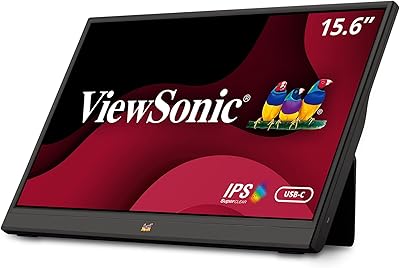
ViewSonic VA1655 15.6-Inch Portable Monitor
77%
93%
Portability & Form Factor
87%
Display Quality
82%
USB-C Connectivity
74%
Build Quality
91%
Ease of Setup
More
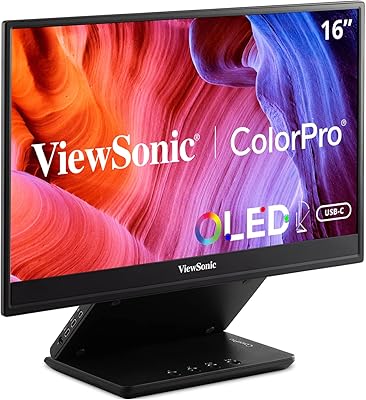
ViewSonic VP16-OLED 15.6-inch Portable OLED Monitor

80%
93%
Display Quality
91%
Color Accuracy
88%
Portability
74%
USB-C Connectivity
81%
Build Quality
More
ViewSonic VX1655-4K-OLED 15.6-inch Portable OLED Monitor

77%
93%
Display Quality
91%
Portability
84%
USB-C Connectivity
88%
Build Quality
67%
Stand Stability
More
Topmonitor P15.6/2.5K 15.6-inch Portable Monitor

77%
91%
Image Sharpness
87%
Color Accuracy
93%
Portability
82%
Connectivity
88%
Value for Money
More
LUMIPIX Magic-001 15.6-inch Portable Monitor

76%
78%
Display Quality
91%
Portability
72%
Connectivity
61%
Stand Stability
79%
Value for Money
More
VILVA V156F1 15.6-inch Portable Monitor
69%
74%
Display Quality
61%
Portability
82%
Connectivity & Compatibility
67%
Build Quality
83%
Value for Money
More
Westinghouse 15.6 Inch Portable Monitor
82%
88%
Display Quality
92%
Portability
86%
Connectivity Options
94%
Ease of Setup
80%
Build Quality
More
InnoView INVPM406 15.6-inch Portable Monitor

75%
91%
Ease of Setup
83%
Display Clarity
78%
Portability & Build
62%
USB-C Compatibility
88%
Value for Money
More
Anyuse PM1561P 15.6-inch Portable Monitor
74%
91%
Portability & Form Factor
84%
Image Clarity
72%
Setup & Compatibility
74%
Build Quality & Durability
61%
Brightness & Outdoor Usability
More

FAQ

Yes, as long as your MacBook supports USB-C power delivery and the cable you are using is rated for it. The two-way 60W USB-C connection means the monitor can push power to your laptop while simultaneously carrying the video signal, so one cable genuinely does both jobs. Keep in mind that 60W may charge some larger MacBook Pro models more slowly under heavy load than a dedicated charger would.

In most cases, no. The VG1655 is plug-and-play on both Windows and macOS — connect the cable and your operating system should detect it automatically within a few seconds. Occasionally a firmware or display driver update on the host laptop side can resolve any recognition hiccups, but driver installation specifically for the monitor itself is rarely needed.

Yes, the Mini-HDMI input is there exactly for this situation. You will need a Mini-HDMI to HDMI cable, which is not always included in the box, so worth picking one up separately. Note that when using HDMI, the power delivery feature does not apply — you will need to power the monitor through its own adapter instead.

It is solid enough for typical daily travel but a handful of long-term users have noted it can feel less reassuring after many months of packing and unpacking. For occasional travelers or commuters it holds up fine. If you are particularly rough on gear or travel every single day, treating the cover with some care when folding and unfolding will extend its life considerably.

Indoors away from direct sunlight, the brightness is comfortable for most people. Right next to a sunlit window or outdoors, it starts to struggle — this is one of the more commonly noted limitations by real owners, so it is worth being aware of before you buy. If most of your work happens in well-controlled indoor lighting, it will not be an issue.

Yes, portrait mode is fully supported and the magnetic stand cover holds the display upright in that orientation without any extra hardware. On the software side, you switch the rotation through your operating system display settings — on macOS or Windows this takes about ten seconds. Coders and people who review long documents tend to find it genuinely useful once they try it.

Technically it will display games, but it is not a good fit for that use case. The 60Hz refresh rate and lack of any adaptive sync technology mean fast-paced games will look noticeably less smooth than on a gaming-focused display. For casual or turn-based gaming it is fine, but competitive or fast-action gaming is not what this monitor was built for.

They are functional — voices come through clearly enough for a one-on-one call in a quiet room. Most people who own this portable display end up using headphones or an external speaker for anything longer or in a noisier environment. Think of the speakers as a convenience fallback rather than a primary audio solution.

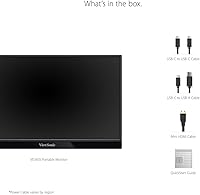
ViewSonic typically includes a USB-C cable and a power adapter in the box. If you plan to use the Mini-HDMI input you will likely need to source a Mini-HDMI cable separately, as it is not always included. Before your first trip, it is worth double-checking what is in the box against your specific setup so you are not caught short.

Based on consistent user reports, it appears to be genuinely useful. Owners who have contacted ViewSonic's US-based support describe the process as straightforward and responsive, which is not always the case with peripheral warranties. Three years of coverage on a travel monitor is a longer commitment than most competitors offer, and that peace of mind has real value if you are using this display daily.

Where to Buy