


Overview

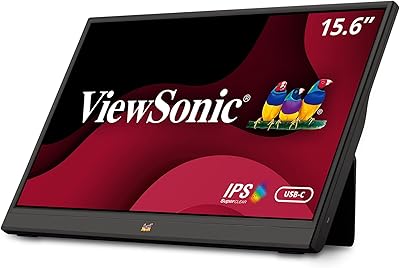
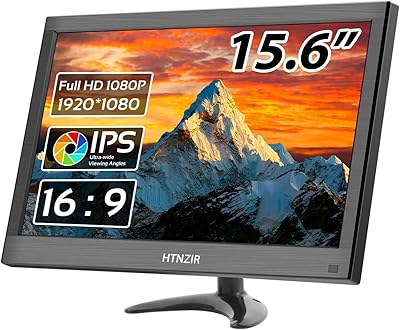
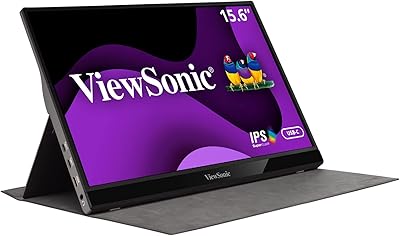
The CAPERAVE CF15 15.6-inch Portable Monitor enters a crowded budget category with a straightforward pitch: a slim, travel-ready second screen that you can toss in a backpack without thinking twice. At under half an inch thick and weighing around 3.6 pounds, it carries well for its size. Connectivity is kept simple — one USB-C cable or a standard HDMI connection gets you up and running without installing anything. CAPERAVE is a relatively new name in this space, so expectations should stay grounded. This is a solid entry-level display, not a tool for color grading or precision creative work. Think productivity on the road, not professional studio output.

Features & Benefits

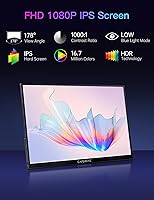
The 15.6-inch IPS matte panel delivers 1080p resolution with 178-degree viewing angles, which means colors hold up well even when someone is watching from the side. The matte anti-glare finish handles reflections better than glossy alternatives, a practical advantage in office or café settings. Single-cable USB-C setup is the standout convenience here — plug in and you have both video and power in one go, provided your device supports Thunderbolt 3 or USB 3.1 DP Alt-Mode. That last part matters: not every USB-C port works. The HDMI port covers consoles and older laptops without fuss. An adjustable built-in kickstand removes the need for a separate stand, and the integrated speakers handle basic audio when earphones are not available.

Best For

The CF15 makes most sense for remote workers and students who regularly set up outside a fixed desk — hotel rooms, libraries, co-working spaces. If you travel with a laptop and find yourself wishing for a second window of screen real estate, this travel screen fits that need without adding much bulk to your bag. Console gamers will also find it handy: HDMI compatibility with the Switch, PS4, PS5, and Xbox makes it a capable portable gaming display for trips or tight spaces. Where it falls short is for buyers who need high color accuracy, fast refresh rates, or outdoor-worthy brightness. If those are priorities, this price tier will not stretch far enough.

User Feedback

Buyers tend to praise the ease of setup — most report being up and running within minutes, which counts for a lot in this category. Portability also gets consistent positive mentions; people appreciate that the CF15 actually fits in a standard laptop bag. On the downside, the 250-nit brightness is a recurring complaint: dim in bright rooms, and essentially unusable in direct sunlight. The kickstand, while convenient, can wobble on soft or uneven surfaces like a couch cushion. Speaker quality rarely draws praise — it works, but no one is using it for serious listening. A few users have noted USB-C compatibility issues with specific laptops, which usually comes down to DP Alt-Mode not being supported on their device.

Pros

  • Plug-and-play setup requires no driver installation — just connect and go.
  • Slim profile and 3.65-pound weight make it genuinely easy to pack in a laptop bag.
  • HDMI port adds broad compatibility with consoles, older laptops, and desktops.
  • IPS panel delivers wide 178-degree viewing angles with decent color consistency.
  • Built-in adjustable kickstand means one less accessory to carry or buy separately.
  • Blue light filter and flicker-free display reduce eye strain during long work sessions.
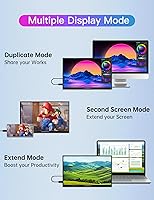
  • Supports multiple display modes including Extended, Portrait, and Second Screen.
  • USB-C single-cable connection handles both power and video when your device supports it.
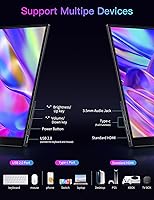
  • Compatible with a wide range of devices: Mac, PC, iPad, Switch, PS4, PS5, and Xbox.
  • Matte anti-glare screen surface reduces reflections in typical indoor environments.

Cons

  • 250-nit brightness is underwhelming in well-lit rooms and nearly unusable outdoors.
  • USB-C connectivity requires DP Alt-Mode support — many users discover their device is incompatible after purchase.
  • The kickstand can wobble or tip on soft, uneven surfaces like beds or couch cushions.
  • Built-in speakers are too weak for any real audio use beyond basic system sounds.
  • No carrying case or protective sleeve is included, which is a notable omission for a travel-focused product.
  • CAPERAVE is a relatively new and unproven brand, raising questions about long-term reliability and warranty support.
  • At 3.65 pounds, it is heavier than some competing portable monitors in the same screen-size range.
  • No built-in battery — the monitor always requires an external power source, limiting flexibility.

Ratings

The scores below reflect AI-driven analysis of thousands of verified global user reviews for the CAPERAVE CF15 15.6-inch Portable Monitor, with spam, bot activity, and incentivized feedback actively filtered out to ensure the ratings represent genuine buyer experiences. Every category captures both what this travel screen does well and where real users have consistently run into frustrations, giving you an honest picture before you commit. Whether you are weighing portability against display performance or comparing value across the portable monitor market, these scores are designed to surface the trade-offs that matter most.

Portability & Build
83%
Travelers consistently appreciate how slim and light the CF15 is for a 15.6-inch screen — it slides into a standard laptop bag without noticeably bulking it up. Most users report it feels well-constructed for the price point, with a sturdy enough chassis that holds up to daily packing and unpacking.
At 3.65 pounds, it is noticeably heavier than some competing portable monitors with the same screen size, which adds up on longer travel days. There is also no included carrying case, so the screen is exposed unless you source a separate sleeve — a meaningful oversight for a product aimed squarely at travelers.
Display Quality
76%
24%
The IPS matte panel produces decent color consistency across a wide viewing angle, which makes working on documents or watching video at non-ideal angles a comfortable experience. Reviewers note that for everyday productivity tasks and casual video playback, the 1080p resolution holds up cleanly without visible pixelation.
This is not a display for color-sensitive work — photo editors and designers who need accurate, calibrated output will find the panel underwhelming. Some users also noted that in default factory settings, colors can look slightly oversaturated, requiring manual adjustment to reach a more neutral presentation.
Brightness
51%
49%
In controlled indoor environments — a dim hotel room, an evening co-working space, or a shaded desk — the 250-nit output is serviceable and does not cause obvious visibility problems. Users who primarily work in low to moderate ambient light rarely flag brightness as a daily issue.
250 nits is a recurring complaint in user reviews, particularly from anyone using this travel screen near windows or in brightly lit meeting rooms, where the image washes out noticeably. Outdoor use is essentially impractical — direct sunlight makes the display nearly impossible to read without significant squinting and repositioning.
Setup & Ease of Use
91%
The plug-and-play experience is one of the most praised aspects across buyer reviews — users describe connecting the monitor and having it detected within seconds, with no driver downloads or configuration menus to navigate. Remote workers especially appreciate that they can be up and running in a new location within a minute of sitting down.
The one caveat that catches buyers off guard is USB-C compatibility — if your laptop's USB-C port does not support DP Alt-Mode, the single-cable connection simply will not work for video. A small number of users also reported that on certain devices the monitor was not recognized immediately and required a reboot or port swap to resolve.
Value for Money
82%
18%
For budget-conscious buyers, this portable monitor genuinely delivers more than its price tag implies — an IPS panel, kickstand, HDMI, and plug-and-play USB-C in a single package is a strong combination at this tier. Students and remote workers on a tight budget frequently rate it as one of the better-value portable monitors they have owned.
The value proposition weakens for anyone who needs more than basic display performance — buyers who later wished for better brightness or higher refresh rates often feel the savings were not worth the trade-offs. Long-term durability at this price tier is also an open question, with some users reporting build issues after six or more months of regular daily use.
Connectivity
78%
22%
Having both USB-C and HDMI on the same portable monitor expands its usefulness considerably — HDMI covers consoles, older laptops, and desktops, while USB-C handles the single-cable setup for supported devices. Buyers who travel between different devices and setups particularly appreciate having two reliable input paths without needing a separate adapter.
The USB-C DP Alt-Mode requirement is a real friction point — buyers discover after purchase that their device's USB-C port does not support video output, forcing them to use HDMI and source a separate power adapter. No HDMI cable is included in the box, which is a minor but frustrating omission for a product in this category.
Kickstand Design
69%
31%
The integrated kickstand is genuinely useful for desk setups — it folds out cleanly, offers a workable range of angles, and removes the need to prop the monitor against a bag or buy a separate stand. Users working at hotel desks or co-working tables find it stable and convenient for full-length work sessions.
On anything other than a hard, flat surface the kickstand becomes unreliable — on a couch, bed, or slightly uneven table it can wobble, shift, or tip forward during use. A few users have also noted that the hinge feels less robust after extended daily use, showing early signs of loosening over time.
Speaker Quality
44%
56%
For quick video calls or catching a system alert without reaching for headphones, the built-in speakers handle the bare minimum adequately. Users who only need a fallback audio source in a quiet hotel room or during a brief clip find them just serviceable enough for that limited purpose.
Most buyers are disappointed by the audio quality — the output is thin, low in volume, and has virtually no bass response, making it unsuitable for music, movies, or anything beyond background listening at low stakes. Reviewers consistently treat the speakers as a last-resort feature rather than a functional audio solution.
USB-C Compatibility
63%
37%
When the USB-C single-cable connection works, buyers love it — one cable handling both video and power is genuinely convenient, especially for MacBook users and those who care about clean cable management at a desk. The plug-and-play nature means no fiddling with settings when the host device properly supports video output.
The DP Alt-Mode requirement trips up a significant portion of buyers — USB-C ports without video output capability are common on budget and mid-range laptops, and the product listing does not always communicate this requirement with enough clarity. Several one-star reviews trace back to this exact issue, where buyers assumed any USB-C port would work.
Viewing Angles
84%
The 178-degree IPS viewing angle is a genuine strength — whether a colleague leans in to look at the same screen or you are watching video with someone seated to the side, the image stays accurate and color-consistent. Buyers regularly highlight this as one of the display's more impressive traits at this price point.
While the angles are wide, the low 250-nit brightness ceiling means that even at ideal viewing positions the image can look dim compared to the laptop screens most users are accustomed to. In practice, the wide angle is most beneficial in collaborative settings rather than solo use, where the dimness tends to stand out more.
Eye Comfort
79%
21%
The combination of flicker-free backlight and built-in blue light filter is a meaningful benefit for users who clock long hours at their screen — developers, writers, and students using this portable monitor for four or more hours at a stretch tend to report less eye fatigue than with typical budget displays.
The 250-nit brightness cap can indirectly contribute to eye strain in well-lit rooms, where users push the backlight to maximum and squint slightly to compensate, partly undermining the flicker-free benefit. The blue light filter setting also shifts the color temperature noticeably toward yellow, which some users find distracting during color-sensitive tasks.
Gaming Performance
67%
33%
Console gamers using this portable monitor via HDMI with a Switch, PS4, or PS5 generally report a satisfying casual gaming experience — the 1080p IPS panel renders game visuals cleanly, and the wide viewing angle makes shared-screen co-op on a portable display more viable than expected at this price tier.
PC and competitive gamers will find the standard 60Hz refresh rate limiting — fast-paced titles show motion blur and lack the smoothness of higher-refresh panels. Response time is not officially specified, and several users noticed ghosting in fast-motion sequences, making the CF15 a poor fit for competitive FPS or racing games.
Color Accuracy
58%
42%
For standard office tasks, casual streaming, and everyday productivity, the color output is acceptable — most non-professional buyers describe the image as looking natural and pleasant enough for daily use. The HDR mode adds some visible improvement to highlight rendering when viewing compatible video content.
This is not a display you would trust for photo editing, design work, or any task that requires calibrated color reproduction — the panel is an entry-level IPS with no factory calibration data provided. Users switching from a quality laptop display or a dedicated desktop monitor noticed a tangible dip in color fidelity right away.
Long-term Durability
61%
39%
Short to medium-term use reports are generally positive — buyers who have used this travel screen for three to six months under normal conditions describe the screen and chassis holding up without obvious degradation. For occasional or moderate travel use, durability appears acceptable relative to the price point.
Buyers who use the CF15 daily and pack it frequently report early wear signs — loosening kickstand hinges, minor bezel creaking, and cable port wear being the most common long-term complaints. CAPERAVE's warranty and customer support track record is also less established than major brands, which adds meaningful risk for buyers who depend on reliable after-sale service.

Suitable for:

The CAPERAVE CF15 15.6-inch Portable Monitor is a practical fit for remote workers, students, and frequent travelers who want a second screen without hauling extra weight. If your daily routine involves working from hotel rooms, coffee shops, or co-working spaces, the slim build and plug-and-play setup mean you can be productive within minutes of sitting down. It also appeals to console gamers on the move — HDMI support for the Switch, PS5, and Xbox makes this a legitimate portable gaming option for trips or dorm rooms. Professionals who just need to extend their laptop display for spreadsheets, video calls, or reference documents will find the 1080p IPS panel more than adequate for those tasks. Anyone who dreads driver installations or fiddly setup processes will appreciate that this travel screen simply works when plugged in.

Not suitable for:

Buyers who need precise color reproduction for photo editing, video grading, or design work should look elsewhere — the CF15 is not built for color-critical workflows, and 250 nits of brightness is a real ceiling that becomes noticeable in sunlit rooms, let alone outdoors. Gamers who prioritize high refresh rates will also be disappointed, as this display is firmly aimed at portability and convenience rather than competitive performance. If you primarily use a laptop with a USB-C port that does not support Thunderbolt 3 or DP Alt-Mode, the single-cable convenience disappears entirely and you will need to rely on HDMI instead, which requires a separate cable and power source. Users expecting meaningful audio from the built-in speakers should recalibrate their expectations; the sound is thin and functional at best. Anyone planning to use this as a permanent desktop replacement will quickly run into the brightness and refresh rate limitations.

Specifications

  • Screen Size: The display measures 15.6 inches diagonally, providing a generous viewing area well-suited to side-by-side multitasking or extended productivity work.
  • Resolution: Native resolution is 1920x1080 pixels (Full HD), delivering sharp, legible text and clear video output for everyday productivity and media use.
  • Panel Type: An IPS matte anti-glare panel is used, maintaining consistent color accuracy across wide angles while reducing surface reflections in typical indoor lighting.
  • Viewing Angle: The IPS panel supports up to 178 degrees of viewing angle both horizontally and vertically, so image quality holds up well even when viewed from the side.
  • Brightness: Peak brightness is rated at 250 nits, which works adequately in dim to moderate indoor environments but falls short in brightly lit rooms or direct sunlight.
  • Aspect Ratio: The screen uses a standard 16:9 widescreen aspect ratio, compatible with the vast majority of video formats and desktop productivity layouts.
  • Connectivity: Inputs include one full-featured USB-C port (requiring Thunderbolt 3 or USB 3.1 DP Alt-Mode for video), one standard HDMI port, and three USB ports in total.
  • Dimensions: The monitor measures 0.46 x 14 x 8.4 inches (depth x width x height), thin enough to slide into most laptop sleeves or backpack compartments without trouble.
  • Weight: The unit weighs 3.65 pounds, which is manageable for daily travel but slightly heavier than some competing portable monitors in the same screen-size range.
  • Display Modes: Supported output modes include Copy (mirror), Extended desktop, Second Screen only, and Portrait orientation, covering the most common dual-display configurations.
  • HDR Support: An upgraded HDR mode is included, which enhances highlight detail and color depth when viewing compatible video content or playing HDR-enabled games.
  • Blue Light Filter: A built-in blue light reduction filter is present to help lower eye fatigue during prolonged viewing sessions, particularly in low-light environments.
  • Flicker-Free: Flicker-free backlight technology is used to eliminate the rapid light cycling that can contribute to eye strain and headaches during extended use.
  • Built-in Audio: Integrated stereo speakers are included for basic audio output, sufficient for system sounds and video calls but not designed for music or media listening.
  • Driver Setup: No driver installation is required; the monitor operates on a plug-and-play basis and is recognized automatically by Windows, macOS, and most other supported systems.
  • Kickstand: An adjustable built-in kickstand is integrated into the rear chassis, allowing the viewing angle to be customized without purchasing a separate stand or case.
  • Input Voltage: The monitor operates at 5 volts DC, drawing power through the USB-C connection or requiring a separate power adapter when using the HDMI input.
  • Model Number: The manufacturer-designated model number for this unit is CF15, produced by CAPERAVE.

Related Reviews

Topmonitor P15.6/2.5K 15.6-inch Portable Monitor

77%
91%
Image Sharpness
87%
Color Accuracy
93%
Portability
82%
Connectivity
88%
Value for Money
More
InnoView INVPM406 15.6-inch Portable Monitor
75%
91%
Ease of Setup
83%
Display Clarity
78%
Portability & Build
62%
USB-C Compatibility
88%
Value for Money
More
LUMIPIX Magic-001 15.6-inch Portable Monitor
76%
78%
Display Quality
91%
Portability
72%
Connectivity
61%
Stand Stability
79%
Value for Money
More
Anyuse PM1561P 15.6-inch Portable Monitor
74%
91%
Portability & Form Factor
84%
Image Clarity
72%
Setup & Compatibility
74%
Build Quality & Durability
61%
Brightness & Outdoor Usability
More
HotYeah 15.6-inch 1080P Portable Monitor

76%
83%
Display Quality
62%
Brightness & Visibility
91%
Portability & Design
88%
Value for Money
93%
Setup & Ease of Use
More
VILVA V156F1 15.6-inch Portable Monitor

69%
74%
Display Quality
61%
Portability
82%
Connectivity & Compatibility
67%
Build Quality
83%
Value for Money
More
Westinghouse 15.6 Inch Portable Monitor

82%
88%
Display Quality
92%
Portability
86%
Connectivity Options
94%
Ease of Setup
80%
Build Quality
More
cocopar 15.6-inch FHD Portable Monitor
77%
83%
Display Quality
91%
Portability
72%
USB-C Connectivity
76%
Build Quality
81%
Stand & Cover Design
More
VILVA 15.6-inch 4K Portable Monitor
75%
91%
Display Sharpness
88%
Color Accuracy
93%
Portability
86%
Value for Money
67%
USB-C Compatibility
More
VisionOwl Portable Monitor 15.6-inch FHD
86%
89%
Display Quality
91%
Portability
88%
Ease of Setup
85%
Compatibility
92%
Connectivity Options
More

FAQ

It should, as long as your MacBook supports Thunderbolt 3 or USB 3.1 with DP Alt-Mode — which most modern MacBook Pro and MacBook Air models do. A single USB-C cable in that case carries both video and power simultaneously. If you are unsure whether your specific port supports video output, it is worth checking your laptop specs before purchasing.

Yes, the HDMI port makes it straightforward to use with the Switch in docked mode. Connect the Switch dock to the CF15 via a standard HDMI cable and it works without any special setup. It is one of the more popular use cases for this travel screen, and it handles it well.

No drivers or software are required. The CAPERAVE CF15 15.6-inch Portable Monitor operates on a true plug-and-play basis, and Windows, macOS, and most Android devices detect it automatically once the cable is connected.

The matte finish genuinely helps cut down glare and reflections, which is a real advantage over glossy panels in typical office settings. That said, at 250 nits the brightness is on the lower side — next to a sunny window or under strong overhead lighting, the image can look noticeably washed out. For a desk away from direct light, it is perfectly usable.

On hard, flat surfaces like a desk or table it is stable and holds the angle well. On softer or uneven surfaces — a bed, your lap, or a couch cushion — it can wobble or shift. If the majority of your use is at a proper desk, the kickstand does its job without complaint.

Yes, the HDMI port supports PS5, Xbox Series X and S, and older console generations too. The display runs at a standard 60Hz refresh rate, so it is not optimized for competitive or high-frame-rate gaming, but for casual play during trips it is a solid option.

They are functional in a quiet room — passable for a video call or background audio when you have no headphones available. Do not expect real speaker quality though; the sound is thin and low on bass. For anything you actually want to enjoy listening to, headphones or a small external speaker will make a noticeable difference.

In that case, the USB-C connection will not transmit video, and you will need to use the HDMI port instead. That also means the monitor will need a separate power source, since HDMI does not carry power. It is one of the most common compatibility surprises buyers run into, so checking your laptop specs in advance is strongly recommended.

Yes, portrait orientation is one of the supported display modes. Physically rotate the monitor, then adjust the display rotation setting in your operating system to match, and it works cleanly. It is a useful configuration for reading long documents, browsing code, or keeping a chat window visible on the side.

No case or sleeve is included in the box, which is a notable omission for a product aimed squarely at travelers. The monitor is thin and the screen can pick up scratches without protection, so picking up a separate padded sleeve is a worthwhile investment before you start packing it in your bag regularly.