Overview

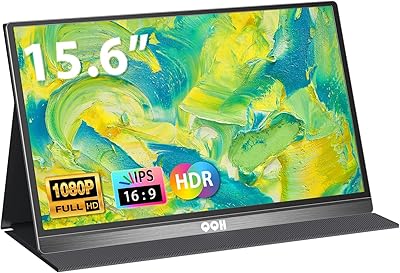
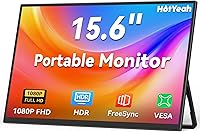
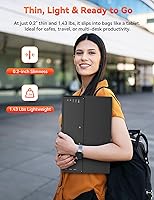
The HotYeah 15.6-inch 1080P Portable Monitor enters a crowded market with a clear pitch: a slim, lightweight second screen that won't drain your wallet. At just 1.44 pounds and barely a quarter-inch thick, it disappears into a laptop bag without adding meaningful bulk. HotYeah is a newer brand — it doesn't carry the name recognition of established players, but that also keeps the pricing sharp. This is not a display built for color-critical work or high-refresh gaming. Think of it as a capable everyday workhorse: plug it in, get more screen space, and get on with your day.

Features & Benefits

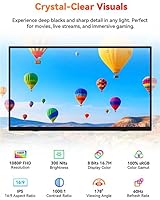
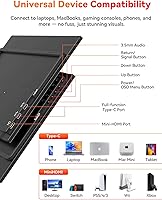
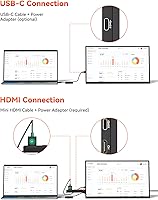
The 15.6-inch IPS panel covers the full sRGB color space, and colors look accurate and punchy for everyday tasks — spreadsheets, video calls, streaming. The matte anti-glare coating handles indoor ambient light well, though 300 nits of brightness means you'll want to avoid direct sunlight. Connectivity is flexible: two full-featured USB-C ports and a Mini-HDMI input cover most scenarios. One important caveat — single-cable USB-C only works if your laptop supports Thunderbolt 3/4 or DisplayPort Alt Mode. Older machines may need the HDMI cable plus a separate power source. The built-in speaker is thin but handy when headphones aren't an option.

Best For

This portable monitor punches well above its price for a specific type of buyer. Remote workers and hybrid professionals get a genuine productivity boost — a second screen on a hotel desk or at a co-working space makes a real difference. Students will appreciate how easily this travel-friendly display slips into a backpack alongside a laptop. Casual gamers can extend a Switch or PS5 to a larger screen while on the road. It also works well for anyone curious about dual-monitor setups who isn't ready to commit to a premium display. One screen in, and most people won't go back.

User Feedback

Most buyers highlight easy setup as the first thing they mention — connect a cable, and the display just works. Image sharpness gets consistent praise given where the price sits, and the solid metal kickstand earns repeated mentions for not feeling cheap. That said, USB-C compatibility catches people off guard: if your laptop lacks DisplayPort Alt Mode, a single cable won't cut it. Speaker volume is another common gripe — workable, but thin. Rotating into portrait mode can be stiff. With HotYeah still building its market history, long-term durability is the one area where the verdict is still out.

Pros

  • At 1.44 pounds and barely a quarter-inch thick, this portable monitor slips into any laptop bag without adding noticeable weight.
  • Plug-and-play setup works right out of the box — no driver downloads or manual configuration required.
  • The IPS panel delivers accurate, vibrant colors with 100% sRGB coverage, well above what most buyers expect at this price.
  • Dual USB-C ports and a Mini-HDMI input make it compatible with a wide range of laptops, phones, and consoles.
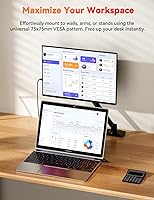
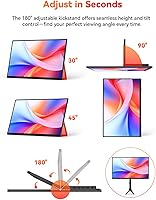
  • The U-shaped metal kickstand feels solid, supports a full 180-degree tilt range, and includes 75x75mm VESA mount compatibility.
  • Flicker-free technology and a low blue light mode reduce eye fatigue during long work sessions or extended gaming.
  • Built-in speaker means one less accessory to pack when working or watching video on the road.
  • The matte anti-glare surface handles indoor ambient light well, keeping reflections from becoming a distraction.

Cons

  • Single-cable USB-C use requires Thunderbolt 3/4 or DisplayPort Alt Mode — older laptops will need a separate power source.
  • At 300 nits, the HotYeah screen struggles in direct sunlight and is best kept to indoor or shaded environments.
  • The built-in speaker maxes out at a volume suitable for quiet rooms but will not fill any meaningful space.
  • HotYeah is a newer brand with limited long-term reliability data, so durability beyond a year or two remains an open question.
  • Adjusting the kickstand into portrait mode can feel stiff and takes noticeably more force than the landscape position.
  • All connectivity is wired — there is no wireless or Miracast option for users who prefer a cable-free setup.
  • The 60Hz refresh rate rules it out for competitive gaming or any workflow that benefits from higher frame rates.
  • Color accuracy, while solid for everyday tasks, falls short of what professional photo editing or color grading demands.

Ratings

Our AI rating for the HotYeah 15.6-inch 1080P Portable Monitor was generated by analyzing thousands of verified buyer reviews from global markets, with bot-driven, incentivized, and duplicate submissions actively filtered out before any scores were assigned. The resulting ratings reflect a fair-weighted picture of what real owners experience day to day — both the strengths that make this screen worth considering and the trade-offs that give some buyers pause. Each category below is scored and explained so you can make an informed decision based on your actual needs.

Display Quality
83%
The IPS panel delivers noticeably sharp visuals for everyday tasks — text stays clean in documents, video streaming looks vibrant, and 100% sRGB coverage keeps colors accurate without the dull, washed-out look of cheaper TN displays. The wide 178-degree viewing angle holds up well when sharing the screen with someone sitting beside you.
At 300 nits of peak brightness, the display can feel underwhelming in rooms with strong overhead lighting, and it falls short for anyone doing color-critical creative work. Professional photo editing or video color grading requires more brightness range and tighter factory calibration than this screen provides.
Brightness & Visibility
62%
38%
For typical indoor use — at a desk, in a hotel room, or in a library — the 300-nit output is workable and comfortable to look at for extended periods. The matte anti-glare surface does a reasonable job of managing reflections from ceiling lights and desk lamps.
Step outside or sit near a sun-facing window, and the brightness ceiling becomes a real obstacle — the image washes out noticeably in direct sunlight, which limits how useful this screen is for outdoor work. Users in brightly lit shared spaces have flagged this as a recurring frustration in reviews.
Portability & Design
91%
At 1.44 pounds and barely half an inch thick, this travel-friendly display disappears into a backpack without competing for space with a laptop or charger. Frequent flyers and daily commuters consistently praise how little they notice it until they actually need it, which is exactly what a portable screen should achieve.
The slim chassis is impressive at this price, but the lack of a protective sleeve or case in the box means frequent travelers will need to source their own padding to avoid scratches in transit. The matte finish, while practical, shows fingerprints from handling during setup.
Value for Money
88%
For the price, the combination of a 15.6-inch IPS panel, full HD resolution, metal kickstand, and USB-C connectivity is hard to beat in the portable monitor category. Students and remote workers who compared it against pricier alternatives frequently note that the core daily-use experience feels like it belongs at a higher price point.
The value proposition does come with trade-offs — modest speaker quality, a 60Hz refresh rate, and open questions about long-term durability from a newer brand are all compromises buyers accept. For most everyday users these trade-offs are acceptable, but buyers with specific performance needs may find a higher-priced option justifies the extra cost.
Setup & Ease of Use
93%
Plug in a cable and the display just works — no driver downloads, no settings adjustments, no compatibility wizards to navigate. This is one of the most consistently praised aspects of the HotYeah screen in buyer reviews, with users across Windows, macOS, and Android all reporting the display was recognized within seconds.
Portrait mode setup requires physically rotating the screen and manually changing the display orientation in your operating system settings, which is not always intuitive for first-time portable monitor users. The kickstand stiffness in portrait orientation adds friction to this process that several users found annoying during initial configuration.
Connectivity
74%
26%
Two full-feature USB-C ports and a Mini-HDMI input cover a wide range of devices — laptops, phones, consoles, and tablets — without requiring extra adapters in most cases. Having two USB-C ports rather than one is a thoughtful inclusion that gives flexibility when swapping between a laptop and a phone.
The single-cable USB-C setup trips up a significant number of buyers whose laptops lack Thunderbolt or DisplayPort Alt Mode support, requiring a separate power cable alongside the HDMI connection. This is not a flaw in the product itself, but the lack of upfront clarity in product listings consistently leads to buyer frustration.
Build Quality
79%
21%
The U-shaped metal kickstand and overall chassis feel more substantial than typical plastic builds at this price point, and the slim body does not flex noticeably when handled or carried. Several buyers specifically mentioned that the monitor felt more expensive than expected when they first took it out of the box.
HotYeah is a newer brand without an extensive reliability track record, so it is difficult to confidently assess how this monitor holds up beyond the first year of regular use. The slim profile also means the internal components have less thermal headroom, though no widespread heat complaints have surfaced in early reviews.
Eye Comfort
84%
Flicker-free backlighting and a certified low blue light mode make this a reasonable choice for long desk sessions, and several users who clock eight or more hours in front of screens daily reported less end-of-day eye fatigue compared to monitors they had used before. The matte surface also reduces glare-related strain.
Activating the low blue light mode noticeably warms the white balance, which some users find uncomfortable for color-accurate tasks or reading white-background documents for extended periods. Those sensitive to color shifts may prefer keeping it off and relying on OS-level night mode or blue light filtering glasses instead.
Color Accuracy
81%
19%
The 100% sRGB panel and 16.7 million color rendering keep everyday content looking accurate and consistent — web browsing, presentations, and streaming all benefit from colors that feel natural rather than oversaturated or dull. The color temperature setting works well for extended reading without causing undue eye fatigue.
The display is not factory-calibrated to tight Delta E standards, so users doing color-sensitive work will notice inconsistencies without a hardware calibrator. Coverage does not extend to DCI-P3 or Adobe RGB, making this screen unsuitable for professional media production or any workflow that demands wider gamut accuracy.
Stand & Ergonomics
76%
24%
The metal kickstand earns consistent praise for staying put on flat desk surfaces without wobbling or creeping, and the 180-degree tilt range gives meaningful flexibility for finding a comfortable viewing angle during long work sessions. The anti-slip feet hold well even on smooth surfaces like glass-topped desks.
Rotating the kickstand into portrait orientation can require noticeably more force than landscape adjustments, and some users find the stiffness awkward when fine-tuning the angle in that mode. On soft or uneven surfaces — a couch cushion or a fabric-covered table — the kickstand loses its reliability and the screen can tip.
Speaker Quality
54%
46%
The built-in speaker removes the need to pack a separate audio device when traveling, which is a practical convenience for video calls or casual media consumption in a hotel room. Most buyers appreciate having any audio output at all given the slim profile and price point of the monitor.
Volume output is modest and the sound quality is noticeably thin at higher levels — music and movie audio lack depth, and the speaker becomes ineffective in anything noisier than a quiet room. Users working in open offices or cafes consistently reach for earbuds within the first few days of use.
Gaming Performance
67%
33%
For casual gaming on a Nintendo Switch, PS5, or a laptop running less demanding titles, the 60Hz IPS panel delivers a smooth enough experience, and FreeSync support reduces screen tearing on compatible devices. The display handles fast-moving content clearly without the ghosting common in cheaper VA or TN panels.
Competitive gamers accustomed to 120Hz or 144Hz displays will feel the 60Hz ceiling immediately in fast-paced titles where motion clarity is critical, and there is no high refresh rate option at any resolution. The screen is not designed for serious PC gaming, and buyers who prioritize frame rate should look elsewhere.
Compatibility
77%
23%
The combination of USB-C, Mini-HDMI, and driver-free operation makes this screen compatible with an unusually wide range of devices for its price — MacBooks, Windows laptops, Android phones, Nintendo Switch, PS4/PS5, and Xbox. Most buyers find that at least one of the included cables covers their primary use case without needing extra adapters.
Owners of older laptops with standard USB-C ports lacking DisplayPort Alt Mode frequently discover compatibility gaps only after purchase, and phone compatibility is not universal — video output varies significantly by Android model and iOS adapter type. This makes it important for buyers to verify their device's USB-C specifications before ordering.
Long-term Reliability
58%
42%
Early buyers report solid build quality with no major issues in the first months of regular use, and the 1-year warranty with 24/7 customer support provides a reasonable safety net at this price point. The metal kickstand in particular shows no signs of early wear in short-term user reports.
HotYeah launched in mid-2025, so there is simply not enough field data to make confident claims about how this monitor holds up after 18 months or more of daily use. Buyers who prioritize long-term durability over upfront savings may feel more comfortable with an established brand that has a proven track record.

Suitable for:

The HotYeah 15.6-inch 1080P Portable Monitor is a strong match for people who need a reliable second screen on the move without spending a lot. Remote workers and hybrid professionals who shuttle between home, coffee shops, and hotel desks will find the slim build and plug-and-play setup immediately practical — no driver installs, no configuration headaches. Students looking to stretch a single laptop into a dual-screen workstation in a dorm or library can do so without a major financial commitment. Casual travelers who game on a Nintendo Switch or want to connect a PS5 to something larger than a hotel TV will find the Mini-HDMI input and adjustable kickstand cover that need well. It also makes a sensible entry point for anyone who wants to test whether dual-monitor productivity is worth pursuing before committing to a more expensive display.

Not suitable for:

The HotYeah 15.6-inch 1080P Portable Monitor is not the right call for buyers with more demanding display requirements. Photo editors, video colorists, and graphic designers will want higher peak brightness and more precise factory calibration than this screen offers — it is built for everyday accuracy, not professional creative work. Competitive gamers will also be let down; the panel runs at 60Hz, which is fine for casual play but noticeably behind the 120Hz and 144Hz displays they are likely accustomed to. Buyers who plan to use this screen outdoors regularly should think carefully, as 300 nits of brightness makes the display genuinely hard to read in direct sunlight. Anyone with an older laptop that lacks Thunderbolt 3/4 or DisplayPort Alt Mode over USB-C should also factor in the need for a separate power adapter alongside an HDMI cable, since single-cable use will not work on those machines. And if audio quality matters, the built-in speaker is a stopgap solution at best.

Specifications

  • Screen Size: The display measures 15.6 inches diagonally, offering a screen footprint comparable to most standard laptops.
  • Resolution: Native resolution is 1920x1080 Full HD rendered at a 60Hz refresh rate.
  • Panel Type: Uses an IPS panel with a wide 178-degree viewing angle both horizontally and vertically.
  • Brightness: Peak brightness is 300 nits, adequate for indoor and dim environments but limited in direct sunlight.
  • Color Coverage: Covers 100% of the sRGB color gamut with 16.7 million colors at 8-bit color depth.
  • Screen Surface: Matte anti-glare coating reduces ambient light reflections for more comfortable indoor viewing.
  • Connectivity: Equipped with two full-feature USB-C ports and one Mini-HDMI port, with single-cable USB-C functionality requiring Thunderbolt 3/4 or DisplayPort Alt Mode on the host device.
  • HDR & FreeSync: Supports HDR content playback and AMD FreeSync for compatible source devices running at 60Hz.
  • Built-in Audio: Includes a built-in speaker for basic audio output without requiring a separate accessory.
  • Stand: Comes with a U-shaped metal kickstand that adjusts up to 180 degrees of tilt and includes anti-slip feet for desk stability.
  • VESA Mount: Compatible with standard 75x75mm VESA patterns for use with third-party monitor arms or wall mounts.
  • Dimensions: Measures 13.98 x 8.27 inches with a thickness of 0.49 inches, fitting easily into most laptop sleeves and bags.
  • Weight: Weighs 1.44 pounds, light enough to carry alongside a laptop without adding meaningful load to a bag.
  • Eye Care: Certified flicker-free and includes a low blue light mode designed to reduce eye strain during extended use sessions.
  • Color Temperature: Factory color temperature is set to approximately 6800K, calibrated for everyday content viewing.
  • Aspect Ratio: Supports both 16:9 widescreen and 4:3 standard aspect ratios depending on the source output.
  • Compatibility: Works with Windows and macOS laptops, Android and iOS devices, Nintendo Switch, PS4/PS5, Xbox, and Wii via appropriate cables.
  • Warranty: Backed by a 1-year manufacturer warranty with 24/7 online customer support included at no extra cost.

Related Reviews
MNN 15.6-inch Portable Monitor
74%
91%
Value for Money
89%
Portability & Weight
74%
Display Quality
61%
Brightness & Visibility
78%
USB-C Connectivity
More
KOORUI 15.6-inch Portable Monitor 1080P FHD
83%
93%
Portability
89%
Display Quality
88%
Setup Ease
56%
Audio Quality
81%
Battery Life
More
QQH Z12 15.6-inch Portable Monitor

71%
91%
Portability
83%
Build Quality
76%
Display Quality
93%
Setup & Ease of Use
62%
Stand & Viewing Angles
More
Topmonitor P15.6/2.5K 15.6-inch Portable Monitor

77%
91%
Image Sharpness
87%
Color Accuracy
93%
Portability
82%
Connectivity
88%
Value for Money
More
Westinghouse 15.6 Inch Portable Monitor
82%
88%
Display Quality
92%
Portability
86%
Connectivity Options
94%
Ease of Setup
80%
Build Quality
More
InnoView INVPM406 15.6-inch Portable Monitor
75%
91%
Ease of Setup
83%
Display Clarity
78%
Portability & Build
62%
USB-C Compatibility
88%
Value for Money
More
LUMIPIX Magic-001 15.6-inch Portable Monitor
76%
78%
Display Quality
91%
Portability
72%
Connectivity
61%
Stand Stability
79%
Value for Money
More
Anyuse PM1561P 15.6-inch Portable Monitor
74%
91%
Portability & Form Factor
84%
Image Clarity
72%
Setup & Compatibility
74%
Build Quality & Durability
61%
Brightness & Outdoor Usability
More
CAPERAVE CF15 15.6-inch Portable Monitor

70%
83%
Portability & Build
76%
Display Quality
51%
Brightness
91%
Setup & Ease of Use
82%
Value for Money
More
VILVA V156F1 15.6-inch Portable Monitor

69%
74%
Display Quality
61%
Portability
82%
Connectivity & Compatibility
67%
Build Quality
83%
Value for Money
More

FAQ

The HotYeah 15.6-inch 1080P Portable Monitor works with a single USB-C cable on MacBooks that support Thunderbolt 3 or Thunderbolt 4, which covers most MacBook models from 2016 onwards. If your MacBook has an older USB-C port without Thunderbolt or DisplayPort Alt Mode, you will need to use a Mini-HDMI cable for video alongside a separate USB-C cable for power.

Yes, both work well with this display. Connect the Nintendo Switch through its dock using a Mini-HDMI cable, and the PS5 connects the same way. Keep in mind the screen runs at 60Hz, so it will not unlock higher frame rates on titles that support them, but for most console gaming it performs just fine.

It holds up reasonably well near a shaded window, but direct sunlight is a real problem. At 300 nits of peak brightness, this portable monitor sits on the lower end for outdoor visibility and most users find it noticeably washed out in full sun. For indoor environments, the brightness is comfortable and the matte coating helps keep glare in check.

No drivers are required. Plug in the cable and your device should detect the display automatically within a few seconds. This works across Windows, macOS, and Android without any software installation steps.

This is the detail that catches most buyers off guard, so it is worth being precise. A single USB-C cable carries both video and power only if the laptop port supports Thunderbolt 3/4 or DisplayPort Alt Mode. If your port is a standard USB 3.0 or USB 2.0 Type-C, you can still use the monitor — you just need a Mini-HDMI cable for video plus a USB-C cable for power running simultaneously. If you are unsure which type of USB-C port your laptop has, checking the manufacturer spec sheet will give you a definitive answer.

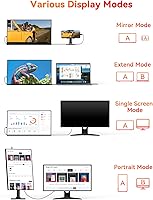
Yes, it supports portrait mode. Rotate the screen physically and then adjust the display orientation in your operating system settings. The kickstand can feel a bit stiff when positioning for portrait use compared to landscape, but once set it holds firmly without shifting.

It is adequate for video calls, background music, or casual video watching while on the road, but the volume ceiling is modest and audio sounds thin at higher levels. In a quiet room it does its job; in a cafe or open office, a pair of earbuds will serve you considerably better.

The U-shaped metal kickstand is one of the more consistently well-reviewed aspects of this screen. On a flat hard surface it sits firmly without noticeable wobble, and the anti-slip feet keep it from drifting. On softer surfaces like a couch cushion, stability is reduced — but that is a limitation shared by any kickstand-based portable display.

Android phones that support DisplayPort Alt Mode over USB-C can connect with a single cable and mirror or extend the display. For iPhones, you will need a USB-C or Lightning to HDMI adapter depending on your model, paired with a Mini-HDMI cable. Not every phone supports video output, so it is worth confirming your specific device's capabilities before assuming it will work.

HotYeah includes the essential cables needed to get started, generally covering USB-C and Mini-HDMI connections. Since accessory bundles can vary slightly between production runs, it is a good idea to verify the exact contents on the current product listing before your purchase.