Overview

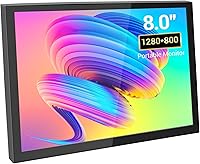
The VIEWMEI 8-Inch Portable Touch Screen Monitor is a compact secondary display built for makers, tinkerers, and anyone who needs a lightweight screen they can actually take somewhere. What immediately stands out is the metal chassis — most competitors at this price point ship with plastic shells that flex and creak; this one feels notably more solid in hand. The 16:10 aspect ratio is a bit unusual today, slightly taller than the widescreen norm, which works well for code editors or dashboards but can add black bars to standard 16:9 video. Think of this mini touchscreen as a purpose-built utility display, not a primary monitor replacement.
Features & Benefits

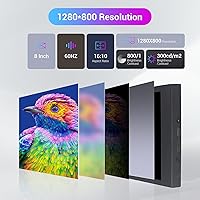
The panel runs at 1280×800 across 8 inches, and at that size pixel density is good enough for sharp text and clean UI elements. Colors look punchy and saturated indoors, though the glossy screen surface will catch reflections in bright rooms or outdoors — worth keeping in mind. Touch input connects via USB and works reliably for tapping and basic gestures; not the fastest capacitive response you will ever use, but it handles navigation well. The built-in dual speakers cover system sounds and light media just fine; do not expect room-filling audio from 2W drivers. A rear VESA mount and broad OS compatibility round things out nicely.

Best For

The VIEWMEI 8-inch display genuinely shines in Raspberry Pi projects, where a compact, dedicated screen is exactly what the setup calls for — Jetson Nano builds, too. DIY PC case builders often use this compact monitor as a secondary status panel to show temps, clock speeds, or task managers without cluttering the main display. It also works well for travelers who want a lightweight second screen that actually fits in a bag without drama. Home automation dashboards and always-on info panels are another natural fit. Where it falls short is as a general-purpose gaming or video monitor — the screen size just does not lend itself to extended use.

User Feedback

Buyers who use this mini touchscreen for Pi projects and DIY builds tend to be satisfied — the solid build and plug-and-play setup draw consistent praise. Touch response gets a more mixed reception; most find it acceptable for navigation but sluggish for anything requiring quick input. A recurring tip from users: if you notice flickering or white lines, manually setting the output resolution to 1280×800 on the host device fixes it almost every time. The two-cable requirement rarely bothers people once they know about it up front. On the downside, the glossy panel frustrates buyers who tried using it near a window, and speaker output, while handy, leaves audiophiles cold.

Pros

  • Metal shell feels noticeably more durable than plastic-bodied rivals at a similar price point.
  • Plug-and-play setup works with just two cables — no driver hunting or software installs required for most systems.
  • Broad OS compatibility covers Windows, Ubuntu, and Android, making it flexible across a wide range of projects.
  • VESA mount support on the rear allows for clean desk setups or wall-mounted dashboard installations.
  • At 1.52 pounds and under half an inch thick, this compact monitor is easy to pack and carry daily.
  • Built-in dual speakers handle system sounds and casual media well enough to avoid needing an extra accessory.
  • Touch input via USB works reliably for navigation and basic interactions across supported operating systems.
  • The 1280×800 resolution looks sharp and clean on an 8-inch panel, with solid color vibrancy indoors.

Cons

  • Glossy screen surface catches reflections badly in bright rooms or near windows, limiting where you can comfortably use it.
  • Touch response latency is noticeable — fine for tapping menus, frustrating for anything requiring quick or precise input.
  • The 16:10 aspect ratio adds black bars when playing standard 16:9 video content, which gets old fast.
  • Some units ship with flickering or white line issues out of the box until you manually force the correct output resolution.
  • Two cables are required to run the display — one for signal, one for power — which can complicate cable management on a crowded desk.
  • Speaker output maxes out quickly; volume and clarity drop off noticeably at higher levels.
  • Android compatibility is limited to older 32-bit ARM kernels, which excludes many modern Android devices entirely.
  • No included stand means you need a VESA mount solution or a third-party stand to prop it up at a comfortable angle.

Ratings

The VIEWMEI 8-Inch Portable Touch Screen Monitor has been evaluated by our AI rating engine after processing verified global buyer reviews, with spam, bot submissions, and incentivized feedback actively filtered out. Scores reflect the honest distribution of real user experiences — the highs and the frustrations alike. Where this compact monitor earns genuine praise and where it falls short are both transparently captured in the category breakdowns below.
Build Quality
83%
The metal chassis is a genuine differentiator at this price tier — buyers consistently note it feels more substantial than expected, with no flex or creaking when handled. For makers who toss gear into bags or use it on workbench setups, that solidity translates to real confidence in daily handling.
While the metal shell impresses, some users note the seams and port openings feel less precisely finished on closer inspection. A few reported minor cosmetic scuffs arriving out of the box, suggesting quality control is not perfectly consistent across units.
Display Clarity
78%
22%
At 1280×800 across 8 inches, pixel density is high enough that text stays crisp and UI elements look clean — particularly appreciated by Raspberry Pi users running terminal windows or dashboards. Colors are vivid and well-saturated under controlled indoor lighting.
The glossy panel finish becomes a liability in bright rooms or near windows, where reflections compete with on-screen content. A handful of buyers also reported needing to manually force the output resolution to get a stable, sharp image without white lines or flickering.
Touch Responsiveness
62%
38%
For basic navigation — tapping menu items, scrolling through dashboards, triggering buttons on a home automation panel — the capacitive touch input works reliably without any driver installation on most supported systems. Pi project users in particular find it more than adequate for their interaction needs.
Touch latency is noticeable enough to frustrate users expecting a tablet-like experience. Accuracy near screen edges is inconsistent, and rapid or multi-touch gestures often register poorly, which rules this mini touchscreen out for any use case requiring precise or fast input.
Portability
88%
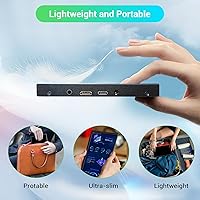
Weighing just 1.52 pounds and measuring well under an inch thick, this compact monitor slips into a laptop bag without drama. Remote workers and travelers who tested it on commutes and in hotel rooms consistently praised how little space and weight it adds to a carry setup.
The two-cable requirement — one for HDMI video and one for USB power — does slightly complicate on-the-go setup compared to single-cable portable monitors. Finding a surface to prop it up is also a recurring mention, since no stand is included in the box.
Setup & Compatibility
81%
19%
Plug-and-play behavior on Windows 7 through 11 is reliable and broadly confirmed by users across very different hardware configurations. The wide OS support list — covering Ubuntu variants and older Android ARM builds — makes it unusually flexible for a display in this category.
macOS support is absent from official documentation, leaving Mac users in an uncertain position for touch input. The resolution-forcing workaround required for some units adds a small but real friction point for non-technical buyers who just want things to work immediately.
Speaker Quality
51%
49%
Having any built-in audio at all is a convenience win for users building info panels or running lightweight media — system notification sounds, video call audio, and low-volume background playback are all handled without needing an external device.
The dual 2W speakers hit a ceiling quickly and distort at higher volume levels. Buyers who expected even modest media-quality sound from the VIEWMEI 8-inch display were routinely disappointed, and the drivers are thin enough that audio feels hollow rather than full.
Value for Money
74%
26%
For the Raspberry Pi and DIY maker community, the combination of metal build, touch input, VESA support, and broad OS compatibility at this price point is genuinely hard to match with alternatives. Buyers in that audience repeatedly describe it as good value for a specialized tool.
General consumers comparing it against larger budget monitors will find the value case much weaker — the small screen size, glossy panel, and touch limitations mean you are paying a premium for portability and form factor rather than raw display performance.
Image Color & Vibrancy
76%
24%
Indoor color performance draws consistent compliments — the panel produces saturated, warm tones that make this compact monitor feel more premium than its price suggests when viewed straight-on in a controlled environment. Great for project showcases or demo setups.
Viewing angles are adequate but not exceptional, with some color shift noticeable when looking from the sides or at a steep vertical angle. Outdoor or bright-room use significantly degrades the color experience due to the glossy surface washing out contrast.
Connectivity Options
69%
31%
Mini HDMI input covers the vast majority of use cases — laptops, single-board computers, game consoles, and mini PCs all connect without adapters in most configurations. The VESA rear mount is a thoughtful addition that opens up genuinely useful desk and wall setups.
The absence of USB-C video input is a missed opportunity given how common USB-C-only laptops have become. The Type-C PD and QC charging cable incompatibility also trips up buyers who try to use what they already have, requiring a specific USB-A to Type-C cable.
Glare & Reflections
47%
53%
Under ideal indoor lighting — diffuse overhead light with no direct windows nearby — the glossy screen delivers noticeably richer colors and deeper blacks than a matte alternative would, which some users in home studio or dim-room setups actively preferred.
In any environment with strong ambient light, reflections on the glossy surface are severe enough that multiple buyers cited it as their biggest frustration with the product. For outdoor use or bright offices, it is practically a dealbreaker without some form of shade or repositioning.
Cable Management
63%
37%
Each cable serves a clear purpose — HDMI carries video, USB handles both power and touch — and once a permanent setup is arranged on a desk or mounted on a wall, the two-cable layout is not meaningfully worse than a single-cable solution in day-to-day use.
During mobile or temporary setups, managing two cables while also needing something to physically support the display becomes genuinely fiddly. Users who expected a one-cable portable experience were consistently caught off guard by the dual-cable requirement.
Ease of Use
77%
23%
For technical users — Pi hobbyists, DIY builders, home server enthusiasts — initial setup is straightforward and the learning curve is minimal. Plug in both cables, set the output resolution, and the display is up and running within a few minutes in most scenarios.
Less technical buyers sometimes struggled with the resolution configuration step, and the lack of a physical setup guide beyond a brief note in the listing leaves those users relying on community forums for help. A quick-start card in the box would meaningfully reduce confusion.
Mounting Flexibility
79%
21%
VESA compatibility on the rear of this mini touchscreen is a genuine practical benefit — it lets users mount it cleanly on a monitor arm, attach it inside a DIY PC case panel, or wall-mount it as a permanent dashboard display, all with standard off-the-shelf hardware.
No mounting hardware or stand ships with the unit, so buyers need to source a compatible VESA solution separately before they can use it in anything other than a flat-surface layout. For buyers who did not realize this upfront, it added an unexpected extra purchase.

Suitable for:

The VIEWMEI 8-Inch Portable Touch Screen Monitor is purpose-built for a specific kind of buyer, and those buyers tend to love it. Raspberry Pi enthusiasts and Jetson Nano hobbyists are the clearest fit — this compact monitor gives their projects a dedicated display without requiring a full-sized screen taking up bench space. DIY PC builders who want a secondary panel to monitor system stats, run a task manager, or display a persistent dashboard will find the size and VESA mounting support genuinely useful. Travelers and remote workers who need a second screen that actually fits in a bag alongside a laptop will appreciate both the metal build and the no-fuss plug-and-play setup. Home automation fans running always-on info panels or smart home dashboards are another natural audience, as the touch input and broad OS compatibility make it easy to integrate into existing setups.
Not suitable for:

Buyers expecting a general-purpose desktop monitor or a primary display for daily computing should look elsewhere — the VIEWMEI 8-Inch Portable Touch Screen Monitor is simply too small and too niche for that role. Anyone planning to use it as a main gaming screen or for watching video regularly will run into the 16:10 aspect ratio adding black bars to standard widescreen content, plus the screen size making long sessions uncomfortable. The glossy panel is a real drawback for people who work near windows or in bright environments, as reflections become distracting quickly. Users who need fast, precise touch input — think stylus-level accuracy or rapid gesture controls — will find the capacitive touch response falls short of that standard. Finally, buyers hoping to replace a dedicated speaker setup should temper expectations; the built-in audio is functional for system alerts but not satisfying for music or media.
Specifications

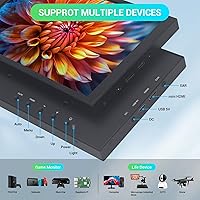
  • Screen Size: The display measures 8 inches diagonally, making it compact enough for portable use while still providing a usable viewing area for dashboards and project interfaces.
  • Resolution: Native resolution is 1280×800 pixels at a 16:10 aspect ratio, delivering sharp text and clean UI elements at this screen size.
  • Aspect Ratio: The 16:10 ratio is slightly taller than the mainstream 16:9 standard, which suits code editors and dashboards but may add black bars to widescreen video.
  • Screen Surface: The panel uses a glossy finish that produces vibrant colors indoors but can reflect ambient light noticeably in bright or sunlit environments.
  • Touch Input: Capacitive touch is supported via a USB connection to the host device, enabling tap and basic gesture input without additional software on most systems.
  • Video Input: Video signal is carried over a mini HDMI port, which connects to most laptops, single-board computers, and game consoles with a standard mini HDMI cable.
  • Power Supply: The monitor draws power through a USB-A to Type-C cable; note that double-headed Type-C PD or QC charging cables are not supported.
  • Speakers: Two built-in 2W speakers provide basic stereo audio output, suitable for system sounds and light media without requiring an external speaker.
  • Shell Material: The outer casing is constructed from metal, offering better resistance to drops, vibration, and everyday wear compared to typical plastic-bodied competitors.
  • Mounting: A rear VESA mounting pattern allows the display to be attached to monitor arms, wall mounts, or compatible desk stands for flexible positioning.
  • Dimensions: The unit measures 7.68×4.76×0.55 inches, keeping it slim enough to slip into most laptop bags or backpack pockets alongside other gear.
  • Weight: At 1.52 pounds, the monitor is light enough for daily carry without adding significant bulk to a travel or commuter bag.
  • OS Support: Compatible operating systems include Windows XP through Windows 11, Ubuntu 12.04 and 16.04 LTS, and Android 4.4 and 5.1 on 32-bit ARM kernels.
  • Connectivity: The monitor requires two cables to operate: one mini HDMI for video signal and one USB-A to Type-C for power and touch data.
  • Brand: Manufactured by VIEWMEI, a brand focused on compact and specialty display solutions for makers, hobbyists, and portable computing use cases.
  • ASIN: The Amazon product identifier for this item is B0CSX6RG5C, useful for locating accessories, replacement cables, or compatible mounts.
  • Availability Date: This monitor was first made available for purchase in January 2024, placing it among the more recent entries in the compact portable display category.

Related Reviews

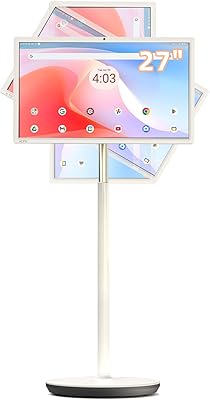
KTC MegPad 27 Inch Portable Touch Screen Monitor
84%
91%
Portability
87%
Battery Life
79%
Display Quality
85%
Build Quality
92%
Ease of Setup
More
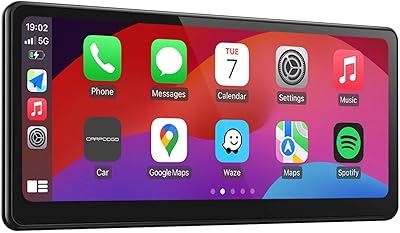
CarpodGo T3 Pro 8.9-inch Portable Wireless CarPlay Screen
81%
91%
Display Quality
83%
Wireless Connection Reliability
86%
Build Quality & Design
88%
Magnetic Mount Stability
67%
Android Auto Performance
More
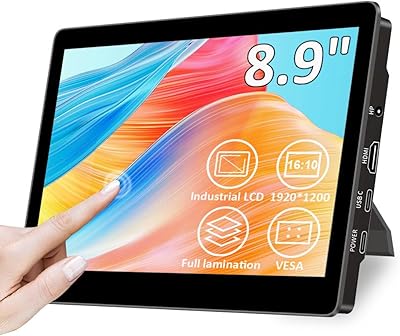
Magedok T089B 8.9-inch Touchscreen Monitor
74%
84%
Touch Accuracy
81%
Display Brightness
78%
Image Sharpness
51%
Color Accuracy
62%
USB-C Connectivity
More
ViewSonic TD2455 24-Inch Touch Screen Monitor
84%
91%
Touch Responsiveness
89%
Display Quality
88%
Ergonomics & Comfort
85%
Connectivity & Ports
80%
Build Quality
More
ViewSonic TD2465 24-inch Touch Screen Monitor
86%
89%
Touchscreen Responsiveness
91%
Ergonomics and Comfort
85%
Connectivity Options
83%
Display Quality
88%
Build Quality and Durability
More
VisionOwl 23.8-Inch 2K Portable Monitor
87%
94%
Gaming Performance
92%
Display Quality
88%
Portability
90%
Build Quality
81%
Setup & Installation
More
Redalf 23.8-inch 2K 180Hz Portable Monitor
86%
88%
Display Quality
92%
Portability
90%
Gaming Performance
85%
Compatibility
91%
Ease of Setup
More
Wisecoco R126F01T-HB 12.6-inch Bar Touch Monitor
67%
78%
Display Quality
81%
Build Quality
61%
Touch Responsiveness
83%
Setup & Ease of Use
53%
Power Stability
More
ASUS ZenScreen Touch 16-inch Portable Monitor (MB16AMTR)
87%
94%
Portability & Weight
88%
Touchscreen Functionality
72%
Battery Life
85%
Display Quality
90%
Connectivity Options
More
ROADOM 10.1-inch Raspberry Pi Touchscreen Monitor
78%
91%
Ease of Setup
83%
Touch Responsiveness
72%
Display Quality
88%
Build & Enclosure
59%
Speaker Quality
More

FAQ

In most cases, no. The VIEWMEI 8-Inch Portable Touch Screen Monitor is designed to work plug-and-play on Windows 7 through 11 and recent Ubuntu builds. Touch functionality also activates automatically on supported systems once the USB cable is connected. Older operating systems or niche Linux builds may require some manual configuration.
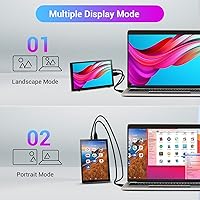
This usually comes down to a resolution mismatch between your host device and the display. Go into your display settings and manually set the output resolution to 1280×800 — that fix resolves the issue for the vast majority of users who report it. It is a known quirk worth sorting out before assuming the unit is defective.

Yes, this is actually one of the most popular use cases for this compact monitor. Connect via mini HDMI for video and USB for touch and power, then set the Pi output resolution to 1280×800 in the config file. Most users in the Pi community have it running smoothly within a few minutes.

macOS is not listed in the official supported OS documentation, so touch input is not guaranteed. The display itself should work as a standard external monitor via HDMI on a Mac, but touch functionality may not be recognized without third-party driver support.

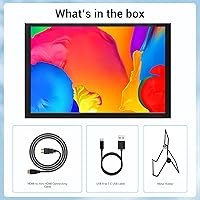
No stand is included. The monitor has a rear VESA mount pattern, so you will need a compatible VESA arm, wall bracket, or a third-party mini monitor stand to prop it upright. Factor that into your setup planning, especially for desk use.

They are functional rather than impressive. For system notification sounds, video call audio, or background music at low volume, they do the job. If you are hoping to use this mini touchscreen for serious media playback or anything where audio quality matters, an external speaker or headphones will make a noticeable difference.

A standard USB-A port on a laptop or USB hub is typically enough to power it. Just make sure you are using a USB-A to Type-C cable — the monitor does not support double-headed Type-C PD or QC fast-charging cables, which is a common point of confusion.

Yes, connect the mini HDMI to your laptop's HDMI output and the USB-A cable to any available USB port, then set the output resolution to 1280×800 in Windows display settings. It will appear as a standard extended or mirrored display. Touch input works on Windows 7 and above with no extra drivers needed.

It depends heavily on your environment. Indoors with controlled lighting, colors look vivid and the glossy finish is not a problem. Near a window or under strong overhead lights, reflections can become genuinely distracting. If your workspace is bright, this is worth weighing before buying — a matte-finish alternative might suit you better.

For basic interactions — tapping buttons, scrolling, navigating menus — the touch response is usable and reasonably accurate. It is not the most responsive capacitive panel on the market, and it would feel sluggish for anything requiring fast or precise input like drawing or gaming. For dashboard controls and Pi project interfaces, most users find it perfectly adequate.