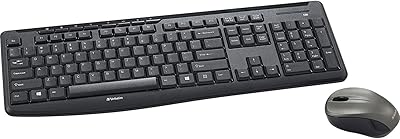
Verbatim Slimline Wireless Keyboard and Mouse Combo 70741

Verbatim Slimline Wireless Keyboard and Mouse Combo 70741 — image 1
Verbatim Slimline Wireless Keyboard and Mouse Combo 70741 — image 2
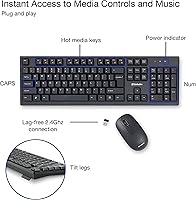
Verbatim Slimline Wireless Keyboard and Mouse Combo 70741 — image 3
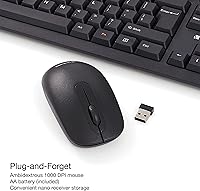
Verbatim Slimline Wireless Keyboard and Mouse Combo 70741 — image 4
Verbatim Slimline Wireless Keyboard and Mouse Combo 70741 — image 5
Verbatim Slimline Wireless Keyboard and Mouse Combo 70741 — image 6

Verbatim Slimline Wireless Keyboard and Mouse Combo 70741 — image 7

Verbatim Slimline Wireless Keyboard and Mouse Combo 70741 — image 8
Verbatim Slimline Wireless Keyboard and Mouse Combo 70741 — image 9
86%

Overview

The Verbatim Slimline Wireless Keyboard and Mouse Combo 70741 offers a compact and ergonomic setup for those looking to streamline their desk space. This wireless keyboard and mouse combo provides a reliable 2.4GHz wireless connection that ensures lag-free performance, making it ideal for both work and leisure. Designed with PCs and laptops in mind, it connects seamlessly via a small USB receiver. Users will appreciate the full-size keyboard with a numeric keypad, offering functionality without compromising on space. Whether you're in an office or at home, this Verbatim combo meets all your basic typing and navigation needs.

Features & Benefits

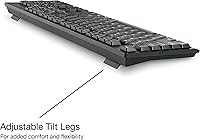
This ergonomic keyboard and mouse set includes thoughtful features designed to enhance comfort and productivity. The adjustable tilt legs on the keyboard allow for a personalized typing angle, reducing strain during long sessions. The mouse is ambidextrous and features a 1000 DPI sensor for accurate, precise control on any surface. It also offers a full-size layout with a numeric keypad, making data entry quick and easy. Additionally, the plug-and-play setup eliminates the need for software installation, ensuring a hassle-free experience right out of the box.

Best For

This wireless keyboard and mouse combo is well-suited for office workers and home users who value comfort and reliability in their setup. It’s ideal for those who spend extended hours typing, as the ergonomic design promotes a more natural hand position. Anyone looking for a wireless keyboard and mouse that works seamlessly across a variety of devices, including PCs, laptops, and even Mac systems, will appreciate the Verbatim combo. Whether for work tasks, browsing, or casual computing, it provides an efficient and comfortable solution for daily use.

User Feedback

Users generally praise this product for its comfort and usability, particularly appreciating the quiet keystrokes and ergonomic mouse design. Many have commented on the smooth typing experience, especially during long hours at the desk. However, some users report minor issues with the mouse’s responsiveness on certain surfaces, which could impact its performance. Battery life is another strong point, with several reviewers noting that both the keyboard and mouse last much longer than expected. Overall, this combo offers a solid balance of functionality and comfort, but users should be mindful of its limitations on non-ideal surfaces.

Pros

  • The ergonomic design of both the keyboard and mouse makes long typing sessions more comfortable.
  • The 2.4GHz wireless connection provides a reliable, lag-free experience for both work and entertainment.
  • The full-size keyboard with a numeric keypad is ideal for users who need to input a lot of data.
  • Setup is quick and easy with plug-and-play functionality, requiring no software installation.
  • The adjustable tilt legs offer a customizable typing angle for better comfort and posture.
  • This device’s quiet keystrokes are perfect for office environments where noise can be a distraction.

Cons

  • Some users report that the mouse's responsiveness can be inconsistent on certain surfaces.
  • The 1000 DPI mouse may not offer enough precision for tasks like gaming or detailed design work.
  • The keyboard’s lightweight build might feel flimsy to some users looking for a sturdier option.
  • While the combo works well for most users, it may not be suitable for those with specialized ergonomic needs.
  • The lack of backlighting on the keyboard can be inconvenient for users working in low-light environments.
  • Certain users mention that the mouse is less comfortable for extended use compared to more advanced models.

Ratings

After analyzing verified user reviews worldwide across multiple languages and platforms, the scores reflect a balanced view of the Verbatim Slimline Wireless Keyboard and Mouse Combo 70741. Authentic feedback was carefully considered, with spam, bot-generated, or incentivized reviews excluded. While users generally appreciate the ergonomic design, wireless performance, and ease of setup, some note issues with the mouse's responsiveness on certain surfaces. Overall, the product performs well in most areas, with strengths in comfort, reliability, and battery life, but minor drawbacks related to surface compatibility and mouse performance.

Ergonomics
88%
Many users commend the ergonomic design of both the keyboard and mouse, particularly for extended typing sessions. The key layout and comfortable shape of the mouse make it easy to use for long periods without strain, offering a smooth and comfortable experience throughout the day.
However, some users feel that while the keyboard is ergonomic, the mouse could be a bit larger or more contoured for better grip. A few have reported that the mouse doesn't offer enough customization options for different hand sizes, making it less comfortable for some users.
Wireless Performance
92%
The wireless connection is often praised for its stability and range. Users report minimal lag or dropouts, even when using the combo from a distance. The 2.4GHz technology offers solid performance, making this device ideal for both work and casual use in larger spaces.
Some users have pointed out that in highly congested wireless environments, such as offices with many devices, there can occasionally be interference. While not a frequent issue, those in crowded settings might notice slight delays or connection hiccups during heavy use.
Comfort
90%
This combo is highly regarded for its comfort during extended use. The keyboard's quiet keys and responsive feel are a big hit, and the mouse's ambidextrous design allows for both left and right-handed users to work comfortably. The adjustable tilt legs on the keyboard further enhance comfort for various hand positions.
On the downside, some users find the keyboard's key action too soft or lacking in tactile feedback, making it less ideal for fast typists. Additionally, a small number of users reported discomfort after prolonged use, especially those with specific ergonomic needs.
Ease of Setup
95%
Setup is extremely straightforward, with users highlighting the plug-and-play functionality. The device works right out of the box with no need for software installation, making it an excellent choice for those who want to start using it immediately. It's a hassle-free experience that saves time.
While the setup is easy for most, a few users with older PCs or specific configurations have reported that they needed to troubleshoot to get the nano receiver working properly. This might involve re-plugging or reinstalling drivers on rare occasions.
Battery Life
89%
Users generally appreciate the long battery life of both the keyboard and mouse. The combo lasts for weeks, even with regular daily use, which helps reduce the hassle of frequent battery changes. It's ideal for those who prefer low-maintenance accessories.
Some users have mentioned that the keyboard's battery can drain quicker than expected if used heavily. In addition, users who keep the device on for extended periods, without turning it off, might find the battery life a bit shorter than advertised.
Mouse Responsiveness
65%
35%
For most users, the mouse provides smooth and precise tracking, especially for day-to-day tasks and browsing. The 1000 DPI setting allows for accurate control, and many report that it works well on most surfaces without issues.
However, several users have reported that the mouse struggles on certain surfaces, particularly glass or very smooth desks. Some also note that the responsiveness can feel inconsistent at times, leading to frustration when working on more detailed tasks or gaming.
Build Quality
83%
The build quality of the combo is solid for its price range. The keyboard feels sturdy, and the mouse has a good weight to it, giving a sense of durability. Most users feel that the combination of materials used strikes a good balance between lightness and sturdiness.
A few users have mentioned that the keyboard feels a bit too lightweight, which makes it feel less premium compared to other models. Additionally, the keys can show signs of wear over time, especially if used heavily for typing or gaming.
Typing Experience
91%
The keyboard’s quiet keypresses are appreciated by users who type for long periods. The soft, non-clicky feel makes it a good choice for shared spaces, as it doesn't disturb others. The full-size layout and responsive keys also contribute to a satisfying typing experience.
Some users prefer a more tactile feedback from their keyboard, and while the keys are quiet, they may feel too soft for users who enjoy more feedback when typing. A small number of users found the key travel a bit shallow, impacting speed and comfort.
Compatibility
94%
The compatibility with a range of operating systems including Windows, MacOS, and Linux makes this combo versatile for many different setups. Users report quick and seamless integration with their PCs and laptops without the need for additional software or configurations.
Some users with older operating systems have had to manually install drivers or software updates to ensure compatibility. While not a widespread issue, this can be a minor inconvenience for users with outdated systems or specific configurations.
Overall Value for Money
92%
At its price point, this wireless keyboard and mouse combo offers strong value. The combination of comfort, wireless performance, and ease of setup makes it a solid choice for users looking for a reliable and affordable desktop setup. The battery life and ergonomic design are standout features for the price.
For some, the mouse's performance on certain surfaces may detract from the overall value, especially if they require a more versatile and responsive pointing device. Additionally, while it's a great budget option, users seeking premium features or higher-end build quality might find it lacking.
Durability
80%
20%
The keyboard and mouse are generally durable for everyday use, with users reporting that they withstand light to moderate use without breaking down. The materials used feel appropriate for the price range and give users confidence in the product's longevity.
However, a few users have noted that after prolonged use, the keyboard starts to feel a bit flimsy. Some have mentioned the mouse feeling less robust, especially with constant clicking, leading to concerns about long-term durability under heavy usage.
Customer Support
72%
28%
The customer support team is responsive and helpful for basic troubleshooting and warranty issues. Users appreciate that the company offers a clear process for returns and replacements.
However, several users have reported slow response times, particularly when dealing with more complex issues. A few also mentioned that getting a replacement part or solution can take longer than expected, which can be frustrating for those in need of quick assistance.

Suitable for:

The Verbatim Slimline Wireless Keyboard and Mouse Combo 70741 is ideal for users seeking a reliable, ergonomic setup at an affordable price. Office workers and students who spend long hours typing will appreciate its quiet keys and comfortable design, making it a great choice for those with limited budgets. Its plug-and-play setup makes it accessible for anyone who needs a hassle-free installation, and the 2.4GHz wireless connection ensures a stable, lag-free experience, even for those working from home or in larger spaces. Users who prioritize comfort during extended typing sessions or who need an easy-to-setup, wireless solution will find this combo very appealing.

Not suitable for:

This combo may not be the best fit for users seeking premium, high-performance devices or specialized features. Gamers or those requiring advanced mouse sensitivity for detailed tasks might find the 1000 DPI mouse lacking in precision, especially on certain surfaces like glass. Additionally, while the keyboard offers decent ergonomics, users with very specific ergonomic needs or those who prefer a more tactile key response may not find this model comfortable for their style. If you need a highly customizable or professional-grade input device, this might not meet your expectations.

Specifications

  • Connection: Uses a 2.4GHz wireless connection for a stable and lag-free experience.
  • Keyboard Type: Full-size keyboard with a numeric keypad for easy data entry.
  • Mouse DPI: Equipped with a 1000 DPI sensor for precise and responsive control.
  • Compatibility: Compatible with PC, laptops, MacOS, Windows, and Linux operating systems.
  • Tilt Legs: Features adjustable tilt legs for customized typing comfort.
  • Battery Type: Keyboard uses a single AAA battery, while the mouse uses a single AA battery.
  • Setup: Plug-and-play setup with no software installation required.
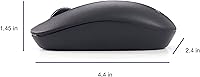
  • Mouse Design: Ambidextrous mouse design suitable for both left and right-handed users.
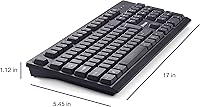
  • Dimensions: Keyboard dimensions are 18 x 6 x 1 inches, weighing approximately 1 lb.
  • Wireless Range: The wireless connection provides a reliable range suitable for typical office environments.
  • Keyboard Layout: The keyboard features a standard QWERTY layout.
  • Included Components: Package includes the keyboard, mouse, and a nano receiver.
  • Form Factor: Compact design ideal for home or office use.
  • Build Material: Constructed with durable plastic materials designed for everyday use.
  • Ergonomics: Ergonomically designed for comfort during extended typing sessions.
  • Compatibility with Devices: Works with a variety of devices including desktops, laptops, and tablets with a USB port.
  • Color Options: Available in a classic black color for a sleek, professional look.
  • Key Feel: The keyboard offers quiet, responsive keystrokes suitable for office environments.
  • Weight: The keyboard and mouse combo weighs approximately 1 lb, making it lightweight and portable.

FAQ

Setting up this keyboard and mouse combo is easy thanks to its plug-and-play functionality. Simply plug the nano receiver into your PC or laptop’s USB port, and the devices should connect automatically without the need for additional software.

Yes, the 2.4GHz wireless connection provides a stable, lag-free experience, ensuring reliable use for both the keyboard and mouse. Users generally report minimal interference, even in environments with other wireless devices.

Yes, this device is compatible with a wide range of operating systems including Windows, MacOS, and Linux, making it versatile for different setups. Simply connect the included USB receiver to your computer to get started.

Yes, the keyboard features adjustable tilt legs that allow you to customize the typing angle, helping to improve comfort during long typing sessions.

This combo is designed with comfort in mind, offering a full-size keyboard and ergonomic layout. The quiet keystrokes and adjustable tilt legs make it a good choice for extended typing sessions. However, some users may find it less sturdy than other models designed for heavy-duty office use.

To maintain the devices, simply use a dry microfiber cloth to wipe off any dirt or dust. For the keyboard, avoid getting liquids inside the keys. The mouse may also need periodic cleaning, especially around the sensor area, to maintain smooth tracking.

The keyboard runs on a single AAA battery, and the mouse uses a AA battery. Battery life is generally impressive, with many users reporting several months of use before needing to replace the batteries, depending on usage frequency.

While this combo is great for general use and office tasks, the mouse with 1000 DPI may not provide the precision needed for professional gaming or tasks requiring high accuracy, such as graphic design or video editing.

The mouse works well on most flat surfaces. However, some users have noted that its responsiveness can be inconsistent on glossy or reflective surfaces. A mouse pad is recommended for the best performance.

This combo is designed to be used with one device at a time via the USB receiver. It does not have multi-device pairing capabilities, so you will need to unplug the receiver and re-plug it into the device you want to use.