
Overview

The Upperizon U156LH 15.6″ Portable Monitor enters a crowded budget category and manages to hold its own, thanks largely to its aluminum chassis and a profile barely thicker than a smartphone. At this price point, most competitors cut corners with plastic shells that flex and creak — this portable monitor feels noticeably more solid in hand. It launched in early 2022 and has maintained a consistent ranking inside the top 200 computer monitors on Amazon — not a fluke. The integrated kickstand and built-in speakers mean you can set it up on a hotel desk or cafe table without hunting for extra accessories. It is built for productivity and casual use, not color-critical professional work.

Features & Benefits

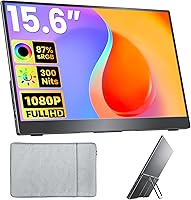
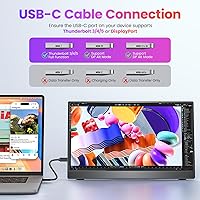
The IPS panel delivers a sharp, full HD image with wide viewing angles — genuinely helpful when you are presenting work to someone sitting beside you. The matte surface handles indoor glare reasonably well, though direct sunlight will still wash things out. Connectivity is where this travel-friendly screen earns real points: two full-featured USB-C ports handle both data and display, while the HDMI port covers older laptops and consoles. One important caveat — your laptop's USB-C port must support DisplayPort Alt Mode or Thunderbolt to carry a video signal; standard charging ports will not work. Color coverage is adequate for documents, video calls, and streaming. The bundled cable kit and sleeve case round things out nicely.

Best For

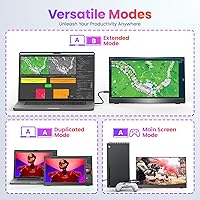
This portable monitor is a natural fit for remote workers and students who set up shop in hotel rooms, co-working spaces, or libraries and need a second screen without hauling heavy gear. Anyone bouncing between a dorm, a cafe, and home will appreciate how easily it tucks into a backpack alongside a laptop. It handles extend and duplicate modes well, giving you room to keep reference material open while you work. Casual PS5 or Xbox players will find the HDMI connection handy for a compact gaming setup in a tight space. Skip it if you need professional color accuracy or refresh rates beyond 60Hz — those use cases call for a pricier display.

User Feedback

Buyers consistently praise the easy plug-and-play setup and the surprisingly premium feel of the aluminum frame for the price. Portability gets high marks too — it is light enough to forget about in a bag until you actually need it. On the flip side, OSD button placement draws repeated criticism for being awkward and fiddly to navigate mid-use. The built-in speakers are a convenience, not a feature — fine for a notification chime, not for music. A notable pattern in negative reviews involves USB-C compatibility: several buyers discovered too late that their port lacked DisplayPort Alt Mode support. Long-term build quality holds up well by most accounts, and display calibration issues appear to be isolated rather than systemic.

Pros

  • The aluminum chassis feels noticeably more solid than plastic-bodied rivals in the same price range.
  • At under 1.6 pounds, this portable monitor fits into a laptop bag without adding meaningful weight to your load.
  • Plug-and-play via USB-C or HDMI means zero drivers, zero software, and a genuinely fast first-use experience.
  • The matte IPS panel stays readable under typical indoor and cafe lighting without distracting glare.
  • Two full-featured USB-C ports give you connection flexibility across both newer and older devices.
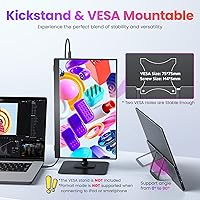
  • VESA compatibility and portrait mode support extend its usefulness well beyond travel scenarios.
  • Everything needed to get started ships in the box — three cables, a power adapter, and a sleeve case included.
  • FreeSync at 60Hz keeps casual PS5 and Xbox gaming smooth without screen tearing.
  • A consistent multi-year sales rank signals proven reliability rather than a rushed-to-market product.

Cons

  • The OSD control buttons are awkwardly positioned and fiddly to press, making brightness and menu adjustments more annoying than necessary.
  • Built-in speakers are barely adequate for system sounds — do not expect usable audio for music or video content.
  • USB-C video output requires DisplayPort Alt Mode or Thunderbolt support, a compatibility detail that catches many buyers off guard.
  • At 300 nits, the screen washes out noticeably in direct sunlight and bright outdoor environments.
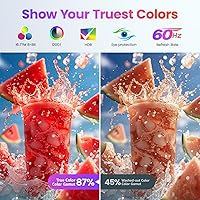
  • The 87% sRGB color gamut is insufficient for photo editors, colorists, or anyone doing color-sensitive creative work.
  • The 60Hz refresh rate is a hard ceiling that will frustrate users coming from high-refresh-rate gaming setups.
  • Some owners report the kickstand hinge gradually losing resistance after repeated folding and travel use.
  • The included sleeve case protects against surface scratches but offers minimal cushioning against impacts or drops.

Ratings

The scores below for the Upperizon U156LH 15.6″ Portable Monitor were generated by our AI rating engine after analyzing thousands of verified purchase reviews across global markets, with bot activity, incentivized posts, and outlier spam actively filtered out. Each score reflects what real buyers — remote workers, students, commuters, and casual gamers — actually experienced across days, weeks, and months of use. Strengths are credited where genuinely earned, and recurring frustrations are weighted honestly rather than softened.

Build Quality
82%
18%
The aluminum chassis genuinely surprises people at this price point. Most buyers coming from plastic-bodied competitors commented on how solid it feels in hand — no flex, no creaking when adjusting the kickstand. Several noted it held up without visible damage after months of daily commuting.
A recurring complaint is the kickstand hinge gradually loosening over time with frequent folding and travel. The tension is adequate out of the box, but a number of users found it no longer held position firmly after six to twelve months of heavy use.
Display Quality
78%
22%
For daily productivity — spreadsheets at a hotel desk, side-by-side browser tabs in a library — the IPS panel looks crisp and the wide viewing angle holds up when someone nearby glances at the screen. The matte finish earns consistent praise for minimizing glare under office and cafe lighting without creating a dull, hazy look.
The panel is clearly tuned for productivity, not visual perfection. Color depth and shadow detail fall noticeably short when watching darker films or doing content creation work, and a few users noticed subtle backlight unevenness toward the edges under solid-color backgrounds.
Portability
89%
At under 1.6 pounds with a sub-half-inch thickness, this is genuinely easy to slip into a laptop compartment and forget about until you need it. Frequent travelers and remote workers consistently highlight portability as the primary reason they chose this over heavier alternatives. The included sleeve adds just enough protection to make bag-to-desk transport feel worry-free.
The sleeve case, while a welcome inclusion, provides scratch protection but very little impact cushioning. Buyers who commute through packed environments or tend to throw everything into a single bag noted the sleeve is not enough on its own — a padded laptop compartment is advisable for heavier daily use.
Connectivity
71%
29%
Having two full-featured USB-C ports and an HDMI port means the Upperizon display plays nicely with a broad range of devices — from recent MacBooks and Windows laptops to gaming consoles and older machines that only output via HDMI. No adapters needed for most common setups, and the plug-and-play experience gets consistently positive marks.
The most common frustration in negative reviews stems directly from USB-C compatibility confusion. Buyers who assumed any USB-C port would carry a video signal discovered after purchase that their laptop's port was charge-only and lacked DisplayPort Alt Mode — an issue that has driven a meaningful share of returns for this product.
Value for Money
86%
Among budget-tier portable monitors, this one consistently earns praise for delivering more than expected at its price point. The aluminum build, bundled cable kit, and solid IPS panel make buyers feel they got a fair deal — a feeling that is not universal in this category. It is one of the most frequently cited reasons for recommendations to friends.
Value perception drops for buyers who encounter the USB-C compatibility issue or who expected more from the speakers and outdoor brightness. Those trading down from premium portable monitors may also feel the color and brightness limitations more acutely, making the price feel less justified for their specific use case.
Setup & Ease of Use
84%
The vast majority of buyers report having the display up and running within a few minutes of opening the box. No software installation, no driver hunting — just a cable connection and a quick display settings tweak on the host device. Students setting it up in a dorm room for the first time found the process particularly straightforward.
The OSD menu navigation is a persistent frustration. The physical buttons for accessing on-screen settings are small, stiffly positioned at the panel edge, and not always clearly labeled — making basic adjustments like brightness tuning feel unnecessarily fiddly, especially in low-light environments.
Color Accuracy
64%
36%
For the intended use case — word processing, spreadsheets, video calls, and casual streaming — color rendering is good enough that most everyday users will not notice any shortfall. Colors look natural and reasonably saturated at first glance, and the IPS panel avoids the washed-out look typical of cheaper TN alternatives.
Photographers, video editors, and designers who tested this display against calibrated reference monitors found obvious color shifts and an inability to reliably represent the full range of hues needed for professional work. At 87% sRGB with no factory calibration, this is not a display to rely on for color-critical decisions.
Brightness & Visibility
62%
38%
In typical indoor settings — a library, a coffee shop with controlled lighting, or a standard hotel room — the brightness level is comfortable for extended use without causing eye strain. The low blue light mode accessible through the OSD is a small but appreciated feature for late-night work sessions.
Three hundred nits is not enough for bright environments, and users who tried working near sunny windows or outdoors quickly found the screen difficult to read. This came up repeatedly in reviews from buyers who expected it to double as an outdoor display — a use case this travel-friendly screen simply cannot support reliably.
Gaming Performance
67%
33%
Casual gamers using a PS5 or Xbox in a small apartment or dorm room found the HDMI connection reliable and FreeSync a genuinely useful addition at 60Hz — it noticeably reduces screen tearing during fast-paced gameplay without any manual setup. For single-player and slower-paced titles, the experience is more than adequate.
The 60Hz ceiling is a real limiter for anyone accustomed to higher refresh rates, and competitive gamers reported feeling noticeably disadvantaged compared to their usual setup. Input lag, while not severe, was also flagged in a number of reviews as a minor but present concern during reaction-dependent gameplay.
Audio Quality
43%
57%
The built-in speakers do serve a functional purpose for buyers who want basic audio without carrying separate accessories — adequate for hearing a notification, catching a brief video clip, or following a quiet video call in a calm room. Having them at all is better than the alternative when traveling light.
Speaker quality is the most consistently criticized aspect across reviews, and the feedback is hard to argue with. Volume headroom is limited, bass is essentially absent, and in any environment with background noise — a cafe, a shared office, or a busy hotel lobby — they become nearly unusable.
OSD & Controls
52%
48%
The OSD itself covers the necessary adjustments — brightness, contrast, color temperature, and input switching — giving users enough control to dial in the picture for their environment. Buyers who configure it once and rarely revisit the menu find the button layout a non-issue in day-to-day use.
Physical button placement is one of the most frequently raised complaints in long-term user reviews. Buttons are small, recessed at the edge of the panel, and positioned in a way that makes them difficult to locate without looking — and even harder to press precisely when adjusting settings while the monitor is already in use.
Accessories & Packaging
83%
Arriving with three cables, a power adapter, and a sleeve case, this portable monitor avoids the frustrating scenario of buying a display and immediately needing to order additional cables. Buyers appreciated being able to open the box and connect to any device right away, without a secondary purchase before first use.
While the accessory bundle is generous for the price, the sleeve case is the weakest item in the package. It is thin fabric construction, and while it protects against surface scratches, a significant number of buyers noted it offers no meaningful padding and feels noticeably cheap relative to the quality of the monitor itself.
Desk Flexibility
77%
23%
VESA compatibility and portrait orientation support genuinely expand the use case well beyond travel. Users who initially bought this as a travel monitor ended up mounting it on a desk arm at home or in the office, appreciating both landscape and vertical configurations across different workflows.
The integrated kickstand works well on flat, stable surfaces but offers limited angle adjustability. Users who needed a specific tilt — particularly those working on a lap or on an uneven surface like a couch armrest — found the fixed-position design more restrictive than they expected.
Long-term Durability
73%
27%
The aluminum construction holds up well under regular use, and long-term owners generally report the display remaining stable in calibration and image consistency over time. Most buyers who have used it for over a year note it still functions exactly as it did when new, with no degradation in picture quality.
The kickstand hinge is the most cited long-term weak point — a number of users report it gradually losing tension and no longer holding the desired angle reliably after many months of travel use. The sleeve case also shows wear quickly at the edges and may need replacing within a year of daily commuting.

Suitable for:

The Upperizon U156LH 15.6″ Portable Monitor was clearly designed with mobile productivity in mind, and it delivers best for people whose work or study life genuinely moves around. Remote workers who rotate between hotel rooms, co-working spaces, and home offices will get real value from the lightweight aluminum build and the integrated kickstand — setup takes seconds on any flat surface. Students bouncing between a dorm, a library, and a cafe will appreciate how easily it tucks into a backpack without adding noticeable bulk to their load. If your daily workload involves writing, research, spreadsheets, coding, or video calls and you simply want a larger canvas to spread things across, this travel-friendly screen is a sensible, low-friction choice. Casual console gamers looking to set up a compact PS5 or Xbox display in a small bedroom or shared living space will also find the HDMI connection reliable and the panel adequate for most titles.

Not suitable for:

The Upperizon U156LH 15.6″ Portable Monitor has meaningful limitations that make it a poor fit for certain buyers, and it's worth being clear about those upfront. If your work involves photography, graphic design, video color grading, or any creative field where accurate color reproduction is non-negotiable, the color gamut coverage falls short of professional standards, and no amount of manual calibration will fully compensate for that gap. Competitive or high-refresh-rate gamers who are accustomed to faster panels will find the 60Hz ceiling noticeably limiting and should look at purpose-built gaming monitors instead. Anyone expecting to use this as a primary outdoor display should know the brightness level gets easily overwhelmed in direct sunlight, making it impractical away from shaded or indoor settings. There is also a connectivity caveat worth flagging prominently: if your laptop's USB-C port supports charging only and lacks DisplayPort Alt Mode or Thunderbolt, the USB-C connection will not carry a video signal — a detail that has caused frustrated returns for buyers who skipped the fine print.

Specifications

  • Screen Size: The display measures 15.6 inches diagonally, offering a comfortable working area without the bulk of a traditional desktop monitor.
  • Resolution: Full HD 1920x1080 resolution delivers sharp, readable text and clear visuals across productivity tasks, video streaming, and casual gaming.
  • Panel Type: An IPS panel ensures consistent color reproduction and contrast across a wide 178-degree viewing angle, both horizontally and vertically.
  • Refresh Rate: The display runs at 60Hz with AMD FreeSync support, which reduces screen tearing during casual gaming without requiring a high-performance GPU.
  • Color Gamut: Color coverage reaches 87% sRGB, suitable for everyday productivity, media consumption, and web browsing, but insufficient for professional color-critical creative work.
  • Brightness: Peak brightness of 300 nits performs reliably in indoor and moderately lit environments but is not adequate for direct sunlight or bright outdoor use.
  • Contrast Ratio: A 1200:1 contrast ratio produces reasonably deep blacks and visible shadow detail, which is competitive for an IPS panel at this price tier.
  • Surface Finish: The matte screen coating diffuses reflections from overhead lighting without meaningfully degrading image sharpness or color vibrancy during normal indoor use.
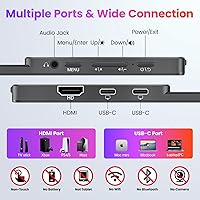
  • Connectivity: Two full-featured USB-C ports and one HDMI port provide connection options for a wide range of laptops, desktop PCs, and gaming consoles.
  • USB-C Requirement: USB-C video output requires the host device's port to support DisplayPort Alt Mode or Thunderbolt 3, 4, or 5; a charging-only USB-C port will not transmit a video signal.
  • Weight: At 1.54 pounds, the monitor is light enough to carry daily in a laptop bag without adding noticeable load to a commuter or travel setup.
  • Dimensions: Physical dimensions of 14.25 x 8.81 x 0.35 inches keep the profile slim enough to slide alongside a standard 15-inch laptop in most bags.
  • Build Material: The enclosure is constructed from aluminum, providing noticeably greater rigidity and a more premium feel than the plastic shells common at this price point.
  • Orientation: Both landscape and portrait orientations are supported, allowing the display to be rotated vertically for coding, document review, or vertical content layouts.
  • VESA Mount: Two VESA mounting holes allow the monitor to be secured to a compatible desk arm or wall mount bracket for a more permanent workstation setup.
  • Built-in Audio: Integrated speakers are present for basic audio output and handle system notifications and quiet video call audio, but are not suited for music or media listening.
  • In the Box: Package contents include an HDMI cable, a USB-C to USB-C display cable, a USB-C to USB-A power cable, a power adapter, and a protective sleeve case.

Related Reviews
Upperizon P156UHT-R 15.6″ 4K OLED Portable Monitor

77%
93%
Display Quality
94%
Color Accuracy
88%
Portability & Design
79%
Build Quality
61%
Touchscreen Performance
More
Topmonitor P15.6/2.5K 15.6-inch Portable Monitor
77%
91%
Image Sharpness
87%
Color Accuracy
93%
Portability
82%
Connectivity
88%
Value for Money
More
InnoView INVPM406 15.6-inch Portable Monitor
75%
91%
Ease of Setup
83%
Display Clarity
78%
Portability & Build
62%
USB-C Compatibility
88%
Value for Money
More
Westinghouse 15.6 Inch Portable Monitor
82%
88%
Display Quality
92%
Portability
86%
Connectivity Options
94%
Ease of Setup
80%
Build Quality
More
Acer PM161Q 15.6-inch Portable Monitor
70%
91%
Portability
78%
Display Clarity
52%
Glare & Screen Surface
88%
Connectivity
89%
Setup Experience
More
Verbatim 15.6″ Portable Touchscreen Monitor
68%
83%
Build Quality
78%
Display Quality
71%
Touch Performance
76%
Portability
86%
Connectivity
More
ARZOPA S1 Table 15.6″ Portable Monitor
76%
93%
Portability
81%
Display Quality
94%
Ease of Setup
67%
Build Quality
58%
Stand & Stability
More
LUMIPIX Magic-001 15.6-inch Portable Monitor
76%
78%
Display Quality
91%
Portability
72%
Connectivity
61%
Stand Stability
79%
Value for Money
More
ZSCMALLS 15.6-inch 4K Portable Monitor
70%
88%
Display Sharpness
52%
Brightness
93%
Portability
86%
Connectivity
77%
Value for Money
More
VILVA V156F1 15.6-inch Portable Monitor
69%
74%
Display Quality
61%
Portability
82%
Connectivity & Compatibility
67%
Build Quality
83%
Value for Money
More

FAQ

It should work fine, provided your MacBook's USB-C port supports DisplayPort Alt Mode or Thunderbolt — which most MacBook Pro and MacBook Air models do. Just connect the included USB-C to USB-C cable and your Mac should detect the display automatically with no drivers required. If you are using an older MacBook that has only a standard charging USB-C port, the included HDMI cable is a reliable fallback.

No software or drivers are needed at all. The Upperizon U156LH 15.6″ Portable Monitor is fully plug-and-play over both USB-C and HDMI, and Windows, macOS, and most Linux distributions will recognize it immediately on connection. You can switch between extend and duplicate display modes directly through your operating system's display settings.

Yes, the HDMI port is compatible with PS5 and Xbox consoles without any special setup. One thing worth knowing is that the panel is capped at 60Hz, so it will not unlock frame rates higher than that. For most games and single-player titles this is perfectly fine, but competitive players used to 120Hz or higher displays will notice the limitation.

The matte coating does a good job managing glare from overhead office lighting, so it reads comfortably at a typical indoor desk. Near a bright window it starts to wash out a bit depending on the angle, and in direct sunlight it becomes genuinely difficult to see clearly. This is a solid indoor and shaded-environment monitor, not one built for outdoor use.

Yes, just use the included HDMI cable instead. The USB-C video connection only works when your laptop's port supports DisplayPort Alt Mode or Thunderbolt, which standard charging-only USB-C ports do not. HDMI is a reliable alternative and delivers the same picture quality, so you are not missing out on anything by going that route.

Yes, portrait orientation is supported. You physically rotate the monitor and then adjust your display rotation setting in Windows or macOS to match. It works particularly well for reading long documents, reviewing code, or browsing content that benefits from vertical screen space.

It is — the monitor has VESA mounting holes that fit standard desk arms and wall mounts. This makes it a practical option not just for travel but as a semi-permanent second screen at a home or office desk. That added flexibility is a genuine advantage over travel monitors that rely solely on a built-in stand.

They are best thought of as a convenience rather than a feature. In a quiet room they handle video call audio and system sounds adequately, but the sound is thin and lacks any real depth or volume. If you plan to watch videos, listen to music, or need decent audio for calls in a noisy environment, headphones or an external speaker will serve you much better.

The aluminum body is more durable than it might look at this price point, and it handles the bumps of regular bag-based commuting reasonably well. The included sleeve case protects against surface scratches, but it offers very little padding against harder impacts. If your commute involves crowded transit or a packed bag, tucking the monitor inside a padded laptop compartment adds a worthwhile layer of protection.

For very casual use — sorting through photos, basic cropping, or quick resizing — it is passable. For anything requiring reliable color judgment, like skin tone correction, print preparation, or professional retouching, the 87% sRGB coverage and absence of factory calibration will produce results you cannot fully trust. A display with wider color gamut coverage would be a more appropriate investment for regular photo editing work.