Overview

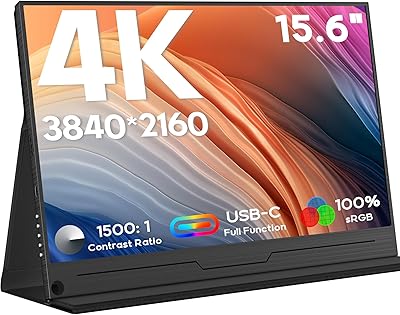
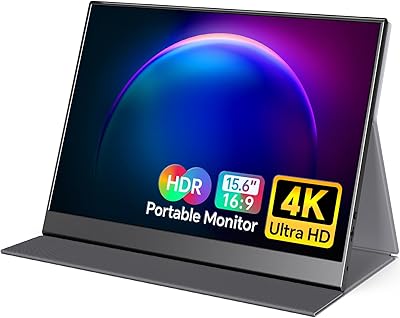
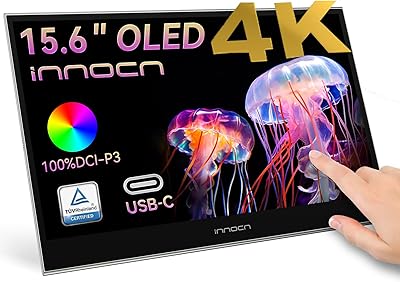
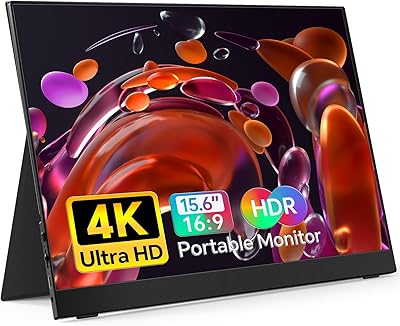
The Upperizon P156UHT-R 15.6″ 4K OLED Portable Monitor is aimed squarely at creative professionals and road warriors who refuse to compromise on color accuracy when working away from their main setup. What sets it apart from the crowded field of IPS-based portable monitors is the OLED panel — a technology that delivers genuinely inky blacks and vibrant colors rather than the washed-out grays you get from backlit alternatives. At 1.9 lbs and 15.6 inches, the balance between screen size and portability is well struck. That said, this is a premium-tier purchase, and the price reflects it. It connects via USB-C or mini HDMI, covering Windows and Mac laptops, gaming consoles, and most modern tablets.
Features & Benefits

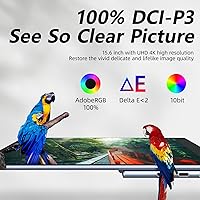
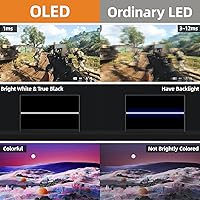
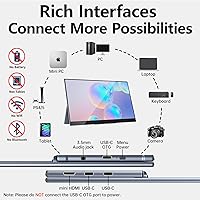
The resolution alone — 3840x2160 pixels across a 15.6-inch panel — means individual pixels are essentially invisible in normal use. But the real differentiator is the DCI-P3 color accuracy: 100% coverage means the colors you see are not approximations. For colorists or editors working with footage destined for cinema or streaming, the gap versus a generic sRGB monitor is immediately visible. The contrast ratio translates in practice to pure blacks with no backlight bleed — something OLED achieves organically. The slim 0.17-inch profile and included sleeve case make packing effortless, and the patented kickstand holds firmly in both portrait and landscape. Connectivity covers two USB-C ports, mini HDMI, and a USB-C OTG port. One honest note: a 45W PD adapter is recommended for reliable performance — underpowered hosts can cause issues.

Best For

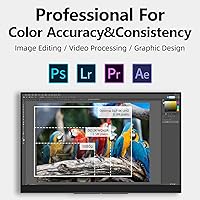
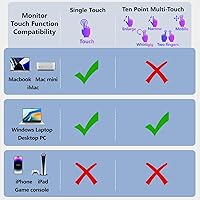
This travel monitor is a natural fit for video editors and colorists who need a trustworthy reference display outside the studio — the DCI-P3 gamut means graded footage looks the same on this screen as it should. Business travelers who frequently work from hotel rooms or co-working spaces will appreciate the dual-screen productivity without the bulk of a traditional monitor. Windows users get the added value of full 10-point touch support, which makes annotation, tablet-style navigation, and touch-based apps genuinely usable. Console gamers taking a PS5 or Xbox on the road will find a crisp 4K display in a carry-on-friendly package. One group to flag: if you regularly work outdoors or near bright windows, the glossy screen surface catches reflections enough to be distracting.

User Feedback

Owners of the Upperizon 15.6-inch display generally point to the OLED image quality as the main reason they chose it over cheaper IPS alternatives — the deep blacks and color fidelity tend to generate strong praise, particularly from users with a background in photo or video work. That said, the feedback is not uniformly glowing. A recurring issue involves power delivery compatibility: buyers who plug into laptop USB-C ports without sufficient wattage report inconsistent performance or the monitor failing to power on at all. Mac users have also expressed frustration after discovering that touchscreen functionality simply does not work on macOS — a detail that is in the spec sheet but easy to miss. Kickstand feedback is mixed, with some finding it solid and others noting it feels slightly less stable on uneven surfaces.

Pros

  • OLED panel delivers genuinely deep blacks and accurate color that IPS portable monitors at this size simply cannot match.
  • Full 100% DCI-P3 coverage makes the Upperizon 15.6-inch display a reliable on-location reference screen for colorists and video editors.
  • At 1.9 lbs and 0.17 inches thin, it slides into a laptop bag without adding meaningful bulk to your load.
  • Kickstand supports both portrait and landscape orientations, giving you real flexibility across different desk setups and workflows.
  • Included sleeve case and kickstand mean everything you need for setup is already in the box on day one.
  • Broad connectivity — two USB-C ports, mini HDMI, and a USB-C OTG port — makes it compatible with most modern devices.
  • Windows users get a fully functional 10-point touchscreen that adds practical value for annotation, drawing, and touch-based apps.
  • Console compatibility via mini HDMI makes this travel monitor a solid portable 4K option for PS5 and Xbox gaming on the road.
  • The 178-degree viewing angle keeps color and contrast consistent when sharing the screen or working from an off-angle position.

Cons

  • Touchscreen is completely non-functional on macOS and iOS — a significant limitation that is easy to miss before purchasing.
  • Requires a 45W PD-capable USB-C source; underpowered laptop ports can cause erratic behavior or prevent the display from powering on.
  • Glossy screen surface catches reflections aggressively in bright rooms or near windows, making ambient-light environments genuinely frustrating.
  • Capped at 60 Hz, so it is not a practical choice for competitive gaming or content where high-refresh motion smoothness matters.
  • Premium pricing is hard to justify for general productivity users who do not specifically need professional color accuracy or OLED contrast.
  • Kickstand stability on soft or uneven surfaces — such as a couch or bed — has drawn mixed feedback from real-world owners.
  • Upperizon is a relatively niche brand, which may give cautious buyers pause when considering long-term warranty support and serviceability.
  • The glossy finish attracts fingerprints quickly, which is a persistent nuisance given that this is also a touchscreen device.

Ratings

The scores below for the Upperizon P156UHT-R 15.6″ 4K OLED Portable Monitor were generated by AI after analyzing thousands of verified purchaser reviews sourced globally, with automated filtering applied to remove incentivized, bot-generated, and spam submissions. The resulting ratings reflect the genuine consensus of real buyers spanning professional colorists and video editors to business travelers and console gamers. Both the areas where this portable display consistently earns strong praise and the recurring pain points that have frustrated owners are transparently represented in each category.
Display Quality
93%
The OLED panel produces genuinely inky blacks and vibrant saturation that IPS portable monitors at this size simply cannot replicate. Reviewers who shoot and edit video describe the difference from their previous portable screen as immediately apparent, especially in dark scenes and content with high dynamic range.
The glossy screen surface attracts fingerprints faster than a matte panel would, which becomes a daily nuisance on a display you are constantly touching and transporting. At 350 cd/m², brightness is adequate indoors but image quality noticeably suffers when ambient light hits the reflective glass directly.
Color Accuracy
94%
Full 100% DCI-P3 coverage means colorists and designers can trust this display as a genuine reference screen rather than an sRGB approximation. Several professional reviewers note it holds up well against much larger studio monitors for on-the-go grading sessions, which is a meaningful endorsement for a 1.9 lb device.
The DCI-P3 advantage is largely wasted on buyers who are not doing color-critical work, since everyday web content and productivity apps are mastered in sRGB and can appear slightly oversaturated out of the box. On-screen color mode controls are also more limited than what professional desktop monitors offer with dedicated calibration software.
Portability & Design
88%
At 0.17 inches thin and 1.9 lbs, this travel monitor genuinely earns the portable label — it slides into most laptop bags with no noticeable added bulk and does not feel like an afterthought in terms of build materials. The included sleeve case is a thoughtful touch that protects the glossy screen during transit without requiring a separate purchase.
A few buyers note that the thin chassis picks up flexing when handled roughly, and the glossy front panel shows scratches more readily than a textured or matte surface would over repeated packing and unpacking. The kickstand, while effective on flat surfaces, adds a slight awkwardness when fitting the monitor back into its sleeve.
Build Quality
79%
21%
The overall construction feels premium for a portable display, with a slim chassis that does not creak under normal desk use. Most users report the panel itself arrives without dead pixels or uniformity issues, which is an important baseline expectation at this price point.
Some long-term owners note that the hinge area and kickstand connection points show signs of wear faster than expected given the premium positioning. There are also scattered reports of bezel flex near the corners when the display is under lateral pressure during travel or packing.
Touchscreen Performance
61%
39%
On a Windows laptop, the 10-point capacitive touch response is accurate and responsive enough for annotation, sketching, and basic navigation tasks. Windows users who pair it with a stylus-compatible application report a noticeably more fluid creative experience compared to non-touch portable monitors they have previously used for the same work.
Touchscreen functionality is completely absent on macOS, iOS, and all game consoles — a limitation that has frustrated a meaningful portion of buyers who did not realize this before purchasing. This single compatibility gap is arguably the most common source of negative reviews, particularly from Mac users who purchased specifically because the word touchscreen appeared prominently in the listing.
Connectivity
82%
18%
Two USB-C ports, a mini HDMI, and a USB-C OTG port give this portable OLED monitor a solid range of connection options for most modern devices, including laptops, tablets, and game consoles. The OTG port in particular is a practical bonus that lets users attach a keyboard or mouse without needing a separate hub.
The mini HDMI port requires a dedicated cable that many users do not already own, and the absence of a full-size HDMI port is a mild inconvenience for console users accustomed to standard cables. There is also no headphone jack, which limits audio output options when connecting via USB-C or HDMI without a separate adapter.
Kickstand & Setup
73%
27%
The integrated kickstand removes the need for a separate stand or prop, and getting set up on a firm desk takes under a minute with no extra accessories beyond the cable. The ability to switch between portrait and landscape orientation by simply repositioning the stand is a practical convenience that users with varied workflows genuinely appreciate.
On soft or uneven surfaces — hotel beds, fabric sofa armrests, or laps — the kickstand provides noticeably less stability and can tip if the surface shifts. Some users also note that the angle range feels narrower than they would like, limiting the ability to achieve shallow viewing angles for low-mounted or reclining desk setups.
Power Delivery
58%
42%
When paired with a capable 45W PD adapter or a Thunderbolt-equipped laptop, the power chain works reliably and the monitor draws enough wattage to function at full performance without throttling. Users who already carry a high-powered USB-C hub or charger in their travel kit report the single-cable setup as genuinely convenient.
The 45W minimum power requirement is a real-world stumbling block: a significant share of user complaints trace directly to under-powered USB-C ports, with symptoms ranging from the screen flickering to the monitor simply not powering on. Buyers using older laptops, entry-level chargers, or phone adapters are particularly affected, and resolving the issue often requires purchasing an additional adapter.
Brightness & Glare
67%
33%
At 350 cd/m², the display is bright enough for standard office environments and hotel rooms, and the OLED panel's rich colors help content look vivid even at moderate brightness settings. Users who work in dim or controlled lighting consistently describe the image quality as exceptional for a display of this size and weight.
The glossy finish catches reflections aggressively in bright environments, and 350 cd/m² is not sufficient to overpower those reflections the way high-brightness matte panels can. Several users describe attempting to use this travel monitor near café windows or in busy airport lounges as genuinely frustrating, ultimately shading the screen or repositioning entirely to get a usable image.
Value for Money
71%
29%
For creative professionals who actively need DCI-P3 color accuracy and OLED contrast in a portable form factor, the Upperizon 15.6-inch display delivers capabilities that genuinely justify the premium over cheaper IPS alternatives. Color-critical workflows where a reference-grade portable monitor prevents costly rework represent a clear and defensible case for the investment.
For casual users who primarily need a second screen for web browsing, video calls, or document editing, the premium pricing is hard to justify when solid IPS portable monitors exist at significantly lower cost. The touchscreen limitation on Mac further erodes perceived value for Apple ecosystem users who expected full functionality and purchased accordingly.
Gaming Performance
74%
26%
Console gamers who travel with a PS5 or Xbox find this portable OLED monitor delivers a noticeably better picture than the typical hotel TV or IPS travel display, with the OLED contrast making dark game environments far more immersive. The 4K resolution at 60 Hz covers what most current-generation console titles actually output in practice.
The 60 Hz ceiling is a genuine limitation for PC gamers accustomed to 120 Hz or higher, as fast-motion games show visible motion blur by comparison to higher-refresh alternatives. There is also no support for variable refresh rate technologies, meaning screen tearing can occasionally appear in games without a frame limiter properly applied.
Viewing Angles
87%
The 178-degree viewing angle is one area where OLED technology delivers without caveats — colors and brightness remain consistent at steep angles, making it practical for side-by-side collaboration or presenting work to a client across a desk. There is no visible color shift or brightness drop that typically affects IPS panels when viewed from wide off-axis positions.
The glossy surface can create localized glare spots depending on the viewing angle and room lighting, which partially undermines the otherwise excellent off-axis performance. This is more of a situational annoyance than a fundamental flaw, but the reflectivity compounds the wide-angle experience negatively in environments where lighting placement cannot be controlled.
Software Compatibility
63%
37%
Plug-and-play recognition works reliably on both Windows and macOS for display output, and most modern laptops with USB-C video support detect the monitor without requiring driver installation. Console connectivity via mini HDMI is equally straightforward with no configuration required beyond selecting the correct input source.
Touchscreen functionality is the compatibility weak point — it works on Windows but is entirely non-functional on macOS, iOS, and game consoles, which significantly limits the feature set for non-Windows users. There are also some reports of the display not being recognized at full 4K resolution on older USB-C ports, requiring a resolution downgrade or switching to mini HDMI as a workaround.
Thermal Performance
78%
22%
Under normal usage conditions — running 4K video playback or productivity applications for several hours — the chassis stays warm but not uncomfortably hot, which is expected behavior for an OLED panel inside a slim enclosure. Most users report no thermal-related throttling or image quality degradation during standard extended desk sessions.
Extended high-brightness use or prolonged HDR content playback can cause the chassis edges to become noticeably warm, which some users find uncomfortable when picking up and repositioning the display. Long-term OLED burn-in risk from static interface elements is a background concern for heavy users, though at typical portable monitor usage durations it is unlikely to manifest quickly.
Packaging & Accessories
84%
The inclusion of a sleeve case and kickstand in the box is a meaningful value-add compared to competitors that often sell these accessories separately, and unboxing feedback suggests the monitor arrives well-protected with no cosmetic damage in the vast majority of reported cases. The cables included cover the most common connection scenarios for day-one use.
A 45W PD adapter is not included in the standard package, which means buyers who do not already own a compatible charger must purchase one separately before the monitor will run reliably. The sleeve case, while practical for screen protection, lacks internal compartments for cables or adapters, requiring a separate pouch to build a truly complete travel kit.

Suitable for:

The Upperizon P156UHT-R 15.6″ 4K OLED Portable Monitor is built for creative professionals who need a trustworthy, color-accurate display away from their primary workstation — freelance video editors finishing a cut in a hotel room, colorists reviewing DCI-P3 graded footage on a client visit, or graphic designers who cannot afford to guess at color when working remotely. The 100% DCI-P3 coverage is not just a spec to check off; on an OLED panel, it translates to saturated, precise color that cheaper sRGB portable displays genuinely cannot replicate. Business travelers who routinely set up in airports, co-working spaces, or temporary offices will appreciate that this travel monitor weighs under 2 lbs and comes with a sleeve case and kickstand, so dual-screen productivity is achievable without hauling extra gear. Windows laptop users specifically get full value from the hardware, since the 10-point touchscreen is completely functional on that platform and adds real utility for annotation, stylus work, or touch-based applications. Console gamers who travel with a PS5 or Xbox and want a sharp portable 4K display for hotel gaming will also find this portable OLED monitor a significant upgrade over the typical budget travel screen.
Not suitable for:

The Upperizon P156UHT-R 15.6″ 4K OLED Portable Monitor is a harder sell for anyone who works primarily outdoors or in brightly lit environments — the glossy panel picks up reflections readily, and while 350 cd/m² is respectable for OLED, it does not overcome glare the way a matte or significantly higher-brightness display would. Mac users need to go in with realistic expectations: touchscreen functionality is completely absent on macOS, so buyers in Apple's ecosystem who factor that feature into their purchase decision are effectively paying for hardware they cannot fully use. Anyone with a laptop USB-C port that does not meet the 45W power delivery requirement should also be cautious, as insufficient wattage from the host device is a known source of unreliable performance and is not immediately obvious from the product listing. If your needs are primarily light productivity, video calls, or general browsing on a secondary screen, the premium pricing is difficult to justify when capable IPS portable monitors exist at meaningfully lower price points. Finally, competitive or fast-motion gamers should note that 60 Hz is the maximum refresh rate, which puts this display out of contention for anyone prioritizing smooth high-refresh gaming.
Specifications

  • Panel Type: Uses an OLED panel, which produces light on a per-pixel basis to deliver true blacks, no backlight bleed, and inherently high contrast without any separate backlight layer.
  • Screen Size: The display measures 15.6 inches diagonally with a 16:9 widescreen aspect ratio.
  • Resolution: Native resolution is 3840 x 2160 pixels (4K UHD), resulting in a pixel density of approximately 282 pixels per inch.
  • Color Gamut: Covers 100% of the DCI-P3 color space, which spans a significantly wider range of saturated colors than the sRGB gamut found on most standard consumer monitors.
  • Contrast Ratio: Rated at 100000:1 contrast, a figure made possible by OLED technology's ability to switch individual pixels completely off, producing an absolute black level.
  • Brightness: Peak brightness is rated at 350 cd/m², which is adequate for typical indoor use but may fall short in high-ambient-light or outdoor conditions.
  • Refresh Rate: Operates at a fixed 60 Hz refresh rate with no support for variable refresh rate technologies such as FreeSync or G-Sync.
  • Viewing Angle: Supports a 178-degree viewing angle both horizontally and vertically, with minimal color shift or brightness drop when viewed from wide off-axis positions.
  • Touchscreen: Features a 10-point capacitive touchscreen that is functional on Windows only; macOS, iOS, iPadOS, and game consoles do not support the touch input signal this display transmits.
  • Connectivity: Equipped with two full-function USB-C ports (supporting video and power delivery), one mini HDMI port, and one USB-C OTG port for connecting peripherals such as a keyboard or mouse.
  • Power Input: Requires a USB-C Power Delivery source, with Upperizon recommending a minimum 45W PD adapter for stable and consistent operation.
  • Dimensions: Measures approximately 14 x 8.8 inches in footprint with a minimum profile of 0.17 inches at its slimmest point.
  • Weight: Weighs 1.9 lbs, placing it among the lighter options available in the 15.6-inch portable monitor category.
  • Screen Surface: Features a glossy finish that enhances perceived color richness and contrast depth but increases susceptibility to reflections in bright or high-ambient-light environments.
  • HDR Support: Compatible with HDR content playback, utilizing the OLED panel's extended dynamic range and deep black output to render highlight and shadow detail more accurately.
  • Orientation: The integrated kickstand supports both landscape and portrait display orientations, allowing flexible positioning for different workspace configurations and use cases.
  • In the Box: Package includes the monitor, a patented adjustable kickstand, a protective sleeve case, and connection cables for initial setup.
  • Brand: Manufactured by Upperizon under model number P156UHT-R, with the product first made available in September 2023.

Related Reviews

ViewSonic VX1655-4K-OLED 15.6-inch Portable OLED Monitor
77%
93%
Display Quality
91%
Portability
84%
USB-C Connectivity
88%
Build Quality
67%
Stand Stability
More
ViewSonic VP16-OLED 15.6-inch Portable OLED Monitor
80%
93%
Display Quality
91%
Color Accuracy
88%
Portability
74%
USB-C Connectivity
81%
Build Quality
More
Upperizon U156LH 15.6″ Portable Monitor
72%
82%
Build Quality
78%
Display Quality
89%
Portability
71%
Connectivity
86%
Value for Money
More
ZSCMALLS 15.6-inch 4K Portable Monitor
70%
88%
Display Sharpness
52%
Brightness
93%
Portability
86%
Connectivity
77%
Value for Money
More
VILVA 15.6-inch 4K Portable Monitor
75%
91%
Display Sharpness
88%
Color Accuracy
93%
Portability
86%
Value for Money
67%
USB-C Compatibility
More
INNOCN 15.6″ Portable OLED Touch Monitor
84%
91%
Display Quality
88%
Portability
75%
Touchscreen Sensitivity
94%
Setup & Installation
89%
Device Compatibility
More
ForHelp 15.6-inch 4K Portable Monitor
74%
91%
Display Sharpness
86%
Color Accuracy
93%
Portability
68%
USB-C Connectivity
63%
Build Quality
More
Topmonitor P15.6/4K 15.6-inch 4K Portable Monitor
79%
93%
Display Sharpness
88%
Color Accuracy
91%
Portability
67%
Stand Stability
84%
Connectivity & Compatibility
More
FMC 15.6-Inch 4K Portable Gaming Monitor
87%
93%
Display Quality
91%
Portability & Design
85%
Touchscreen Performance
88%
Build Quality
90%
Connectivity
More
QQH Z12-4 15.6-inch 4K Portable Monitor
76%
88%
Display Quality
91%
Build Quality
89%
Pixel Density
67%
Brightness & Visibility
53%
Gaming Performance
More

FAQ

No, it does not. The 10-point touchscreen is only functional on Windows — macOS does not support the touch input signal this display transmits. You will still get the full 4K OLED image on a Mac, but the touchscreen hardware will be completely inactive regardless of how it is connected.

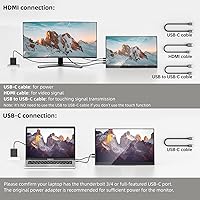
Upperizon recommends a 45W Power Delivery (PD) USB-C adapter as the minimum for reliable operation. This is worth taking seriously: plugging this travel monitor into a laptop USB-C port that outputs less than 45W can result in erratic behavior or the display refusing to power on at all. Always check your laptop or wall adapter's PD output wattage before assuming a single-cable setup will work cleanly.

Yes, both consoles connect via the mini HDMI port and will output a 4K signal at 60 Hz, which covers what most titles support. Keep in mind the touchscreen does not function with game consoles, and you will need to power the monitor separately since HDMI does not carry power on its own.

It is genuinely well-suited for that workflow. The Upperizon P156UHT-R 15.6″ 4K OLED Portable Monitor covers 100% of the DCI-P3 color space, which is the standard used in cinema and streaming post-production. On an OLED panel, that color accuracy is reinforced by per-pixel light control, so graded footage will look on this screen the way it is actually supposed to look.
On a flat, firm desk surface the kickstand holds its position reliably across a useful range of viewing angles. On softer or uneven surfaces, like a couch cushion or a hotel bed, some owners have found it feels less secure. For standard desk use, stability should not be a concern during extended work sessions.

The kickstand supports both landscape and portrait orientations, so you can stand the display upright for reading long documents, coding, or vertical browsing. Portrait-mode touch input follows the same rule as landscape: it only works on Windows.

It depends on your laptop's specific USB-C port capabilities. If the port supports video output and simultaneously delivers at least 45W of Power Delivery, a single-cable connection should work. Laptops with Thunderbolt 3 or Thunderbolt 4 ports typically meet that bar. Older machines or those with lower-wattage USB-C ports may still need a separate power adapter alongside the display cable.

In a controlled indoor environment with lighting positioned behind you, the glossy finish is manageable and actually makes colors look richer and more vivid. Near a bright window or under strong overhead lighting, reflections become noticeable enough to genuinely affect usability. If your primary workspace has a lot of ambient light, a portable monitor with a matte screen finish would be a more practical choice.

For creative work, productivity, and casual gaming, 60 Hz is completely adequate and you are unlikely to notice any shortcomings. Where it starts to feel limiting is in competitive gaming, where 120 Hz or higher displays offer a real advantage in motion clarity and responsiveness. Standard video playback at 24, 30, or 60 frames per second looks smooth and natural.

The package includes the monitor, Upperizon's patented kickstand, a protective sleeve case, and connection cables. A 45W PD USB-C adapter is recommended for full performance, but whether one is bundled can vary depending on the specific listing or kit version — it is worth confirming this detail before purchasing if you do not already have a compatible adapter.