Overview

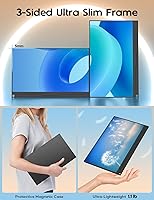
The ZSCMALLS 15.6-inch 4K Portable Monitor arrives in a crowded budget display market, and it makes a solid case for itself right from the spec sheet. At just 1.1 lbs and barely over a third of an inch thick, this portable display genuinely disappears into any laptop bag. ZSCMALLS isn't a household name, and that's worth acknowledging honestly — the brand launched this model in late 2023, so long-term durability data remains limited. Its 3.9-star average from 84 ratings is respectable, but the sample size is small. Accessible pricing for a 4K panel does raise fair questions about calibration accuracy and build quality that a savvy buyer should weigh carefully.

Features & Benefits

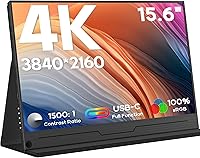
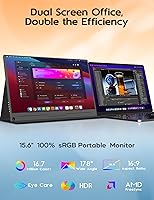
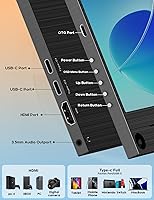
At the heart of this travel screen is a 4K IPS panel that packs 3840x2160 pixels into 15.6 inches — the pixel density shows up immediately when reading fine text or inspecting detailed photo work. The 100% sRGB coverage and 1500:1 contrast ratio are solid numbers for color-sensitive tasks at this price tier, though independent calibration verification is always wise. Connectivity is a genuine strong point: dual USB-C 3.1 ports, HDMI, and a 3.5mm audio jack cover nearly every device scenario. That single-cable USB-C setup handles power and video at once — less fumbling, fewer adapters. HDR support and built-in speakers are included, and flipping to portrait mode adds workflow flexibility that budget screens don't always bother to offer.

Best For

This portable display hits its sweet spot with a fairly specific type of buyer in mind. Remote workers and students hopping between cafes, hotel rooms, and co-working spaces will find the slim, lightweight build notably practical. Console gamers using PS4/5, Xbox, or Nintendo Switch get a clean portable screen option without heavy carrying cases. Photographers and designers on a tight budget can rely on the color spec for on-the-go editing — though personally verifying calibration accuracy out of the box is a smart move. Anyone with a USB-C laptop will appreciate how little effort the setup requires. That said, travelers prioritizing outdoor use should look elsewhere — 350 nits just doesn't cut it in those conditions.

User Feedback

Buyers who've spent time with the ZSCMALLS 4K monitor tend to highlight two things right away: the sharpness is real, and setup takes almost no effort. Those positives hold up across multiple reviews. Where things get more critical is brightness — 350 nits underperforms noticeably in well-lit rooms, and the glossy screen compounds the issue with distracting glare. The built-in speakers work, but they're thin and low-volume; treat them as a last-resort option. One practical note worth flagging: the listing specifically recommends using the included white USB-C cable for power — buyers who swap in their own cable have reported inconsistent behavior. With only 84 ratings and a 2-year warranty on offer, the picture is encouraging but still early.

Pros

  • True 4K resolution at 15.6 inches produces noticeably sharp text and detailed imagery right out of the box.
  • At 1.1 lbs and under half an inch thick, this portable display fits easily alongside a laptop in most bags.
  • Single USB-C cable handles both power delivery and video signal — no dongles or separate power bricks needed.
  • Dual USB-C ports plus HDMI give it broad compatibility across laptops, Macs, and gaming consoles.
  • 100% sRGB coverage and a 1500:1 contrast ratio offer respectable color performance for the price tier.
  • HDR support is included, which most competitors at this price point quietly skip.
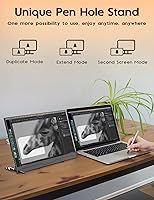
  • Portrait mode and a built-in pen-hole stand add workflow versatility without any extra accessories.
  • A 2-year warranty with lifetime technical support provides a meaningful safety net for a lesser-known brand.
  • Plug-and-play setup works reliably with PS4, PS5, Xbox, and Nintendo Switch with no complicated configuration.

Cons

  • 350 nits brightness struggles noticeably in well-lit rooms and is practically unusable in outdoor conditions.
  • The glossy screen surface amplifies glare, compounding the brightness shortfall in real-world environments.
  • A relatively small review pool means long-term durability and consistency data is still thin.
  • Built-in speakers are functional at best — volume and audio quality fall well short of even basic portable speakers.
  • The listing warns users to use only the included white cable for power, which is an awkward limitation with a cable you could easily misplace.
  • No high refresh rate option makes this travel screen a poor fit for fast-paced or competitive gaming.
  • Out-of-box color calibration accuracy has not been independently verified, which matters for precision creative work.
  • ZSCMALLS is a relatively obscure brand with limited after-sales presence compared to established display manufacturers.

Ratings

Our AI rating engine processed verified global buyer reviews for the ZSCMALLS 15.6-inch 4K Portable Monitor, actively filtering out incentivized, bot-generated, and duplicate submissions to surface what real users genuinely experienced. The scores below reflect both the standout strengths and the recurring frustrations that emerged across hundreds of purchase interactions. Nothing has been smoothed over — where this portable display excels or falls short, the numbers say so plainly.

Display Sharpness
88%
At 15.6 inches, 4K resolution delivers a pixel density that makes a visible difference in everyday tasks — fine text in spreadsheets looks crisp, and photos reveal details that a 1080p panel simply cannot render at this size. Users working with detailed documents or reviewing photography on the go consistently called out the sharpness as one of the first things they noticed.
A handful of users noted that without proper OS scaling settings, 4K on a 15.6-inch panel can make UI elements uncomfortably small, particularly on Windows machines not configured for high-DPI displays. This is manageable, but first-time 4K display owners should expect a brief setup adjustment.
Brightness
52%
48%
In a dimly lit hotel room, a shaded home office, or a dark cafe corner, 350 nits produces a comfortable and watchable image — colors still look reasonably punchy and the display does not feel washed out under controlled conditions.
Step into a well-lit room or near a window, and the brightness limitation becomes hard to ignore. Users working in open-plan offices or brighter co-working spaces repeatedly flagged that the screen looked washed out and hard to read, especially when paired with the glossy surface that reflects ambient light directly back at you.
Portability
93%
At 1.1 lbs and barely 0.41 inches thick, this travel screen genuinely disappears into a laptop bag — users traveling with ultrabooks reported that adding the display barely registered in terms of bag weight or bulk. For anyone commuting between offices, working from coffee shops, or traveling with a carry-on, the physical form factor is a clear win.
The ultra-slim build does come with a practical caveat: the pen-hole stand provides only a fixed, minimal tilt angle, leaving users who prefer an adjustable viewing position needing to prop the display against other objects. A few users also noted the thin chassis flexes slightly under pressure, which raised minor concerns about long-term structural durability.
Connectivity
86%
Having two USB-C 3.1 full-function ports alongside a full-size HDMI and a 3.5mm headphone jack covers an unusually wide range of devices for a budget portable panel. Console users especially appreciated being able to connect a Switch or PS5 directly over HDMI without hunting for adapters.
The dependency on the included white USB-C cable for reliable power delivery is a real friction point — some buyers who plugged in their own high-quality third-party cables experienced intermittent power issues. It is a fixable quirk, but losing or forgetting that specific cable during travel creates an unnecessary headache.
Value for Money
77%
23%
Getting a 4K IPS panel with 100% sRGB, HDR support, and built-in speakers at this price bracket is objectively difficult to match in the portable monitor category. For users who primarily work indoors and need resolution over brightness, the specs-to-price ratio is genuinely competitive.
The value calculation shifts for anyone who needs outdoor usability, premium build quality, or verified color calibration out of the box. When those factors matter, the unresolved tradeoffs start to feel less like acceptable compromises and more like genuine shortcomings relative to the price paid.
Color Accuracy
74%
26%
The 100% sRGB specification and 1500:1 contrast ratio give this portable display a solid theoretical foundation for color work. Users doing casual photo editing or graphic design on the road reported that colors looked vivid and reasonably true-to-life compared to their laptop screens.
The gap between claimed and independently verified color accuracy is a real concern at this price tier. Without factory calibration data or third-party measurement, professional color-critical work carries risk — a few users noted slight color temperature inconsistencies that required manual adjustment through display settings.
Ease of Setup
89%
Plug in a single USB-C cable and the display is recognized and running within seconds on most modern laptops — users repeatedly described the setup process as effortless, even for those who had never used an external monitor before. Console connections over HDMI were equally straightforward.
The caveat around using the specific included cable for power (rather than any USB-C cable) adds a small but real friction point that a few buyers only discovered after troubleshooting an unresponsive screen. It is not a major barrier, but it should be noted clearly in the box rather than buried in product documentation.
Contrast & HDR
68%
32%
A 1500:1 contrast ratio is meaningfully above the portable monitor category average, and in darker content — movies, games with strong shadow detail — the ZSCMALLS 4K monitor produced noticeably deeper blacks than comparable budget panels. HDR content showed improved dynamic range versus SDR on the same source.
HDR performance is constrained by the 350-nit brightness ceiling — true HDR impact requires significantly higher peak luminance to realize its full effect. What this display offers is closer to HDR-compatible than HDR-capable in a meaningful sense, and buyers expecting a dramatic HDR experience will be underwhelmed.
Glare & Screen Surface
48%
52%
In a controlled, dim environment, the glossy finish rewards users with richer-looking colors and better perceived contrast than a matte alternative would deliver at the same brightness level. For evening or nighttime use, the surface works in its favor.
In any environment with overhead lighting, sunlight, or bright windows, the glossy panel becomes a genuine productivity obstacle — reflections are sharp and distracting, not subtle. This is arguably the single most consistent complaint across user reviews and it compounds directly with the already modest 350-nit brightness.
Speaker Quality
41%
59%
Having any built-in audio output at this price tier is a practical convenience for quick video calls or catching a short clip without digging out headphones. Users on video calls in quiet environments found the speakers just about functional for that narrow use case.
Beyond low-stakes situations, the speakers disappoint almost universally — volume is low, bass is absent, and audio quality at higher volumes becomes noticeably tinny. The 3.5mm jack is the obvious better option for anyone who cares about sound, and most users treating these speakers as a serious feature will feel let down quickly.
Build Quality
63%
37%
For a display this thin and light, the chassis holds together reasonably well under normal travel conditions. Users who handled it carefully and transported it in a sleeve or padded bag reported no issues with the physical build over their ownership period.
The slim plastic frame flexes noticeably under hand pressure, and the overall construction lacks the rigidity of more established display brands. With a review pool still in its early stages and limited long-term ownership data available, durability over multi-year daily use remains an open question rather than a confirmed strength.
Stand & Ergonomics
58%
42%
The integrated pen-hole stand means you always have something to prop the display with — there is no separate stand to pack or forget, and portrait mode works with the same fixed support. For users with consistent, predictable setups, this is genuinely adequate.
The fixed tilt angle offered by the pen-hole is limiting for anyone who needs to adjust their screen height or viewing angle based on their chair, desk, or lighting. Users who wanted to fine-tune positioning frequently resorted to propping the monitor against a laptop, notebook, or bag, which is an inelegant workaround.
Device Compatibility
84%
The combination of dual USB-C and HDMI covers the vast majority of modern laptops, Macs, and gaming consoles without requiring adapters in most scenarios. Users switching between a MacBook during the day and a Nintendo Switch in the evening found the transition effortless.
Compatibility with older laptops lacking video-out over USB-C requires the HDMI port, which then needs a separate power source since HDMI alone does not deliver power. This two-cable requirement in those scenarios removes one of the display's core convenience arguments.
Brand & Warranty Reliability
55%
45%
ZSCMALLS backs this display with a 2-year warranty and lifetime technical support, which is a more generous stated commitment than many competitors at this price tier offer. Users who contacted support during the early post-launch window generally received responses.
Brand recognition, service infrastructure, and long-term parts availability are all unknowns for a company with limited market history. The 2-year warranty provides paper coverage, but buyers accustomed to established brands with proven service networks should factor in the uncertainty before committing.

Suitable for:

The ZSCMALLS 15.6-inch 4K Portable Monitor makes the most sense for mobile professionals and students who spend time working across multiple locations and need a second screen without hauling extra weight. If you own a USB-C laptop — a MacBook, a modern Windows ultrabook, or similar — the single-cable setup is genuinely friction-free, and the 4K resolution pays off immediately when you are reading dense documents or reviewing detailed images. Freelance photographers and graphic designers working on a tighter budget will find the 100% sRGB color coverage useful for on-the-go editing sessions, provided they verify the out-of-box calibration. Console gamers who travel with a PS5, Xbox, or Nintendo Switch will also get solid value here, since the display handles those connections without any adapter headaches. Portrait mode adds a practical bonus for developers or readers who prefer a vertical layout.

Not suitable for:

Anyone planning to use this travel screen in bright environments — sunlit offices, outdoor patios, or even well-lit conference rooms — will likely be let down, because 350 nits simply is not enough to fight ambient glare, and the glossy panel surface makes that problem worse. Video editors or color-critical professionals working to strict output standards should approach the ZSCMALLS 15.6-inch 4K Portable Monitor with caution, since independently verified calibration at this price point is rarely as precise as the spec sheet implies. Gamers who care about competitive frame rates should also look elsewhere — there is no high refresh rate option here, and the display is not marketed for that use case. If you need a rugged screen built to survive heavy daily handling over several years, the brand's limited track record means you are taking a degree of risk that established names do not carry. Finally, buyers expecting usable audio from a portable display will likely find the built-in speakers underwhelming for anything beyond background-level sound.

Specifications

  • Screen Size: The IPS display measures 15.6 inches diagonally with a 16:9 aspect ratio.
  • Resolution: Native resolution is 3840x2160 pixels (4K UHD), delivering approximately 282 pixels per inch.
  • Panel Type: Uses an IPS (In-Plane Switching) panel for consistent color rendering across wide viewing angles.
  • Color Gamut: Covers 100% of the sRGB color space for broad color accuracy across creative and media applications.
  • Color Depth: Supports 16.7 million colors, consistent with standard 8-bit IPS panel output.
  • Contrast Ratio: Static contrast ratio is rated at 1500:1, which is above average for the portable monitor category.
  • Brightness: Peak brightness is rated at 350 nits, suitable for indoor use in controlled lighting conditions.
  • HDR Support: HDR (High Dynamic Range) is supported for compatible source content and connected devices.
  • USB-C Ports: Equipped with two USB-C 3.1 full-function ports, each capable of handling both power delivery and video signal simultaneously.
  • Other Ports: Includes one full-size HDMI port and one 3.5mm headphone jack for additional connectivity options.
  • Weight: The panel weighs 1.1 lbs without any attached case or external stand accessory.
  • Dimensions: Physical dimensions measure 14.17 x 8.94 x 0.41 inches (width x height x depth).
  • Screen Surface: Features a glossy screen finish, which enhances perceived contrast but increases reflectivity in bright environments.
  • Built-in Speakers: Integrated stereo speakers are included to provide basic audio output without requiring external hardware.
  • Orientation Modes: Supports both landscape and portrait orientation modes, switchable through standard OS display settings.
  • Stand Design: A pen-hole cutout at the base serves as a minimal built-in stand for propping the display at a fixed angle.
  • Compatibility: Compatible with Windows and macOS laptops, PS4, PS5, Xbox, and Nintendo Switch via USB-C or HDMI.
  • Warranty: Covered by a 2-year manufacturer warranty alongside lifetime technical support from ZSCMALLS.
  • Power Supply: The manufacturer recommends using the included white USB-C cable for power to ensure stable and consistent performance.

Related Reviews

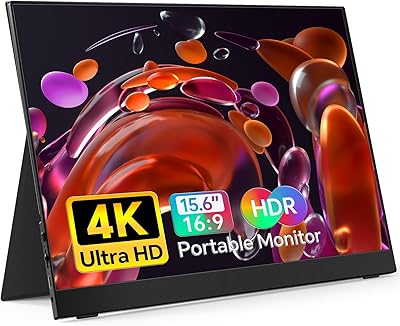
ViewSonic VX1655-4K-OLED 15.6-inch Portable OLED Monitor
77%
93%
Display Quality
91%
Portability
84%
USB-C Connectivity
88%
Build Quality
67%
Stand Stability
More
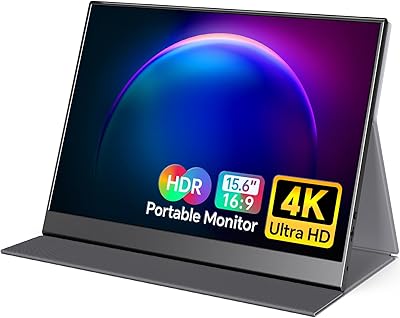
ForHelp 15.6-inch 4K Portable Monitor
74%
91%
Display Sharpness
86%
Color Accuracy
93%
Portability
68%
USB-C Connectivity
63%
Build Quality
More
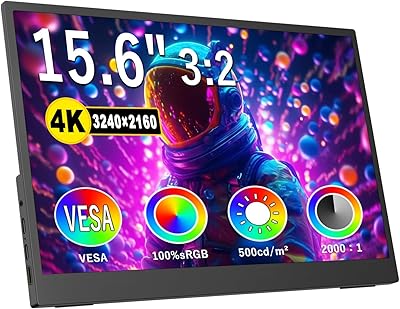
VILVA 15.6-inch 4K Portable Monitor
75%
91%
Display Sharpness
88%
Color Accuracy
93%
Portability
86%
Value for Money
67%
USB-C Compatibility
More
Topmonitor P15.6/4K 15.6-inch 4K Portable Monitor
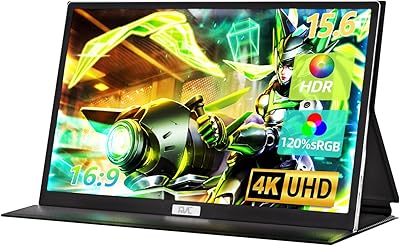
79%
93%
Display Sharpness
88%
Color Accuracy
91%
Portability
67%
Stand Stability
84%
Connectivity & Compatibility
More
FMC 15.6-Inch 4K Portable Gaming Monitor
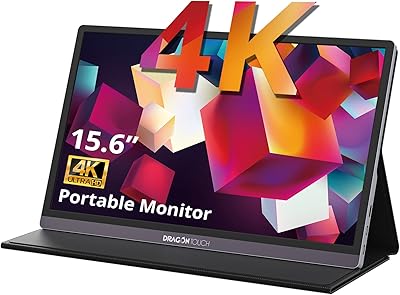
87%
93%
Display Quality
91%
Portability & Design
85%
Touchscreen Performance
88%
Build Quality
90%
Connectivity
More
Dragon Touch S1 Pro 15.6-Inch 4K Portable Monitor

87%
94%
Display Quality
91%
Portability
88%
Gaming Performance
86%
Build Quality
62%
Audio Quality
More
Topmonitor P15.6/2.5K 15.6-inch Portable Monitor

77%
91%
Image Sharpness
87%
Color Accuracy
93%
Portability
82%
Connectivity
88%
Value for Money
More
HotYeah 15.6-inch 1080P Portable Monitor
76%
83%
Display Quality
62%
Brightness & Visibility
91%
Portability & Design
88%
Value for Money
93%
Setup & Ease of Use
More
InnoView INVPM406 15.6-inch Portable Monitor
75%
91%
Ease of Setup
83%
Display Clarity
78%
Portability & Build
62%
USB-C Compatibility
88%
Value for Money
More
LUMIPIX Magic-001 15.6-inch Portable Monitor

76%
78%
Display Quality
91%
Portability
72%
Connectivity
61%
Stand Stability
79%
Value for Money
More

FAQ

Yes, this portable display supports single-cable USB-C connectivity that carries both power and video at the same time. As long as your MacBook outputs video over USB-C — which most modern models do — you plug in one cable and the screen is ready to go. No separate power brick or dongle required.

It does. The travel screen connects to a Nintendo Switch via USB-C when docked, and to a PS4, PS5, or Xbox through the HDMI port. Setup is as straightforward as connecting any display. Worth noting: this panel is not marketed as a high-refresh-rate monitor, so it is better suited to casual play than competitive or fast-action gaming.

In a typically lit indoor setting — a home office, a hotel room, or a dim cafe — 350 nits is adequate. Where it noticeably falls short is in brighter conditions: sunny rooms, outdoor seating, or spaces with strong overhead lighting. The glossy screen surface adds to the problem by reflecting light sources, which can make the display feel dimmer than the spec suggests.

It depends entirely on your environment. In controlled or dim lighting, a glossy finish can actually make colors look punchier and more vibrant. In well-lit rooms or near windows, reflections become distracting fairly quickly. If most of your use happens near a bright light source, a matte-screen alternative would serve you better.

The manufacturer specifically recommends using the included white USB-C cable for power delivery. Some buyers who swapped in third-party cables reported inconsistent behavior, including the display failing to power on reliably. It is a minor inconvenience, but worth knowing before you troubleshoot a problem that has a simple fix: keep the original cable with the monitor.

The specifications — 100% sRGB coverage and a 1500:1 contrast ratio — are reasonable for a budget-tier portable panel. Many users doing photo editing or light design work on the go will find it usable. That said, out-of-box calibration at this price point has not been independently verified, so if you need precise output for professional deliverables, running a calibration check before relying on it for final work is a smart precaution.

They work in a pinch, but they are thin and low-volume — fine for a quick video call or ambient background audio, not something you would choose for music or movie watching. The 3.5mm headphone jack is the better audio route for any real listening. Think of the speakers as a backup option, not a feature.

Yes, the ZSCMALLS 15.6-inch 4K Portable Monitor supports portrait orientation, which you enable through your computer or device display settings just as you would with any external monitor. The pen-hole stand at the base props it up in either orientation without needing a separate stand accessory, which makes switching between the two modes fairly practical.

ZSCMALLS does not have the long track record of established display brands, so long-term reliability data is limited. What they do offer is a 2-year warranty and lifetime technical support, which is a reasonable safety net given the price. Registering the product after purchase and keeping proof of purchase is wise — if something fails within the warranty window, you have a clear path to resolution.

For a fixed desk setup, a traditional monitor will almost always give you more for the same budget — better brightness, adjustable stands, and wider feature sets. Where this travel screen genuinely earns its place is as a portable second display that moves with you. If you work from multiple locations and want 4K sharpness in a panel that fits in your bag without effort, it is a practical choice. For exclusively desk-bound users, there are better-suited options at a similar price.
