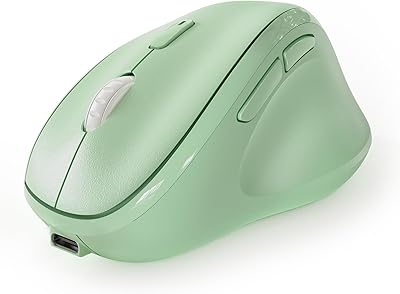
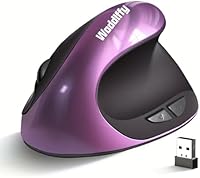
Woddlffy RAAVEE Ergonomic Vertical Wireless Mouse


Overview
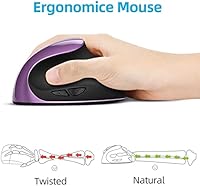
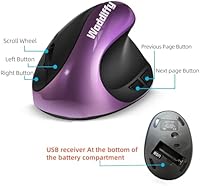
The Woddlffy RAAVEE Ergonomic Vertical Wireless Mouse is a compact, right-handed option that takes the vertical mouse concept — holding your hand in a natural handshake position — and packages it at a price that makes trying ergonomic peripherals far less intimidating. If your wrist has been complaining after long hours at a desk, a vertical orientation may help reduce some of that strain by shifting pressure off the forearm. It sits small enough to suit users with narrower hands, runs wireless via a nano USB receiver tucked neatly into the base, and works with Windows, Linux, and macOS straight out of the box.
Features & Benefits
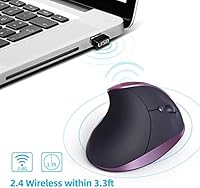
The mouse runs on a 2.4GHz wireless connection and keeps setup simple — pull the receiver from the base, plug it in, and you're ready with no driver installation required. You get three DPI settings (1000, 1200, and 1600), which cover casual browsing and document work just fine, though anyone doing detailed graphics work will want more headroom. The six-button layout includes forward and back navigation keys, but Mac users should note those two buttons are not recognized on macOS — that's not a footnote, it's worth factoring in. Clicks are noticeably quiet, making this wireless ergo mouse a sensible choice for open offices or shared spaces.
Best For
This vertical mouse is a strong match for office workers and students who spend most of their day clicking through documents, spreadsheets, or browser tabs and are starting to feel wrist fatigue creeping in. The compact footprint genuinely matters if your hands run on the smaller side — it doesn't feel like you're wrestling with something oversized. It also travels well since the receiver stows right inside the body, so there's nothing extra to misplace in a bag. Windows and Mac laptop users who want a portable wireless companion will find the setup fast and straightforward, as long as the Mac button caveat isn't a dealbreaker for them.
User Feedback
Across more than 2,300 ratings and a 4.2-star average, the Woddlffy ergonomic mouse earns most of its goodwill from everyday office users rather than power users or gamers. Common praise covers comfort improvement after ditching a flat mouse, how quickly most people adapt to the vertical angle, and how painless the setup is. The criticism side, though, is consistent: build quality feels plasticky, which is understandable at this price tier but still worth knowing. The limited DPI range gets flagged by anyone doing more than light computing. Mac users in particular call out the non-functional navigation buttons as a genuine frustration that should be disclosed clearly before purchase.
Pros
- Vertical design encourages a more natural hand angle that may ease wrist strain during long work sessions.
- Compact size is a genuine advantage for users with small to medium hands, not just a marketing claim.
- Silent optical clicks make this wireless ergo mouse considerate in shared offices, libraries, or quiet home environments.
- Plug-and-play setup requires no software or drivers — just insert the receiver and start working.
- The nano USB receiver stores inside the mouse body, making it easy to travel with and hard to lose.
- Three DPI settings give enough flexibility for switching between tasks like reading and precise clicking.
- Broad OS compatibility covers Windows, Linux, and macOS without any extra configuration.
- At its price tier, this vertical mouse offers a low-risk way to try ergonomic peripherals for the first time.
- Lightweight at 3.53 oz, so it does not add fatigue during extended use sessions.
- Over 2,300 ratings at 4.2 stars signals a consistent track record among everyday office and home users.
Cons
- The plastic build feels noticeably budget-grade, which affects long-term confidence in its durability.
- DPI maxes out at 1600, which is too limited for graphic work, fast gaming, or large multi-monitor setups.
- Forward and back navigation buttons do not function on macOS, removing a key feature for Mac users.
- Right-hand-only design completely excludes left-handed users with no workaround available.
- No dedicated software means there is zero ability to remap buttons or fine-tune cursor behavior.
- The scroll wheel can feel imprecise compared to mid-range competitors, which some users find frustrating quickly.
- Battery life and battery type details are not clearly disclosed, leaving buyers guessing about ongoing running costs.
- The very light weight, while comfortable for some, may feel insubstantial to users who prefer a grounded, heavier mouse.
Ratings
The scores below for the Woddlffy RAAVEE Ergonomic Vertical Wireless Mouse were generated by our AI system after analyzing thousands of verified buyer reviews from global markets, with spam, bot-submitted, and incentivized feedback actively filtered out. Each category reflects the honest consensus of real users — from daily office workers to students switching from traditional flat mice — with both standout strengths and recurring frustrations weighted equally. Nothing has been softened or inflated to protect a rating.
Ergonomic Comfort
Build Quality
Wireless Connectivity
DPI Range
Button Functionality
Click Noise Level
Setup & Ease of Use
Fit for Small Hands
Portability
Value for Money
Tracking Accuracy
Adaptation Period
Compatibility Range
Scroll Wheel Feel
Suitable for:
The Woddlffy RAAVEE Ergonomic Vertical Wireless Mouse is a practical fit for right-handed office workers, students, and remote workers who spend long stretches clicking through documents, emails, and browser tabs and are starting to notice wrist discomfort from a traditional flat mouse. The vertical orientation positions the hand more naturally, which may help reduce forearm and wrist strain for those in the early stages of repetitive stress issues — though it is not a medical device and results vary by individual. Users with small to medium hands will find the compact form factor genuinely comfortable rather than just tolerable, which is not always the case with ergonomic mice at any price point. It is also a smart pick for anyone who wants to test the vertical mouse concept without a significant financial commitment before investing in a higher-end model. Laptop users who move between workspaces will appreciate that the nano USB receiver stows inside the mouse body, keeping the setup tidy and travel-ready.
Not suitable for:
The Woddlffy RAAVEE Ergonomic Vertical Wireless Mouse is not the right tool for power users, gamers, or anyone who needs precise, high-speed cursor control, since its DPI tops out at 1600 — a modest ceiling that falls short for fast-paced or detail-intensive work. Left-handed users are completely excluded by the right-hand-only design, with no ambidextrous option available. Mac users who rely on browser forward and back navigation buttons should treat this as a near-dealbreaker, since those two buttons are not recognized on macOS, which is a meaningful daily-use limitation rather than an edge case. Users who prefer a heavier, more premium-feeling peripheral will likely find the lightweight plastic construction underwhelming over time. Anyone already committed to a high-performance wireless mouse setup will find little reason to step down to this entry-level option.
Specifications
- Brand: Manufactured by Woddlffy under the model designation RAAVEE.
- Connectivity: Uses a 2.4GHz wireless connection via a nano USB receiver included in the box.
- Receiver Storage: The nano USB receiver stores inside a compartment built into the base of the mouse.
- DPI Settings: Offers three selectable DPI levels: 1000, 1200, and 1600.
- Button Count: Features 6 buttons including left click, right click, scroll wheel click, DPI toggle, and forward and back navigation keys.
- Sensor Type: Uses an optical sensor for movement tracking on most standard desk surfaces.
- Click Mechanism: Equipped with silent optical switches designed to reduce audible click noise compared to standard mice.
- Hand Orientation: Designed exclusively for right-handed users; not compatible with left-handed use.
- Weight: The mouse weighs 3.53 oz, making it suitable for users with small to medium hands.
- Dimensions: Measures 4.9 x 2.7 x 0.1 inches, reflecting a compact vertical form factor.
- OS Compatibility: Compatible with Windows 2000, XP, Vista, 7, 8, and 10, as well as Linux and macOS.
- Mac Limitation: The forward and back navigation buttons are not recognized on macOS, limiting button functionality on Apple systems.
- Setup Requirements: Plug-and-play design requires no driver installation on any supported operating system.
- Color Option: Available in a purple finish as the primary color variant for this listing.
- Market Tier: Positioned as a budget-friendly, entry-level ergonomic peripheral suitable for casual and office use.
- User Rating: Holds a 4.2 out of 5 star average rating based on over 2,300 customer ratings on Amazon.
- Availability Date: First made available for purchase on March 4, 2022.
- Orientation Design: Vertical ergonomic shape positions the hand at a natural handshake angle to reduce forearm pronation during use.
Related Reviews

Acer OMR241 Ergonomic Vertical Mouse

seenda Ergonomic Vertical Wireless Mouse

UGREEN Vertical Wireless Ergonomic Mouse

Lekvey XC-05 Vertical Wireless Mouse
SHARE SUNSHINE Ergonomic Vertical Wireless Mouse
Cherry MW4500 Wireless Vertical Ergonomic Mouse
MEETION DirectorC Split Ergonomic Keyboard Mouse Combo
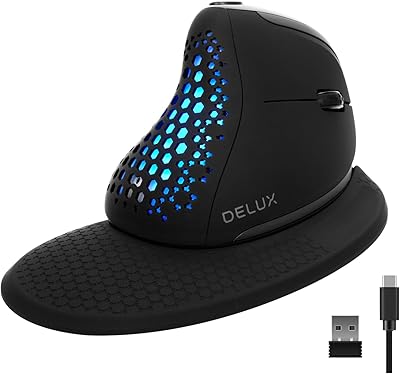
DeLUX Seeker M618XSD Wireless Ergonomic Vertical Mouse
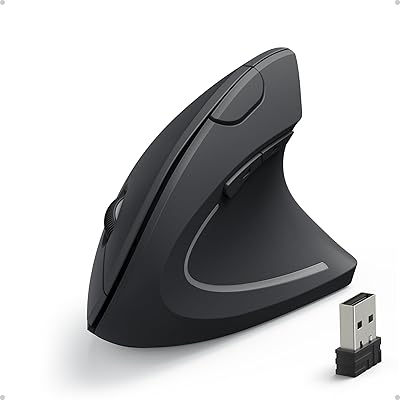
Anker AK-98ANWVM-UBA Wireless Vertical Mouse