


Overview

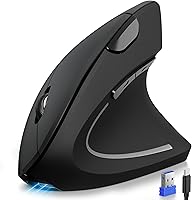
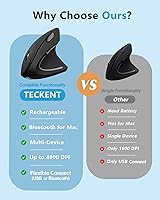
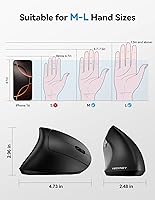
The TECKNET TK-MS007 is a vertical ergonomic mouse that arrived late in 2024 and has already carved out a respectable spot among the top-ranked computer mice on Amazon. Built specifically for right-handed users with medium to large hands, fit matters here more than it does with a standard flat mouse — if your hand is on the smaller side, you will feel it. What makes this wireless ergo mouse genuinely interesting at its price point is the triple connectivity support: Bluetooth 5.0, Bluetooth 3.0, and a 2.4GHz USB receiver, letting you pair up to three devices and toggle between them with a single button press.

Features & Benefits

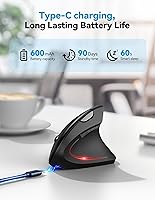
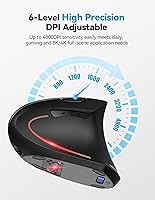
The six DPI settings — from 800 up to 4800 — let you dial in sensitivity whether you are doing precise spreadsheet work or just scrolling through a long document. The built-in rechargeable battery is a practical win: roughly 1.5 hours of charging buys you one to two months of regular use, and the auto-sleep mode quietly extends that when the mouse sits idle. Switching between your laptop, tablet, and desktop takes a single button press. Worth flagging: left and right clicks are genuinely quiet, and so is the scroll wheel, but the side buttons and DPI toggle do make an audible click, so this is not a fully silent mouse.

Best For

This vertical mouse is a natural fit for multi-device professionals — think someone bouncing between a work laptop, a personal MacBook, and an iPad throughout the day. It also suits anyone who spends long hours at a desk and has started to notice wrist or forearm tension; the vertical grip shifts your arm into a more natural handshake position, which can reduce strain over time. That said, this is not a medical device, and managing existing carpal tunnel issues should involve a professional. Mac users should know the forward/back side buttons will not work on macOS, and smaller hands may find the size a bit much.

User Feedback

Early adopters of the TECKNET ergonomic mouse tend to highlight comfort after switching from a conventional flat mouse as the standout win, with several noting that arm fatigue dropped noticeably within the first week. Battery life generally lives up to the claimed range, though a handful of users report it running shorter under heavy daily use. Bluetooth pairing has been reliable across devices for most buyers, but occasional reconnection hiccups do surface in reviews. Build quality feels solid for the price tier. The consistent caveat from buyers with smaller hands is that the mouse feels slightly oversized — echoing the manufacturer's own sizing guidance, so measuring your hand before buying is genuinely worth the extra minute.

Pros

  • Connecting to three devices simultaneously and toggling between them takes a single button press.
  • The vertical grip noticeably reduces forearm and wrist tension for medium-to-large-handed users during long sessions.
  • Type-C charging with a roughly 90-minute full charge is fast and uses a cable most people already own.
  • Silent main clicks and scroll wheel make this vertical mouse a genuinely considerate choice in quiet offices.
  • Six DPI levels cover everything from precise spreadsheet work to casual browsing without needing any software.
  • Battery lasts weeks of regular use without interruption, eliminating the disposable-battery replacement cycle entirely.
  • Works out of the box on Windows, macOS, Linux, Android, and iOS with no driver installation needed.
  • The built-in USB receiver storage means no loose dongles to lose when moving between locations.
  • A 36-month warranty for registered users is generous for this price tier and adds meaningful purchase confidence.

Cons

  • Smaller hands will find the grip uncomfortable — the size is not adjustable or adaptable.
  • Side navigation buttons are completely non-functional on macOS, a significant loss for Apple-first users.
  • No button remapping or companion software means you are locked into the default button layout permanently.
  • Battery life falls noticeably short of the two-month claim for users running heavy six-plus-hour daily sessions.
  • Side buttons, DPI toggle, and mode switch all produce audible clicks, partially undermining the quiet office appeal.
  • Plastic build quality feels hollow in spots, and the scroll wheel can develop slight looseness over time.
  • Bluetooth connectivity can stutter in high-interference environments like crowded open-plan offices.
  • The mouse cannot be used while charging, which forces downtime if you run the battery fully flat.
  • No left-hand version exists, making this wireless ergo mouse completely inaccessible to left-handed users.

Ratings

Our AI rating engine analyzed thousands of verified global reviews for the TECKNET TK-MS007, actively filtering out incentivized, duplicate, and bot-generated submissions to surface what real everyday users actually experienced. The scores below reflect a balanced synthesis of genuine strengths and recurring frustrations — nothing is glossed over. Whether this wireless ergo mouse fits your workflow or falls short depends on factors this breakdown addresses directly.

Ergonomic Comfort
88%
The majority of users who switched from a standard flat mouse reported meaningful reductions in wrist and forearm tension within the first week or two of regular use. The vertical grip angle keeps the arm in a more natural position during long desk sessions, which many office workers found noticeably better than what they had before.
There is a real adjustment period — some users felt awkward and even experienced temporary muscle soreness in the first few days as their hand adapted to the new grip angle. A small but vocal group never fully adapted and returned the mouse after two to three weeks.
Multi-Device Connectivity
91%
The ability to pair three devices simultaneously and switch between them with a single button press genuinely impressed multi-device users. Professionals juggling a work laptop, personal computer, and tablet found the toggle fast and reliable in day-to-day use across Windows and macOS systems.
A handful of users reported occasional Bluetooth reconnection delays, particularly when waking devices from sleep mode. The issue was intermittent rather than persistent, but it surfaced often enough across reviews to be worth flagging for anyone who needs instant, friction-free switching.
Battery Life
83%
Most users confirmed the battery holds up well through weeks of regular use without needing a recharge, which is a genuine convenience upgrade over AA-battery mice. The Type-C charging port feels modern and practical, and the short charge time means a brief cable connection during lunch can top it up quickly.
Heavy users — those running the mouse six or more hours daily — tended to see battery life fall short of the two-month upper estimate, landing closer to three to four weeks. The claimed range appears to assume moderate use, so power users should set their expectations accordingly.
Build Quality & Feel
74%
26%
For its price tier, the mouse feels reasonably solid in hand — no obvious flex, the buttons actuate with consistent feedback, and the matte finish resists fingerprints well. Most buyers felt the construction matched or slightly exceeded what they expected given the cost.
It does not feel premium in the way a higher-end ergonomic mouse does. The plastic housing has a slightly hollow sound when tapped, and a few reviewers noted that the scroll wheel felt less refined than the rest of the mouse, with a slightly loose wobble after extended use.
Hand Size & Fit
69%
31%
Users with medium to large hands consistently praised how naturally the mouse fills the palm, allowing a full grip without feeling cramped. For this target group, the dimensions translate into a comfortable, fatigue-reducing hold during long work sessions.
Users with smaller hands flagged a genuine fit problem — the mouse is simply too wide and tall for a comfortable grip, causing the fingers to stretch rather than rest naturally. The manufacturer does provide hand-measurement guidance, but buyers who skip that step and have smaller hands frequently report dissatisfaction.
Cursor Tracking & Precision
82%
18%
The optical sensor performs reliably across common desk surfaces including fabric mouse pads, wood, and laminate. The six DPI levels give enough range to satisfy both precision-focused tasks like photo editing and casual browsing, and switching between levels is quick.
On highly reflective or glass surfaces, tracking becomes inconsistent — a common limitation for optical sensors at this price point. A dedicated mouse pad resolves most surface issues, but it is worth noting for users who prefer working on glass desks.
Noise Level
79%
21%
The silent left and right click buttons, combined with a quiet scroll wheel, make this a genuinely considerate choice for shared office environments or late-night work sessions where noise matters. Regular clicking during document work or email browsing produces almost no audible sound.
The side navigation buttons, DPI toggle, and connection mode switch all produce a standard audible click, which breaks the otherwise quiet experience. For users expecting near-total silence across all buttons, this is a notable partial compromise.
Software & Customization
44%
56%
There is essentially no setup friction — plug in the USB receiver or connect via Bluetooth and the mouse works immediately across all listed operating systems with no driver installation required. Plug-and-play simplicity is genuinely appreciated by users who do not want to manage software.
The buttons are not programmable, and there is no companion software available. Power users who want to remap buttons or create custom DPI profiles will find this mouse frustrating. For the price tier this is not unusual, but the absence of even basic customization limits flexibility.
Mac Compatibility
58%
42%
Core functionality works fine on macOS — the cursor tracks well, left and right clicks behave normally, and Bluetooth pairing with MacBooks and iPads is straightforward. For users who just need a comfortable pointing device on Apple hardware, the basics are covered.
The forward and back side buttons are non-functional on macOS, which is a meaningful loss for users who rely on browser navigation shortcuts. Several Mac-focused reviewers felt this limitation should be more prominently disclosed before purchase, and a few returned the mouse specifically because of it.
Value for Money
86%
At its price point, the combination of triple connectivity, rechargeable battery, and a genuine ergonomic form factor represents solid value. Buyers comparing it to single-connection vertical mice in the same range consistently rated it favorably given what you get.
Competing options from brands like Logitech cost more but offer programmable buttons and better build refinement. If budget is not a constraint, the TK-MS007 starts to look less compelling — it earns its value specifically within the budget-to-mid-range bracket.
Charging Experience
85%
The Type-C port is a welcome choice over older Micro-USB designs, and the roughly 90-minute full charge time is genuinely fast. Users appreciated being able to use the same cable they already carry for other devices rather than hunting for a proprietary charger.
There is no pass-through charging, meaning the mouse cannot be used while plugged in and charging — you either use it cordlessly or charge it while it sits idle. For users who frequently run the battery low, this occasionally forced short unplanned breaks.
Connectivity Stability
77%
23%
Under normal desktop and office conditions, both the 2.4GHz USB connection and Bluetooth modes performed reliably with minimal cursor stutter or dropout. The 2.4GHz receiver in particular was praised for its consistent, lag-free feel during regular workday use.
In environments with significant wireless interference — crowded open-plan offices with multiple active Bluetooth devices, for example — some users reported occasional micro-stutters over Bluetooth. Switching to the 2.4GHz USB receiver resolved this in most cases, but it does mean carrying the dongle.
Weight & Portability
80%
20%
At 4.2 ounces, the mouse is light enough to toss in a laptop bag without adding noticeable bulk, and there is no USB dongle to worry about losing since it stores in the mouse itself. Remote workers who move between locations appreciated not having to babysit a tiny receiver.
The vertical form factor makes the mouse slightly bulkier in a bag than a slim flat mouse, even at the same weight. It is not a problem for most, but users with very compact bags or those who prioritize minimal carry setups noted the shape takes up more awkward space than expected.
Setup & Ease of Use
92%
Out of the box, pairing all three devices takes only a few minutes, and the physical toggle button makes switching child-simple. Reviewers consistently praised how little friction was involved in getting everything running, particularly for users who find Bluetooth pairing processes tedious.
The device channel indicator lights are small and can be hard to read in bright ambient light. A few users noted they occasionally pressed the wrong mode button and had to re-check which device they were connected to, suggesting the indicator could be clearer in the hardware design.

Suitable for:

The TECKNET TK-MS007 is a strong fit for right-handed professionals with medium to large hands who spend most of their working day at a desk and have started noticing wrist or forearm tension from a conventional flat mouse. It is especially well-suited to multi-device users — anyone who regularly switches between a work laptop, a personal computer, and a tablet will appreciate the triple connectivity and the one-button toggle that makes hopping between all three feel effortless. Remote workers and home office setups benefit from the rechargeable battery, since never hunting for AA batteries is a small but genuine quality-of-life improvement over time. The quiet main clicks and scroll wheel also make this wireless ergo mouse a considerate choice for shared workspaces or open-plan offices where noise is a social concern. Windows, Android, and iPadOS users will get the full feature set, and the broad OS compatibility means it travels well across a mixed-platform household or team.

Not suitable for:

The TECKNET TK-MS007 is not the right choice for users with smaller hands — the dimensions are genuinely sized for medium to large palms, and forcing a smaller hand into this grip tends to cause finger fatigue rather than relieve it, which defeats the entire purpose. Mac-heavy users who rely on browser forward and back navigation should also think carefully, since the side buttons simply do not function on macOS, making what should be a productivity feature completely inert on Apple systems. Power users who want to remap buttons, assign macros, or fine-tune behavior through companion software will find this mouse frustrating — nothing is programmable, and there is no software support at all. Left-handed users are entirely excluded by the right-hand-only ergonomic shape. Anyone expecting a premium, solidly built peripheral on par with higher-end ergonomic mice will likely notice the plastic construction feels more budget than boutique, particularly around the scroll wheel after extended use.

Specifications

  • Model Number: The official model identifier for this mouse is TK-MS007.
  • Connectivity: Supports three wireless connection modes: Bluetooth 5.0, Bluetooth 3.0, and a 2.4GHz USB receiver.
  • DPI Range: Six adjustable DPI levels are available: 800, 1200, 1600, 2400, 3200, and 4800.
  • Dimensions: The mouse measures 4.73 x 2.96 x 2.48 inches (approximately 12 x 7.5 x 6.3 cm).
  • Weight: The mouse weighs 4.2 ounces, making it light enough for comfortable all-day desk use.
  • Hand Orientation: Designed exclusively for right-handed users with a vertical ergonomic form factor.
  • Hand Size Fit: Optimized for medium to large hands; the manufacturer provides a sizing guide in the product imagery.
  • Battery Type: Powered by a built-in lithium polymer rechargeable battery — no disposable batteries required.
  • Charging Port: Charges via a Type-C USB cable, reaching a full charge in approximately 1.5 hours.
  • Battery Life: Rated for one to two months of use per full charge under typical moderate-use conditions.
  • Tracking: Uses optical sensor technology for smooth and consistent cursor tracking across a variety of desk surfaces.
  • Silent Buttons: The left button, right button, and scroll wheel operate silently; all other buttons produce an audible click.
  • OS Compatibility: Compatible with Windows 11, 10, 8, 7, XP, and Vista, as well as macOS, Linux, Android, and iOS 10.4 and above.
  • Mac Limitation: The forward and back side navigation buttons are non-functional on macOS systems.
  • Programmability: No buttons are programmable and no companion software is available for customization.
  • Power Management: Features both an auto-sleep mode and a Wake-on-Button function to conserve battery during idle periods.
  • USB Receiver: The 2.4GHz USB-A receiver stores inside the base of the mouse when not in use.
  • Color: Available in black with a matte finish that resists fingerprints during regular handling.
  • Warranty: Covered by a 36-month manufacturer warranty for users who register their product after purchase.
  • Package Contents: The box includes the mouse, a Type-C charging cable, a USB-A wireless receiver, and user documentation.

Related Reviews
TECKNET TK-KB002 Gaming Keyboard
86%
89%
Comfort and Ergonomics
93%
RGB Customization
88%
Key Responsiveness
90%
Durability and Build Quality
84%
Water Resistance
More
TECKNET TK-HS013 Noise Cancelling Headphones
85%
94%
Battery Life
88%
Active Noise Cancellation
91%
Comfort & Fit
80%
Sound Quality
70%
Build Quality
More
TECKNET TK-KB041 Wireless Keyboard
80%
91%
Value for Money
78%
Typing Feel & Key Response
93%
Noise Level
82%
Multi-Device Switching
63%
Build Quality & Materials
More
TECKNET TK-HS012 Wireless Bluetooth Headset
88%
91%
Comfort for All-Day Wear
88%
Noise Cancellation Effectiveness
95%
Battery Life
84%
Dual Device Connectivity
85%
Sound Quality
More
TECKNET TK-HS016 Wireless Headset with Mic
86%
94%
Noise Cancellation
88%
Comfort and Fit
91%
Battery Life
85%
Sound Quality
76%
Microphone Performance
More
TECKNET TK-EKB01040BS01 Wireless Keyboard
76%
83%
Ergonomic Comfort
86%
Typing Noise Level
79%
Wireless Reliability
62%
Build Quality
88%
Value for Money
More
TRAILKICKER Travel Backpack TK-CAS0003GRY
87%
88%
Comfort
91%
Build Quality
93%
Versatility of Design
89%
Durability
85%
Capacity for Short Trips
More
TECKNET TK-KB029 Large Print Backlit Keyboard
79%
93%
Key Legibility
88%
Backlight Quality
79%
Wrist Rest Comfort
62%
Typing Feel
67%
Build Quality
More
TECKNET Solar Wireless Driveway Alarm
86%
91%
Detection Range
95%
Ease of Installation
88%
Battery Life & Solar Efficiency
84%
Customization of Alerts
90%
Weatherproof Design
More
TECKNET X315 Wireless Keyboard and Mouse Combo
78%
91%
Value for Money
74%
Typing Experience
62%
Mouse Comfort & Ergonomics
83%
Wireless Connectivity & Stability
86%
Noise Level
More

FAQ

No driver installation is needed. Plug the USB receiver into your computer or pair via Bluetooth and the mouse is ready to use immediately. It is fully plug-and-play across all supported operating systems.

Unfortunately, no. The forward and back side buttons do not function on macOS — this is a known hardware limitation, not a settings issue. Left click, right click, scroll, and DPI adjustment all work fine on Mac, but the side navigation buttons simply do not respond under Apple operating systems.

There is a dedicated connection mode toggle button on the mouse. Each press cycles through the three paired device channels, and a small LED indicator shows which channel is active. Pairing each device to its own channel is a one-time setup process.

Probably not. The TECKNET TK-MS007 is genuinely sized for medium to large hands, and users with smaller hands consistently report that the grip feels oversized and causes finger stretch rather than relief. The manufacturer actually includes a hand measurement guide in the product listing, and it is worth checking before you buy.

No, the lithium polymer battery is built in and not user-replaceable. For most buyers this is a non-issue since the battery is rated for a high number of charge cycles, but it is worth knowing that the long-term lifespan of the mouse is tied to the built-in battery.

No, there is no pass-through functionality — the mouse needs to be idle while it charges. Since it only takes about 1.5 hours to reach a full charge, the downtime is brief, but if you regularly drain the battery fully during a workday this could occasionally interrupt your session.

The scroll wheel is silent, as are the left and right click buttons. The parts that do make an audible click are the side navigation buttons, the DPI switch, and the connection mode toggle. So for typical document and browser work, the mouse is very quiet — just be aware those secondary buttons are not silent.

The one-to-two month estimate applies to moderate use of around four hours per day. If you are using the mouse for six or more hours daily, expect the battery to run closer to three to four weeks between charges. The auto-sleep mode helps stretch things out, but heavy users should keep a charging cable accessible.

Yes, and it is worth being honest about this — most first-time vertical mouse users feel awkward for anywhere from a few days to two weeks while their hand and arm adapt to the new grip angle. Some people even experience temporary muscle soreness as different muscles engage. Stick with it past the initial adjustment and most users find the comfort improvement worth it.

The receiver is a standard nano-sized USB-A dongle, so it sits fairly flush in most laptop ports and is unlikely to snag or break during normal desk use. When you are not using the 2.4GHz connection, it stores neatly inside a compartment on the bottom of the mouse so you will not misplace it.